Before and after photo software for clinics keeps patient images attached to the right patient, visit and consent, in encrypted storage that staff reach through their own login rather than a phone gallery or shared folder. When you compare options, four things decide it: whether each image is tied to a specific treatment visit, whether the consent behind it is recorded with its wording and date, whether you can see who opened it, and whether you can take the whole archive with you when you leave. If a product is vague on any of those, it is a tidier gallery, not an archive.
This guide is written for the owner or manager of a medspa, aesthetic clinic, dermatology practice or hair restoration practice who already knows the phones-and-folders arrangement has outgrown itself. It will not tell you which brand to buy. It should leave you able to run a demo properly and spot the answers that ought to end one.
The day the phone leaves the building
Most clinics do not choose their photo system. It just happens. An injector starts snapping results on a personal phone because the patient asks to see them. A laser technician does the same. Someone copies the good ones to the front desk computer for social media. For months nothing goes wrong, and that is why the arrangement survives.
Then one of three ordinary things happens. A technician resigns, and with her go four years of images, sitting on a device you do not own and probably backed up to a personal cloud account you cannot reach. Or a patient on a six-session skin programme says nothing has changed, and you cannot find session one, because it was taken by someone else on a phone that has since been upgraded. Or a former patient emails asking you to take her picture off your Instagram, and now you are digging through paper to find out what she actually agreed to and when.
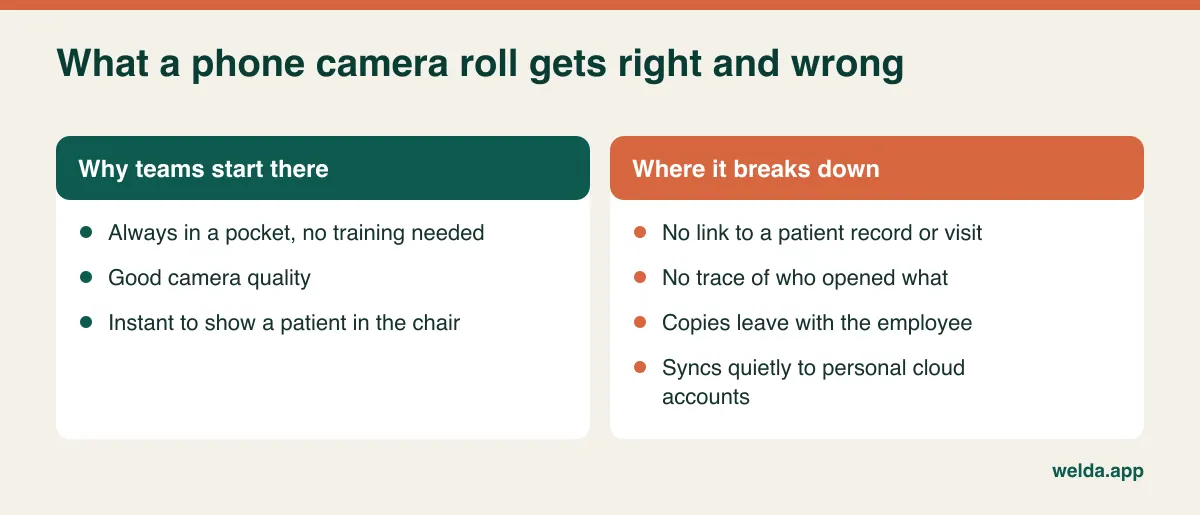
None of these is a camera problem. What is missing in each case is the link between an image, a person, a visit, a permission and a responsible member of staff. Keep that in mind during every sales conversation, because almost every clinic system can technically accept a file upload. What separates them is what the file gets attached to once it arrives. If you are still working out how your patient records should hang together more broadly, our guide to patient records systems covers the wider picture; here we stay with the images.
One photo can have three jobs, and each needs its own permission
Treatment documentation, teaching and marketing are three different uses with three different audiences. A signed form saying "I agree to photographs being used" tries to cover all of them at once, and that is the weakest possible position to be in. A patient who is happy for her clinician to track pigmentation over time may be horrified to find the same image in a reel.
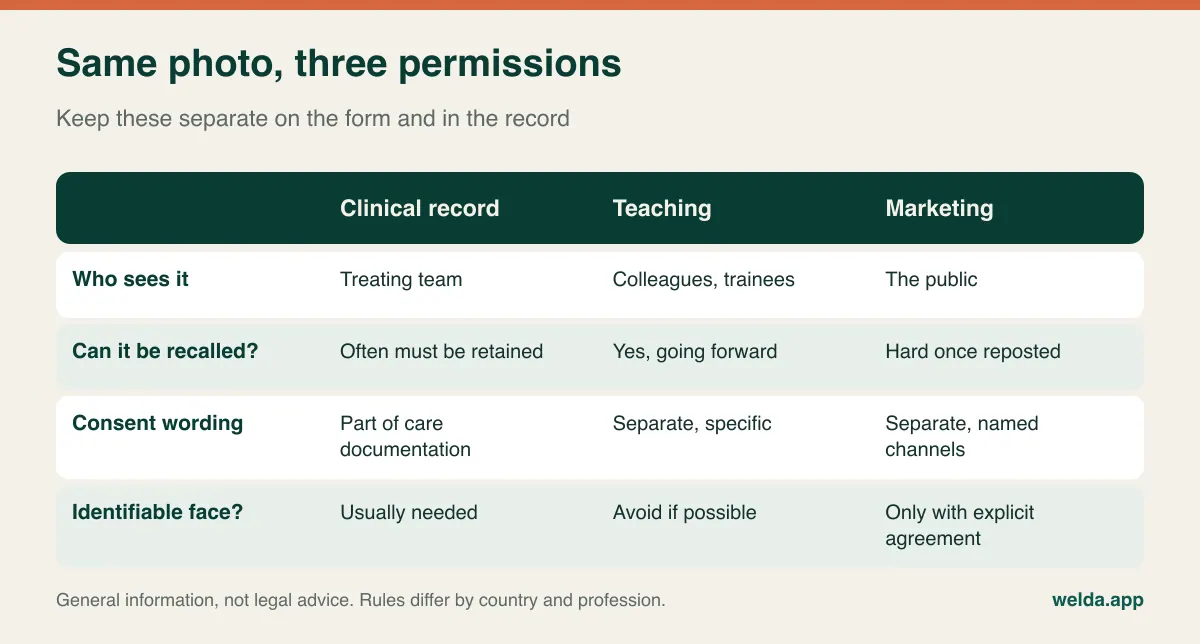
The legal framing depends on where you practise, so treat what follows as orientation. Under the EU GDPR and UK GDPR, a photograph showing a person's treatment is very likely to count as health data, which sits in a specially protected category. In the United States, images held by a covered entity can be protected health information under HIPAA, full-face photographs are listed among the identifiers that have to be removed for de-identification, and using them in marketing generally calls for a specific authorization. In the UK, the General Medical Council publishes guidance specifically on visual and audio recordings of patients, and other professional bodies have their own expectations. Your lawyer or data protection adviser needs to apply this to your clinic. We are not offering legal advice and no software can do it for you.
What you can ask of the software is much more concrete. Is consent stored as a record on the patient's file, with date, scope and the version of the text she saw? Or is it a scanned PDF nobody can query? Version history sounds pedantic until the day you revise your form. If you changed your wording last spring, you still need to show what a patient signed the year before.
Withdrawal matters just as much. When someone withdraws marketing consent, how does the person running your Instagram find out? If the answer is "reception sends a message", the record protects nobody. Decide who owns that step before you go live.
Marketing is where clinics get into trouble fast
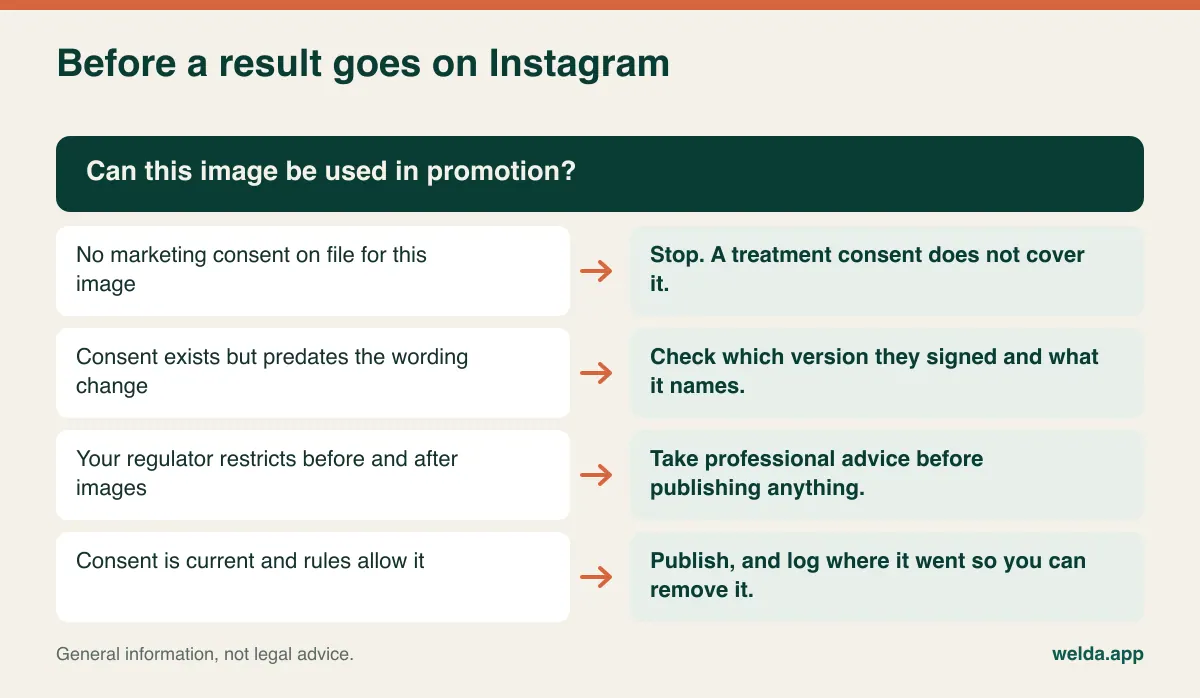
A signed release does not settle whether you may publish. Several countries regulate before and after imagery in healthcare advertising on top of privacy law, and the rules vary a lot from place to place. Australia's health practitioner regulator has issued guidance on advertising cosmetic procedures, including the use of images. In the UK, advertising codes require that claims not mislead, and a retouched or inconsistently lit result is an obvious way to fall foul of that. Germany restricts before and after advertising for certain cosmetic surgery by statute. Assume your market has something relevant and go and find out what it is.
There is a quieter marketing risk too. Lighting and angle can flatter a result without anyone intending to deceive. A before shot under ceiling tubes next to an after shot beside a window implies a change the treatment may not have produced. Publishing that comparison is a credibility problem at best. The fix is covered further down, and it has nothing to do with software.
From a systems point of view, the useful habit is a publication log: which image, which channel, what date, under which consent. It is easy to skip, and it is what makes a takedown request quick. Whether your software tracks this or you keep a simple register alongside it matters less than the fact that someone keeps it. For the wider question of what to post at all, see our guide to social media for clinics.
Reading an encryption claim properly
Nearly every vendor says your data is encrypted. On its own, that sentence tells you very little. Encryption in transit, meaning the connection between browser and server, is the bare minimum. Encryption at rest, including on the backups, is the more useful question, because backups are often the forgotten copy that lives somewhere else under looser rules.
Then ask what encryption does not do. It does nothing about the employee who looks up an old school friend out of curiosity. Only access logging catches that, and only if the log records views rather than just uploads and deletions. It does nothing about the staff member who downloads a folder before leaving, either, which is why role-based download limits are worth asking about. Our article on patient data security in clinics covers the general safeguards; photos raise the stakes because an image is trivially easy to copy and impossible to recall.
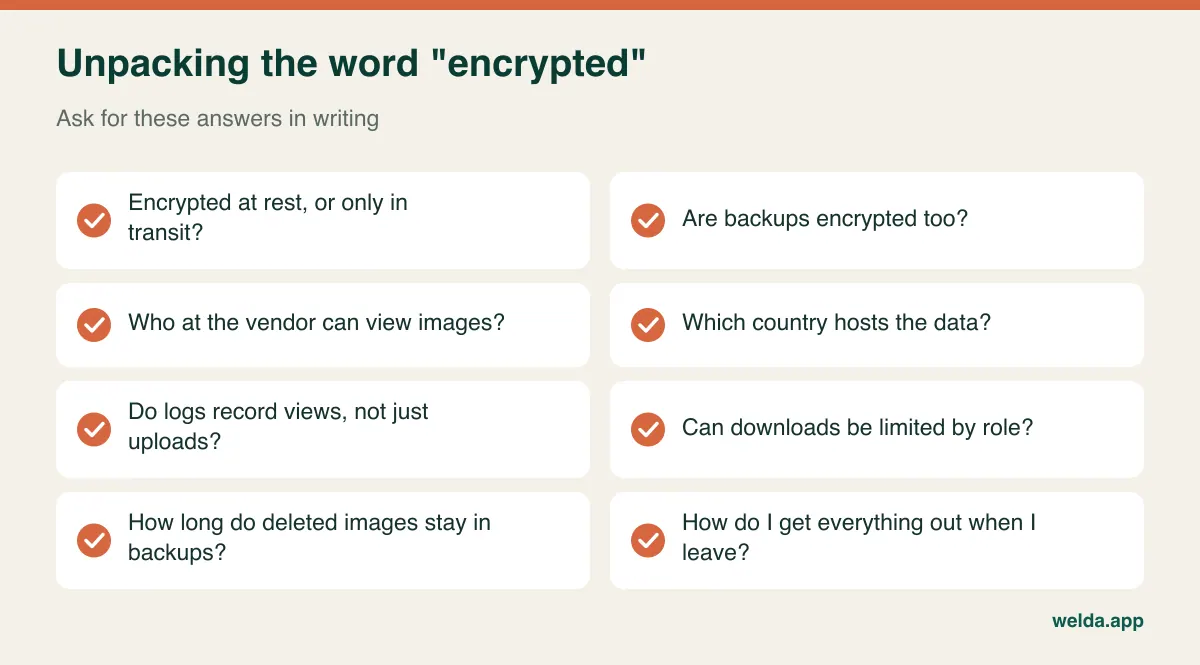
Data location deserves its own line. Where the servers sit affects which transfer rules apply to you, and clinics in different countries will have different answers about what is acceptable. If you operate under HIPAA, you will normally need a signed business associate agreement from a vendor handling your patient data, so ask for it directly. Welda's published materials speak to KVKK and GDPR requirements. We make no claim about HIPAA here, so a US clinic should treat that as an open question to raise with us rather than assume.
The same list applies to us. In Welda CRM, our before and after photo software for clinics, treatment notes, consent forms and before and after photos sit together on the patient profile. Client and health records are stored encrypted and are not shared with third parties, consents are managed in the system, and access is written to an audit log. For the finer technical points on the list, such as backup location or per-image download control, please ask us for a written answer in your consultation. We would rather you held us to it than took a blog post on trust.
Photos you cannot compare are not evidence of anything
This never appears on a feature list, yet it decides whether your archive is worth having. Say session one was shot at midday by a window and session six at 6pm under LEDs, half a metre closer. Put them side by side and the difference you see may be light and distance. You can overstate a result that way, or fail to show a real one to a patient who has genuinely improved and does not believe it.
Each treatment type has its own trap. With injectables, a slight head tilt or a held smile changes the whole impression. With skin treatments, makeup, recent sun and colour temperature all interfere. With laser hair removal, the frame is the usual issue, since no two shots of a lower leg cover the same area without a guide. With hair restoration, wet or dry hair and the direction it has been combed can make or break the comparison.
So write a one-page protocol per treatment: fixed spot in the room with a plain background, one constant light source, the required views, a marked distance using tape on the floor or a tripod, and the preparation expected of the patient (no makeup, no jewellery, hair back, neutral expression). Pin it to the wall of the room. A new starter should be able to reproduce the shot on day one.
Features can help at the margin. Seeing the images in visit order, pulling up the last shot before taking the next one, a side-by-side view, a ghost overlay of the previous image, annotations. If any of those matter to you, make the vendor demonstrate them in a real workflow, because "photo archive" on a pricing page does not promise them. The same goes for Welda: ask to see the actual screens and judge whether they meet your needs rather than relying on our wording.
Also settle the device question. One clinic-owned tablet or phone, locked, with no personal accounts and cloud sync switched off, is much cleaner than ten personal phones. Web-based systems make this easier because staff can open the profile in a browser and upload directly. Welda CRM runs in the browser on computers, tablets and phones, with no installation.
What treatment series do to the archive
Single-visit practices can get by with loose organisation for a long time. Series cannot. An eight-session laser package, a course of microneedling or a staged hair programme generates a sequence, and the sequence is the point. "Photo from 12 March" means little. "Session three of eight, left forearm, these settings, this technician" is a record that can settle a dispute in a minute, because you can show what was done and what was visible at each stage.
That is the main argument against a standalone photo app. Once images live in one tool and session and package tracking in another, a person has to keep the two lined up by hand, and that person is busy. In Welda CRM, package sales, remaining sessions and usage history update on the patient profile, where photos and notes are also stored. Check in a demo how your own workflow would feel, including how clearly an individual image can be tied to an individual session.
Do the storage arithmetic before you compare plans
Images are the heaviest thing most clinic systems store, and plans tend to differ on storage. Five minutes with a calculator will save you a surprise later.
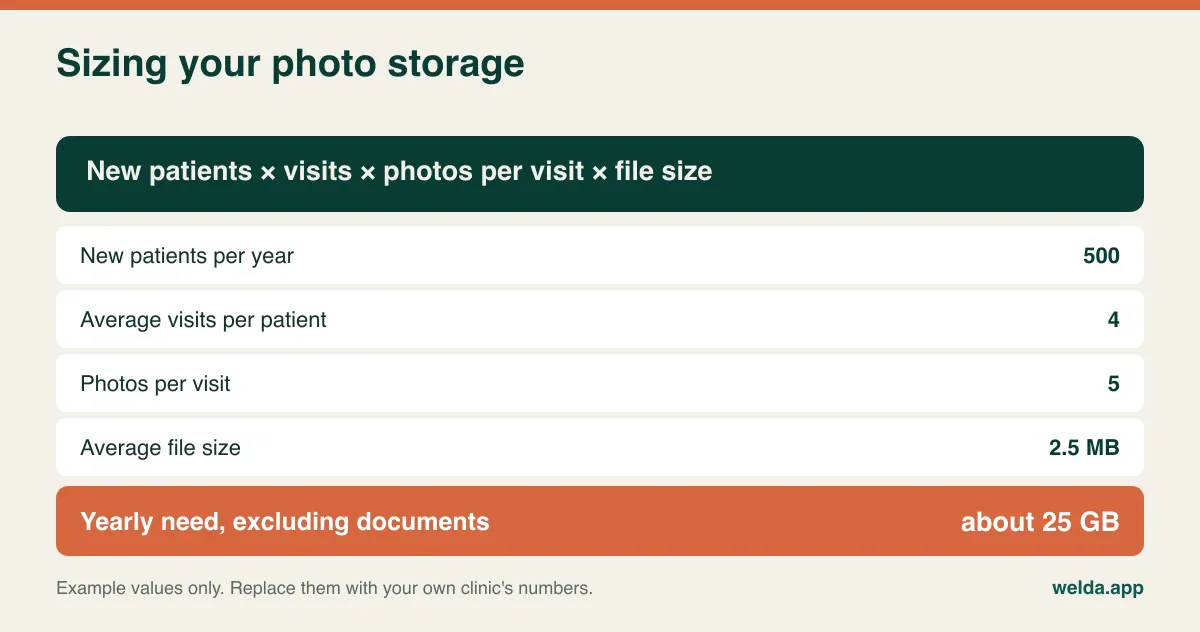
Bear in mind that this total stacks up: unless your retention rules say otherwise, year two sits on top of year one. Modern phones also produce large files, so find out whether the system compresses on upload and whether that affects the detail you need. Welda CRM plans come with 1 GB, 10 GB or 100 GB of storage shared between photos and documents, so for a clinic shooting heavily this can be one of the deciding factors in choosing a plan.
Who actually needs to see these images?
Write your own answer before you see the vendor's role screen, otherwise its defaults will start to look like the correct answer. A typical starting point:
| Role | View images | Upload | Delete or export |
|---|---|---|---|
| Physician or lead clinician | Own patients or all | Yes | By clinic policy |
| Technician or nurse | Patients under their care | Yes | No |
| Front desk | Usually no need | No | No |
| Marketing | Only marketing-consented images | No | No |
| Owner or manager | For oversight | No | Yes, logged |
Front desk is usually the awkward row. Reception handles bookings and payments and has no clinical reason to view body photos, yet they can wherever everyone shares a login. A shared login destroys the audit trail: the log says "reception" and nobody knows who was on shift at the desk. If the per-user cost pushes you towards sharing passwords, the saving is false.
In Welda CRM, permissions are set by role and only authorised users reach patient records. Note the difference between role-level permission and image-level filtering. A rule like "marketing sees only consented images" is a much finer control, so if your plan relies on it, ask any vendor, us included, to show it working on screen.
Run the demo with test images, not patients
Trying software with your own data is usually sound advice, and patient photographs are the exception. Uploading real images to a system you have no agreement with creates precisely the exposure you are trying to remove. Use a staff volunteer who has agreed to it, or a set of images unrelated to patients.
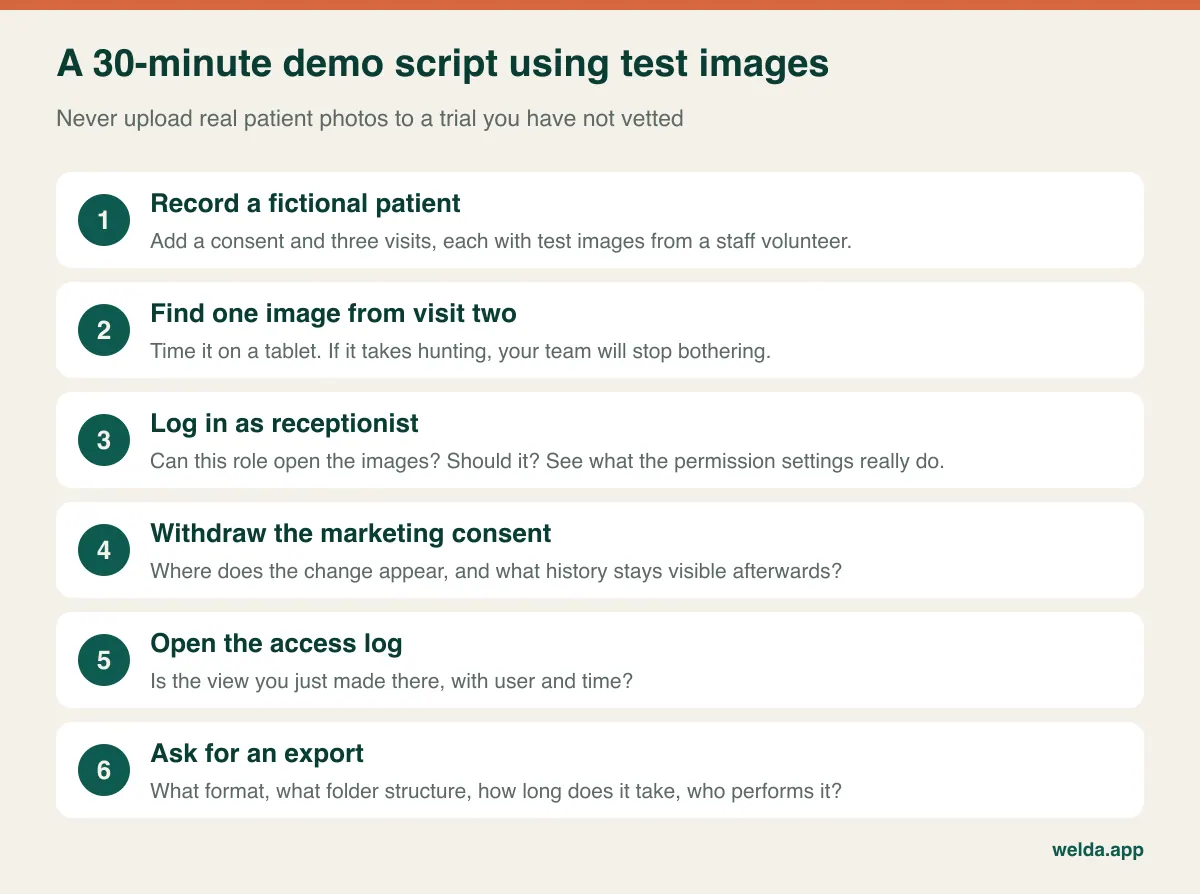
The final step reveals the most. Getting a patient's data out, or leaving altogether, should not hand you thousands of files called IMG_4471. Ask to see the export's folder structure, and whether patient and date survive in it. A system that makes leaving painful has an advantage over you that will never show up on a comparison sheet. Welda CRM's 7-day free trial has all modules unlocked, so you can run this script on test data with your own team.
What to do with the images you already have
Tempting as it is, do not bulk-load everything into the new system. Images with no clear owner and no clear consent are the same liability in a more expensive location. Treat the migration as a clean-up.
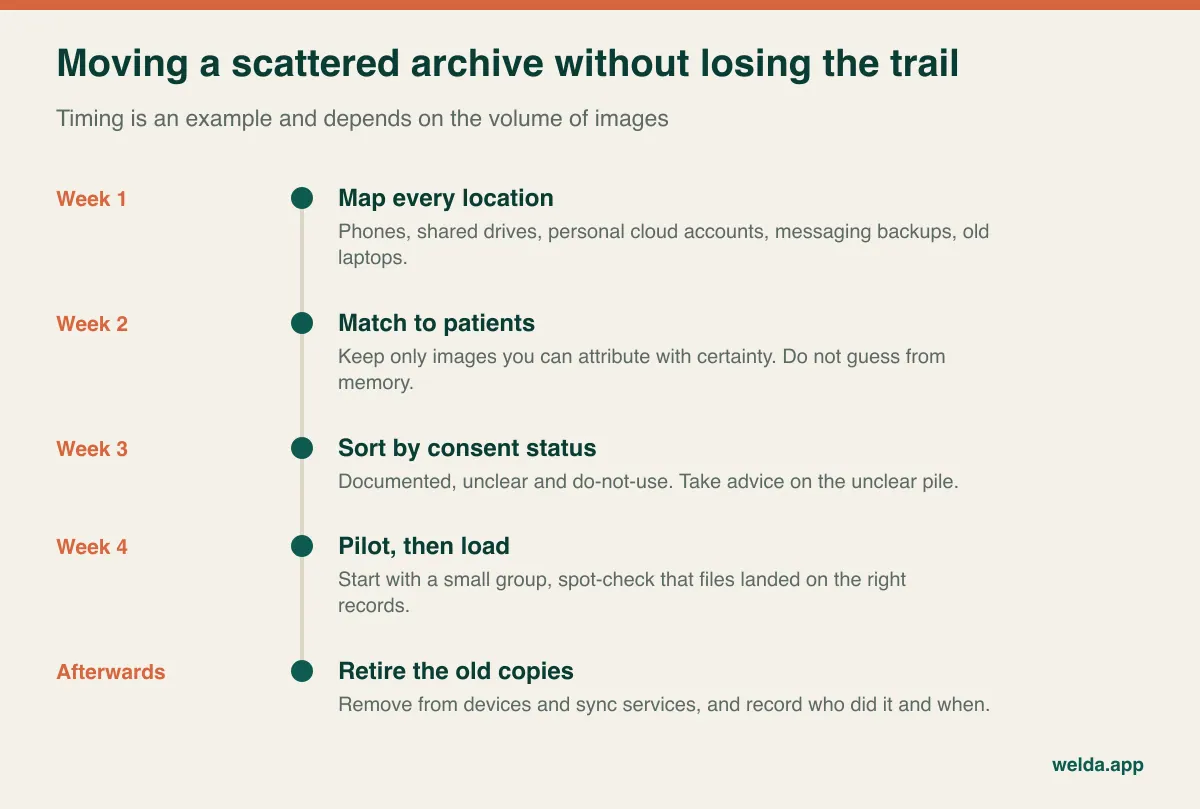
Be strict at the matching stage. Attaching a photo to the wrong patient is worse than leaving it out, because the system now presents it as fact. For images with unclear consent, take advice on what to do; retention duties and deletion duties can pull in opposite directions for health records, so this is not a decision for an office manager on a Friday afternoon.
Ask every vendor exactly who performs the image migration. At Welda, moving existing patient and appointment data is included in setup on every plan. How a bulk photo archive fits within that depends on where your files are and how they are organised, so we look at that with you in the consultation instead of promising it blind. If filenames do not identify patients, part of the work will need your own team's judgement whichever vendor you pick.
Finish by writing the new rule down: clinic device only, uploaded the same day, nothing on personal phones. Decide also how you will treat photos patients send you by WhatsApp or email, because that is how personal devices creep straight back in.
Is this software right for your clinic?
Not every practice needs it. If you photograph a handful of cases a year and do not run treatment series, a locked device, a good consent form and a careful filing routine may do the job. Dedicated software earns its place as the number of images and the number of people touching them grow, particularly with packages, several practitioners, more than one site and long follow-up periods.
It is also the wrong category for some needs. If you need to manage X-ray, CT or MRI through a standard medical imaging workflow, you are looking for a PACS. Welda CRM has no direct integration with imaging devices; files are uploaded to the patient profile to keep them together. If you want 3D simulation, outcome prediction or automated facial analysis, that is a separate class of product and not something we claim here.
If you do want photos alongside appointments, packages, reminders, payments and consents in one place, then a clinic system with a built-in archive usually beats a separate image tool. That is the group our before and after photo software for clinics is aimed at.
What drives the cost when you compare quotes
Put quotes side by side on the same items. How much storage is included, and what happens when you pass it? Is pricing per user or per clinic? Is the photo function part of the base product or an add-on? Are bulk migration and team training charged separately? Is there a fee, or simply a practical obstacle, to getting your data back? Exit cost is rarely printed on the quote, and with an image archive it is often the biggest hidden item.
Staff time is the other cost nobody writes down. Think of a workflow where someone transfers and renames each photo at the end of the day. As soon as one busy week interrupts it, the archive falls behind and never recovers. A method that fits into the treatment itself can be cheaper than one that merely looks cheaper on paper.
Welda CRM is a monthly subscription with no separate setup fee, and setup, data migration and training are included. Pricing depends on branches, users, message volume and modules, and is settled in a free consultation. Bring your storage estimate and role table and that conversation will be short.
Frequently asked questions
Can staff use their personal phones if they delete the photos afterwards?
It is a weak control. Deleted images may remain in cloud sync or recently deleted folders, and you cannot verify any of this on a device you do not own. A clinic-owned device is simpler to defend. Check with your adviser what your regulator expects.
If the face is not visible, is the photo still personal data?
Often, yes. A tattoo, a birthmark or the patient name on the record can make a person identifiable. Filed against a patient record, it should be treated as personal data.
Can I send results to patients over WhatsApp?
It is convenient and risky, since the image then lives on two phones and their backups. Showing results from the profile during a visit is cleaner. Welda's WhatsApp functions are designed for reminders and information messages; we do not present them as a photo sharing channel.
What do I do if a patient asks me to delete their photos?
Log the request and take advice. Images in marketing can usually come down at once. Images in the clinical record may be subject to retention duties, depending on your country and profession.
Can patients see their own photos in a portal?
Welda's client portal is there for appointments and packages. We do not promise photo access through it, so if that matters to you, raise it during your consultation.
Does Welda work in my language and country?
The interface and message templates are available in English, Turkish and German. Compliance with your local rules remains the clinic's responsibility, and the questions above are the right ones to settle before signing.
How should we start?
Book a free consultation, bring your storage estimate, and see how aesthetic clinic software fits your treatment mix. If it looks right, the 7-day free trial lets your team run the demo script themselves.