Welda Stock
Inventory & Sales Tracking Software
Inventory & Sales Management Software
Delivers real-time stock control, sales management and profitability analysis on a single platform for retail businesses such as delis, markets, grocers and cafés.
Screenshots
Take a closer look at the interface
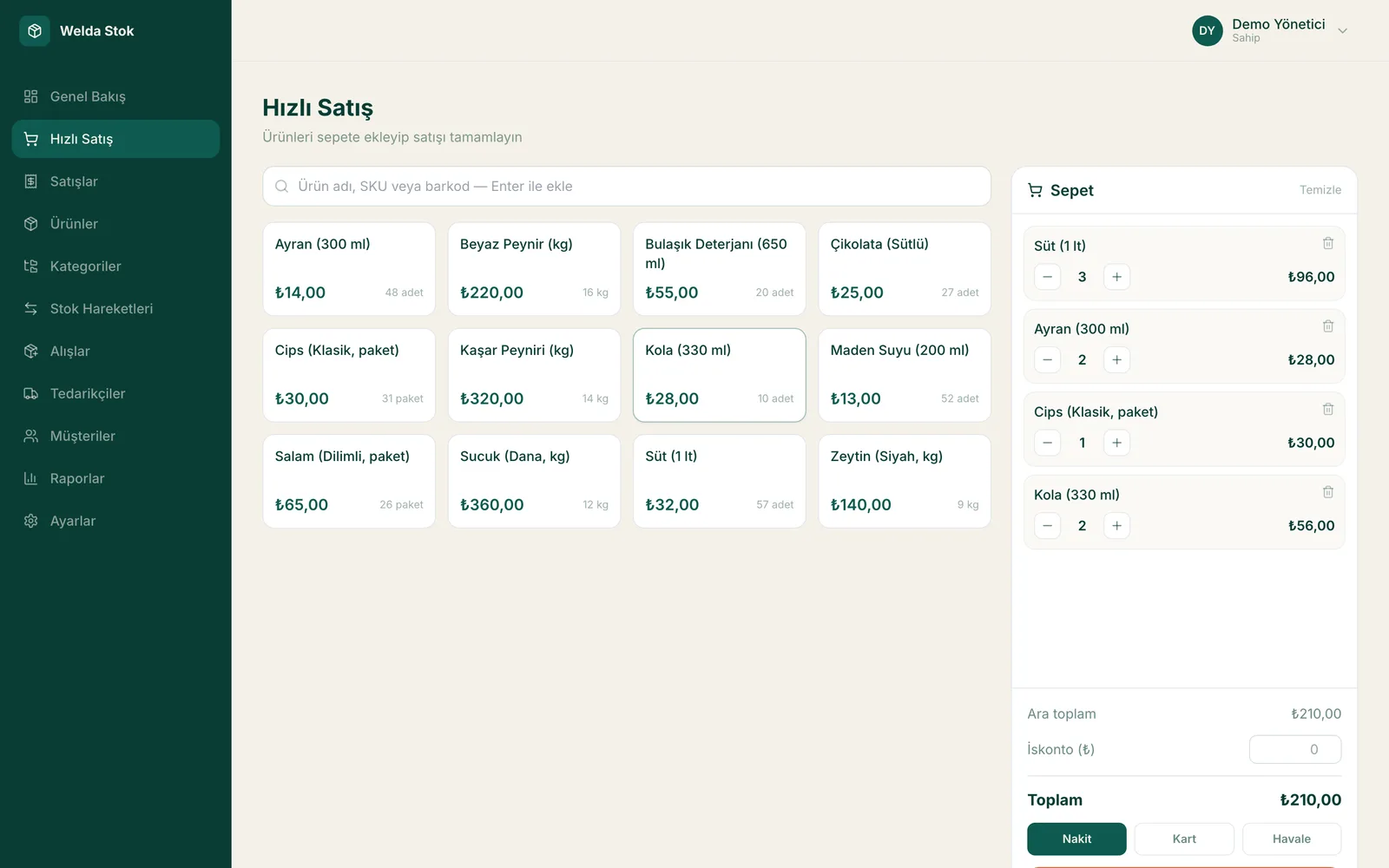
Fast checkout (POS) with barcode and scale support
Features
Everything your business needs, on one platform
Real-Time Stock Control
Track product movements as they happen and receive automatic alerts at critical stock levels.
Barcode Sales & Receipts
Streamline operations with barcode and scale-barcode checkout, customer receipts and daily closing reports.
Profitability Analysis
View buy-sell margins per product and clearly identify your most profitable items.
Supplier Management
Record supplier invoices and keep debt and payment tracking in order.
Reporting
Report daily, weekly and monthly stock movements with a single click.
Access Control
Define separate access and permission levels for cashiers, warehouse staff and managers.
Capabilities
Everything you need for retail inventory and sales
Stock & Warehouse
- Real-time stock tracking so you always see the right quantity
- Quick product entry by name, SKU or barcode
- Low-stock alerts that warn you before an item runs out
- Manage stock across multiple warehouses and branches from one panel
- Stock counts and shrinkage tracking to keep inventory accurate
Sales & Checkout
- Fast checkout and sales with a barcode scanner
- Automatic decoding of scale (weight) barcodes
- Generate a receipt for every sale
- End-of-day cash report to see your daily turnover
Accounts & Finance
- Store credit and customer account tracking
- Per-customer balance and payment history
- Supplier invoices and payables tracking
- Profit margin and profitability analysis per product
Management & Reporting
- Run multiple branches from a single account
- Permission levels for cashier, warehouse staff and manager
- Daily, weekly and monthly sales reports
- Import data from Excel for a fast start
- Multilingual interface (EN/TR/DE)
Process
Move your business to Welda Stock in four steps
Demo & assessment
We review your business needs together, understand your product groups and how you work, and plan how Welda Stock should be set up for you.
Setup & data import
Being web-based, it requires no installation. We import your existing product and stock list from Excel and define your branches and warehouses.
Team training
We configure permission levels for cashiers, warehouse staff and managers, and train your team on everything from barcode sales to reading reports.
Go live & support
Once the system is live, you start tracking stock and sales in real time. Our multilingual support team is with you at every stage.
Integrations
Works with your hardware and your data
Barcode scanner
Scan products in seconds with standard barcode scanners for fast checkout.
Scale (weight) barcodes
Automatically decodes weight barcodes printed by retail scales, so weighed products sell seamlessly.
Excel import/export
Import your product, stock and price lists from Excel and export your reports.
Multiple branches
Manage several branches and warehouses from one account, each with its own stock balance.
User permission levels
Decide who can see and do what, based on cashier, warehouse staff and manager roles.
Web-based access
No installation required; access securely from any computer with a browser.
FAQ
Frequently asked questions
Which businesses is Welda Stock built for?
It is designed for retail businesses such as markets, delis, grocers, cafés, kiosks and herbalists. It scales on the same infrastructure as your product range and branch count grow.
How much does the inventory software cost?
Pricing is tailored to your business based on users, branches and requirements. There is a one-time setup fee with no hidden or recurring costs. Send your request and we will reply with a clear quote within 24 hours.
How long does setup take, and can I migrate my existing data?
Setup is usually completed the same day. Migrating your product and customer data from Excel or your current system is included.
Can I track customer credit (tab) sales?
Yes. You can track credit and account balances per customer and view collection history on a single screen.
Can I use it across multiple branches?
Yes. With multi-branch support you can monitor each branch's stock and sales separately, and define different permission levels for cashiers, warehouse staff and managers.
Does it support barcode scanners and scale (weight) barcodes?
Yes. You can scan products by barcode to sell in seconds, and the system automatically parses the weight/price barcodes printed by retail scales (for example a deli scale) for error-free checkout.
Can I sell if the internet connection drops?
Because Welda Stock is web-based, operations run over your internet connection. We recommend a stable connection; for unreliable connections we plan the best working setup together during onboarding.
How many users can be on the system at the same time?
Multiple users can work simultaneously. By defining different permission levels such as cashier, warehouse staff and manager, you can ensure each user only accesses their own tasks.
Can I migrate from another program or an Excel list?
Yes. You can get started quickly by importing your existing product, stock and price lists from Excel. We assist you with the data import during setup.
Can I manage multiple branches from a single account?
Yes. With multi-branch and multi-warehouse management you can track each branch's stock separately and view sales and stock status for all branches from one panel.
How do I sell weighed products (sold by the kilo)?
Welda Stock automatically decodes the weight barcodes printed by retail scales. You can sell weighed products just like packaged ones by scanning the barcode.
Welda Stock in action
Request a free demo and we'll handle deployment the same day.