The right therapy practice management software depends first on how you get paid and on who else touches the record. If you are a private-pay solo clinician, you can usually do well with secure scheduling, an encrypted client file and discreet reminders. If you run a group practice with a shared front desk, clinician-level separation of notes matters more than any other feature. If most of your income flows through insurance, claims and billing support should be your first filter, because a beautiful calendar will not fix a rejected claim.
Most buying guides for this category read like feature tables. The trouble is that nearly every product ticks the same boxes: calendar, notes, invoices, reminders. What separates them for a therapist is less visible. Who can read a progress note at 9 pm from home? What does a reminder look like on a partner's glance at a locked phone? What happens to your records on the day you leave the vendor? This guide is organized around those questions.
Sort out your payer model before you open a single product page
A therapy practice in Texas billing insurers, a counsellor in Manchester with self-funding clients, and an English-speaking psychologist in Dubai or Berlin are shopping in different markets, even if they type the same words into a search box. The payer model decides which features are essential and which are decoration.
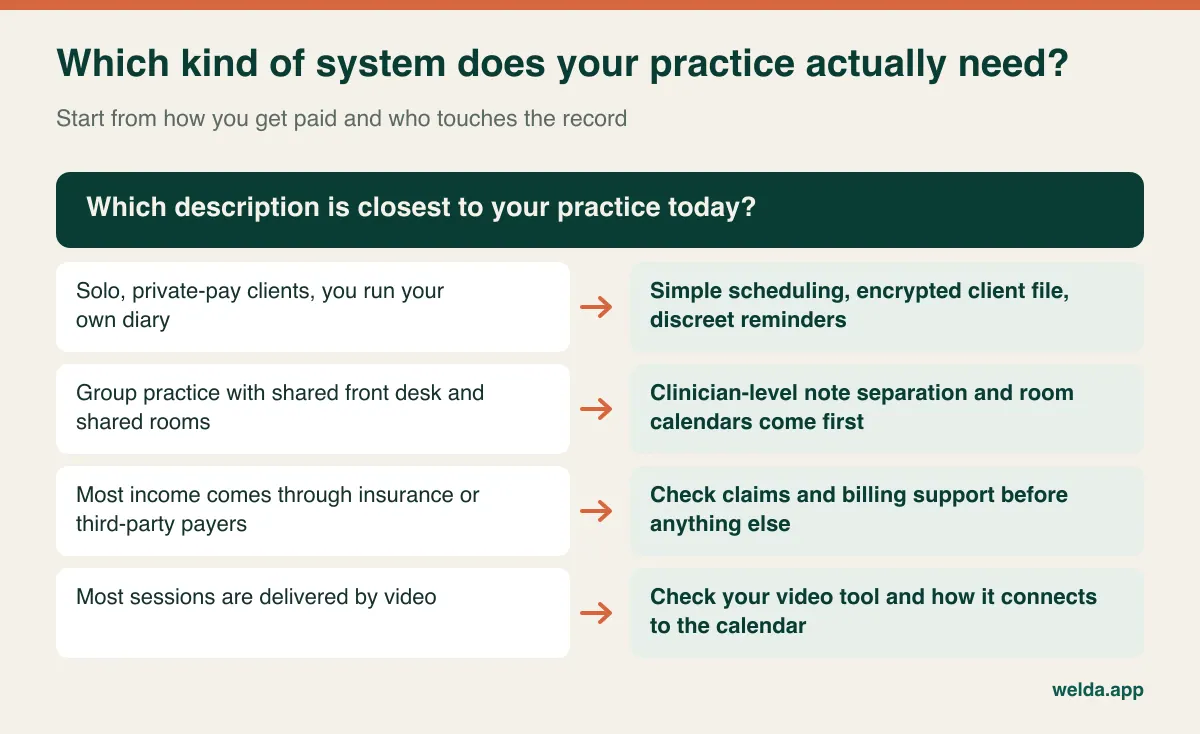
If insurers or public funders pay you, look closely at electronic claims, eligibility checks, remittance handling, diagnosis and procedure coding and whichever regional rules apply. That is specialist territory; general scheduling and client management tools rarely cover it in depth, and building it by hand around a tool that was not designed for it is a slow way to lose money. Ask for a live claim walkthrough, not a slide.
If clients pay you directly, your world is simpler: invoices or receipts with a discreet description, card or bank payments, package balances if you sell blocks of sessions, and a clear record of late cancellation fees. You may also provide superbills or receipts that clients submit themselves, so check that the document can carry your credentials and session dates without saying more than necessary.
If you work mainly through video, the question is how scheduling meets your video tool. Some products include one; many do not. A separate tool is perfectly workable, as long as the link is handled cleanly and you have checked its privacy terms for your jurisdiction.
The appointment itself is confidential information
Security pages tend to talk about notes. In daily practice, the fact that someone sees a therapist often leaks through much more ordinary channels. A reminder lights up on the phone beside a family dinner. A client's manager sees a calendar invite. A waiting room screen shows the next three names. A client paying privately may still not want a bank statement saying "Trauma Recovery Center."
Automated reminders are genuinely useful for attendance, so this is not an argument against them. It is an argument for treating them as a clinical configuration rather than a marketing feature. Can you edit every template? Can you remove the clinician's title? What sender name does the client see? Could a client opt for no messages at all, and is that preference stored where staff will respect it?
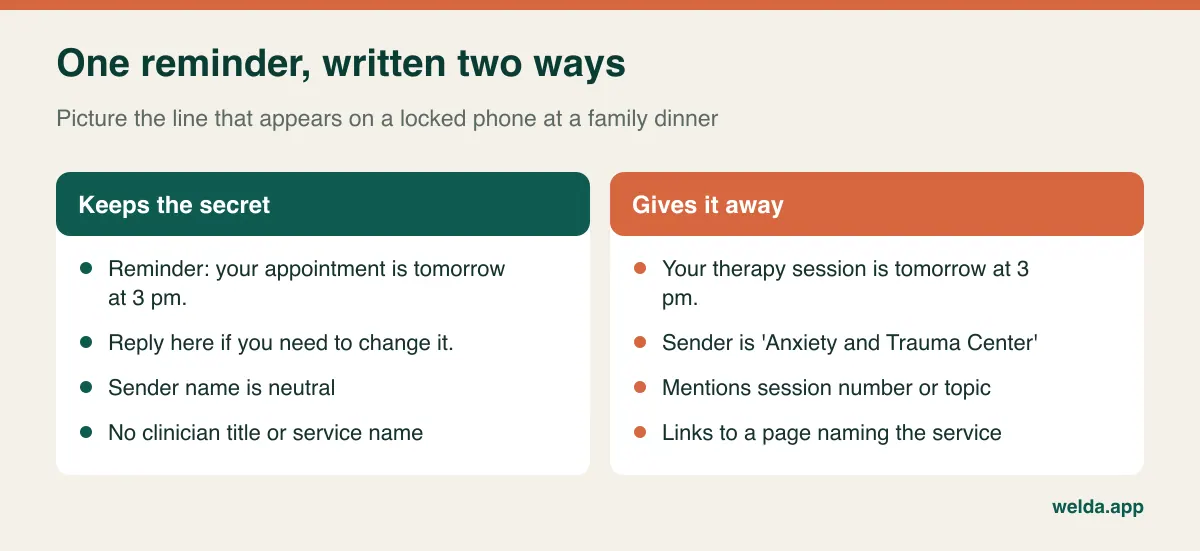
Channel matters as well. SMS, email and WhatsApp behave differently across markets, and each brings its own provider. Whichever you use, the safest default is the same: put no clinical information in the message. In HIPAA-covered settings, many practices also keep to minimum-necessary wording and document client communication preferences; under GDPR-style regimes, you would normally explain the channel in your privacy notice. Get local advice on the details. Our guide to WhatsApp appointment automation covers the general setup if that channel is common in your country.
Finally, look at any public booking page and client portal the way a curious relative would. Page titles, service names like "Couples crisis session" and the email subject on a confirmation all stay in histories and inboxes. A short, neutral service list usually does the job.
Standing slots are the heartbeat of a therapy calendar
A hair salon's diary is a stream of separate visits. A therapist's diary is a set of promises: Tuesday at 3 pm belongs to one person, week after week, sometimes for years. That changes what good scheduling looks like. The important test is how easily you can place someone into a recurring slot, move it around a public holiday, pause it during your leave and then restore it, without someone quietly falling out of the schedule.
Think about a client who takes a three-week break. Does the slot stay reserved, or is it released? Who decides? Good software lets you make that visible instead of leaving it in someone's memory. The session length also matters: if you work 50 minutes with ten for notes, you need the calendar to protect that margin, otherwise a day looks healthy on screen but leaves you writing notes at home. Room-level views matter too once two clinicians share an office, and conflict checks prevent a double-booked consulting room.
Waiting lists deserve special attention here. When a Thursday slot opens, a therapist typically offers it to someone who has asked for a change of time, not to the first person in the general public. A list that notifies the next person automatically saves real effort, but read its wording first. "A time has become available" is fine. "A client has cancelled" is not.
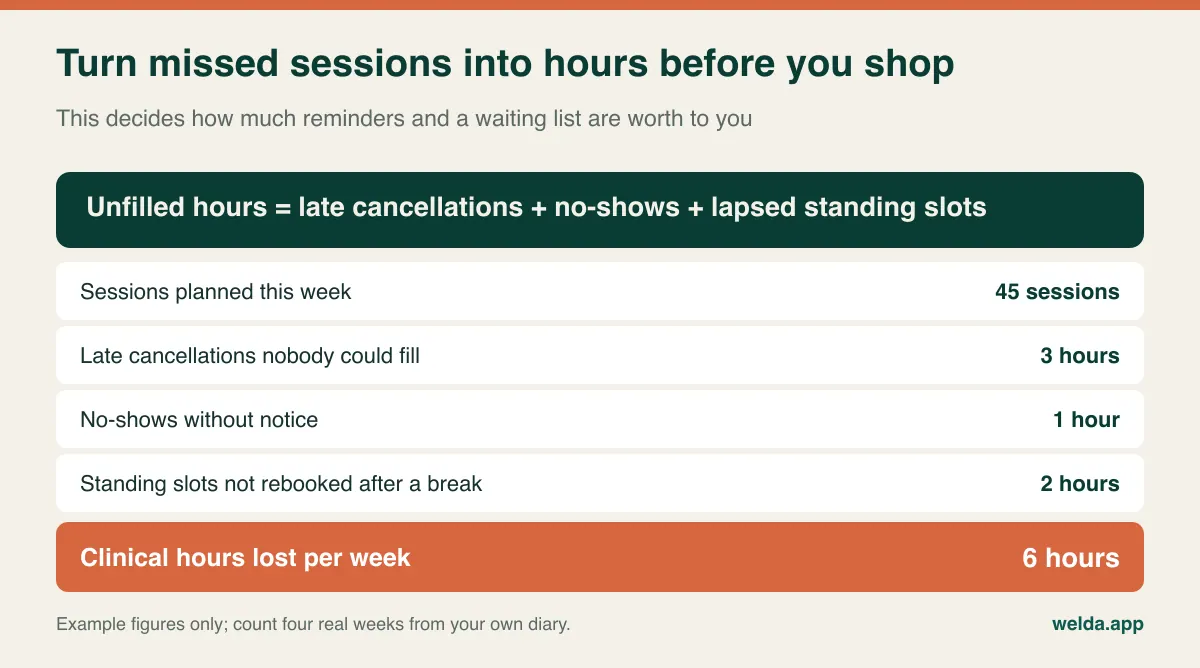
That small piece of arithmetic often changes the buying decision. If lost hours mostly come from late cancellations, a waiting list and a clear policy will help. If they come from standing slots that are never restored after a holiday, the issue is your rebooking routine, and no reminder system will solve it. If no-shows are high in a specific group, the answer may be clinical rather than administrative. Our article on reducing no-shows looks at the operational side more generally.
Three kinds of record, three different audiences
A therapy record is not one object. It usually contains at least three layers: administrative data such as contact details and balances; the clinical record such as progress notes, diagnoses and treatment plans; and for some clinicians, private process notes kept separately. The HIPAA Privacy Rule, for example, gives specially protected status to psychotherapy notes that are kept separate from the rest of the medical record, and other jurisdictions treat mental health information as a sensitive category in their own ways. Exact obligations vary, so ask a qualified adviser. The point for software buying is straightforward: if everything lands in one open profile, you lose the ability to treat those layers differently.
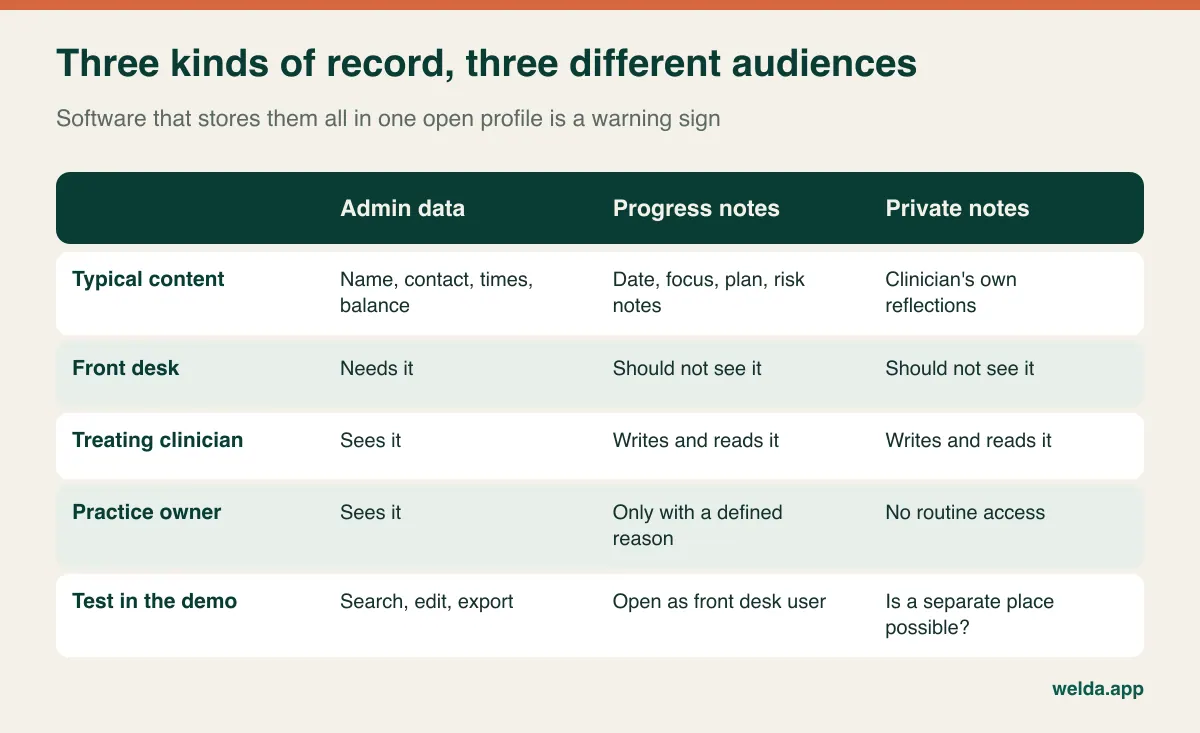
Work through your real team, not an org chart. A front desk colleague must see names, phone numbers and times; they do not need the presenting problem. A bookkeeper needs amounts, not the reason for them. A practice owner who also carries a caseload is the case most often skipped: owning the business does not automatically mean routine access to colleagues' clinical notes.
Three situations deserve an explicit decision:
- Independent clinicians sharing premises. If they are separately responsible for their own clients' records, a single shared account raises real questions. Sort out who is responsible for what before any data goes in.
- Supervision and trainees. Does a supervisor get temporary access to a specific case, or is the case discussed in de-identified form elsewhere? Your software should support your policy without nudging you into broad access by default.
- A clinician leaving. On their last day, what happens to their login, to their open cases and to their ability to reach old notes? Writing this down in advance prevents awkward disputes when feelings are running high.
Access logs complete the picture. A useful audit log shows who opened which record and when, including views rather than only edits. In a therapy setting the threat is rarely someone altering a file; it is somebody quietly reading one. Ask who can read the log itself, and how far back it goes.
What "encrypted" should mean by the time you sign
Almost every vendor will tell you the data is encrypted. It is a good answer to a question that has several parts. Encryption in transit protects information on its way to the browser. Encryption at rest protects it on the server. Neither one automatically tells you whether a free-text note, a scanned intake form or a backup copy is covered, or whether vendor staff can read client records when troubleshooting.
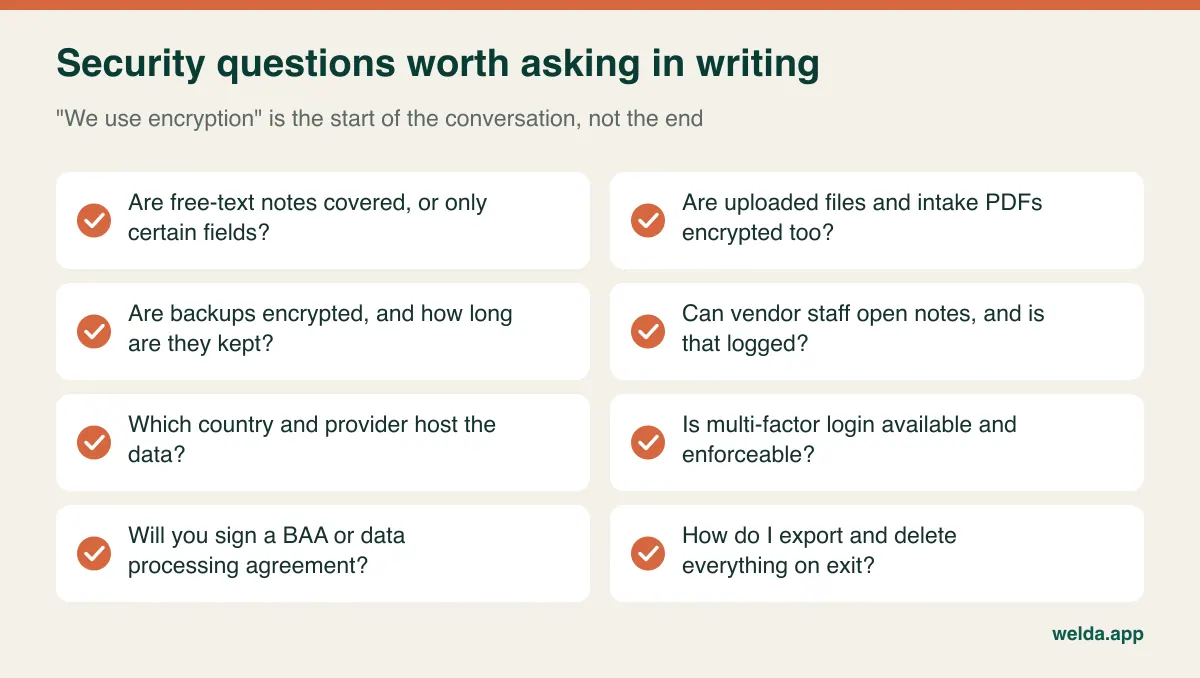
The contract matters as much as the architecture. If you are a covered entity in the US, you would generally expect a business associate agreement from a vendor handling protected health information. In the UK or EU, you would look for a data processing agreement under UK GDPR or GDPR, and information about sub-processors and international transfers. Canada, Australia and other regions have their own health-privacy expectations. Treat this paragraph as a checklist starter rather than legal advice, and make sure the vendor's offer actually matches your jurisdiction. If the answer is "we are not set up for that," it is better to hear it now.
Exports are the other quiet risk. The strongest platform does nothing for the unencrypted spreadsheet of client names that somebody downloaded to a shared laptop. Check who can export, and whether that action leaves a trace. For wider background, see our article on patient data security in clinics.
Couples, kids and groups break the one-client-one-file assumption
Software tends to assume one person per record. Therapy often does not. Before you commit, walk through any of these that apply to you, because retrofitting them later is painful.
Couples and family work. A session belongs to two or more people, but the invoice may go to one and the reminder to both. Something disclosed in an individual session should not surface in a shared view. Can you link two people to one appointment and still control what each one, and each clinician, can see? If there is a client portal, check precisely what appears in it.
Children and adolescents. The mobile number on file probably belongs to a parent or guardian. Reminders and invoices go to them, but session content should not sit anywhere a guardian's login can reach. With teenagers, keep the agreement on what gets shared with parents as a document on file. Rules about minors' consent differ widely between places, so get specific local guidance.
Group therapy. A calendar with class capacity can handle group scheduling, but look at what participants can infer. Group messages must not reveal each other's numbers, and a group name such as "Grief Support" should not appear in a message preview. Also check whether the screens call everything a "class"; it is a small thing, but it will irritate a clinical team every day.
Risk information. Emergency contacts and safety plans must be easy to find for the treating clinician and not casually visible to everyone else. Software can help a little, but your written crisis protocol does more. Our guide to running a counseling practice addresses that operational side.
Session tracking: beyond counting what is left
Session tracking in general clinic software often comes from aesthetics or physiotherapy: ten sessions sold, three used, seven left. That is useful if you sell blocks or prepaid programmes. But most therapists care about a different question: continuity. Who has no next appointment? Who has cancelled twice running? Who said "let's pause for now" two months ago and has quietly vanished?
Dropout in therapy tends to be silent. A dated task, such as "check in gently in two weeks," can allow a planned ending rather than a disappearance. Filters by last-session date and a follow-up list make that easy. However, there is a line to hold: a reactivation list in a CRM is designed to win customers back. A clinician deciding to reach out to a former client is doing something different, and that decision should stay clinical. Do not hand it to an automated campaign, and be wary of any marketing workflow that switches on by default.
Note structure is the other half. A chronological record with a date, duration, focus and next step for each session is easier to live with than a single growing text box. Dedicated products may add note templates such as SOAP or DAP, outcome measures and treatment-plan builders. Whether you need them is easy to check: look at how you actually write notes today. If you score measures elsewhere and write brief narrative notes, a simpler structure could be plenty. If your funder or regulator expects a specific format, make it a hard requirement.
Where a general platform like Welda CRM fits, and where it doesn't
Welda CRM is not a therapy-only product. It is a scheduling and client management system for appointment-based businesses, and psychologists are among the wellness professionals it serves. You get a client profile with history, notes and tasks; a calendar by staff member, room and branch with conflict detection; online booking requests you confirm yourself; a waiting list that notifies the next person after a cancellation; multi-session packages with remaining sessions; automated WhatsApp reminders; invoices, receipts and installment tracking. Records are stored encrypted and not shared with third parties, permissions follow user roles, consent is managed and an audit log records who accessed what. Because modules switch on and off individually, you can hide what a therapist has no use for.
That last point matters. Before-and-after photo archives, lead funnels and review collection are built for other sectors. Turning them off is the right starting position, and soliciting public reviews from therapy clients is ethically questionable in any case.
The honest limits: our product material does not list insurance claims processing, clearinghouse connections, HIPAA business associate terms, built-in video sessions, outcome measures, note templates such as SOAP or automatic weekly repetition of a standing slot. Nor can we promise from that material how finely note visibility can be separated clinician by clinician, or that multi-factor login is available. If you bill US insurers, you will very likely want a specialist system instead. If any of the others is a requirement, ask directly on a call and test it with your own scenario. Reminders run on WhatsApp, so if your clients do not use it, factor that in too.
Where it can fit: private-pay practices and counseling centers outside the US insurance system, especially those wanting scheduling, client records, packages and payments in one place. If that sounds like you, take a look at Welda CRM as therapy practice management software and hold it to the same test below as you would any other vendor. Our guide to solo practice software is also worth reading if you work on your own.
Run this demo, not the vendor's
A guided demo shows you what the vendor rehearsed. To measure confidentiality, use a made-up client. Never enter real client data during evaluation.
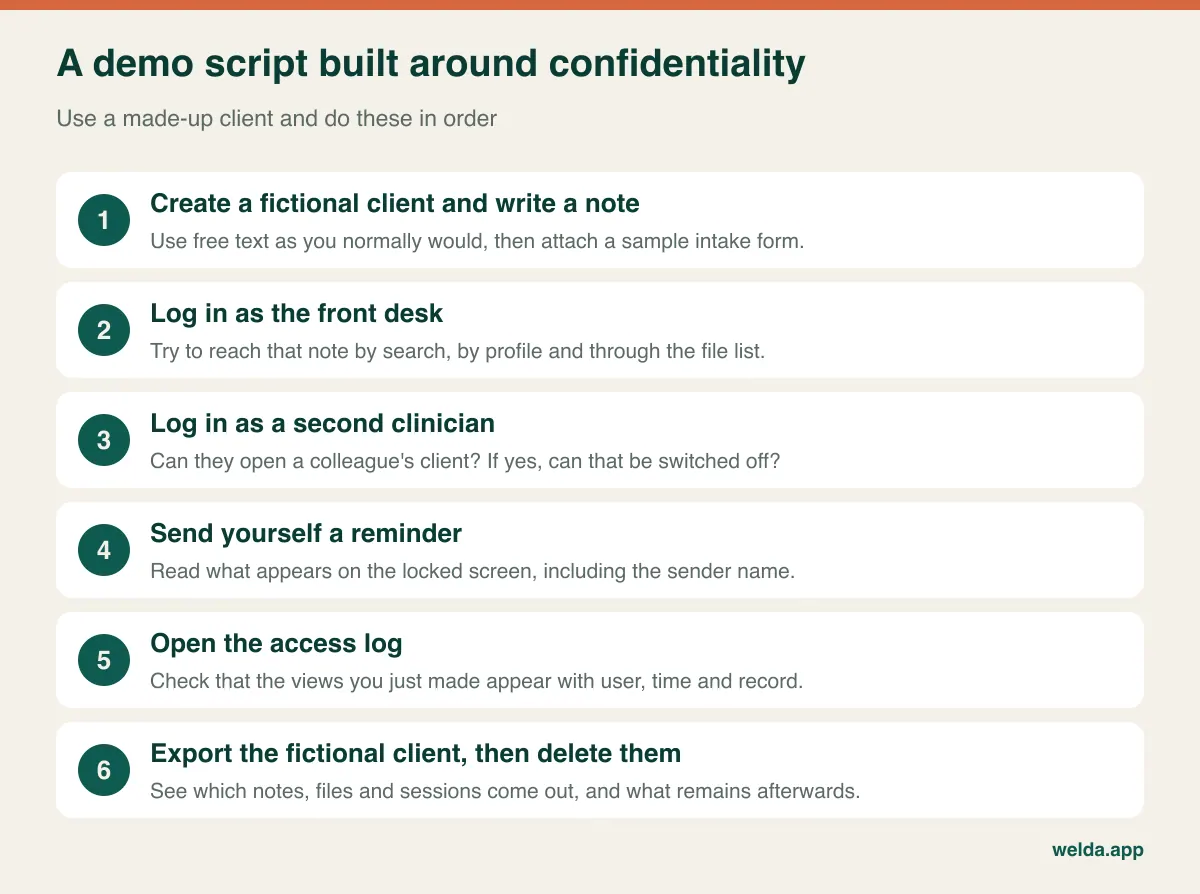
Then add a few sector-specific tests: set a Tuesday standing slot for eight weeks and shift it across a public holiday; book a couples session with one payer; issue a receipt and see how generally you can word the service line; trigger a cancellation and read the message that goes to the next person on the waiting list.
Use these questions for the sales call:
| Ask | A good answer sounds like | Keep probing if you hear |
|---|---|---|
| Can your support staff open client notes? | Explains the limits, and how access is recorded | "Don't worry, we never would" |
| What leaves with me when I cancel? | Named formats, covering notes and files | "We can look into it at that point" |
| What happens when a clinician leaves? | Concrete steps for login, cases and history | "Just delete the user" |
| Which rules do you support in my country? | Specific documents you can read | "We're fully compliant everywhere" |
On cost, compare offers by line items rather than headline figures: number of users and locations, message volume and overage, storage, data migration, training, video or claims add-ons, and support hours. Also estimate exit costs, including the time needed to verify an export. At Welda, the plan and price are settled in a free consultation once we understand your practice; setup and data migration are included in every plan.
Moving a live caseload without anyone feeling it
In most businesses, migration means moving data. For a therapist it begins with deciding what should not move. Scanning a decade of closed paper files creates a new copy of highly sensitive material in a new place, and that may not serve anyone. A common, sensible pattern: bring across identity, contact and scheduling details for current clients, start new notes in the new system, and keep closed records in their existing secure archive for as long as your retention rules require. Those rules vary by profession and location, so check them first.
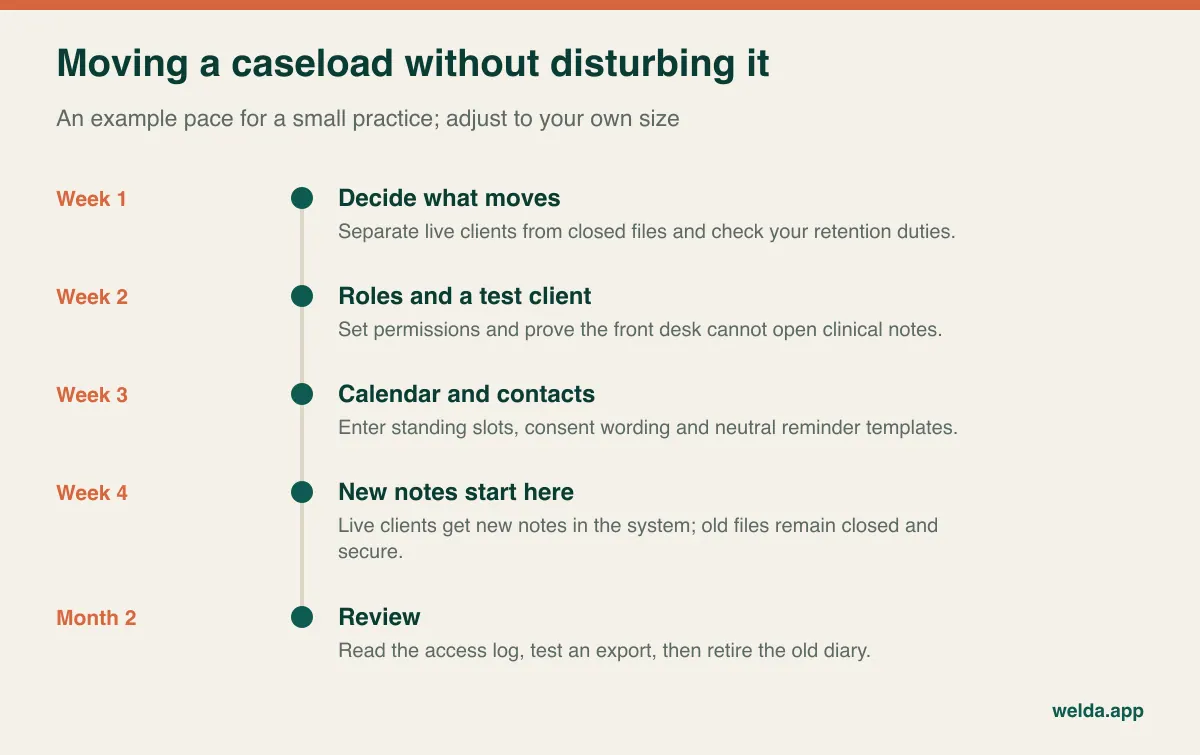
If you are coming from a spreadsheet, look at the columns before you send it anywhere. A "notes" column gathered over years usually holds the most sensitive content in the file. Sending it to a vendor is a data transfer in its own right, so do not email it unprotected, and ask what happens to the copy after import. Leaving that column behind can be a perfectly valid choice.
Tell clients about the change briefly: if the reminder channel will change, one sentence plus an updated privacy notice usually covers it. Keep the old diary alongside the new one for the first month, and check every standing slot by hand at least once. The client who arrives on Tuesday at 3 pm and finds their slot taken will remember that much longer than any new feature.
Frequently asked questions
Is therapy practice management software automatically HIPAA or GDPR compliant?
No product makes you compliant on its own. Software can support technical safeguards, and vendors can sign the relevant agreements, but policies, notices, training and risk assessment remain your responsibility. Ask which obligations a product supports and how.
Do I need a therapy-specific system, or will a general one do?
If you bill insurers, need structured clinical note formats or depend on outcome measures, a specialist product is usually the safer choice. If you are private pay and your needs center on scheduling, secure records, packages and payments, a general platform can be enough, provided it passes the confidentiality tests above.
Can the front desk manage appointments without reading notes?
They should be able to. With role-based permissions, front desk users handle the calendar, contacts and payments while clinical notes remain restricted. Don't rely on the description; log in with a front desk account and try to find the note.
Are WhatsApp or SMS reminders appropriate for therapy clients?
They can be, with the client's agreement. Keep the wording neutral, look at the sender name, and offer a no-message option. Requirements differ by country, so check how your regulator views each channel.
Should the software include video sessions?
Not necessarily. Many clinicians are happy to use a separate video tool and keep only the appointment in the system. Check that tool's privacy terms and any agreement your jurisdiction requires. Welda CRM does not list built-in video, so plan on a separate tool if you use it.
Should all clinicians in a group practice see each other's clients?
Usually not by default. Seeing that a slot is busy may be necessary for planning, but client details and notes should be opened on a need-to-know basis. Test how precisely a product can draw that line.
Should I use real client data in a free trial?
No. Use fictional records until the contract, processing terms and permissions are settled. A trial is for testing behavior, and a made-up client tests it just as well.
What drives the total cost of this kind of software?
Users, locations, messaging volume, storage, modules, migration, training and any add-ons for claims or video. Compare quotes by these items and ask what is charged once you go past each limit.
Before you book any demo
Do two small pieces of homework this week: count your unfilled hours over the last four weeks, and fill in the record-access table above for your actual team. You will walk into any sales conversation knowing what you need, and you'll spot quickly when a product isn't it. If you are a private-pay practice and want to see whether we fit, book a free consultation about therapy practice management software or try Welda CRM with a fictional client during the 7-day free trial. If we are the wrong fit, we would rather tell you on that first call.