Does schema markup for AI search actually matter? Schema markup restates your business facts (name, address, phone, hours, services, profiles) in a format machines can read without guessing. It will not get you named in ChatGPT or Google's AI Overviews by itself. What it does is help AI systems read the basic facts about your business correctly and consistently, which is why it belongs in the foundation of any AEO plan.
AEO, or answer engine optimization, is the work of getting your business named and cited in AI answers. Some people call the same work GEO (generative engine optimization); this article uses AEO. Below we cover what schema markup for AI search does and does not do, which properties a local business should fill in, the mistakes we see most often, and a step-by-step plan. If you want to see where your own site stands first, the free AI visibility analysis reads your homepage and a few inner pages, checks whether business structured data is present, and lists what is missing.
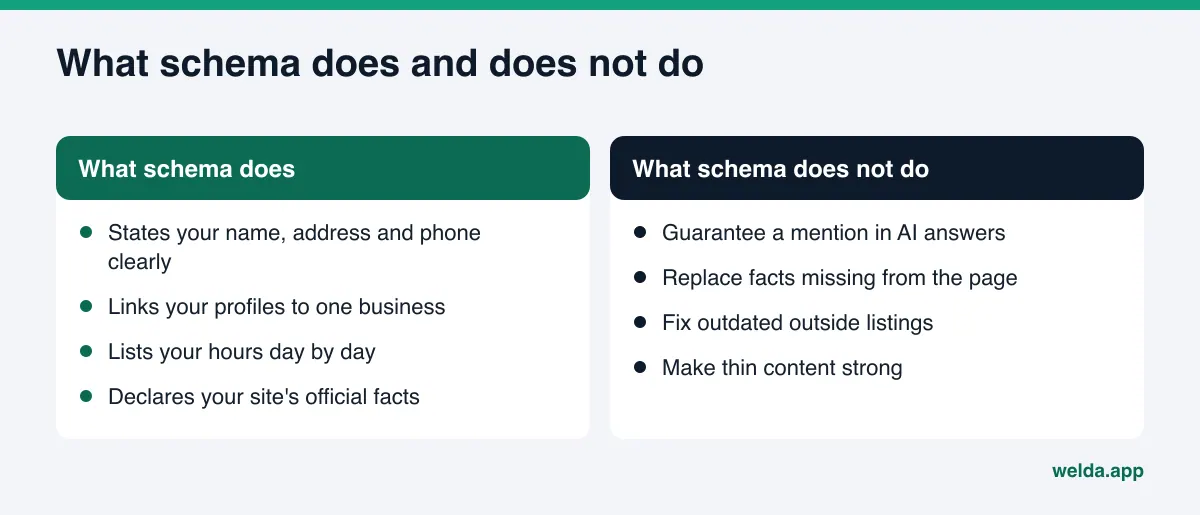
What is schema markup, and why does it matter for AI search visibility?
Web pages are written for people. A visitor reads "Open Monday through Saturday, 8 to 6" and understands it instantly. A search engine or an AI system mostly understands it too, but there is room for doubt. Which of the three phone numbers on the page is the main one? Is "Round Rock" your office or one of the towns you serve? Is "Smith Dental" the same business as "Smith Family Dentistry" on Yelp? Schema markup removes that doubt by using a shared vocabulary, schema.org, that the major search engines developed together.
In practice, schema markup is a small block of data in your page's source code. Google recommends the JSON-LD format for it (Google's introduction to structured data). Visitors never see the block. It repeats facts already on the page as labeled fields: your business name in name, your street address in address, your phone number in telephone, your hours in openingHoursSpecification.
For AI search visibility, the value comes down to three things:
- Clear identity. Other businesses may share or resemble your name. The
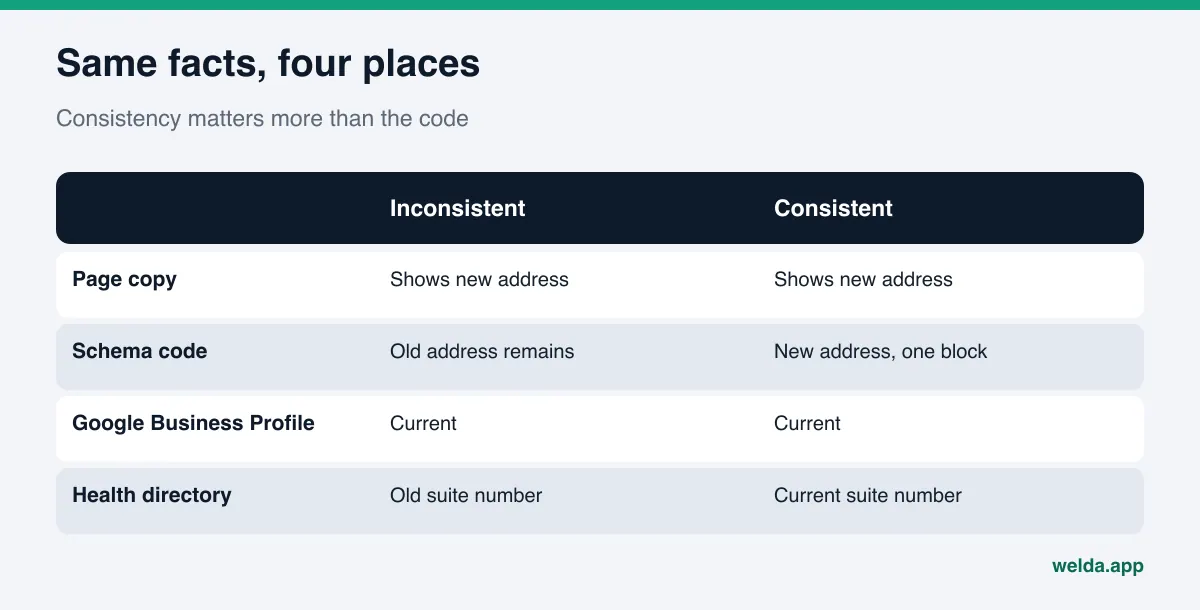
sameAsproperty links your Google Business Profile, Yelp page, BBB listing or Healthgrades profile to your site as one entity. When an AI system pulls facts from several sources, those links help it attach them to the right business. - Consistency. AI answers draw on your site, map listings, directories and review sites. If your phone number or address differs across them, a confident answer gets harder to build. Schema states the official version from your own site.
- Readability. Some sites show key facts only inside images, sliders or widgets that load with JavaScript. A plain-text business data block gives crawlers at least the basics. Our guide to JavaScript rendering and AI crawlers covers that problem in more depth.
Think of schema as handing AI a clean business card: this site belongs to this business, and these are its facts. Whether the AI reads the card, how much it trusts it, and whether it names you in an answer are decisions the AI system makes.
What Google says: is there special schema for AI Overviews?
This is where most of the confusion lives. You will find plenty of advice promising "AI schema" or special markup for answer engines. Google's own documentation says otherwise: to appear in AI Overviews or AI Mode, you do not need new machine-readable files, AI text files, or any special schema.org structured data (Google Search Central on AI features and your website). The same page lists making sure your structured data matches the visible text on the page as a standard good practice.
Two conclusions follow. First, schema markup for AI search is not a new technology. It is the same markup search engines have used for years, with a shifted goal: less about earning a fancy search result and more about getting your identity and core facts read correctly. Second, schema does not replace page content. Putting facts only in the code breaks Google's rules and does not help. Google asks you not to mark up content that readers cannot see, and it does not guarantee that even valid markup will show up in results (Google's general structured data guidelines).
FAQ markup deserves its own note. Google stopped showing the FAQ rich result in Search in 2026 (announcement on Google's FAQPage documentation). That does not make FAQ sections useless. Writing out the questions customers really ask, with direct answers on the page, gives AI systems more text they can quote. What disappeared is the visual reward in Google. You can keep FAQPage markup if it is already there, but the value sits in the visible answers, not in the code.
Which schema types and properties should a local business use?
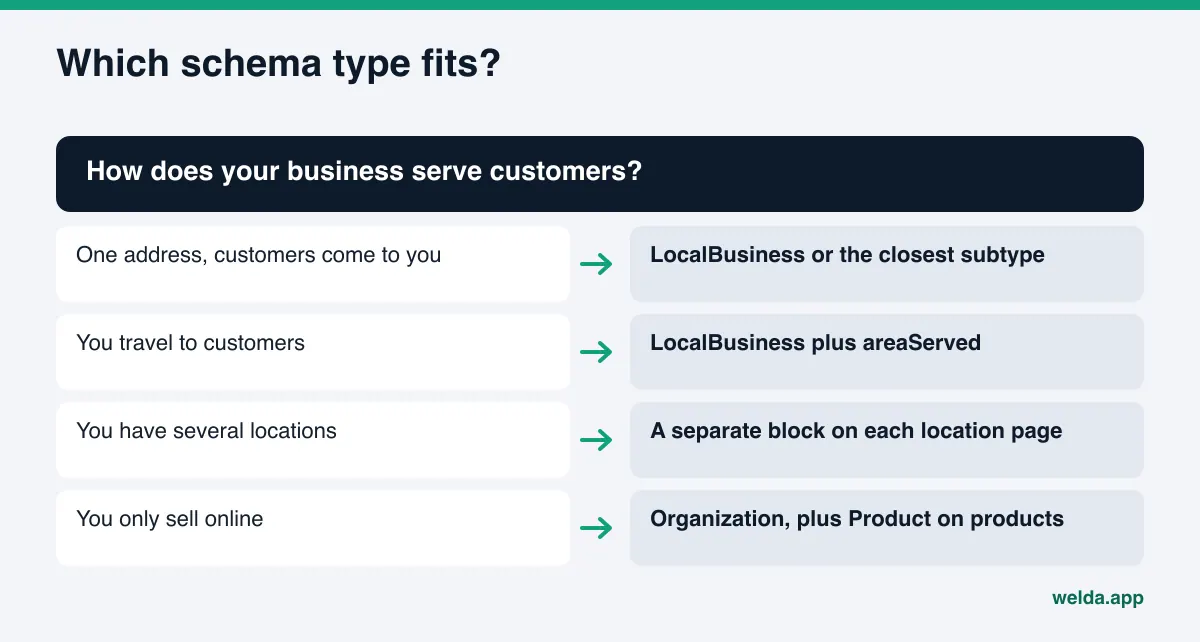
For most small businesses, one well-built business data block is worth more than ten half-finished ones. The core type is LocalBusiness, which schema.org defines as both an organization and a physical place (schema.org LocalBusiness). If a more specific subtype fits, use it: Dentist for a dental practice, the types under LodgingBusiness for hotels and inns, the types under FoodEstablishment for restaurants and cafes.
The table below shows the properties a local business should have on its homepage or contact page, and what each one does for AI search.
| Property | What goes in it | Why it matters for AI answers |
|---|---|---|
@type | LocalBusiness or the closest subtype | Tells systems what kind of business you are |
name | The exact name on your sign and profiles | Lets your listings match one another |
address | Street, city, state, ZIP | Matches you to city and neighborhood questions |
telephone | The main number shown on the site | Keeps contact details consistent |
openingHoursSpecification | Opening and closing times per day | Supports "open now" and "open Sunday" questions |
geo | Latitude and longitude | Points to the same spot as your map listing |
areaServed | Cities or counties you serve | Essential for service-area businesses |
sameAs | Google Business Profile, Yelp, BBB and social URLs | Declares that those profiles are you |
url, logo, image | Homepage, logo, business photo | Official site and brand details |
Notice what is missing: aggregateRating and review. That is deliberate. Google does not treat reviews a business controls about itself as eligible for star ratings when the business marks them up on its own pages. Showing testimonials on your site is fine, but coding your own star rating will not read as independent proof to Google or to an AI system. Reviews carry weight when they live on outside platforms such as Google Business Profile, Yelp, Angi or Healthgrades.
Beyond the main business block, two more types help when the page calls for them. On service or product pages, Service or Product clarifies what the page is about; we cover the ecommerce side in product pages for AI shopping. On articles and guides, Article with author details (Person) makes expertise visible; see author bios and expertise signals for AI.
How to add schema markup for AI search, step by step
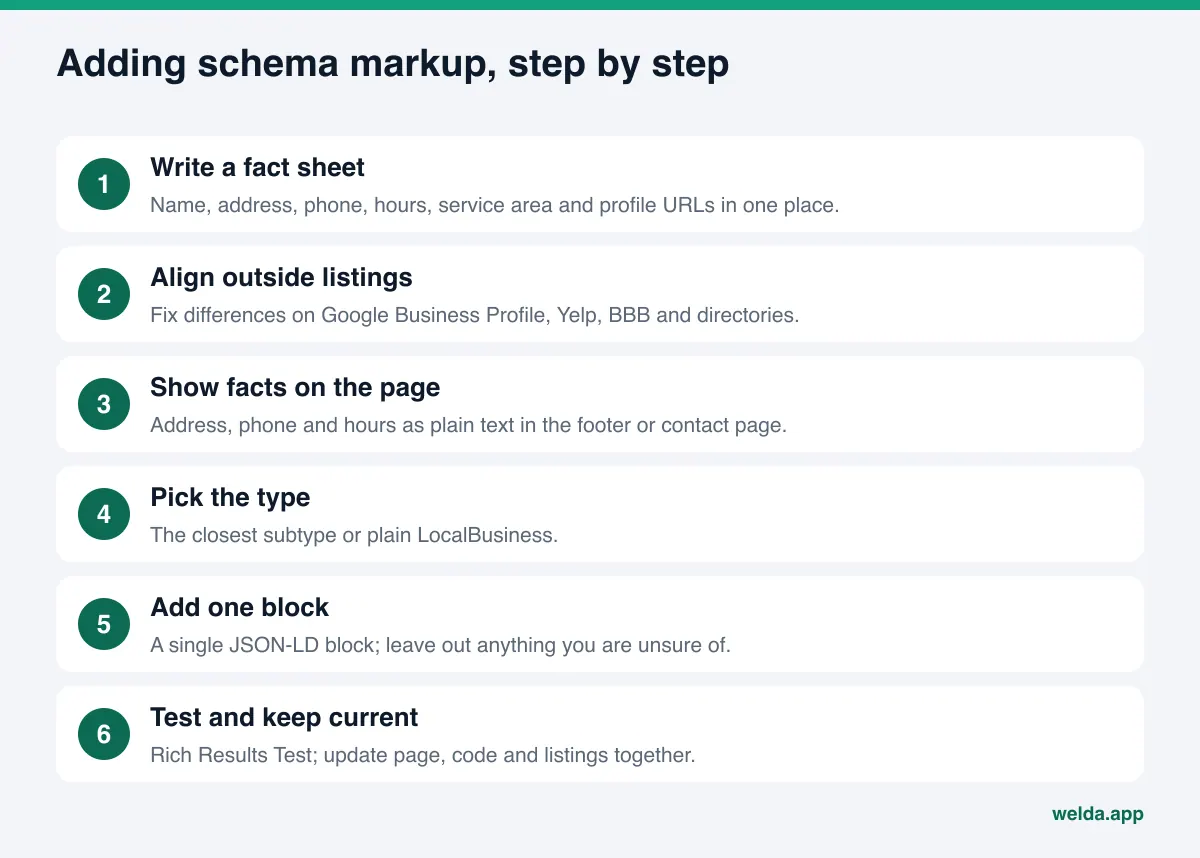
This sequence works for an owner with little coding experience or for whoever manages the website. The order matters: the code comes last, after the facts are right.
- Write one source-of-truth fact sheet. Put your legal or trade name, street address, main phone, hours by day, service area and profile URLs in a single document. Every later step pulls from it.
- Compare it with your outside listings. Check Google Business Profile, Apple Maps, Yelp, BBB and any industry directory. If your name is spelled differently, an old number is still listed, or hours are outdated, fix those first. Schema does not repair inconsistent listings; it only announces your site's version.
- Make sure the facts are visible on the page. Address, phone and hours should appear as plain text in the footer or on the contact page. Facts that exist only in an image or only in code are not enough.
- Pick the type. Choose the closest subtype. If you are unsure, plain
LocalBusinessis valid and safer than a wrong subtype. - Build the JSON-LD block. Fill in the properties from the table. Leave out anything you do not know for certain; do not guess.
- Add it to the site. The main business block usually goes on the homepage and the contact page. On WordPress, an SEO plugin or theme setting can handle it; most site builders offer a custom code field.
- Test it. Google's Rich Results Test shows whether the code is read and whether it has errors. Passing is not a promise of visibility, but code that cannot be parsed does nothing at all.
- Update it whenever something changes. A move, a new phone number, new hours or a new location means updating the page, the schema and your outside listings on the same day.
Here is an example scenario. A dental practice in Austin moved across town two years ago. The site footer shows the new address, but an old plugin still outputs a schema block with the old one. The Google Business Profile is current; an older listing on a health directory still shows the previous suite. An AI system now sees two addresses for one practice and cannot be sure which is right. The fix is not more code. It is deleting the stale block, keeping a single correct one, and correcting the directory listing.
Common schema mistakes that confuse AI
Most of the problems we see are not technical. They are information problems. The comparison below puts problem markup next to healthy markup.
| Problem | What happens | Better approach |
|---|---|---|
| Several conflicting blocks | Theme, plugin and hand-added code each say something different | One business block from one source |
| Facts in code but not on the page | Hours or services exist only in the markup | Write it on the page first, then mark it up |
| Stale information | A move or number change never reached the code | Update page, code and listings together |
| Self-marked ratings | Hand-picked testimonials coded as stars | Let outside platforms carry ratings |
| Wrong type | A clinic coded as Organization, a cafe as Store | Closest subtype or plain LocalBusiness |
| Missing sameAs | Profiles never linked to the site | Add map, review and social profile URLs |
One more warning. Having schema in your code does not mean crawlers can reach the page. If your robots.txt blocks AI crawlers, even perfect markup goes unread. The free analysis checks both at the same time.
Is schema markup enough on its own?
No. Schema is the infrastructure layer of AI search visibility. Whether you get named in an answer depends on more: a homepage that says clearly what you do and where, separate service pages, answers to the questions customers actually ask, and your presence on outside sources. Schema replaces none of these. It ties them together.
A practical order: first make your homepage and services clear (our guide on homepage copy for AI search walks through this), then make business facts consistent on the page and in the code, then bring outside listings in line. Reverse the order, writing code first and copy later, and the code and the page drift apart within months.
If you run several locations, the work multiplies but the logic stays the same: one page per location, one block per page, each matching that location's listings. Our article on multi-location AEO covers the structure.
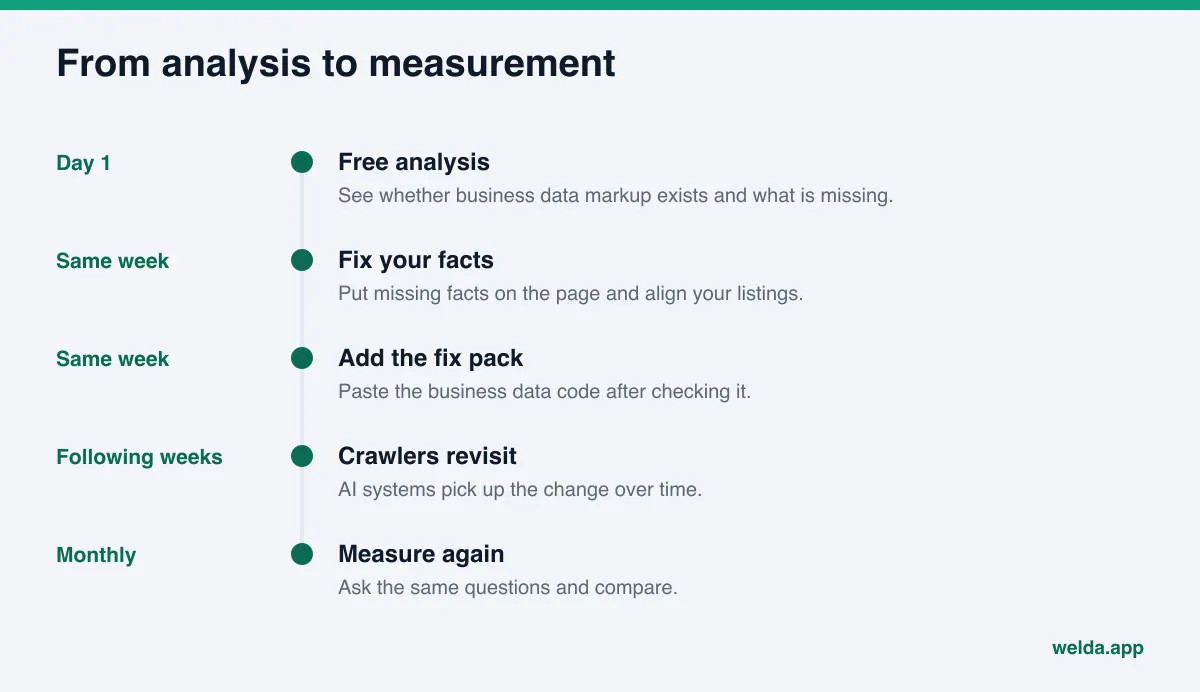
Set expectations, too. Do not expect AI answers to change the day after you add schema. Crawlers need to revisit your site and the information needs to work its way into answers, which usually takes weeks. That also makes the effect of schema hard to isolate. The honest way to judge it is to ask the same questions at regular intervals and compare.
How Welda handles schema markup
Welda helps in two places: the free site analysis, available to anyone today, and the Welda dashboard, which is in early access. Here we focus only on the parts that touch schema.
The business data check in the free analysis. The analysis reads your homepage plus a few inner pages such as services, pricing, about and contact. One of the items it checks is your business structured data: whether it exists, what type it uses, whether address, phone and location fields are filled in, and whether your social and map profiles are linked to the site. For this gap, the report tells you three things: what we found on your site, why it matters for AI answers, and how to fix it. A simulation shows roughly how much this fix would move your score next to the other fixes, so you can decide whether schema is actually the priority for your site. On some sites the bigger problem is a vague headline or unclear services, and the simulation makes that visible.
The ready-made fix pack. The analysis ends with a fix pack you can add to your site, and it includes business data code built from what the analysis read on your pages. You or your web person adds it. The important part is that the code is built from information that exists on your site. If your hours are not on the site, Welda does not make them up; that field stays empty, and the hours need to go on the page first. Before you paste the pack in, compare its address, phone and profile links with your own fact sheet.
The to-do list in the Welda dashboard. In the dashboard, Welda does not guess at facts it cannot read from your site. It asks you on the to-do list, and an answer you give once is applied to every page and piece of copy it prepares. On WordPress sites, Welda connects through a separate Editor user and an application password, with nothing to install; content opens on your site as a draft and goes live when you approve it. On other platforms, the same work arrives as a ready-made package that you apply by hand. If your Google Business Profile is not connected, the profile update appears as a manual task with the text ready to paste, so your site code and your listing say the same thing.
The dashboard also asks the questions your customers would ask on ChatGPT, Gemini, Perplexity and Google AI, three times each, and tracks which ones name you. That repeated measurement is how you see whether anything moved after a schema fix.
To be clear about status: the free analysis works in English today. The full Welda dashboard is in early access and is opening first in Turkey. Regular measurement across all four engines is being added during early access, and the sample dashboard screens use illustrative data. Pricing is discussed in an early access conversation.
Limits: what Welda does not do
Realistic expectations save time. Here is what Welda does not do in this area:
- No ranking or visibility guarantee. Neither Google nor any AI system promises that markup will show up in an answer, and Welda does not either. The free analysis does not measure rankings.
- No invented facts. Everything that goes into the code either appears on your site or comes from you. Missing fields are not filled with guesses.
- No fake reviews or ratings. Welda does not suggest coding a rating in your favor. Reviews should come from real customers on outside platforms.
- No publishing without approval. Prepared content and code go live only when you approve them. Content always lives on your own site; Welda does not host it.
- Outside work stays with you. Handling negative reviews, directory accounts and PR remain your job. Welda drafts the text; it does not log into those accounts on your behalf.
New information usually takes weeks to show up in AI answers. Deleting or rewriting your schema because nothing changed in week one only hurts consistency.
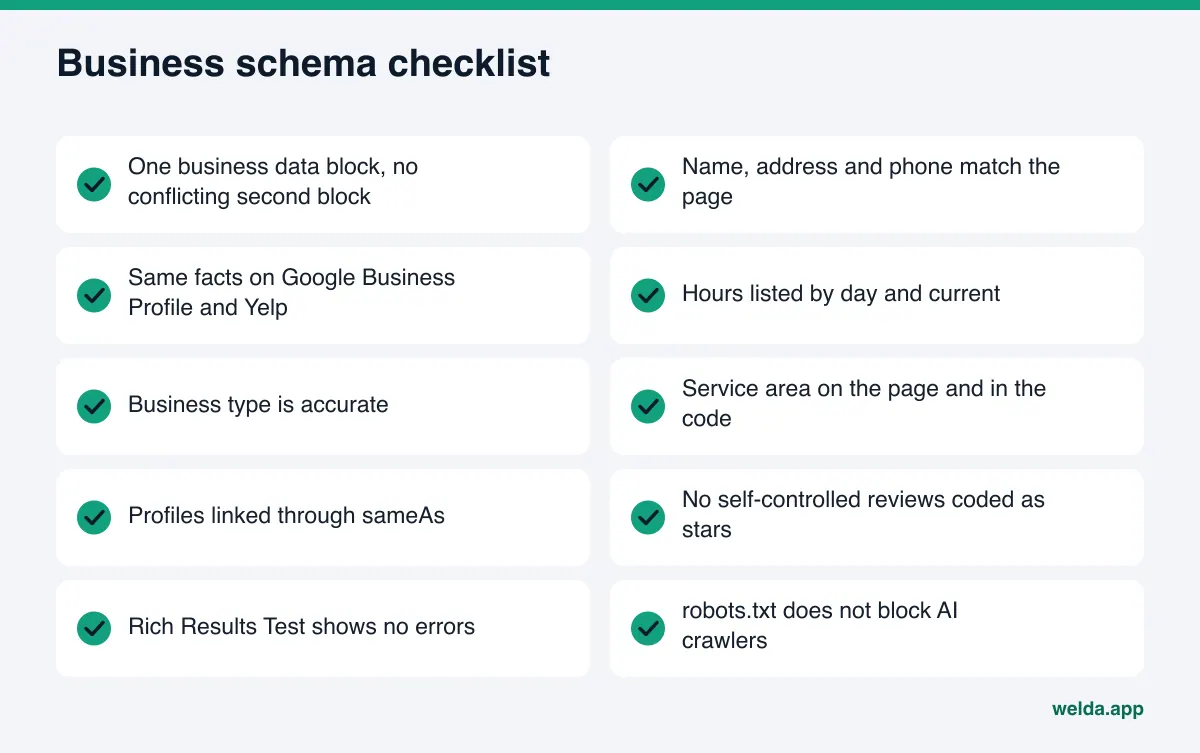
Checklist: is your business schema ready for AI search?
Go through this list with whoever manages your website. Every "no" is a point where AI is less certain about you.
- The site has one business data block, with no conflicting second block.
- Name, address and phone in the block match what the page shows, character for character.
- The same facts appear on Google Business Profile, Yelp, BBB and industry directories.
- Hours are listed by day and are current.
- The business type is accurate, or plain LocalBusiness.
- If you travel to customers, your service area is on the page and in the code.
- Map, review and social profiles are linked through sameAs.
- No self-controlled reviews are coded as a rating.
- The Rich Results Test reads the code without errors.
- robots.txt does not block AI crawlers.
If you can answer yes to most of these, the schema groundwork is done and your time is better spent on content and outside sources. To understand which outside sources AI leans on when it names a business, read how to get cited by AI next.
Frequently asked questions
Is there a special schema type for AI search?
No. Google states that no special schema.org markup is needed for AI Overviews or AI Mode. You use the same structured data search engines have supported for years; the goal is to have your business facts read correctly and consistently.
Will adding schema get my business recommended by ChatGPT?
There is no guarantee. Schema helps AI systems read your basic facts correctly. Whether you are named also depends on your content, your listings and reviews on outside sites, and how your competitors look.
Should I remove my FAQ section now that FAQ rich results are gone?
No. Google dropped the visual FAQ result, but clear answers to real customer questions still give AI more text to quote. Keep the section; whether you keep the FAQPage markup is a minor decision.
Is the schema my WordPress SEO plugin generates good enough?
Often it is a fine start, but check it. A theme and a plugin can each output a block, and old details can linger. Look at how many blocks the page source contains and whether the address and phone inside them are current.
What should a business with several locations do?
Give each location its own page with its own block. Organization details go on the homepage, location details on each location page. Every address and phone number should match that location's listings.
Does the free analysis add the schema code to my site for me?
No. The free analysis prepares the code and includes it in the fix pack; you or your web person adds it. In the dashboard, on connected WordPress sites, content opens as a draft and goes live when you approve it.
Bottom line: facts first, code second
Schema markup for AI search is the simplest way to describe your business identity to machines. It is not a shortcut. It produces value when it works alongside accurate facts, visible copy and consistent outside listings. Start with one fact sheet, make sure the facts are on the page, add one clean block, then test it.
To see whether your site has business data markup, which properties are missing and how this fix ranks against everything else, run the free AI visibility analysis. The results include ready-made business data code for your site.