Are SEO plugins enough for AEO? No, but you still need one. An SEO plugin handles the technical groundwork on your own website: title tags, meta descriptions, sitemaps, robots.txt and basic schema. It does not tell you whether ChatGPT, Gemini, Perplexity or Google's AI Overviews name your business when a customer asks, and it cannot touch the sources outside your site that those answers are built from.
If your business runs on WordPress, there is a good chance someone installed an SEO plugin years ago and the dashboard shows a row of green lights. It is easy to assume that green means "covered" for AI search too. The trouble is that the green lights measure whether your pages follow a checklist. They say nothing about what a customer sees when they ask an AI assistant "Who's a reliable roofer in Plano that does insurance claims?" or "What's a good pediatric dentist near Wicker Park open on Saturdays?" That answer names three or four businesses. If yours is not one of them, the plugin score is beside the point.
This guide walks through what an SEO plugin actually contributes to AEO (answer engine optimization), the six areas it never sees, and how to close the gap step by step. If you want to see where your own site stands first, run the free AI visibility analysis. It lists the gaps your plugin left behind, one by one.
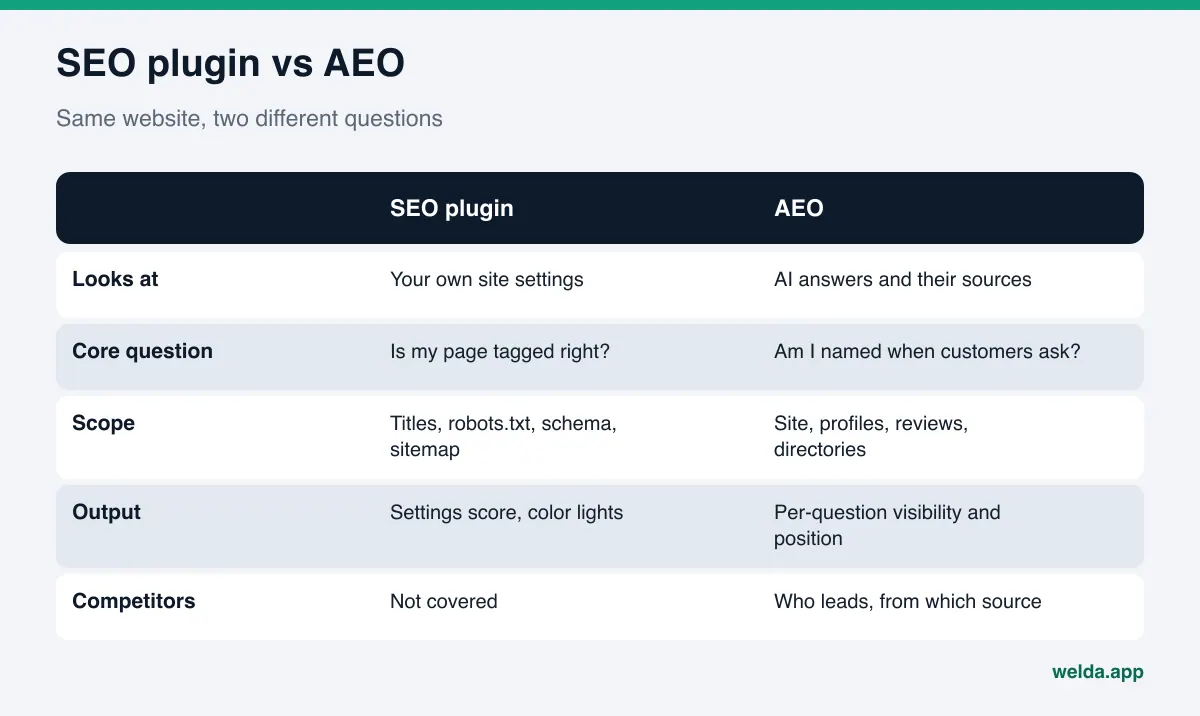
What an SEO plugin does, and what AEO asks for
An SEO plugin pulls the settings a site needs to describe itself to search engines into one panel. Features vary from plugin to plugin, but most help with the same core jobs: writing a title and meta description for each page, generating an XML sitemap, editing robots.txt, adding basic structured data (schema), setting canonical URLs, and giving on-page content suggestions. All of this is useful, and much of it is groundwork for AI search visibility as well.
AEO asks a different question. When a customer describes a need to an AI assistant, does the answer include your business, in what position, and why is a competitor ahead of you? That depends on more than your site settings. AI answers pull from many places: your website copy, your Google Business Profile, reviews on Google and Yelp, your BBB listing, directories like Angi or Healthgrades depending on your industry, Reddit threads, local news and "best of" roundups. A plugin can reach exactly one of those sources: your own site.
Put simply, a plugin asks "Is my page tagged correctly?" AEO asks "When my customer asks, do I get recommended?" The first is a settings checklist. The second is a cycle of measuring and fixing. You will also hear this field called GEO (generative engine optimization); in the US the terms are used almost interchangeably, and we compare them in our post on GEO vs AEO.
The part of your SEO plugin that does help AEO
Writing the plugin off would be a mistake. A lot of the basics that let AI crawlers read and understand your site are set inside it. These are the parts that matter for AEO:
- Title tags and meta descriptions. A short, clear title that says what the page is about helps both search results and AI systems classify the page. We cover how to write them for this new context in title tags and meta descriptions for AI search.
- Robots.txt editing. Whether AI crawlers can enter your site is decided in this file. The plugin gives you the editor, but you decide which bots get access to what.
- Basic schema. Many plugins can output code that describes your business or organization. The real work is filling that code in correctly and completely.
- Sitemaps and canonical URLs. These help your pages get found and keep duplicate content consolidated under one address.
Google's own documentation is direct on this. According to Google Search Central, there are no additional requirements or special optimizations needed to appear in AI Overviews or AI Mode, and no special schema.org structured data you need to add; standard SEO best practices still apply. So the foundation your plugin lays is not wasted. But the same page does not describe any setting that guarantees you will appear. The foundation is necessary, not sufficient.
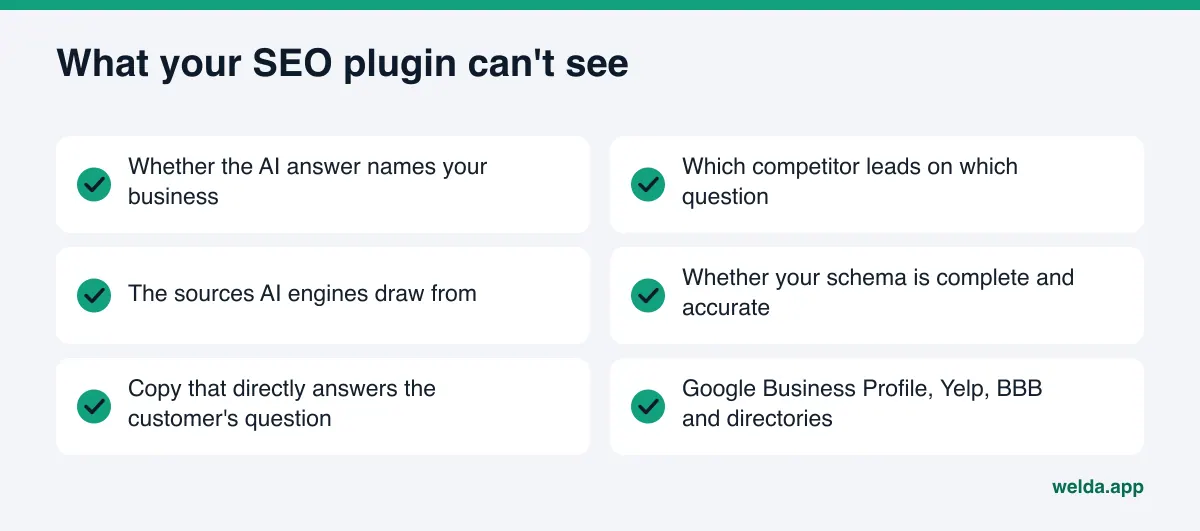
Are SEO plugins enough for AEO? Six areas no plugin sees
A plugin's reach ends at the edge of your website and its own list of settings. A large share of what decides AI visibility sits outside that edge.
1. Whether the answer names you. No SEO plugin asks ChatGPT or Gemini the questions your customers ask and reads the answers. A "good" plugin score and your position in an AI answer are not directly connected. The only way to know is to ask.
2. Which competitor is ahead, and why. If a competitor is named ahead of you, the reason is often off-site: more reviews, a listing in a local guide, mentions in comparison articles. Your plugin does not look at competitors at all.
3. The sources AI draws from. Perplexity shows its sources under each answer, and the other engines also assemble answers from somewhere. Which sources those are, and whether you appear in them, never shows up in a plugin dashboard.
4. Whether your schema is actually right. A plugin can insert LocalBusiness code, but if the address, phone, hours, service area and links to your social and map profiles are missing or wrong, the code is an empty shell. We go deeper in schema markup for AI search.
5. Copy that answers the question. Plugins usually check whether a focus keyword appears in the title and how often it shows up on the page. AI looks for something else: does the page plainly answer what a customer wants to know? What you do, who you serve, where, when you are open, how to book. If those answers are not written in the copy, the keyword indicator can be green while AI still finds nothing worth recommending.
6. Profiles and reviews off your site. Your Google Business Profile description, your replies to reviews, your Yelp page, your BBB profile, your industry directory listings. None of these are within reach of a WordPress plugin.
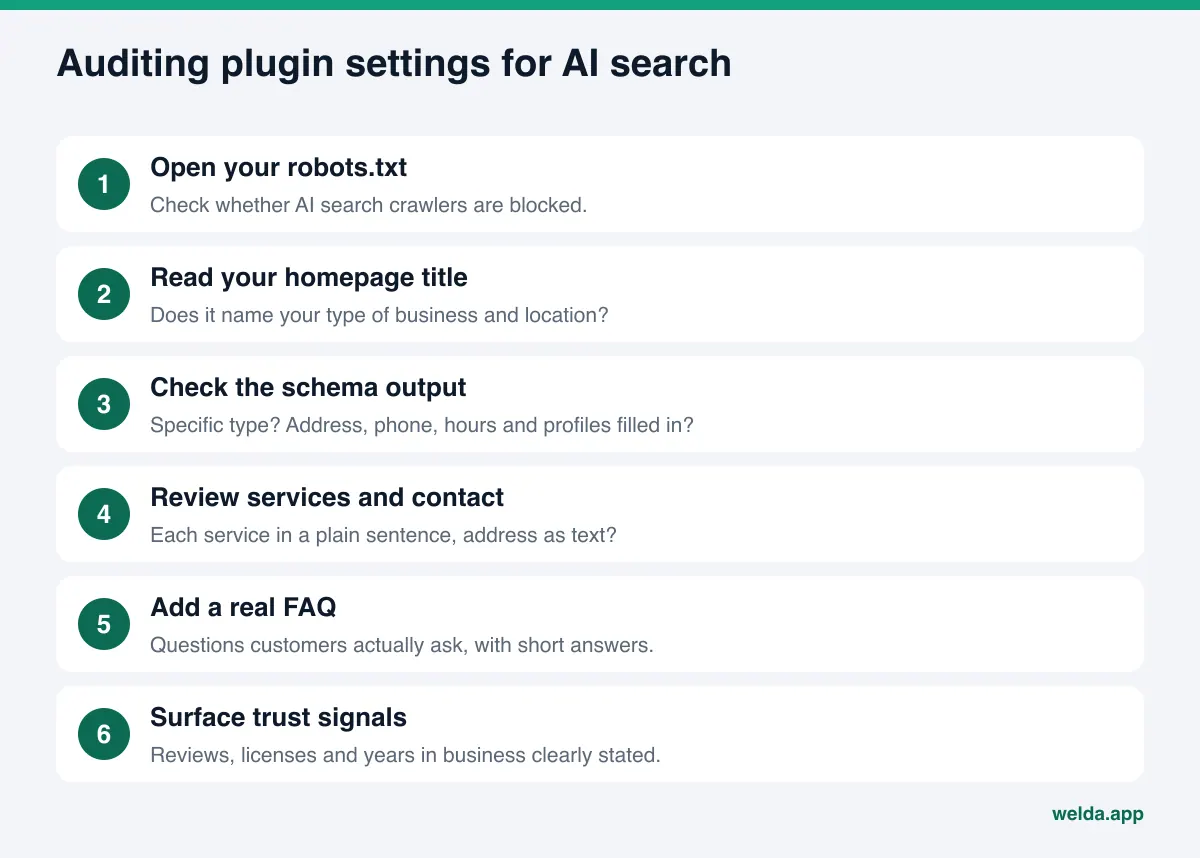
How to audit your plugin settings for AI search, step by step
We are not suggesting you uninstall anything. The suggestion is to review your plugin's settings a second time, through the eyes of an AI system. You can do the following in an afternoon.
- Open your robots.txt. Go to yourdomain.com/robots.txt and check whether AI crawlers are blocked. OpenAI, for example, states in its crawler documentation that OAI-SearchBot is used to surface websites in ChatGPT's search features and can be controlled through robots.txt, separately from GPTBot, which is used for model training. Perplexity documents its own PerplexityBot the same way. Some security plugins or preset rules block these bots wholesale, and you would never notice from the SEO plugin panel.
- Read your homepage title and meta description. Do they name your type of business and your city or neighborhood? If the title says "Home" or only your brand name, you are not telling AI what you do.
- Check the schema output. Is the type specific to your business (Dentist, Plumber, Restaurant) rather than a generic Organization? Are address, phone, hours and profile links filled in?
- Look at your services and contact pages. Is each service described in its own plain sentence? Is your address on the contact page as text, or only inside an embedded map?
- Check for an FAQ section. Real questions your customers ask, with short, direct answers. A plugin will not write these for you.
- Look for trust signals. Are reviews, licenses, certifications and years in business stated clearly on the site?
You can map the results to the table below. The left side is what your plugin gives you; the right side is what you need to check separately for AEO.
| Plugin setting | What the plugin provides | What to check for AEO |
|---|---|---|
| Title and meta description | Fields, length warnings | Do they state business type, location and main service? |
| Robots.txt | An editor for the file | Are AI search crawlers blocked? |
| Schema | Basic business or organization code | Right type? Address, phone, hours, profiles filled in? |
| Keyword analysis | Keyword placement and density | Does the copy answer the customer's question directly? |
| XML sitemap | A list of your pages | Do you have service pages and an FAQ page? |
| None | Out of scope | Does the AI answer name you? Where is a competitor ahead? |
| None | Out of scope | Google Business Profile, Yelp, BBB, directories |
The off-site work your plugin never touches
The last two rows of that table are where most businesses fall short. When an AI system recommends a business, it tends to rely on several sources agreeing with each other, not on one. Does the address on your site match your Google Business Profile? Do the services listed in your Instagram bio match your services page? Have the recent reviews on Google and Yelp been answered?
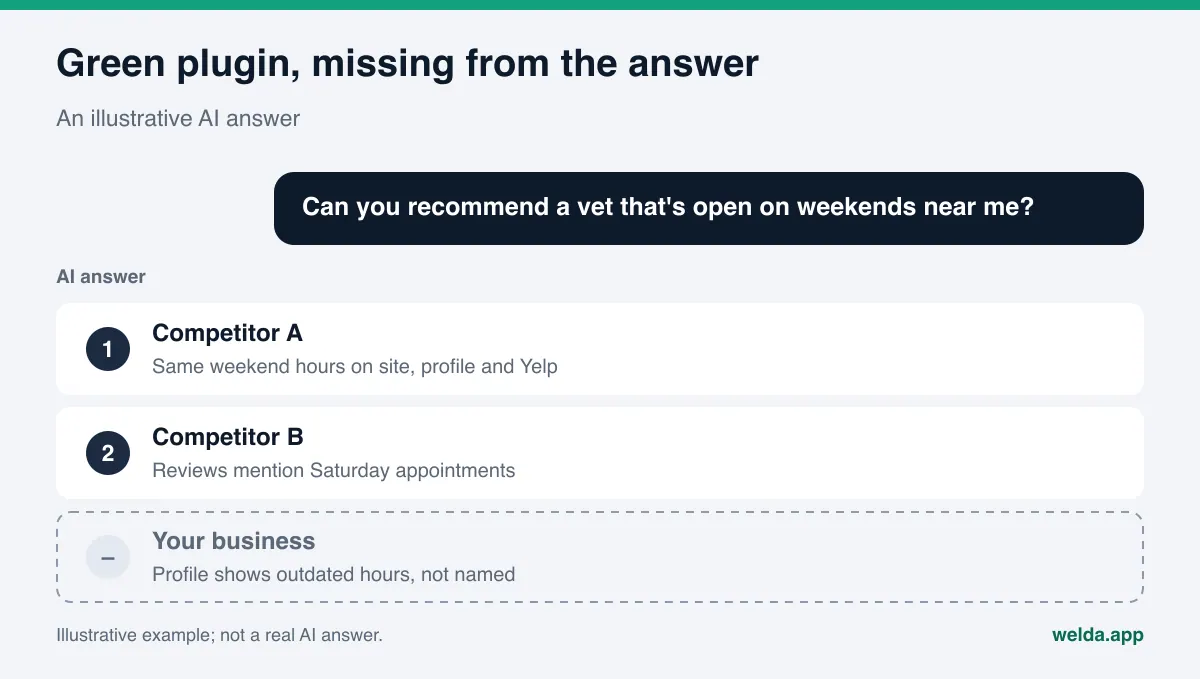
Here is an illustrative scenario. An example veterinary clinic uses a well-configured SEO plugin. Every page has a title and description, and the sitemap is tidy. But the Google Business Profile still shows old hours, the description field is empty, and none of the reviews from recent months have replies. A customer asks an AI assistant for "a vet open on weekends," and the AI cannot confirm from a reliable source that this clinic is open on Saturdays. Competitor A, which lists the same weekend hours on its site, its profile and its Yelp page, makes the answer. The plugin has nothing to offer here, because the problem lives outside its reach.
Example: a page that passes the plugin and fails AI search
To make the difference concrete, picture one service page in two versions. An example house-painting company has a "Services" page that passes every plugin check: focus keyword in the title, description at the right length, page in the sitemap.
Version one. The copy reads: "We deliver quality, professional painting services to refresh your living spaces. Our expert team puts customer satisfaction first." The plugin is satisfied. An AI system, however, cannot learn from this text which suburbs the company serves, whether it does interior or exterior work, whether estimates are free, how long a typical job takes, or whether the crew works weekends. When a customer asks "Which painters in Naperville can do an exterior job on a weekend?" this page gives the answer nothing to work with.
Version two. The same page is rewritten. It lists the towns served by name. Interior, exterior and cabinet painting each get their own heading. It explains how estimates work, roughly how long a typical three-bedroom interior takes, and whether weekend scheduling is available. It ends with five questions customers actually ask, with short answers. The schema has the service area and hours filled in, and the Google Business Profile says the same thing.
The plugin lights up green for both. For AI search they are very different: version two contains sentences that can directly answer a customer's question, and those sentences agree with other sources. The difference is not in anything the plugin measures. It is in what the copy says and how consistent it is with the rest of the web.
You can't know without measuring: does the answer name you?
An SEO plugin gives you a score or a colored indicator. That indicator tells you how well a page follows a settings checklist, not what a customer sees. The only way to understand your AI visibility is to ask the questions your customers ask and read the answers.
You can do this by hand. Write ten questions a customer might ask, without your brand name in them, each describing a need. Ask every question in ChatGPT, Gemini, Perplexity and Google's AI Mode. Answers shift from run to run, so repeat each one a few times. Log whether you were named, in what position, which competitors appeared and which sources were cited. The hard part is repeating all of that next month with the same rigor.
This is also not the same as rank tracking. A rank tracker tells you where a page sits in Google's results; it does not tell you whether an AI answer names you. We compare the two in rank tracker vs AI visibility tracker.
How Welda handles what the plugin leaves behind
Welda starts where the plugin stops. It does not ask you to remove your plugin. It makes the gap visible and helps close it. Here are the three pieces most relevant to this topic.
The free site analysis: a list of what your plugin missed. The analysis reads your homepage and a few inner pages (services, pricing, about, contact) the way Google and AI systems do. On a site with a well-configured plugin, a typical result looks like this: titles and descriptions are filled in, but the main heading never says what kind of business this is; schema is present, but social and map profiles are not linked; there is no FAQ section; one AI crawler is blocked in robots.txt. For each gap you see what was found, why it matters and how to fix it. The report also simulates how much each fix would move your score, and it includes a ready-to-install fix pack with your business schema code already written. That means you are not guessing what to paste into your plugin's schema field. On top of that, the analysis asks five questions a customer might ask to an AI assistant that can search the web, and checks whether your business name appears in the answers. It is a one-time measurement, but it is exactly the information a plugin never gives you. It works in English.
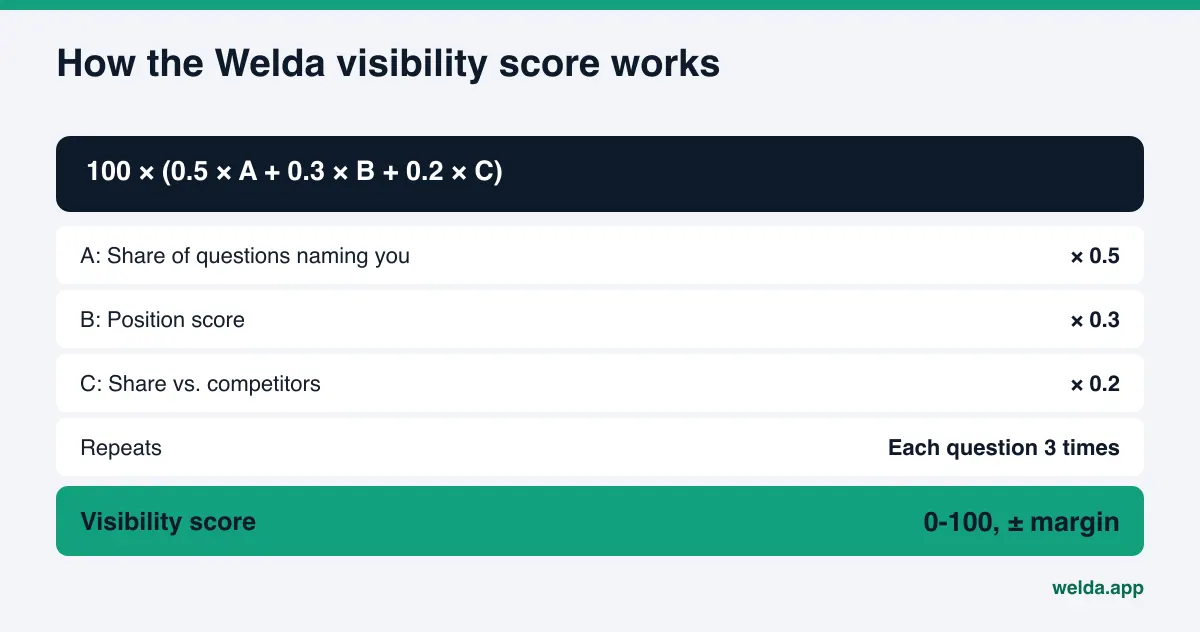
The Questions screen: the answer your customer sees, instead of a plugin score. In the Welda dashboard, the questions your customers would ask are put to ChatGPT, Gemini, Perplexity and Google AI three times each. The Questions screen shows, for every question, which engines named you and in what position. Open a question and you see the answer itself and the sources it cited. The decision here is simple: which questions never mention you, and which sources are competitors winning from on those questions? The visibility score is calculated from those answers with an open formula: the share of questions naming you, a position score, and your share against competitors.
The WordPress connection: alongside your plugin, with no code. On WordPress sites, Welda connects through a separate Editor user and an application password that you create. No extra plugin or code is installed, and your existing SEO plugin stays exactly where it is. Page copy, FAQs and fixes that Welda prepares open on your site as drafts, and go live only after you approve them. Content always lives on your own site. For systems without a connection, Welda hands you a ready-made package to apply by hand. Off-site work, such as Google Business Profile text and review replies, sits on the to-do list with the copy already drafted.
Be clear on where things stand today. The Welda dashboard is in early access and is opening first to businesses in Turkey; regular four-engine tracking is being added during early access, and the sample dashboard screens use representative data. What anyone can use right now, in English, is the free site analysis. Pricing is discussed in the early access conversation.
Limits: what Welda does not do
We have been candid about the plugin's limits. Here are Welda's.
- No guarantees. Welda does not guarantee rankings or that you will "show up in ChatGPT." The free analysis does not measure rankings.
- No made-up facts. If Welda cannot find a piece of information on your site, such as hours or an owner's name, it asks you instead of inventing it.
- No publishing without approval. Approval stays with you. Sensitive content is never published without it.
- No fake reviews. Welda drafts replies to reviews. It never writes reviews.
- Some work stays with you. Handling negative reviews, opening directory accounts and press outreach remain the business's job.
- Results take time. New content usually takes weeks to show up in AI answers.
- It does not replace your plugin. Sitemaps, canonical URLs and title fields stay in your SEO plugin.
Checklist: is your SEO plugin enough for AEO?
Answer these for your own site. The more "no" or "not sure" answers you collect, the clearer it gets that the plugin alone is not enough.
- Have you confirmed that AI search crawlers are not blocked in robots.txt?
- Does your homepage title state your type of business and your location?
- Does your schema include address, phone, hours and profile links?
- Does your site have an FAQ section that answers real customer questions?
- Do you know whether AI answers name you for at least five customer questions?
- Do you know which source the leading competitor is being cited from?
- Does your Google Business Profile match your website?
- Is there a person or a tool that repeats this check every month?
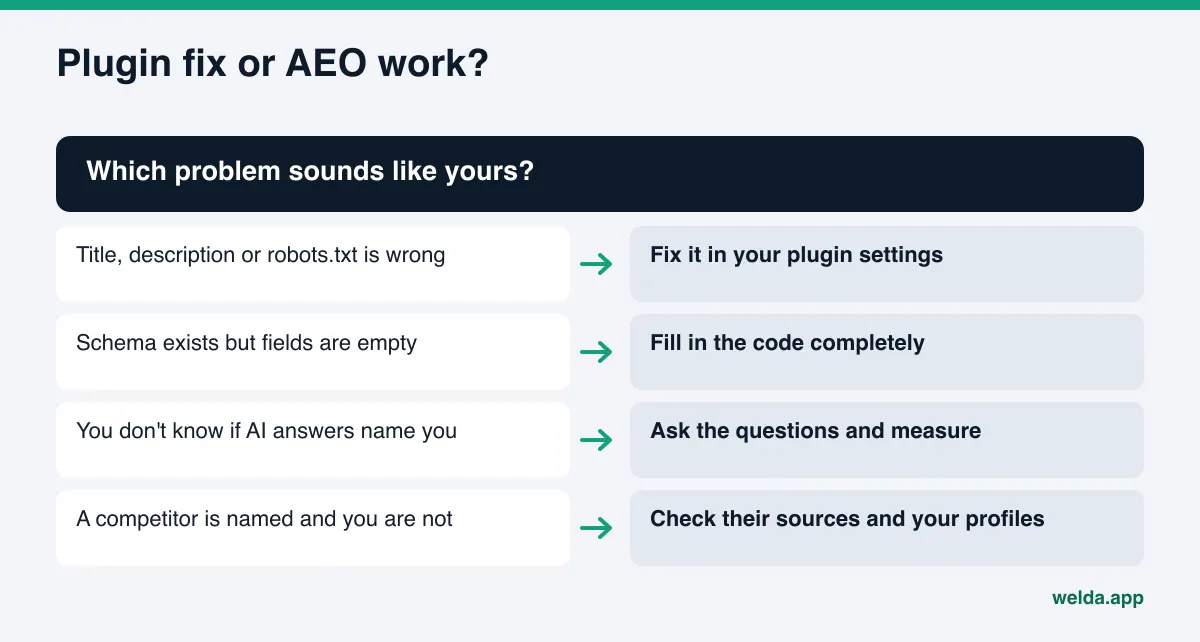
The first four are plugin settings and can be fixed inside the plugin. The last four are outside its scope. For a broader site check, see our guide to an AI readiness checker for websites.
Frequently asked questions
Should I replace my SEO plugin with an AEO tool?
No. The plugin is still needed for basic settings like titles, descriptions, sitemaps and robots.txt. An AEO tool does not replace those. It adds the measurement and off-site work the plugin cannot see.
Is my plugin's schema setting enough for AI search?
Having the code is not enough; what is inside it matters. The type should match your business, and address, phone, hours and links to your social and map profiles should be complete. Google says no special schema is required for its AI features, but the information has to be accurate and match what the page says.
My plugin score is high. Why doesn't ChatGPT mention me?
Because the plugin score measures how well a page follows a checklist, not where you stand in an AI answer. Answers are often built from off-site sources too: your business profile, reviews, directories. To find out why you are missing, you have to ask the questions and read the answers.
What happens if I block AI crawlers in robots.txt?
If you block search crawlers, that engine has a harder time using your site as a source in its answers. Training crawlers and search crawlers can often be set separately, so check each engine's own documentation for which bot does what.
Does Welda install a plugin on WordPress?
No. Welda connects through a separate Editor user and an application password, without installing code. What it prepares opens as a draft on your site and goes live when you approve it. Your SEO plugin stays as it is.
Does the free analysis work for US businesses?
Yes. The free analysis runs in English and reads your public website. It is free once per site; you verify your email and phone, and the results link arrives by email and stays open for 14 days.
See the gap your plugin leaves
Whether SEO plugins are enough for AEO depends on your site, but no plugin will tell you where you stand in an AI answer. Start with the free AI visibility analysis. You will see the gaps your plugin could not fill, how to fix each one, and whether your business is named for five questions a customer might ask.