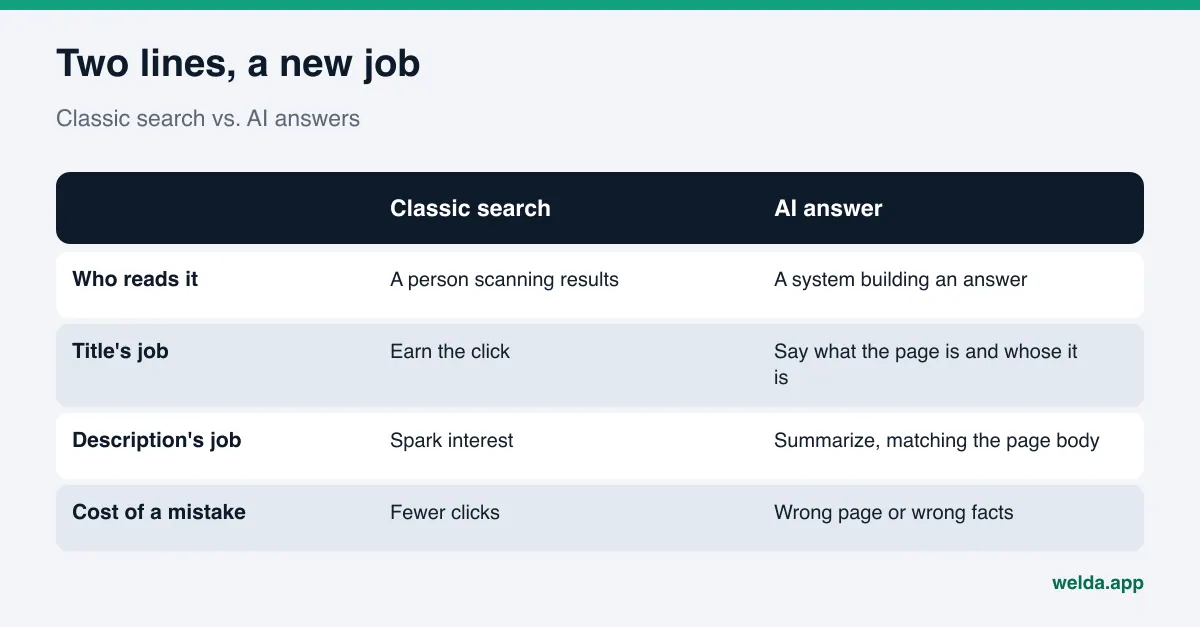
Do you still need title tags and meta descriptions for AI search? Yes, but their job has changed. They used to exist mainly to earn a click on a search results page. Now answer engines also read them when deciding which pages to pull into an answer and how to summarize your business. A good title tag says in one line whose page this is and what it covers; a good meta description is a short, accurate summary that matches what the page actually says.
This guide covers title tags and meta descriptions for AI search from start to finish: what these two lines do for Google AI Overviews, ChatGPT search and Perplexity, the mistakes that confuse answer engines, page-by-page examples for a local business, and a checklist to run before you publish. If you want to see how your own pages read today, the free site analysis reads your homepage and several inner pages, flags missing or weak titles and descriptions, and drafts ready-to-use homepage copy.
Why title tags and meta descriptions for AI search still matter
The title tag (<title>) and the meta description (<meta name="description">) live in your page's code. Visitors rarely see them on the page itself. For years they had one purpose: represent your page in a list of blue links, and persuade someone to click.
AI search added a second reader. A system that builds answers now reads your page too, and it does two things. First it picks candidate pages that might answer a question. Then it reads the chosen pages and writes a summary in its own words. At both steps, the title and description are the shortest available statement of what a page is about and who it belongs to.
It's worth being precise about how much weight they carry. Google says it builds title links not only from the <title> element but also from the main visible heading, og:title, anchor text in links pointing to the page, and other text on the page (Google Search Central, title links). It also says snippets are primarily drawn from page content, and the meta description is used when it describes the page more accurately than the body text does (Google Search Central, snippets). So a title and description alone won't get a page into an AI answer. What they do is sharpen the signal: when they agree with the rest of the page, they make it obvious which question the page answers.
Google's guidance on AI features points the same way. It says there are no additional requirements or special optimizations needed to appear in AI Overviews or AI Mode, and that SEO best practices remain relevant (Google Search Central, AI features). That doesn't make titles unimportant. It means getting the basics right now pays off in two channels at once: classic search results and AI-generated answers.
A quick note on terms. In the US, this work is usually called AEO, answer engine optimization. You'll also see GEO (generative engine optimization) used for the same idea. Both describe making your business easy for AI systems to find, understand and cite accurately.
How answer engines use your title and description
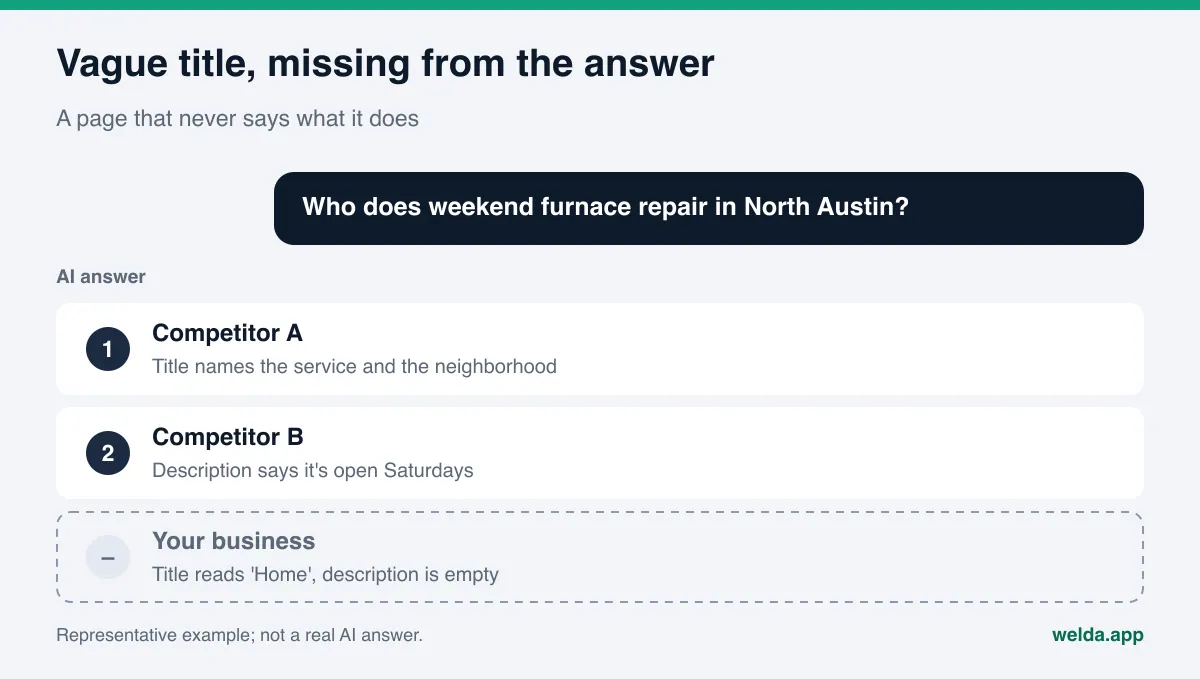
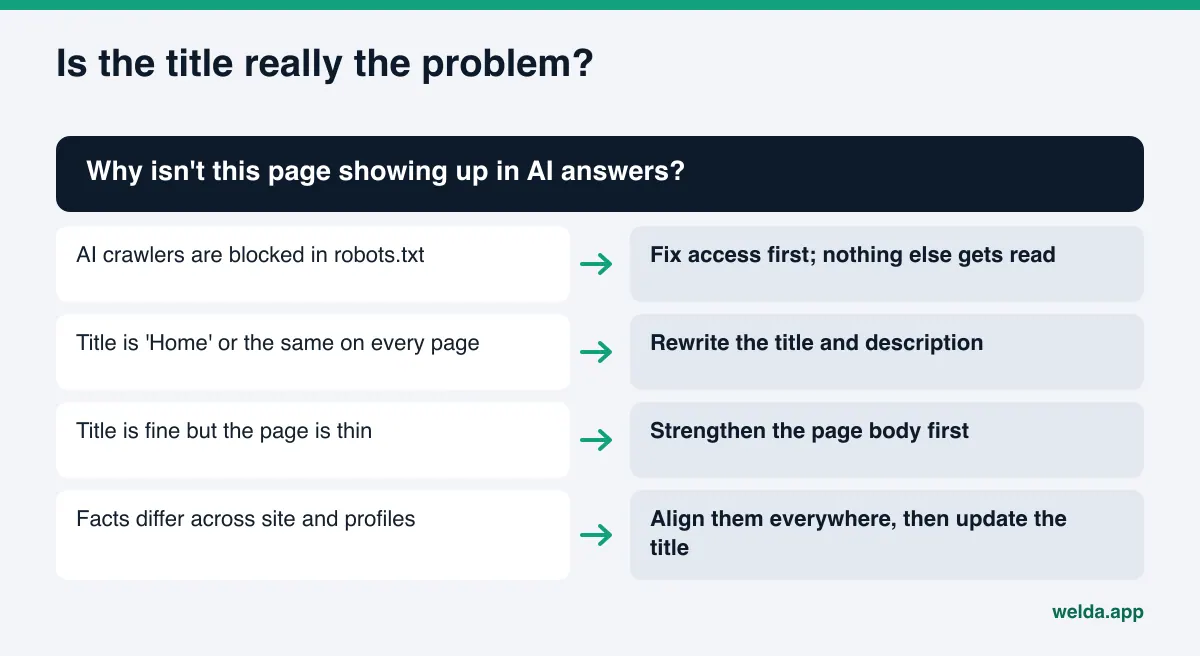
Picture a homeowner asking an AI assistant: "Who does weekend furnace repair in North Austin?" An assistant that can search the web turns that into search queries, scans the results, opens a few pages and writes an answer. In a results list, the first thing representing each page is usually its title and a short summary. If your title reads "Home" and the description is empty, your page shows up as a line that doesn't say what it is.
The second risk comes after your page is picked: inconsistency. The title promises "24/7 service," the contact page lists weekday hours, and your Google Business Profile shows something else again. The AI has to resolve the conflict on its own, and sometimes it picks the wrong version. Outdated or contradictory lines like these are one of the common sources of wrong answers about a business. We cover that problem in detail in what to do when ChatGPT shows wrong information about your business.
In short, title tags and meta descriptions for AI search carry three jobs:
- Identity: which business the page belongs to and what that business does.
- Scope: which service, which area and which customer the page is about.
- Consistency: every fact in those two lines also appears, in the same form, in the page body, in your structured data (schema markup), and on your Google Business Profile, Yelp listing and other profiles.
Common title tag and meta description mistakes
Title and description problems tend to fall into a handful of familiar patterns. Sites built on templates or website builders often never had these lines written by hand; the system just reuses the page name or the business name. The table below shows each pattern, why it hurts in AI search, and which direction the fix should go.
| Mistake | Problem for AI search | Fix |
|---|---|---|
| Title is just "Home" or only the business name | No signal about the service or location | Main service + area + business name |
| Same title on every page | Service pages can't be told apart; the wrong page gets picked | A distinct title that describes each page |
| Empty meta description | The summary is guessed entirely from body text | A two-sentence summary of the page |
| Keyword stuffing | Not a real summary; likely ignored | One plain sentence in the customer's words |
| Stale facts (closed location, old hours, expired promo) | Wrong information flows into answers | Update titles and descriptions whenever facts change |
| Claims the page doesn't back up ("lowest prices," "24/7") | Conflicts with the page; erodes trust | Only what the page itself supports |
| Title and H1 disconnected | Two different stories about the page's topic | Same topic, two lengths |
One more point on unsupported claims. The FTC says an ad must be truthful, not misleading and, when appropriate, backed by evidence (FTC, truth in advertising), and a meta description is still marketing copy. Keep superlatives and promises out unless the page itself shows the proof. This isn't legal advice; it's simply the safer default for both customers and answer engines.
How to write title tags and meta descriptions for AI search, step by step
These steps work for any page. Start with the homepage, then move to service pages, then the about and contact pages. It helps to keep a simple spreadsheet with four columns per page: title, description, H1 and first paragraph, side by side.
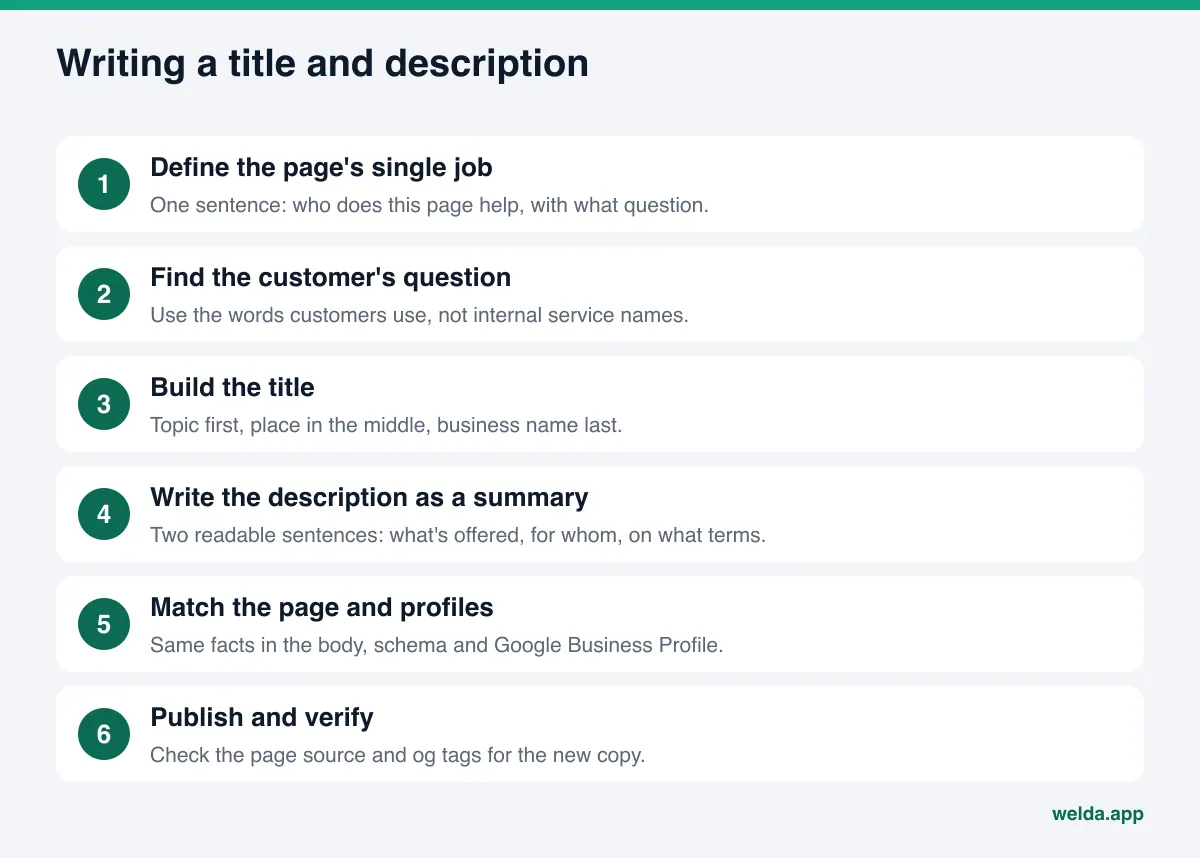
- Write down the page's single job. One sentence: who does this page help, and with what question? If you can't write that sentence, the problem isn't the title. The page is probably trying to cover three unrelated services at once.
- Find the customer's question. People ask AI assistants about needs, not service names: "my furnace is blowing cold air" rather than "furnace diagnostics." We explain how to collect these in how to find the questions customers ask AI. Your title and description should use the same words.
- Build the title: topic, place, name. Lead with the service or page topic, add the city or neighborhood if you're a local business, and put the business name last. Google doesn't set a fixed character limit, but it truncates long titles to fit the device, so put the most important words first and cut filler.
- Write the description as a summary of the page. The first sentence says what the page offers. The second says who it's for and under what conditions: service area, hours, how to book. Two readable sentences, not a keyword list.
- Match the body. Every fact in the title and description should appear in the visible text of the page. If the description says "serving Round Rock and Pflugerville," those two cities belong on the page. The H1 should describe the same topic as the title, and the first paragraph should read like a slightly longer version of the description.
- Match your other sources. If your name, address, phone or hours appear in these lines, they must match your structured data, your Google Business Profile and listings like Yelp, BBB or Angi. Hours are a frequent source of mismatches; see how to keep business hours accurate for AI.
- Publish and verify. Check the page source to confirm the new title and description are live, and that the social tags (
og:title,og:description) aren't stuck on old copy. Changes reach search results and AI answers only after the page is recrawled, which usually takes days to weeks.
One prerequisite: if AI crawlers are blocked from your site, none of this gets read. You can check that with our guide on whether AI bots are crawling your website.
Title tag and meta description examples by page type
The examples below are made up; they don't belong to a real business. They show how the same rules apply across different page types. Our example business is a heating and cooling company serving the north side of Austin, Texas.
| Page | Weak title | Stronger title | What the description should carry |
|---|---|---|---|
| Homepage | Home | Heating and AC Repair in North Austin | Example Air | Main services, service area, how to reach you |
| Service page | Services | Furnace Repair and Tune-Ups in Round Rock | Example Air | Brands serviced, booking options, response time only if true |
| Pricing page | Pricing | AC Tune-Up Pricing and What's Included | Example Air | What drives the price, what's included |
| About page | About Us | About Example Air: Team, Licensing and Service Area | Founding, licensing, service area |
| Contact page | Contact | Contact and Hours | Example Air, North Austin | Address, phone, hours, which channels you answer |
Some of those titles are longer than people are used to, and that's deliberate. An answer engine handling "furnace repair Round Rock" is looking for both ideas on the same page. Seeing them together in the title is the shortest way to say the page is a candidate. The longer a title gets, though, the more likely it is to be truncated, which is why the business name goes last: if anything gets cut, it should be the least critical part.
The service page itself is a separate job. A great title can't make up for a page that doesn't clearly describe the service, because the AI will find nothing to quote. We cover that in how to build service pages AI can quote.
How the meta description and your opening paragraph work together
Since Google says it mostly pulls snippets from page content, your first paragraph effectively acts as a second description. The same goes for AI answers: when an engine quotes your page, the easiest text to quote is a first paragraph that answers the question directly.
So don't treat the meta description in isolation. A solid pattern: the description is a two-sentence summary, the H1 states the topic, and the first paragraph is a slightly longer, more detailed version of the description. All three say the same thing at different lengths, and none contradicts the others. This is the core of answer-first writing, which we explain in answer-first content.
Here's what that trio could look like for a service page (fictional example):
Meta description: Furnace repair and seasonal tune-ups in Round Rock and Pflugerville. Book by phone or online; the page lists every item we check during a tune-up.
H1: Furnace repair and tune-ups in Round Rock
First paragraph: We repair and tune up gas and electric furnaces in Round Rock and Pflugerville. A tune-up covers the burners, heat exchanger, blower, filter and thermostat. Call or book online; we work weekdays and Saturdays.
Every fact in that example (cities, inspection items, booking options, working days) goes in only if the business actually offers it. Don't add a detail you aren't sure about just to make the description sound stronger.
How Welda does this work
Welda is software that measures where a business shows up in AI answers and fills in what's missing on the business's behalf. For titles and meta descriptions, two parts are directly relevant: the free site analysis and the to-do list in the Welda dashboard.
What you see in the free site analysis. The analysis reads your homepage plus a few inner pages such as services, pricing, about and contact. On each page it checks whether a title and description exist and whether the main heading describes what the page is about. When something is missing or weak, the report puts three things next to each other: what it found (for example, "the title is only the business name"), why that matters, and how to fix it. For the homepage, it also drafts ready-to-use copy: a title, a description, an H1, an opening paragraph and FAQ entries. Those drafts build the description, H1 and first-paragraph trio from the previous section so the pieces line up. A simulation shows how much fixing the title and description would move your score compared with other fixes, which helps you decide what to do first. A competitor comparison shows where you stand against them.
The analysis also asks five questions a customer might ask to an AI assistant that can search the web, and checks whether your business name appears in the answers. That's a one-time check; it doesn't track changes after you update your titles. The free analysis works in English and German. You verify your email and phone, the results link arrives by email and stays open for 14 days, and each site gets one free analysis.
What changes in the dashboard. The full Welda dashboard is in early access and is opening first in Turkey. There, title and description fixes land on a single to-do list with ready-made copy next to each task. If Welda can't read a fact from your site, such as your service area or working days, it doesn't make one up; it asks you. Once you answer, that fact flows into every piece of copy that uses it.
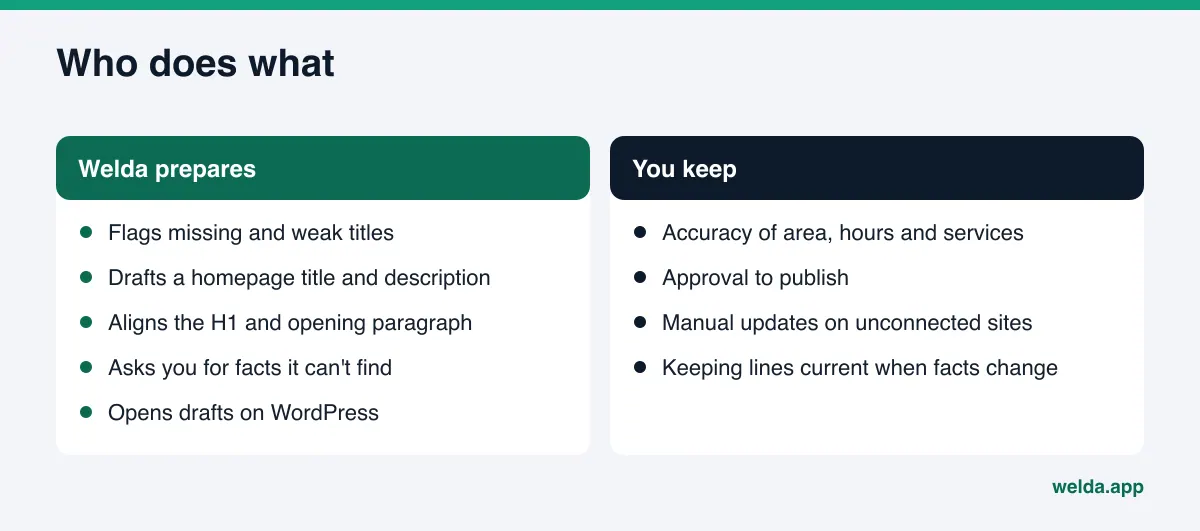
On WordPress sites, Welda connects through a separate Editor user and an application password, with no code to install. New titles and descriptions open as drafts on your site and go live only after you approve them. On other platforms, Welda hands you a ready package and the change is applied by hand. Content always stays on your own site.
The ongoing measurement side, where customer questions are asked to ChatGPT, Gemini, Perplexity and Google AI three times each, is being added during early access, and the sample dashboard screens use representative data. Watching how a title change affects answers over several weeks is what that measurement is for. Today, the part anyone can use is the free site analysis. Pricing is discussed in the early access conversation.
Limits: what titles can't do and what Welda doesn't do
Titles and descriptions matter, but they cover a narrow slice of AI search visibility. It's worth being straight about the limits.
- They aren't enough on their own. A title can't teach an AI something the page doesn't say. If the body is thin, structured data is missing, your Google Business Profile is out of date, or you're absent from the sources answer engines lean on (Yelp, BBB, Angi, industry directories), a better title won't close that gap.
- Google may rewrite your title. Google doesn't always show your title or description as written and can pick other text from the page. That's documented behavior, not an error.
- Changes take time. Updates depend on recrawling. New content usually takes weeks to show up in AI answers.
- Welda doesn't guarantee rankings or placement in ChatGPT. No title change can make an engine mention you for certain.
- Welda doesn't write facts it doesn't know. Service area, hours or licensing aren't guessed; Welda asks you.
- You keep the publish decision. Welda prepares the copy; nothing goes live without your approval.
- Welda doesn't create fake reviews and won't add unverified trust claims like "hundreds of happy customers" to a description.
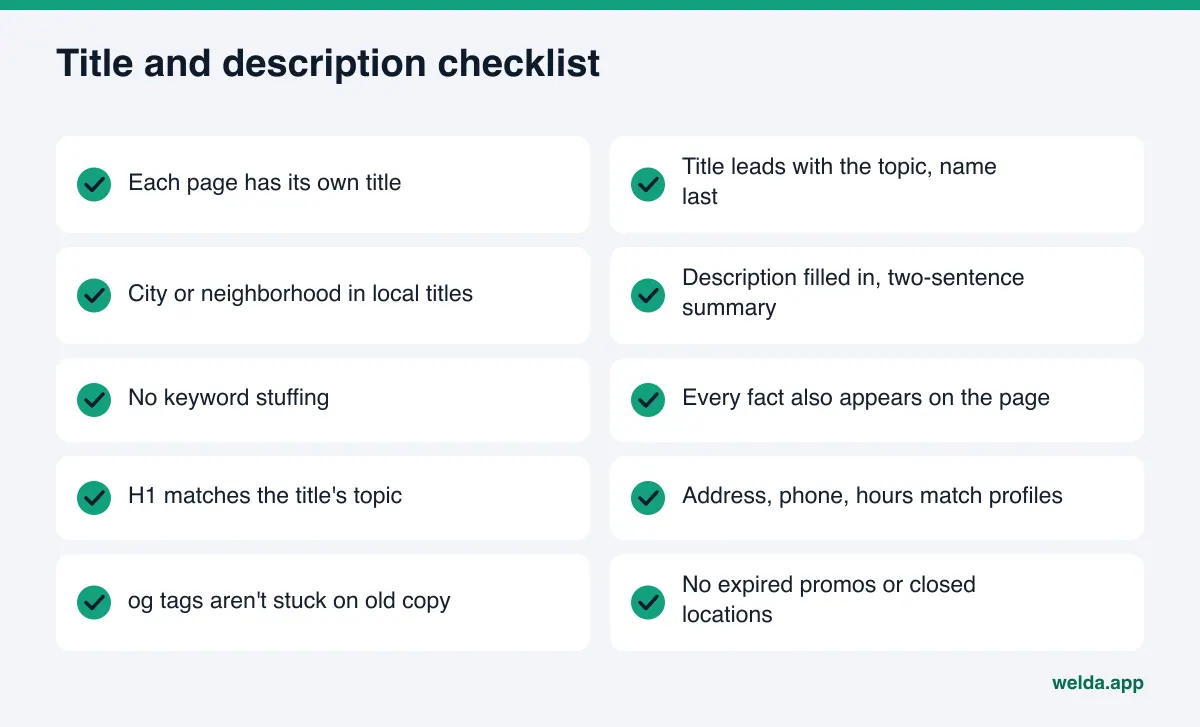
Title and meta description checklist for AI search
Run through this list each time you finish a page. Every "no" is a task. Start with the homepage, then go through each service page.
- The page has its own title, different from every other page.
- The title leads with the topic; the business name is last and short.
- For a local business, the city or neighborhood is in the title.
- The meta description is filled in and summarizes the page in two sentences.
- No keyword stuffing; the description reads like normal sentences.
- Every fact in the title and description is also in the visible page text.
- The H1 describes the same topic as the title.
- The first paragraph is a slightly longer version of the description.
- Address, phone and hours match your structured data, Google Business Profile and directory listings.
- Social tags (
og:title,og:description) aren't stuck on old copy. - No expired promotions, closed locations or outdated hours.
You don't need to rerun the full list every week. But when you add a service, close a location or change your hours, reread the titles and descriptions on the affected pages. Forgotten lines like these are one of the common sources of stale facts in AI answers.
Frequently asked questions
Do meta descriptions directly affect AI answers?
Not directly or on their own. A meta description is a short signal about what the page covers. Google mostly builds snippets from page content and uses the description when it summarizes the page more accurately. Its value comes from matching the body of the page.
How long should a title tag be?
Google doesn't set a fixed character limit; it truncates long titles to fit the screen. Put the most important words (topic and location) first, put the business name last, and cut filler so the critical part survives truncation.
Does every page need its own title and description?
Yes. Reusing the same title and description across pages makes it harder for AI systems to tell your service pages apart and can lead to the wrong page being chosen. Google also advises against repeated or boilerplate titles.
Does repeating a keyword in the title help?
No. Repetition doesn't tell the reader anything new and can look spammy. One clear phrase in the customer's own words is enough.
How long until a new title shows up in AI answers?
It depends on when the page is recrawled. You may see it in search results within days; AI answers usually take weeks. There's no reliable fixed timeline.
Will Welda change my titles and descriptions for me?
Welda drafts them. On WordPress, it opens them as drafts and they go live after you approve. On other platforms, you get ready copy and apply it by hand. Nothing is published without your approval.
What else does the free analysis check?
Whether AI crawlers can access the site (robots.txt), the main heading, business schema, address and phone details, links to social and map profiles, an FAQ section, reviews and trust signals, clear service descriptions and page speed. It doesn't measure rankings.
Your title tag and meta description are the first two lines your site uses to introduce itself to AI. When they're accurate, current and consistent with the rest of the page, they give answer engines solid ground to describe you correctly. To see where your site stands today, run the free site analysis: you'll get the title and description gaps, ready-to-use homepage copy, and a view of which fix would move your score the most, all in one report.