Are AI bots crawling my website, and how can I tell? Start with your robots.txt file and look for rules that name the crawlers behind ChatGPT, Perplexity and Google. If those bots are turned away, AI assistants cannot read your own pages and will describe your business using other sources, or leave you out. This guide explains which bots matter, how to check access step by step, and which ones a business that wants customers should let in.
It sounds like a technical question, but the outcome is commercial. When someone asks ChatGPT for "a family dentist in South Austin open on Saturdays" or "an HVAC company in Columbus that does same-day repairs," the answer is built from pages the engine can read. A crawler that cannot get into your site learns about your services, hours and service area from Yelp, a directory or a competitor's page instead. In the US this work is usually called AEO, short for answer engine optimization; you will also see it called GEO (generative engine optimization), which describes the same goal. Every piece of AEO work assumes the crawlers can get in. If you want to see where your own site stands right now, a free AI visibility analysis reads your robots.txt file along with your key pages and shows in the technical section whether AI crawlers are blocked.
Why "are AI bots crawling my website" is the first AEO question
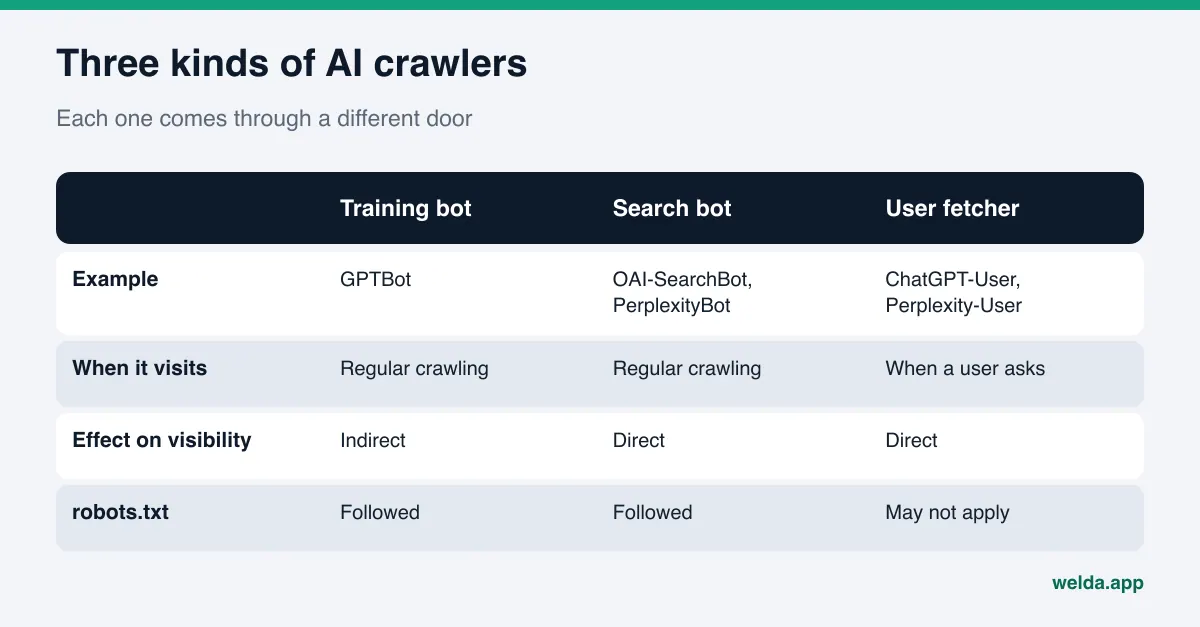
Most business owners know that Google has to crawl a site before it can show it. AI search is messier. Each company runs several bots, and each one comes for a different reason. One collects text that may be used to train models. One builds the index that search answers draw on. Another fetches a page in real time because a user just asked a question. If you do not know which door you closed, "we blocked AI" or "we allow AI" is only half an answer.
For a business, there are three situations:
- The door is open and your content is read. Crawlers come in, read your pages, and your business information can be used in answers. Whether you get named now depends on your content and on outside sources.
- The door is closed and nobody knows. An old robots.txt template, a security plugin or a setting at your hosting or CDN layer turns the bots away. The owner usually has no idea.
- The door is closed on purpose. You blocked some bots because you do not want your content used for training. That is a legitimate choice, but if the search crawler was caught in the same rule, you pay for it by being absent from answers.
The second situation is the most common and the easiest to fix. A business can spend months adding service pages and FAQs while a single line in robots.txt keeps part of that work out of AI search answers. That is why AI search visibility work should start with access, not with content.
Which AI crawlers exist and what each one does
The table below summarizes the bots that OpenAI, Perplexity and Google describe in their own documentation. Names and purposes come from the official pages: OpenAI's crawler documentation, Perplexity's crawler documentation and Google's crawler documentation. These lists change over time, so check the source again before you edit your own file.
| Bot or token | Owner | Why it visits | What blocking it does |
|---|---|---|---|
OAI-SearchBot | OpenAI | Finds sites to surface in ChatGPT's search features | Per OpenAI, your site will not be shown in ChatGPT search answers |
GPTBot | OpenAI | Collects content that may be used to train models | Signals that your content should not be used for training |
ChatGPT-User | OpenAI | Opens a page when a user asks a question | Because a user starts it, robots.txt rules may not apply |
PerplexityBot | Perplexity | Surfaces and links sites in Perplexity search results | Lowers your chance of being cited in Perplexity answers |
Perplexity-User | Perplexity | Fetches a page for a user's question | Per Perplexity, it generally ignores robots.txt |
Googlebot | Powers Google Search, including AI Overviews and AI Mode | Your page content can no longer be used in Search or its AI features | |
Google-Extended | Not a separate crawler; a control token for Gemini training and some Gemini uses | Per Google, it does not affect inclusion in Google Search |
The main lesson: training and search are separate doors. On the OpenAI side you can block GPTBot and leave OAI-SearchBot open. On the Google side there is no special bot for AI Overviews or AI Mode. Google's guidance on AI features says a page only needs to be indexed and eligible to show in Search with a snippet, with no additional technical requirements. Blocking Googlebot therefore takes you out of classic results and AI Overviews at the same time.
How to check if AI bots are crawling your website, step by step
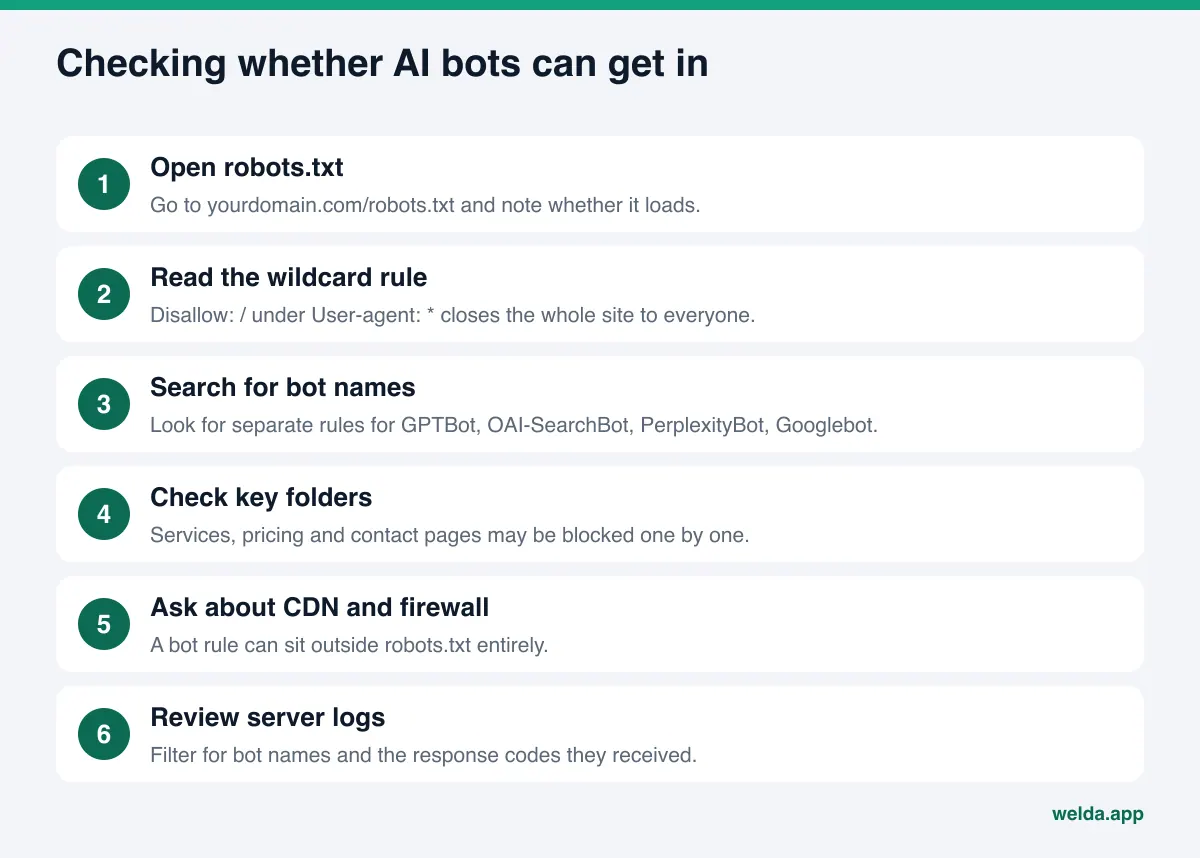
You do not need a developer for most of this. A browser and thirty minutes will cover it. Work through these steps in order:
- Open your robots.txt file. Type
yourdomain.com/robots.txtinto a browser. If the file does not load or returns an error, write that down. A missing file usually means nothing is restricted, but a server error is a different signal and worth asking about. - Read the wildcard rule. Rules under
User-agent: *apply to every bot that is not named separately. If you seeDisallow: /there, the whole site is closed to everyone. This is often a leftover from a staging site that went live without the rule being removed. - Search for bot names. Look for
GPTBot,OAI-SearchBot,PerplexityBot,GooglebotandGoogle-Extended. A bot with its own group of rules follows that group, not the wildcard. - Check the folders that matter. Even if the site is open, folders like
/services,/pricingor/contactmay be blocked individually. Those pages hold exactly what customers ask about. - Look at page-level tags. If a page's source contains
noindexornosnippet, Google may not use it in AI features even when robots.txt is open. - Ask about your CDN or firewall. If your site sits behind a CDN or a web application firewall, there may be a separate rule for AI bots. You will not see it in robots.txt; ask whoever manages your site or your hosting provider.
- Check your server logs. If you can access raw access logs, filter the last few weeks for these bot names and note the response codes they got. If a bot never shows up, or keeps getting blocked, you have found the problem.
The last step is the strongest evidence, because robots.txt is only a request; logs show what actually happened. For most small businesses, though, the first six steps are enough to find the issue. Keep in mind that a bot name in your logs does not prove the request really came from that company. The providers publish ways to verify their crawlers in the same documentation linked above.
Why AI crawlers get blocked without anyone deciding to
Most blocks are not decisions. They are settings that piled up over time. The usual causes:
- A rule left over from staging.
Disallow: /was added to hide the site while it was being built, and nobody removed it at launch. - Copied block lists. "Block bad bots" lists that circulate online sometimes include AI search crawlers. The list gets pasted in without anyone reading it.
- Security plugins. Some plugins rate-limit or challenge crawlers they do not recognize. The bot sees a challenge page instead of your content.
- Infrastructure defaults. In July 2025 Cloudflare announced that new domains are asked at sign-up whether to allow AI crawlers. The person who set up the site usually knows which option was chosen. The owner usually does not.
- Information locked in images. This is not a block, but the result is similar. If your hours, menu or price list only appear inside an image, the bot gets in but cannot read the text.
- Pages behind a login. If service details or pricing are members-only, no crawler will ever see them.
On hosted site builders, access to robots.txt can be limited. We cover where that setting lives on Wix in our guide to Wix AEO.
Which AI crawlers should you allow?
Split this into two questions: "Do I want my content used as a source in AI answers?" and "Do I want my content used to train models?" For a local business that wants customers, the answer to the first is almost always yes. The second is a business preference. A company whose content is itself the product, such as a paid course or a publication, may want to opt out of training.
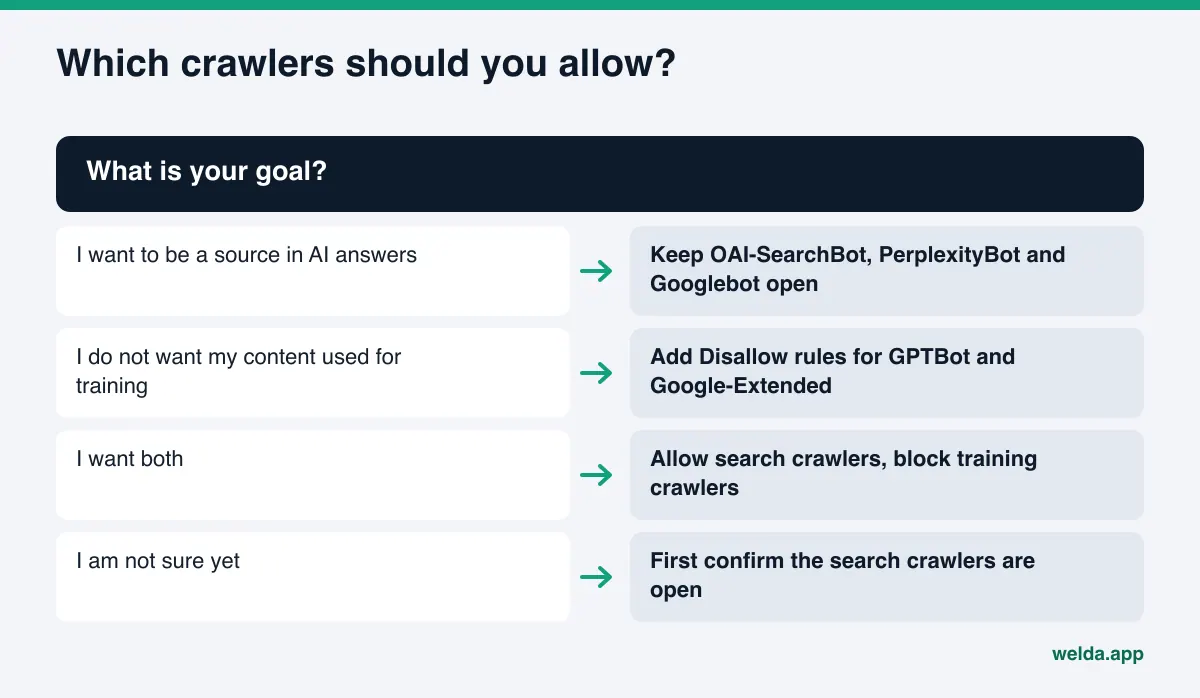
A business that wants search crawlers in and the training crawler out could use a robots.txt file like the one below. It is an example only. Adapt it with whoever manages your site, and do not delete the other rules already in your file.
User-agent: OAI-SearchBotAllow: /User-agent: PerplexityBotAllow: /User-agent: GPTBotDisallow: /User-agent: *Disallow: /admin/
In this example Googlebot has no group of its own, so it follows the wildcard rule: everything except the admin area is open. If you add a rule for Google-Extended, remember that it affects Gemini training and some Gemini uses, not whether you appear in AI Overviews.
One more caveat: for fetchers that a user triggers in real time (ChatGPT-User, Perplexity-User), the providers state that robots.txt rules may not apply. robots.txt is not a reliable lock for those. Your real visibility decision is made through the search crawlers.
Once the door is open, what should AI crawlers find?
Fixing access is half the job. A crawler that gets in but finds no clear information may still leave you out of the answer. After you open access, make sure these pages are readable:
| Page or information | What the crawler looks for | Common gap |
|---|---|---|
| Homepage | What you do, where, and for whom | A slogan, but no service or location in plain text |
| Services | Each service with a name and short description | Services only appear as image tiles |
| Contact | Address, phone, hours | Details only in a map embed or a form |
| Structured data | Name, address, phone and business type in code | Missing, or pointing to an old address |
| FAQ | Short answers to real customer questions | No FAQ, or answers hidden in collapsed widgets |
Turning your business details into code is covered in our guide to schema markup for AI search. If your pages are readable but out of date, our piece on how to update old content for AI search walks through what to revise first.
How Welda handles AI crawler access
Welda's work on this comes in two parts: showing the access problem in plain language, then turning the fix into something your team can actually apply.
Access checks in the free analysis. The analysis reads your homepage and a few inner pages (services, pricing, about, contact), and it reads your robots.txt file along the way. If a rule keeps AI crawlers out, it shows up as a gap in your technical score. For each gap, the report spells out what was found, such as which rule affects which bot, why it matters and how to fix it. A simulation shows how much each fix would raise your score, so you can see the robots.txt fix next to the other gaps and decide what to do first. The report ends with a ready-to-apply fix package that includes business structured data, and it downloads as a PDF you can forward to your web developer or hosting provider. The free analysis runs in English.
The analysis also asks 5 questions a customer might ask to an AI assistant that can search the web, and checks whether your business name comes up in the answers. If robots.txt blocks AI crawlers and your name appears in none of those answers, reading the two findings together makes it clear where to start. This is a one-time check, not ongoing tracking.
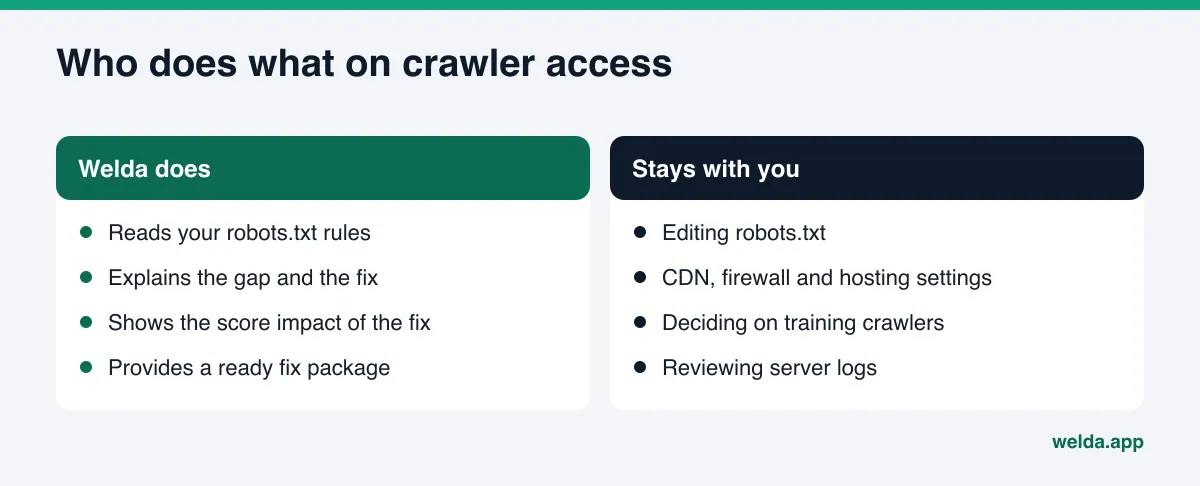
The to-do list in the Welda dashboard. In the Welda dashboard, a gap like this lands on a single to-do list. robots.txt and firewall settings live on your server and hosting side, so Welda does not change them for you. The task is listed as manual work with the exact text to apply next to it. You or your developer make the change and mark it done. For WordPress sites, Welda can connect through a separate Editor user and open content as drafts, but infrastructure decisions like crawler access stay with you.
Once the door is open, the next job is strengthening what the crawlers read. The dashboard asks the questions your customers ask on ChatGPT, Gemini, Perplexity and Google AI, three times each, and tracks which questions name you. Because new content usually takes weeks to show up in AI answers, this is how you see whether a fix made a difference.
A note on availability: the Welda dashboard is in early access and is opening first to businesses in Turkey. Regular four-engine tracking is being added during early access, and sample dashboard screens use representative data. The part anyone can use today is the free site analysis, which works in English and German. Pricing is discussed in the early access conversation.
Limits: what opening robots.txt does not fix
Access is a precondition for AI visibility, not visibility itself. It is worth being direct about this:
- An open door is not a guaranteed mention. A crawler can read your site and still recommend a competitor. The answer also depends on how clear your content is, outside sources like Google Business Profile, Yelp or BBB, and your reviews. Welda does not guarantee rankings or a spot in ChatGPT; we explain why no one honestly can in our piece on guaranteed ChatGPT rankings.
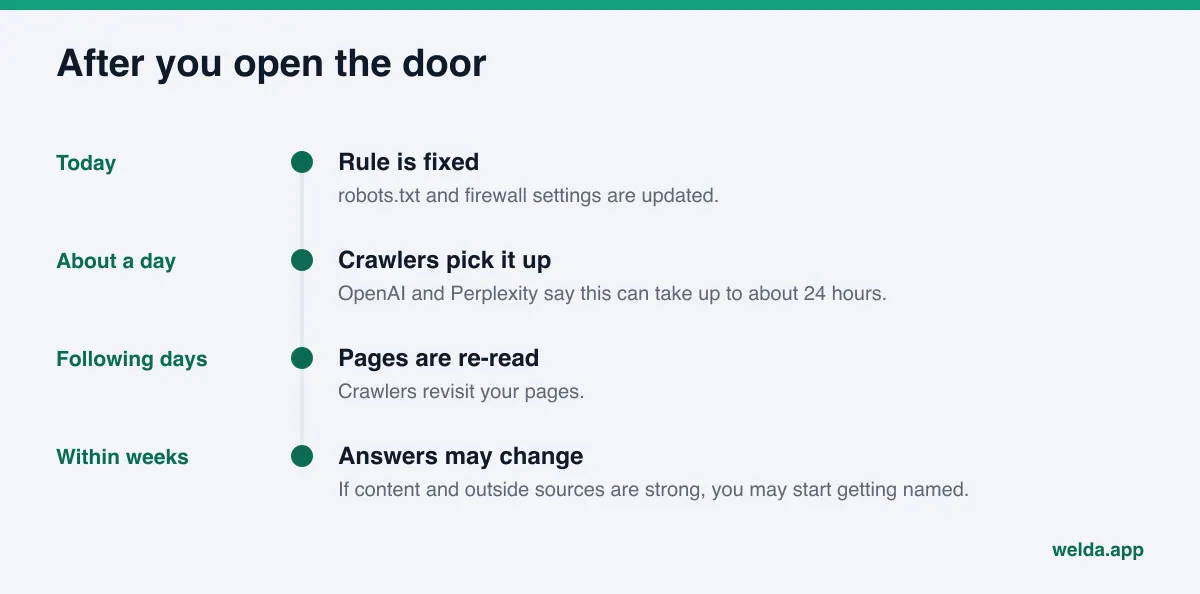
- The effect is not instant. OpenAI says it can take about 24 hours for its search systems to adjust after a robots.txt update, and Perplexity says changes can take up to 24 hours. A crawler re-reading your page and answers actually changing are different things; the second usually takes weeks.
- The analysis does not see your server logs. The free analysis evaluates robots.txt rules and how readable your pages are. It does not measure how often bots really visit. For that, you need your own access logs.
- Infrastructure stays with you. Welda has no access to your CDN, firewall or hosting settings. You or your developer change those.
- The training decision is yours. Which bots may use your content for training is a business choice and, where needed, a legal one. This article is not legal advice.
Welda does not write information it does not know; it asks you. It does not publish sensitive content without approval and does not create fake reviews. Negative reviews, directory accounts and PR stay with your business.
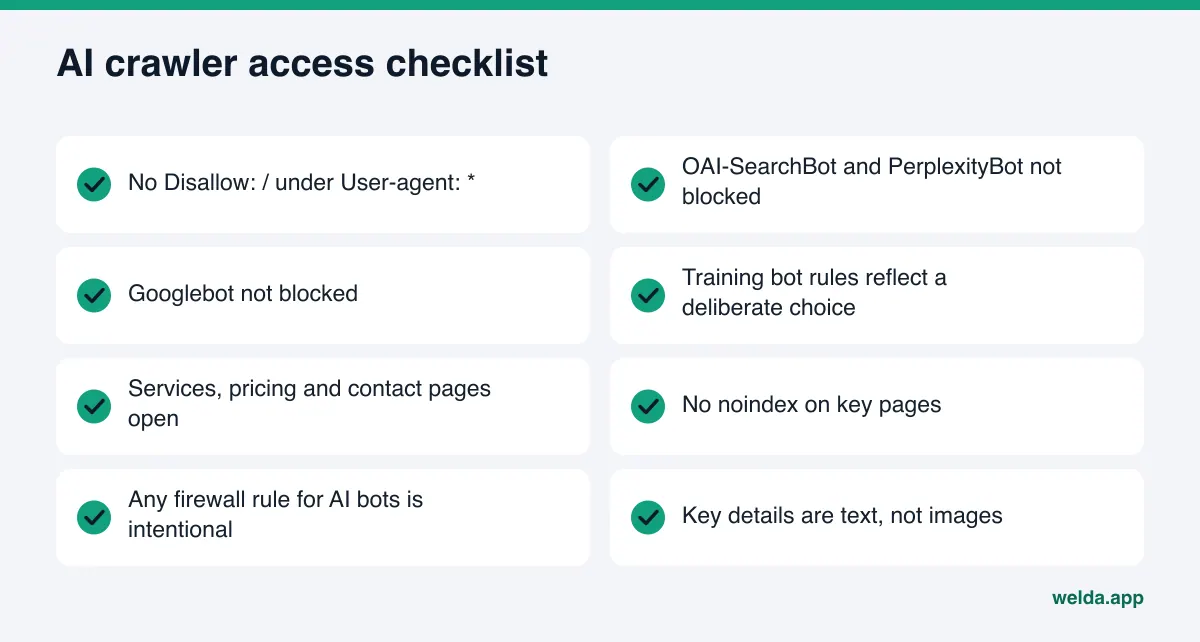
AI crawler access checklist
Run through this list twice a year, and again whenever the site is rebuilt or you change hosts. A robots.txt file getting reset during a redesign is common.
| Check | Where to look | Who does it |
|---|---|---|
No Disallow: / under User-agent: * | robots.txt | You |
| OAI-SearchBot and PerplexityBot are not blocked | robots.txt | You |
| Googlebot is not blocked | robots.txt | You |
| Training bots reflect a deliberate choice | robots.txt | Owner |
| Services, pricing and contact pages are open | robots.txt and page tags | You or your developer |
No noindex on key pages | Page source | Developer |
| Any AI bot rule in the firewall is intentional | CDN or hosting dashboard | Host or developer |
| Key details are text, not images | The page itself | You |
If your organic traffic dropped after AI Overviews arrived, blocking Googlebot is not the answer. Our guide to losing traffic to AI Overviews covers what to do instead.
Frequently asked questions
If I have no robots.txt file, can AI bots crawl my site?
Generally yes. No file means no specific restrictions for crawlers. There can still be a separate block at the firewall or plugin level, which robots.txt will not show you.
If I block GPTBot, will I disappear from ChatGPT?
According to OpenAI, GPTBot is for training, while OAI-SearchBot controls whether you are shown in ChatGPT search answers. You can block GPTBot and leave OAI-SearchBot open.
Does blocking Google-Extended remove me from AI Overviews?
Google says Google-Extended does not affect inclusion in Google Search. AI Overviews and AI Mode follow the normal Search controls: Googlebot access and page-level tags.
I changed robots.txt. When will I see results?
Per the providers' documentation, crawlers can pick up a new rule within about a day. Getting named in answers depends on your content and outside sources, and usually takes weeks.
Does Welda edit my robots.txt file?
No. Welda shows the problem and gives you the exact fix. robots.txt, firewall and hosting settings stay with you or whoever manages your site.
Does the free analysis prove AI bots are actually visiting?
No. It evaluates your robots.txt rules and how readable your pages are. To see actual visits, check your server access logs.
Check the door first
Every page you write for AEO assumes crawlers can reach it. Checking that assumption takes half an hour and often ends with fixing a single line. To see robots.txt, page titles, structured data and other gaps in one report, run the free AI visibility analysis. For each gap, it tells you what it found, why it matters and how to fix it.