One-time AEO audit vs ongoing tracking: which one do you actually need? They answer different questions. A one-time AEO audit tells you what your website is missing today, so AI assistants can read and trust it. Ongoing tracking tells you whether ChatGPT, Gemini, Perplexity and Google AI actually mention your business, and how that changes week to week. For most businesses the right order is audit first, then tracking once the basic gaps are closed. This guide walks through what each approach shows, where each one falls short, and how Welda handles both.
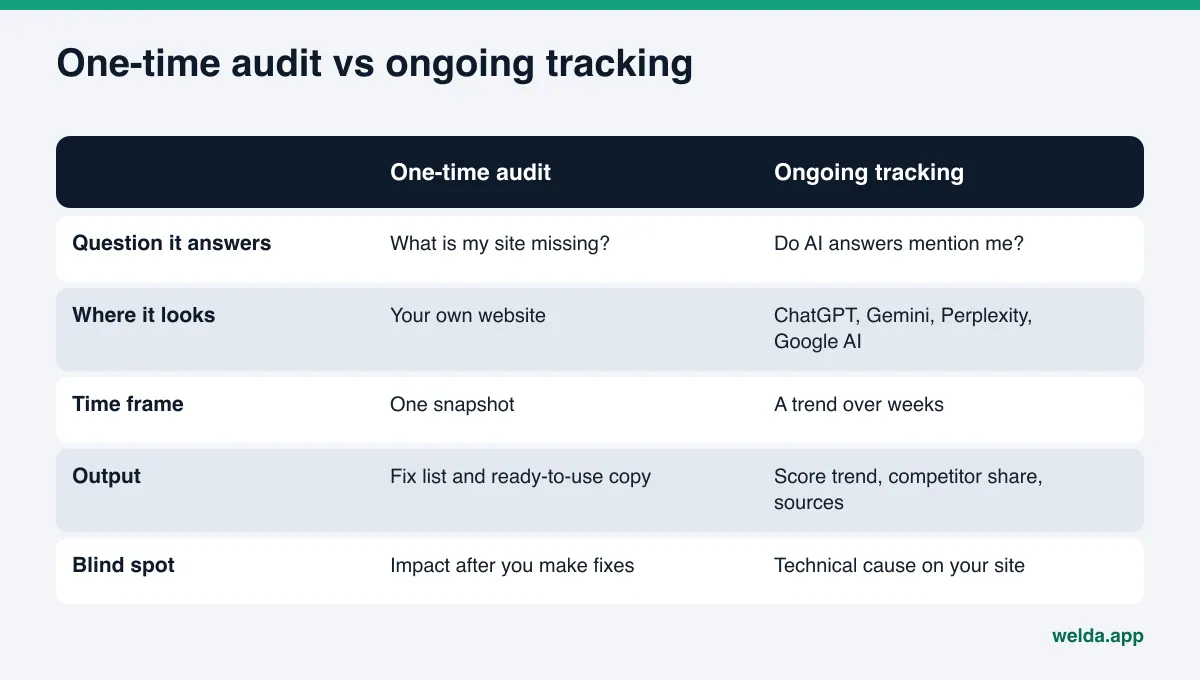
What is the difference between a one-time AEO audit and ongoing tracking?
AEO, short for answer engine optimization, is the work of getting your business named in the answers AI assistants give. You may also see it called GEO (generative engine optimization); in practice the two terms describe the same goal. Inside that work, "audit" and "tracking" often get used as if they were the same service. They are not.
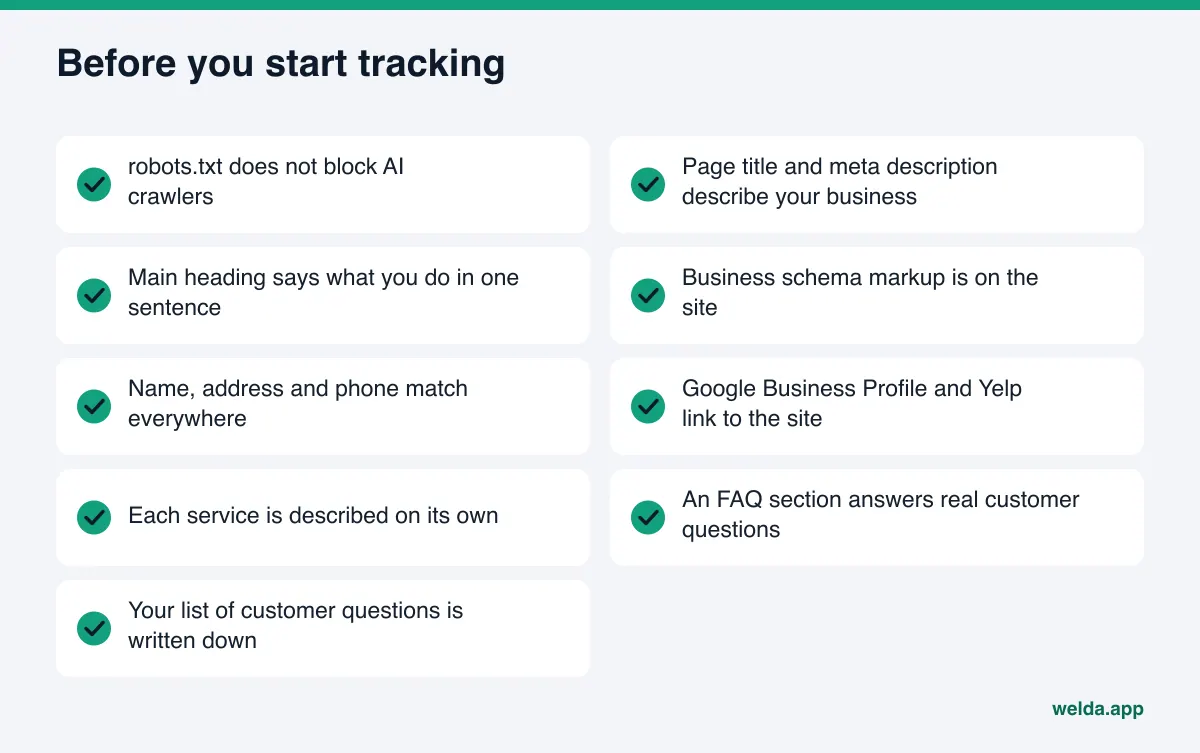
A one-time audit looks at your website at a single point in time. Can AI crawlers get in? Does your page title describe what you do? Is there business schema markup? Are your name, address and phone number consistent? Are your services spelled out clearly? Is there an FAQ section that answers what customers really ask? The result is a list of gaps and a score. Think of it as an inspection report for your site.
Ongoing tracking looks somewhere else entirely: at the answers. The questions your customers would ask get sent to AI engines on a regular schedule, and each time the results are recorded. Were you named? In what position? Which competitor showed up ahead of you, and based on which source? The result is not a snapshot but a trend line. That line answers the question an audit never can: did the changes we made last month work?
The two also fail in different ways. A business that only audits knows what is wrong with its site but has no idea what happened after the fixes went live. A business that only tracks sees "not mentioned" every week but may not know why. One is diagnosis, the other is monitoring. If you are coming from classic SEO, we covered a similar split in rank trackers vs AI visibility trackers; the main difference is that in AI answers, what you measure is being mentioned, not a ranking position.
To see where your site stands right now, you can run the free AI visibility analysis. It is the one-time audit half of this picture, and below we explain exactly what it can and cannot tell you.
Why one AI answer is not enough to judge your visibility
In classic search, the results for a query stay mostly stable from one day to the next. AI answers behave differently. Ask the same assistant the same question twice in a row and you can get different business names, a different order and different reasons. The answer is generated fresh each time, and if the assistant runs a web search, the sources it finds can change too.
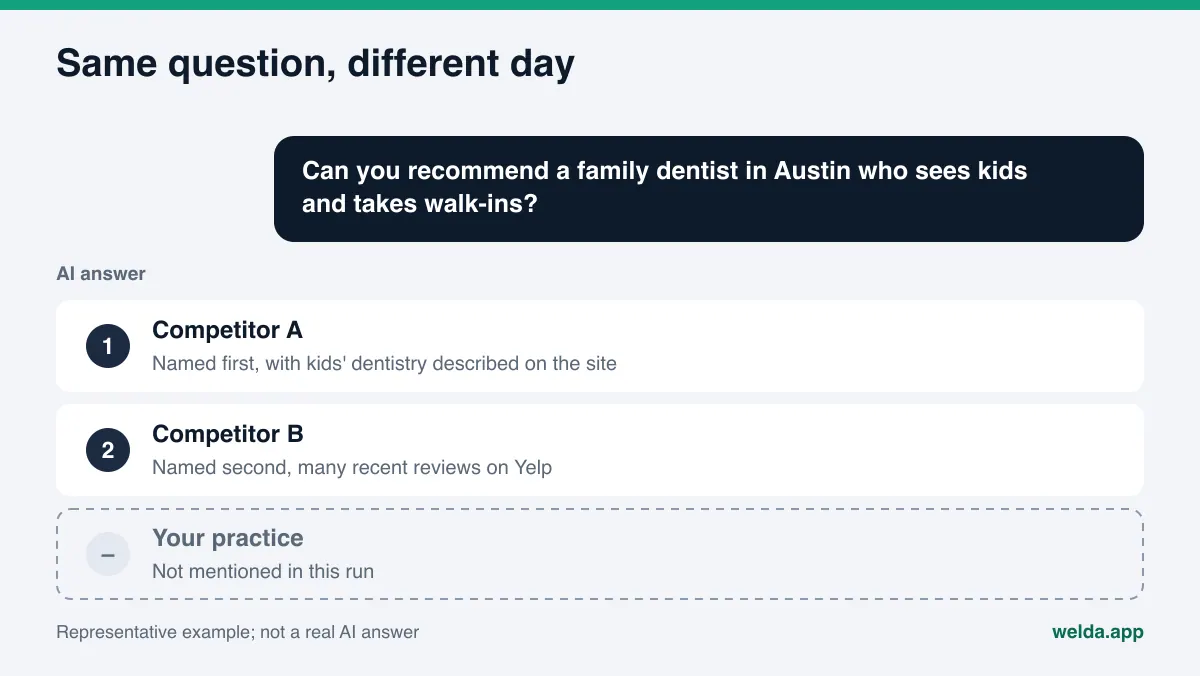
The practical consequence: seeing your practice named once when you ask ChatGPT for "a family dentist in Austin who sees kids" does not mean you show up for that question reliably. Tomorrow a different practice may appear. The reverse is also true. Not showing up once does not prove you never show up. A single answer is a single roll of the dice.
The engines also differ from each other. Each one leans on different sources. One may weigh your Google Business Profile heavily, another may pull from Yelp reviews, Tripadvisor listings, Healthgrades profiles, Angi pages or a BBB listing, depending on your industry. Being visible in one engine and invisible in another is common. That is why asking one engine one time says very little about your overall AI search visibility. We go deeper on this in manual ChatGPT checks vs tracking tools.
Then there is time. When you fix something on your site, it usually takes weeks for that change to show up in AI answers. Crawlers need to revisit the page, search indexes need to update, and the engines need to start using the new information. A check run the day after an audit cannot show the effect of the work yet.
What a one-time AEO audit does well, and what it cannot see
The strength of an audit is that it clearly lays out the part of the problem you control. Before an AI assistant recommends a business, it looks at what it can read about that business. If the information is missing, scattered or blocked from crawlers, no amount of measurement will change the outcome. An audit lists those basic gaps in one pass.
What an audit does well:
- Finds technical blockers. A robots.txt file that accidentally blocks AI crawlers, or a page that loads very slowly, shows up in a single scan.
- Exposes content gaps. A homepage heading that does not say what you do, services lumped into one vague line, no FAQ section: all of these are found by reading the page.
- Checks consistency. Whether your name, address and phone number are correct and identical, and whether your Google Business Profile and social profiles link back to your site, can be checked at once.
- Sets priorities. Knowing which fix will move your score the most helps you spend limited time in the right place.
What an audit cannot see is just as clear. It looks at your site, not at the answers. It cannot tell you whether the fix you made four weeks ago got you named in ChatGPT. It does not show which source a competitor is winning from, why you trail in one engine, or a drop that happened last month. Even when an audit includes a small AI test, that test is still a single moment and cannot separate a real change from normal variation.
In short, an audit answers "what should I fix?" well. It cannot answer "did it work?"
What ongoing tracking measures and when you need it
Ongoing tracking sends the same list of questions to the same engines at regular intervals and lines the results up side by side. The key word is "same." When the questions, the engines and the method stay fixed, a change in the result means something actually changed. Asking a different question of a different engine every time only collects noise.
What you should expect from tracking: which questions name you and which do not, your position when you are named, which competitors lead on which questions, which sources the engines rely on, and how all of that moves over time. To reduce the noise in individual answers, each question should be asked more than once and the result should come with a margin of error. Otherwise you may mistake a random weekly swing for a real decline.
Tracking is genuinely worth it when:
- You have changed something on your site. A new service page, an FAQ section or schema markup only proves its value through a before and after comparison.
- Your local market is crowded. If there are many similar businesses in your area, a competitor's change can shift your visibility without you doing anything.
- Your customers ask AI before they choose. In categories where people ask "recommend a place," such as hotels, dentists, restaurants or home services, small shifts in the answer can show up in inquiries.
- You need to see more than one engine. Only regular, multi-engine measurement reveals that you are strong in one assistant and weak in another.
Understanding why a specific competitor keeps winning is its own task, covered in our guide to AI competitor analysis.
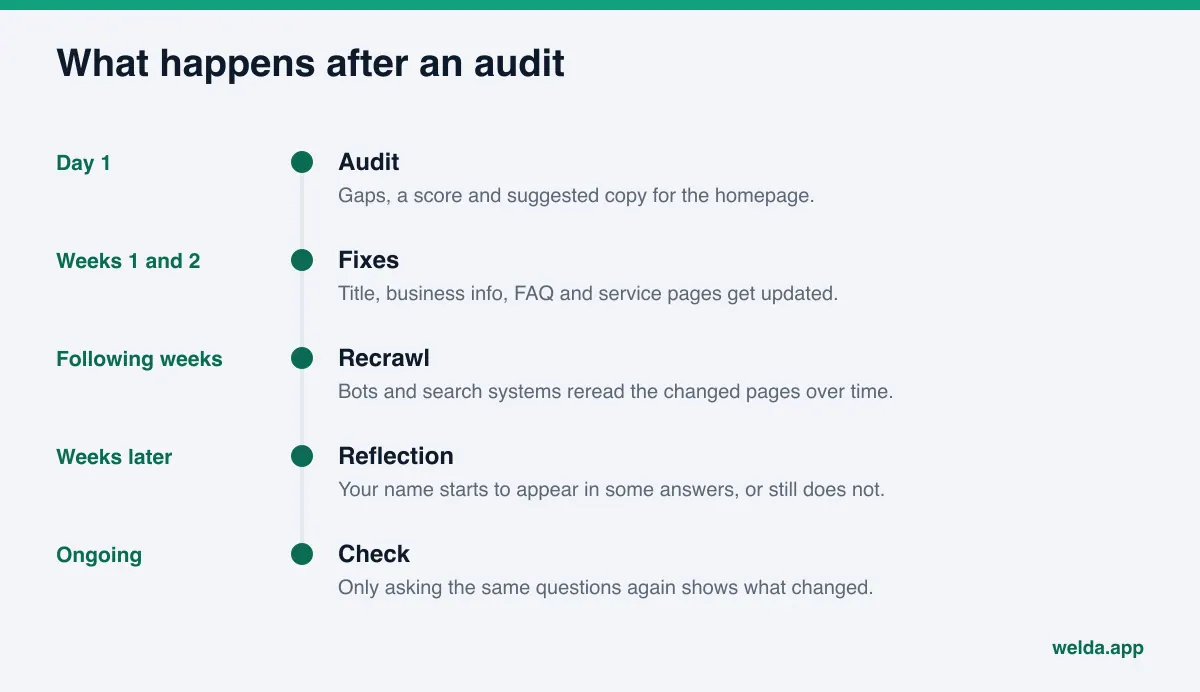
One-time AEO audit vs ongoing tracking: the right order, step by step
Rather than treating the two as competitors, put them in sequence. The order below is the most efficient path for a small or mid-sized business.
- Start with an audit. Learn how AI reads your site: crawler access, title and description, business info, name, address and phone consistency, service clarity and the FAQ section.
- Close the highest-impact gaps first. Do not try to fix everything at once. Start with the two or three items that will move the score the most. Usually that means crawler access, schema markup and a homepage that states plainly what you do and where.
- Write down the questions to track. List the sentences your customers would really type into an AI assistant: "quiet brunch spot in Wicker Park," "dentist in Plano that takes walk-ins," "same-day water heater repair in Phoenix." Good questions include a place, a service and a need.
- Record a baseline. Capture how those questions are answered today, before the fixes take effect. Tracking without a starting point cannot show change.
- Wait a few weeks, then measure again the same way. Changes take time to reach AI answers. Ask the same questions of the same engines in the same way and compare against the baseline.
- Re-audit when the site changes. As your site grows, new pages bring new mistakes. A periodic audit helps you find the cause on your site when tracking flags a problem.
The most common mistake is skipping step two and jumping straight to tracking. If your site blocks AI crawlers, getting "not mentioned" every week tells you nothing new. Close the basics first; then measurement starts to mean something.
An example: a home services company moves from audit to tracking
To make this concrete, picture an example plumbing and HVAC company in a mid-sized US city. This is a made-up scenario, not a real business and not a real result.
The owner hears from a new customer that "ChatGPT gave me three names and you weren't one of them," and decides to get an audit. It finds three major gaps. An old security plugin setting is blocking some AI crawlers in robots.txt. There is no business schema markup telling machines what the company is and where it operates. And the homepage headline just says "Quality You Can Trust," with no city, no service area and no mention of what the company actually fixes. The audit also flags a missing FAQ section and a phone number on the site that does not match the Google Business Profile.
The owner fixes crawler access, adds schema markup and rewrites the headline to name the city, the service area and the core services. The new FAQ covers emergency hours, service area boundaries, how estimates work and which brands they service. The phone number gets fixed everywhere. At this point the audit's job is done: the list of gaps is closed.
But the real question is still open. Did these changes get the company named for "emergency plumber near me open on Sunday" or "who installs heat pumps in this area"? Another audit cannot answer that, because the site will now look complete. Only asking the same questions before and after, of the same engines, in the same way, answers it. Tracking shows which questions improved, where a competitor still leads, and which source gives that competitor the edge. The next task may not be on the website at all. It might be an incomplete Angi profile or unanswered reviews on Yelp.
The lesson: an audit lets you close the gaps you control, and tracking shows you where the next gap is. Together they form a loop.
How Welda handles audits and tracking
Welda covers the two approaches with two separate pieces. One is the free site analysis anyone can use today, in English as well as other languages. The other is the Welda dashboard, which is in early access. Here are the three parts most relevant to this topic.
The one-time audit: free site analysis
The free analysis reads your homepage and a few inner pages, such as services, pricing, about and contact, the way Google and AI assistants would. It checks crawler access in robots.txt, title and description, the main heading, business schema, address, phone and location details, whether your social and map profiles are linked from the site, your FAQ section, reviews and trust signals, how clearly your services are described, and page speed. You get a score out of 100, with technical and content scored separately.
Because it is an audit, the most useful part is how each gap is explained: what was found, why it matters and how to fix it. For the homepage you get ready-to-use copy for the title, description, main heading, intro paragraph and FAQ. A simulation shows how much each fix would raise your score, which helps with step two above. You also get a fix package to add to your site, including the schema markup code, plus a competitor comparison, a PDF and a shareable score card.
The analysis also sends 5 questions a customer might ask to an AI assistant that can search the web, and checks whether your business name appears in the answers. To be clear about its limits: this is a one-time measurement. It gives you a sample of that moment, not variation or change over time. It does not measure rankings or guarantee any. Each site gets one free analysis; your email and phone are verified, and the results link arrives by email and stays open for 14 days.
Ongoing tracking: measurement and an open score
In the Welda dashboard, the questions your customers would ask are sent to ChatGPT, Gemini, Perplexity and Google AI three times each. The three runs reduce the chance that one lucky or unlucky answer skews the picture. The questions screen shows, question by question, which engines named you and in what position. The competitors screen shows which topic and which source a competitor is winning on. The sources screen shows the sites the AI relies on and where you are missing.
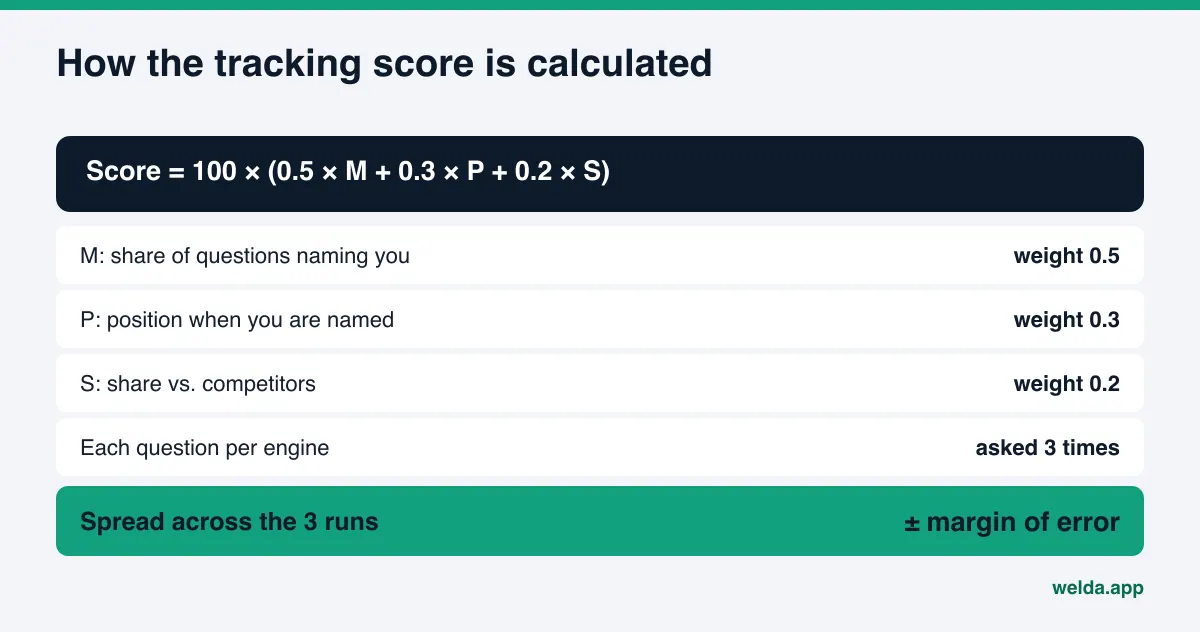
The score formula is open: 100 × (0.5 × share of questions that name you + 0.3 × position score + 0.2 × share against competitors). The spread across the three runs produces a ± margin of error. That margin matters for tracking decisions: if your score moved within the margin, you can tell normal variation apart from a real shift.
Before and after: connecting fixes to results
The piece that ties auditing to tracking is the before and after comparison in the dashboard. When you apply a fix, Welda places the measurements from before and after side by side. A one-page monthly report (PDF) sums up which questions you gained or lost, the risks and what comes next. That way you can see the link between "we changed this on the site" and "we started showing up for these questions" for yourself.
The dashboard also prepares fixes: missing content, profile copy and review replies, listed on a to-do screen with the text ready. Publishing approval always stays with you, and content always lives on your own site. On WordPress, Welda connects through a separate Editor user and an application password, with no code to install, and opens content as a draft that goes live once you approve it. For other systems, Welda hands you a ready package to apply yourself.
About availability: the full Welda dashboard is in early access and is opening first to businesses in Turkey. Regular four-engine measurement is being added during early access, and the dashboard views described here use representative data. What anyone can use today, in English, is the free site analysis. Pricing is discussed in the early access conversation.
Limits: what Welda does not do
Both audits and tracking work best when you know their limits. Spelling out what Welda does not do also makes clear which work stays with you.
- No ranking guarantee. Nobody controls AI answers. Welda does not promise that you will "show up in ChatGPT." Measurement and fixes improve your odds; they do not lock in an outcome.
- No made-up facts. If Welda does not know your hours, how you price or a service detail, it asks you instead of guessing.
- No sensitive content without approval. In healthcare there is no automatic publishing; every piece of content comes to you for approval, and patient data is not sent to AI.
- No fake reviews. Welda drafts replies to reviews, never the reviews themselves. The FTC finalized a rule banning fake reviews and testimonials in August 2024, including AI-generated ones.
- Some work stays with you. Handling negative reviews, setting up directory accounts and press outreach remain your job.
- The compliance check is not legal advice. Welda flags patterns like price claims, guarantees, superiority claims and diagnostic suggestions before publishing, but the check has not been reviewed by a lawyer.
There is a time limit, too. New content usually takes weeks to show up in AI answers. Tracking does not shorten that wait; it just makes visible what is happening.
Audit or tracking: a decision checklist
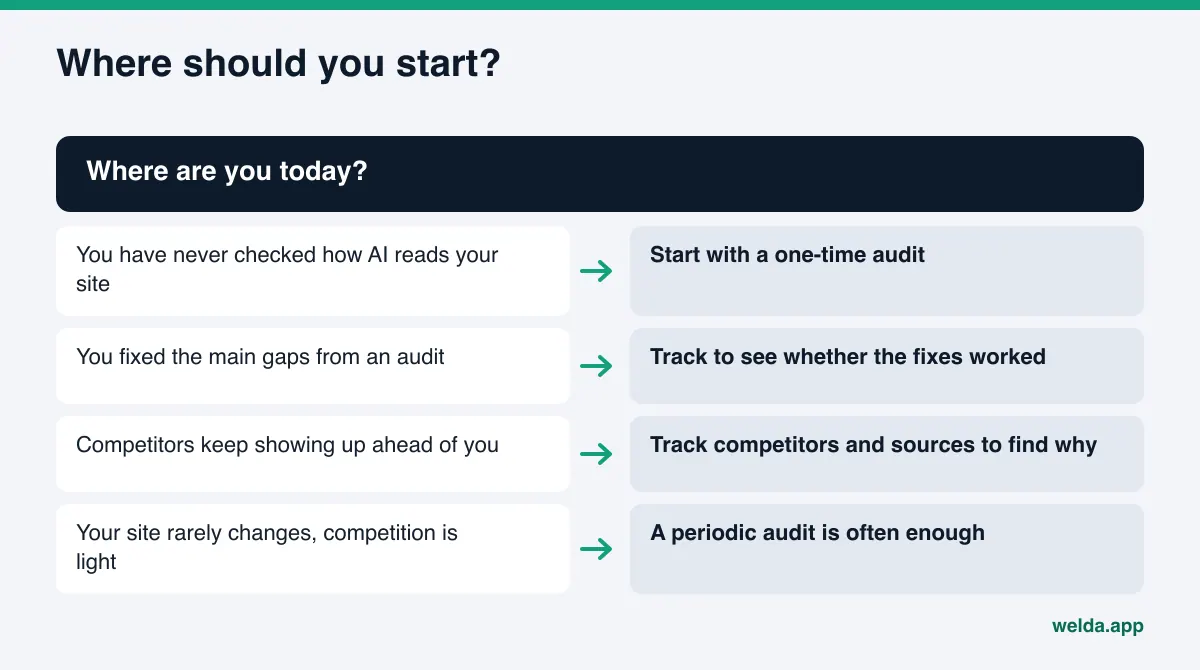
The table below summarizes which approach gives you more useful information based on where you are today. The point is not to pick one forever, but to see which one helps most right now.
| Your situation | One-time audit | Ongoing tracking |
|---|---|---|
| You have never checked how AI reads your site | Do this first | Too early |
| You are not sure crawlers can reach your site | Visible in one scan | Will not show the cause |
| You made fixes and want to know if they worked | Cannot show impact | Needs before and after |
| Your local market is crowded | One-time snapshot | Shows competitor share over time |
| You show up in one engine but not another | Does not split by engine | Breaks results down by engine |
| Your site rarely changes, competition is light | Periodic audit often enough | Limited need |
| An agency or freelancer is doing the work | Defines the to-do list | Checks the outcome of their work |
Beyond the table, ask yourself three questions. First: does my site still have a basic gap to fix? If yes, audit first. Second: have I made a meaningful change to my site or profiles in the last few months? If yes, track to see the effect. Third: do my customers ask an AI assistant before they choose a business like mine? If they do, tracking is not a luxury; it is how you check your work.
If you are making this decision with an agency or a consultant, agree early on who will read the tracking results and act on them. We look at that division of labor in hire an AEO specialist or use software.
Frequently asked questions
Is a one-time AEO audit enough on its own?
It is enough to find the basic gaps on your site. It cannot show whether your fixes reached AI answers. If your site rarely changes and competition is light, a periodic audit may be all you need.
When should I start ongoing tracking?
After you close the main gaps from the audit, especially crawler access and business info. Recording a baseline before the changes take effect is what makes later measurements meaningful.
Can't I just ask ChatGPT myself?
It gives you a feel for things, but one answer cannot separate a real change from normal variation. A reliable picture needs the same questions asked of several engines, more than once, in the same way.
Does the AI test in the free analysis replace tracking?
No. The analysis asks 5 questions once and gives you a sample of that moment. It does not show change over time, differences between engines or competitor share; that is what tracking is for.
How long until changes show up in AI answers?
Usually weeks. A check right after the audit will be too early, so repeat the measurement a few weeks apart.
Can I use the Welda dashboard in the US?
The full dashboard is in early access and is opening first to businesses in Turkey. The free site analysis works in English today, and pricing for the dashboard is discussed in the early access conversation.
Start with a clear picture of your site today
The short answer to one-time AEO audit vs ongoing tracking is this: first find out what is missing, then track whether your work paid off. Tracking without an audit produces a number with no explanation. An audit without tracking leaves you with a to-do list and no idea of the outcome.
For the first step, run the free AI visibility analysis. See how AI reads your site, which fix would move your score the most, and get ready-to-use copy for your homepage. Once the gaps are closed, you can join the Welda early access list if you want to track whether those changes reach AI answers.