How do I update old blog posts and service pages so AI search can use them? Sort your pages first: which ones still hold accurate information and which ones have gone stale. Then rewrite the pages that matter so they answer the question up front, state their facts in plain text and carry an honest updated date. Changing the date alone, or adding a paragraph at the bottom, does not work. AI answers need clear facts they can quote.
Most small business websites carry years of leftovers: a "2021 pricing" post, a page for a service you stopped offering, directions written before you moved, a long intro that buries the one detail a customer actually wanted. In classic search, those pages quietly slip down the results and nobody notices. In AI answers, they cause real trouble. ChatGPT, Gemini, Perplexity or Google AI can read that page and repeat outdated information to a customer, or skip your site entirely and cite a competitor's current page instead. When you update old content for AI search, you are doing repair work, and it often pays off faster than publishing something new. This guide covers which pages to fix first, how to rewrite a page, and how to send an honest freshness signal. This is part of AEO (answer engine optimization), sometimes also called GEO (generative engine optimization): the work of getting your business into AI-generated answers. If you want to see how AI reads your site today, start with the free site analysis.
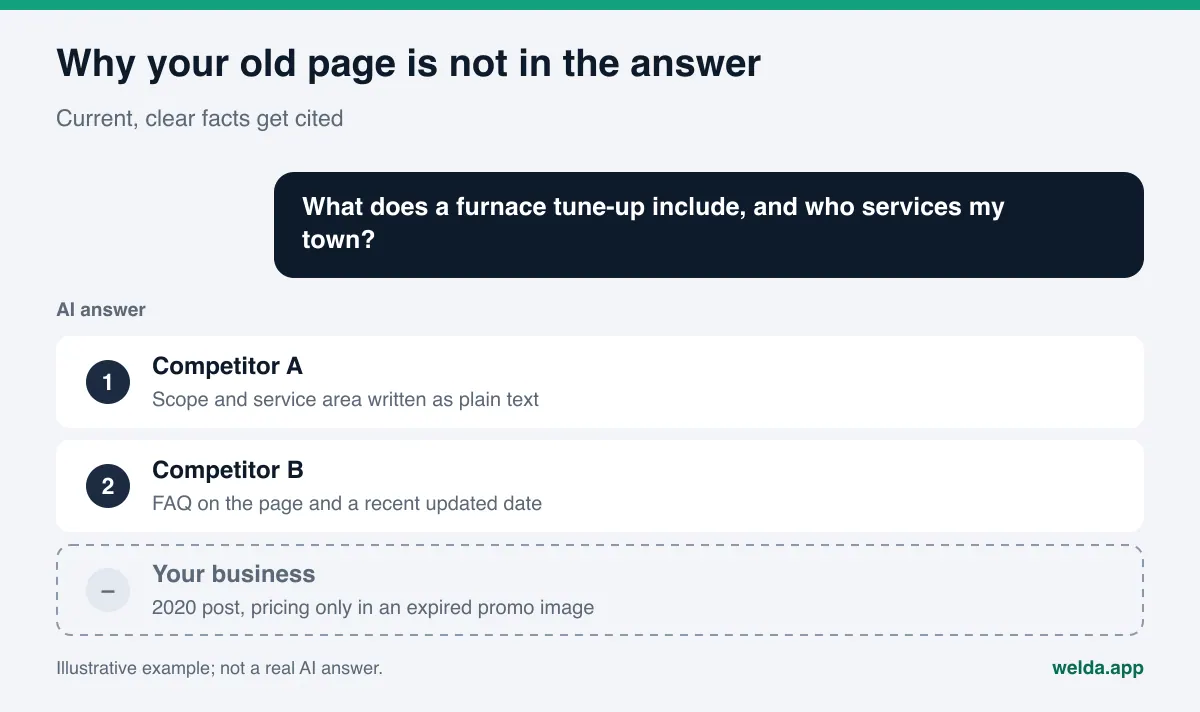
Why old content hurts your AI search visibility
When an AI assistant answers a customer, it often runs a web search, reads the pages it finds and blends a few sources into a short answer. It does not care much how old a page is. It cares whether the page contains a clear fact that matches the question. An outdated page hurts you in three ways.
- It carries wrong facts. An old price, a closed location, changed hours, a service you no longer offer. Because the AI read it on your own site, it may treat it as true and pass it on.
- It buries the right facts. The real answer sits in the fourth paragraph, inside an image, or behind a "read more" toggle. The AI may read the page and still find nothing it can quote.
- It sends mixed signals. If three posts cover the same topic and each says something slightly different, the AI has no clear page to trust. It often picks another source whose information is single and consistent.
Google says there are no additional technical requirements or special markup needed to appear in AI Overviews or AI Mode; a page only has to be indexed and eligible to show in search. That means an old page that is still indexed can still become a source for an AI answer. The question is which facts it brings with it.
Consistency matters too. If an old blog post lists a phone number that does not match your Google Business Profile, or your Yelp listing shows a different address, the AI has to resolve that conflict on its own. We cover that problem in detail in wrong address or phone number in AI answers. Cleaning up old content usually removes many of those contradictions at the source.
Which old pages should you update first?
Not every old page deserves the same effort. Start with an inventory: put your blog posts, service pages and FAQ page in one spreadsheet. For each row, answer four questions. Does this page answer a question a customer might ask? Is the information accurate today? Do I have another page on the same topic? Does it still describe part of my business?
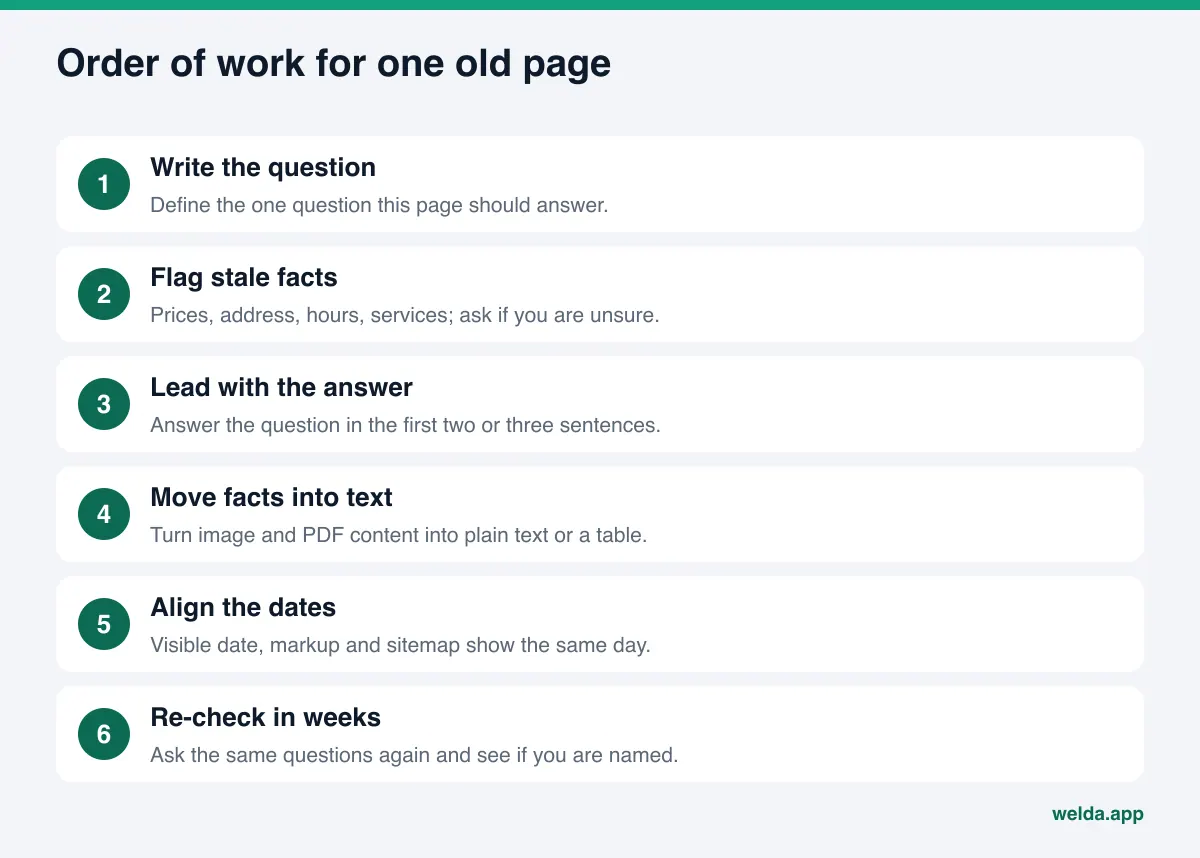
Based on the answers, each page falls into one of five decisions:
| Situation | Decision | What to do |
|---|---|---|
| Topic still relevant, facts mostly correct | Refresh | Move the answer to the top, fix what is stale, update the date honestly |
| Topic relevant, facts mostly outdated | Rewrite | Rewrite the page from scratch at the same URL |
| Two or three pages cover the same topic | Consolidate | Merge into the strongest page, 301 redirect the others to it |
| Service discontinued, page still gets visits | Redirect or explain | Redirect to the closest current page, or state clearly that the service ended |
| Off-topic for your business, no traffic | Remove | Take it down and clean up internal links pointing to it |
For priority, use a simple rule: pages closest to a buying decision come first. Pages about pricing, service scope, service area, hours, booking or appointment terms cost you customers directly when they are wrong. A general "5 trends in our industry" post can wait. The second rule is fit with real questions. If a post covers a topic that could directly answer a common customer question but does not answer it today, it moves up the list.
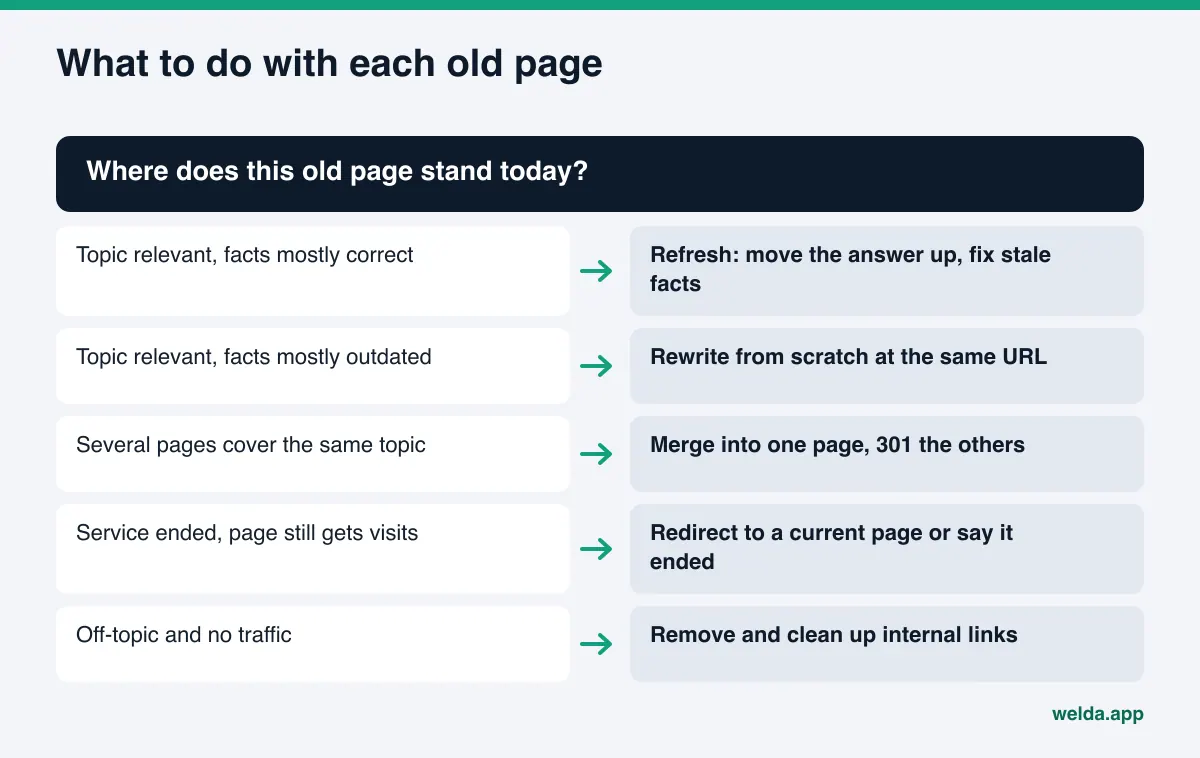
How to update old content for AI search, step by step
Once the inventory is done and the order is set, run every page through the same workflow. It is the same whether you do it yourself or with a tool.
- Write the question the page should answer. One sentence, for example: "What does an annual AC tune-up include, and do you serve my town?" That question shapes the title and the opening paragraph.
- Flag every fact that is no longer true. Prices, dates, address, phone, hours, staff, service list. Do not guess a correction. Ask whoever in the business actually knows.
- Put the answer in the first paragraph. Two or three sentences that answer the question directly. Backstory and context can follow.
- Move facts out of images and PDFs. If your price sheet is a JPEG, your menu is a PDF, or promo terms live on a banner, write the same information as plain text or an HTML table.
- Turn subheadings into questions. Swap "Our Services" for "Which services do we offer, and which don't we?" These headings help an AI find the right passage.
- Add a short FAQ. The three to five questions your front desk hears most, with short answers.
- Show who wrote it and when it was updated. Author name, role and a visible "Updated" date. We go deeper on this in author bios and expertise signals for AI.
- Rewrite the title tag and meta description. They should summarize the new content. See title tags and meta descriptions for AI search for how to write them.
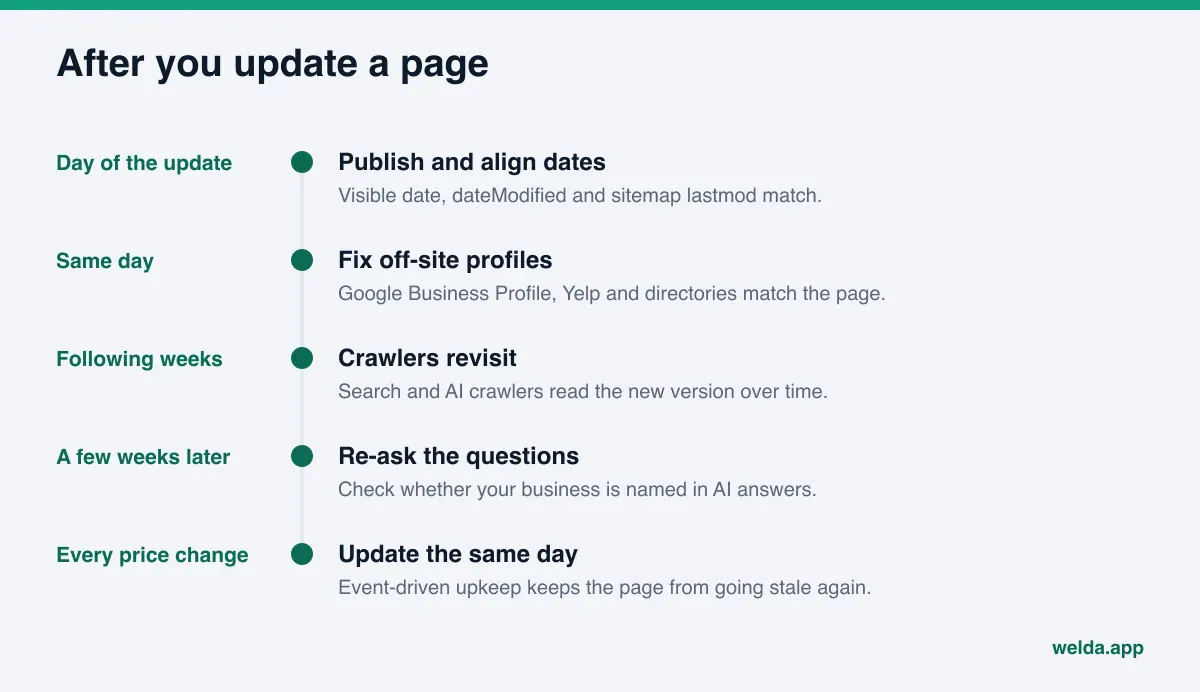
- Update the date signals together. The visible date, the dateModified field in your markup and the lastmod value in your sitemap should all point to the same day.
- Ask the same questions again a few weeks later. New content usually takes weeks to show up in AI answers. Do not expect a change the next morning.
What to watch when rewriting an old post
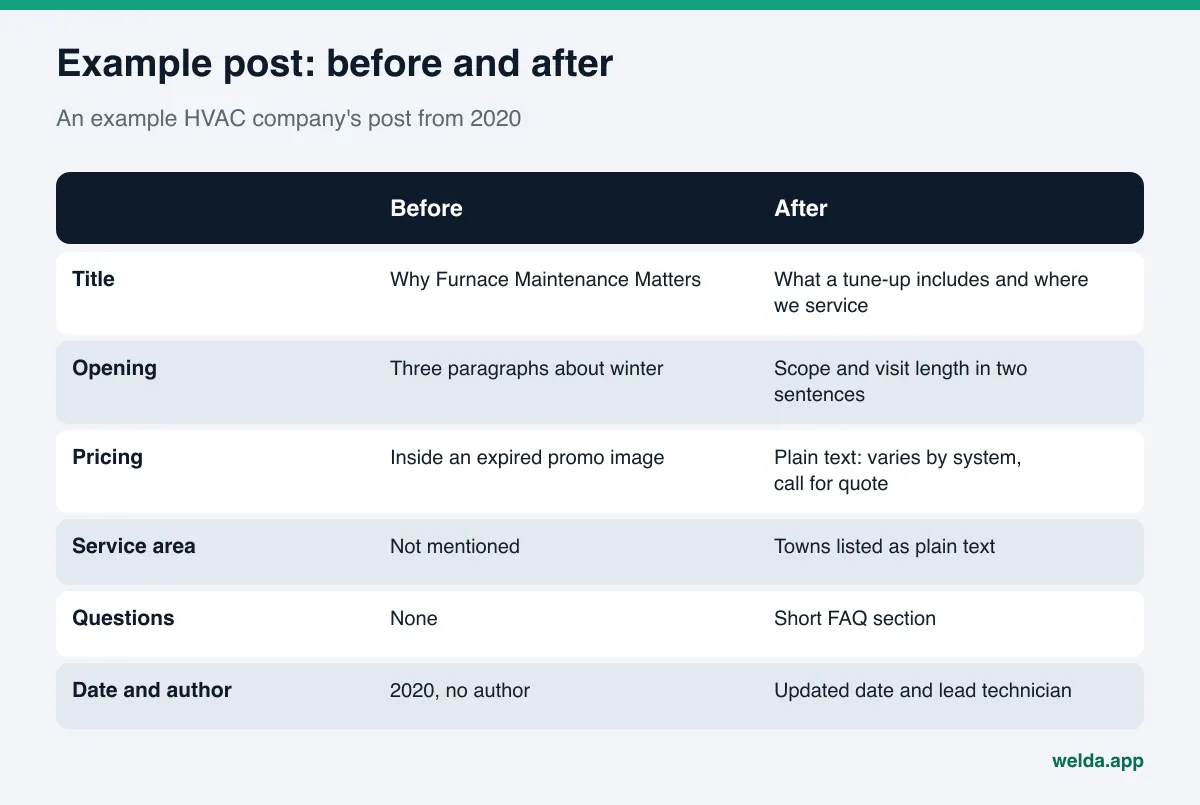
Here is an example. An example HVAC company has a blog post from 2020 titled "Why Furnace Maintenance Matters." It opens with three paragraphs about winter, explains what a tune-up includes only in the sixth paragraph, never says which towns the company serves, and shows pricing inside a promo graphic for a deal that expired long ago.
To update that post for AI search, the company would make these changes:
- The title moves closer to the customer's question: "What a Furnace Tune-Up Includes, How Long It Takes and Where We Service."
- The first paragraph states the scope and the typical visit length in two or three sentences.
- The expired promo graphic comes down. If pricing varies, the page says so in plain words, such as "pricing depends on the system; call for a quote." No made-up estimate.
- The service area is listed as plain text, town by town.
- Short questions are added: "How often should a furnace be serviced?" and "Do I need to be home during the visit?"
- The lead technician's name and role appear at the end of the post.
The second thing to watch is the URL. Keep it. If the page is already indexed, has earned links from other sites, or has been cited by an AI assistant before, staying at the same address preserves that history. If the URL contains "2020," you can still keep it; removing the year from the visible title is enough.
The third is consolidation. If you have three short posts on the same subject, pick the one with the most traffic or links as the main page, move the useful parts of the other two into it, and 301 redirect those two URLs to the main page. Instead of three competing half-answers, the AI finds one complete answer. If your overlapping pages are comparisons, comparison pages for AI search walks through how to structure the merged page.
Finally, check access. Some older pages were built with plugins that load content only through JavaScript in the browser. In that case, AI crawlers may never see the text you just rewrote. Make sure your words appear in the page source.
Changing the date is not enough: how to send an honest freshness signal
The most common shortcut is to bump the date to today without touching the content. Google's guidance on helpful content asks site owners directly whether they are changing the date of pages to make them seem fresh when the content has not substantially changed. The same page says that adding or removing lots of content just to make a site seem fresh will not help. The date should record the work. It should not replace it.
When you have made a substantial update, show the date consistently in three places:
- A visible date on the page. Google's guidance on byline dates recommends a date readers can see, labeled "Published" or "Updated." You can show both.
- Structured data. The datePublished and dateModified fields in your Article or BlogPosting markup. Google asks that the visible date and the markup date match.
- Your XML sitemap. Google says it uses the lastmod value if it is consistently and verifiably accurate. Changes to main content, structured data or links count as significant; updating the copyright year does not.
In practice: do not change the date because you updated the footer. Fixing a typo is not an update either. But if you corrected the pricing, rewrote the answer paragraph or added an FAQ, that is a substantial change, and a new date is an honest record of it.
How to keep old content from going stale again
If you clean up once and walk away, you will be back where you started in two years. Prices change, staff turns over, services get added, a location closes. After the cleanup, set up a light maintenance routine that ties each page type to a trigger and an owner.
| Page type | When to review | Who owns it |
|---|---|---|
| Pricing and packages | Same day as any price change | Whoever sets prices |
| Contact, address, hours | On every change, plus a seasonal check | Owner or manager |
| Service pages | When a service is added or dropped | The team that delivers it |
| FAQ | When a new question keeps coming up on calls | Whoever talks to customers |
| Blog posts | One full review per year | Whoever owns content |
Notice that the schedule is driven by events, not calendar dates. When a price changes, the pricing page changes that day. It does not wait for the annual cleanup. That keeps the page an AI reads in line with what a customer hears on the phone.
Then there are off-site sources. When you update a fact on your site, check your Google Business Profile, Yelp, Angi, BBB and any industry directory the same day. You cannot edit what other people wrote about you on review sites, but stating the right facts clearly and consistently on your own site makes it easier for an AI to decide which version to trust. If your site is right and your profile is stale, the conflict stays.
How Welda helps you update old content for AI search
Welda sits at both ends of this job. It shows which pages fall short and why, and it drafts the corrected text. The publishing decision and the website stay with you.
Start with the free site analysis. It reads your homepage and a few key inner pages, such as services, pricing, about and contact, the way Google and AI assistants would. For old content, the most useful part is that every gap comes with what was found, why it matters and how to fix it. You might learn that your services are not clearly described, that there is no FAQ section, that your title tag does not describe the page, or that your address and phone are not readable on the page. For the homepage, you get ready-to-use text for the title, meta description, main heading, opening paragraph and FAQ. A simulation shows how much each fix would move the score, which helps you decide what to tackle first. The analysis does not crawl your entire blog archive. It focuses on the pages closest to a buying decision, which is exactly where your inventory should start anyway. The free analysis works in English.
The questions view in the Welda panel. In the panel, the questions your customers would ask are put to AI assistants on a regular schedule. For each question, you see whether your business is named and which sites the answer cites. For old content, this view supports one decision: for a question where you are missing, is there an old page on your site that could answer it? If so, that page jumps to the top of your update list. If not, you need a new page.
The to-do list and ready text. For a page that needs updating, Welda drafts new text: an opening that answers the question directly, facts moved into plain text, a short FAQ. If it cannot find a fact on your site, such as current hours or the lead technician's name, it does not guess. It asks you in the to-do list. On WordPress sites, Welda connects through a separate Editor user with an application password, so no code is installed. Drafts open on your site as drafts and go live only after you approve them. On other platforms, Welda hands you a ready package and you or your web person apply it.
The rest of the panel supports the work: the sources view shows which sites AI answers draw on, a before and after comparison shows what changed, and a one-page monthly report sums up the month. A compliance check flags patterns such as pricing claims, guarantees or superiority claims before anything goes live. It is not legal advice.
About early access: The Welda panel is in early access and is opening first in Türkiye. Regular four-engine measurement is being added during early access, and panel screens are shown with sample data. What anyone can use today is the free site analysis, which works in English. Pricing is discussed in an early access call.
Limits: what Welda does not do
Updating old content is repair work, not magic. Here is what Welda does not do.
- No guarantees. Welda does not guarantee that an updated page will be cited in ChatGPT or Google AI, or that your business will appear in a specific position.
- No guessing. It does not invent prices, promotions, staff names or credentials. It asks you.
- No publishing without approval. Every draft comes to you first. In healthcare, nothing is published automatically; every piece goes through approval.
- No hosting. The updated page always lives on your own website.
- No fake reviews or fake expert quotes. Old posts do not get invented testimonials to look more trustworthy. See fake reviews rules and AI visibility for why that matters.
- No overnight results. New content usually takes weeks to show up in AI answers.
Technical changes such as redirects, server settings or removing an old plugin are handled by whoever manages your site. Welda can tell you whether they are needed; carrying them out stays with you or your web developer.
Checklist before you mark a page updated
Before you call a page done, run through these questions. If you cannot say yes to all of them, the page is not ready.
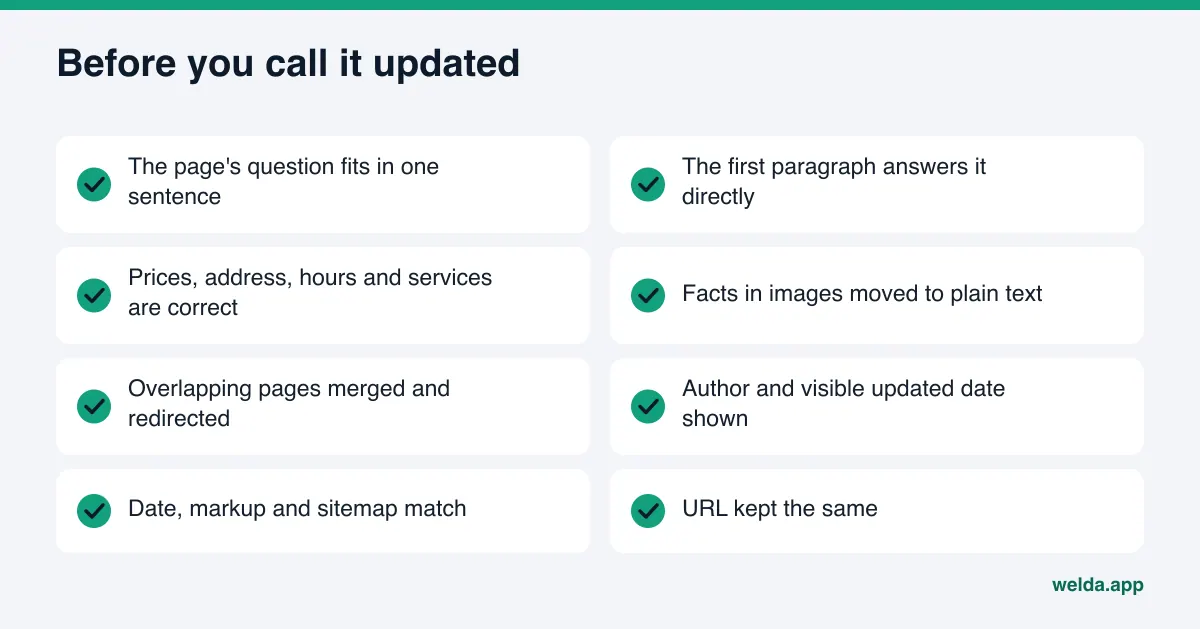
- Can you write the question this page answers in one sentence?
- Does the first paragraph answer that question directly?
- Are prices, address, phone, hours and the service list correct today, and do they match your Google Business Profile?
- Has every fact locked in an image or PDF been moved to plain text?
- If other pages covered the same topic, were they merged and redirected?
- Is there an author or responsible person and a visible updated date?
- Do the visible date, the markup and the sitemap show the same date?
- Did the URL stay the same?
- Is the new text free of guarantees, "best" claims and anything you cannot back up?
- Did you note the questions to re-ask in a few weeks?
Frequently asked questions
Is it better to update old content for AI search than to write new content?
Not always, but for most businesses it is the first job. An old URL is already indexed and may have earned links. If its topic is close to a customer question, updating it takes less effort than starting from zero. Questions that no page answers still need new pages.
Can I just change the published date?
No. Google states plainly that changing the date without substantially changing the content does not make a page fresh. AI assistants look at the facts on the page, not the date. The date should be an honest record of a real update.
Will deleting old posts hurt my site?
Removing off-topic posts that nobody reads usually causes no harm. If a page gets visits or links, set up a 301 redirect to the closest current page before removing it. Do not mass-delete content just to look fresh.
How many pages should I start with?
There is no magic number. A practical approach is to start with the pages closest to a buying decision: services, pricing, location and contact, FAQ. Once those are solid, move on to the blog archive.
How do I know whether the update worked?
Before you update, write down the questions customers might ask and put them to AI assistants. A few weeks after the update, ask the same questions again and check whether your business is named. In the Welda panel, the before and after view handles that comparison.
Does Welda rewrite my old blog posts for me?
Welda drafts the new text and asks you for anything it does not know. On WordPress, the draft opens on your site and you approve publishing. On other platforms, you get a ready package to apply yourself.
Where to start
The easiest way into an old content cleanup is to see how your most important pages read today. The free site analysis reads your homepage and a few inner pages, lists every gap with the reason behind it and suggests ready text for your homepage. It is a solid way to fill in the first rows of your inventory.