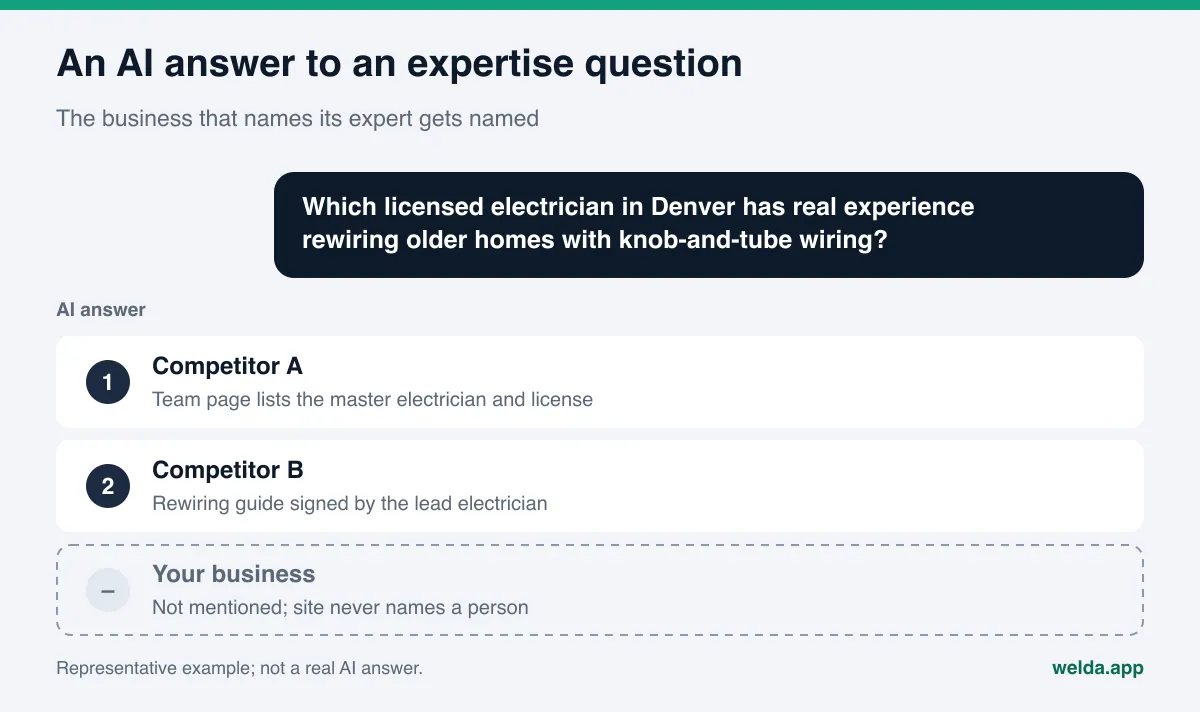
Do author bios and expertise signals affect how AI answers mention you? Not as a direct score, but they decide whether an answer engine can figure out who is behind your content and why that person is worth quoting. A page with no byline and no named expert gives ChatGPT or Google's AI Overviews nobody to point to. A page that names a real person, their title, and experience that can be checked does.
This guide looks at author bios and expertise signals for AI from a small business owner's point of view: which signals an answer engine can actually read, what a strong author page contains, how to mark up authors in schema, which claims to stay away from, and how Welda handles this work. If you want a baseline first, run the free AI visibility analysis. It reads your home page and key inner pages such as About, Services, and Contact the way Google and AI assistants do, and shows whether your business information is in the code and how clear your trust signals and service descriptions are.
What are author bios and expertise signals?
An expertise signal is any plain, visible piece of information that shows who stands behind a piece of content and why that person knows the subject. The simplest form is a byline: a real person's name on the page. The next step is an author page that lists the person's title, training, how long they have done the work, and where those facts can be confirmed. The most technical form is putting that same information into the page's structured data so machines can read it without guessing.
Google is direct about this. Its guidance on creating helpful, reliable, people-first content asks site owners to make the "who, how, and why" of their content clear, strongly encourages accurate bylines where readers expect them, and asks whether those bylines lead to more information about the author. The same page also states that E-E-A-T (experience, expertise, authoritativeness, and trustworthiness) is not itself a specific ranking factor. So an author box does not move anything on its own. Its value is indirect: it makes ownership and credibility readable.
Answer engines face the same problem from the other side. When someone asks ChatGPT, Gemini, Perplexity, or Google's AI Mode "who is experienced," "which dentist," or "who should I talk to," the answer has to recommend a person or a business. None of these engines publish how much weight they give each signal. What is clear is simpler: if your site never states who your expert is and what they have done, the engine cannot learn it from you. It learns it from somewhere else, often a competitor's site or a directory.
That is why AEO (answer engine optimization), the work of getting your business named in AI-generated answers, pays attention to expertise. You may also see the term GEO, short for generative engine optimization; in the US it describes largely the same job, and AEO is the one most people search for.
Which businesses need expertise signals most?
Not every business runs a blog, and not every business needs one. But nearly every business has a person customers want to trust: the doctor, the attorney, the master electrician, the chef, the owner. An expertise signal is not only a blog byline. It is that person being visible on your site. The table below shows who should be featured in different types of businesses and what kind of information helps.
| Business type | Person to feature | Information that helps | Claim to avoid |
|---|---|---|---|
| Medical or dental practice | Physician, dentist | Degree, board certification, state license, procedures they perform | "Best dentist in town" |
| Law or accounting firm | Attorney, CPA | Bar admission or CPA license, practice areas, publications | Promised outcomes |
| Home services | Licensed tradesperson | License type and number, specialties, years in the trade | A license you do not hold |
| Restaurant or bakery | Chef, founder | Kitchen background, who builds the menu, the story behind dishes | Award names you cannot verify |
| Hotel or inn | Owner, general manager | Who runs the property, since when, who looks after guests | "America's best boutique hotel" |
| Training or coaching | Instructor | Training, certifications, courses taught | Made-up success rates |
The last column matters. The most common mistake with expertise signals is inflating them. "Industry-leading experts," "highly experienced team," and "top professionals" carry no information, and an answer engine has nothing to check them against. One specific, verifiable sentence does more than a paragraph of praise.
What should a strong author bio include?
An author page introduces one person at one stable URL. In a small business it does not have to be a standalone page; a section on a "Meet the team" page works too. What matters is that each person has one permanent address and that every byline on the site links to it. A strong author bio includes:
- Real name and title. Not "Admin," "Editor," or just the company name; the person's name and professional title.
- A short, concrete bio. Three or four sentences: what they do, how long they have been with the business, what topics they focus on.
- Verifiable facts. Where they trained, which licenses or certifications they hold, which professional bodies they belong to. If you cannot document it, do not write it.
- Focus areas. Not "everything"; specific procedures, customer types, or problems.
- Content they wrote or reviewed. A list of their pages on your site, so readers and answer engines can connect the person to the topics.
- External profiles. A state license lookup, LinkedIn, a professional directory listing; only profiles that truly belong to that person.
- A real photo. The actual person, not a stock image.
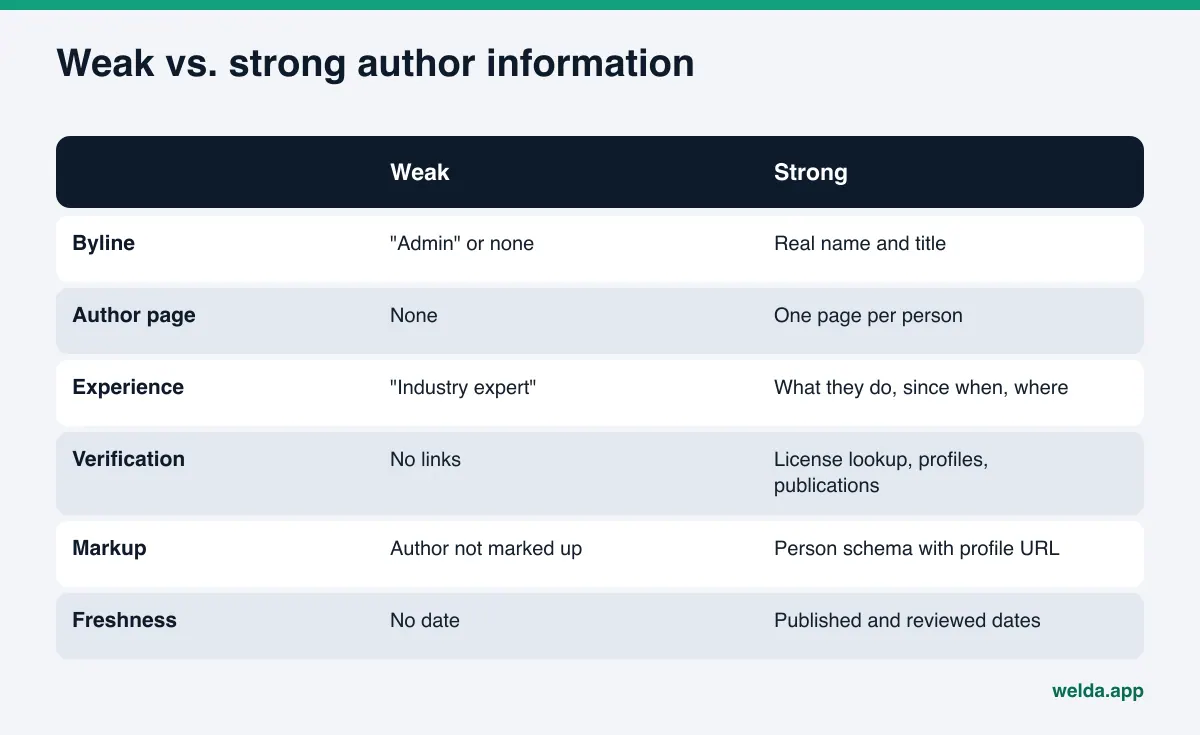
Content pages need a few small signals too. Each post should show the author's name with a link to the author page. On health, legal, or money topics, if the writer and the reviewer are different people, name both. Show the published date and the last reviewed date; an expert opinion with no date is an opinion of unknown age. We cover that side in our guide to content freshness for AI search.
How to set up author bios and expertise signals for AI, step by step
Order matters here. Many businesses install an author box plugin first and then wonder what to put in it. The better order is the reverse: gather real facts, write the page, and add the markup last.
- List who creates and who reviews each page. For every service page, blog post, and FAQ section, name one responsible person. If an agency or freelance writer drafted the content, name the expert who approved the facts.
- Collect verifiable facts. Title, training, license numbers, certifications, years in the field. Skip anything you cannot back up with a document.
- Write the author or team page. Use the list above. Keep it short; clarity beats length.
- Connect bylines to content. Every page gets the author's name, a link to the author page, and dates. Add bylines to older posts too; bylines on new posts only look inconsistent.
- Add structured data. Covered in the next section.
- Align external profiles. Make the person's name and title match across your site, Google Business Profile, license lookups, and directories such as Yelp, Healthgrades, or Angi where they apply.
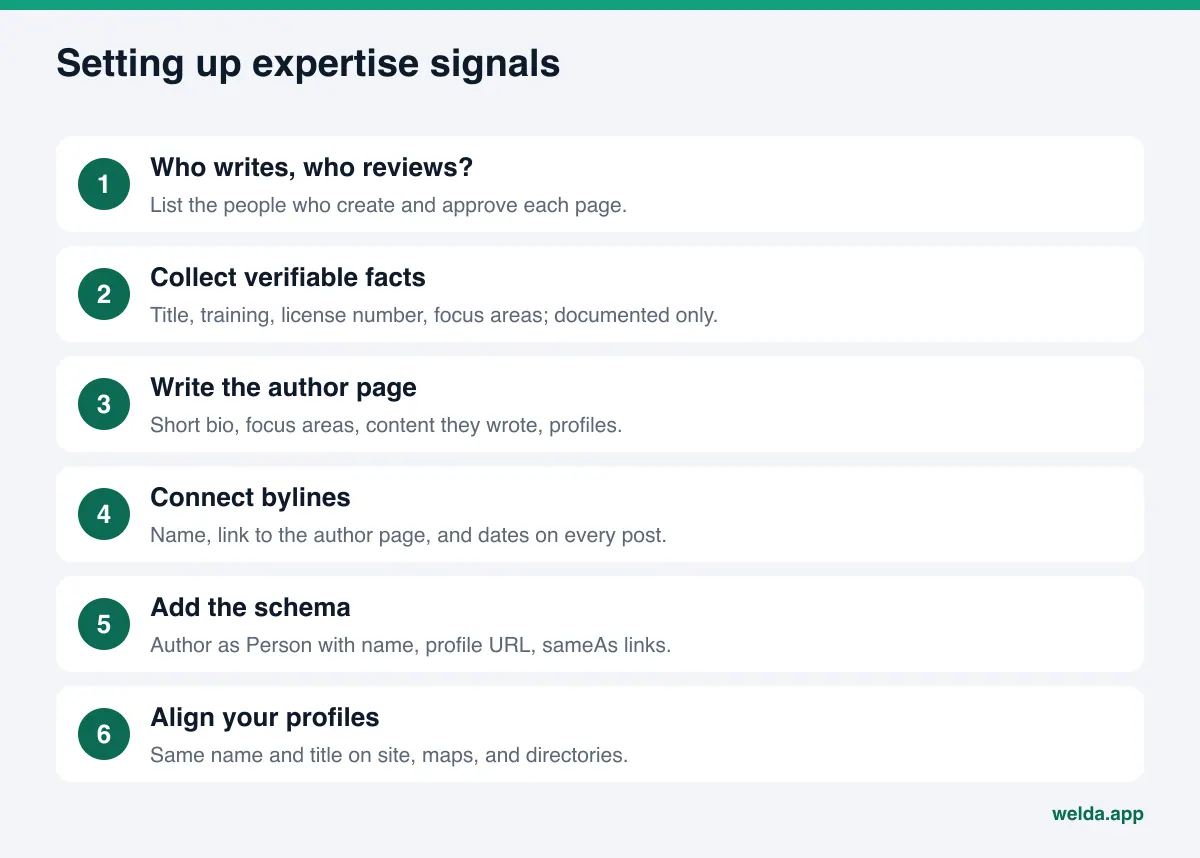
The last step is the one most often skipped, and it is one of the most important for AI visibility. An answer engine does not learn about a person from one page; it pieces the picture together from many sources. If your site says "Dr. J. Smith," a directory says "Jennifer Smith, DDS," and your map listing only shows the practice name, it is harder to tell that these are the same person. Our guide on how to link social profiles with sameAs walks through connecting those profiles to your site.
How to mark up authors and experts in schema
Structured data repeats what is on the page in a form machines can read with certainty. For authors and experts, the basic structure is an Article or BlogPosting on the content page, with an author property holding a Person.
Google's Article structured data documentation sets out a few clear rules. Put only the person's name in author.name; titles, the company name, and words like "posted by" do not belong there, and titles go in jobTitle or honorificPrefix instead. Use Person for people and Organization for organizations. author.url should point to a page that uniquely identifies the author, usually your author page, while sameAs lists their profiles elsewhere. With several authors, give each one a separate author entry rather than merging names into one field, and include every person shown as an author on the page.
For a typical service business, this structure is enough:
| Page | Schema type | Key properties |
|---|---|---|
| Home, contact | Local business type (e.g. Dentist, Electrician) | Name, address, phone, sameAs profiles |
| Team or author page | ProfilePage with a Person | name, jobTitle, worksFor, sameAs |
| Blog post | BlogPosting | author (Person with url), datePublished, dateModified |
| FAQ section | Type that fits the page | The expert's name visible in the text as well |
Markup should never claim something the page does not show. Marking up a "board-certified specialist" who appears nowhere on the page, or adding an author to the code who is not in the byline, creates confusion instead of clarity. The rule is simple: what readers see and what the code says should match.
Example: a contractor's team page, before and after
To make this concrete, picture an example electrical contractor. It is not a real company, just a simplified version of a pattern that shows up on many small business sites. Two electricians run the jobs, and the site has a services page and a few how-to posts. The About page says:
Our team of highly experienced, industry-leading electricians delivers the best service in the area. With state-of-the-art tools and a customer-first attitude, we are here for all your electrical needs.
There is nothing in that text an answer engine can use. How many electricians, what their names are, what kind of work they focus on, how long they have done it: none of it is there. "Best service in the area" is a superiority claim nobody can verify. The how-to posts are signed "Admin."
Once the facts come from the business, a revised version could read:
Two licensed electricians lead every job. [Name] holds a [state] master electrician license (No. [number]) and has focused on rewiring older homes since [year], including knob-and-tube replacement and panel upgrades. [Name] holds a journeyman license and handles EV charger and generator installs. Both licenses can be checked on the [state] licensing board's lookup.
The brackets are left empty on purpose: those details are never filled in until the business supplies them. The revised text does not praise; it informs. When someone asks which electrician has experience rewiring older homes, an answer engine now has a person, a type of job, and a way to verify both. Add that electrician's byline and author link to the rewiring post, and the content and the expert are connected too.
The same logic applies to FAQ answers. Naming who answered "Do I need a permit to replace my panel?" shows there is a professional behind the answer. Our guide to FAQ pages for AEO covers how to structure that section.
Expertise signals beyond your own website
AI answers do not rely only on your site. They also read what other sources say about the person and the business: Google Business Profile, reviews on Google, Yelp, or Tripadvisor, BBB listings, state license lookups, professional directories such as Healthgrades for clinicians, and local news. When the person's name appears in those places and matches your site, the expertise signal gets stronger.
Two things help here. First, reviews that mention your expert by name: a customer writing "Mike explained every step of the rewire" shows that this person really works with you. We cover collecting and replying to reviews in reviews and AI recommendations. Fake reviews or scripted name-dropping are not part of this work. Second, knowing which sources answer engines lean on: if your expert does not appear in the directory where a competitor shows up, that is where the gap is. Our citation gap analysis guide explains how to find it.
One more point on rules. If you present someone as an expert in your marketing, the FTC's Endorsement Guides set a clear standard: under 16 CFR 255.3, an endorser presented as an expert must actually have the expertise the ad implies, and their endorsement must rest on a real exercise of that expertise. Licensed professions also have their own advertising rules set by state boards and bar associations. Check what applies to your field; this article is not legal advice.
How Welda handles expertise signals
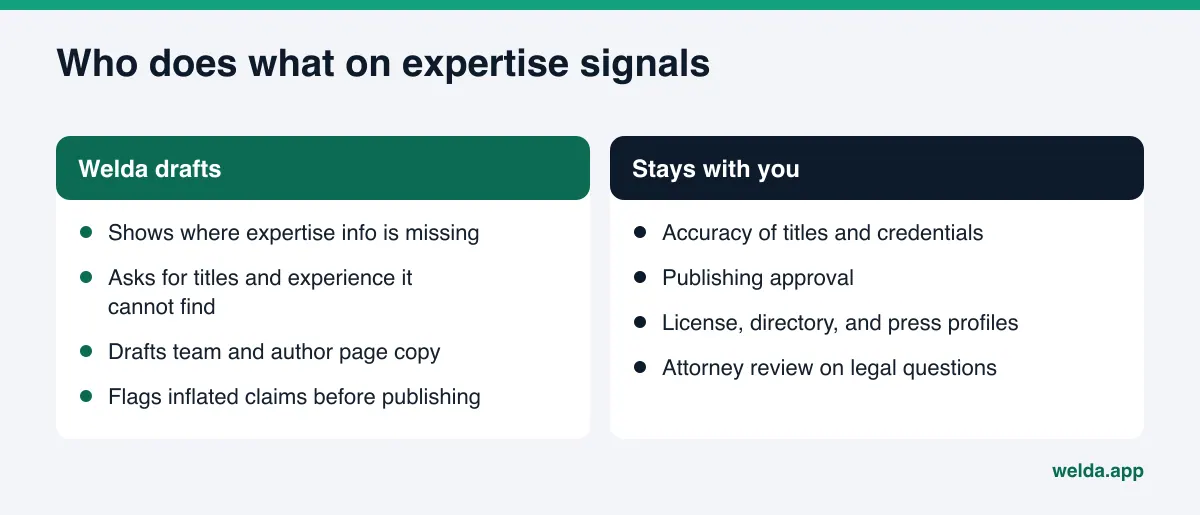
Welda is software that measures where your business shows up in AI answers and fills the gaps on your behalf. For author bios and expertise signals, three parts of it matter most.
Asking instead of guessing. The biggest risk with expertise signals is invention. A content tool that gives a dentist a specialty they do not have, or a tradesperson a license they never earned, creates a problem that is hard to undo. Welda's to-do list has a section for information it needs from you: anything it cannot read on your site is left blank and asked for, never filled in with a guess. Once you enter a fact such as the owner's name and background, it is applied to every draft that needs it. Blank fields stay flagged in the preview so nothing incomplete goes live by accident.
Drafting the copy and the markup. With the facts in hand, Welda drafts the team or author page, the bylines, and the structured data. On WordPress, Welda connects through its own Editor user and an application password, with no code to install; the page opens on your site as a draft and goes live when you approve it. On other systems, Welda hands you a ready package and the changes are applied by hand. License lookups, directory listings, and LinkedIn are places Welda cannot post to, so they appear on the to-do list as manual tasks with the text already written.
Flagging claims before they publish. Bios attract praise. Welda's compliance check flags patterns such as "best," "only," and guaranteed results, plus diagnostic suggestions in health content, before anything goes live. It is a warning layer, not legal advice, and it has not been reviewed by an attorney. In healthcare there is no automatic publishing; every piece of content comes to you for approval, and patient data is never sent to an AI model.
On the measurement side, Welda asks the questions your customers are likely to ask, such as "who is experienced with" or "which provider," in ChatGPT, Gemini, Perplexity, and Google AI, three times each, and shows whether your name comes up and which source a competitor wins from.
Where things stand today: the free analysis works in English, German, and Turkish, and anyone can use it now. The full Welda dashboard is in early access and is opening first in Turkey. Regular four-engine tracking is being added during early access, and the dashboard screens you may see use representative data. Pricing is discussed in the early access conversation.
Limits: what Welda does not do
Building expertise signals is not the same as creating expertise. So the limits are worth stating plainly:
- Welda does not guess a title, a license, or years of experience. If it does not know, it asks; if no answer comes, the field stays empty.
- Adding an author page does not guarantee a mention in AI answers. Welda does not guarantee rankings or "showing up in ChatGPT."
- It does not create fake reviews, fake authors, or expert profiles for people who do not exist.
- License records, directory accounts, press outreach, and handling negative reviews stay with the business.
- It does not publish sensitive content without your approval. Content always lives on your own site; Welda does not host it.
- A new author page or updated bio usually takes weeks to show up in AI answers.
The free analysis has its own limit: it reads your business schema, trust signals, About page, and service pages, but it does not score each author separately and it does not measure rankings. Missing expertise information usually shows up under trust signals and business information.
Checklist: are your expertise signals ready?
Before working on author bios and expertise signals for AI, run your site through the questions below. Every "no" is a task.
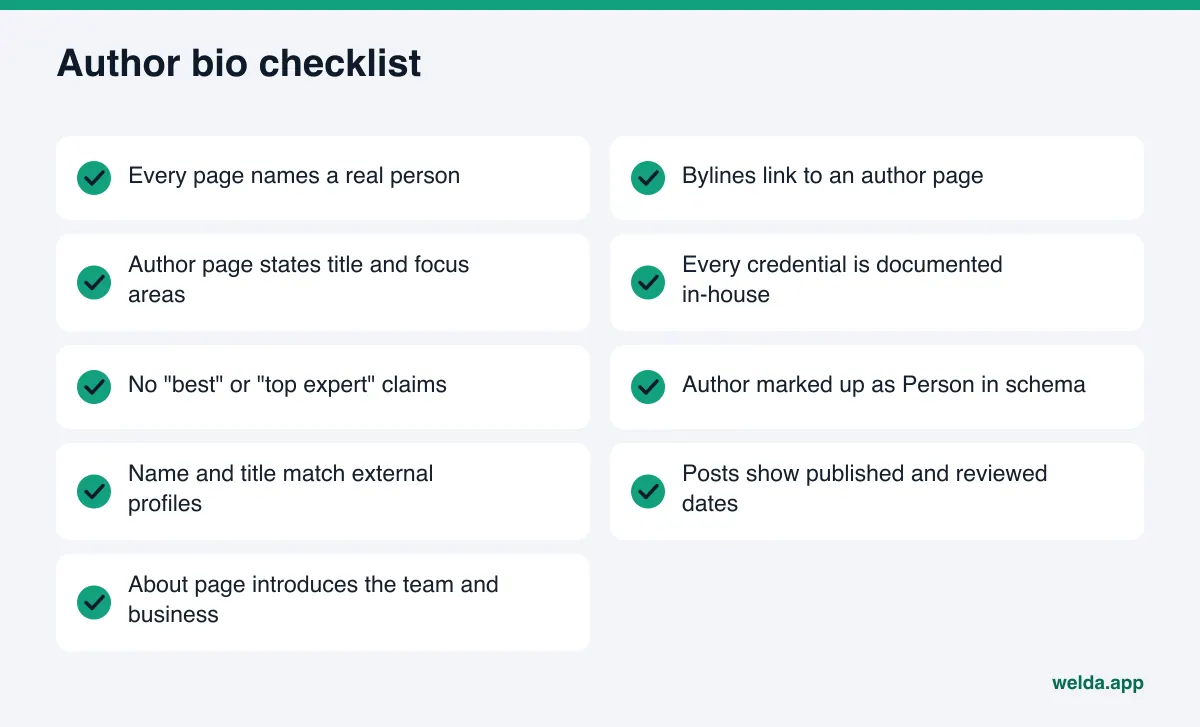
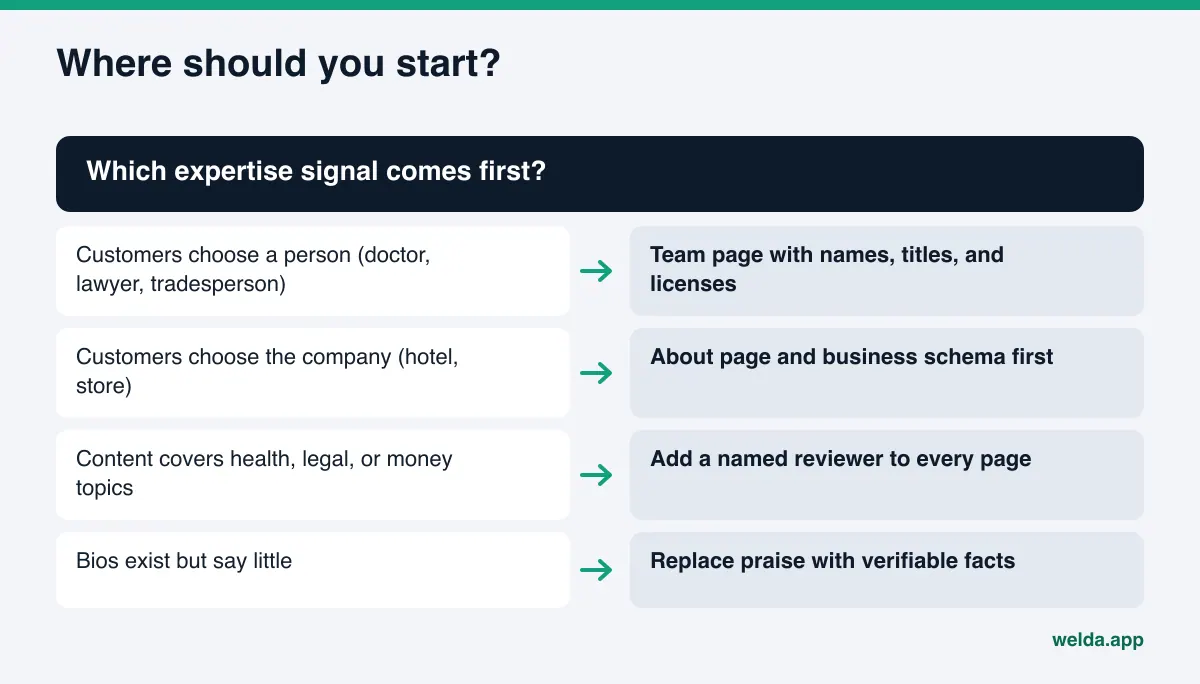
To set priorities, use a simple test. If customers choose you because they trust a person, such as a doctor, attorney, tradesperson, or chef, start with the team and author pages. If they choose the company, as with a hotel or a store, tighten the About page and business information first and add people later. If your content covers sensitive topics, naming a reviewer on every page comes first. For a broader starting order, follow the sequence in our AEO audit guide.
Frequently asked questions
Will adding an author box improve my rankings?
Not by itself. Google states that E-E-A-T is not a specific ranking factor. Author information makes it clear who owns the content and why it is credible; the effect is indirect and never guaranteed.
I run a small business and do not blog. Do I still need author pages?
A separate author page is optional. But introducing the person customers trust, with name, title, and experience on your About or team page, gives answer engines something to work with on expertise questions.
Whose name goes on content an agency wrote?
The expert who approved the facts. If the writer and reviewer are different people, you can name both. Putting an expert's name on content they never read is misleading.
How should I mark up an author in schema?
Use the Person type with only the name in name, the title in jobTitle, the author page in url, and external profiles in sameAs. The markup should match what is visible on the page.
Will Welda write my expert's bio for me?
Welda drafts the text, but the facts come from you. If it cannot find a title, license, or experience detail on your site, it asks on the to-do list instead of inventing it. Publishing approval stays with you.
How long until an updated bio shows up in AI answers?
Usually weeks, and it varies by engine. Asking the same expertise questions again on a regular schedule is the most reliable way to see the effect.
To see where your site's expertise and trust signals stand today, start the free AI visibility analysis. It is free once per site; the results link arrives by email and stays open for 14 days.