Do customer reviews affect AI recommendations? Yes, and more through what reviews say than through the star rating. AI assistants that search the web often read Google Business Profile, Yelp, Tripadvisor, BBB and industry directories before naming a business, and reviews are the richest text those pages hold. The link between reviews and AI recommendations comes down to review content, consistency across platforms and how you respond.
This guide explains how ChatGPT, Gemini, Perplexity and Google's AI features use review signals, what you can actually control, and which shortcuts break platform rules or federal law without helping your AEO (answer engine optimization). If you want a baseline first, the free site analysis checks the trust and review signals on your website, whether your map and social profiles are linked from it, and what to fix for each gap.
Reviews and AI recommendations: what is the actual problem?
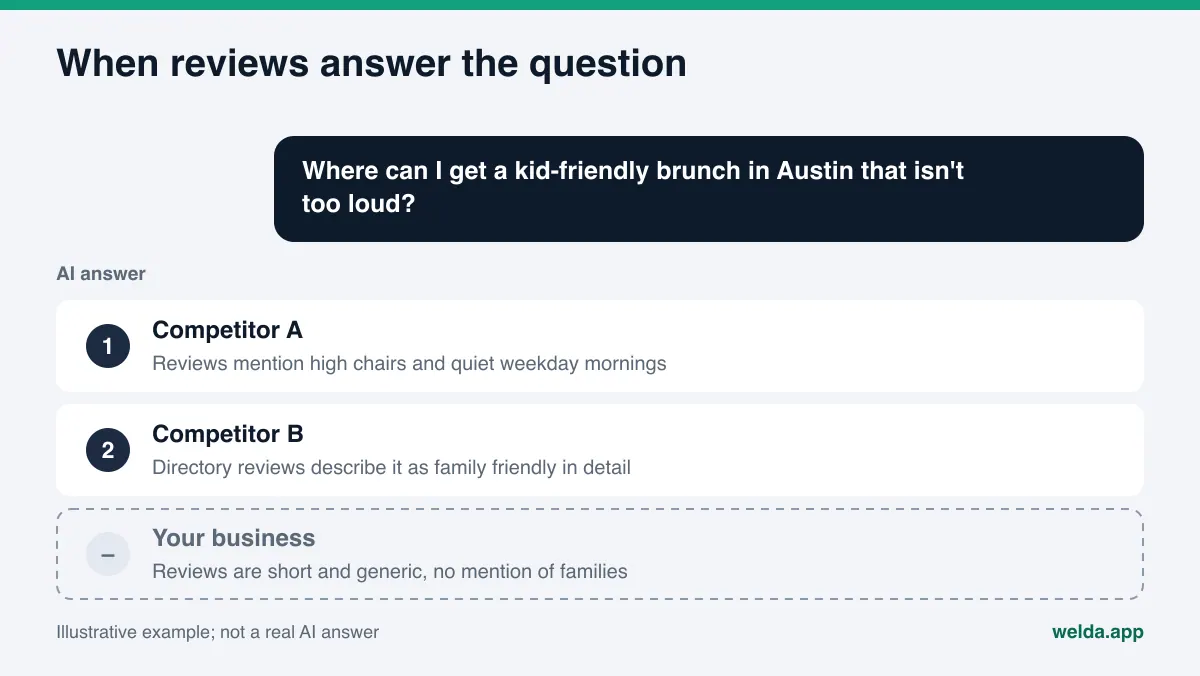
In a classic search, a customer scans ten results, compares stars and clicks a few. In an AI answer, they usually get one paragraph and two or three business names. When someone asks "Where can I get a kid-friendly brunch in Austin that isn't too loud?", the assistant has to have read those words somewhere. If your website does not say it, your customers' reviews might: "they brought a high chair right away", "quiet on weekday mornings", "easy street parking".
For an answer engine, reviews do two jobs:
- Description. Real customer language about what you do, who you serve and when you are a good fit. Your homepage says "quality service". A review says "they showed up inside the two-hour window and texted before arriving". Only the second one can answer a question.
- Corroboration. When several independent sources say similar things, it signals that the business exists and works the way it claims. Assistants tend to lean on what multiple sources agree on rather than on a single page.
Problems start when reviews are concentrated on one platform while other profiles sit empty or stale, when reviews are short and generic ("great, thanks"), when complaints go unanswered, or when your business name, address and phone number differ from one listing to the next. None of that lowers your average rating. It does make it harder for an AI system to connect you to a specific question.
A note on honesty: no AI company publishes how much weight it gives reviews when recommending a business. What we can see is which sources these assistants cite in their answers, and for local and service questions many of those sources are review-bearing profiles. Which ones matter in your category is something to measure, not guess. The industry name for this work also varies; you will see it called AI search visibility, AEO, or GEO (generative engine optimization), which is the same idea under a different label.
Which review sources do AI assistants read?
The mix depends on your category and city, but in the US the usual sources look like this:
| Source type | Examples | What it gives an AI system |
|---|---|---|
| Map and business profiles | Google Business Profile, Apple Business Connect | Rating, review text, hours, category, owner responses |
| General review platforms | Yelp, Tripadvisor | Detailed experiences, photos, recurring themes |
| Trust and complaint sites | BBB | Complaint history and whether the business resolved it |
| Vertical directories | Healthgrades for medical, Angi for home services | Service detail, specialties, category-specific reviews |
| Communities | Reddit threads, local forums | Unfiltered comparisons and how people talk about you |
| Your own site | Service pages, FAQ | Your own account; it reinforces trust when it matches the reviews |
Knowing which source dominates your category tells you where to put your effort. For a hotel, travel and booking sites may carry the most weight. For an HVAC contractor, Google Business Profile, Angi and BBB are more likely. When a competitor keeps showing up for your own brand name, the cause is often one of these sources; the guide on competitors showing up when AI is asked about your brand walks through that case.
How to prepare your reviews for AI recommendations, step by step
These steps take a week to start and months to sustain. None of them involve fake reviews, paid reviews or review gating. We cover why those fail, and what the FTC says about them, further down.
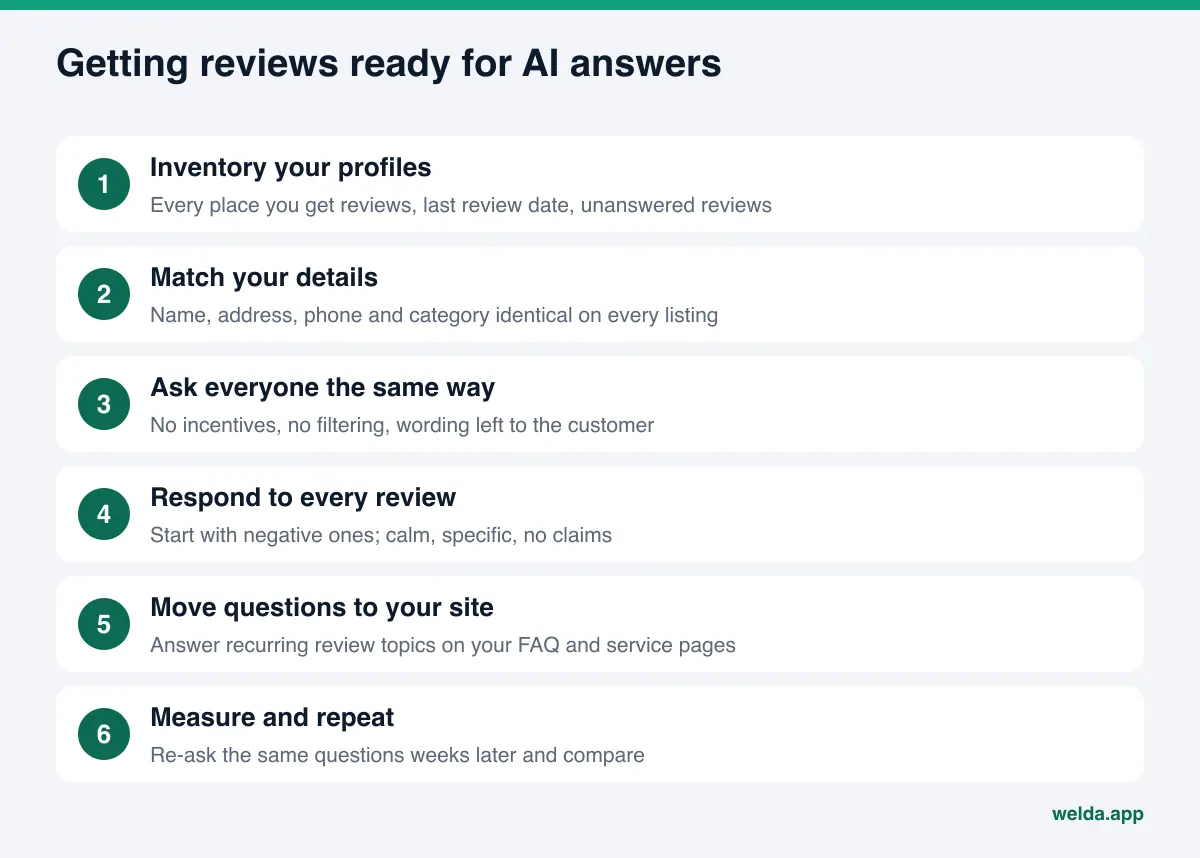
1. Inventory every profile
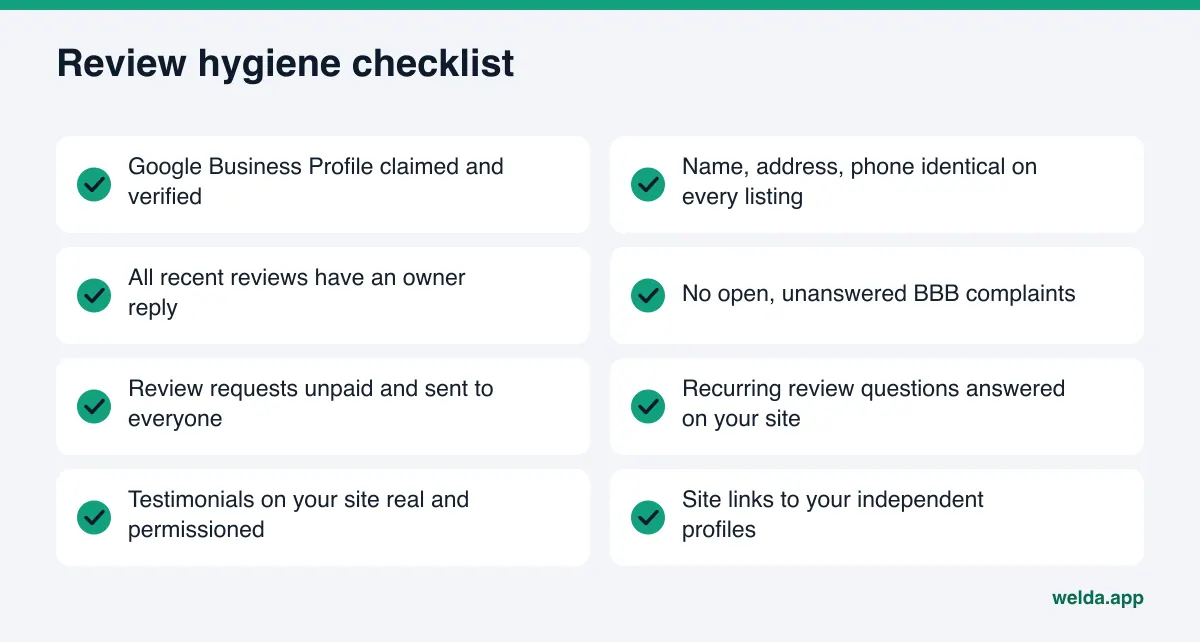
List every place your business can collect reviews: Google Business Profile, Yelp, BBB, your vertical directory, booking or ordering platforms, Facebook. For each, note four things. Is the profile claimed and verified? When did the last review arrive? Are there unanswered reviews? Do the name, address and phone match your website exactly? That table sets your priorities.
2. Make your business details identical everywhere
Reviews attach to a listing, and a listing attaches to a business. If one platform says "Example Plumbing", another says "Example Plumbing & Heating LLC" and your site shows a different phone number, an assistant may struggle to tell that all those reviews describe the same company. Pick one spelling for name, address, phone and primary category, use it everywhere, and link to your profiles from your site.
3. Ask real customers, the same way, every time
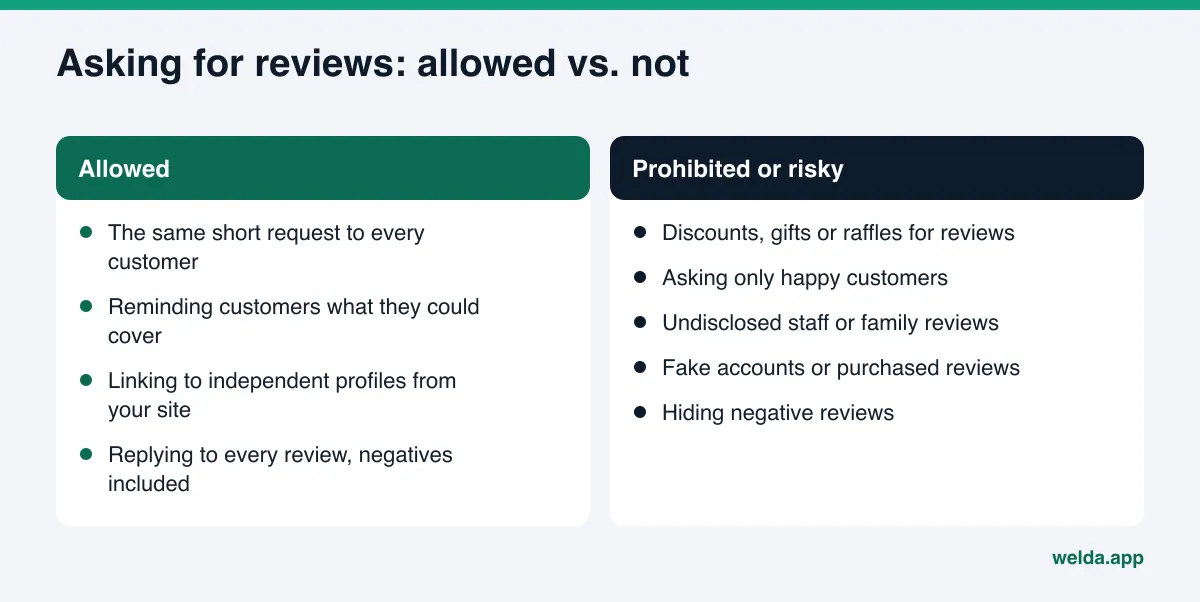
Asking for reviews is allowed on most platforms; how you ask matters. Send every customer the same short request after the job, and leave the decision and the wording to them. A message that routes happy customers to a review site and unhappy ones to a private form is review gating, and Google's policy prohibits selectively soliciting positive reviews. Offering a discount, gift card or raffle entry for a review falls under the same policy.
Platforms differ here. Some go further than Google and discourage businesses from soliciting reviews at all, so read each platform's business guidelines before you build a request into your workflow.
One thing that is fine and useful for answer engines: reminding customers what they could write about, without telling them what to say. "If you mention how scheduling went, how long you waited, or how the result held up, it helps other customers" invites detail without steering the verdict.
4. Respond to every review, negative ones first
Owner responses are part of the profile, and they are text an AI system can read. A good response acknowledges the issue, says concretely what happened or changed, and does not argue. A calm, specific reply under a negative review often says more than the review itself. Keep pricing promises, guarantees and "best in town" claims out of your responses; they cannot be verified and can create legal exposure.
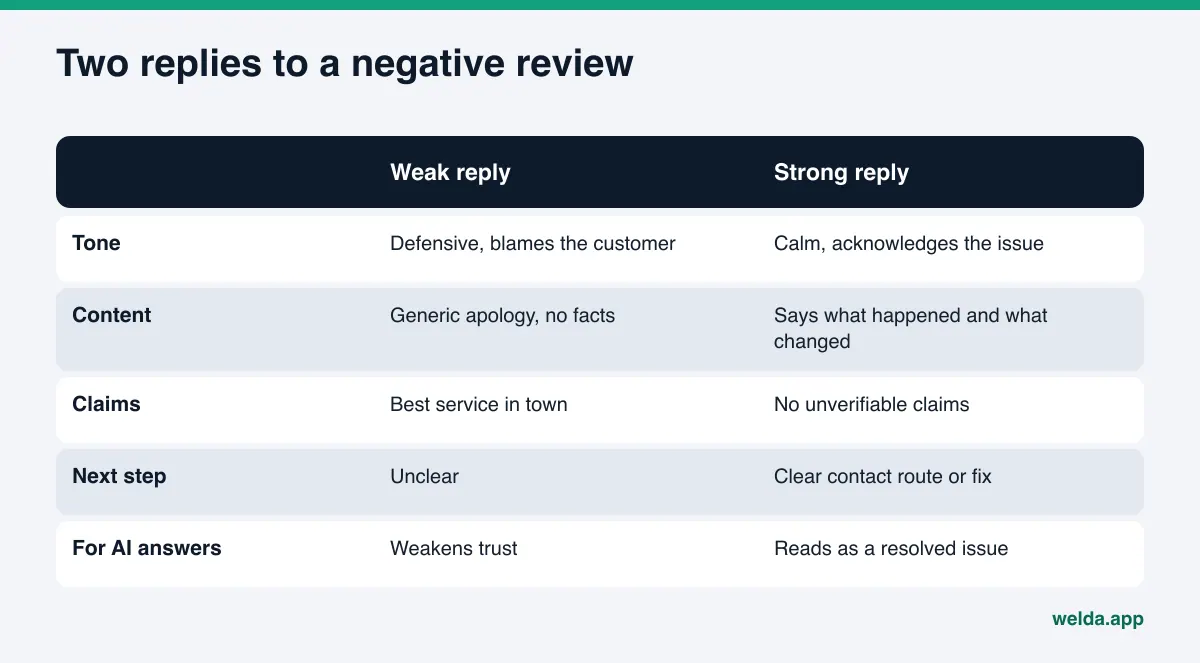
A concrete example. A customer writes about an example HVAC company: "Tech showed up two hours late and nobody called." A weak reply is "We're sorry for any inconvenience, we've been very busy." It carries no information and shifts the blame. A stronger reply looks like this:
Thanks for letting us know, and we're sorry. The job before yours ran long, but we should have called you. Our dispatcher now calls any customer when a tech will be more than 30 minutes late. If anything else came up during the visit, please call our office directly.
It names what happened, what changed and where to reach someone. The next customer, or an assistant summarizing your profile, reads that the problem was seen and handled. One rule: everything in a response must be true. If you did not change your process, do not say you did; an apology and a contact route are more honest.
Replies to positive reviews help too, as long as they are not copy-paste. Instead of "Thanks for the review", mention the service: "Glad the furnace tune-up went smoothly before the cold snap." That adds one more line of service information to your profile.
5. Bring review questions onto your website
Topics that repeat in reviews are the questions in customers' heads: "Do they do weekend appointments?", "Is there parking?", "Do they give written estimates?" Answer those on your FAQ and on the relevant service page. Then the same fact lives in your reviews and on your site, and each confirms the other. You do not need to quote reviews; take the question and answer it with your own facts. The guide on service pages AI can quote covers how to structure those pages.
6. Keep testimonials on your site honest
If your site has a testimonials section, every quote should come from a real customer who agreed to be quoted. Do not present a hand-picked handful as "what all our customers say". Linking to your independent profiles shows visitors and AI systems where the full set of reviews lives.
7. Measure, then repeat
Review work shows up over weeks. Record your starting point: which questions name you, and which competitor wins from which source. Ask the same questions again a few weeks later. You can do this by hand, but consistency is hard; you need the same wording each time and a record of every answer.
The rules on reviews: FTC and platform policies
This section is not legal advice. We summarize the rules and link to the sources; ask an attorney about your situation.
The FTC's Trade Regulation Rule on the Use of Consumer Reviews and Testimonials (16 CFR Part 465) took effect on October 21, 2024 (Federal Register text). Among other things, it prohibits creating, buying or selling fake reviews; offering incentives conditioned on a review expressing a particular sentiment; reviews by officers, managers, employees or relatives without clear disclosure of the relationship; company-controlled "independent" review sites; and certain forms of review suppression, such as hiding negative reviews while implying you show all of them.
Google's contribution policy is stricter on incentives: it prohibits offering payment, discounts or free goods in exchange for any review, discouraging negative reviews, and selectively soliciting positive ones, and it treats conflict-of-interest content such as employee reviews as fake engagement (Google fake engagement policy). Reviews that violate it can be removed.
For AEO the takeaway is simple. Rule-breaking tactics carry legal and platform risk, and they do not last. A removed review breaks the consistency you built, and templated praise carries no detail an assistant could use to answer a question anyway.
How Welda handles reviews and AI recommendations
Welda is software that measures where a business appears in AI answers and fills in the gaps on the business's behalf. For reviews, three parts matter most: a sources view that shows which review sites AI systems actually cite, a competitor view that shows where rivals win, and a task list that prepares review responses and profile copy for your approval.
The sources view: which review sites count?
In the dashboard, the questions your customers would ask are put to ChatGPT, Gemini, Perplexity and Google AI. The sources view lists the sites those answers cite, grouped by type: directories, booking sites, forums, social, your own site. Each row shows your status there (present, incomplete, unverified, missing) and the next action.
That turns "where should we ask for reviews?" from a guess into a decision. If, for an example boutique hotel, travel directories and booking sites dominate the citations while the hotel's profile on one of them is incomplete, the first job is to complete that profile and answer the reviews already there. If you are never mentioned in community threads, the view shows that too. Posting there from fake accounts is not an option.
Competitors: where does the rival win?
The competitor view shows, for the same questions, where a rival is ahead and which sources feed that. For reviews, this answers "why does Competitor A get recommended?" Maybe they have a deep set of detailed reviews on one directory. Maybe they are listed on a site where you have no profile at all. With that, you decide whether being on that source makes sense for you.
Tasks: review responses and profile copy
Welda drafts review responses and profile copy. Drafts land in a single task list; you read, edit if needed and approve. The publishing decision always stays with you. Google Business Profile, Instagram and Facebook can be connected; for anything without a connection, the task appears as a manual item with the copy ready to paste.
Before anything goes out, the compliance check flags patterns such as price promises, guarantees and superiority claims. It is not legal advice and has not been reviewed by counsel; its job is to make a risky sentence visible before it is published. Welda does not fill in facts it does not know. If it cannot tell how a complaint was resolved, it asks you.
The rest, briefly: the free site analysis reads your homepage and a few inner pages, checks review and trust signals, and also asks an AI assistant with web search 5 questions a customer might ask, then reports whether your business name appears. It is a one-time snapshot.
Where Welda stands today: the free analysis works in English and German. The full dashboard is in early access and is opening first in Turkey; regular four-engine measurement is being added during early access, and sample dashboard screens use representative data. Questions can be set in English or Turkish. Pricing is discussed in an early access conversation.
Limits: what Welda does not do with reviews
Reviews attract more shortcuts than any other part of AI visibility, so the limits are worth stating plainly:
- No fake reviews. Welda does not write or commission reviews, positive or negative, on any platform or from any account.
- No review collection or buying. Asking your customers for reviews is your job.
- No review removal. Flagging a review with a platform, handling the complaint and talking to the customer stay with you. Welda can draft the public response.
- No directory account setup on your behalf. Claiming and verifying listings belongs to the account owner. Welda prepares the profile copy.
- Nothing published without approval. Every response and profile text goes live only after you approve it.
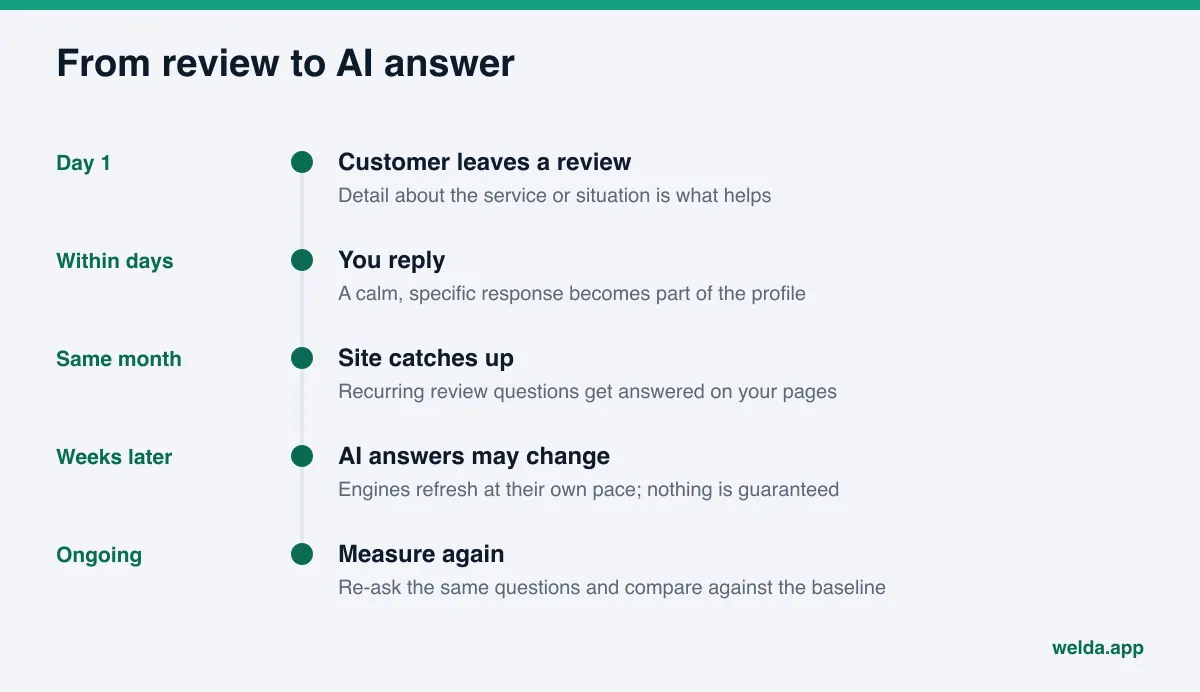
- No ranking or placement guarantee. New reviews and responses typically take weeks to show up in AI answers, and nobody can guarantee that they will.
These limits come from how the work functions. An assistant recommends you because it sees you in sources it trusts. Real customer voices in those sources cannot be faked; you can make sure they are in the right places, consistent and answered.
Decision checklist: where to start with reviews
Starting points differ. This table maps common situations to a first move.
| Your situation | First move | Why |
|---|---|---|
| No Google Business Profile, or it is unverified | Claim, verify and match details to your site | It is the base listing many reviews attach to |
| Plenty of reviews, zero responses | Answer recent reviews, negative ones first | Responses are read and signal trust |
| Reviews on one platform, others empty | Find the second source AI cites in your category | Single-source information is weak |
| Reviews are short and generic | Mention topics in your request, without steering | Detailed reviews can answer questions |
| A competitor is always recommended | Measure which source they win from | So effort goes where it counts |
| Open complaints on BBB | Answer each one calmly and specifically | A resolved issue reads far better than an open one |
For the wider list beyond reviews, see the AEO checklist. If the problem is negative mentions or wrong information in AI answers, AI reputation management goes deeper.
Example scenario: a dental practice gets its reviews in order
This is an example, not a real business. Picture an example dental practice in Denver. Its Google Business Profile has a reasonable number of reviews, mostly positive, none answered. Healthgrades shows a sparse profile. BBB lists two complaints, both without a response. The website has a "patient reviews" section with six short quotes and no source.
One question a patient might ask: "Dentist open Saturdays near Cherry Creek." The practice is open on Saturdays, but that appears only in the profile hours, not on the website or in any review. Competitor A has several reviews mentioning "got a Saturday appointment" and lists weekend hours on its site.
A sensible order: calm, specific replies to the two BBB complaints; responses to the Google reviews; completing the Healthgrades profile; a short FAQ on the site about Saturday hours and how booking works; finally, replacing unsourced quotes with links to the independent profiles. Healthcare adds one constraint: responses should not promise treatment outcomes or discuss a patient's care, which also raises privacy concerns. In Welda, healthcare content never publishes automatically; every item waits for approval, and patient data is not sent to the AI.
Frequently asked questions
Is review volume or review content more important for AI recommendations?
No one knows the exact weighting. What can answer a question is content: which service, which situation, which neighborhood. A smaller set of detailed, genuine reviews carries more usable information than a pile of one-word ratings.
Will deleting negative reviews help my AI visibility?
Trying to bury genuine negative reviews runs against platform policies, and the FTC rule covers certain forms of review suppression. A calm, specific public response works better. If a review truly violates a platform's rules, use that platform's reporting process.
Should I add my testimonials to schema markup?
Honest, permissioned testimonials come before markup. Structured data should describe what is visible on the page; marking up ratings or reviews that visitors cannot see is misleading. The fix pack in the free analysis includes business information markup; check that it matches what your page shows before you add it.
Is a small discount for a review allowed?
Google's policy prohibits discounts, payment or free goods in exchange for reviews, and such reviews can be removed. The FTC rule specifically targets incentives tied to a positive or negative sentiment. The safe path is an unpaid request sent to everyone the same way.
Does Welda send review requests to my customers?
No. Collecting reviews stays with the business. Welda shows which review sources AI systems cite and where you stand there, and drafts responses and profile copy for your approval.
How long until review work shows up in AI answers?
Usually weeks, and it varies by engine. That is why recording a baseline and re-asking the same questions at set intervals matters.
See where to start with your reviews
The connection between reviews and AI recommendations gets stronger through order, not shortcuts: consistent profiles, answered reviews and a website that answers the questions customers keep raising. To see which of these you are missing, run the free site analysis. It is free once per site and shows your on-site review and trust signals, how your profiles are linked, and whether your name came up in a five-question AI test, all in one report.