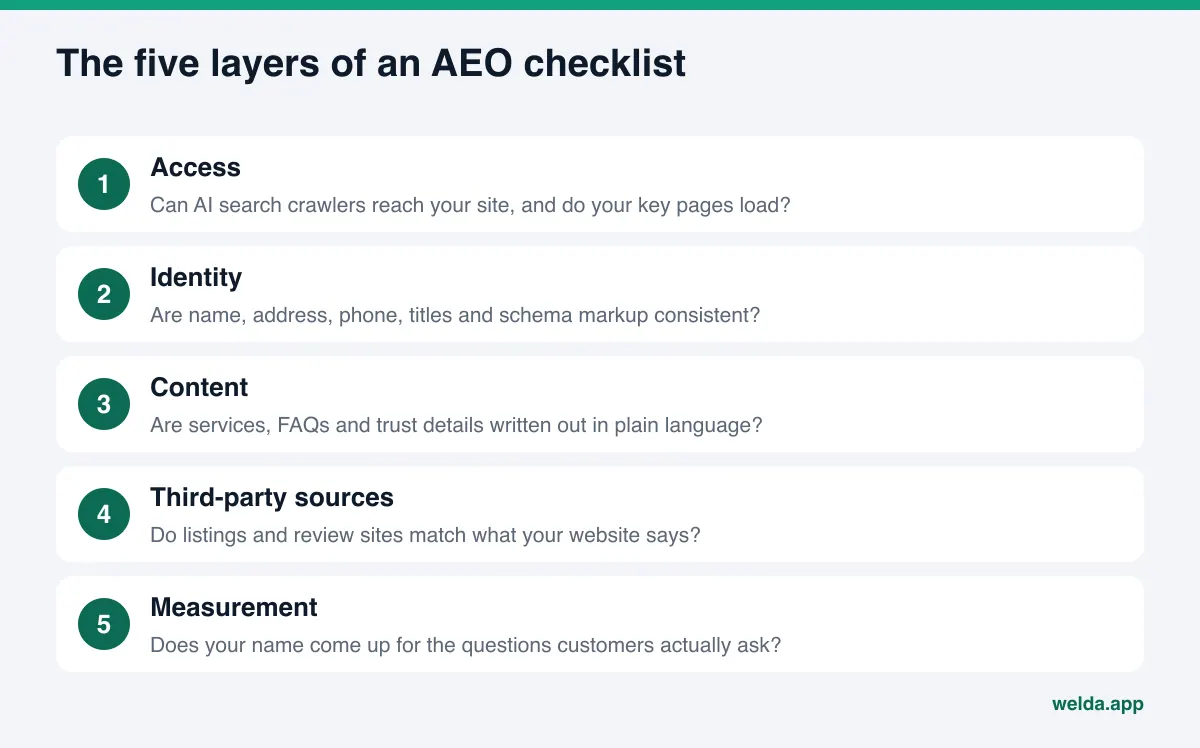
What is an AEO checklist, and why would a small business need one? An AEO checklist is an ordered list of what has to be in place on your website and your online listings before answer engines like ChatGPT, Gemini, Perplexity and Google's AI Overviews and AI Mode can recommend your business. It runs through five layers: access, identity, content, third-party sources and measurement. It does not guarantee anything. But without it, every fix you make is a guess.
Why an AEO checklist matters now
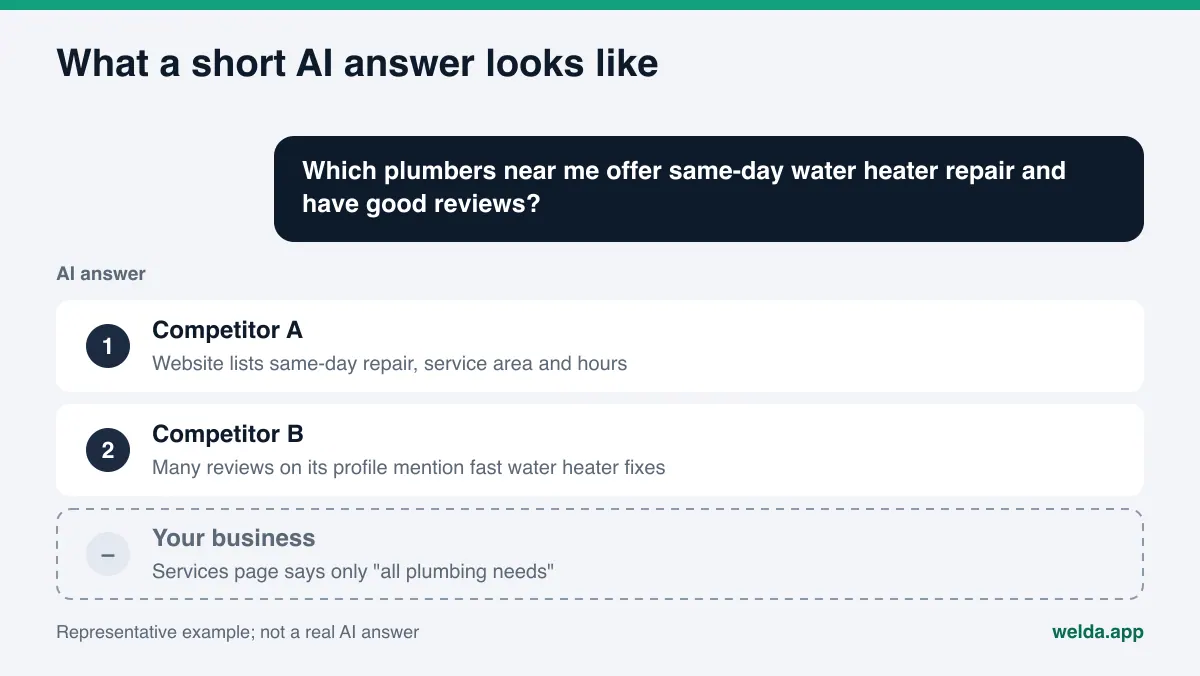
Customers no longer type "plumber Denver" and scroll. They ask full questions: "Which dentist near me is open Saturdays and takes new patients?" or "What's a quiet boutique hotel in Savannah that allows dogs?" The answer is not a page of ten blue links. It is two or three business names, each with a one-line reason. To write that reason, the AI model needs information it can read about you: the text on your site, your schema markup, your Google Business Profile, your Yelp page, your reviews.
The trouble is that this information lives in many places. When an owner asks "why doesn't ChatGPT mention us," the answer is rarely one thing. Somewhere a security plugin blocks a search crawler in robots.txt. Somewhere an old phone number is still on a directory listing. Somewhere the services page says "we handle all your needs" and nothing else. Each gap looks small. Together they leave the model unable to say anything confident about you, so it recommends the competitor that describes itself better.
That is why AEO (answer engine optimization, sometimes called GEO or generative engine optimization) works best as a checklist. Each item is simple on its own. The hard part is not skipping any and picking the right one to start with. The checklist below goes layer by layer: what to look at, how to check it, and when to move on.
If you want to see where your site stands before reading on, the free website analysis checks most of the first three layers in a few minutes. It reads your site the way Google and AI systems do and, for each gap, explains what it found, why it matters and how to fix it. The analysis runs in English. If you prefer to work through the list by hand, the sections below cover the same ground.
How to use this AEO checklist
Read the list top to bottom, but fix it bottom to top. The bottom layer is access. If an AI search crawler cannot reach your site, even a perfect services page goes unread. Once access is fine, move to identity; once identity is fine, move to content. Third-party sources and measurement come last, because you cannot align outside listings with your site until the site itself is right.
Before you start, gather three things:
- A spreadsheet or sheet of paper with three columns for each item: "done," "missing," "not sure."
- The URLs of your homepage, services, pricing, about and contact pages. AI systems lean on these pages most.
- Five to ten questions customers actually ask you, on the phone, by text or at the counter. You will use them in the content layer and again in the measurement layer.
The "not sure" column matters. If you do not know whether your site has schema markup, mark it missing and go check. The list is only as useful as your honesty when you fill it in.
Layer 1: Can AI crawlers reach your site?
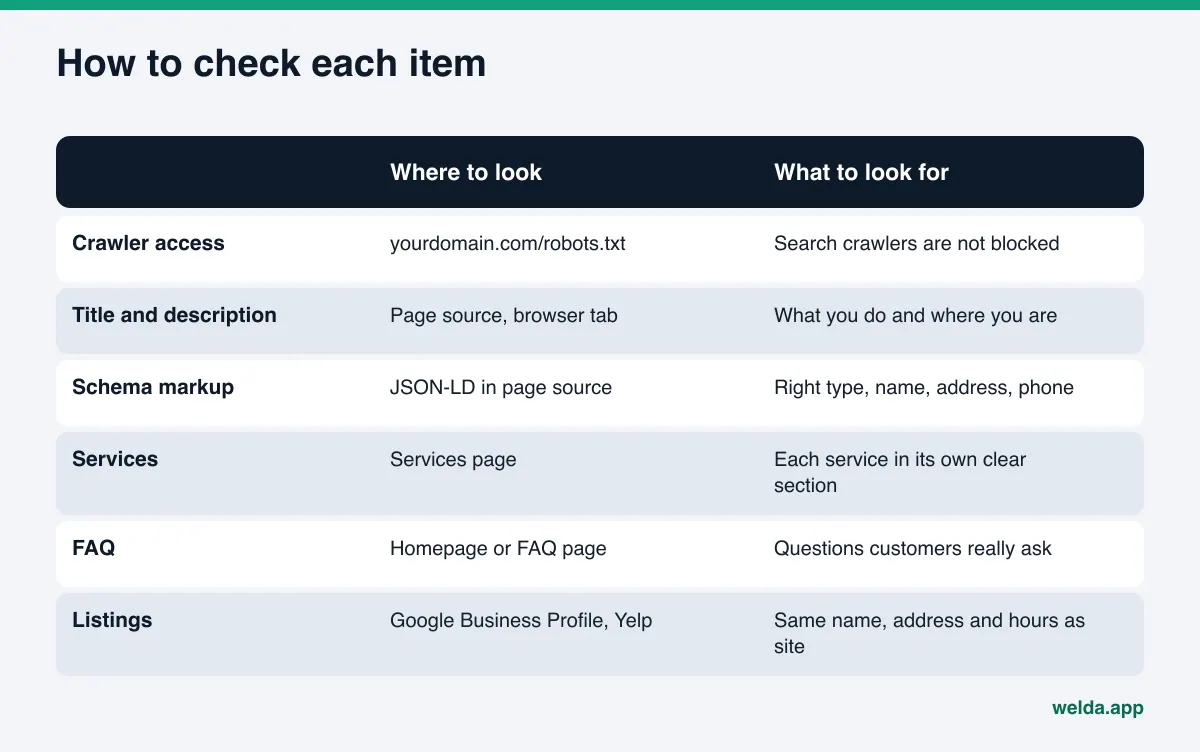
The first item sounds technical, but it is easy to check. Open yourdomain.com/robots.txt in a browser. That file tells crawlers which parts of your site they may visit. Some themes, security plugins or settings left behind by a previous web developer block AI crawlers wholesale.
It helps to know that some crawlers fetch pages for search answers and others collect data for model training. According to OpenAI's crawler documentation, OAI-SearchBot indexes sites for ChatGPT's search features, and sites that opt out of it will not be shown in ChatGPT search answers, while GPTBot is used for training. Perplexity says PerplexityBot is used to surface and link websites in its search results. On Google's side, the Google-Extended token governs whether content may be used to train Gemini models, and Google's crawler documentation states it does not affect inclusion or ranking in Google Search.
So the decision looks like this: you can block training crawlers if you do not want your content used for training, but if you block search crawlers you close the door on that engine's answers yourself. The checklist item is simply "are search crawlers allowed?"
Other items in this layer:
- Do key pages load without a wall? Services and contact pages should not sit behind a login or a blocking pop-up.
- Is the text actually on the page? If your services are listed only inside an image or a PDF menu, they are harder to read. Key facts belong in plain HTML text.
- Is page speed reasonable? Very slow pages tire out both visitors and crawlers.
- Is the page indexed by Google? Google's page on AI features says a page must be indexed and eligible to show with a snippet to appear in AI Overviews or AI Mode, and that no extra AI text files or special markup are required.
If you want to confirm that AI crawlers are actually visiting, we explain how in our guide to log file analysis for AI bots.
Layer 2: Is your business identity consistent everywhere?
Before an AI model recommends a business, it wants to know what the business is and where it operates. The items in this layer are the places where your site introduces itself.
- Page title: The text in the browser tab. If it says "Home" or only your brand name, it is incomplete. It should briefly say what you do and where.
- Meta description: The two lines under your title in search results. Plain language, service and location.
- Main heading (H1): The largest heading on the page. "Welcome to our website" is not a main heading.
- Schema markup (JSON-LD): Code in the page source that states your business type, name, address, phone and hours in a machine-readable way. Google says no special schema is needed for its AI features, but keeping structured data consistent with the visible text is still recommended, and it puts your core facts in one clear place.
- Name, address, phone: These should match on your site, Google Business Profile, Apple Maps, Yelp, BBB and your industry directories. "St." versus "Street" is fine. An old phone number or a pre-move address is not.
- Linked profiles: Link your map and social profiles from your site so it is obvious they belong to the same business.
The most common mistake in this layer is a homepage that sells a mood instead of describing a business. There is a tagline and a hero photo, but no sentence saying who you are, what you do and which area you serve. AI models do not quote taglines; they look for the sentence that describes you. Writing homepage copy for AI search is often the single most useful fix in this layer.
Layer 3: Does your content answer the customer's question?
With identity in place, the next question is what reasons the model can give for recommending you. Customers ask about details: "open late," "good with kids," "same-day service," "accepts my insurance." If those details are not on your site, the model cannot say them about you.
Items in the content layer:
- Are services clearly written out? Each service with its own heading and a few plain sentences: what it is, who it is for, how long it takes, where it is offered.
- Is there an FAQ? Questions customers really ask, with short, direct answers. Not invented questions written only to sell.
- Does the first paragraph describe the business? Read on its own, your homepage intro should tell a stranger what you do.
- Are trust signals visible? Links to reviews, licenses and certifications, years in business: facts that can be checked.
- How is pricing explained? You do not have to list numbers, but explaining what drives price helps more than "best prices in town."
- Have you removed overclaims? "Best," "guaranteed," "100% results" erode trust, and in some industries they can run into advertising rules.
One trap here is adding new file types or hidden text in the hope of feeding AI models. Google says plainly that no new machine-readable files are needed for its AI features. The bigger gain comes from writing the visible page so it answers the customer's question.
Layer 4: What do third-party sources say about you?
AI systems do not read only your website. They look at other sites too, and often cite them as sources. For local businesses in the US, those sources tend to be Google Business Profile and Google Maps, Yelp, the Better Business Bureau, Apple Maps, and industry directories: Healthgrades for medical practices, Angi for home services, Tripadvisor for hotels and restaurants.
Items in this layer:
- Your Google Business Profile is claimed, the category is right, and hours are current.
- You are listed on the main directories for your industry, and the details match your site.
- Complaints on review sites have calm, specific replies.
- Reviews get regular responses; negative reviews are not hidden or suppressed.
- Review requests go only to real customers. No fake reviews.
That last point is not only about ethics. The FTC's rule on consumer reviews and testimonials, published in August 2024, covers fake reviews, including AI-generated ones, and review suppression. This is not legal advice; check the current rule or ask counsel if you are unsure.
Consider an example scenario: an example boutique hotel says "pets welcome" on its own site, but an old listing on a travel site still says "no pets." When a customer asks for a dog-friendly hotel, the model sees two conflicting facts. Often the safest move for the model is to leave that hotel out entirely. This layer of the checklist exists to find exactly those conflicts.
Most of these items are not things software can do for you. You own the profile account, your customers write the reviews, and you reply to complaints. A tool can prepare the text and show which source has a gap, but posting and verifying stay with the business.
Layer 5: Is the checklist done if you never measure?
The first four layers are preparation. The fifth shows whether that preparation reaches the answers. The final item on the AEO checklist answers one question: does your name come up for the questions customers will ask?
To measure by hand:
- Fix five to ten customer questions. Ask them with the same wording every time.
- Ask each question in several engines: ChatGPT, Gemini, Perplexity and Google's AI Mode.
- Ask the same question in the same engine more than once. AI answers vary between runs, so a single try can mislead.
- For each answer, note whether you are named, in what position, and which competitors appear.
- Repeat every few weeks. New content usually takes weeks to show up in AI answers.
This works, but it is tedious. Ten questions, four engines and three runs is 120 answers per round. For a one-off look, free tools can help; we compared what they cover in our roundup of free AEO tools.
Which item on the AEO checklist should you fix first?
The first time you run the checklist, expect several gaps. Rather than tackling all of them at once, weigh impact against effort. The table below gives a general order; your site may differ.
| Item | Layer | Effort | Why early? |
|---|---|---|---|
| Unblock AI search crawlers | Access | Low | If blocked, nothing else gets read |
| Align name, address, phone | Identity | Low | Conflicting facts lower confidence |
| Rewrite page title and H1 | Identity | Low | First place the site says what it is |
| Add LocalBusiness schema | Identity | Medium | Puts core facts in one consistent place |
| Write out each service | Content | Medium | The model's reasons come from here |
| Add an FAQ | Content | Medium | Answers customer questions directly |
| Update listings and directories | Third-party | Medium to high | These are the sources models cite |
| Set up regular measurement | Measurement | Ongoing | Shows which fixes actually worked |
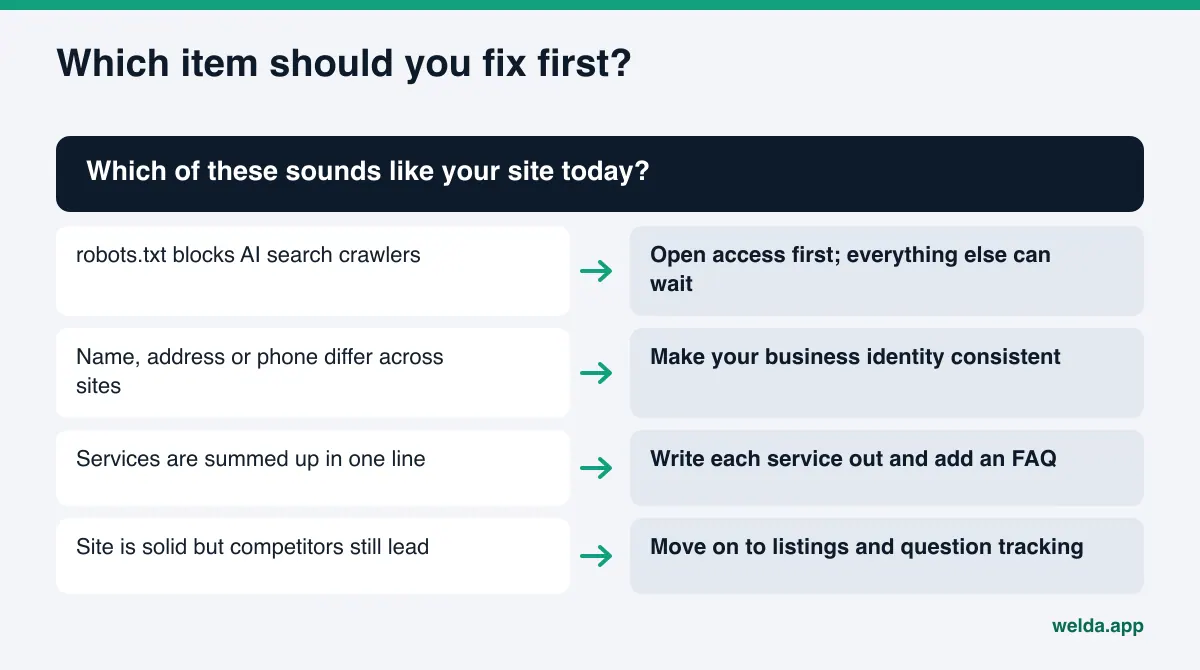
Do not try to finish everything in a month. Access and identity items can close within days. Content and listings stretch over weeks. If you want a calendar, our 90-day AEO plan breaks these checklist items into weekly tasks.
How Welda works through the AEO checklist
Welda is software that measures where a business shows up in AI answers and fills the gaps on the business's behalf. Since this article is about the checklist, we focus on two pieces: the free analysis, which checks the first three layers in one pass, and the to-do list, which turns unchecked items into tasks.
The free analysis: the first three layers in one report. The analysis reads your homepage and a few inner pages such as services, pricing, about and contact. It covers most of the access, identity and content items above: whether robots.txt lets AI crawlers in, page title and description, main heading, schema markup, address and phone, links to map and social profiles, FAQ, reviews and trust signals, how clearly services are described, and page speed. You get a score out of 100, with technical and content scored separately.
For checklist purposes, the most useful part is what comes with each gap: what was found, why it matters, and how to fix it. Next to a missing location in your page title, for example, you get a ready-to-use title suggestion for your homepage, along with suggested description, H1, intro paragraph and FAQ text. A simulation shows roughly how much each fix would move the score, which answers the "where do I start" question for your own site. The report also includes a competitor comparison and a fix package with ready schema code to add to your site, plus a PDF and a shareable score card.
The analysis also asks five likely customer questions to an AI assistant with web search and checks whether your business name appears in the answers. That is a one-time first look at layer five, not ongoing tracking. Each site gets one free analysis; email and phone are verified, and the results link arrives by email and stays open for 14 days.
The to-do list: every unchecked item gets an owner. In the Welda dashboard, open checklist items live in a single list split three ways. First, information needed from you: if Welda cannot read a fact from your site, it does not make one up; it asks, and what you enter flows into all prepared text. Second, items waiting for your approval, such as a services page, an FAQ or schema code. Content always lives on your own site, and you decide what gets published. On WordPress sites, Welda connects through its own Editor user and an application password, with no code to install, and content opens on your site as a draft. Third, manual tasks, such as a directory listing with no connection: the text comes ready, but posting and verifying belong to the account owner.
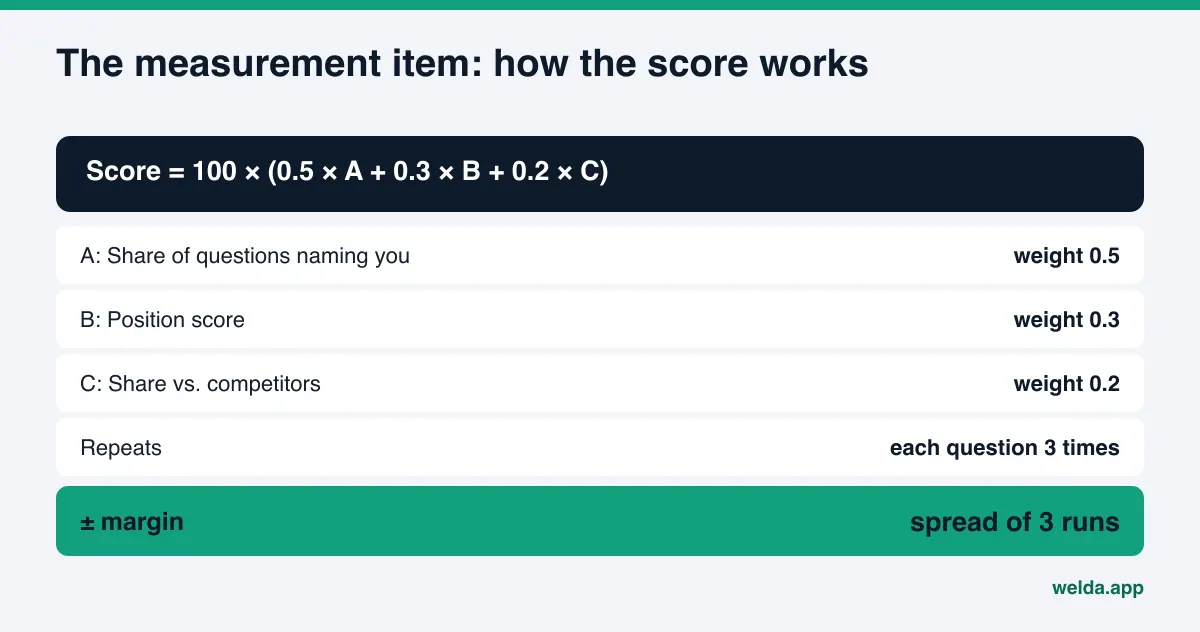
For layer five, the dashboard runs each question three times in ChatGPT, Gemini, Perplexity and Google AI, and computes the score with the open formula shown above, with a ± margin from the spread of the three runs. Competitor and source views show which third-party sources you are missing.
A clear note on availability: the free analysis works today in English and German. The full Welda dashboard is in early access and is opening first to businesses in Turkey. Regular four-engine tracking is being added during early access, and dashboard screens are shown with representative data. Pricing is discussed in an early access conversation.
Limits of the checklist, and what Welda does not do
A checklist is a disciplined way to find gaps. It does not guarantee results. A business that ticks every box may still be left out of some answers, because AI answers depend on competitors, on how a question is phrased and on which sources the engine leans on that day.
Welda is clear about what it does not do:
- It does not guarantee rankings or promise you will "show up in ChatGPT."
- It does not write facts it does not know; it asks the business.
- It does not publish sensitive content without approval. In healthcare there is no automatic publishing; every piece goes to approval.
- It does not create fake reviews.
- Handling negative reviews, opening directory accounts and press outreach stay with the business.
- The free analysis does not measure rankings; it checks whether your site is ready.
Timing is a limit too. Fixing an item today does not mean AI answers change tomorrow. New content usually takes weeks to be reflected. Re-measuring every few weeks is more realistic than waiting for an overnight change.
Finally, items carry different weight by industry. A dental practice has to think about advertising rules and patient privacy, a hotel about booking sites, an online store about product pages. This list is the shared core; add your industry's items on top.
The short AEO checklist to print
The ten items below summarize the five layers. Re-checking the same list every quarter helps you catch what breaks. After a site redesign, a theme change, a move or a new phone number, run it again right away; access and identity items break most often at those moments.
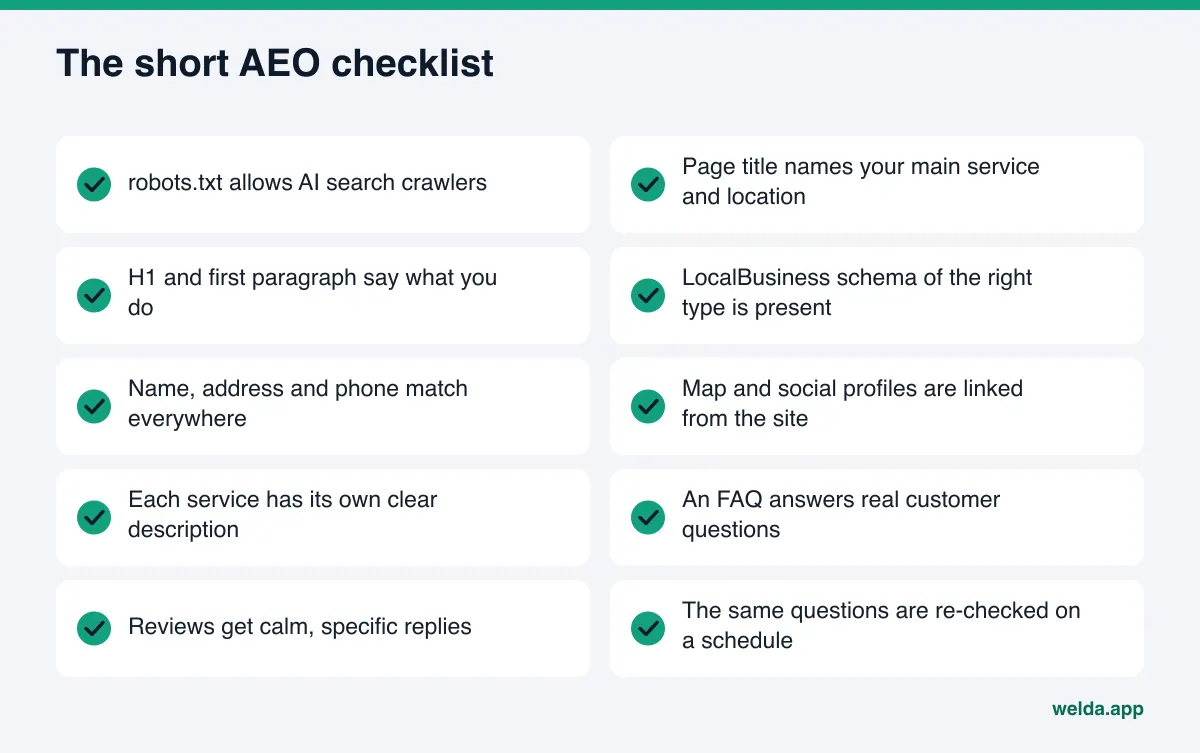
Should you run it yourself or use a tool? Most owners can work through access and identity in a few hours. Content and measurement need ongoing attention. We cover how to decide in our guide to an AI readiness checker for websites.
Frequently asked questions
How is an AEO checklist different from an SEO checklist?
Some items overlap: indexing, page titles, speed. The differences are AI crawler access, plain sentences that describe the business, consistency across third-party sources and question-based measurement. SEO looks at rankings; AEO looks at whether you are named in the answer.
How often should I run the checklist?
Quarterly is enough for the full list. Re-run it right after a redesign, a theme change, a move or a phone change. The measurement item should repeat every few weeks.
Do I need schema markup to appear in AI answers?
Google says no special structured data is required for its AI features. Even so, schema of the right type that matches your visible text puts your core facts in one clear place. It is worth keeping on the list.
Should I allow every AI crawler in robots.txt?
That is your call. You can block training crawlers while allowing search crawlers. What matters is not blocking search crawlers by accident.
If I check every box, will I show up in ChatGPT?
There is no guarantee. The checklist prepares the information a model needs to recommend you. Results still depend on competitors, the question and the engine's sources, which is why measurement is on the list.
How much of this list does the free analysis cover?
It checks most of the access, identity and content layers automatically and runs a one-time test with five questions. The contents of your outside listings and ongoing tracking are outside its scope.
Check the first three layers today
An AEO checklist turns AI visibility from guesswork into ordered tasks: access first, then identity, then content, followed by third-party sources and regular measurement. To see which items your site is missing right now, run the free website analysis. For every gap it explains what it found, why it matters and how to fix it, and the simulation shows which fix to start with.