What can free AEO tools actually tell you about your AI search visibility? Quite a lot about your starting point: whether AI crawlers can reach your site, whether your business information is readable, and whether your name shows up for a handful of questions today. The free options fall into three groups: asking AI assistants yourself, the free testing tools search engines provide, and Welda's free site analysis. What none of them give you is repeated, tracked measurement over time.
AEO, short for answer engine optimization, is the work of getting your business named when customers ask ChatGPT, Gemini, Perplexity or Google's AI Overviews for a recommendation. Some people call the same work GEO (generative engine optimization); in the US, AEO is the more common term, so that is what this guide uses. Before you spend anything on software or an agency, you can run a solid baseline with free AEO tools. This guide explains which free check answers which question, where each one stops, and how to turn the results into a single prioritized to-do list. If you want the fastest complete starting point, run a free AI visibility analysis of your site and keep the report open while you read.
What problem are free AEO tools solving?
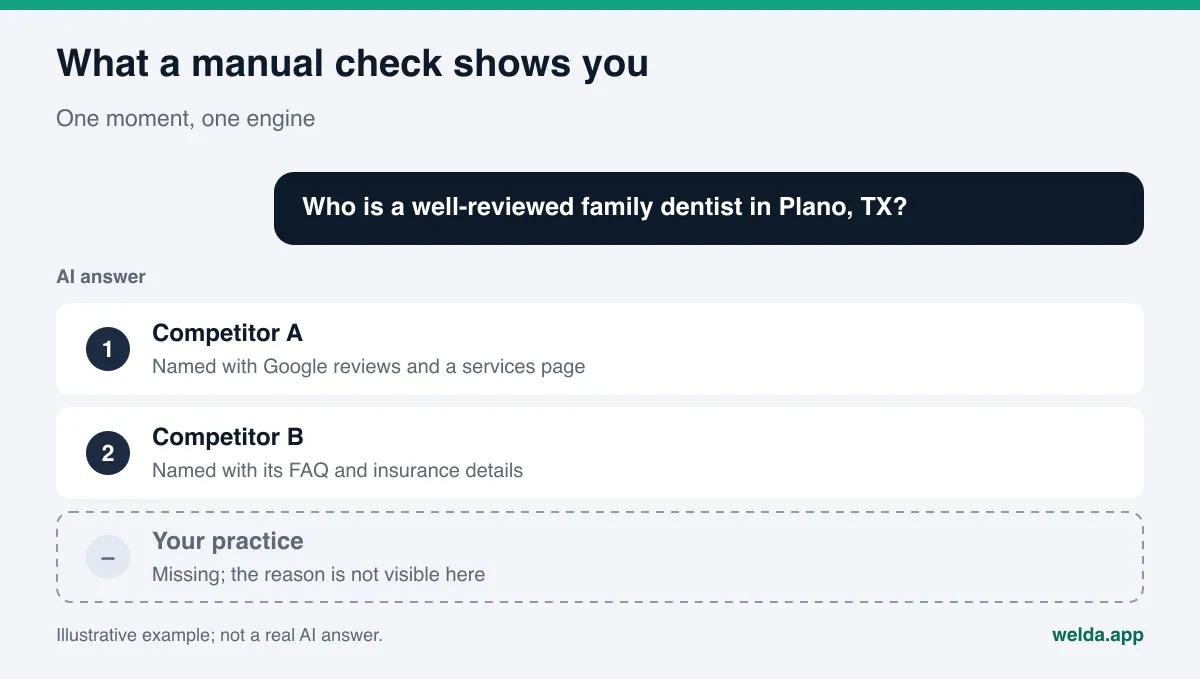
When a customer types "best family dentist in Plano" or "quiet boutique hotel near Savannah's historic district" into an AI assistant, the answer is usually a paragraph with two or three business names and a short reason for each. If your business is not in that paragraph, the customer may book a competitor without ever seeing your website, your Yelp page or your reviews.
The hard part is that this problem is invisible. In classic search, you can look up where you rank. In an AI answer there is no rank list to check, and the answer can change by person, wording, day and engine. So most owners start with two questions: "Where do I stand right now?" and "What can I fix without paying for anything?"
Free AEO tools answer those two questions, but each one looks at a different layer of the problem:
- Manual checks show you the outcome: does this question, asked right now, name you?
- Search engine testing tools show you the plumbing: can crawlers get in, is your structured data valid, does the page load quickly?
- A free site analysis connects the two: it reads your site the way AI does, ranks what is missing, drafts fixes and checks a few questions for your name.
Knowing which layer you are looking at saves time. If your robots.txt blocks AI search crawlers, asking ChatGPT the same question fifty times will not tell you anything useful. If the technical side is clean and you still never appear, the gap is most likely in your content or in outside sources like Google Business Profile, Yelp or the BBB. Our guide to an AI readiness checker for websites goes deeper on the technical layer.
Free AEO tools compared: which one shows what?
The table below groups the free options by the job they do. The point is not to pick one. It is to match each question you have with the right free tool.
| Free option | What it shows | What it misses | Time needed |
|---|---|---|---|
| Asking AI assistants yourself | Whether one question names you at one moment, and which competitors appear | How stable the answer is; why you are missing; site gaps | A few minutes per question |
| Robots.txt plus crawler documentation | Whether AI search crawlers are allowed on your site | Whether your content is good enough to be cited | About 10 minutes |
| Google's Rich Results Test and the Schema Markup Validator | Whether your structured data is readable and where it has errors | Wrong or outdated facts inside valid code | A few minutes per page |
| Google Search Console | Impressions and clicks in Google Search, with AI features counted in the totals | Other AI engines; which answer named you | Data builds up after you verify your site |
| Welda free site analysis | Score out of 100, the reason and fix for each gap, ready-to-use copy, a fix pack, a five-question AI test | Rankings; repeated measurement over time | A few minutes, once per site |
No single free option gives you the whole picture. Manual checks show the result but not the cause. Technical tools show part of the cause but never measure the result. A site analysis connects the two, but it is a snapshot. The order that works: have your site read first, close the gaps, then ask the questions again.
How to run a manual AEO check without fooling yourself
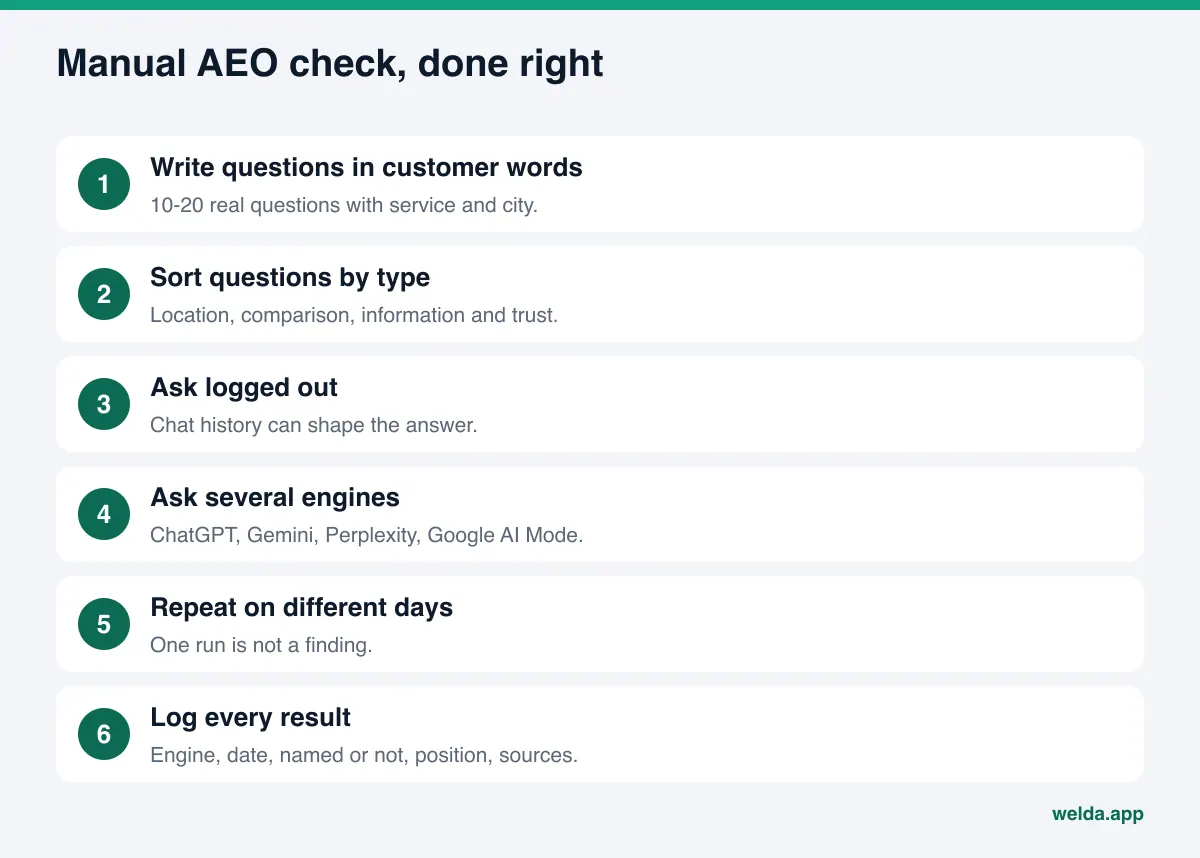
The simplest free method is to ask the question your customer would ask. It looks trivial, but done carelessly it produces misleading results. These steps make a manual check more reliable.
- Write questions in your customer's words. Not "teeth whitening" but "who does reliable teeth whitening near Frisco, TX?" Use the questions you hear on the phone, in your contact form and in reviews. Ten to twenty questions is enough.
- Sort them by type. Location plus service, comparisons ("X or Y"), information ("how long does it take"), and trust ("a contractor with no complaints"). Include a few of each.
- Ask while logged out or in a private window. Chat history and personal settings can shape the answer, and if you have asked about your own business before, the result may look better than it is.
- Ask more than one engine. ChatGPT, Gemini, Perplexity and Google's AI Mode lean on different sources. Showing up in one and not another is normal.
- Repeat on different days. AI answers vary from run to run. A single "we're in" or "we're out" is not a finding.
- Log every result. Question, engine, date, whether you were named, in what position, which competitors appeared, and which sources were cited.
The last step is the one people skip. A screenshot feels like enough, but a month later you need structured data to see what changed. A plain spreadsheet does the job.
The biggest limit of manual checks is consistency. An engine that names you today may not name you tomorrow for the same question. We cover the reasons in why AI answers change every time. The short version: do not draw conclusions from one run, and do not call yourself visible until you have asked the same question several times.
Technical checks with free search engine tools
The second group of free AEO tools are the public testing tools from search engines and standards bodies. They do not measure AI answers. They check the foundation AI needs to read your site at all.
Robots.txt: can AI crawlers get in?
Open yourdomain.com/robots.txt in a browser. This file tells crawlers which pages they may not visit. AI companies list their crawlers by name. OpenAI's crawler documentation separates OAI-SearchBot, which surfaces websites in ChatGPT's search features, from GPTBot, which collects content that may be used for model training. Perplexity's documentation describes PerplexityBot as the crawler that surfaces and links sites in its search results. If your robots.txt blocks a search crawler, that engine may not be able to use your site as a source. Allowing training and allowing search are separate decisions, so treat them separately.
One caveat: some website builders, hosting plans and security plugins block bots by default, sometimes at the firewall level. Your robots.txt can look clean while a firewall still turns crawlers away. Free tools rarely reveal this; ask your web host or developer.
Structured data: is your business information readable?
Your site may describe your business name, address, phone, hours and services in structured data (schema markup) that machines can read. Google's free Rich Results Test and the Schema Markup Validator read that code and flag errors. Paste in your homepage and your contact page. No markup at all, or markup with errors, goes on your list.
Validators only check syntax. They will not tell you that your phone number changed last year or that your suite number is different on Google Business Profile, Yelp and your site. That comparison you do by hand.
Google Search Console: what does Google report?
Google's guidance on AI features says there are no additional requirements to appear in AI Overviews or AI Mode, and that traffic from these features is included in the Performance report in Search Console as part of overall search traffic. So Search Console gives you the Google totals, but not a separate line that says "you were cited in an AI Overview for this question." It also says nothing about ChatGPT, Gemini or Perplexity.
Page speed and headings
Google's free page speed tool and your browser's "view page source" option show two quick things: how fast the page loads, and what your title tag, meta description and main heading actually say. If your main heading reads "Welcome to our website," AI has to guess what you do and where.
How Welda handles it: the free site analysis
You can run each check above with a separate tool, but combining the results and deciding what to do first is left to you. Welda's free site analysis pulls that scattered work into one report. The analysis works in English. Here are the three parts that matter most for this topic.
A report that reads your site the way AI does
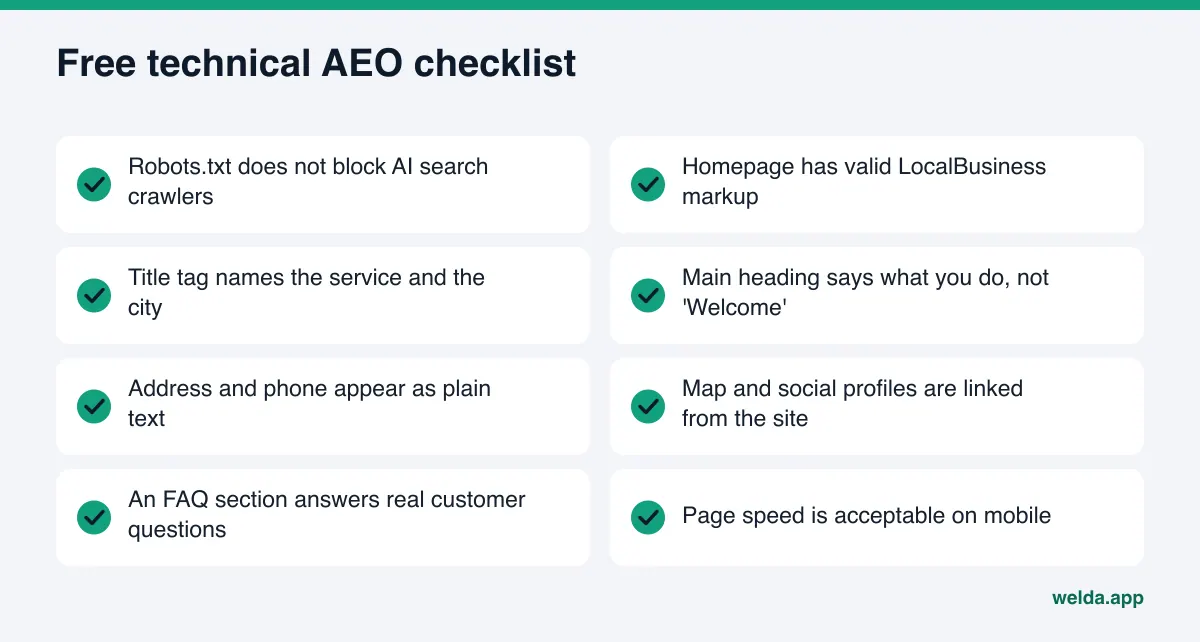
The analysis does not stop at your homepage. It also reads a few inner pages such as services, pricing, about and contact. It checks whether robots.txt lets AI crawlers in, your title and meta description, your main heading, your structured data, your address, phone and location details, whether your social and map profiles are linked from the site, your FAQ section, reviews and trust signals, how clearly your services are described, and page speed.
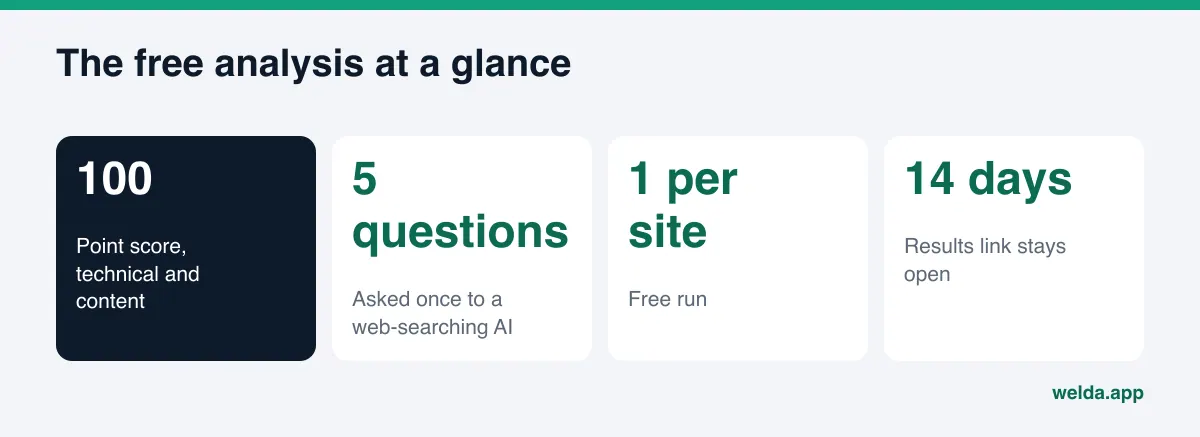
You get a score out of 100, split into technical and content. Every gap comes with three notes: what was found, why it matters, and how to fix it. If the finding is "main heading does not say what you do or where," you also get a suggested heading, a meta description, an intro paragraph and FAQ copy for your homepage. A simulation shows how much each fix would move the score, which tells you what to do first. For a walkthrough of each section, see how to read your AI visibility report.
A fix pack you can hand to your developer
A validator tells you "no LocalBusiness markup found" and stops there. The analysis gives you a ready-to-add fix pack, including the business information code. You or your developer add it to the site, then confirm it with the free validators above. Used this way, the free tools check each other instead of competing.
A five-question AI test
The analysis also asks an AI assistant that can search the web five questions your customers might ask, and checks whether your business name appears in the answers. Think of it as a structured, recorded manual check. It is a one-time measurement: one day, one assistant, five questions. The report includes a competitor comparison, so you can see where a competitor's site is ahead using the same lens. You can download it as a PDF and share a score card.
The analysis is free once per site. Your email and phone number are verified, the results link arrives by email, and it stays open for 14 days. It does not measure rankings and does not promise any.
When you need ongoing measurement
The next step after a free analysis is measuring the same questions over time. The Welda dashboard asks each question three times on ChatGPT, Gemini, Perplexity and Google AI, and shows question by question whether you were named and in what position. The full dashboard is in early access and is opening first in Turkey. Regular four-engine measurement is being added during early access, and sample screens use illustrative data. Today, the part anyone can use is the free site analysis. Pricing is discussed in an early access conversation.
A one-hour AEO baseline using only free tools
If you have an hour, use the free AEO tools in this order. Order matters: a technical block makes content work pointless.
| Time | Task | Tool | Output |
|---|---|---|---|
| 0-10 min | Start the free site analysis | Welda free analysis | Score, gap list, suggested copy |
| 10-20 min | Open robots.txt and look for AI crawlers | Browser, crawler docs | Blocked or not |
| 20-30 min | Run homepage and contact page through validators | Rich Results Test, Schema Markup Validator | List of markup errors |
| 30-45 min | Ask 10 questions on two engines and log them | Private window, spreadsheet | Question-by-question results |
| 45-55 min | Compare name, address, phone and hours across your site, Google Business Profile, Yelp and BBB | By hand | List of mismatches |
| 55-60 min | Merge everything into one to-do list | Spreadsheet | Prioritized task list |
At the end you should have two lists. On-site work: title, description, markup, FAQ, clear service pages. Off-site work: Google Business Profile, review replies on Google and Yelp, your BBB listing, and the directories that matter in your industry, such as Healthgrades for medical practices, Angi for home services or Tripadvisor for hospitality. The first list usually goes faster. The second takes longer, but many of the sources AI cites live outside your site.
How to prioritize what you find
Free checks can produce a long list. Rather than trying everything at once, sort the findings like this. It is a practical starting point, not a rule.
| Finding | Priority | Why | Who does it |
|---|---|---|---|
| AI search crawlers blocked | Now | If crawlers cannot get in, other work has limited effect | Developer or host |
| Address or phone inconsistent | Now | AI may skip a business with conflicting details | Owner |
| Markup missing or broken | Week one | It is the clearest machine-readable source of facts | Developer |
| Vague title and main heading | Week one | The page topic should be clear at first glance | Owner |
| No FAQ section | First month | It answers customer questions directly | Owner |
| Competitors ahead on some questions | Ongoing | Source and content work takes time | Together |
Limits of free tools, and what Welda does not do
Free AEO tools are a good start, but know where they stop. These limits apply to general free methods and to Welda's free analysis alike.
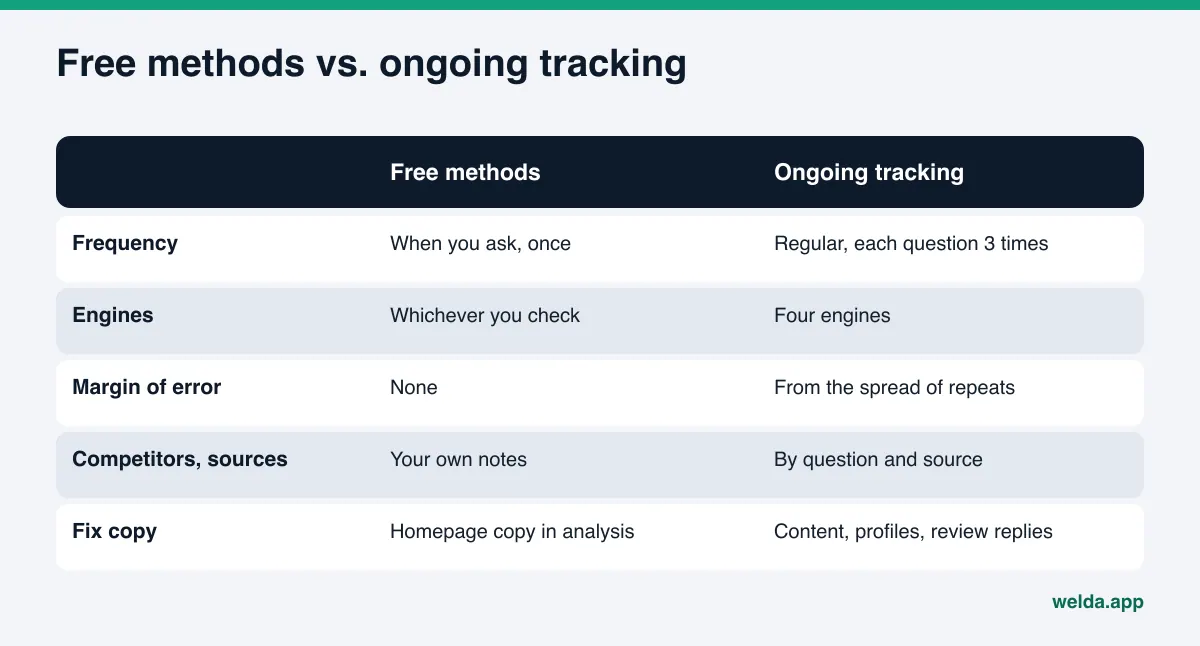
- A snapshot, not a trend. Manual checks and the five-question test both capture one moment. Because AI answers vary, one reading does not show direction.
- No margin of error. Asking once does not tell you how volatile a result is. Ongoing measurement asks each question several times and derives a margin from the spread; free methods do not.
- Sources stay a blind spot. Free tools look at your site. They do not systematically show which outside sites AI relies on and where you are missing there.
- Implementation is on you. Validators flag errors but do not fix them. The analysis gives you copy and a fix pack, but you or your developer put it on the site.
Welda is equally clear about what it does not do. It does not guarantee rankings or promise you will "show up in ChatGPT." It does not make up information it does not have; it asks the business. It does not publish sensitive content without approval and it does not create fake reviews. Handling negative reviews, directory accounts and PR stays with the business. New content usually takes weeks to show up in AI answers, so do not expect results the day you make a fix.
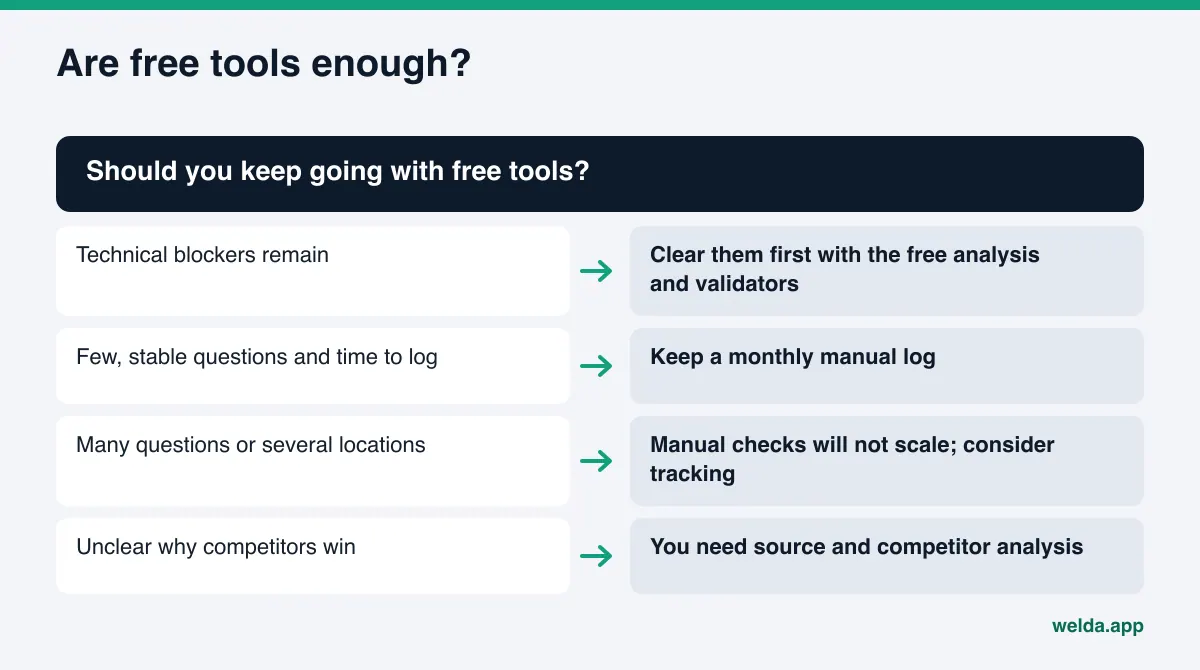
You have reached the limit of free tools when you no longer have time to re-ask the same questions every month and log them, or when you cannot move forward without knowing which source a competitor wins from. We look at that decision in one-time AEO audit vs. ongoing tracking.
Checklist: are free AEO tools enough for you?
Answer these honestly. If most answers are yes, free tools can carry you for a while.
- Is your set of customer questions small and stable (one service, one area)?
- Have you cleared the technical blockers (robots.txt, markup errors, headings)?
- Do you have time each month to ask 10 to 20 questions on several engines and log the results?
- Can you plan your work without knowing which sources competitors win from?
- Can you write site content, profile copy and review replies yourself?
If several answers are no, it may be time to evaluate tools. Our AI visibility tool demo checklist covers what to look for. Whatever you consider, the score and gap list from a free analysis make a useful baseline: check whether the work a vendor proposes actually matches your gaps.
The first 30 days after your free baseline
Once free AEO tools have shown you the gaps, the work moves to implementation. A simple 30-day plan:
- Week 1: clear technical blockers, add the suggested title and description to your homepage, install the business information code from the fix pack, and confirm it with a validator.
- Week 2: add an FAQ section with answers to questions customers really ask. Give each service a clear page of its own.
- Week 3: complete your Google Business Profile, make name, address and phone identical everywhere, and link your map and social profiles from the site.
- Week 4: re-ask the questions from week one using the same method and update your log. Do not be surprised if nothing has changed yet; it can take weeks.
None of these steps requires a paid tool. What costs money is running the same measurement regularly, repeatedly and across four engines, and having content and profile copy drafted for you.
Frequently asked questions
Can free AEO tools tell me for sure whether ChatGPT recommends my business?
Not for sure. A manual check or the five-question test shows one moment. Because answers vary, you need to ask the same questions several times on different days before drawing conclusions.
Is Welda's free analysis really free?
Yes, once per site. Email and phone verification are required, the results link is emailed to you and stays open for 14 days, and you can download a PDF.
If I block GPTBot in robots.txt, will I disappear from ChatGPT?
According to OpenAI's documentation, GPTBot is for model training, while OAI-SearchBot surfaces sites in ChatGPT's search features. Check which crawler you are blocking and make the two decisions separately.
Does Google Search Console measure AI visibility?
Partly. Google says traffic from AI Overviews and AI Mode is included in the Performance report as part of overall search traffic. There is no separate AI line, and it does not cover other engines.
Does the free analysis track rankings?
No. It does not measure rankings or guarantee them. It shows how well AI can read your site, what is missing and how to fix it, and checks once whether five questions name you.
Is the Welda dashboard available in the US?
The dashboard is in early access and is opening first in Turkey. The free site analysis works in English and is available to anyone today.
Get your baseline: run the free analysis
The most efficient way to use free AEO tools is to get the full picture of your site first and then use the other tools to verify. To see your score, your gaps, suggested copy and a fix pack in a few minutes, start your free AI visibility analysis. Pair the report with the one-hour plan above and your first week of work is already mapped out.