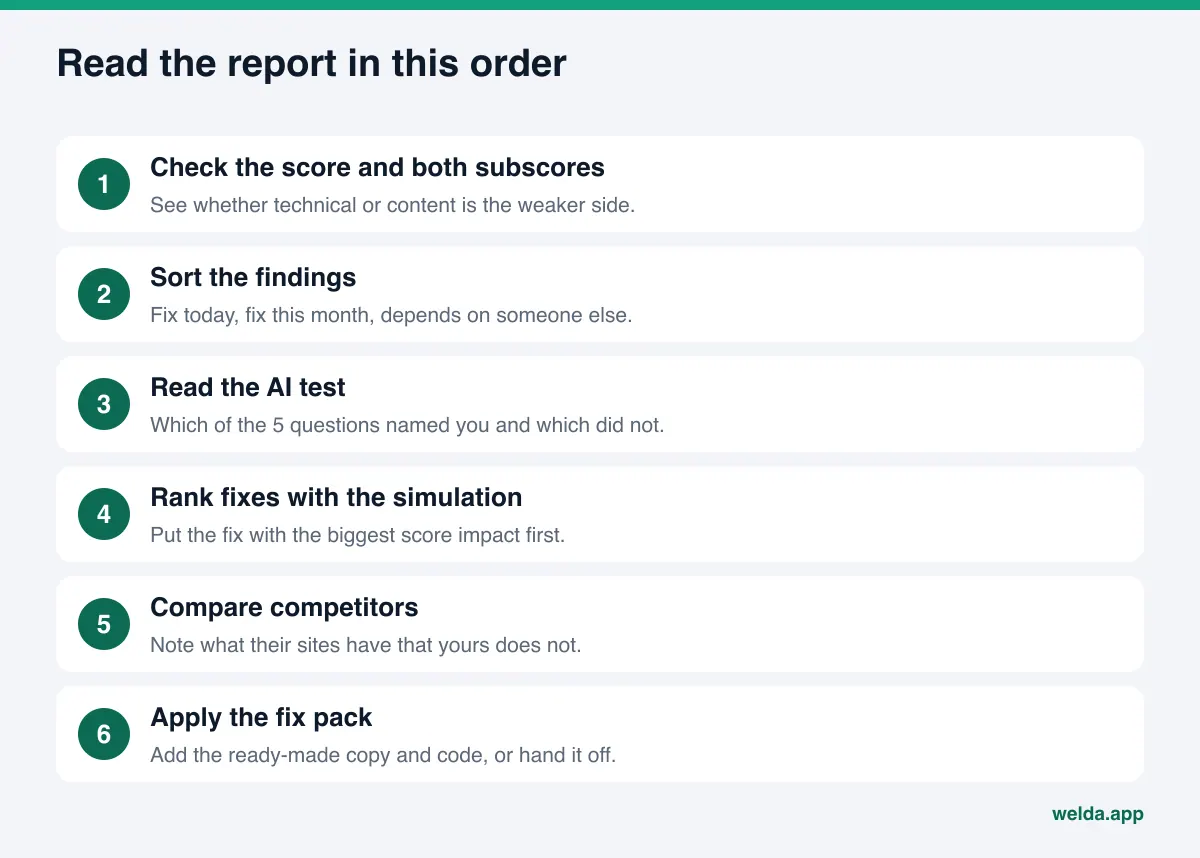
How do you read your AI visibility report? Start with the score out of 100 and its two subscores, technical and content, then read each finding as three parts: what was seen, why it matters, and how to fix it. Next, check which of the five AI test questions named your business, use the simulation to decide which fix comes first, and compare your site with your competitors'. Finish by applying the ready-made fix pack.
What your AI visibility report is for, and why reading it well matters
Your customers no longer search only by typing keywords into Google. They ask ChatGPT, Gemini, Perplexity, or Google's AI Overviews and AI Mode things like "which pediatric dentist near me takes walk-ins" or "best family-friendly hotel near the beach in San Diego," and instead of ten blue links they get two or three names. Answer engine optimization, or AEO, is the work of becoming one of those names. You will also see it called GEO, generative engine optimization; in the US, AEO and "AI visibility" are the more common terms, and they describe the same job.
The first step in AEO is seeing how your site reads to AI systems and to Google today. That is what Welda's free site analysis does. It reads your home page plus a few inner pages, such as services, pricing, about, and contact, and produces a report. The report is not short. It includes a score, two subscores, finding cards, suggested copy, a simulation, a competitor comparison, a fix pack, and a test of real AI answers. Faced with all of that for the first time, most owners either glance at the score and close the tab, or try to fix everything at once and stall halfway.
Both waste the report. The score alone says little; the useful information sits in the findings that explain it. And not everything needs doing at once. Some findings take five minutes, some need a developer, and some depend on a process that runs for weeks. This guide walks through the report in the order that makes sense and shows which decision to take from each part. If you do not have a report yet, you can run the free AI visibility analysis and read this guide side by side with your results.
If you want to see what a full report looks like before running one, our AI visibility report template walks through each section. This article focuses on interpretation: what each section means for your next move.
Three things to know before you open the report
First, the report is generated once. The analysis is free once per site. Your email address and phone number are verified, the results link arrives by email, and that link stays open for 14 days. Download the PDF the day you open it. When you want to check "what did it say back then" two months later, you will want a copy you control.
Second, the report does not measure rankings. It will not tell you where you rank on Google or what position you hold in ChatGPT. It looks at whether your site can be read, whether your business information is complete and consistent, and whether the signals AI systems use to recognize a business are present. The AI test it includes is a single snapshot, not ongoing tracking.
Third, every suggestion is generated for your site, but none of them decides for you. If suggested copy gets a detail wrong, such as your hours or your service area, you correct it. The report does not invent information it could not find. Where it could not read something, it shows the gap.
How to read your AI visibility report score: technical vs. content
At the top you see a score out of 100, and next to it two subscores: technical and content. That split is one of the most useful parts of the report, because it tells you whose desk the work lands on.
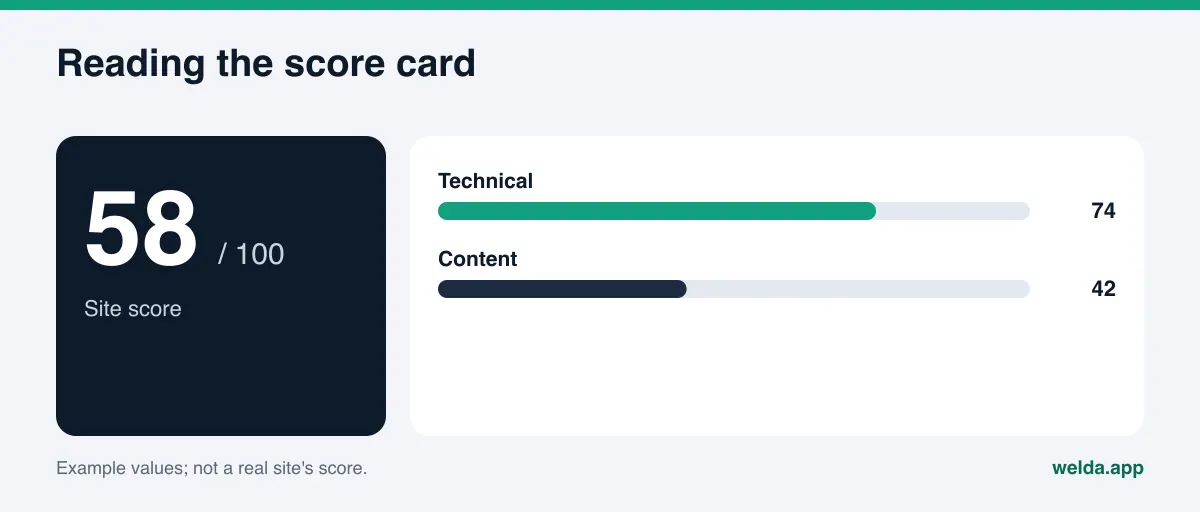
The technical subscore asks whether your site is readable. Are AI crawlers allowed in by your robots.txt file? Are the page title and meta description in place? Is there one clear main heading? Has business schema markup been added? Does the page load fast enough? Most of these are jobs for whoever built your site or for a developer.
The content subscore asks what your site actually says. Are your services spelled out by name? Are your address, phone number, and location stated consistently? Is there an FAQ section? Can a visitor see reviews and trust signals? Are your Google Business Profile, Yelp page, and social profiles linked from the site? Most of these are jobs for whoever writes your copy, which in a small business is often the owner.
Here is an example reading. A site with a high technical score and a low content score is usually well built but says very little. It loads fast and the code is clean, but the services page says "quality care" and nothing else. The reverse happens too: rich content, but robots.txt shuts out AI crawlers or there is no business schema at all. In the first case you start with writing; in the second you start with your developer.
Whether a score counts as "good" depends on your industry and your local competitors. We cover that question in detail in what is a good AI visibility score. When reading the report, the practical rule is simple: treat the score as a way to sort findings, not as a target to hit.
Finding cards: what was seen, why it matters, how to fix it
The body of the report is made of finding cards. For each gap you get three pieces of information: what was observed on your site, why it matters, and how to fix it. Reading those three parts carefully is the most productive fifteen minutes you will spend with the report.
"What was seen" is an observation. For example, "the home page has no meta description," or "the phone number on the contact page appears only inside an image, not as text." Check that observation against your live site. If you changed the page recently, the report may reflect the older version.
"Why it matters" explains what the gap means for AI answers or for Google. This is what lets you set priorities. If AI crawlers are blocked, every other improvement stays invisible to them, so a finding like that goes to the top of the list.
"How to fix it" describes the job, often with ready-made copy or a code snippet. As you read, put each card into one of three buckets:
- Fix today: page title and meta description, the main heading, contact details written as plain text, links to your Google Business Profile, Yelp, and social profiles.
- Fix this month: writing and publishing an FAQ section, giving each service its own clear description, adding business schema, improving page speed.
- Depends on someone else: settings your hosting provider controls, changes your site platform does not allow, reviews that build up over time.
The table below shows the finding areas you will meet most often and who usually handles each one in a small business.
| Finding area | What the report shows | Who usually fixes it |
|---|---|---|
| AI crawler access (robots.txt) | Which crawler is blocked and what to change in the file | Developer or site admin |
| Page title and meta description | Current text and suggested replacement | Owner or marketing lead |
| Main heading | The current heading and what it should say | Whoever writes the copy |
| Business information (schema) | Whether the code exists, missing fields, ready-made code | Developer or site admin |
| Address, phone, location | Whether these appear as text on the site | Whoever writes the copy |
| Map and social profiles | Whether profiles are linked from the site | Whoever writes the copy |
| FAQ section | Whether one exists, suggested questions | Owner |
| Reviews and trust signals | Visible reviews, credentials, or trust details on the site | Owner |
| Clear service descriptions | Whether services are named and scoped | Whoever writes the copy |
| Page speed | A note on what is slowing the page | Developer |
One detail on the robots.txt finding. According to OpenAI's crawler documentation, the crawler that decides whether a site can appear in ChatGPT search answers is OAI-SearchBot, while GPTBot collects content for model training. Blocking every AI crawler because you do not want your content used for training can also remove you from search answers. That is a legitimate choice, but it should be a deliberate one.
The schema finding has a useful primary source too. Google's local business structured data guide lists the business name and address as required, and phone number, opening hours, and geo coordinates as recommended. The code in your report is filled with what the analysis could read from your site; fields it could not read are left empty for you.
The AI test: how to interpret five real AI answers
This is the section most people jump to first. The analysis asks an AI assistant that can search the web five questions your customers might ask, then checks whether your business name appears in each answer. You see, question by question, whether you were named and who was named instead.
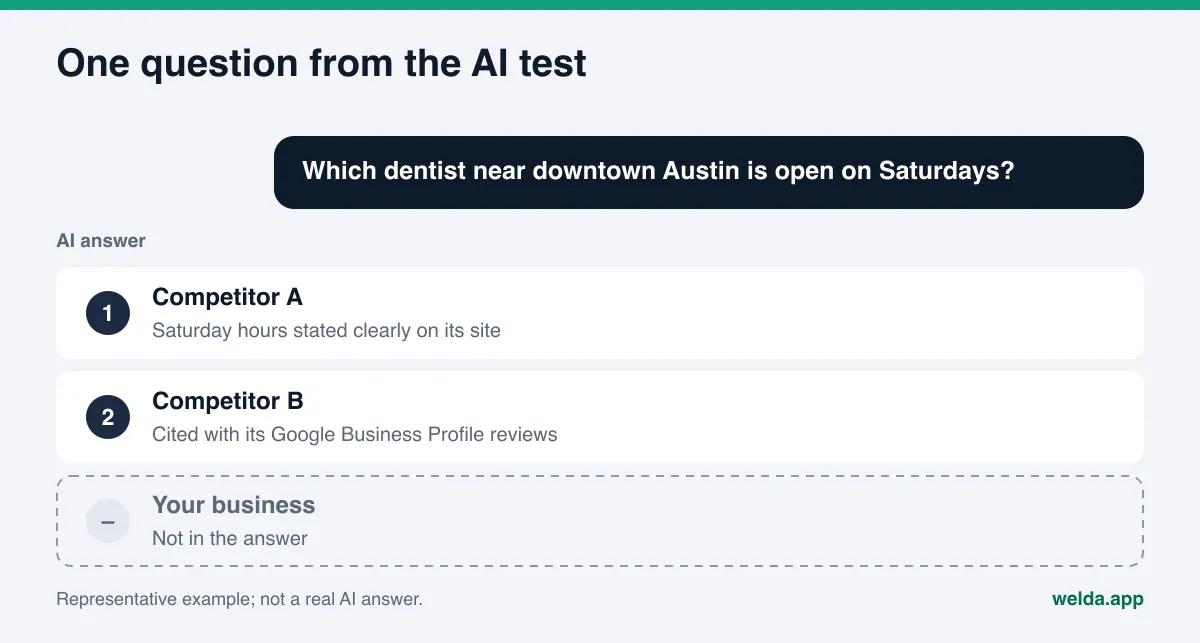
Keep three things in mind. First, this is a one-time measurement. AI answers can change from one moment to the next for the same question. Being named in one of five questions versus two of five can flip on the next try. Read the test as a direction, not a verdict.
Second, look at which questions named you and which did not. It is very common to appear when someone asks about your business by name but not when they ask a general question like "best urgent care near me." That pattern suggests AI systems know you exist but do not find strong enough signals to recommend you. Showing up in general questions usually depends on clearer service descriptions on your site, visible reviews, and a Google Business Profile and directory listings such as Yelp, Healthgrades, or Angi that point back to your site.
Third, look at the competitors who were named. If one competitor shows up in every answer, pay special attention to their site in the competitor section. We explain how AI answers pick sources and why certain businesses get recommended in our guide to LLM SEO.
Suggested copy and the simulation: what to fix first
The report includes ready-made copy for your home page: a new page title, a meta description, a main heading, an opening paragraph, and FAQ questions with answers. They are written from what the analysis read on your site. Before you paste anything, check two things: is every fact correct, and does it sound like your business? If the suggestion says "open 24/7" and you are not, delete it. Wrong information does more harm than missing information, because an AI system may repeat it.
The simulation shows how much each fix would raise your score. It is the most practical decision tool in the report. Most businesses start with whatever is easiest; the simulation lets you start with whatever matters most.
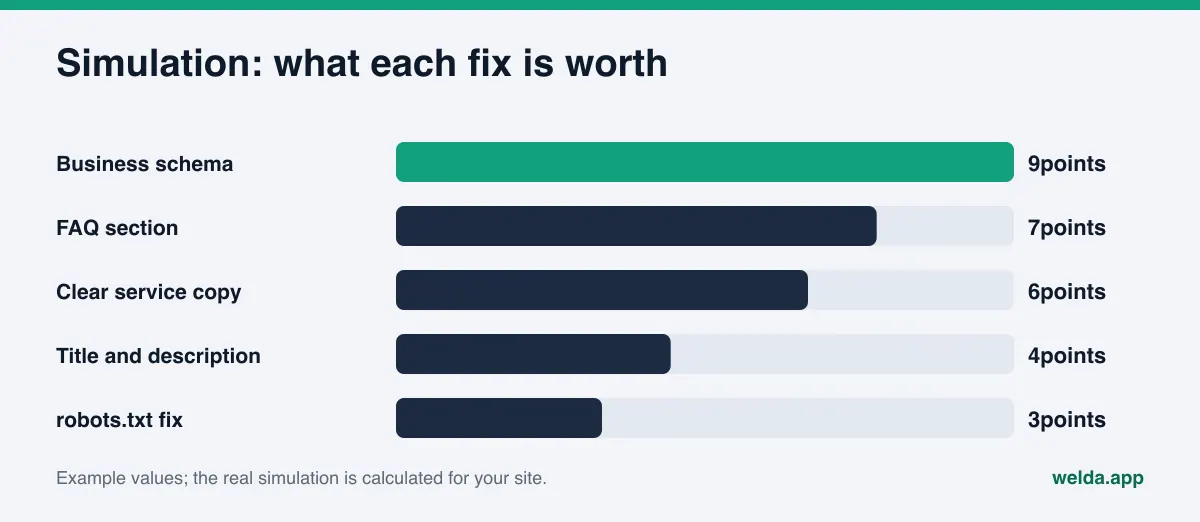
Read the bars together with effort. If a fix adds a lot and you can do it today, it goes first. If it adds a lot but needs a developer, book that developer today. Leave low-impact, slow jobs for the end. The numbers are estimates of the analysis score; they do not mean AI answers will shift by the same amount.
Competitor comparison: what their sites have that yours lacks
The competitor section reads competitors' sites against the same criteria and puts them next to yours. The goal is not to copy anyone. It is to see the concrete gap.
Go row by row. If a competitor has business schema and you do not, that is the easiest gap to close. If their FAQ covers price ranges, hours, parking, and insurance accepted and yours does not exist, that is a few hours of writing. If their reviews are visible on their site while yours live only on Google and Yelp, consider adding a short summary and a link to your review profiles.
Some gaps will not close quickly. If a competitor is ahead because of years of published content or a large volume of reviews, catching up in a month is not realistic. The report shows the gap but does not predict how long it takes to close. New content typically takes weeks to show up in AI answers.
One useful signal: if the competitor named most often in the AI test is not the one with the best site score, their advantage probably comes from off-site sources such as their Google Business Profile, reviews, BBB or industry directory listings, or press mentions. In that case, fixing your own site will not be enough on its own.
The fix pack: what gets added to your site, and by whom
The last hands-on section is the ready-made fix pack. It bundles what needs to be added to your site, including business schema code, so you can act on the findings without retyping them.
Before applying it, check every value in the code: business name, address, phone, hours. They need to match your site copy, your Google Business Profile, and your other listings. Three different phone numbers in three places make it harder for AI systems to recognize you reliably.
How you add the pack depends on your platform. On WordPress you can add code through your theme's header area or a plugin; see our WordPress AEO guide for details. Hosted site builders usually have a custom code field in their settings. If an agency or freelancer manages your site, forward the pack as is; it says what to do. Afterward, run your page through Google's Rich Results Test to confirm the code is read without errors.
The PDF and shareable score card help at this stage too. Send them to your team or your web person so everyone sees what changed and why. If you need to present the results upward, AEO reporting for executives shows how to summarize them.
How Welda does this work after the report
The free analysis is a snapshot of your site today. Welda's real job starts after that snapshot: making measurement regular and closing gaps on your behalf. Here is what two parts of the report turn into inside the Welda dashboard.
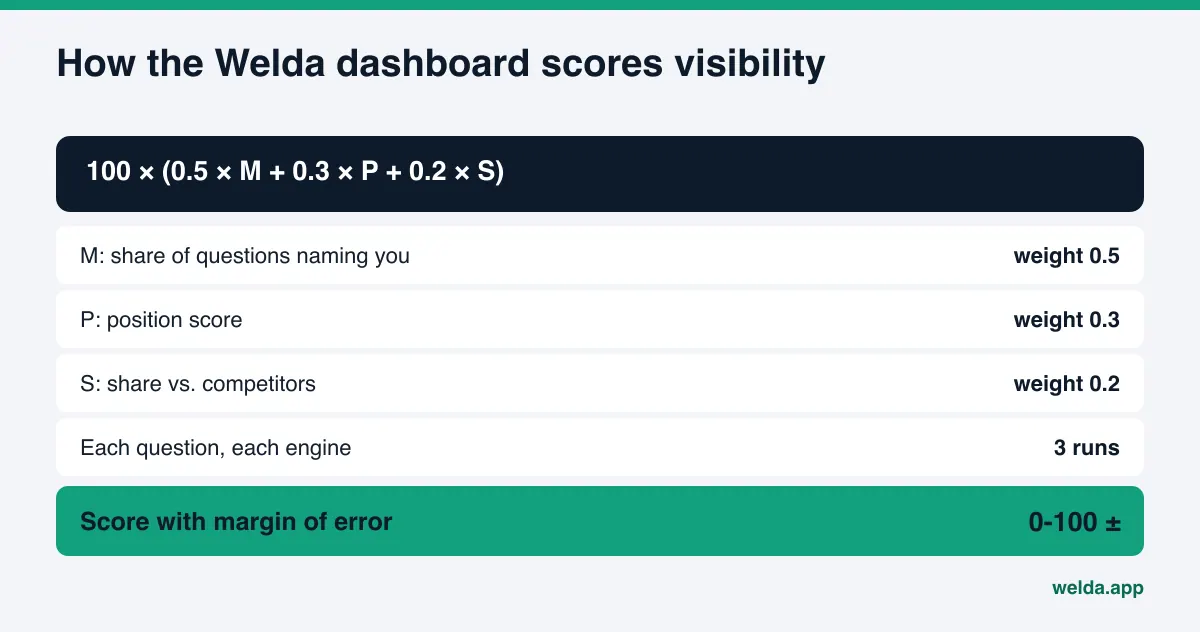
From a one-time test to repeatable measurement. The report's five-question test runs once. In the dashboard, the questions your customers would ask go to ChatGPT, Gemini, Perplexity, and Google AI, and each question runs three times on each engine. The report's "were you named?" becomes a fuller picture: which question, which engine, what position, and where competitors lead. The scoring formula is published, and the spread across the three runs produces a margin of error, so you can tell whether a two-point move is real change or normal variation in AI answers.
From finding cards to a single to-do list. In the report, each gap is a card and the work is yours. In the dashboard, gaps collect into one to-do list. Welda drafts the content, profile copy, and review replies, with ready text next to each task. When it lacks a fact, such as a service's scope or a staff member's name, it asks you instead of making something up, and your answer flows into every draft that needs it.
Publishing approval always stays with you. On WordPress, Welda connects through a separate Editor user and application password you create, with no code to install; content lands as a draft, and you publish it after approval. For platforms without a connection, Welda hands you a ready pack and the change is made by hand. Google Business Profile, Instagram, and Facebook can be connected; tasks on profiles that are not connected appear as manual items. Your content always lives on your own site. Welda does not host content.
To be direct about where things stand: the free analysis works in English today and anyone can use it. The full Welda dashboard is in early access and is opening first in Turkey. Regular four-engine measurement is being added during early access, and sample dashboard screens use representative data. Pricing is discussed in an early access conversation.
Report limits, and what Welda does not do
Part of reading the report well is knowing what it does not claim.
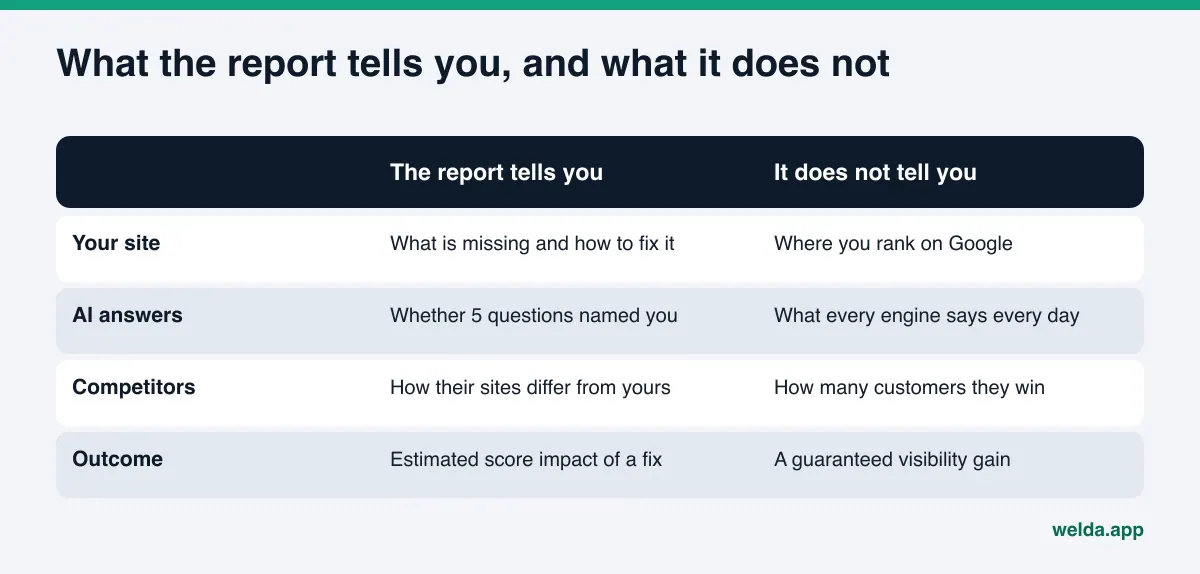
The report does not measure rankings and does not promise them. Welda does not guarantee that you will appear in ChatGPT or any other AI answer, in the report or in the dashboard. No business or tool controls AI answers. What you can control is whether the information AI systems need to recognize and recommend you is complete and consistent.
The AI test is a single run of five questions. It shows one moment. It does not replace regular, multi-engine measurement.
Welda does not write facts it does not know, does not create fake reviews, and does not publish sensitive content without your approval. Responding to negative reviews, claiming directory listings, and press outreach remain your work; Welda can draft text for them, but it does not open accounts or contact editors on your behalf. If you make claims on your site about results or reviews, the FTC's guidance on endorsements and reviews applies to you regardless of what any AI system does with them; this is not legal advice. And once you apply the fixes, expect weeks, not days, before new content shows up in AI answers.
Your first two weeks after the report: a checklist
Spreading the work over two weeks makes it easier to finish and easier to see what helped. This list turns the report's sections into a working order.
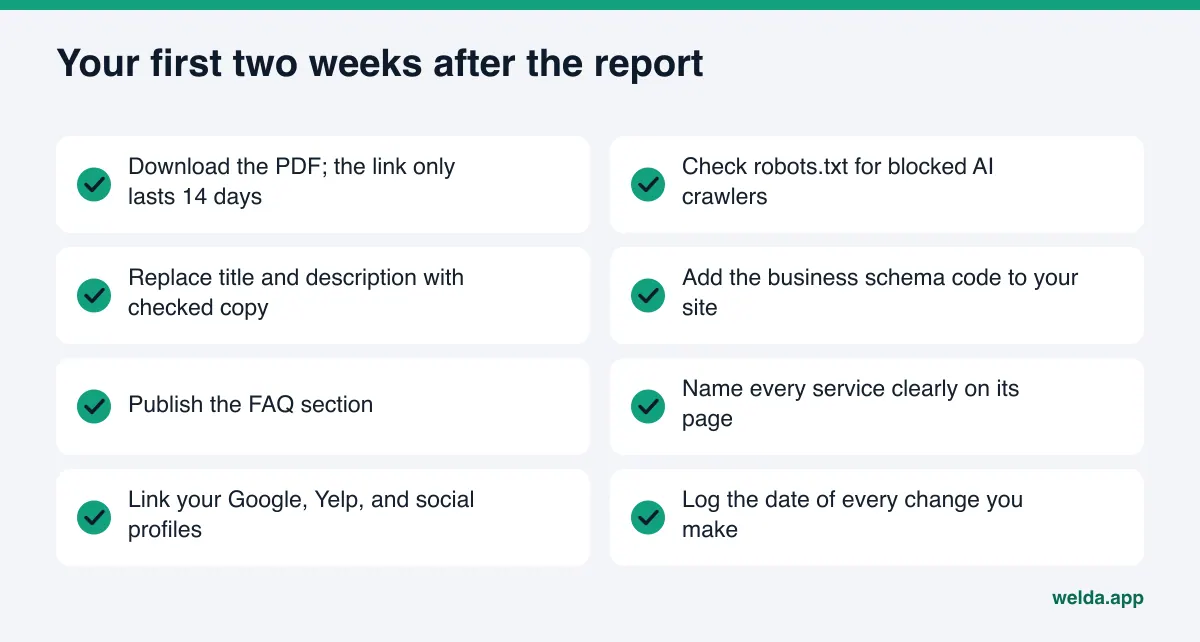
- Day one: download the PDF and save the shareable score card. Sort the finding cards into today, this month, and depends on someone else.
- Days two and three: if there is a robots.txt finding, solve it first. Replace your page title, meta description, and main heading with the suggested copy, after checking every fact.
- End of week one: add the business schema code and confirm it matches your Google Business Profile, Yelp, and other listings. Link to those profiles from your site.
- Week two: write and publish your FAQ section. On your services page, describe each service by name, scope, and who it is for.
- End of week two: log the date of every change. A few weeks from now, when you look at AI answers again, you will need to know what changed when.
When the list is done, answer two questions. How much of the report have I applied? For each AI test question that did not name me, does my site now contain a clear answer? If both answers are yes, the next step is regular measurement. If you are evaluating tools at that point, our AI visibility tool demo checklist covers what to ask.
Frequently asked questions
How long does the results link stay open?
The link arrives by email and stays open for 14 days. Download the PDF the day you open it so you keep a copy after the link expires.
Can I run the analysis again for the same site?
The free analysis runs once per site. Tracking changes over time is what the Welda dashboard is for, and the dashboard is in early access.
My technical score is high and my content score is low. Where do I start?
Start with the content findings: clear service descriptions, an FAQ section, contact details as text, and visible trust signals. Most of these do not need a developer.
The AI test did not name my business at all. Is that bad?
It is a starting point, not a verdict. The test is a single run of five questions, and not appearing in general questions is very common. Apply the findings, then look at AI answers again a few weeks later for a more meaningful comparison.
Will the score gains in the simulation actually happen?
The simulation estimates how a fix affects the analysis score. It does not mean AI answers will move by the same amount, and it is not a guarantee. Its job is to help you rank work by impact.
Does the report show my Google rankings?
No. It does not measure or guarantee rankings. It looks at how well Google and AI systems can read your site and which information is missing.
Can I add the fix pack myself?
On most sites, yes. WordPress and most hosted site builders have a place for custom code. If you are unsure, forward the pack to whoever manages your site; the instructions are inside.
Get your report and read it with this guide
The free site analysis is the shortest way into AEO: one report shows how your site reads to AI systems, what is missing, and which fix should come first. Read it in the order described here: score, findings, AI test, simulation, competitors, fix pack. If you do not have yours yet, start the free AI visibility analysis here; the results link arrives by email and stays open for 14 days.