What does an AI readiness checker for websites actually check? A useful one tests whether ChatGPT, Gemini, Perplexity and Google's AI features can read your site, and whether what they read describes your business correctly. That means crawler access, page titles, the main heading, business schema, address and phone consistency, service descriptions, FAQs, reviews and page speed. Every finding should come with a reason and a fix, not just a grade.
"Is my website ready for AI search?" has become a common question from owners of local businesses, clinics, hotels and online stores. The answer isn't a feeling. It's a list you can check, item by item. This guide walks through what an AI readiness checker for websites looks at, why each item matters for answer engine optimization (AEO), how to run the same checks by hand, and how Welda's free AI visibility analysis reports them. The goal isn't a nice score. The goal is to close the gaps behind the score, one at a time.
What is an AI readiness checker, and why do you need one?
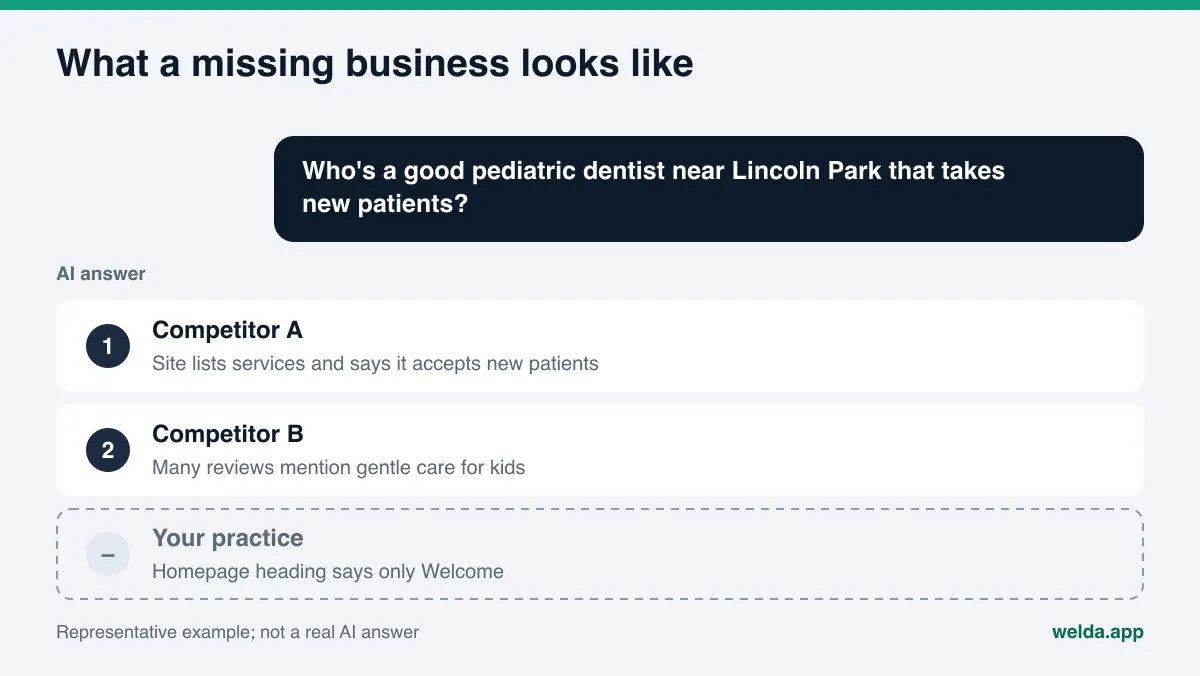
When someone asks "Who's a good pediatric dentist near Lincoln Park that takes new patients?" or "Best family-friendly hotel in Scottsdale with a pool?", they no longer only type it into a search box and scan ten links. They ask ChatGPT, Gemini or Perplexity, or they read Google's AI Overviews and AI Mode. They get a short paragraph that names a few businesses. If your business isn't in that paragraph, a strong position on a classic results page doesn't help with that customer.
To write that paragraph, an AI system pulls facts from somewhere: your website, your Google Business Profile, reviews on Yelp or Tripadvisor, listings on the BBB, Healthgrades or Angi, local news and industry directories. Of all those sources, the only one you fully control is your own website. If AI crawlers can't get in, if your pages don't say clearly what you do, or if your address reads differently on every page, the AI leans on other sources or leaves you out.
That's the job of an AI readiness checker: it tells you whether your website helps or hurts when a machine tries to describe your business. It overlaps with a classic SEO audit, since a page title matters to both. The difference is the question it answers. An SEO audit asks how a page ranks for a keyword. An AI readiness check asks whether a machine reading the page could describe your business accurately in a sentence. A page can rank well and still give an AI almost nothing concrete to work with. You'll also hear this work called GEO, short for generative engine optimization; in the US, AEO and "AI search visibility" are the more common terms for the same goal.
Small and mid-sized businesses feel this most. A national brand shows up in hundreds of news stories and directories, so AI systems know it even without its website. A single-location restaurant, a two-dentist practice or a boutique inn usually has its own site and a few profiles. For them, a readable website isn't a nice extra. It's the foundation.
What an AI readiness checker for websites looks at
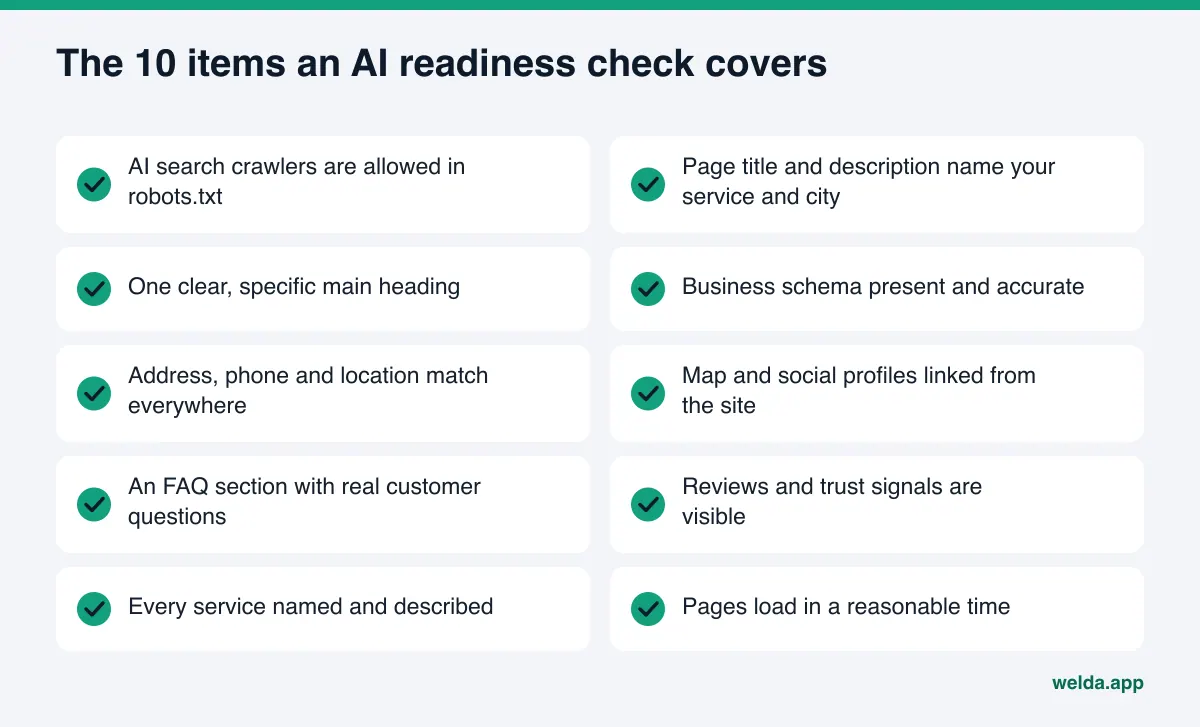
It helps to sort the checks into two groups. Technical items decide whether your site can be read at all. Content items decide whether the business is understood once it's read. The table below lists the items Welda's free analysis checks and why each one matters for AI search visibility.
| Item | What gets checked | Why it matters |
|---|---|---|
| Crawler access (robots.txt) | Whether AI search crawlers are allowed in | A crawler that's blocked can't read the page or cite it |
| Page title and meta description | Whether they name the business type, location and main service | The shortest, earliest signal of what a page is about |
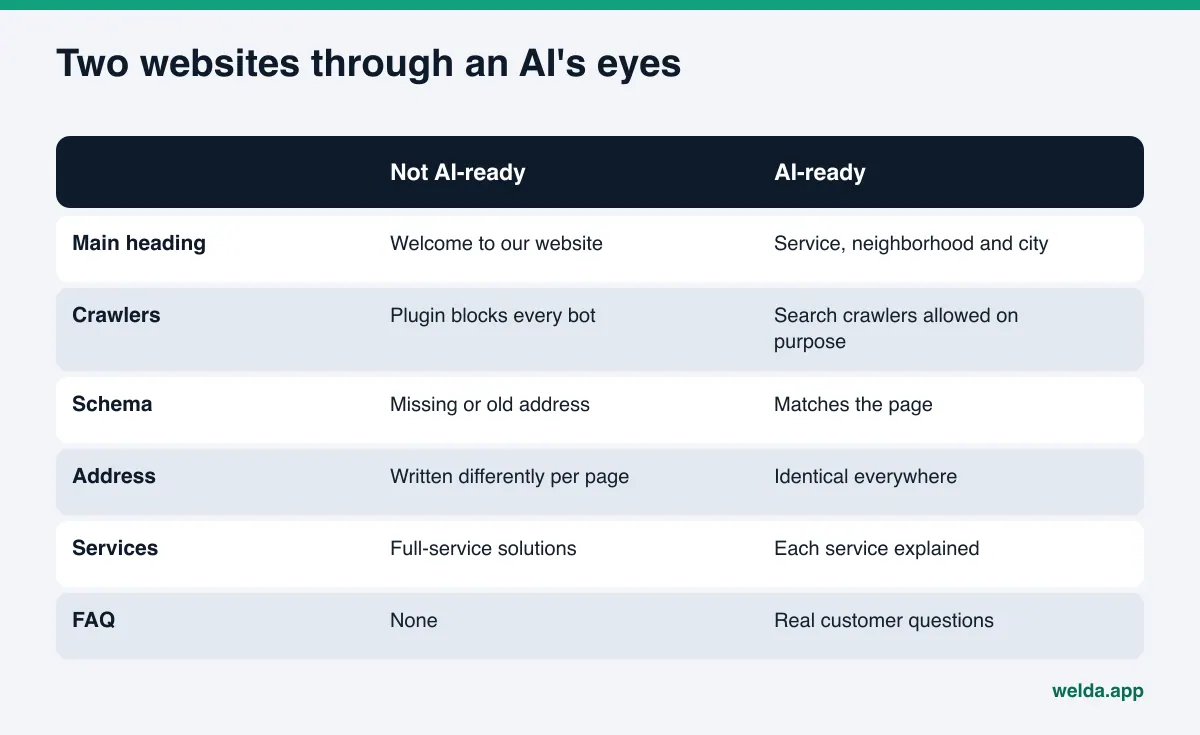
| Main heading (H1) | One clear H1 that says something specific | "Welcome to our website" tells a machine nothing |
| Business schema | Name, address, phone and hours in machine-readable form | Gives facts in a structured way, without guesswork |
| Address, phone, location | Whether they appear as text and match across pages | Inconsistent versions make the business harder to pin down |
| Social and map profiles | Whether Google Business Profile, Yelp, Instagram and others are linked | Ties the site and the profiles to the same business |
| FAQ section | Short answers to the questions customers really ask | Ready-made answers to the questions AI is trying to answer |
| Reviews and trust signals | Reviews, licenses, years in business, team details | Gives the AI a reason to recommend you |
| Clear service descriptions | Each service named and briefly explained | "Full-service solutions" can't be matched to a question |
| Page speed | Whether pages load in a reasonable time | Slow, heavy pages are harder to fetch and to use |
A good checker doesn't stop at the homepage. The facts customers and AI systems need most often sit on inner pages: services, pricing, about and contact. Your homepage can be flawless, but if your services page is a gallery of photos, an AI has no way to answer "Does this practice offer clear aligners?" from your site.
Crawler access: the item most owners miss
Plenty of sites block AI crawlers in robots.txt because of a security plugin or an old setting, and the owner never knows. One detail matters a lot here: not all crawlers do the same job. According to OpenAI's crawler documentation, GPTBot collects content that may be used to train its models, while OAI-SearchBot is used to surface websites in ChatGPT search, and each setting is independent. So you can opt out of training and still be eligible for ChatGPT search. Perplexity's documentation describes PerplexityBot as the crawler that surfaces and links websites in its search results. On Google's side, the crawler documentation states that Google-Extended does not affect a site's inclusion in Google Search. A good AI readiness checker reports which crawler can get in, one by one. A single "AI bots blocked" flag isn't enough to act on.
Business schema: your ID card for machines
Schema is a small block of code that visitors don't see. It states your business name, address, phone, hours and type. Google's local business structured data guide lists name and address as required properties and shows its examples in JSON-LD. Without schema, an AI has to infer these facts from page text. With schema that contradicts the page, such as an old address or the phone number of a closed location, you may be worse off than with none. That's why the check should compare the schema to what the page says, not only confirm that a block exists.
Content items: what gets understood once the page is read
Even with every technical item in place, a site can tell an AI very little. The most common example is the main heading. "Quality you can trust" could belong to a coffee shop or a law firm. "Late-night urgent care in Midtown Atlanta, open until 11 p.m." matches a customer question directly. Service text, FAQs and reviews are judged the same way: is there a concrete sentence that could answer someone's question? Our guide to FAQ pages for AEO covers how to pick the questions worth answering.
How to run an AI readiness check yourself, step by step
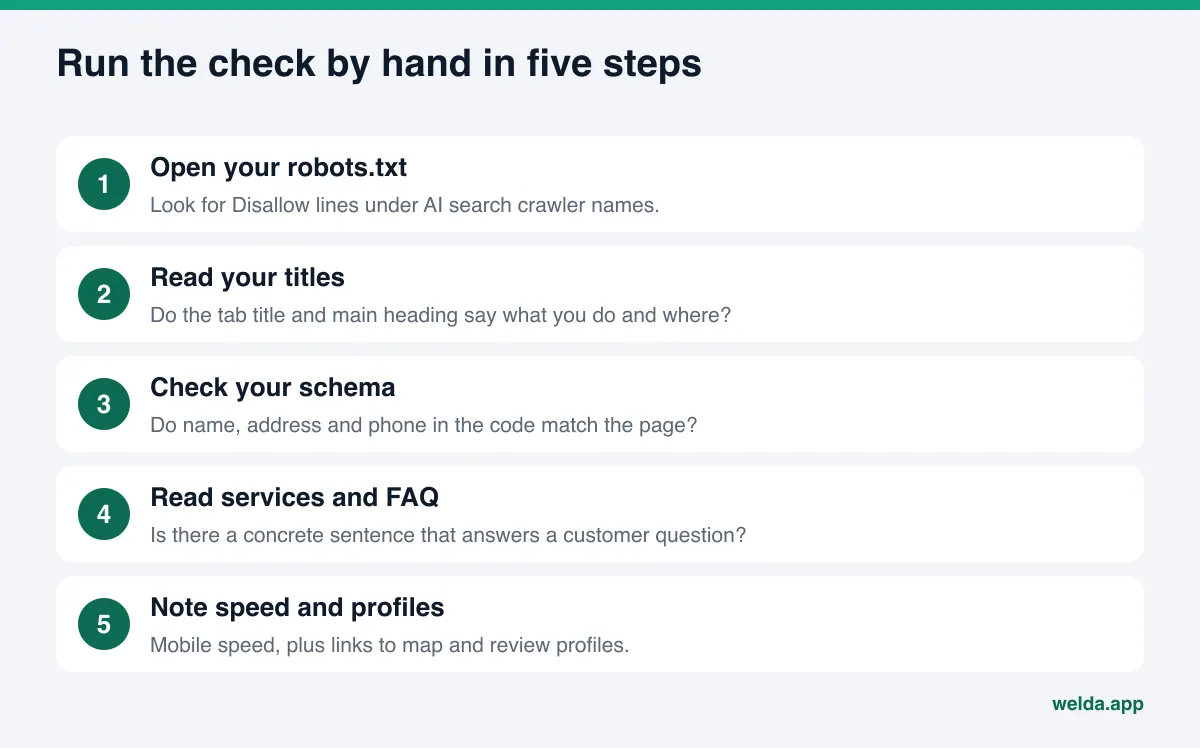
You can run a basic version of this check without any tool. Set aside about an hour. These steps mirror what an AI readiness checker for websites does automatically.
- Open your robots.txt. Type your domain followed by
/robots.txtin a browser. If you seeDisallow: /under names such as GPTBot, OAI-SearchBot, PerplexityBot or Google-Extended, that crawler can't access your site. Decide on purpose which ones you block and why. - Read your homepage title. It's the text in the browser tab. If it doesn't include your type of business, your city or neighborhood and your main service, that's your first fix.
- Look at the main heading. What does the largest text on the page say? Read on its own, does it describe what you do?
- Check your business schema. Paste your homepage URL into a structured data testing tool. Do you see LocalBusiness or a more specific type for your industry? Are the address and phone correct?
- Compare address and phone everywhere. Homepage, contact page, footer and Google Business Profile should match. Even "St." on one page and "Street" on another weakens consistency.
- Count your profile links. Does the site link to your Google Business Profile, Yelp, Instagram and any industry listing such as Healthgrades or Angi?
- Read your services page as a customer would. Is every service named, with who it's for and how it works?
- Look for an FAQ. Are the five questions your front desk hears most often answered on the site?
- List your trust signals. Reviews, licenses, years in business, team bios. Are they visible?
- Test speed. Run your homepage through a page speed tool on mobile and note any oversized images.
Put the results in a simple spreadsheet and mark each item "present," "missing" or "conflicting." Conflicting items, where two places give different facts, are usually the ones to fix first. For checks that go beyond your own website, the AEO checklist covers outside sources as well.
How Welda runs the check: the free analysis report
Running these steps by hand works, but it takes time, and the "how do I fix this" part often stays vague. Welda's free analysis runs the checks in one pass. The analysis works in English, so a US business can use it today. Here are the three parts most relevant to an AI readiness check: the item-by-item findings, the simulation that ranks fixes, and the ready-to-install fix pack.
Findings item by item: what was seen, why it matters, how to fix it
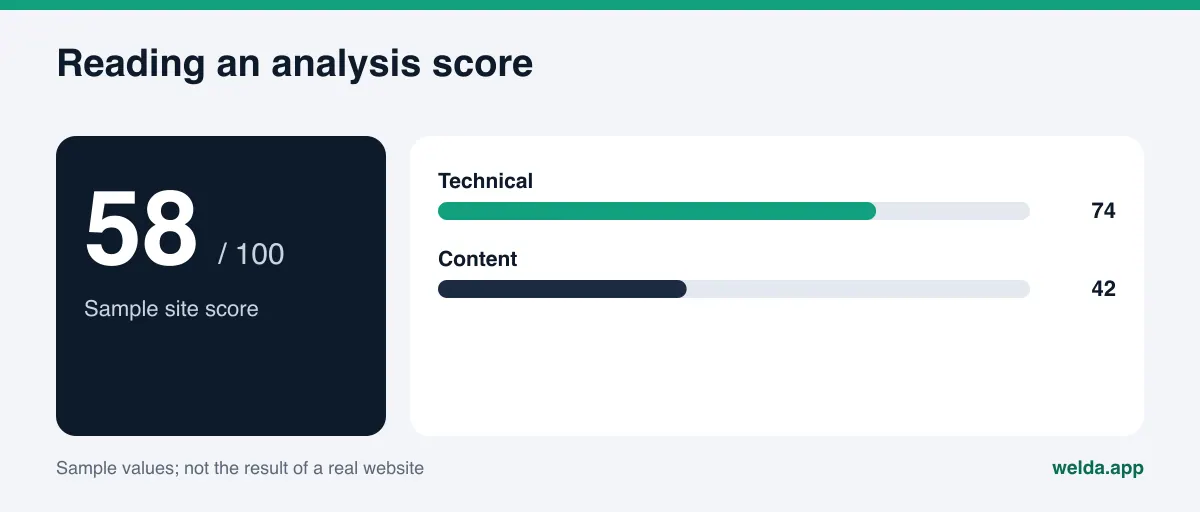
The analysis reads your homepage plus a handful of inner pages, such as services, pricing, about and contact, the way Google and AI systems would. You get a score out of 100, with technical and content scores shown separately. That split lets you tell "my site is slow but the content is solid" apart from "the site is fast but nobody can tell what I do."
The list under the score matters more than the number. For each gap, the report says what it saw (for example, "H1: Welcome"), why that's a problem for AI systems, and how to fix it. For the homepage you also get draft copy: a new page title, meta description, main heading, intro paragraph and FAQ entries. You don't have to use the drafts as written. They give you something concrete to edit instead of a blank page.
Simulation: which fix comes first?
Fixing all ten items in one week isn't realistic for most owners. The simulation shows how much each fix would raise the score. Say a site is missing both business schema and an FAQ section. The simulation puts the expected effect of each side by side. The call stays with you: maybe the smaller fix is the easier one and you do it first. The report also includes a competitor comparison, so you can see where competing sites stand on the same items.
The fix pack and a five-question spot check
At the end of the report there's a fix pack ready to add to your site, including the business schema code. You can hand it straight to whoever manages your website. The report downloads as a PDF, and you get a shareable score card.
The analysis goes one step further. It asks five questions a customer might ask to an AI assistant that can search the web, then checks whether your business name appears in the answers. That links the state of your site to real answers. It's a one-time reading, though. AI answers vary even for the same question, so one reading is a snapshot, not a trend. We explain why in our article on margin of error in AI visibility tracking.
The analysis is free once per website. Your email and phone number are verified, and the link to your results arrives by email and stays open for 14 days.
After the analysis: the Welda dashboard
The full Welda dashboard is in early access and is opening first in Turkey. Regular tracking across four AI engines is being added during early access, and the sample screens shown for the dashboard use representative data. What anyone can use today, in English, is the free site analysis. In the dashboard, the gaps the analysis found become one to-do list: facts the site doesn't state are asked of you instead of guessed, and profiles Welda can't connect to show up as manual tasks with the text ready. Pricing is discussed in the early access conversation.
How to read your AI readiness score
An AI readiness score measures how well your site explains your business to a machine. It doesn't measure how often AI answers mention you. The two numbers can move in different directions, and it helps to know why.
A high-scoring site can still be missing from answers: maybe competitors have far more Google and Yelp reviews, or you aren't listed in the directories your industry relies on. A low-scoring site can still be named: an AI may already know a long-established business from other sources. The readiness check is your roadmap for the part you control. The rest depends on sources outside your site.
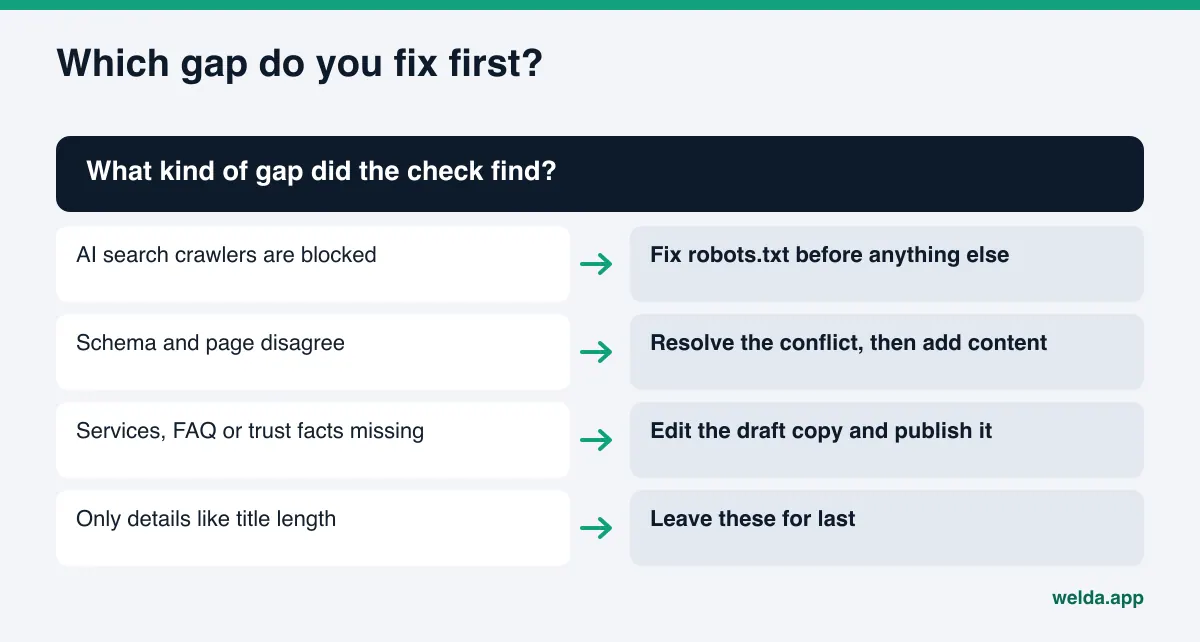
Read the results in this order:
- Blockers first. If AI search crawlers are blocked, the other items barely matter. Start there.
- Conflicts next. If the page shows one address and the schema another, adding new content won't help much until that's fixed.
- Missing facts after that. Service descriptions, FAQs, trust signals. These take time, but they give an AI something to say about you.
- Fine-tuning last. Title length, description wording and similar small edits.
If your technical score is high and your content score is low, the work is in writing. You need someone who knows your business more than you need a developer. If it's the other way around, an hour with whoever manages your site can often close most of the technical items.
Limits: what the checker and Welda don't do
An AI readiness checker for websites is useful, but it doesn't tell you everything. Welda's free analysis doesn't measure rankings and doesn't guarantee them. There's no promise that fixing these items gets you into ChatGPT. If a service promises that, our piece on guaranteed ChatGPT rankings explains why to be careful.
Other limits worth knowing:
- Changes take time to show. New content on your site usually takes weeks to be reflected in AI answers. Don't expect results the day after a fix.
- Unknown facts aren't invented. Welda doesn't guess facts your site doesn't state, such as the year you opened, a provider's credentials or your hours. It asks you.
- No fake reviews. The trust signals item doesn't mean "add more reviews" by any means necessary. Welda doesn't write reviews. The FTC's Consumer Reviews and Testimonials Rule prohibits creating or buying fake reviews, which is one more reason not to. This isn't legal advice.
- Off-site work stays with you. Handling negative reviews, claiming directory listings and press outreach remain the business's job.
- Nothing goes live without approval. Content prepared in the dashboard is published only with your approval, and it always lives on your own website.
Checklist: how to judge an AI readiness checker
You'll find many tools with names like "AI readiness score" or "AI SEO grader." Whichever one you use, these questions show whether its results are worth acting on:
| Question | A useful checker | A weak checker |
|---|---|---|
| How many pages does it read? | Homepage and key inner pages | Homepage only |
| Does it separate crawlers? | Tells search crawlers from training crawlers | Says "blocked" or "open" |
| Are findings specific? | Quotes what it saw on the page | Gives only a grade and a color |
| Does it show a fix? | Drafts copy and schema code | Says "improve your content" |
| Does it set priorities? | Shows which fix has the bigger effect | Treats every item the same |
| Does it look at real answers? | Checks sample questions and says it's a one-time reading | Doesn't check, or presents one reading as proof |
| How does it talk about results? | States its limits plainly | Promises rankings or "getting into ChatGPT" |
After the check, keep a short list of your own. Are crawlers set on purpose? Does the main heading say what you do? Does the schema match the page? Are address and phone identical everywhere? Does every service have its own description? Are your five most common questions answered on the site? If all six answers are yes, your site is in good shape to explain your business to AI systems. The next step is the sources outside your website.
Frequently asked questions
Is an AI readiness check the same as an SEO audit?
No, but they overlap. An SEO audit focuses on rankings and clicks. An AI readiness check asks whether an AI system can read your site and describe your business accurately. Page titles, speed and schema matter to both.
If I get a high score, will I show up in ChatGPT?
There's no guarantee. The score measures how well your site explains your business. Being mentioned in AI answers also depends on reviews, profiles and industry sources outside your site.
If I block GPTBot, will I disappear from ChatGPT search?
According to OpenAI's documentation, GPTBot is used for model training and OAI-SearchBot for showing sites in ChatGPT search, and the settings are independent. For search visibility, look at your OAI-SearchBot rule.
How do I get the results of the free analysis?
Once the analysis has read your site, a link to the results arrives by email. It stays open for 14 days, and you can download the report as a PDF. It's free once per website.
Does it work if my site isn't on WordPress?
Yes. The analysis reads your public pages, whatever platform they're built on. Whoever manages your site adds the fix pack to it by hand.
How often should I rerun the check?
Check the items again after any major change, such as a new theme, new service pages or a move. Ongoing tracking of AI answers is a different job; that's what the Welda dashboard is for, and it's in early access.
See how your site scores
The value of an AI readiness checker for websites is the to-do list it leaves you with. Once you know which crawlers can get in, which facts are missing or conflicting, and which fix should come first, turning your website into a source that explains your business to AI becomes concrete work. To see where your own site stands, start the free AI visibility analysis. The report shows each gap and how to close it.