What is the margin of error in AI visibility tracking? AI assistants do not give the same answer to the same question every time. On Monday ChatGPT names your business third; on Wednesday it leaves you out. The margin of error in AI visibility tracking is the range that tells you how far your score can move from that natural wobble alone. Read your score as "about this much, plus or minus that much" and you can separate real progress from noise.
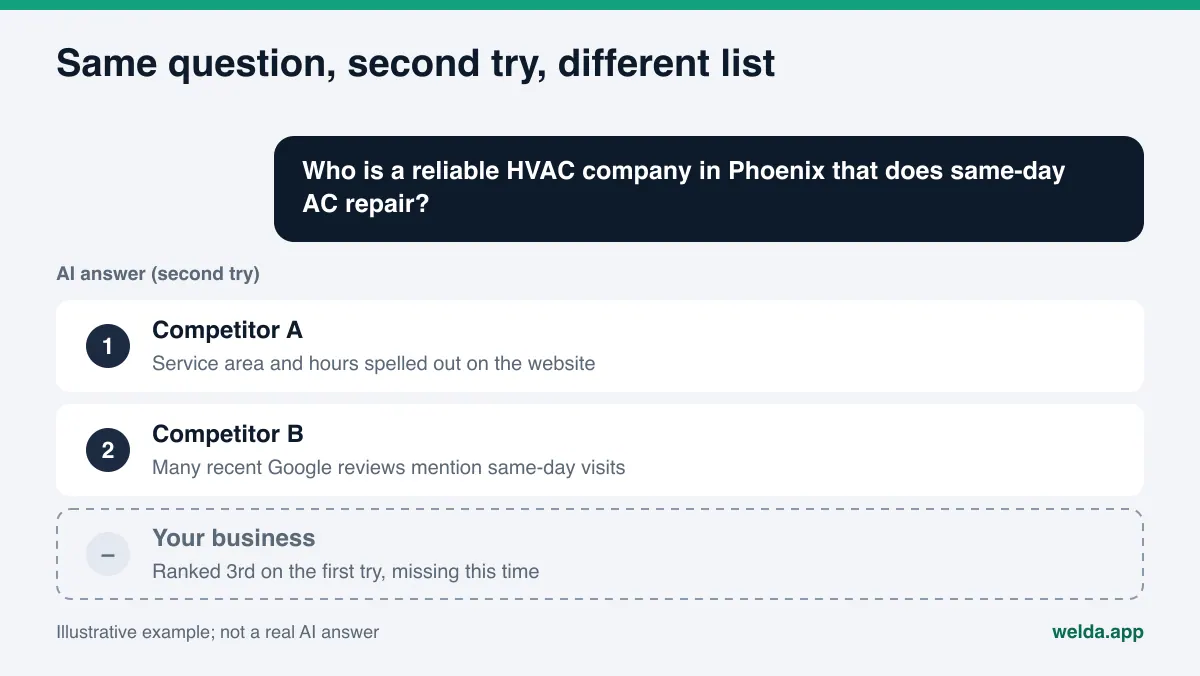
Why does the same question get a different answer each time?
In classic Google search, typing the same query from the same place usually returns a similar page of results for a while. AI answers work differently. ChatGPT, Gemini, Perplexity and Google's AI Overviews and AI Mode write a fresh answer every time. The structure of the answer may stay similar, but which businesses are named, in what order, and for what reason can change from one try to the next.
There are several reasons for that:
- How language models generate text: A model picks each word from a probability distribution. The same prompt with the same settings does not always produce the same text. Microsoft's documentation for one of its language model services says plainly that asking the same question several times will likely give you different responses, and that even its reproducible output setting does not guarantee identical results.
- Live web search: Engines that search the web while answering may pull slightly different pages each time. When the sources change, the list of businesses in the answer changes with them.
- Wording: "Phoenix HVAC company" and "who is a reliable HVAC company in Phoenix that does same-day AC repair" describe the same need, yet they can get different answers.
- Location, language and account: A question asked while logged in, from another city, or in another language can return something else.
- Model updates: Engines are updated from time to time. Behavior that held last month may not hold today.
None of this is a bug. It is how these systems work. The mistake is to ignore the wobble and treat one answer as a final verdict.
Why ignoring the margin of error in AI visibility tracking misleads you
Here is what this looks like for a business owner. You ask ChatGPT "best brunch spot near me" and your restaurant comes up second. Two days later you ask again and you are gone. The first reaction is usually "something broke." You start rewriting pages, adding content, maybe calling an agency. But nothing may have changed. Both answers can be two draws from the same distribution.
The opposite happens too. You add an FAQ section, your name shows up the next day, and you conclude it worked. Maybe it did. Maybe you got a lucky answer that day. One check cannot tell you which.
A margin of error protects you from both mistakes. If your score is 40 with a margin of ±4, seeing 37 next week is not a drop; it is inside the range. If the score comes in at 48 and then 50 in two consecutive runs, that is a move outside the range that repeats. (These numbers are examples.) The basis for your decision changes: not the single number, but the number relative to its range.
This ties directly into how often you measure. Measuring too often and reacting to every wiggle is costly, and so is measuring so rarely that you catch a real drop late. We cover that balance in how often to measure AI visibility.
If you want a baseline for your own site today, start with the free AI visibility analysis. It reads your site the way search engines and AI systems do, lists what is missing, and asks five customer-style questions to an AI assistant that can search the web. That is a one-time snapshot. The repeated tracking and margin of error described in this article belong to ongoing monitoring in the Welda dashboard.
How is the margin of error in AI visibility tracking measured?
The idea is simple: run the same measurement several times and see how far apart the results land. If the results sit close together, the margin is small and the measurement is stable. If they spread out, the margin is wide and a single run is hard to trust.
In practice you need three things:
- A fixed question list. If the questions change between runs, you cannot tell whether a difference came from the questions or from your business.
- Several runs per question. Asking one engine one question once gives you one sample. Asking it the same question several times shows you the spread of answers that engine gives to that question.
- A summary of the runs together. The average or median of the runs gives you the score; the spread between runs gives you the margin.
Take an example. A business runs the same question list three times. The first run scores 31, the second 27, the third 29. (Example values.) Reporting this as a flat "29" leaves something out. The honest reading is "about 29, give or take a few points." If the next measurement comes in at 30, it tells you nothing new. If it comes in at 38 and stays there, it tells you something.
More runs make the margin more reliable, but every run costs time and money. Three runs remove most of the distortion of a single check and can still be repeated on a regular schedule. Keep in mind that three runs are not a statistics lab. The margin is not a guaranteed confidence interval; it is an honest signal of how much the result moves.
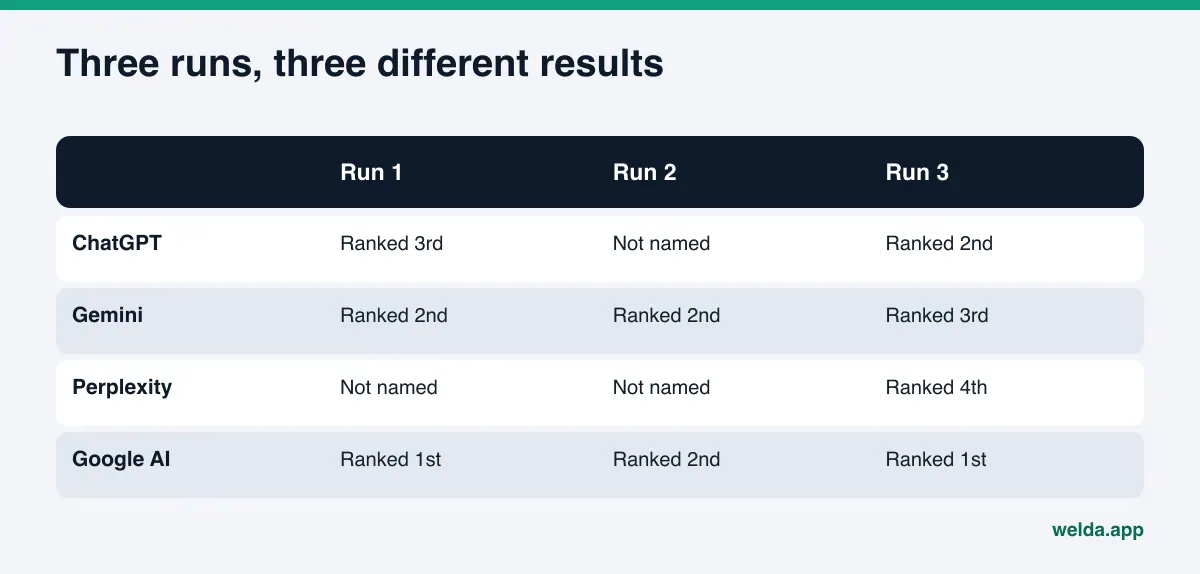
What makes the margin wider or narrower?
Not every business has the same margin. Some get named in roughly the same spot on every try; others flicker in and out. The usual reasons:
| Factor | Effect on the margin | What you can do |
|---|---|---|
| Thin or scattered information about you | The engine sometimes remembers you, sometimes not; results swing | State services, address and hours clearly and consistently on your site |
| Conflicting sources | When Yelp, BBB and your site disagree, the answer gets unstable | Align your Google Business Profile, website and directory listings |
| Borderline position | The business at the end of the list falls in on one run and out on the next | Find the topic where a competitor wins and close that gap |
| Broad, vague questions | More candidates fit, so the order moves more | Use the specific questions real customers ask |
| Watching one engine only | A swing on one engine looks like the whole picture | Track engines separately, then summarize them together |
| Too few questions | A swing on a single question moves the whole score | Keep the list broad enough to cover all your services |
One useful takeaway: a shrinking margin is a sign of progress in its own right. The more clear, consistent information about a business AI systems can read and confirm across several sources, the more consistently they mention it. Even if the score holds steady, a narrower ± can mean your AI search visibility is standing on firmer ground.
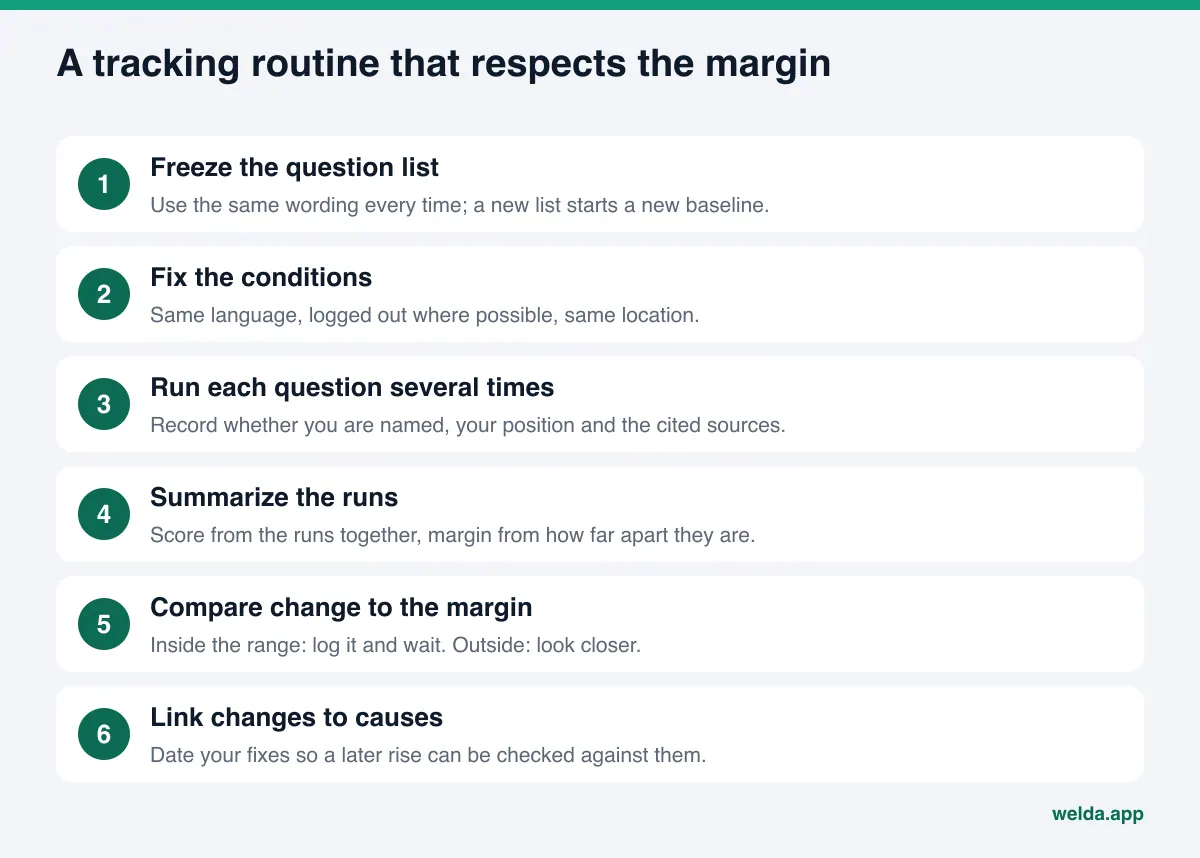
Step by step: an AEO tracking routine that accounts for error
Whether you track by hand or with a tool, these steps make the margin visible and cut down on false alarms. In answer engine optimization (AEO), sometimes also called GEO or generative engine optimization, they matter as much as the fixes themselves.
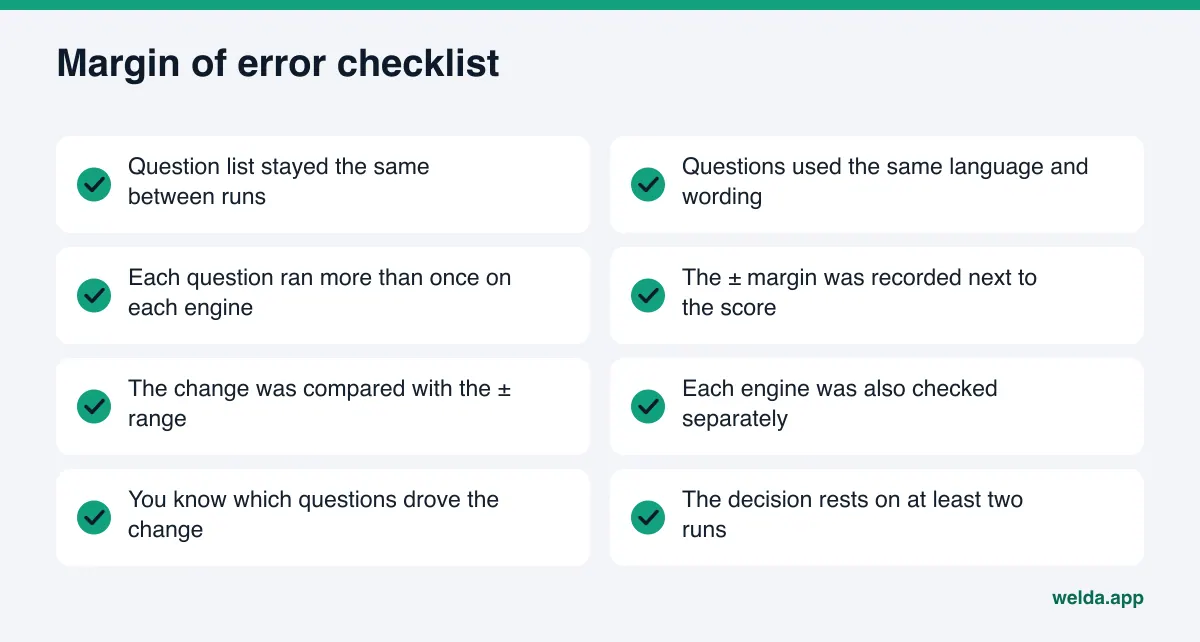
- Write the question list and freeze it. Use the questions customers actually ask: service, neighborhood or city, price range, comparisons, "which one is better." Use the exact same wording each time. If the list has to change, log that as a new baseline.
- Fix the conditions. Same language, logged out where possible, same location. If conditions change, the difference may come from them.
- Ask each question on each engine more than once. Record whether you were named and in what position. Note the sources the answer cites.
- Summarize the runs. Per question: in how many runs were you named, what was the median position. Overall: the score and the spread across runs.
- Compare the change with the range. Is the new difference inside or outside the ± margin? If inside, log it but do not act on it.
- Look for repeated movement. If a change outside the range holds in the next run too, it is probably real. Then drill down to the questions and engines behind it.
- Link the change to a cause. What changed on your site, your profiles or your sources in between? Knowing the date of each fix makes it easier to judge whether a rise came from it.
That last step matters most. To see the effect of a fix, the before and after runs must use the same question list and the same number of runs. We walk through that in before and after AEO measurement. Also remember that new content usually takes weeks to show up in AI answers; a check the next morning rarely tells you much.
A worked example: six weeks of scores
To see these steps in practice, picture an example dental practice in a mid-size US city tracked for six weeks. At the end of week 3, it adds an FAQ section to its website covering insurance accepted, emergency appointments and evening hours. Every value in the table is an example and does not belong to a real business.
| Week | Score | Margin | Right reading |
|---|---|---|---|
| 1 | 24 | ±5 | Baseline. Wide range; the practice is borderline on several questions. |
| 2 | 20 | ±5 | Looks like a drop, but it is inside the range. No action. |
| 3 | 26 | ±4 | Still inside the range. FAQ section added this week. |
| 4 | 25 | ±4 | No change. New content takes time to show up. |
| 5 | 33 | ±3 | First move outside the range. Log it, wait for one more run. |
| 6 | 35 | ±3 | The move holds and the range narrows. Likely a real change. |
Two wrong calls were easy to make here. In week 2, the drop from 24 to 20 could have triggered a full site rewrite, even though it sat inside the margin. In week 4, the team could have decided the FAQ "didn't work" and stopped, when it was simply too early. The right reading is to notice the repeated move outside the range in weeks 5 and 6, then open the question detail and check whether the gain really came from questions about insurance, emergencies and evening hours.
Notice one more thing: the margin itself narrows over the weeks. That means the engines are naming the practice more consistently from run to run. The narrowing is a result of the work just like the higher score, and a tool that reports only a single number never shows it.
How Welda reports the margin of error
Welda builds the margin into its regular tracking, so you do not have to calculate it yourself. The ± sits next to the score, and the individual runs sit in the question detail. Here are the three parts most relevant to this topic.
Every question, three times on every engine
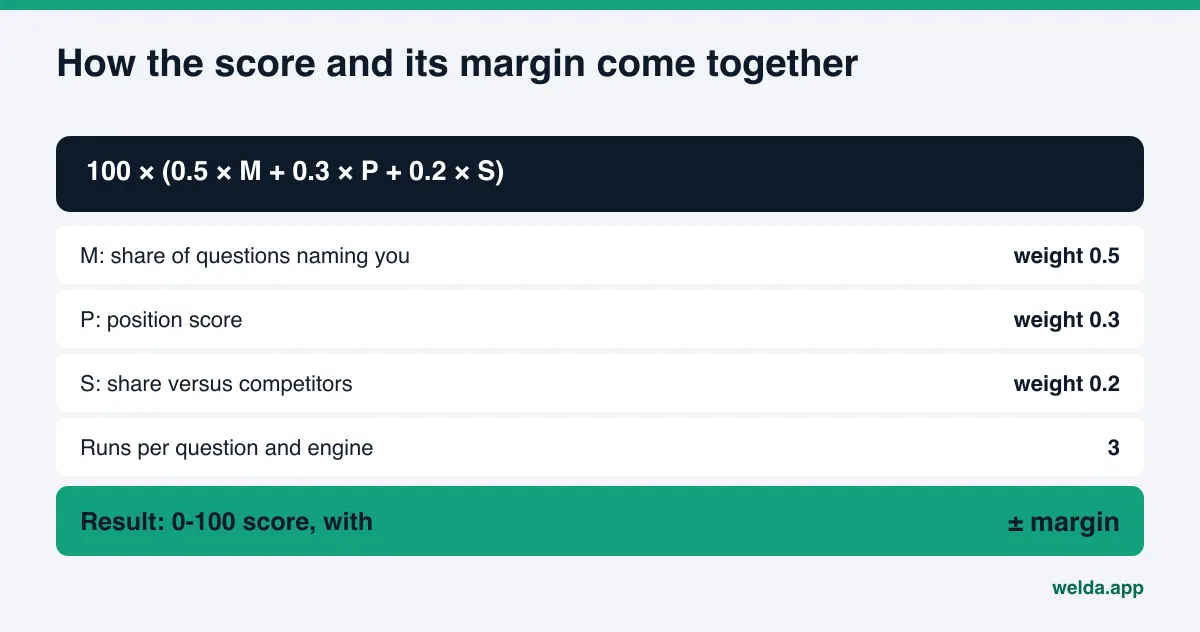
Welda asks the questions your customers would ask on ChatGPT, Gemini, Perplexity and Google AI, three times each. So for every question and engine pair you get three answers, not one. The score is calculated from those answers using a published formula: 100 × (0.5 × share of questions that name you + 0.3 × position score + 0.2 × share versus competitors). The spread across the three runs is shown next to the score as a ± value.
In practice, when you look at the score card you do not see a bare "27 / 100." You see the ± value and how many runs the score averages. When you spot a dip in the weekly score line, your first question becomes "is this inside the ±?" If it is, there is nothing to do.
The three runs side by side
The questions screen shows, row by row, where you stand on each of the four engines. Click a question and the answer detail lists the three runs separately: for example, not named in one, fourth in another, second in the third, with the median beside them. That answers the question that matters: am I truly weak on this question, or just borderline?
The answer changes what you do next. A question where you are missing in all three runs is a clear gap; the information behind it needs to go on your site and profiles. A question where you are missing once but ranked high twice is borderline; a small reinforcement may be enough instead of a major rewrite. The answer detail also lists the sources each engine cited, which helps explain why the result swings.
Finding where a change came from
When the score leaves its ± range, Welda lets you see which questions and which engine drove the move. The competitors screen shows on which topic and from which source a competitor is ahead. Together, "why did my score change" becomes "which question, which engine, which source." For more on the competitor side, see AI competitor analysis; for the overall layout, see AI visibility dashboard.
The rest of Welda (the to-do list, ready-made page drafts, the sources view, the monthly one-page report) builds on the same question list and the same measurements.
A plain note on availability: the Welda dashboard is in early access and opening in stages, starting with businesses in Turkey. Regular four-engine tracking is being added during early access, and the sample screens are shown with representative data. Questions can be tracked in English or Turkish. What anyone can use today, in English, is the free site analysis. Pricing is discussed during the early access conversation.
What the margin does not tell you: limits, and what Welda does not do
A margin of error is useful, but it does not explain everything. An honest measurement states its limits.
- Three runs are a small sample. Their spread gives a good sense of how much the result moves, but it is not a strict statistical confidence interval. On a very unstable question, even three runs may not capture the full picture.
- The margin describes the moment of measurement. When an engine is updated, its behavior can change completely, and earlier weeks' ± values no longer describe the new situation.
- Not every customer sees the same answer. Tracking uses a set question list in a set language. Real customers ask from different accounts, places and with different words. The score is a trend indicator, not a copy of every customer's screen.
- The five questions in the free analysis run once. That AI check is a good starting point, but it is not repeated and does not produce a margin. Read it as a snapshot.
- Welda does not guarantee rankings. It makes no promise of a position or of "showing up in ChatGPT." Showing the margin is part of that honesty: results move, and hiding that would mislead you.
- Welda does not write what it does not know. When tracking reveals a gap, it asks you for the facts needed to fill it. Content it prepares does not go live without your approval and always lives on your own website.
- Some work stays with you. Handling negative reviews, managing directory accounts and press outreach are not things Welda does. Their effect shows up in the tracking, but the work itself is yours.
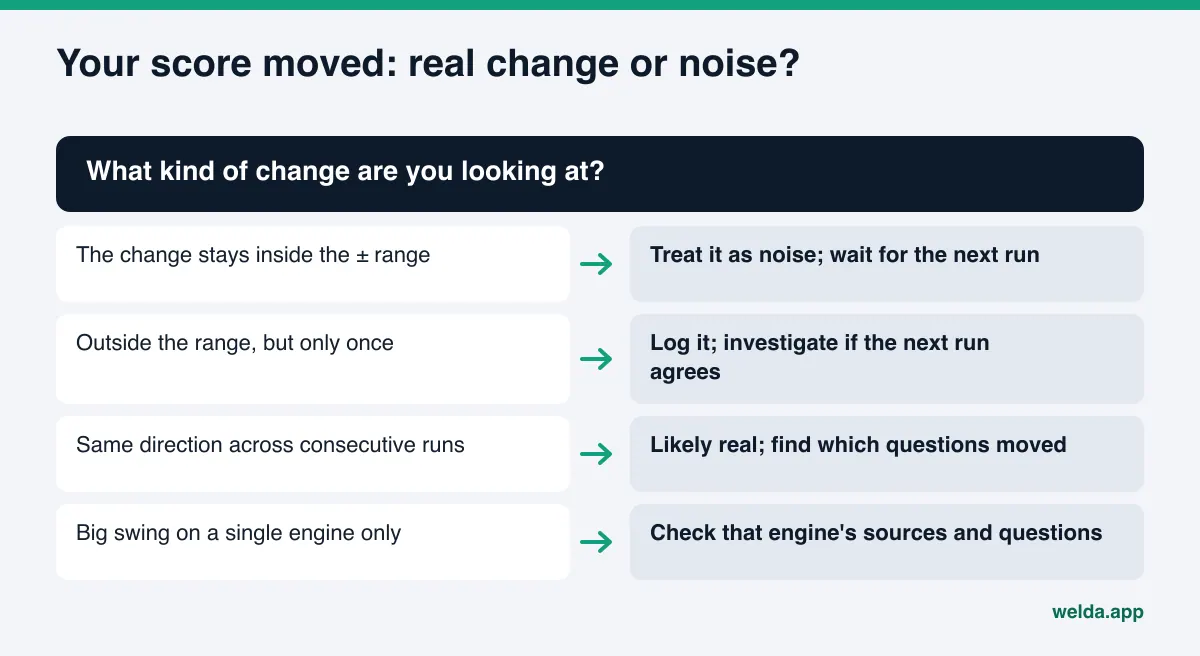
Decision checklist: when should you react to a score change?
When the next report lands, go through these questions in order. If you cannot answer yes to all of them, waiting for one more run before making a big change is usually the better call.
| Question | If yes | If no |
|---|---|---|
| Are the question list and conditions the same as last time? | The comparison is meaningful | Attribute the gap to the method change; treat it as a new baseline |
| Is the change outside the ± range? | Move to the next question | Treat it as noise and log it |
| Has the change held for at least two runs in a row? | Likely a real change | Wait for another run |
| Do you know which questions drove it? | Focus on those questions | Open the question detail, not the total score |
| Is it on one engine or all of them? | One engine: check that engine's sources | All: look for a shared change on your site or profiles |
| Did you change something in between? | Note the date and confirm the effect next run | Look at competitors and sources |
The same list helps when you pick a tool. If a tracker does not show a margin next to its score, does not say how many runs it makes, or does not explain its formula, you cannot tell how much of a weekly change is real. We collected more questions to ask in ChatGPT rank tracker.
Frequently asked questions
My score fell 5 points in a week. Should I worry?
Check the margin first. If the drop sits inside the ± range, it is most likely measurement noise. If it falls outside and holds in the next run, drill into the questions and engines behind it.
Why ask each question three times instead of once?
Because AI engines do not give the same answer every time. A single answer can be a lucky or unlucky draw. Three runs give you a steadier score and a ± value that shows how much the result moves.
What does a small margin mean?
The engines name you, or leave you out, consistently across runs. A high score with a small margin means solid visibility. A low score with a small margin means the gap is clear, and that is where the fixing starts.
How can I see the margin if I track by hand?
Ask the same question list under the same conditions several times and record whether you were named and in what position each time. The size of the differences between runs gives you a rough margin. It is tedious, but far more reliable than deciding from one screenshot.
Does the free analysis give me a margin of error?
No. The free analysis asks five questions once and checks whether your business name appears in the answers. It is a one-time snapshot. Repeated runs and the ± value are part of the dashboard, which is in early access.
Does the margin make AI visibility tracking unreliable?
The opposite. A measurement that shows its margin lets you tell real change from noise. The unreliable one is the measurement that hides the wobble and presents a single number as certain.
Start with where you stand today
To read a margin you need a starting point. The free AI visibility analysis reads your site the way search engines and AI systems do, lists each gap with why it matters and how to fix it, simulates how much each fix could lift your score, and runs a five-question AI check. It is free once per site and works in English; the results link arrives by email. That gives you a solid first reference point for the repeated tracking that comes later.