How do you do log file analysis for AI bots, and what does it actually tell you? Your web server's access log records every request with a user agent string and an IP address. Filter it for names like GPTBot, OAI-SearchBot, ChatGPT-User and PerplexityBot, verify the IPs against the lists those companies publish, and you can see whether AI crawlers reach your site and where they get stuck. What the log cannot tell you is whether your business is named in AI answers. That takes a separate measurement.
This guide walks through log file analysis for AI bots step by step: which bot does what, where to find your logs, how to read status codes, and where server logs stop being useful. It sounds like a job for a developer, and partly it is, but the outcome is a business decision. AEO (answer engine optimization) is the work of getting your business named when people ask ChatGPT, Gemini, Perplexity or Google's AI Overviews for a recommendation. Some people call it GEO, generative engine optimization; it is the same goal. None of it works if the bots cannot read your pages in the first place. For a quick outside view of how your site reads to AI today, run a free AI visibility analysis. It checks whether your robots.txt lets AI crawlers in and how readable your key pages are.
Why log file analysis for AI bots matters for your business
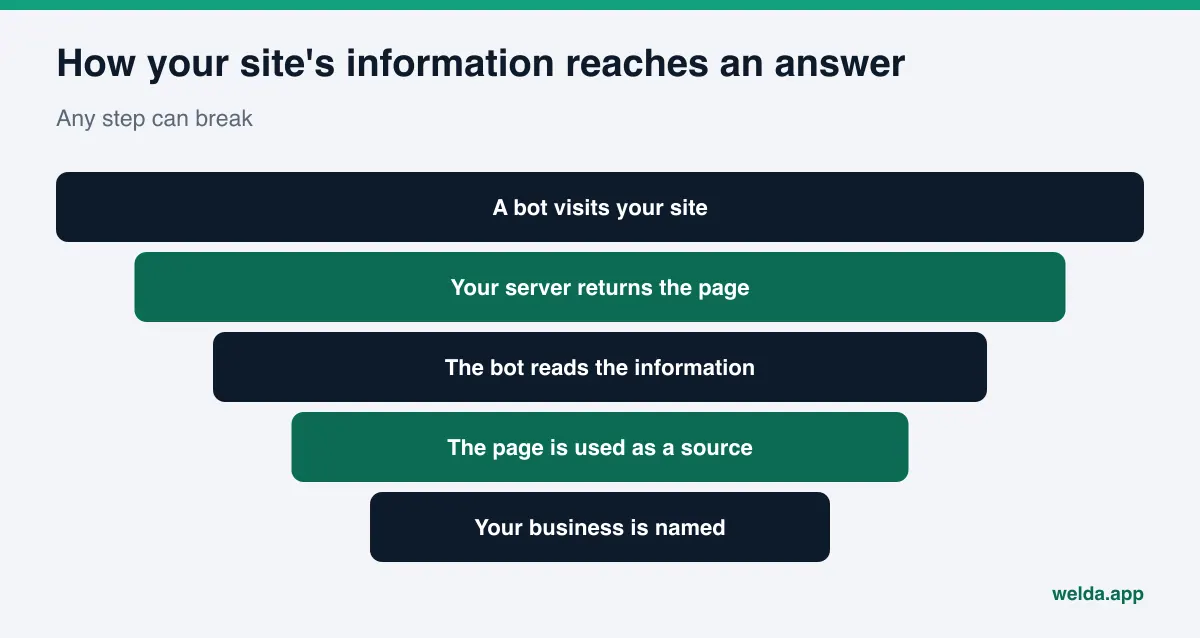
When an AI assistant answers a question like "best family dentist in Plano" or "reliable HVAC company near me," it learns about businesses in two ways. One is pages it crawled and indexed earlier. The other is a live visit, made the moment a user asks. Both depend on the same thing: a bot requests a page from your server and your server answers. If the server refuses, returns an error, or sends the bot in circles, the information on your site never makes it into the answer.
Most business owners would never notice. The site loads fine in a browser. Meanwhile a firewall rule, a bot-blocking plugin or a robots.txt line someone added years ago quietly turns AI crawlers away. The only place that shows this is the access log, where you see the bot arrive and receive a 403 or a 503 instead of the page.
Logs also help you set priorities. If AI crawlers spend their visits on an old promotion page and rarely touch your service pages, your internal links and sitemap deserve a look. And logs show user-triggered visits. A ChatGPT-User or Perplexity-User entry means someone asked a question and the assistant opened your page to answer it. That is indirect evidence your site is being tried as a source. Indirect, because opening a page is not the same as naming you in the answer.
Which AI crawlers show up in your server logs?
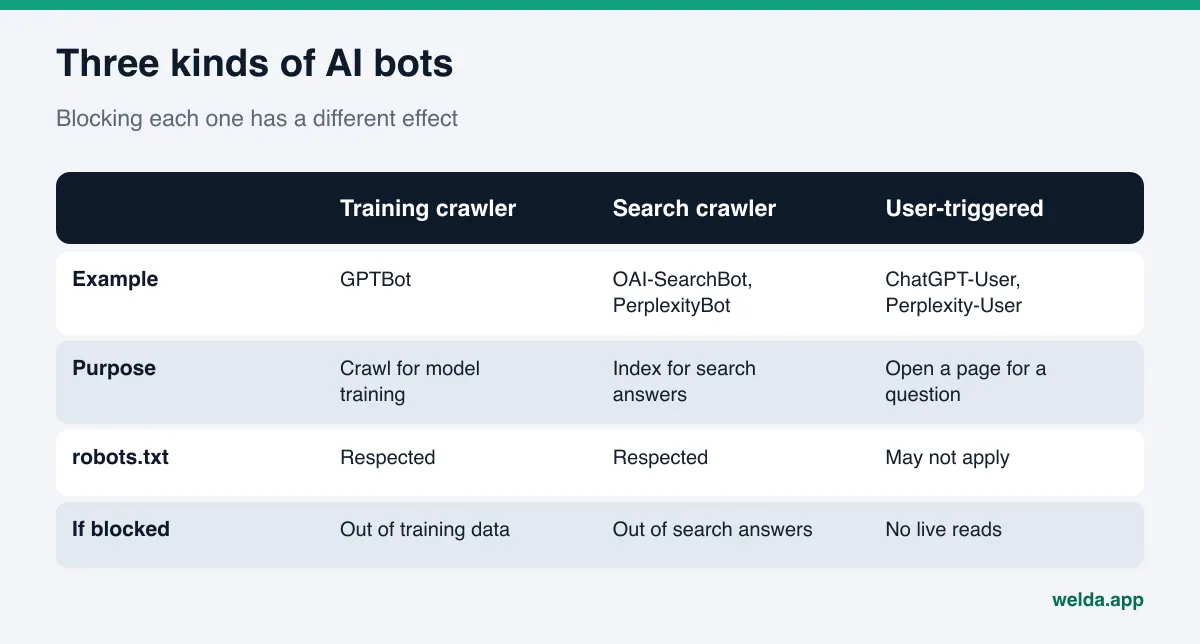
AI companies run three kinds of bots, and the difference matters, because blocking each kind has a different effect. The details below come from each company's own documentation as of November 2026. OpenAI lists its crawlers on its official bots page, and Perplexity documents its own in its crawler guide.
| Name in the log | Company | What it does | robots.txt |
|---|---|---|---|
| GPTBot | OpenAI | Crawls content that may be used to train models | Respected; blocking it opts you out of training |
| OAI-SearchBot | OpenAI | Crawls to surface sites in ChatGPT search | Respected; blocked sites do not appear in ChatGPT search answers |
| ChatGPT-User | OpenAI | Opens a page when a user's question calls for it | May not apply, since a user triggered it |
| PerplexityBot | Perplexity | Crawls to surface and link sites in Perplexity results | Respected |
| Perplexity-User | Perplexity | Fetches a page to answer a user's question | Generally ignores it |
| Googlebot | Crawls for the Google Search index | Respected |
Google has a twist worth knowing. According to Google's crawler documentation, Google-Extended is not a crawler but a robots.txt control token with no user agent string of its own. It decides whether content Google has crawled can be used to train Gemini models and to ground answers in Gemini apps, and it does not affect whether you appear in Google Search. So searching your logs for "Google-Extended" will turn up nothing. On the Google side, the entry to look for is Googlebot.
A single log line looks roughly like this (the IP is a documentation example):
203.0.113.10 - - [12/Nov/2026:09:14:02 -0600] "GET /services HTTP/1.1" 200 18432 "-" "Mozilla/5.0 ... compatible; OAI-SearchBot/1.4; +https://openai.com/searchbot"
Five fields matter: the requesting IP, the timestamp, the URL requested, the status code (200 here, meaning success) and the user agent. Finding AI bots is mostly a matter of filtering that last field. But the user agent alone proves nothing, because anyone can fake it.
Where to find your access logs
How you get to the logs depends on where your site lives. There are three common setups.
- Shared hosting: Your hosting control panel usually has a section called "raw access logs," "access logs" or something similar. You can download daily or monthly files there. Some hosts keep logs for only a few days, so download them on a schedule.
- Your own server or VPS: The web server writes the access log to a file on the machine. Whoever runs the server knows where it lives and how long it is kept.
- A CDN or security layer in front of the site: Requests hit that layer first. If a bot is blocked there, it never reaches your server and never shows up in your server log. You need that layer's own logs as well.
The third case is the one people miss most often. If you see no GPTBot or PerplexityBot at all, the bots may be arriving and getting stopped before your server ever sees them. Know the path requests take before you draw conclusions from an empty log.
One caution: access logs contain visitors' IP addresses, and under some US state privacy laws an IP address can count as personal information. Before you hand logs to an agency or upload them to a tool, check your obligations, and where you can, share only the bot lines. This is not legal advice.
Step by step: log file analysis for AI bots
The sequence below is written so a business without an in-house tech team can follow it with help from a developer or their host's support desk. The first pass takes an hour or two. After that, it is much faster.
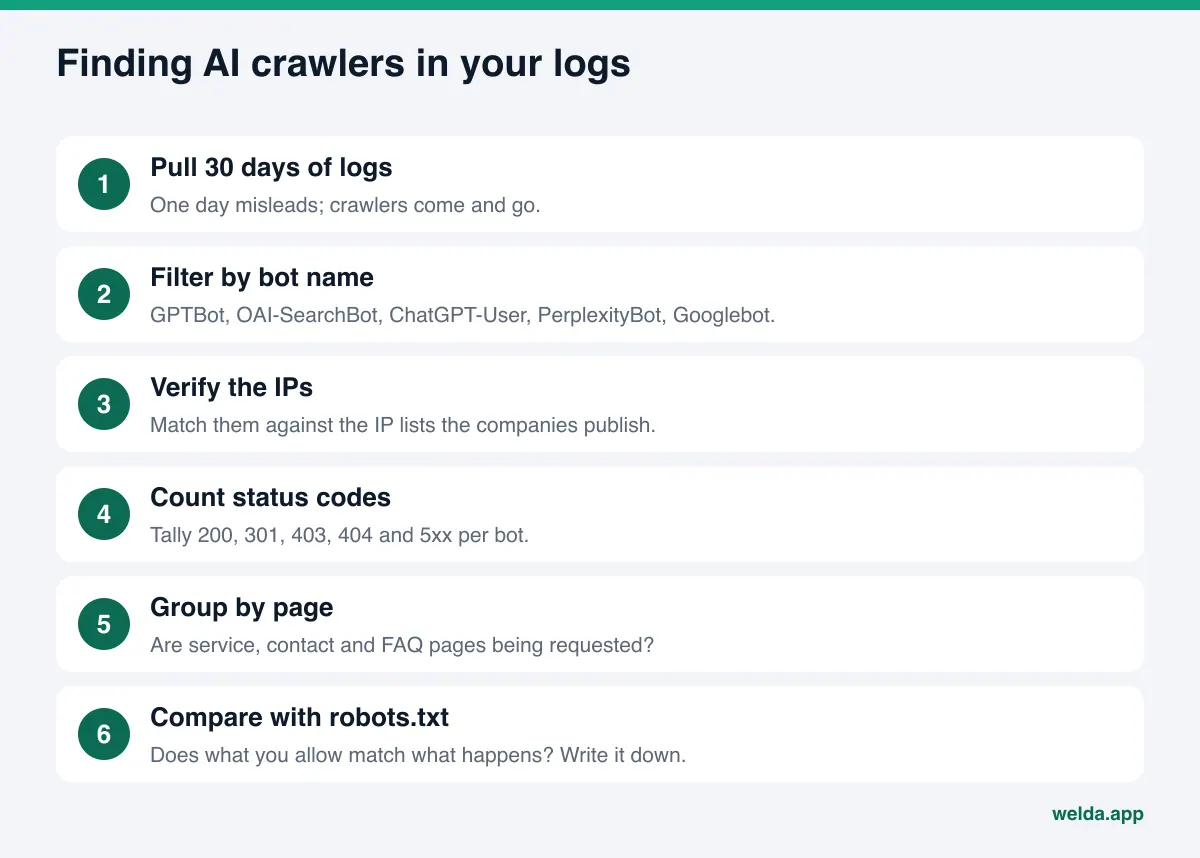
- Pull the last 30 days of logs. A single day misleads; crawlers come and go. A month gives you a fair picture.
- Filter by bot name. Search for
GPTBot,OAI-SearchBot,ChatGPT-User,PerplexityBot,Perplexity-UserandGooglebot. On the command line:grep -E "GPTBot|OAI-SearchBot|ChatGPT-User|PerplexityBot|Perplexity-User" access.log - Verify the IPs. OpenAI and Perplexity publish the IP ranges their bots use as JSON files. A request that claims to be OAI-SearchBot from an IP that is not on the list is very likely an impostor. For Googlebot, use the verification method Google documents.
- Count status codes. For each bot, tally how many requests got 200 (OK), 301 or 302 (redirect), 403 (forbidden), 404 (not found) and 5xx (server error). This is where the real findings are.
- Group by page. List which URLs the bots request. Are your homepage, service pages, contact page and FAQ on that list?
- Compare with robots.txt. You may have blocked a bot you meant to allow. Or a bot you thought was blocked is still coming.
- Write the findings down. Which bot, which problem, who fixes it. Repeat the same steps next month and compare.
While you work, give the user-triggered entries their own look. Pages opened by ChatGPT-User or Perplexity-User were pulled up to answer real questions. Do they load without errors? Is the content current? If a page opened during a live question still lists last year's prices or a location you closed, that outdated detail can flow straight into the answer. Our guide on content freshness for AI search covers how to keep those pages current.
What each status code in your logs means
Finding the bot lines is the easy part. Interpreting them is the work. The same entry can mean different things on different sites, but the table below points the right way in most cases.
| What you see | Likely cause | What to do |
|---|---|---|
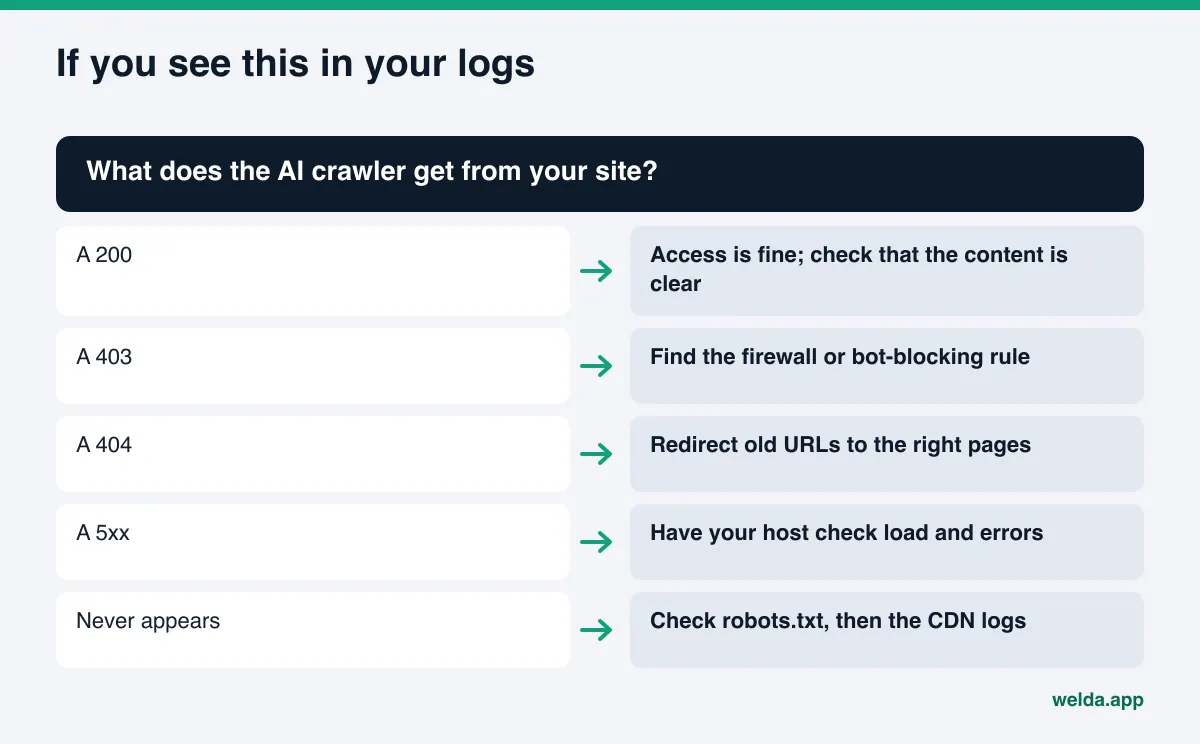
| Bot arrives, gets 200 | No access problem | Move on to content: is the information clear and current? |
| Bot arrives, gets 403 | Firewall, bot-blocking plugin or server rule | Find the rule; remove it if the block is unintended |
| Bot arrives, gets 404 | Old or wrong URLs, broken internal links | Add permanent redirects to the right pages |
| Bot arrives, gets 5xx | Server load, timeouts, application errors | Have your host or developer investigate |
| Long redirect chains | Several 301s or 302s in a row | Collapse them into a single redirect |
| Bot never appears | robots.txt block, a block at the CDN, or the bot has not come yet | Check robots.txt first, then the CDN or security logs |
That last row causes the most confusion. A missing bot is not always a problem; crawlers visit small, new sites rarely. But if robots.txt or a security rule blocks them, they will never show up. The way to tell the difference is to rule out any block first, then wait a few weeks.
There is also a content problem that logs will not flag. A bot can get a 200 and still miss the information if your key details only load through scripts that run after the page opens. It is not always documented which AI crawlers execute scripts. The safe approach is to keep services, address, phone number, hours and FAQ in the page's plain HTML.
Example: a month of logs for a local HVAC company
The scenario below is an illustration, not a real business. It shows how the steps fit together.
An example HVAC company in a mid-sized Texas city downloads 30 days of access logs and filters for AI bots. Googlebot and PerplexityBot visit regularly and get 200s. OAI-SearchBot visits too, but some of its requests get 403. GPTBot does not appear at all. ChatGPT-User shows up a handful of times, always opening the page about AC repair pricing.
The company works through it. robots.txt has a block on GPTBot that a previous web vendor added. The owner does not want the site's content used for model training, so the block stays, on purpose this time. The 403s for OAI-SearchBot come from somewhere else: a security plugin that throttles visitors who make many requests in a short window, and the bot trips that rule. The owner asks the person who manages the site to relax the rule for search crawlers.
The last finding is about content. The pricing page that ChatGPT-User keeps opening still shows last season's service call fee. When someone asks ChatGPT about AC repair costs in town, stale numbers could be what it reads. The company updates the page and adds a "last updated" date.
A month later, the same check shows OAI-SearchBot getting 200s. That still does not mean the company is named in ChatGPT answers. To know that, you have to look at the answers to questions like "who does same-day AC repair near me." The log did its job: it found the block at the door.
A real example: 17 days of logs from our own test site
The HVAC scenario above is made up. Here is a real count to put next to it. We sorted the server logs of Welda's own test site, a single small business website, by AI crawler type for the 17 days from October 31 to November 16, 2026.
| Log entry type | Count in 17 days | What it means |
|---|---|---|
| Model training crawl | 77,955 requests | Bots reading content for model training; by far the largest group |
| Search index crawl | 7,075 requests | Bots indexing the site for an assistant's search feature |
| Live fetch on a user question | 166 requests | Someone asked an assistant, and it opened a page while answering |
| People who clicked a link in an answer | 8 visitors | The part that shows up in analytics as "traffic from AI" |
In the same period we also saw 24 requests that used an assistant's name while probing for hidden file names. Those were security scans, not real questions, and they are a concrete reason not to trust the user agent on its own.
The only honest conclusion from these numbers is this: AI crawlers read a site many times more often than people click through to it. That is why the "AI referral" number in your analytics does not measure visibility by itself. This is one site over 17 days; your ratios may look different, and we are not generalizing from it.
What server logs cannot tell you
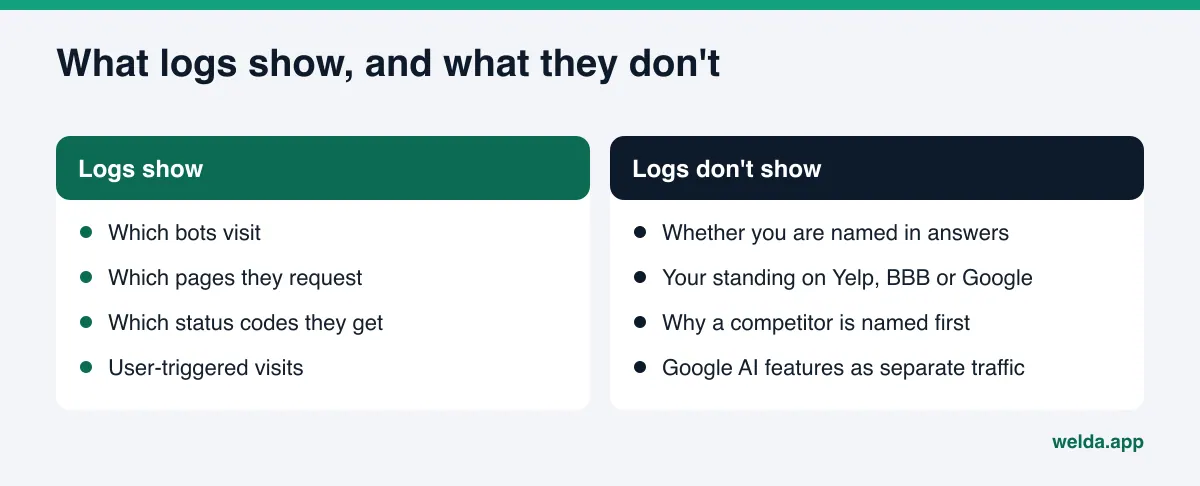
Logs are valuable, but they are limited. Reading them as a measure of AI visibility leads to bad calls. Here are four things they cannot show.
Whether you are named in answers. GPTBot crawling your site a hundred times does not mean ChatGPT will name you when someone asks for a dentist in your town. Answers are assembled from many sources, and your site is only one of them.
What outside sources say about you. AI often learns about local businesses less from their own sites than from Google Business Profile, Yelp, Tripadvisor, BBB, Angi or industry directories. Bots visiting those sites never appear in your logs. Our piece on citation gap analysis covers how to find which of those sources matter for you.
Why a competitor wins. Nothing in your logs explains why a competitor is named first for a given question.
Google's AI features as separate traffic. Because Google has no AI-specific user agent, you cannot separate AI Overviews or AI Mode activity from regular Googlebot crawling.
So log file analysis is an access check. It answers "is the door open?" To answer "what is being said inside," you need to ask real questions to the AI engines and look at the answers. Our guide to AEO KPIs sorts out which metric shows what, and attribution for AI referrals covers how to track customers who arrive from an AI answer.
How Welda handles this
To be clear up front: Welda does not read your server logs and does not ask for log files. Log analysis is a check that you or whoever runs your site performs. Welda works at the two ends around it: checking from the outside whether the door is open, and measuring what happens in the answers once it is.
The free analysis: looking at your site the way a bot does. The analysis reads your homepage and a few inner pages, such as services, pricing, about and contact, the way Google and AI crawlers would. One of the first things it checks is whether your robots.txt lets AI bots in. If it finds a block, the report says what it saw, why it matters and how to fix it. The same report covers page titles and descriptions, business structured data, address and phone details, FAQ content and page speed. It is a useful first step for sorting out a 403 in your logs: if the analysis finds no robots.txt block, the problem is more likely a firewall or security rule.
The Welda dashboard: sources and questions. In the dashboard, the Sources view lists the sites AI engines cite when they build answers in your category, and where you stand on each. Your own website is one of those rows, and if it cannot be reached, that row is flagged with the task next to it. Fixing access itself, changing a firewall rule or sorting out server errors, stays with you or your host; Welda lists it as a manual task. The Questions view is where you watch the result. Welda asks the questions your customers would ask on ChatGPT, Gemini, Perplexity and Google AI, three times each, and shows whether your name comes up and in what position. After you fix an access problem, this is where you see whether the related questions start naming you. That usually takes weeks.
Together, these cover the half that log analysis cannot. The log says a bot arrived. Sources shows whether AI uses your site as a source, and Questions shows whether that turns into your name in the answer. The dashboard also has a task list, a competitor view and a one-page monthly report, but for this topic, these two views do the work.
Where things stand: the Welda dashboard is in early access and is opening first in Turkey. Regular four-engine tracking is being added during early access, and sample screens use representative data. The free analysis works in English today and is the part anyone can use now. Pricing is discussed in the early access conversation.
Limits, and what Welda does not do
Some things no tool controls, in log analysis or in AI visibility generally. Knowing them up front keeps expectations realistic.
- Welda does not do log file analysis. It does not take your log files or count bot visits. You or your web team handle that check.
- No ranking or "show up in ChatGPT" promise. Bots reading your site cleanly is necessary, not sufficient. Neither Welda nor anyone else can promise a place in an answer.
- Server and security settings stay with you. Welda does not change firewall rules or access your server. The WordPress connection exists only to open content as drafts and publish them once you approve.
- It does not invent facts. If a page is missing your hours or service area, Welda asks you instead of guessing.
- Nothing publishes without approval. Prepared content opens as a draft on your site; you decide when it goes live.
- Changes take time to show. After an access fix, crawlers need to revisit and answers need to catch up. That usually takes weeks.
There is also the nature of measurement itself. AI answers vary from one run to the next, which is why Welda asks each question three times and shows a margin of error next to the score. Our piece on the margin of error in AI visibility tracking explains how to read that spread.
Monthly checklist for AI crawlers in your logs
Log file analysis for AI bots is not one and done. Site updates, new plugins and hosting changes can all break access. The checklist below is built to take about half an hour once a month.
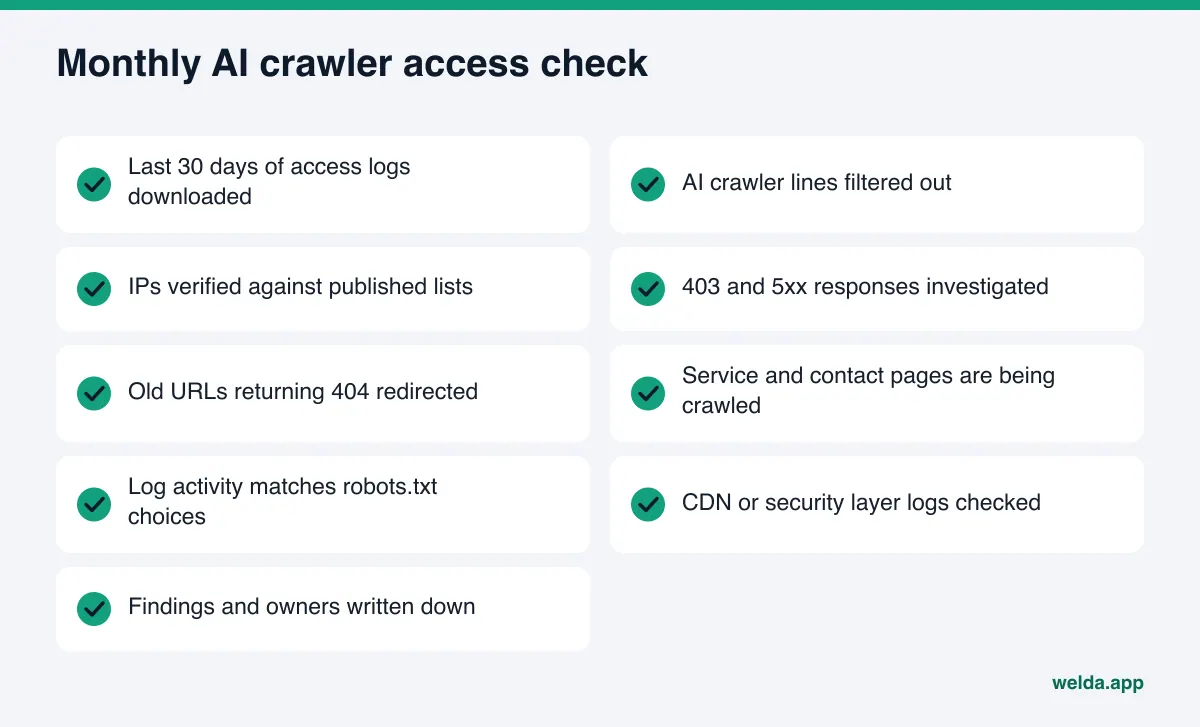
Two decisions sit behind the checklist. The first is which bots to allow. You can block the training crawler (GPTBot) and leave the search crawlers (OAI-SearchBot, PerplexityBot) open. That is a reasonable balance if you do not want your content used for training but do want to appear in AI search answers. Blocking a search crawler takes you out of that engine's search answers. The second is ownership. If the person who reads the logs is not the person who fixes things, written findings speed everything up.
| Choice | Result | Good fit for |
|---|---|---|
| Allow all AI crawlers | Content can be used for training and in search answers | Local businesses that put visibility first |
| Block training, allow search | You stay in AI search answers without feeding training | Businesses that want visibility but protect their content |
| Block all AI crawlers | Your own site stops feeding those engines' search answers | Businesses not pursuing AI visibility |
Frequently asked questions
If GPTBot shows up in my logs, does that mean I appear in ChatGPT?
No. GPTBot crawls content for model training. The only way to know whether you are named is to ask the questions and read the answers. The log only shows that the bot reached your site.
What if I see no AI crawlers in my logs at all?
Check robots.txt for lines that block them. If a CDN or security service sits in front of your site, check its logs too. If neither shows a block, small sites simply get crawled less often; check again in a few weeks.
Is every request labeled GPTBot really from OpenAI?
No. User agent strings are easy to fake. Compare the request's IP with the IP list OpenAI publishes. An address that is not on the list is most likely an impostor.
Why can't I find Google-Extended in my logs?
Because it is not a crawler. Google-Extended is a robots.txt token. Google's crawling shows up as Googlebot; Google-Extended only controls how your content can be used for Gemini.
Does Welda analyze my server logs?
No. Welda does not take log files or count bot visits. The free analysis checks robots.txt access and page readability from the outside, and the dashboard measures whether your name comes up in answers.
How long after an access fix will I see a difference?
There is no fixed timeline. Crawlers have to revisit and answers have to update, which usually takes weeks. Tracking the same questions over the following month or two is the honest way to see a change.
Bottom line: open the door, then measure the answers
Log file analysis for AI bots answers the most basic AEO question: can the crawlers get in? If the answer is no, content and profile work will have limited effect. If the answer is yes, the next job is measuring what the answers say. As a first step, check how your site reads to AI and whether robots.txt is blocking anything with a free AI visibility analysis. The report lists every gap it finds and how to fix it.