How do you handle attribution for AI referrals? You combine three signals instead of trusting one. The first is the hard trace in your analytics: the tag ChatGPT adds to outbound links and referrals from AI sites. The second is what the customer tells you ("I asked ChatGPT and it named you"). The third is visibility measurement that shows which questions your business actually appears in. None of these is complete alone; read together, they give you an estimate you can make decisions on.
Attribution for AI referrals means being able to say, with reasonable confidence, that a lead or a sale started with an answer from ChatGPT, Gemini, Perplexity or Google's AI Overviews. For small businesses that are putting time into AEO (answer engine optimization, also called GEO or generative engine optimization), this has become a practical budget question: if you work on AI search visibility, where do you see the return? This guide covers why AI attribution breaks the usual tracking model, which traces survive, how to set up a lightweight system step by step, and which part of the job Welda takes on. If you first want to know whether AI crawlers can reach your site and whether your business shows up for a few customer questions, start with the free site analysis.
Why is attribution for AI referrals so hard?
Classic digital attribution was fairly orderly. Someone clicks an ad, the link carries campaign parameters, and your analytics tool credits the visit to that campaign. A visit from a Google search shows up as organic. AI answers break this model in several places.
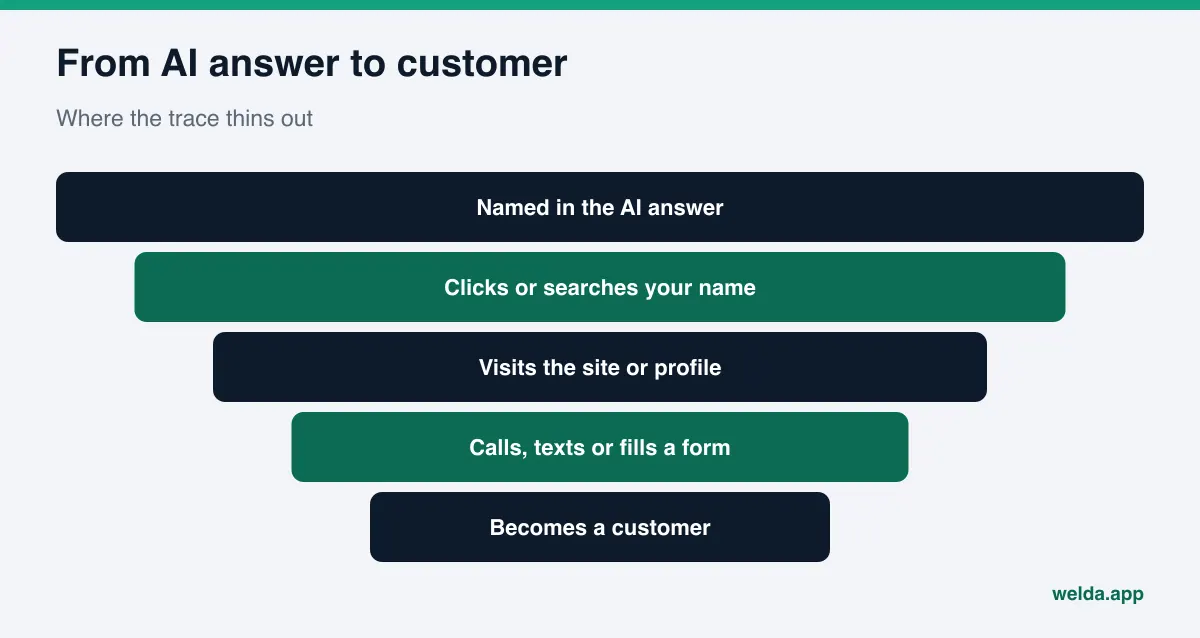
- Many answers end without a click. A homeowner asks "Who can fix a furnace on a Sunday in Columbus?", sees your company in the answer, then finds you on Google Maps and calls. Your website analytics never sees any of that.
- Referral data does not always arrive. When a link opens inside an app, gets copied and pasted, or is opened later on another device, the source can be lost. Those visits land in "direct" traffic.
- Google's AI features are not a separate channel. According to Google's own documentation, clicks from AI Overviews and AI Mode are included in overall search traffic in Search Console and reported under the "Web" search type (Google Search Central, AI features). A click from an AI Overview looks like any other organic click.
- The path is long. A customer asks an AI assistant, checks your Yelp reviews, looks at your Google Business Profile photos, maybe asks a neighbor, and then books. Which step actually decided it is unknowable in any strict sense.
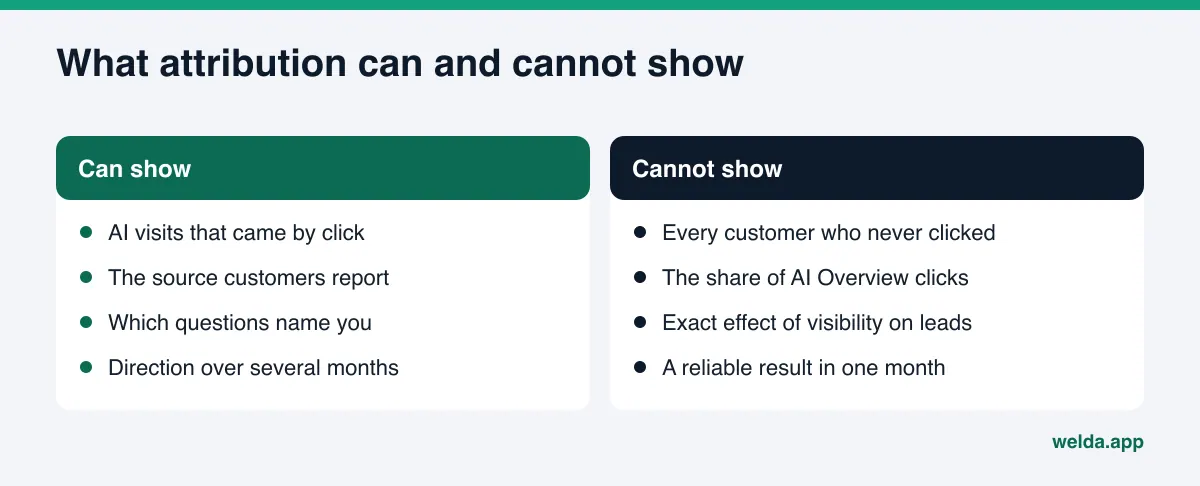
So there is no exact answer today to "how many customers did AI send us?" That does not mean nothing can be measured. The better question is "which direction do the signals point, and is that direction getting stronger over time?" Framing it that way also helps when you defend an AEO budget: instead of one inflated number, you bring three separate lines of evidence that support each other.
Which traces survive and which disappear?
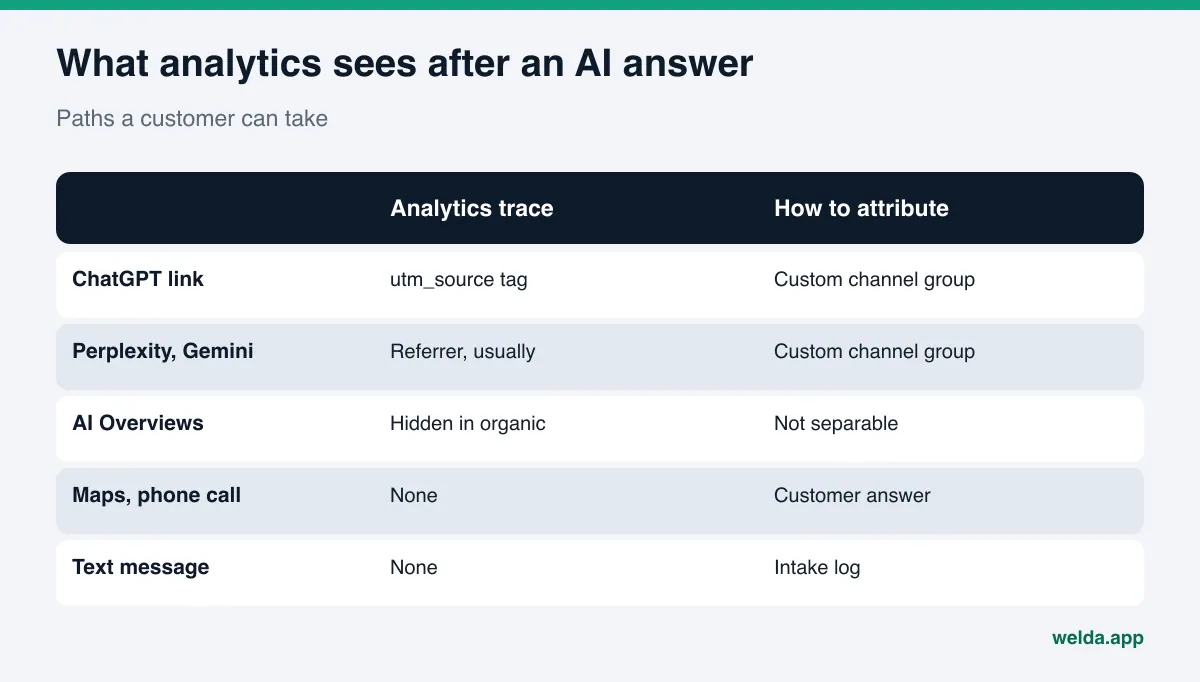
Before building anything, it helps to map the paths a customer can take after an AI answer and what each path leaves behind. The table below covers the most common paths for a local or service business in the US.
| Customer path | What is left | Where you see it | Confidence |
|---|---|---|---|
| Clicks a link in a ChatGPT answer | utm_source=chatgpt.com on the URL | Analytics (for example GA4), source/medium | High |
| Clicks a link in a Perplexity or Gemini answer | Referrer, usually but not always | Analytics referral traffic | Medium |
| Clicks from an AI Overview or AI Mode | Looks like organic Google | Search Console "Web", GA4 organic | Low (not separable) |
| Sees your name, finds you on Google Maps | Calls or directions from the profile | Google Business Profile performance | Low (source unclear) |
| Sees your name, calls or texts directly | Only if the customer says so | Intake notes, "how did you hear about us" | Self-reported |
| Remembers your name, types the URL days later | Direct visit | "Direct" in analytics | Very low |
Two things stand out. High-confidence traces only exist on paths that include a click. And the paths that bring most local customers (maps, phone calls, text messages) leave the weakest traces. That is why a workable setup needs both an analytics piece and a human piece: asking the customer.
Step by step: setting up attribution for AI referrals
The steps below are designed for a small business without an in-house analytics team. Most owners or office managers can set them up in a day or two. Order matters: first stop traces from being lost, then collect them in one channel, then add the human layer.
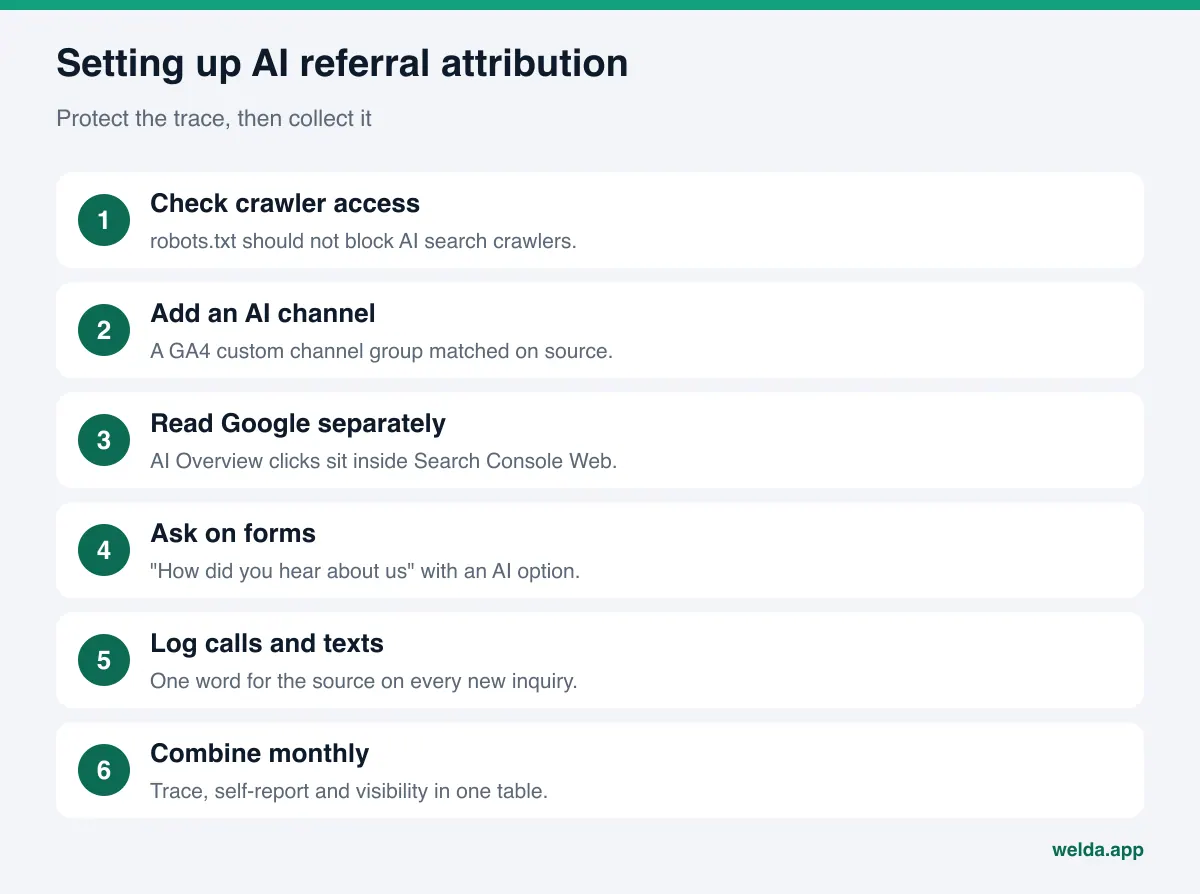
- Make sure AI search crawlers can reach your site. OpenAI's publisher FAQ states that ChatGPT automatically adds
utm_source=chatgpt.comto referral URLs, and that publishers who allow OAI-SearchBot can track ChatGPT referral traffic in tools such as Google Analytics (OpenAI, Publishers and Developers FAQ). The crawler names and robots.txt rules are listed in OpenAI's crawler documentation. If your robots.txt blocks the search crawler, you reduce both your chance of being cited and the traffic you could attribute. Our guide on robots.txt for AI crawlers walks through the rules. - Create an "AI assistants" channel in GA4. Default channel groups in GA4 cannot be edited, but you can create rule-based custom channel groups. Google's help page uses this exact case as its example: add a channel with a "matches regex" condition on source to capture traffic from assistants such as ChatGPT and Gemini, and place it above Referral (Google Analytics, custom channel groups). The same page notes that custom channel groups can be applied to reports retroactively.
- Start the source list with a simple pattern. An example starting point:
chatgpt\.com|perplexity\.ai|gemini\.google\.com. Treat this as a draft. Check the source names that actually appear in your own reports, add what is missing, and review the list every quarter, since domains change. - Read Google separately. Because AI Overview and AI Mode clicks cannot be isolated, filtering Search Console for question-style queries ("best ... for", "who can ...", "is there a ... near") gives you a rough proxy. We cover the method in AI traffic in Search Console.
- Ask the customer and record the answer. Add "How did you hear about us?" to your contact form, booking form and phone intake script, with "ChatGPT or another AI assistant" as an explicit option. If you collect this alongside personal information, review your privacy notice with your attorney; this article is not legal advice.
- Set up a simple log for calls and texts. For many service businesses, most leads come by phone. A shared sheet where whoever answers writes down the source in one word for every new inquiry is the only record of a path analytics cannot see.
- Once a month, put all three signals in one table. The AI channel in analytics, self-reported AI leads, and your visibility measurement. Attribution comes from reading those three side by side.
Asking "How did you hear about us?" the right way
Self-reported attribution is the most underrated source here. Analytics only sees people who click; a good intake question also catches the customer who never visited your site. But the wording shapes the answer.
Make the options specific. If you offer "Internet" as a choice, AI assistants, Google, Yelp and Instagram all collapse into it. Split them: Google search, Google Maps, Yelp, social media, referral from a friend, ChatGPT or another AI assistant, other. Allowing more than one choice reflects real paths better.
On the phone, one sentence is enough. "Mind if I ask how you found us?" does not get in the way of a booking. If the caller says "I asked ChatGPT," try to learn what they asked. An answer like "I asked who does same-day water heater replacement nearby" tells you which question in your visibility measurement it matches. That match is the most valuable piece of the whole exercise.
Record what was said, not what you hoped. If a customer says "I think I saw you on Google," do not log it as AI. Keep vague answers in their own bucket. An inflated channel will mislead your next budget decision.
Ask existing customers in the first month. When you start, there is no history. Asking every customer during the first month gives you a baseline. Without one, you will not know what any later increase is measured against; we explain why in before and after AEO measurement.
How do you classify a single lead?
At the end of the month you will have a stack of inquiries, and each one needs a bucket. To stay consistent, use a fixed decision order: look for the strongest trace first, and only step down if you cannot find it.
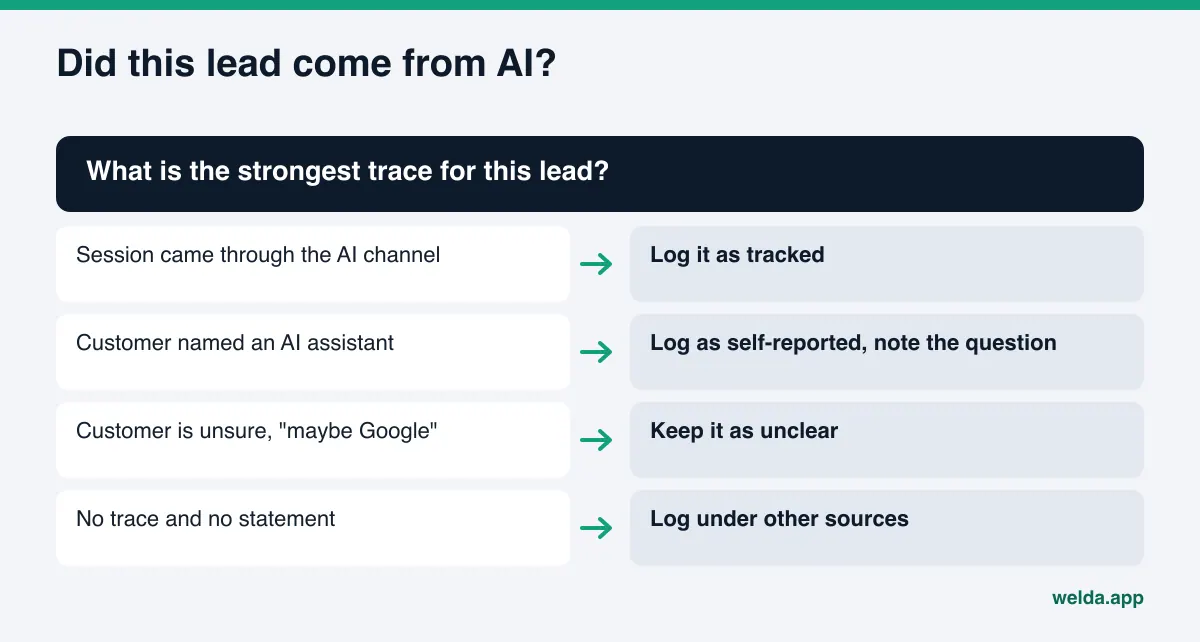
Three buckets are enough:
- Tracked: the visit or form submission came through the AI channel in analytics. For example, a booking request from a session tagged
utm_source=chatgpt.com. - Self-reported: no analytics trace, but the customer named an AI assistant as the source.
- Unclear: neither trace nor statement, but the customer came with a need that closely matches a question where your business appears in AI answers. This bucket is not counted as AI. It is only noted.
The "unclear" bucket still tells you something over time. If your visibility score rises while that bucket grows, it is a signal, not proof. Keeping that distinction in writing protects you, and whoever approves the budget, from false certainty.
How do you read the data?
Suppose you now have a monthly table built from all three signals. The most common mistake is to make a decision from one month. AI answers are not stable: your business can appear for a question one week and disappear the next. Our piece on why AI answers change every time explains the mechanics. That volatility shows up in leads, too.
The table below shows how a monthly attribution log could look for an example home services company. It has no numbers on purpose: the point is how to read each line, not what the values are.
| Metric | Source | What to look at | When to be suspicious |
|---|---|---|---|
| AI channel sessions | GA4 custom channel group | Month-over-month direction; landing pages | A sudden spike from a single source |
| Forms or bookings from the AI channel | GA4 key events | Whether sessions turn into inquiries | Sessions up, inquiries flat at zero |
| Self-reported AI leads | Form field, call log | Which questions they asked | The month you changed the option wording |
| Share of questions where you are named | Visibility measurement | Which questions you gained or lost | When the question list changes |
| Unclear but matching leads | Intake log | Whether they grow with visibility | Always; never counted as proof |
The core rule: visibility is the leading indicator, leads are the lagging result. When you publish a new FAQ section, it usually takes weeks before AI answers reflect it, and longer before it shows up in leads. Read the direction over at least three months, not one. For how to package this into a recurring report, see our guide to the monthly AEO report.
Look at landing pages. Where AI channel sessions land is the most concrete clue to which question you were shown for. If visits mostly land on a pricing or FAQ page, the answer probably drew on that page. Visits that land on the home page usually come from answers that named you without pointing to a specific page. That tells you which page to strengthen next.
Read the visits that do not convert. If the AI channel sends sessions but no calls or forms, visitors may not be finding what the answer promised. If hours, service area, price range or a way to book are not obvious on the page, curious visitors leave. That is a side benefit of attribution: it points at the page that is falling short.
How does Welda handle this?
The analytics side of attribution, reading tags and separating channels, lives in your own analytics account. Welda does not set that up for you. What Welda adds is the piece that is weakest in most setups: regular measurement of which questions your business is named in, on which AI engine, and in what position. Analytics tells you "they came." Welda answers "where were you visible." Put side by side, they give you a basis for interpreting the self-reported and unclear leads.
The questions view: matching what customers say to what you measure. The Welda panel asks the questions your customers are likely to ask to ChatGPT, Gemini, Perplexity and Google AI, three times each, and shows question by question whether your business is named and in which position. When a caller says "I asked for a same-day plumber and it suggested you," you find the closest question in that list and check which engines actually named you. If there is a match, the self-reported lead is backed by measurement. If not, either the customer asked something you are not tracking, or your list has a gap; adding that question makes the next month's measurement more accurate. The view also shows which sources an answer cited, which hints at where the customer went next to check you out.
Before-and-after comparison and the monthly report: one timeline. Attribution depends on matching dates. Which page did you publish when, which week did visibility change, which month did self-reported leads move? Welda's before-and-after comparison puts the measurement from before a change next to the measurement after it, and the one-page monthly PDF report summarizes the score, the questions where you are named, and the questions gained and lost. The score formula is published: it weights the share of questions where you are named, your position, and your share against competitors, and the spread across three repeats gives a margin of error. That margin matters for attribution: if a score change sits inside the margin, do not credit a shift in leads to it.
The panel also has an inbound requests view that collects messages, sign-ups and calendar entries in one place. Recording the source and deciding whether a lead came from AI stays with you. Welda does not prove on its own that any specific lead came from an AI answer.
The free site analysis: stopping traces from getting lost. Before any of this, remove the most basic obstacle. The free site analysis checks whether AI crawlers can access your site through robots.txt. If they are blocked, you can neither be cited nor receive an attributable click. It also asks five likely customer questions to an AI assistant that can search the web and checks whether your business is named in the answers. That is a one-time snapshot, but it works as a starting point.
Early access. The Welda panel is in early access and opening in stages, first for businesses in Turkey. Regular measurement across all four engines is being added during early access, and sample screens in the panel use representative data. The part anyone can use today is the free site analysis, which works in English. Pricing is discussed in an early access conversation.
Limits: what attribution and Welda cannot do
Being honest about the limits of AI attribution is the first step to not making a bad call with it.
- There is no exact number. No setup captures every customer who never clicked. Attribution is an estimate, and a well-built estimate beats a badly built certainty.
- It does not prove causation. Leads rising while your visibility score rises does not prove the first caused the second. Seasonality, promotions, pricing and reviews all play a role. A change log reduces the confusion; it does not remove it.
- Welda does not guarantee rankings or placement in ChatGPT. It measures, shows gaps and drafts content, but it cannot decide what an engine will answer.
- Welda does not configure your analytics or attribute leads automatically. The custom channel group, the form field and the call log are your system.
- Welda does not invent facts. When a draft is missing information, it asks you, and publishing approval stays with you. It does not generate fake reviews.
- Some work stays with you. Responding to negative reviews, managing directory listings and press outreach remain the business's job.
- It takes time. New content usually takes weeks to show up in AI answers. The first month's table often looks empty; that does not mean the setup is broken.
Checklist: is your attribution setup ready?
Go through the list once. Every unchecked item leaves part of your attribution picture in the dark.
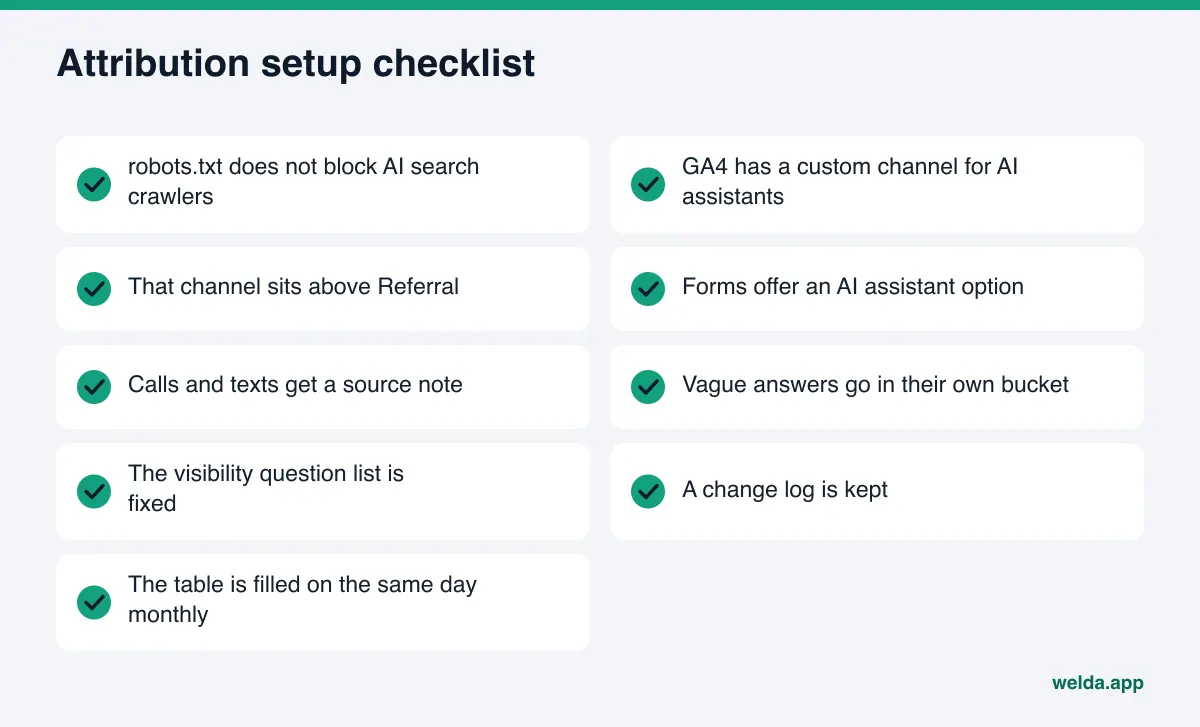
After that, the real work is consistency. Fill in the same table on the same day each month and judge the direction after three months. If you also want to see where competitors stand on the same questions, our guide to AI competitor analysis suggests a column to add.
A short decision rule for the three-month mark: if the tracked and self-reported buckets are growing and visibility is moving the same way, your AEO work is paying off. If visibility rises but leads do not move at all, the problem is probably the question list; you may not be measuring what customers actually ask. If both are flat, go back to the basics on your site and in the sources AI engines rely on.
Frequently asked questions
How do I see ChatGPT visits in Google Analytics?
According to OpenAI's publisher FAQ, ChatGPT adds utm_source=chatgpt.com to referral URLs. You can see that source in the GA4 source/medium report and group it into a custom "AI assistants" channel. Customers who never click will not appear there.
Can I separate clicks from Google AI Overviews?
Not directly. Google says AI Overview and AI Mode clicks are reported within overall "Web" search traffic in Search Console. Tracking question-style queries separately gives a rough proxy at best.
How much can I trust self-reported answers?
Self-reports are the only way to capture no-click paths, but they rely on memory. Specific answer options, a separate bucket for vague answers, and matching reports to your visibility measurement all make them more reliable.
Does Welda prove that a lead came from AI?
No. Welda measures which questions and engines name your business and lines that up over time in the before-and-after comparison and the monthly report. Deciding the source of a lead and keeping the source log stay with you.
What if my attribution table is empty in the first month?
That is normal. Confirm that AI crawlers can reach your site and that your question list reflects what customers really ask. New content usually takes weeks to appear in answers, so judge the trend over at least three months.
Is this too much for a small business?
No. One custom channel group, one question on your forms and phone script, and a table filled in monthly are enough. No extra software is needed; the hardest part is making the question a habit.
The first step in attribution for AI referrals is making sure the traces are not lost in the first place. Run the free site analysis to see whether AI crawlers can reach your site, whether your pages are readable for AI engines, and whether your business is named for a few customer questions. The result becomes the first line in your attribution table.