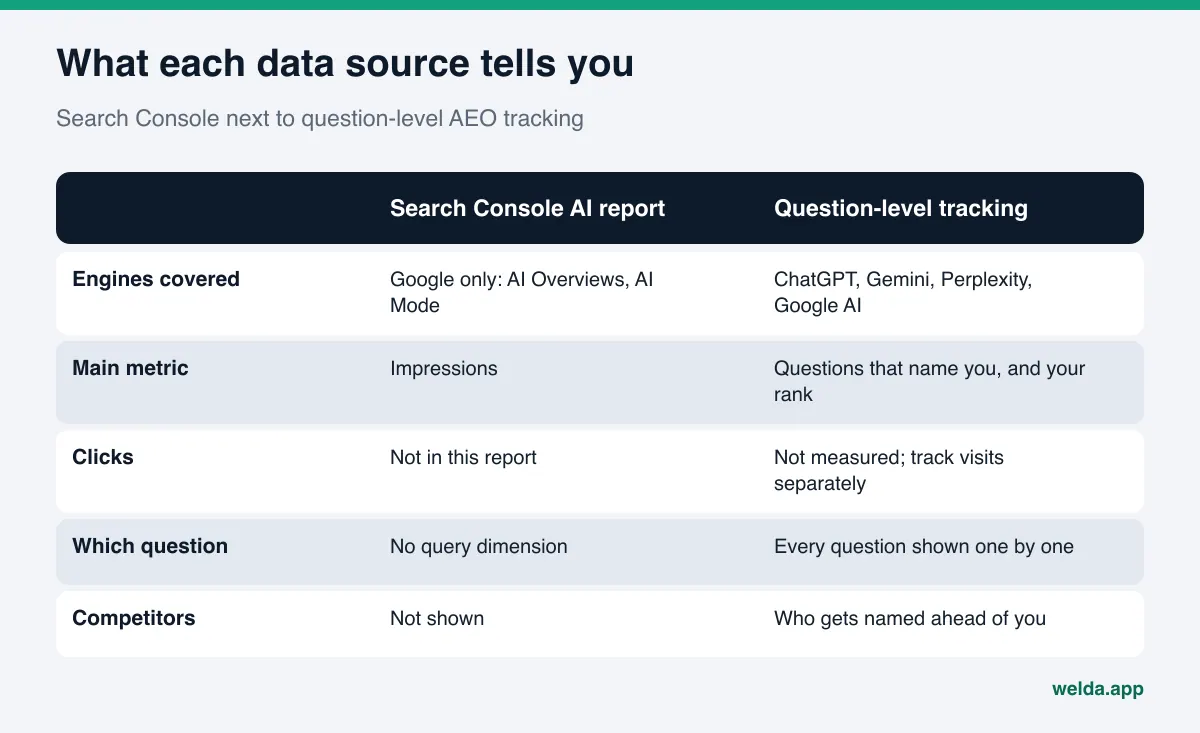
Where do I find AI traffic in Search Console? Google added a dedicated generative AI performance report for AI Overviews and AI Mode. It counts impressions only. It has no clicks, no queries and no competitor data, and it does not cover ChatGPT or Perplexity at all. AI traffic in Search Console is one useful piece of your AEO picture, and you need a question-level measurement to fill in the rest.
What is the AI traffic report in Search Console?
In June 2026 Google announced a new set of reports for Search Console, and according to the announcement on the Search Central blog, they reached all websites worldwide as of August 31, 2026. There are two parts: one for Google Search (AI Overviews and AI Mode) and one for generative AI features in Discover. This article focuses on Search, because that is where customers ask the questions that lead to a purchase or a booking.
The core metric is impressions. The Search Console help page defines an impression as the number of times a link to your site was shown to a user in a generative AI feature on Google Search. If one AI answer shows several links to your site, the chart counts that as a single impression. You can break the data down by page, country, device and date. Dates follow Pacific Time.
There is also a search type filter. "Web: text-based" covers typed searches, and "Web: multimodal" covers image-based searches such as Google Lens and Circle to Search. Data from Search Labs experiments is excluded. The usual 1,000-row limit of the performance reports also applies here.
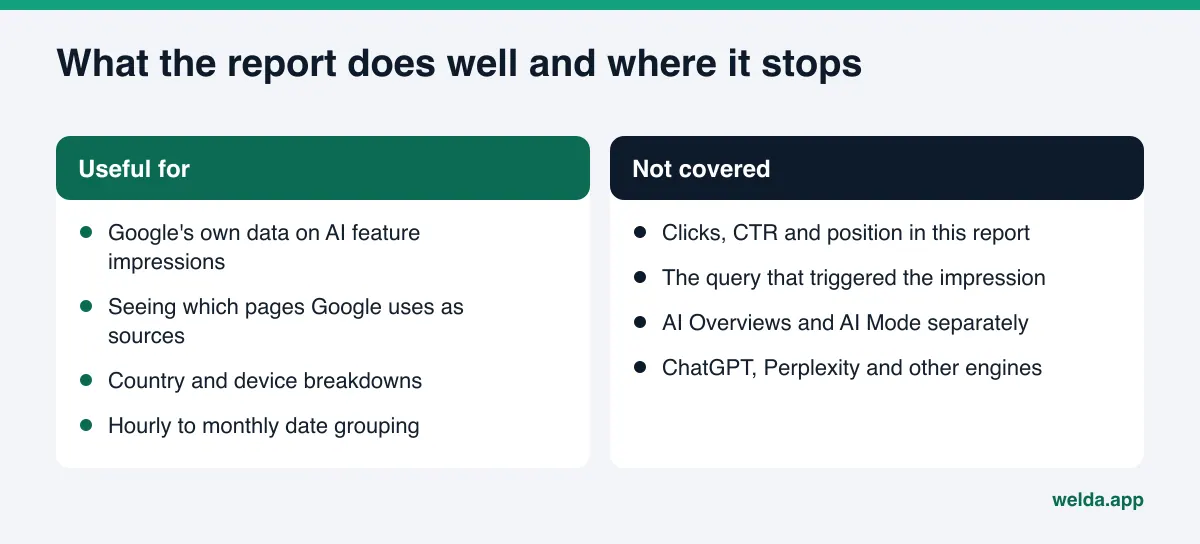
One more detail matters. The new report does not replace the old data. Google's documentation on AI features says traffic from AI Overviews and AI Mode is still counted in the main performance report under the "Web" search type. So the clicks are there, but they are mixed in with every other search click and cannot be pulled out.
Why this report matters for a business, and why it is not enough
For a long time, businesses had no official number for how often Google's AI answers used their site. The new report partly closes that gap. You can now see, from Google's own data, which of your pages appear as sources in AI Overviews or AI Mode. That is a real step forward for anyone working on AEO (answer engine optimization), the practice of making your business easy for AI answers to find, understand and recommend. You will also see it called GEO, generative engine optimization; in this article we use AEO.
But the report leaves three questions open, and they are the three a business owner cares about most.
- Which question did you show up for? There is no query dimension. You cannot tell whether you appeared for "emergency plumber near me" or for an unrelated how-to question.
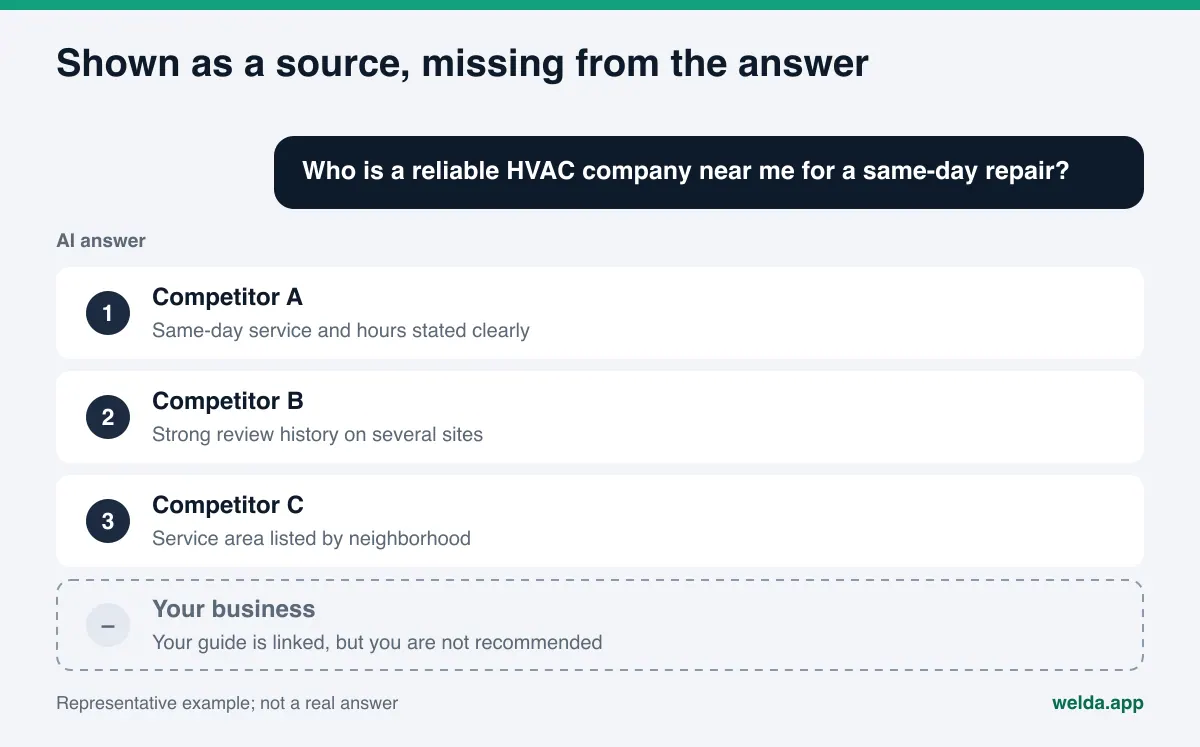
- Did the answer actually name you? An impression means your link was shown with the answer. It does not say whether the AI's text recommended your business, or in what position.
- What happens on other engines? ChatGPT, the Gemini app and Perplexity are outside Search Console. If your customers ask those tools too, this report shows you nothing about it.
None of this makes the report bad. Search Console is a site owner's tool, and it describes how your site performs on Google. AI search visibility for a business goes beyond the site: a customer asks a question, the engine names a few businesses, and you are either on that list or you are not. We break down how to measure that in our article on AEO KPIs.
Before you interpret impression counts, check whether AI can read your site at all. If the report is missing or nearly empty, start with Welda's free site analysis to see the basic gaps on your homepage and key pages.
How to read AI traffic in Search Console, step by step
Opening the report is easy. Drawing the right conclusion from it takes a routine. The sequence below lets you look at the data the same way every month, so the months are comparable.
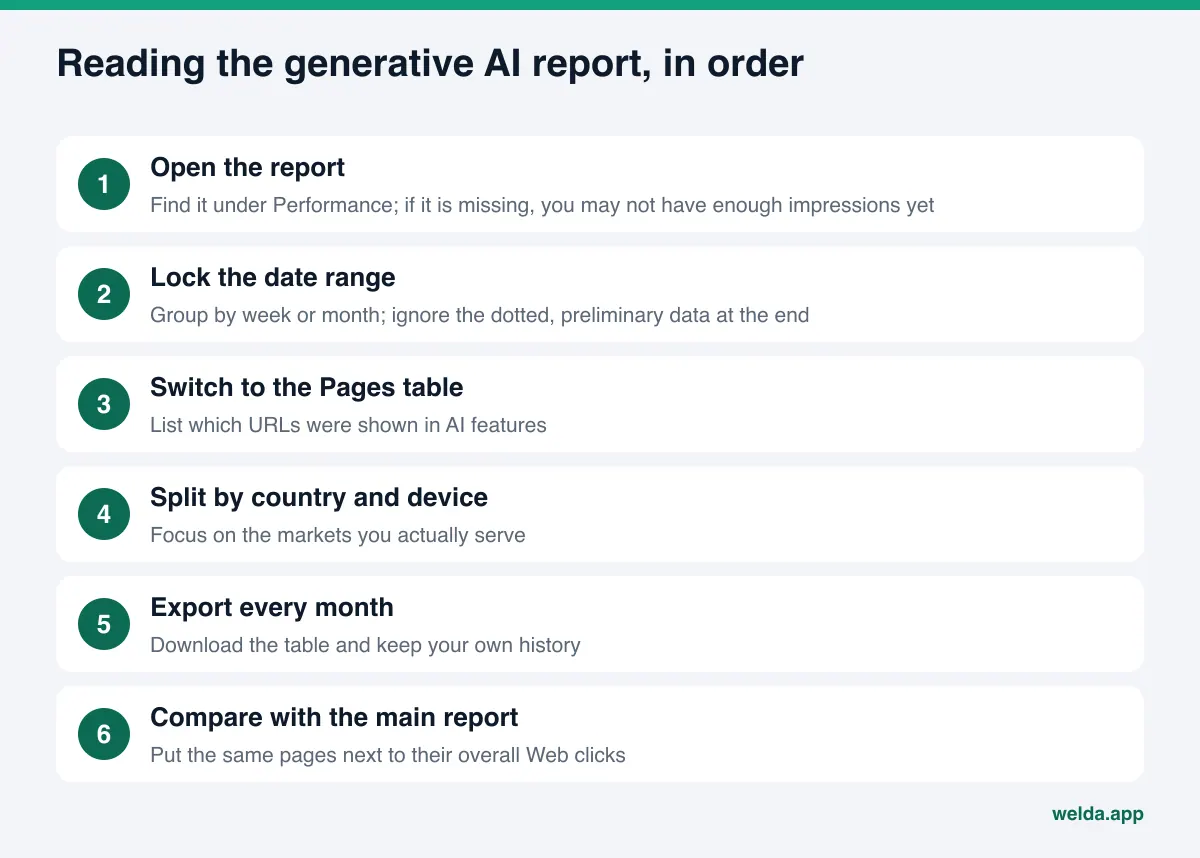
- Find the report. Go to Performance and open the generative AI report. If it is not there, the help page lists two possible reasons: your site has not received enough generative AI impressions yet, or it is excluded from these features. You can rule out the second by checking robots.txt and your page-level directives.
- Lock the date range. Group by week or month. The newest data is preliminary, shown as a dotted line, and may change within hours. Do not draw conclusions from the last few days.
- Switch to the Pages table. List the URLs that received impressions. Many owners are surprised here: impressions often come not from the homepage but from a service page or an FAQ section that answers one question clearly.
- Split by country and device. If you are a local business, filter to the United States. Impressions from other countries may mean your how-to content is cited for general questions, which rarely turns into customers.
- Export. The report has an export button. According to the help page, values shown as "~" or "-" download as zeros, so keep that in mind when you read the spreadsheet.
- Compare with the main report. Look at the same pages in the overall "Web" report. If AI impressions rise while clicks fall, the answer may be using your information without sending the visitor to your site.
Why you read the data from the screen
As of November 2026, the Search Console help page does not mention API access for this report. If your reporting pulls performance data through the Search Console API, generative AI impressions will not arrive as a separate field. That leaves two options: read the numbers in the interface, or export them on a schedule and build your own history in a spreadsheet. A monthly export is the simplest way to keep that history. Recheck Google's documentation every few months in case this changes.
What to compare impressions against
A single impression count says very little. "We got this many impressions last month" is neither good nor bad on its own. The comparisons that mean something are: the same page last month, the same page's share of its overall Web impressions, and the period before and after a change you made. Write the date of every content change next to the numbers. Without that log, three months from now you will not know what moved the line.
How to fill the gaps the report leaves
Search Console tells you Google showed your page. The real business question is different: when a customer asks for a business like yours, does the answer name you? The only way to measure that is to pick the questions customers actually ask, put them to AI engines and read the answers.
You can do this by hand. Write a list of ten to fifteen questions. Each month, ask the same questions to the same engines. Record whether your name appears, in what position, and which competitors are named. Manual tracking has two weaknesses. First, AI answers vary from one run to the next, so a single check can mislead you; we cover this in our article on margin of error in AI visibility tracking. Second, the work grows quickly as you add questions and engines. Choosing the right questions is its own task, covered in prompts to track for AI visibility.
The table below shows how the two sources work together.
| Question | Search Console generative AI report | Question-level tracking |
|---|---|---|
| Did Google show my page in AI answers? | Yes, impressions by page | Indirectly, through cited sources |
| Which customer question did I appear for? | No query dimension | Yes, question by question |
| Did the answer text name me, and where? | No | Yes |
| What about ChatGPT, Gemini, Perplexity? | Not covered | Yes |
| Where is a competitor ahead of me? | No | Yes |
| Clicks from AI to my site | Not separate; mixed into overall Web data | Not measured; track visits in analytics |
The last row matters. No visibility measurement counts the visitors who come to your site from an AI answer. Tracking visits from ChatGPT or Perplexity, and whether they become calls or bookings, is separate work; see attribution for AI referrals. If you also want Microsoft's view, read our article on the Bing Webmaster Tools AI performance report.
What decision should the report lead to?
The AI traffic table in Search Console usually looks like one of four patterns. Each one points to different work.
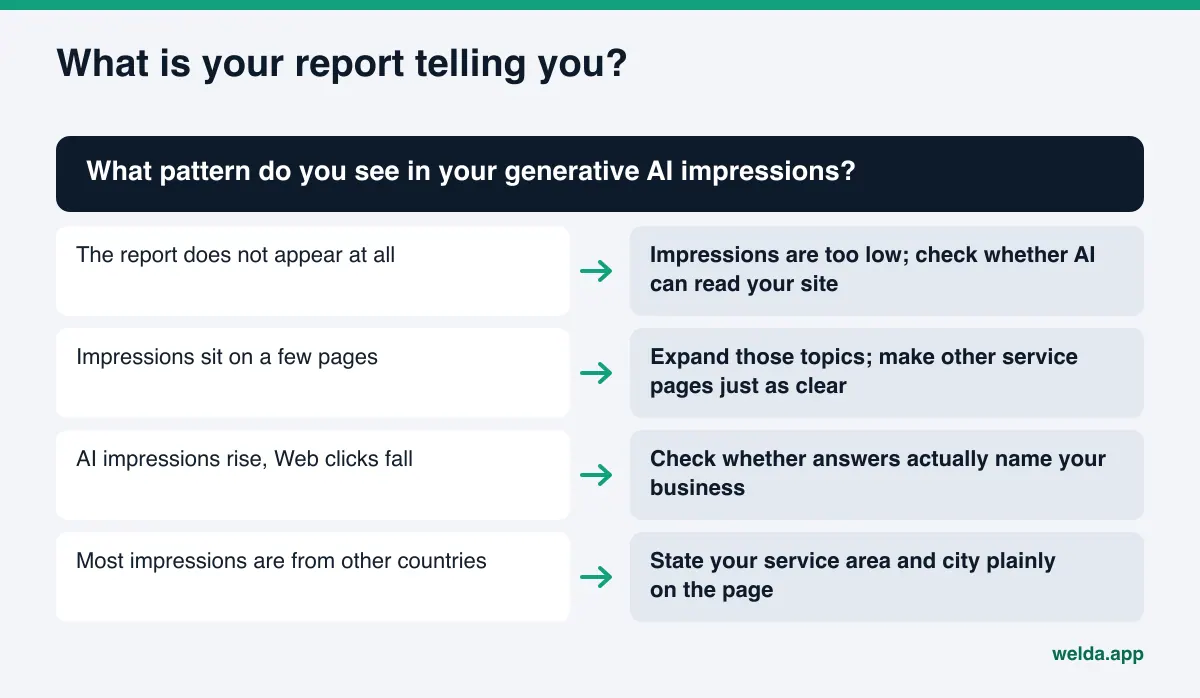
The report does not appear. Your site is not shown in Google's AI features often enough. This is usually a readability problem rather than a lack of content: a vague title and meta description, services that are not spelled out, no business markup (Schema), no FAQ section. Fix those first.
Impressions exist but sit on a few pages. That is a good sign. Google treats those pages as reliable answer sources. Look at which questions they answer, and bring your other service pages up to the same level of clarity.
AI impressions rise while Web clicks fall. The answer is using your information, but users may stop at the answer. Check two things: does the answer text name your business, or only link to you; and is the next step on your page (book, call, request a quote) obvious.
Most impressions come from other countries. Your informational content may be cited in markets you do not serve. If you are local, state your city, service area and neighborhoods plainly so you match local questions too. Keep your Google Business Profile, Yelp and BBB listings consistent with what the site says.
How Welda handles this
Welda works on the two gaps Search Console leaves: which questions you show up for, and what happens outside Google. It does not read your Search Console data or replace it. You use the two side by side.
The free site analysis: why is the report empty?
If your generative AI report is empty or thin, the cause is usually on your own site. The free analysis reads your homepage and a few inner pages (services, pricing, about, contact) and checks the things that decide whether AI can use them: whether AI crawlers are blocked in robots.txt, what your title and description say, whether business markup is present, whether name, address and phone are consistent, whether you have an FAQ section, and whether your services are described clearly. For every gap it shows what it found, why it matters and how to fix it. It also drafts homepage copy and shows which fix would raise your score by how much.
The analysis also asks five customer-style questions to an AI assistant that can search the web, and checks whether your business name appears in the answers. It is a one-time check, but it shows the thing Search Console never does: whether a question named you. The analysis is free once per site and works in English. Your result link arrives by email and stays open for 14 days.
The Welda dashboard: question by question, engine by engine
Ongoing measurement happens in the Welda dashboard. It tracks the questions your customers are likely to ask, and each question goes to ChatGPT, Gemini, Perplexity and Google AI three times. On the questions screen, each row is one question, and for each engine you see whether you were named and in which position. Open a row and you see a summary of the answer and the sources it cited.
Here is how that reads next to Search Console. Search Console shows your service page earning impressions in AI Mode. In the dashboard you look at the questions about that service: are you named in the Google AI column, and in ChatGPT and Perplexity? If Google shows your page but the other engines do not name you, the gap is probably off your site, in places like your Google Business Profile, your Yelp reviews or industry directories such as Angi.
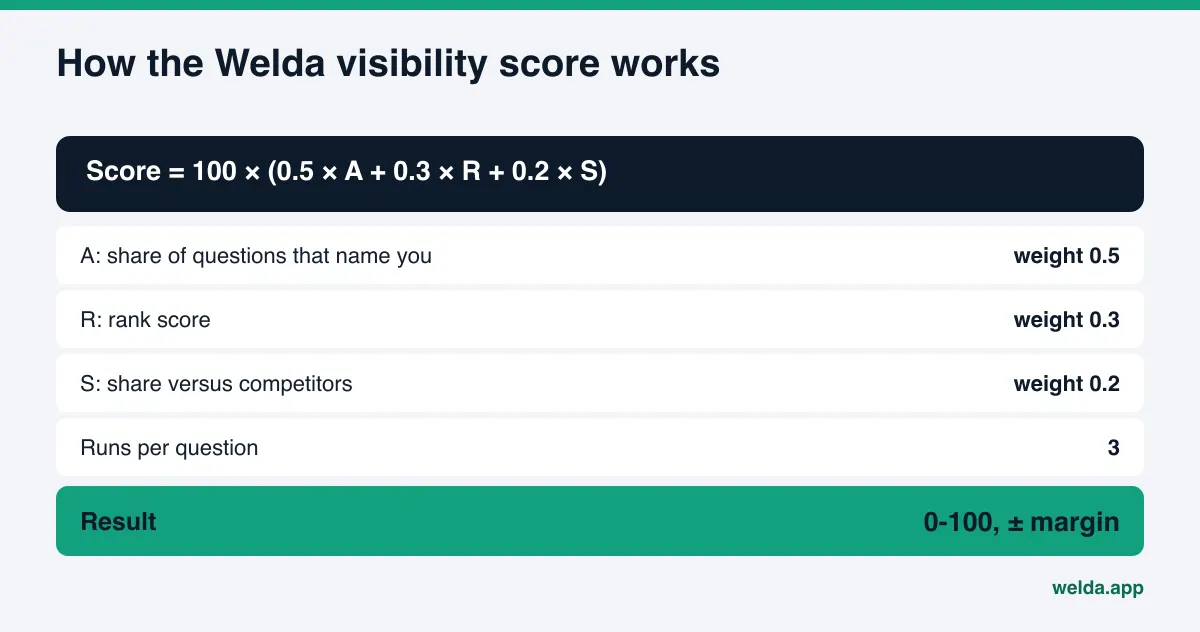
The score formula is public: 100 × (0.5 × share of questions that name you + 0.3 × rank score + 0.2 × share versus competitors). The spread across the three runs gives a ± margin. So when your score moves two points from one week to the next, you can tell a real change from normal variation in the answers. Search Console impressions have no such margin; the number is exact, but it measures something narrower.
The dashboard also shows the score over time, a breakdown by engine, and a one-page monthly PDF report. Putting your monthly Search Console export next to that report is a practical way to see how Google impressions and your place in the answers move together. We describe how to set that up in the monthly AEO report. Gaps land in a single to-do list; Welda drafts the content, profile copy and review replies, and publishing approval stays with you.
A plain note on availability: the dashboard is in early access and is opening first to businesses in Turkey. Regular four-engine tracking is being added during early access, and the sample screens use representative data. What anyone can use today, in English, is the free site analysis. Pricing is discussed in the early access conversation.
Limits: what neither Search Console nor Welda does
Knowing the limits of both tools is the best way to avoid reading the wrong story into the numbers.
Search Console:
- The generative AI report shows impressions only. Clicks, CTR and average position are not in it; Google says it may add metrics over time.
- AI Overviews and AI Mode cannot be separated; they share one report.
- There is no query dimension.
- Engines outside Google are not covered.
- The report may not appear for sites with too few AI impressions.
Welda:
- Welda does not guarantee rankings or that you will "show up in ChatGPT". It measures, shows gaps and prepares fixes; the engines decide.
- It does not make up facts. If it cannot find something on your site, such as hours, service area or how you price, it asks you.
- It does not publish sensitive content without approval, and it never writes fake reviews.
- Handling negative reviews, setting up directory listings and press work stay with your business.
- It does not read your Search Console data; you put the two sources side by side.
- New content usually takes weeks to show up in AI answers. Judge any fix in both Search Console and the dashboard after a few weeks.
A monthly routine for AI traffic in Search Console
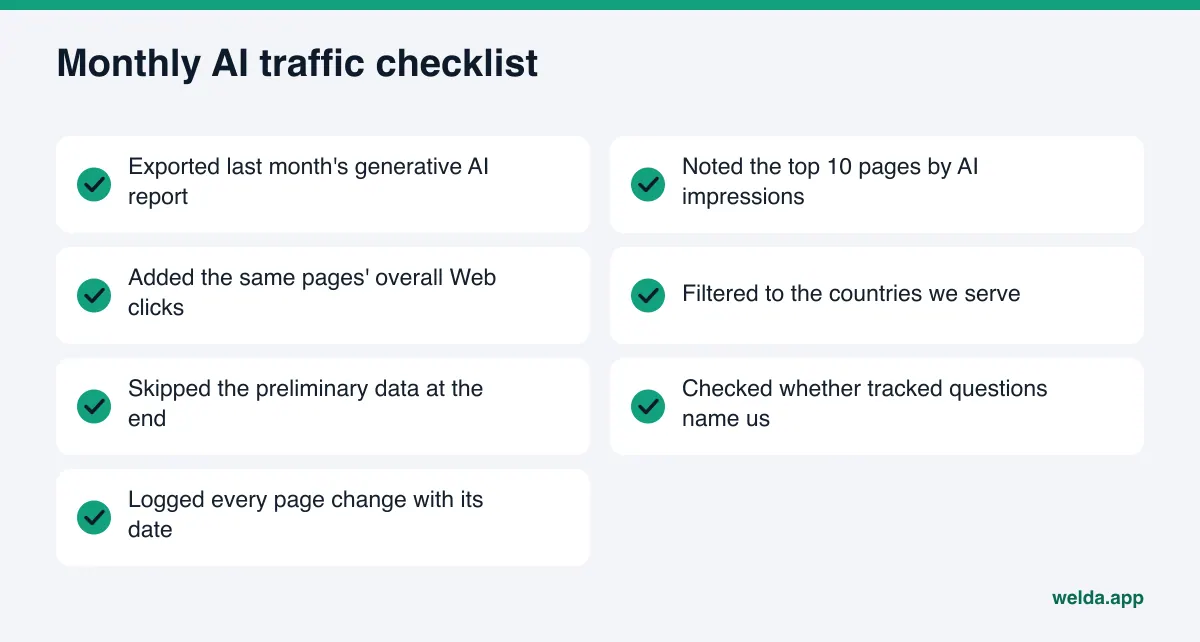
The routine below collects the same steps each month. The goal is a history you can line up against the changes you made.
| When | What to do | Where it goes |
|---|---|---|
| First week of the month | Export last month's generative AI report | Your spreadsheet, one tab per month |
| Same day | Note the top 10 pages and the country split | Same spreadsheet |
| Same day | Add each page's overall Web clicks | Same spreadsheet |
| Second week | Check whether your tracked questions name you | Your question list or the Welda dashboard |
| Every change | Log what you changed on which page, with the date | Change log |
| Every quarter | Check Google's docs for new metrics or API access | Notes |
Frequently asked questions
Can I see clicks from AI features separately in Search Console?
No. As of November 2026, the generative AI report shows impressions only. Clicks from AI Overviews and AI Mode are counted inside the overall "Web" performance data, but they cannot be separated out there.
Is the generative AI report available through the Search Console API?
The Search Console help page does not mention API access for this report. You can read the data in the interface or download it with the export button. Exporting monthly and storing it yourself keeps your history.
Can I see AI Overviews and AI Mode separately?
No. Both features are combined in one report, so you cannot tell from it which one shows your pages more often.
Why don't I see the report at all?
According to Google's help page, your site may not have enough generative AI impressions yet, or it may be excluded from these features. Check robots.txt and page directives first, then check how well AI can read your site.
Can Search Console show my visibility in ChatGPT or Perplexity?
No. Search Console covers Google Search and Discover only. To see where you stand on other engines, you have to ask them questions and read the answers. The Welda dashboard does this per question across four engines.
If my AI impressions go up, will I get more customers?
Not automatically. An impression means your link was shown with an answer, not that the answer recommended you. To see customers, track the visits and inquiries that reach your site.
Does Welda connect to Search Console?
No. Welda runs its own measurement by asking AI engines questions. You export your Search Console data and place it next to Welda's monthly report.
Next step
The AI traffic report in Search Console tells you whether Google showed your pages. The quickest way to learn whether answers to your customers' questions actually name you is to look at your site as AI sees it. Run the free site analysis to get your gaps, ready-to-use copy suggestions and a first five-question check in one report.