What does the Bing Webmaster Tools AI performance report actually tell you? The Bing Webmaster Tools AI performance report (labeled AI Performance in the tool) shows how often Microsoft Copilot and Bing's AI-generated summaries cite your pages, which pages get cited, and which behind-the-scenes searches led to those citations. It is free for any verified site. It does not cover ChatGPT, Gemini, Perplexity, or Google AI Overviews. Below we walk through setup, how to read each number without over-reading it, and how to close the gap for the engines the report cannot see.
What is the Bing Webmaster Tools AI performance report?
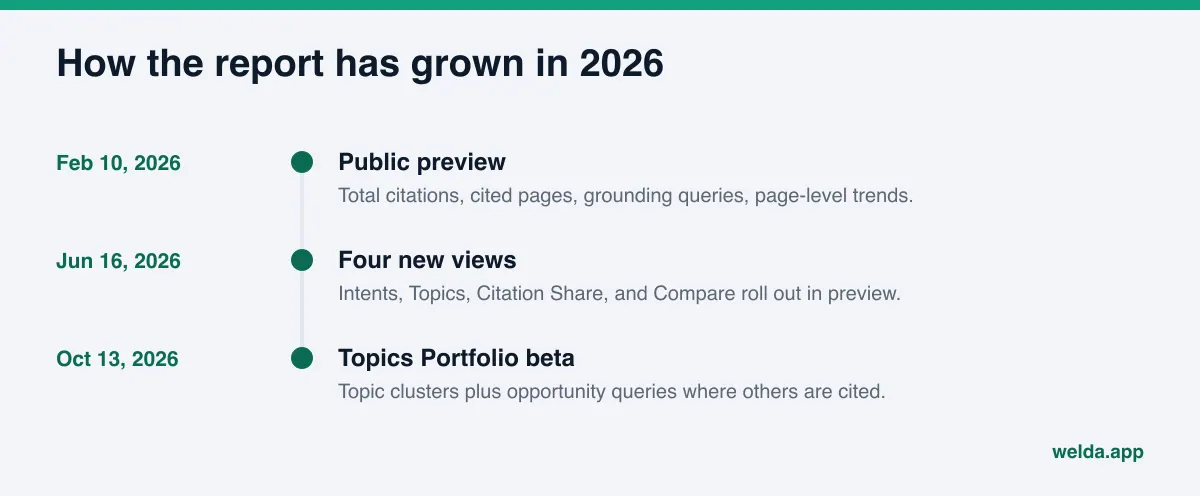
Microsoft announced AI Performance as a public preview on February 10, 2026. According to the launch post on the Bing Webmaster blog, the report shows when your site is cited in AI-generated answers across Microsoft Copilot, AI summaries in Bing, and select partner integrations. If your site is already verified in Bing Webmaster Tools, the report is waiting for you in the same account.
The launch post describes five core pieces:
- Total Citations: how many times your site was shown as a source in AI answers during the selected period.
- Average Cited Pages: the number of unique pages from your site cited per day, averaged over the date range.
- Grounding queries: the key phrases the AI used when it retrieved content that ended up cited.
- Page-level citation activity: citation counts for individual URLs.
- Visibility trends: a timeline of citation activity.
The report has grown since then. A June 16, 2026 post from Bing added four preview views: Intents, which sorts grounding queries into informational, commercial, navigational, and research categories; Topics, which groups related queries into themes; Citation Share, which shows how much of the citation space you receive for a given query; and Compare, which overlays a previous period on the current view. Microsoft is explicit that Citation Share is an observational metric, not a ranking system or a competitive scoreboard.
On October 13, 2026, Microsoft added a Topics Portfolio beta. It clusters the queries where your site appears into topics and lists "opportunity queries" where other sites are cited and yours is not. The tab only appears when there is enough data for your site, and Microsoft's own advice is to treat the numbers as directional signals for planning, not as a precise ledger.
Why this report matters for AEO
Answer engine optimization (AEO), which some people also call GEO or generative engine optimization, has had a measurement problem from the start. Classic search consoles report impressions and clicks. Until recently, no search engine told site owners whether their pages were being used as sources inside AI answers. The Bing Webmaster Tools AI performance report is one of the first first-party data sources that does. That alone makes it worth turning on.
The most useful part is the grounding query list. A grounding query is not the long prompt a customer typed into Copilot. It is the search the AI ran in the background to answer that prompt. It tells you two things: what topics the AI finds your pages useful for, and which words it uses to go looking. Picture an example HVAC contractor in Texas. If the report shows citations on a query like "heat pump vs furnace cost," the contractor's comparison page is doing its job. If nothing shows up for "same-week AC installation," that information is either missing from the site or buried where it is hard to read.
The second useful part is page-level visibility. Most business owners assume the AI reads their homepage. The report sometimes shows that citations go to an old blog post, an FAQ page, or a pricing page nobody has touched in two years. That tells you which pages are actually working as sources and which ones need to be kept accurate.
The limit is just as clear: the report only sees Microsoft's side. Many of your customers are asking ChatGPT, Gemini, or Google. Doing well in Bing's report says little about whether you are being recommended there. If you want a quick read on your site's fundamentals first, run the free AI visibility analysis. It checks whether AI crawlers can reach your site, whether your business information is marked up, and whether your services are clearly written.
How to set up the Bing Webmaster Tools AI performance report
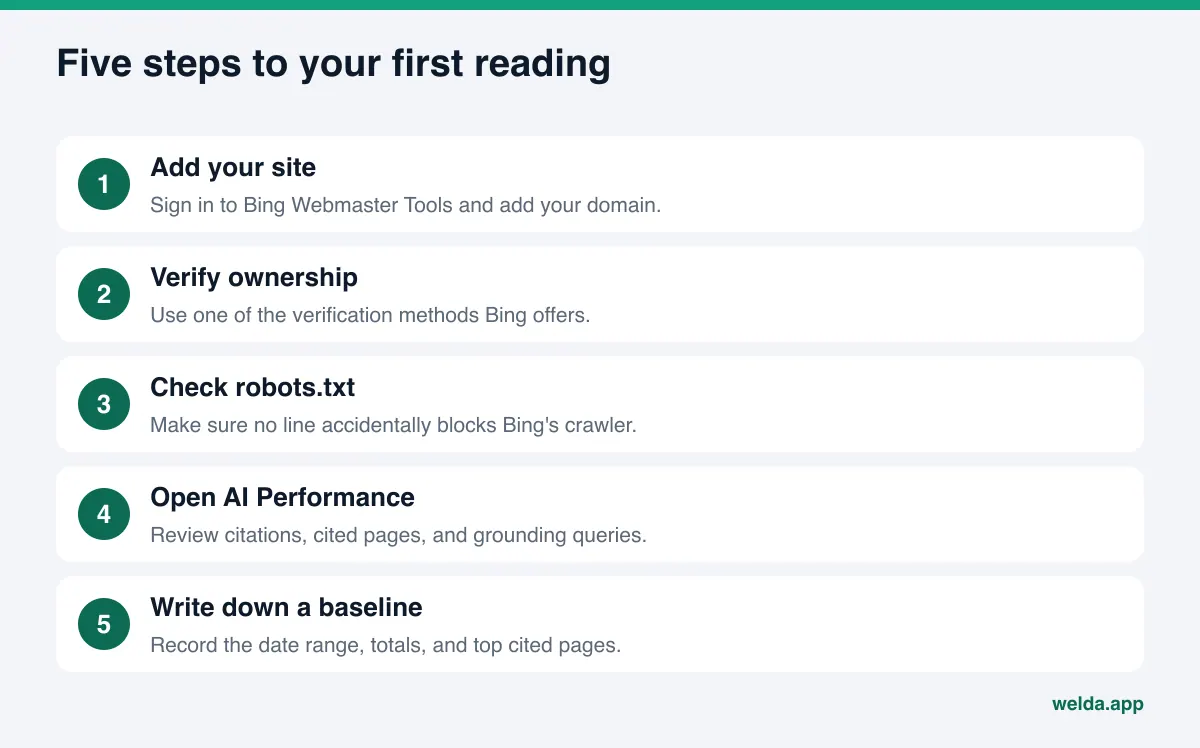
Setup does not require a developer, but skipping a step is the most common reason the report looks empty. Work through these in order:
- Create a Bing Webmaster Tools account. Sign in and add your domain. If you already use Google Search Console, Bing offers an import option that can save time.
- Verify ownership. Pick one of the verification methods Bing offers. If an agency or freelancer manages your site, do this together, since the verification code goes into your site or your domain settings.
- Check robots.txt. Microsoft says Bing respects the preferences site owners express through robots.txt and other supported controls. That cuts both ways: a stray line that blocks Bing means your pages cannot be cited. Look closely at lines added by themes, plugins, or a past site migration.
- Submit your sitemap. Make sure service, pricing, and FAQ pages are crawlable. The report can only show citations for pages Bing knows about.
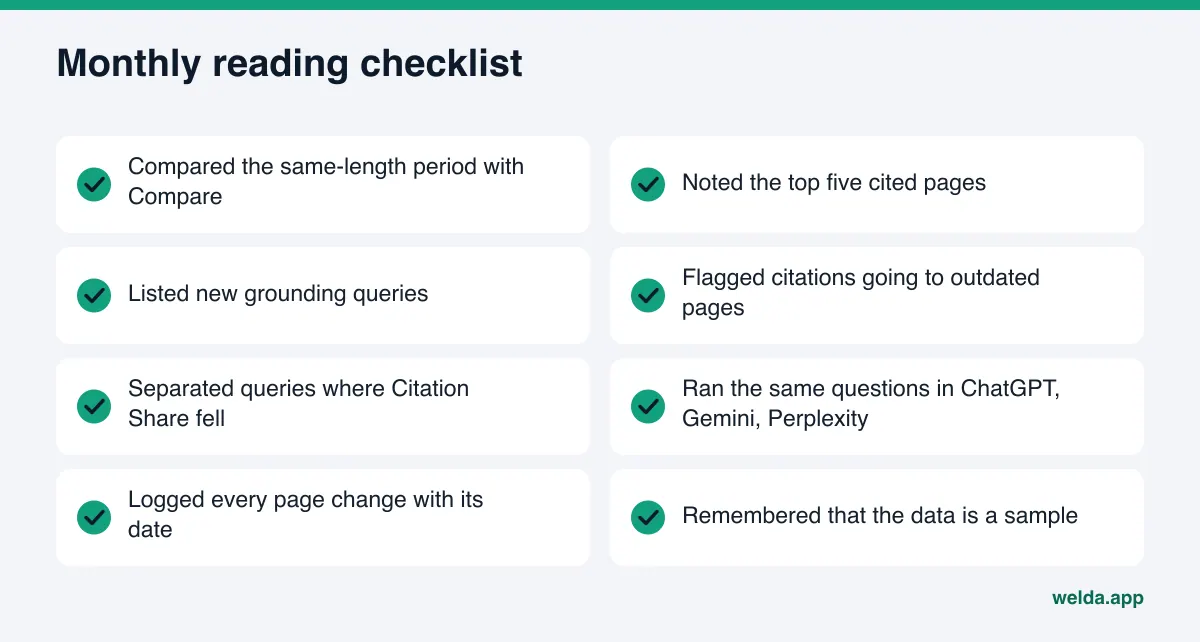
- Open AI Performance and record a baseline. Write down the date range, total citations, top cited pages, and the most frequent grounding queries. Every future reading gets compared to this note.
Newly verified sites can take a while to show data. Small business sites may see low citation counts, and some tabs, such as Topics Portfolio, only appear once there is enough data. An empty report does not mean something is broken. It means there is not much to read from this source yet.
Reading citations and grounding queries without over-reading them
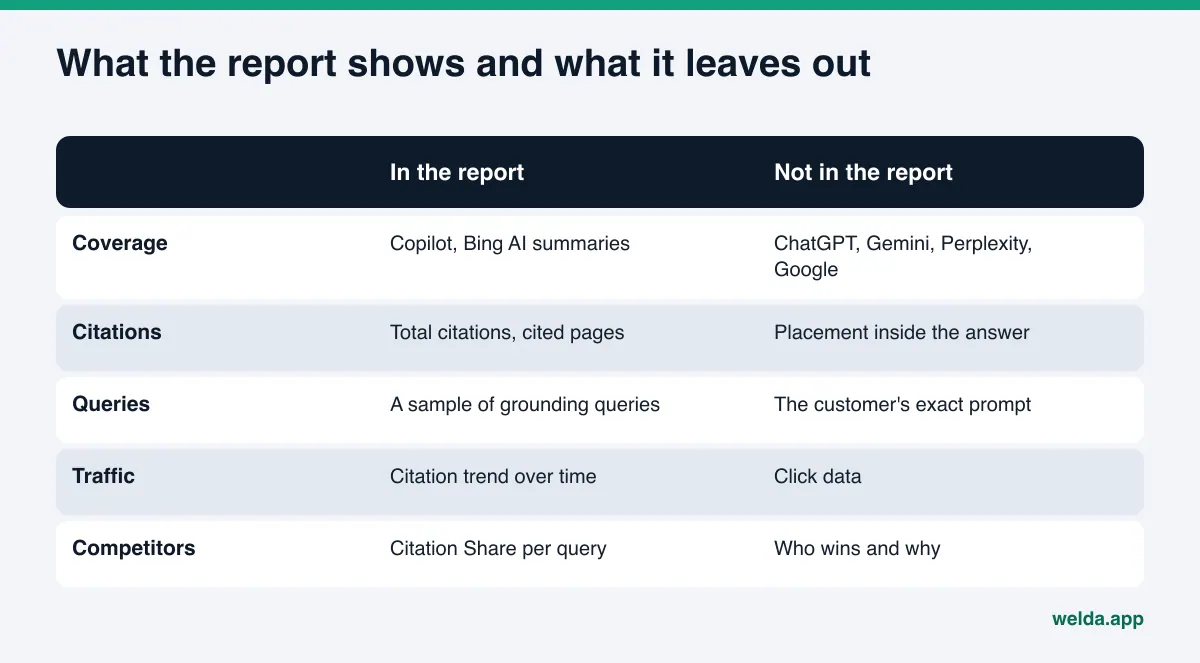
Microsoft's own launch post sets two guardrails: citation counts do not reflect page importance, ranking, or placement inside the answer, and the data shown is a sample of overall citation activity. Those two sentences define how to read everything else. The table below summarizes each metric:
| Metric | What it tells you | What it does not tell you | How to use it |
|---|---|---|---|
| Total Citations | How often Microsoft's AI experiences use you as a source | Whether you appear first or last in the answer | Compare same-length periods month over month |
| Average Cited Pages | How many different pages act as sources | Which page is more "authoritative" | If only one or two pages get cited, strengthen the others |
| Grounding queries | The searches that led the AI to you | The customer's exact prompt | Rewrite them as customer questions for your content plan |
| Page-level citations | Which URL is the source | Whether that page is still accurate | Update heavily cited outdated pages first |
| Citation Share | Your slice of the citations for a query | Which competitor wins and why | Flag queries where your share is falling |
Three habits help. First, always compare periods of the same length; that is what Compare is for. Second, do not attach meaning to single-day spikes or dips. Sampled data moves around, and one bad week does not mean your site broke. Third, watch direction, not the exact number. Microsoft's "directional signals" advice for Topics Portfolio applies to the whole report.
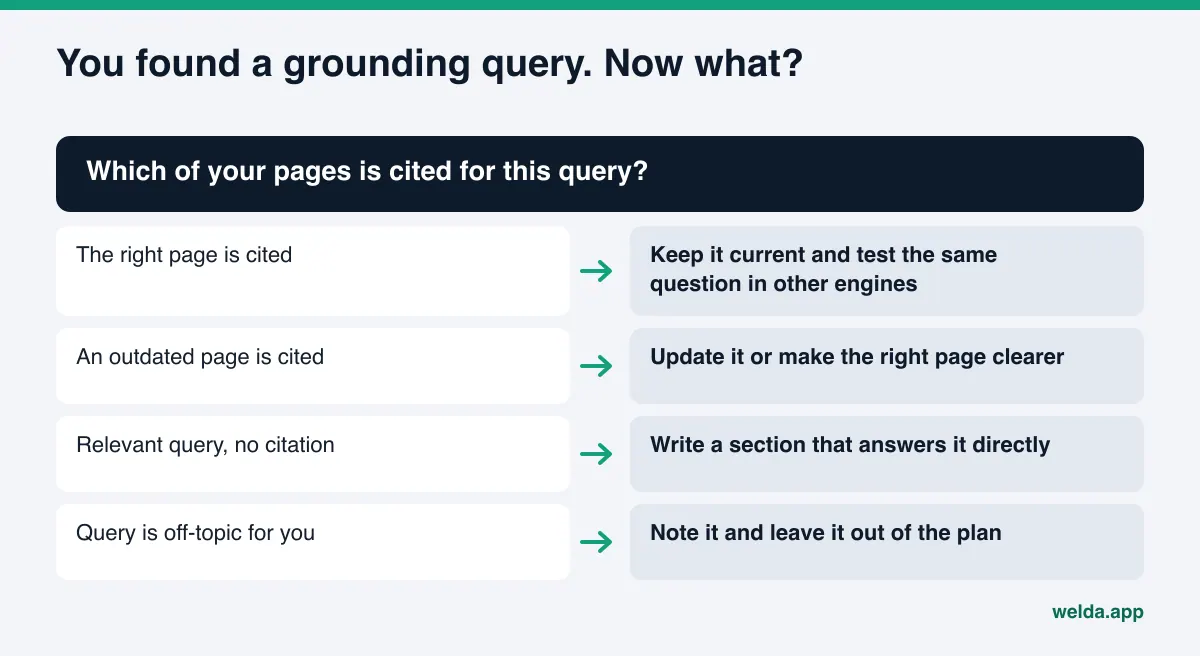
The practical way to turn a grounding query into work is to rewrite it as a customer question. For an example dental practice in Ohio, "teeth whitening how many sessions" becomes "How many whitening sessions will I need, and who should not get it?" Then check whether your site answers that in a clear sentence. If it does and citations come in, keep the page current. If it does not, you know exactly what to write. We cover more ways to surface these questions in finding the questions customers ask AI.
A worked example: turning one month of data into a to-do list
Here is a fictional scenario to make this concrete. An example roofing company in the Midwest has used Bing Webmaster Tools for three months and reads AI Performance during the first week of each month. The table shows the kinds of queries it might see and the work each one produces. The queries and outcomes are illustrative, not data from a real business.
| Example grounding query | Cited page | As a customer question | Resulting task |
|---|---|---|---|
| roof replacement insurance claim | Old blog post | Will you help me with my insurance claim? | Move the current process to the FAQ, update the old post |
| metal roof vs shingle lifespan | Services page | Is a metal roof worth it here? | Keep the comparison accurate |
| roofer free inspection | No citation | Who offers a free roof inspection near me? | The site never says it; write it plainly |
| roofing company hours | Homepage | Are you open on Saturdays? | Match hours on the site, Google Business Profile, and Yelp |
Three lessons follow. A citation going to an outdated post is a warning sign: the AI may be repeating information that is no longer true, so fix that page first. A relevant query with no citation points to information the site never states. If the company offers free inspections but never says so, an AI has nothing to base that recommendation on. And basic facts like hours and address need to match across the site and profiles such as Google Business Profile, Yelp, and the BBB; conflicting details make any source harder to trust.
The engines the report cannot see
The Bing report looks at Microsoft's products. ChatGPT, Gemini, Perplexity, and Google AI Overviews and AI Mode pick their own sources their own way, and none of them gives you a comparable report. So there are really two questions:
- How often are my pages cited in Microsoft's AI experiences? The Bing report answers this.
- When a customer asks a buying question, in any engine, is my business named, in what position, and where are competitors ahead? The Bing report does not answer this.
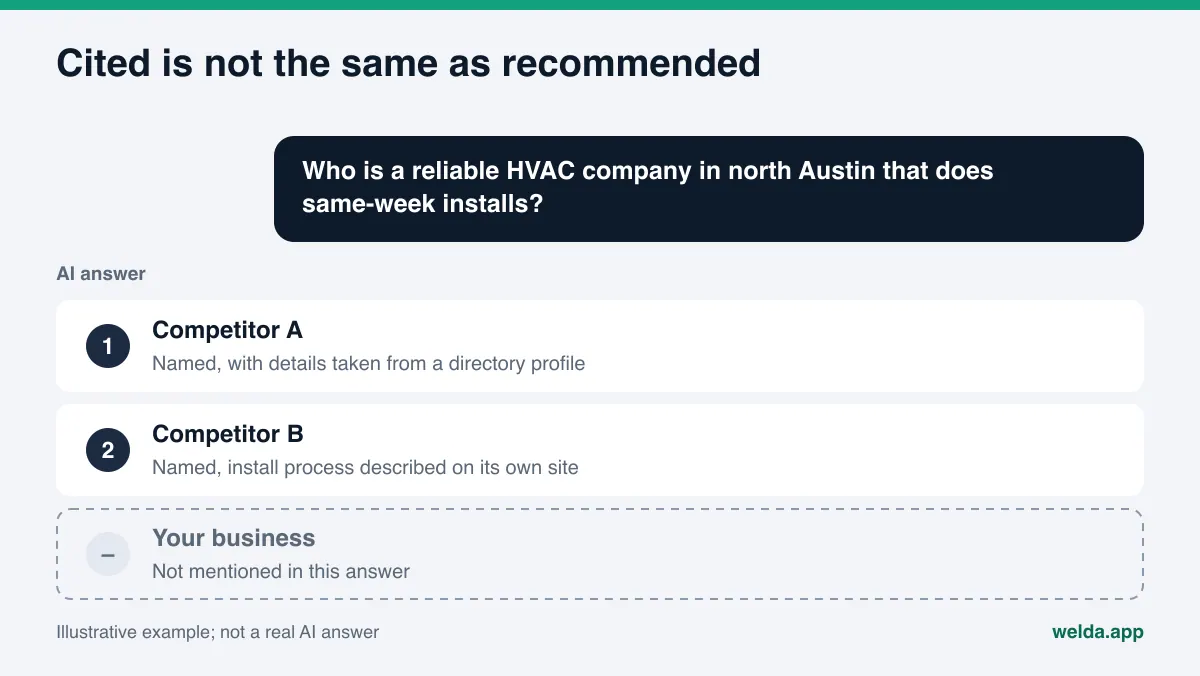
The second question usually matters more, because customers act on recommendations, not on citations. An AI can cite your page and still recommend someone else. Or it can recommend you based on your Yelp or Angi profile without citing your site at all. The Bing report cannot show the second case, because it only counts citations to your own domain.
There are two ways to close the gap. You can ask each engine the same questions by hand. That works for a handful of questions, but answers vary by prompt and by day, and a single check can mislead. We compare the approaches in manual ChatGPT checks vs tracking tools. Or you can use a tracking tool that asks the same question set on a schedule and repeats each run. That is where Welda comes in.
How Welda handles this work
Welda does not replace the Bing report. It looks where the report does not. Three parts of Welda are directly relevant here.
Prompt-level tracking. The Bing report gives you grounding queries; Welda starts from the full customer question. In the panel, each question is asked to ChatGPT, Gemini, Perplexity, and Google AI three times, and the questions view shows, side by side, whether your business is named in each engine and in what position. In practice: you spot a new grounding query in Bing, rewrite it as a customer question, and add it to your tracked questions in Welda. A few weeks later you can see where you stand on that same question in the four engines outside Copilot.
The sources view. The Bing report's biggest blind spot is citations that never reach your domain. Welda's sources view lists the sites AI answers draw on and your status on each: a profile exists, is incomplete, or is missing. If a directory or review site shows up often and your listing there is thin, it becomes a task. If that profile is connected, Welda drafts the text; if not, the task is marked as manual, with ready-to-use text next to it.
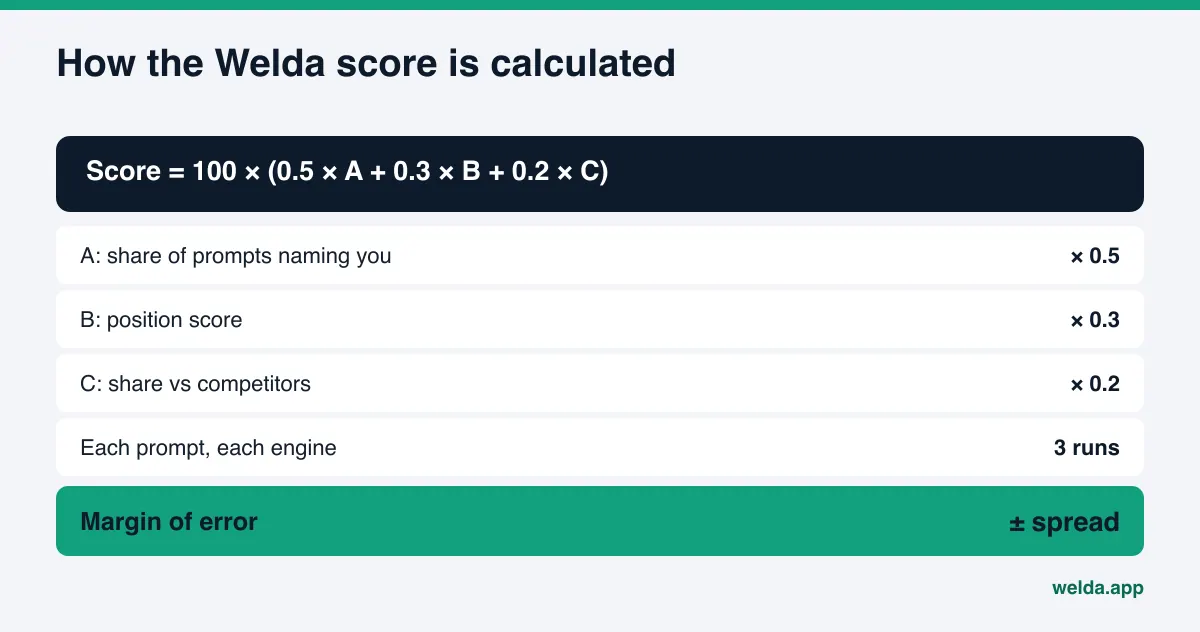
An open score formula. Microsoft says Citation Share is not a ranking. The Welda score does not claim to be a ranking either, but its math is public: the share of questions where you are named carries 50 percent of the weight, your position in the answer 30 percent, and your share against competitors 20 percent. The spread across the three runs produces a margin of error, so you can tell a real change from noise. We go deeper in how often to measure AI visibility and margin of error in AI visibility tracking.
Other parts touch this topic only indirectly. When a page or section is missing, Welda drafts it; on WordPress sites it opens as a draft through a separate Editor user, and you approve publishing. Content always lives on your own site, so the page Bing cites is still your page. A one-page monthly report gives you a summary you can set next to your Bing notes.
What anyone can use today is the free site analysis, which works in English. It reads your homepage and a few inner pages, checks AI crawler access in robots.txt, business markup, FAQ content, and how clearly your services are described, and asks an AI assistant with web search five questions a customer might ask to see whether your business is named. It is a one-time snapshot. The Welda panel itself is in early access and is opening first in Türkiye. Regular four-engine tracking is being added during early access, and sample screens in the panel use illustrative data. Pricing is discussed during the early access conversation.
Limits: what neither the Bing report nor Welda does
The Bing report's limits. By Microsoft's own description, the data is a sample, and citation counts say nothing about rank, importance, or placement. The launch post does not mention click or traffic data, so the report cannot tell you whether a citation brought you a customer. You need separate tracking for AI referrals; see attribution for AI referrals. Most newer features are in preview or beta, so names and definitions may change.
What Welda does not do. Welda does not guarantee rankings or promise you will "show up in ChatGPT." It does not invent facts; when information is missing, it asks you. It does not publish sensitive content without your approval and never writes fake reviews. Handling negative reviews, managing directory accounts, and PR work stay with your business. Welda does not manage your Bing Webmaster Tools account or pull data from it; reading both sources side by side is your call. And new content usually takes weeks to show up in AI answers, so do not expect the Bing report to move the next day.
Decision checklist: is the Bing report enough for you?
Every site owner should turn on the Bing Webmaster Tools AI performance report. It costs nothing and shows data you cannot get anywhere else. The mistake is treating it as your only measure. These questions help you decide what else you need:
- Do your buyers live in Microsoft products? If you sell to companies that run on Microsoft 365, Copilot can be an important channel and the Bing report will tell you a lot.
- Do you need to know where competitors are ahead? Citation Share gives you a share, not the competitor's name or the reason.
- Do you think in pages or in questions? Bing counts citations per page; buying decisions usually start with a question.
- Do you need to measure the effect of a change? That requires asking the same questions on a regular schedule and seeing the margin of error.
A workable rhythm: read the Bing report once a month with the same checklist, turn new grounding queries into customer questions, and track those questions in the other engines too. To see which questions and sources give competitors the edge, start with our guide to AI competitor analysis.
Frequently asked questions
Does the Bing Webmaster Tools AI performance report cost anything?
No. Bing Webmaster Tools is free, and the report appears in the account of any site verified there. It is in public preview, so its contents may change over time.
Does the report include ChatGPT or Google AI Overviews data?
No. It covers citations in Microsoft Copilot, AI summaries in Bing, and select partner integrations. ChatGPT, Gemini, Perplexity, and Google's AI answers are outside its scope.
Is a grounding query the same as what the customer typed?
No. It is the phrase the AI used to look for content while building its answer. It is derived from the customer's prompt but is not the same, which is why rewriting it as a customer question is useful.
My report is empty. Is something wrong with my site?
Not necessarily. New or small sites may have little data, and some tabs only appear when there is enough. Still, confirm robots.txt does not block Bing and that your key pages are crawlable.
My citations dropped. What should I do?
First compare two periods of equal length; the data is a sample, so some movement is normal. If the drop lasts several weeks, check which pages and queries are affected and whether the information on those pages is still accurate.
Does Welda pull data from Bing Webmaster Tools?
No. Welda runs its own measurement by asking customer questions to four AI engines three times each. You read the Bing report in your own account; the two sources complement each other.
If I do well in the Bing report, will I show up in ChatGPT?
Not automatically. Each engine chooses sources its own way. A clear, readable site helps with all of them, but you need to measure each engine separately.
Next step: see where your site stands today
The Bing Webmaster Tools AI performance report is a free and useful window into how Microsoft's AI experiences use your pages. To understand the rest of the picture and fix gaps in order, start with your site's fundamentals. Run the free AI visibility analysis: it reads your site through the eyes of Google and AI systems, gives you a score out of 100, and explains what it found, why it matters, and how to fix each gap. The results link arrives by email and stays open for 14 days.