What is a monthly AEO report, and what should be in it? A monthly AEO report is a one-page summary of where your business showed up in ChatGPT, Gemini, Perplexity and Google AI answers last month and what changed. A useful one shows the score together with its margin of error, the prompts you won and lost by name, where competitors pulled ahead, and no more than three tasks for next month. This guide covers each section, how to read the numbers, how to build the report by hand and how Welda produces it.
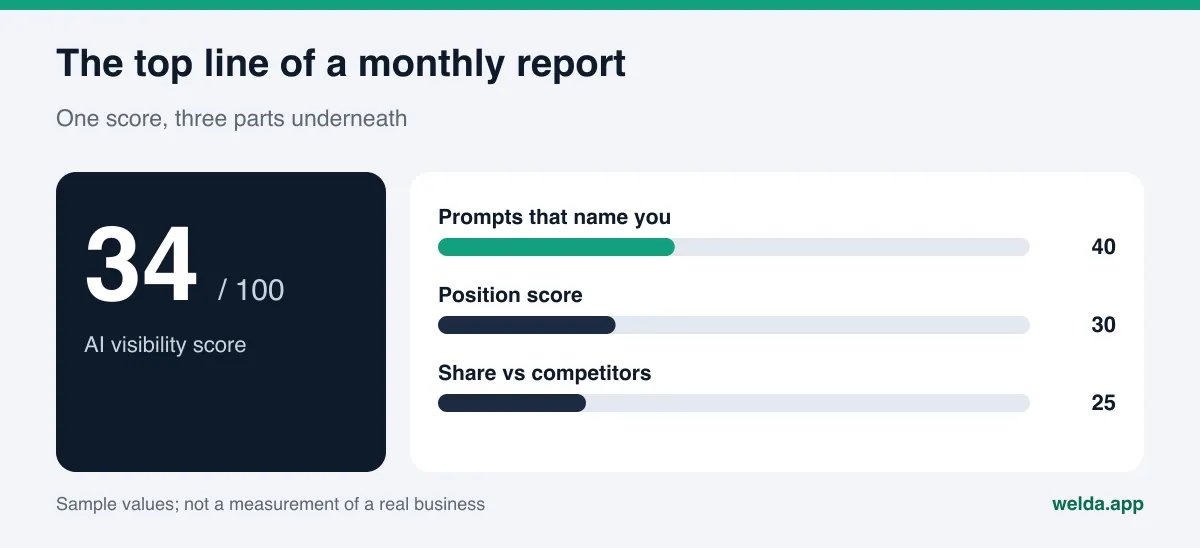
Why a monthly AEO report matters for a local or growing business
AEO, short for answer engine optimization, is the work of getting your business named when customers ask AI tools for a recommendation. You will also see it called AI search visibility, and sometimes GEO (generative engine optimization), which means the same thing. In classic search, there is a results page and a rank you can check. In an AI answer there is no fixed page. The same question can produce one answer today and a slightly different one tomorrow. So "do we show up in ChatGPT?" cannot be answered with one screenshot. You need a repeatable measurement and a readable summary of it.
The monthly report is that summary. Weekly data is good for detail, but most owners do not have time to study a chart every Monday. A quarterly review comes too late: if you lose a prompt in January and nobody notices until April, a competitor has had three months to settle into that answer. A month is long enough to separate a trend from noise and short enough to act on what you find.
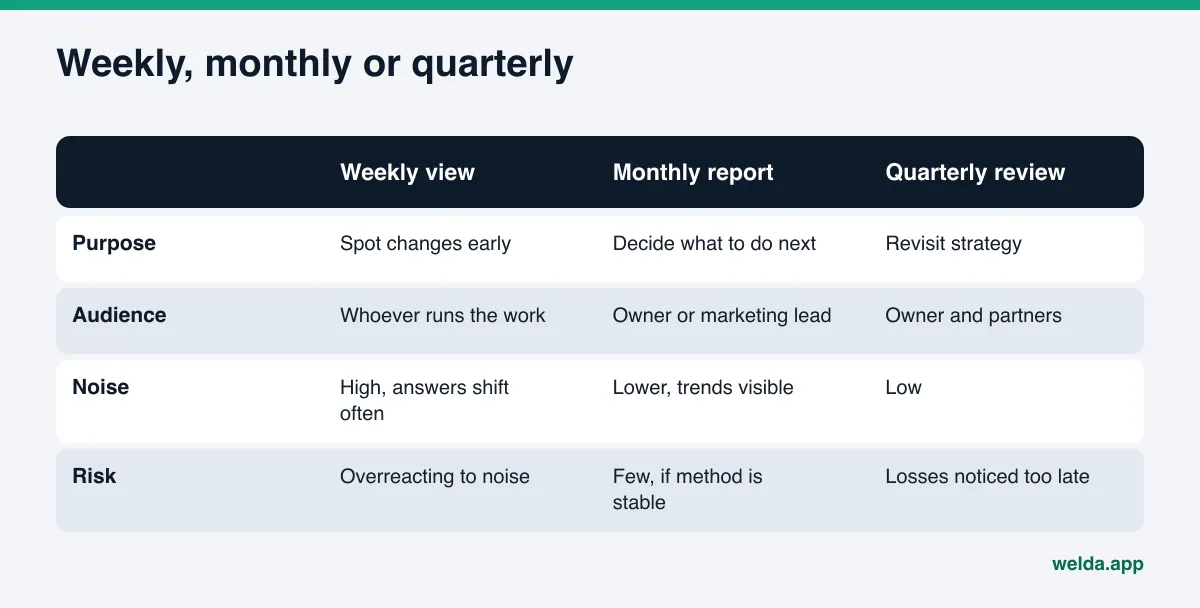
Who reads the report shapes what it looks like. In a small business, it goes to the owner and should take five minutes. In a company with a marketing lead or an outside agency, it is the agenda for a monthly meeting and has to answer two questions: why did this move, and what are we doing about it. Either way, the job is the same. A monthly AEO report is not there to show a number. It is there to produce a decision.
If you have never measured anything, you need a baseline before you need a report. Welda's free site analysis reads your homepage and a few inner pages the way Google and AI tools do, gives you a technical score and a content score out of 100, and asks five customer-style questions to an AI assistant with web search to see whether your business is named. It is a one-time snapshot, but it makes a good "before" column for your first report.
What belongs in a monthly AEO report?
The shorter the report, the more likely it gets read. But some sections cannot be cut without the report losing its meaning. The table below lists the sections of a one-page report, the question each one answers and where the data comes from.
| Section | Question it answers | Where the data comes from |
|---|---|---|
| Score and margin of error | Where do we stand overall, and is the change real? | Repeated runs of the same prompt list |
| Share of prompts that name you | In how many customer questions are we mentioned? | Prompt-by-prompt log |
| Share versus competitors | How much of the same answers do we take up compared with rivals? | Count of businesses named in each answer |
| Wins | Which prompts named us for the first time or higher up? | Prompt-level comparison with last month |
| Losses and risks | Which prompts dropped us, and which sources are weak? | Comparison with last month and the source list |
| Work completed | What did we change this month? | Completed items on the to-do list |
| Next month's plan | What do we do now? | Tasks picked from losses and missing sources |
| Method note | How were these numbers measured? | Prompt count, engines, number of runs, formula |
The section people skip most often is the method note. Without it, you cannot tell whether this month is comparable with last month. If the prompt list changed, if an engine was added, or if the number of runs dropped, the score moved because of the method, not because of your business. The note takes two lines, and it is what makes the rest of the page trustworthy.
The second common mistake is reporting wins and losses as counts. "You were named in three more prompts" tells nobody what to do. "Gemini named you for the first time on 'emergency plumber open Sunday,' and ChatGPT dropped you from 'best rated water heater installer'" turns straight into a task. That is why prompts should be written out by name. Choosing which prompts to watch is its own job, covered in our guide to prompts to track for AI visibility.
How to read the numbers: score, share and margin of error
The score at the top of the report is a weighted sum of three separate measurements. In Welda the formula is public:
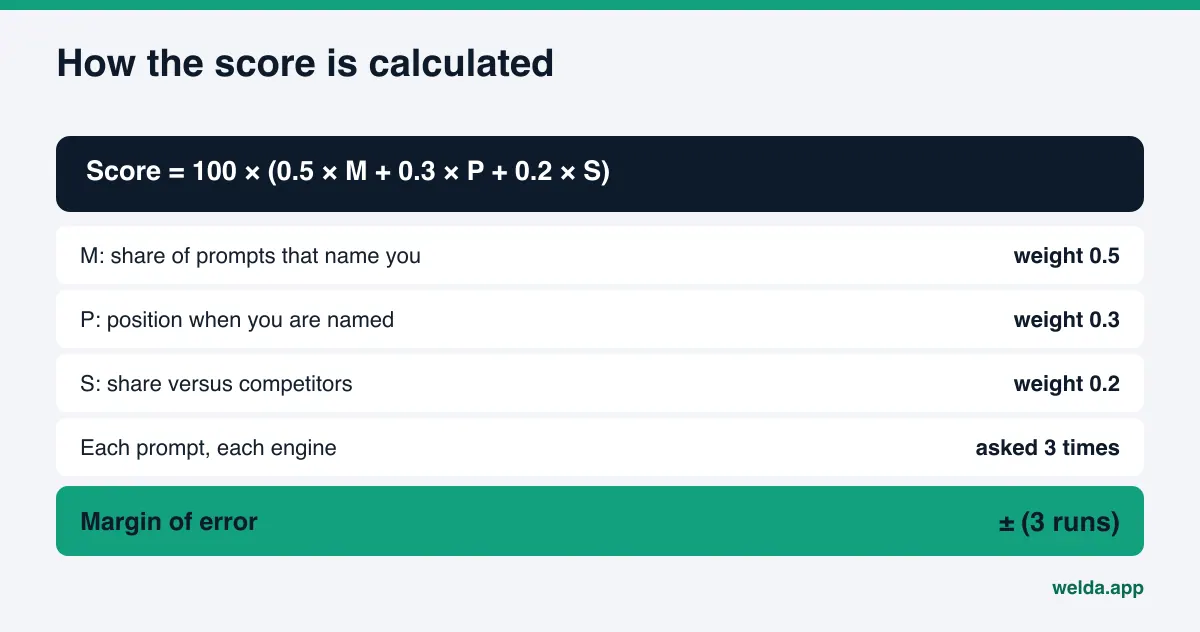
- Share of prompts that name you (weight 0.5): In how many of the tracked prompts does your business appear in the answer. Half the score comes from here, because if you are not in the answer at all, position and share do not matter.
- Position score (weight 0.3): When you are named, are you first on the list or last. Being the first business mentioned and being the fifth do not have the same effect.
- Share versus competitors (weight 0.2): How much space you and your competitors take up in the same answers. We cover this idea in more depth in our piece on AI share of voice.
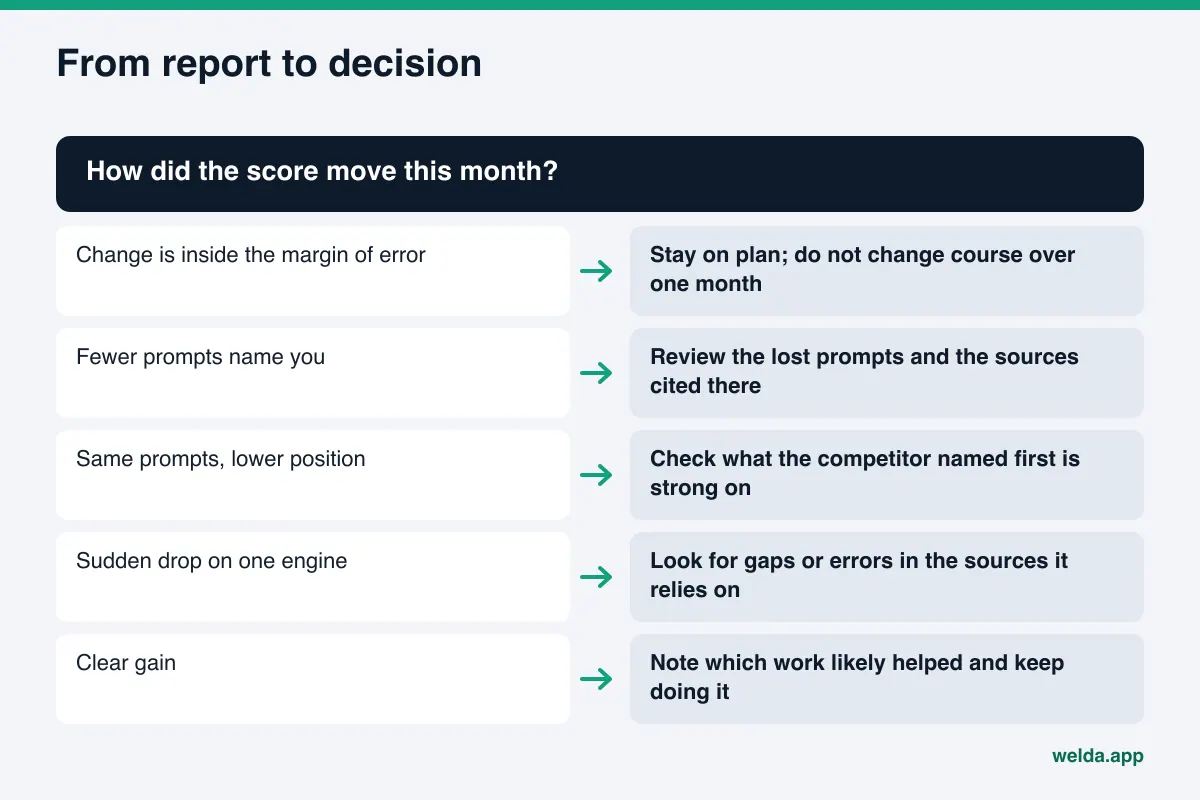
When you read the report, look at how the three parts moved, not just at the score. If the score fell two points and all of the drop came from position, you are still in the answers but a competitor got ahead of you. If the same drop came from the share of prompts that name you, you fell out of some answers completely. Those two situations call for different work.
The margin of error is the line people miss most. AI tools do not give the exact same answer to the same question every time. That is why Welda asks every prompt to every engine three times and, based on how much those three runs differ, writes a ± value next to the score. If your score went up one point and the margin is two points, do not read that as real progress. We explain how the margin is calculated in our article on the margin of error in AI visibility tracking.
A practical rule: if the change is inside the margin of error, write "no meaningful change" and stay on plan. If it is outside, find which component and which engine it came from. Changing strategy because of a single month is the most common way monthly reports get misused.
How to build a monthly AEO report yourself
You can produce a monthly report without any software. It takes time, but it is a good way to understand the method. The steps below are the skeleton of a manual report.
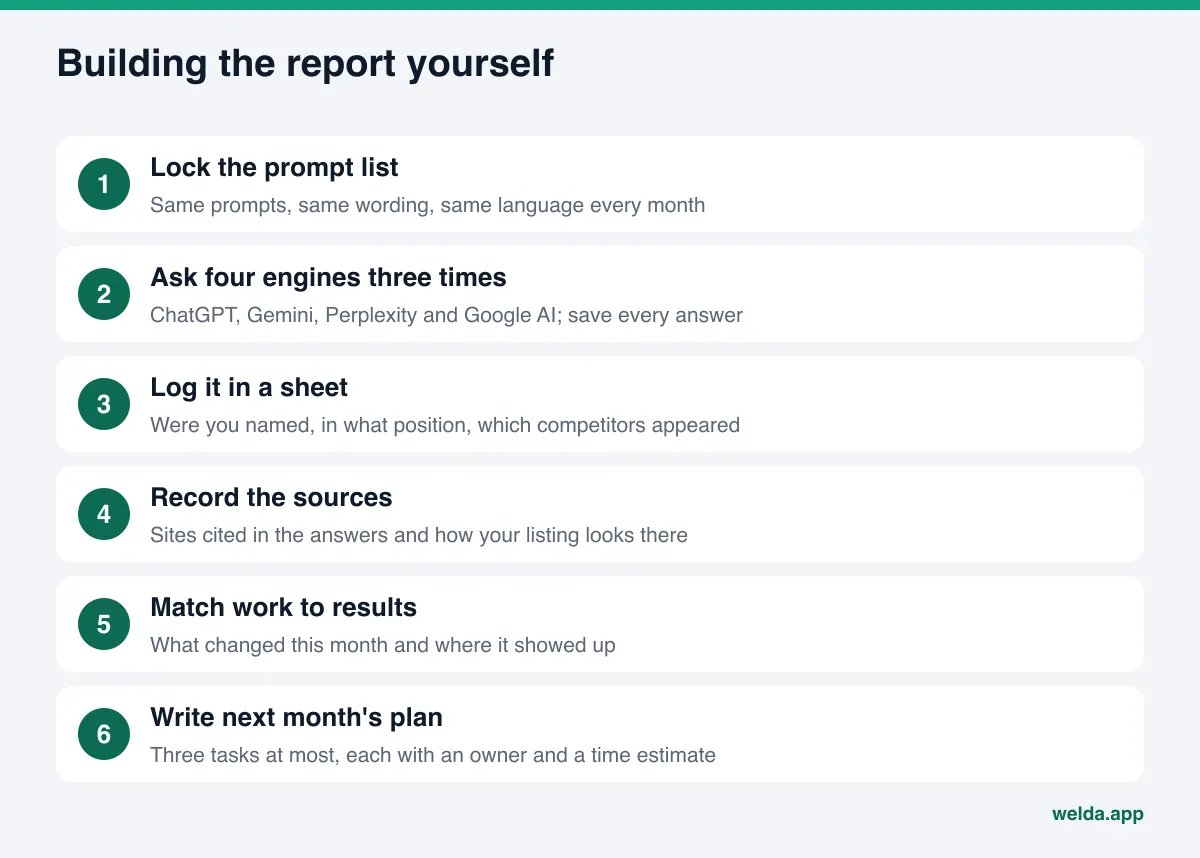
- Lock the prompt list. Write down the questions your customers would ask an AI tool: service questions ("same-day furnace repair near me"), comparison questions ("is it better to repair or replace a 15-year-old AC unit"), trust questions ("reliable roofer with good reviews in my area"). Use the same list, in the same wording, every month. If the list changes, months cannot be compared.
- Ask each prompt to each engine more than once. ChatGPT, Gemini, Perplexity and Google's AI Overviews or AI Mode lean on different sources and give different answers. A single run is misleading; do at least three. Where possible, ask from a fresh, logged-out session so your history does not color the answer.
- Log the answers in a spreadsheet. One row per prompt, engine and run. Columns: were you named, in what position, which competitors appeared, which sources the answer cited.
- Record the sources separately. For each site that shows up in answers, such as Google Business Profile, Yelp, Angi, BBB or a local news site, check what it says about you, whether you have a listing there and whether your details are current.
- List this month's work. Did you add an FAQ section, update your Google Business Profile, respond to reviews? Without this list you cannot explain your wins or losses.
- Compare with last month. Which prompts did you enter, which did you drop out of, which competitor moved ahead? Write these out by name.
- Pick next month's plan. Three tasks at most, each with an owner and a time estimate. A long plan usually means none of it gets done.
The weakness of this approach is effort. Thirty prompts across four engines with three runs each means hundreds of answers to read and log. Miss one month and the series breaks. Most businesses that track by hand end up cutting the prompt list or skipping repeat runs, and then the margin of error becomes unknown. If you want to see how a tool can take on that load, our guide to the AI visibility dashboard walks through it.
Writing the wins, losses and plan section
The numbers are the frame of the report; the commentary is the reason anyone reads it. Follow three rules when you write it.
First, name the prompt and the engine. Instead of "visibility improved," write "Perplexity named us fourth for 'licensed electrician for panel upgrade' for the first time." The reader immediately sees which customer question that represents.
Second, record the trace, not a guess about cause. You cannot know for sure which piece of work produced a win, because the engines' decisions are not visible from outside. What you can do is put the work and the result side by side: "The FAQ section went live three weeks ago; this month two of its questions started naming us." That is an observation, not a claim, and it should read like one.
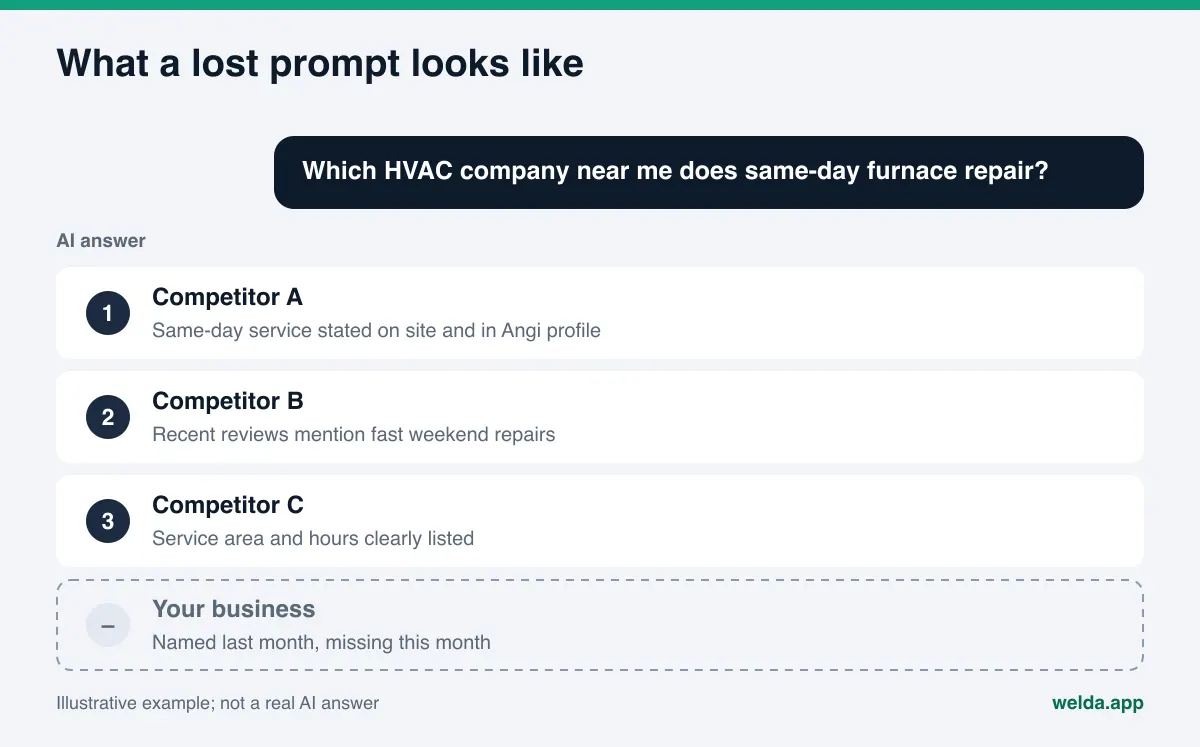
Third, do not hide losses. A report that only carries good news stops being trusted after a few months. If you dropped out of a prompt, write who was named instead and which source the answer cited. Losses usually give you the clearest task list: if a competitor has a complete, current Angi or Yelp listing that the answer cites and you have none, next month's work is obvious.
When you choose tasks for the plan, weigh impact against effort. Adding missing business markup (Schema) to your site is about an hour of work and can affect many prompts. Writing a new service page takes longer but targets a specific group of prompts. Press outreach or claiming a directory listing are tasks the business has to do itself and can take weeks. The plan should list these three types separately and say who owns each one.
Finally, change in AI answers is slow. New content usually takes weeks to show up in answers. That means the result of this month's work often appears in next month's report or the one after. A note like "expected effect: next two reports" keeps people from making impatient calls.
Example: the commentary section of a monthly AEO report
The text below is the commentary part of a made-up report for a sample HVAC contractor. The numbers and prompts are examples and do not belong to any real business. The point is to show what the rules above look like on a page.
Summary: The score rose one point from last month. That is inside the margin of error, so there is no meaningful change. The share of prompts that name us held steady; position improved slightly.
Wins: Gemini named us for the first time on "AC tune-up before summer near me." Perplexity moved us up one spot on "HVAC company that offers financing." Both questions are answered in the FAQ section added to the site three weeks ago.
Losses and risks: ChatGPT no longer names us for "same-day furnace repair." Competitor A and Competitor B appear instead. The answer cites a home services directory where our listing is incomplete.
Next month: State same-day availability and service hours clearly on the site (owner, one hour). Complete the directory listing (owner, manual task). Add business markup to the services page (waiting for approval).
Notice what this example does. It says plainly that the change is inside the margin of error. It names wins by prompt and engine. It puts the win next to the work that preceded it without claiming "because of." It names both the competitor and the source behind the loss. And the plan stops at three tasks, each with an owner. Someone can read it in five minutes and know what happened and what comes next.
The emphasis can shift with the audience. For an owner, the summary and plan are enough. For a marketing team, the losses and sources section should go deeper. For a business with several locations, a page per location is more useful than a single averaged page, because AI answers often change from one city or neighborhood to the next.
How Welda produces the monthly AEO report
In Welda, the monthly report is not a separate project. It is a one-page summary of the measurements and completed work that build up in the dashboard. That removes the hardest part of a manual report, keeping the method identical every month: the prompt list, the engines and the number of runs stay the same and are written at the bottom of the page as a method note.
When you open the report page, the score, last month's score and the margin of error sit side by side at the top, so you can see in one glance whether the change is inside or outside the margin. Below that are summary boxes such as the share of prompts that name you, your share versus competitors and incoming inquiries. The middle of the page has two columns: this month's wins, and losses and risks. Wins list which engine named you, for which prompt, for the first time or higher up; completed tasks show in the same list. Losses list the prompts you dropped out of and the sources where your presence is weak. Next month's plan sits at the bottom, with an estimated time for each task. The page downloads as a PDF, so you can send it to a partner or your accountant without building a separate deck.
The decision stays with you. Welda suggests the plan, but you decide which task goes first and which content gets published. Content and profile text that Welda drafts land on the to-do list as items waiting for your approval; nothing goes live without it. For profiles that are not connected, such as an industry directory, the task appears as a manual item with ready-to-use text next to it. Content always lives on your own website; Welda does not host it.
Behind the report are the detailed views. When you want to know why you lost a prompt, you can drill into the score over time, the breakdown by engine and what changed prompt by prompt. Which topics and sources competitors win on, and which sites the AI tools rely on, each have their own screen. The monthly report is the summary of those screens; in months when you do not need the detail, the report is enough.
To be clear about where things stand: the free site analysis works in English and German today. The full Welda dashboard is in early access and is opening first in Turkey. Regular four-engine tracking is being added during early access, and the sample screens are shown with representative data. Pricing is discussed in the early access conversation.
Limits of a monthly report, and what Welda does not do
A good report also says what it does not show. These are the limits to keep in mind.
- It is not a rankings report. AI answers have no fixed position the way a search results page does. The position score measures where your name appears inside an answer, not where you rank in search.
- It only covers the prompts you track. Not every question a customer could ask is on the list. The report is a sample of the prompts you chose.
- Cause and effect are not certain. You can link a task to a win, but the engines' internal decisions are not visible. The report records this as an observation.
- Leads and revenue are a separate measurement. Counting customers who came from AI tools requires source tracking on your site and contact channels. We explain how in our guide to attribution for AI referrals.
It also helps to know what Welda does not do. Welda does not guarantee rankings or promise that you will "show up in ChatGPT." It does not invent information it does not have, such as your hours, prices or service area; it asks you. It does not publish sensitive content without approval and does not create fake reviews. Handling negative reviews, claiming directory listings and press outreach stay with the business; the report can put them on the plan, but it does not do them.
Monthly AEO report checklist
Whether you build the report yourself or get it from a tool, these questions tell you whether it is doing its job.
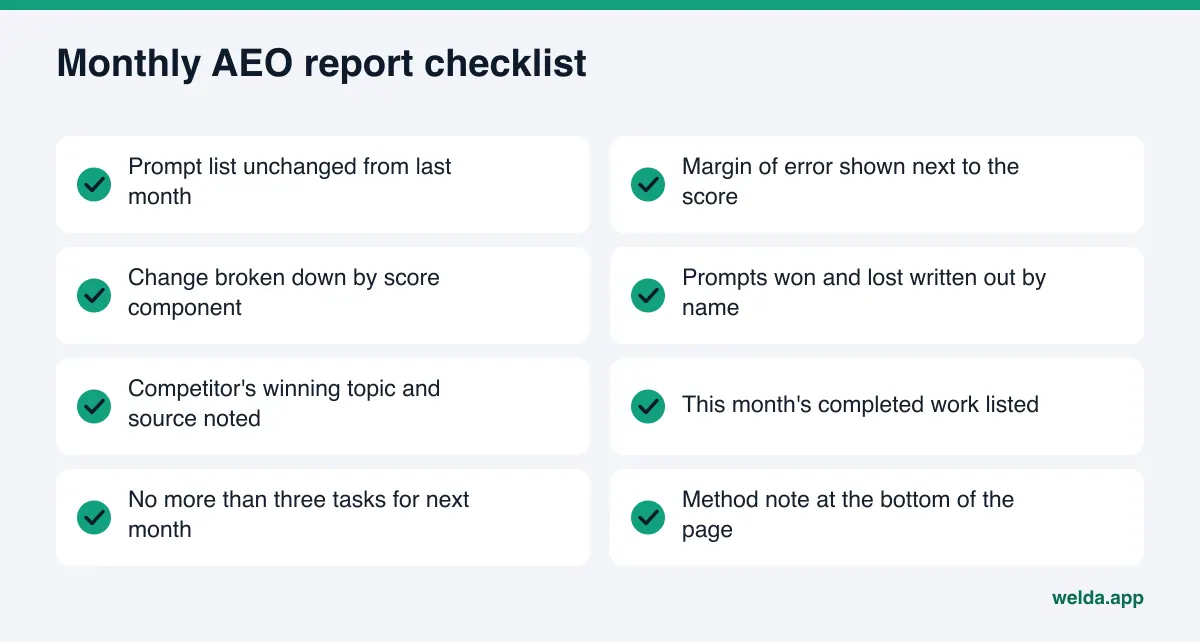
On top of the checklist, ask whoever reads the report two questions: "After reading this page, do you know what we are doing this month?" and "Can you say in one sentence what changed since last month?" If either answer is no, the report is too long or too numeric. Cut it down, write prompts out by name and trim the plan to three tasks.
If this is your first report, treat the first three months as a baseline. Month one is your starting point, month two shows how large the margin of error is, and month three gives you the first meaningful comparison. Try not to change the prompt list during that time; if you have to, note it in the report.
Frequently asked questions
What is the difference between a monthly AEO report and weekly tracking?
Weekly tracking is for detail: which prompt changed, whether a fix worked. The monthly report summarizes that detail in a form you can decide on. Since AI answers shift from week to week, business decisions are better made from the monthly view.
My score dropped this month. Should I worry?
First check whether the drop is outside the margin of error. If it is inside, nothing meaningful changed. If it is outside, find which component (prompts that name you, position, share) and which engine it came from; the right task depends on that.
How many prompts should the report track?
There is no single right number. What matters is that the prompts are the kind your customers actually ask and that they stay the same every month. A short, stable list gives a more reliable report than a long list that keeps changing.
Does the report show how many customers came from AI tools?
Visibility tracking shows whether you are named in answers. Counting customers requires source tracking on your site and contact channels. In the Welda dashboard incoming inquiries have their own screen, and that section stays empty until tracking is set up.
Can the free site analysis replace a monthly report?
No. The free analysis is a one-time check, available once per site and limited to five questions. A monthly report needs the same prompts measured again every month. The free analysis works well as the starting point for your first report.
How long before a change shows up in the report?
New content usually takes weeks to show up in AI answers, so the effect of this month's work often appears one or two reports later. Do not change the plan based on a single month.
Get the baseline for your first report
A monthly AEO report only means something once you have a starting point. To see how your site looks to AI tools today, which gaps would lift your score the most and whether you are named in five customer-style questions, start the free site analysis. The results link arrives by email and stays open for 14 days; keep the PDF as the "before" page of your first report.