Which prompts should you track for AI visibility? Track the questions your customers actually type into ChatGPT, Gemini, Perplexity and Google's AI Overviews, written in their words, grouped by intent and kept fixed over time. That list is your yardstick for AEO (answer engine optimization). If the list is wrong, the score measures the wrong thing.
Most owners start their AI visibility work the same way. They open ChatGPT, type the first question that comes to mind, and look for their name. If it shows up, they relax. If it does not, they worry. But one prompt, especially one the owner made up, says very little about how customers search. Before any measurement can be trusted, you need a written answer to a simple question: which prompts do I want to show up for? This guide walks through building that list step by step, with good and bad examples, guidance on size, and how Welda measures the list. To see where you stand today, run the free AI visibility analysis. It reads your site the way AI engines do and checks whether your business is named for a handful of customer questions.
What are prompts to track for AI visibility, and why do they matter?
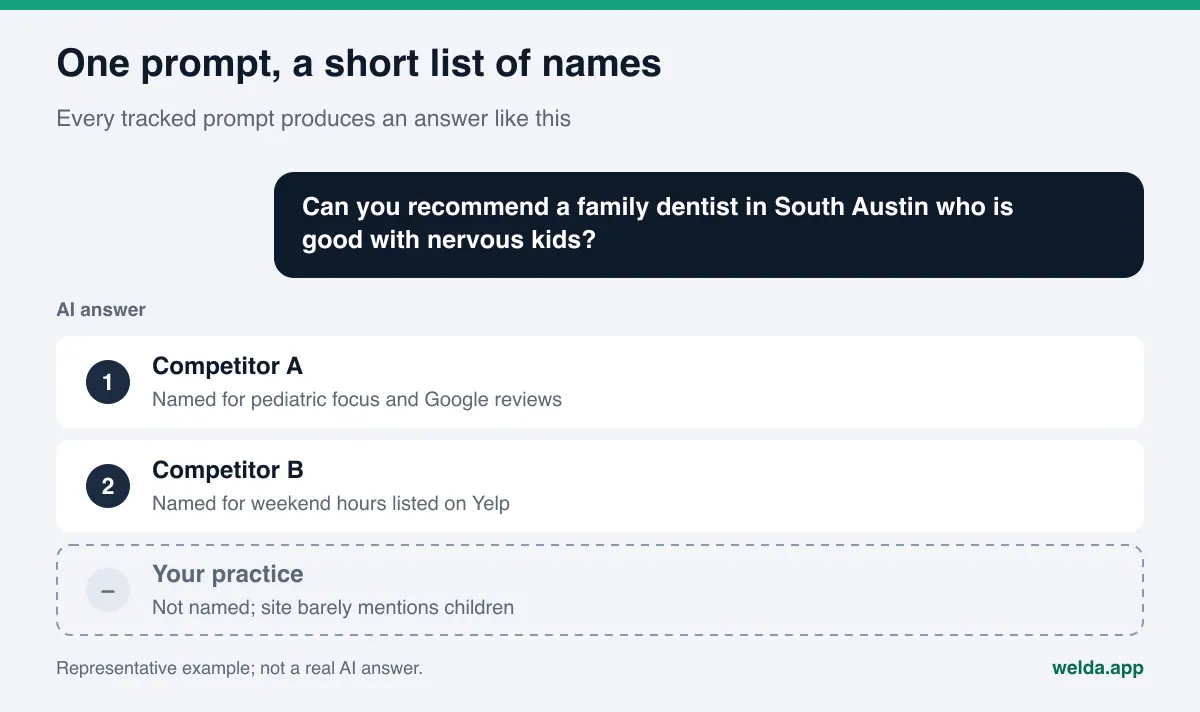
Your tracked prompts are the fixed set of questions you use to measure how often AI answers name your business. In classic SEO you kept a keyword list. In AEO you keep a prompt list. The difference matters. People type two or three words into a search box, but they talk to an AI assistant in full sentences with context. Instead of "dentist Austin," they write "Can you recommend a family dentist in South Austin who is good with nervous kids?" That is why a keyword list renamed as a prompt list rarely works.
Some people call this work GEO (generative engine optimization). In the US the more common terms are AEO and AI search visibility, and they describe the same goal: being named in the answer, not just ranked on a page of links.
The prompt list matters for three reasons.
First, AI visibility changes prompt by prompt. The same HVAC company can be named first for "best AC repair in Mesa" and not appear at all for "who installs heat pumps in Mesa." The prompts you choose decide the picture you see.
Second, the prompts decide the work. When you are not named for a prompt, the usual reason is that nothing on your site or in your outside sources answers it. The prompt list is a map of missing content. A topic that is not on the list will never show up as a gap.
Third, a list that keeps changing cannot be compared. If you check ten prompts this month and ten different prompts next month, you cannot tell whether the score moved because of your work or because of the questions. Before-and-after comparisons only mean something when the same prompts are asked again.
Which prompt types belong on your AI visibility list?
Customers ask different questions at different stages. A useful list covers all of them. The table below shows five prompt types that work for most local businesses and service firms in the US.
| Prompt type | Example | What it measures | First place to look if you are missing |
|---|---|---|---|
| Category | "Who is the best HVAC company in Phoenix?" | Whether you make the shortlist | Clear service pages, reviews, directory listings |
| Local or "near me" | "Is there a plumber open on Sunday in Plano?" | Whether your location and hours are being read | Google Business Profile, address and hours on your site, structured business data (Schema) |
| Problem | "Why is my AC blowing warm air, and who should I call?" | Whether your service pages answer real problems | Service pages, FAQ section |
| Comparison | "Is Competitor A worth it, or is there a better roofer in Tulsa?" | How you are described next to rivals | Reviews on Yelp and Google, BBB profile, a page that explains your difference |
| Brand | "Is [your company] legit? What do reviews say?" | What AI says about you | Review responses, Reddit threads, your About page |
The weight of each type depends on your industry. A restaurant lives on category and local prompts. A CPA firm or an estate attorney gets more clients from problem prompts. A home services company listed on Angi or a hotel listed on Tripadvisor will see comparison prompts matter a lot, because those platforms are where comparisons happen. Still, keeping at least one prompt of each type exposes blind spots.
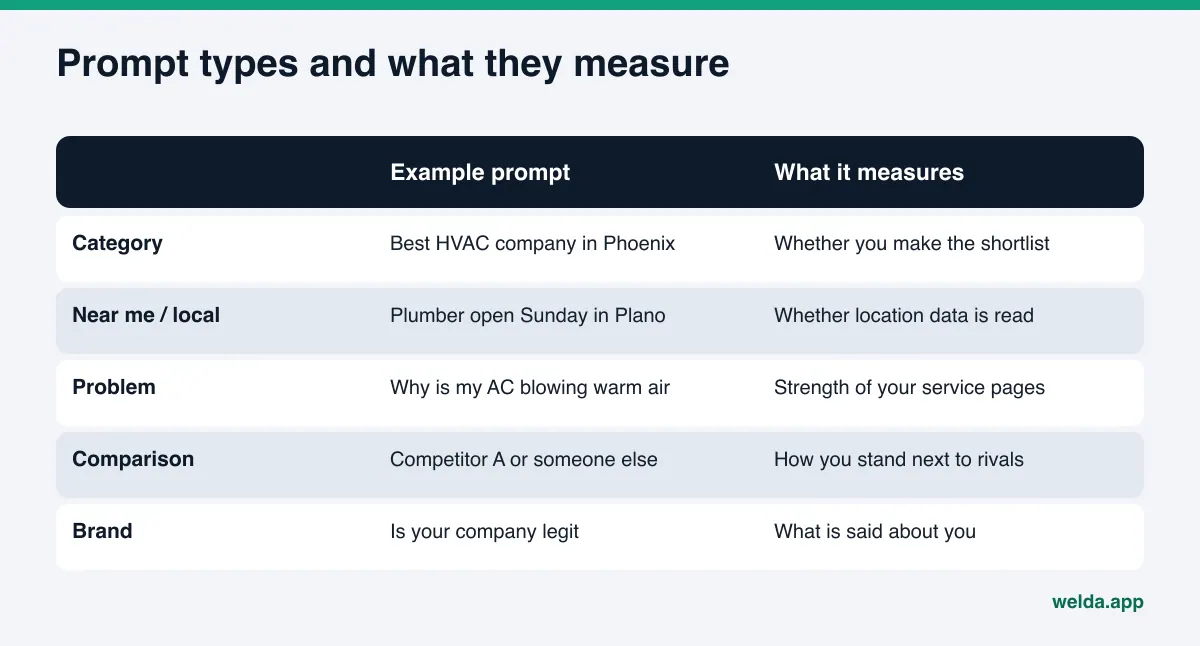
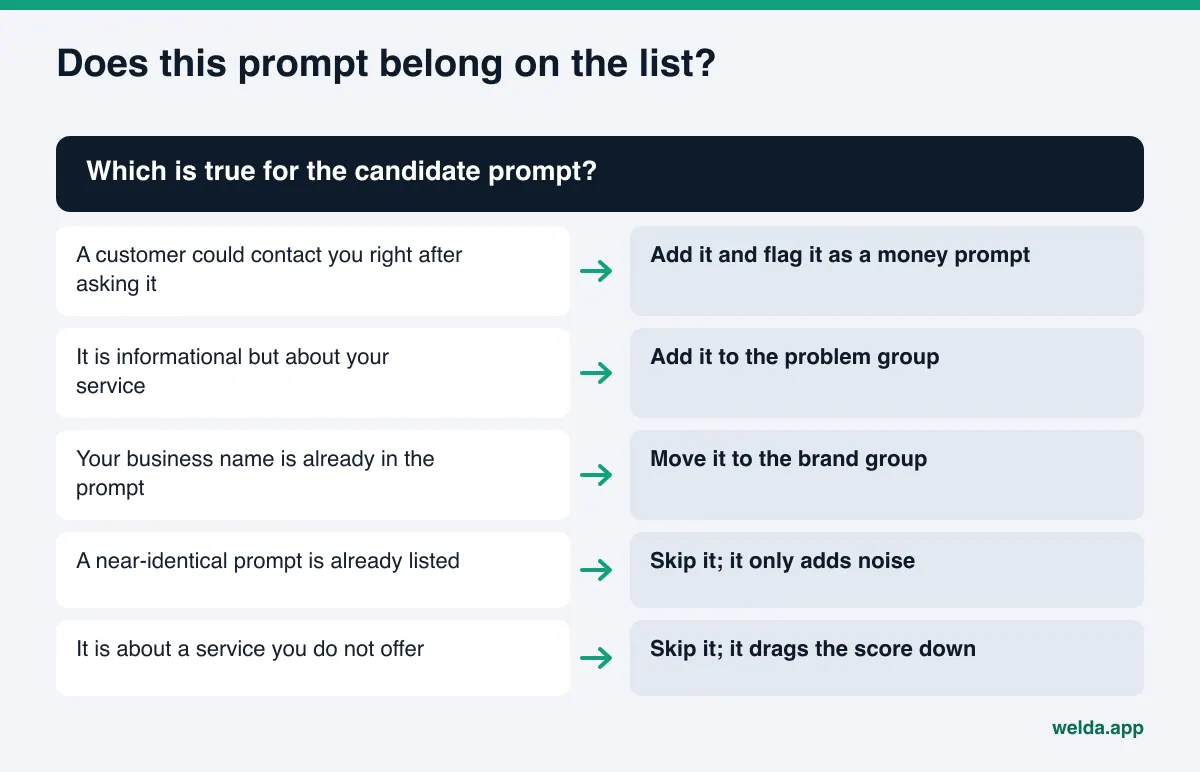
Brand prompts need special handling. Because your name is in the question, AI will almost always mention you in the answer. If you count these prompts toward your mention rate, the rate goes up for no real reason. Keep brand prompts in their own group, and judge them by a different test: is what AI says about you accurate?
For a deeper look at where to find the raw questions, read our guide on how to find the questions customers ask AI. It picks up where this section leaves off.
How to build a list of prompts to track, step by step
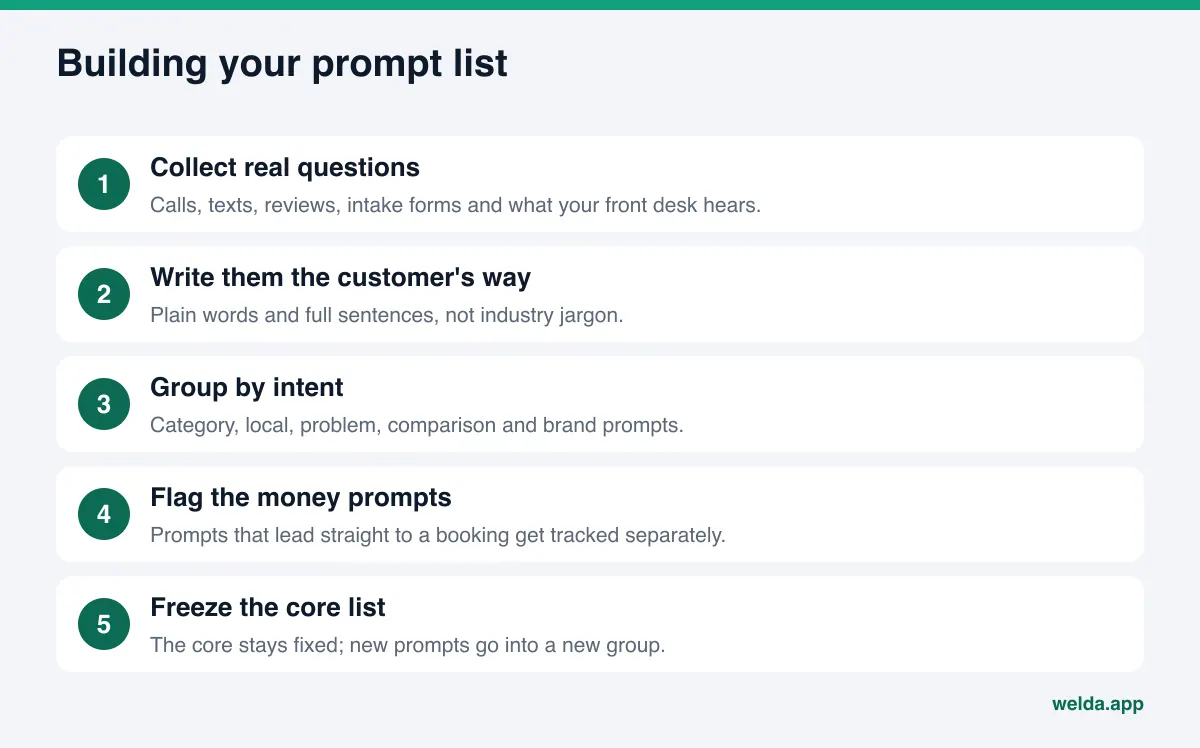
You can build the first version in an afternoon. What matters is following the order and applying the same test to every prompt.
- Collect real questions. The best sources are the questions you hear on the phone, text messages, contact form submissions, the wording in your Google and Yelp reviews, and what your front desk or sales team hears every day. The "People also ask" box in Google for your service is another source of ideas. Do not filter yet. Just get a raw list on paper.
- Rewrite them the way customers talk. A dental office may call it "implant restoration," but the patient asks "what can I do about a missing tooth?" Write the prompt in the customer's words, not yours. AI answers shift with the wording of the question.
- Add real places. If you serve a local area, put the city in some prompts and the neighborhood in others. "In Denver" and "in Capitol Hill, Denver" can produce different answers built on different sources.
- Group by intent. Put each prompt into one of the five types above. If a type is empty, fill it. If one type takes up half the list, trim it.
- Flag the money prompts. A prompt is a money prompt when a customer is likely to call or book right after asking it. "Emergency dentist open now in Arlington" is a money prompt. "Why do teeth get stained" is informational. Flagged prompts get tracked separately and come first when you set priorities.
- Prune. Merge near-duplicates. Remove services you do not offer. Move any prompt that includes your business name into the brand group.
- Pick the language. If your customers ask in English, the list is in English. If you serve a large Spanish-speaking customer base, consider whether a separate group of Spanish prompts reflects how they actually search, and note that not every tool measures every language.
- Freeze and document the list. Keep the core list in a shared spreadsheet, date it, and share it with your team. From here on those prompts do not change. New prompts go into a new, dated group.
How to write a good tracking prompt
Two prompts that describe the same need can get very different AI answers. The way you write a prompt matters as much as which prompts you pick. Here are common mistakes and better versions.
| Weak prompt | Problem | Better version |
|---|---|---|
| "Roofer" | Search box language; nobody asks an assistant this way | "Who is a reliable roofer in Tulsa for hail damage repair?" |
| "Is [your name] the best med spa in Scottsdale?" | Your name is in the prompt; it does not measure discovery | "Which med spa in Scottsdale is good for a first-time Botox visit?" |
| "What is Invisalign, how much does it cost, and which orthodontist is best?" | Three questions in one; the answer scatters | "Which orthodontist in Naperville offers clear aligners for adults?" |
| "Full-service fractional CFO solutions" | Industry jargon; customers do not talk like this | "I run a small construction company in Charlotte. Who can help with bookkeeping and taxes?" |
| "Best restaurant in America" | Scope too wide for a local business | "Where can I get a good seafood dinner in Fells Point, Baltimore?" |
The rules that come out of these examples are short:
- Write full sentences, the way a person talks.
- Keep your business name out of discovery prompts.
- Ask about one need per prompt.
- Use the real names of places you serve, at a realistic scope.
- Include the qualifiers customers use, such as "good with kids," "open late," or "takes walk-ins," because AI picks businesses based on those details.
The last rule deserves a second look. When a prompt asks for a dentist who is "good with nervous kids," AI tends to name practices whose site, Google Business Profile or reviews say so clearly. Putting those qualifiers into your tracked prompts also shows you which facts need to be written out plainly on your site.
How many prompts should you track, and when should the list change?
There is no single right number. The test is this: the list should cover the main questions customers ask before they choose you, without padding from duplicates or services you do not offer. A single-location business with one core service can work with a short list. A business with several services across several neighborhoods will naturally need more prompts, because each service and each area produces its own questions.
Keep the tradeoff in mind. With a very short list, one prompt flipping can swing the score hard, and you may mistake normal noise for the effect of your work. With a very long list, tasks pile up and priorities blur. Flagging money prompts solves most of the second problem.
The core list should change as little as possible. Update it only when:
- You add a new service or location. Add those prompts as a new, dated group.
- You drop a service. Remove those prompts and write down the date.
- Customers keep asking something that is not on the list. Add it.
- Seasonal questions matter (tax season for a CPA, spring storms for a roofer, holidays for a restaurant). Keep them in a separate seasonal group so they do not distort the core score.
Log every change with a date. When the score jumps, being able to say "we added three prompts that week" keeps you from drawing the wrong conclusion.
How Welda measures the prompts you track
In Welda, the prompt list sits at the center of measurement. Two parts of the panel connect directly to it: the prompts view, where each prompt is tracked on its own line, and the formula that turns those results into a score. The free site analysis gives you a quick first look before you build a list at all.
The prompts view. Each prompt on your list is asked three times in each of four engines: ChatGPT, Gemini, Perplexity and Google AI. The view shows one row per prompt. For each engine you see whether your business is named and, if so, in what position. Open a prompt and you see a summary of the answer and the sources it drew from. The decision this view supports is simple: find the money prompts where no engine names you, then ask, for each one, "do I have a page or an outside source that answers this?" Prompts can be filtered by intent, so you can look at comparison prompts on their own, for example.
Why three runs? AI answers to the same prompt are not identical every time. One check can catch a lucky mention or a random miss. Welda takes the spread across the three runs and reports a ± margin, so you can tell a real shift from normal noise.
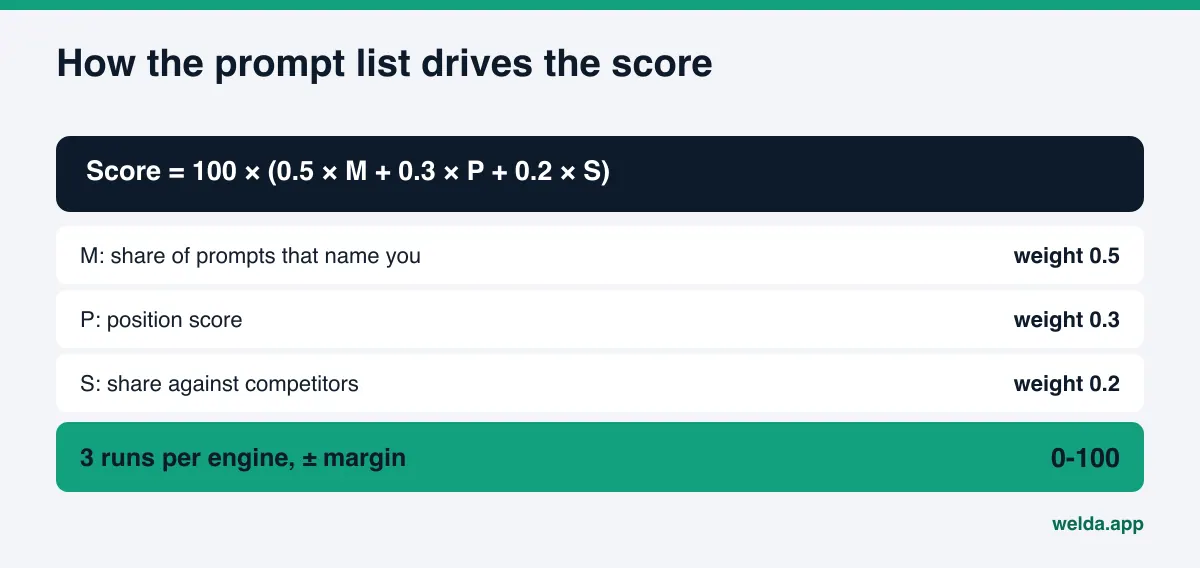
The score formula. Welda's score uses a published formula: 100 × (0.5 × share of prompts that name you + 0.3 × position score + 0.2 × share against competitors). Half of the weight sits on one question: on how many tracked prompts are you named? That makes an honest prompt list essential. A list padded with brand prompts inflates the score without bringing in a single customer. A list full of services you do not offer drags the score down and fills the task list with work that does not matter.
From prompt to task. Every prompt where you are not named becomes a task. Welda drafts the missing content, profile copy or review responses. You approve before anything is published, and the content always lives on your own site. If Welda needs a fact it does not have, say whether you take walk-ins, it does not guess; it asks you. The competitors view shows which rival wins which prompt and from which source, and read together with the prompt list it tells you where to focus. Prompts can be tracked in English or Turkish.
The free site analysis. Separate from the panel, the free AI visibility analysis asks 5 questions your customers might ask to an AI assistant that can search the web, then checks whether your business is named in the answers. It is a one-time snapshot, not ongoing tracking, but it shows where you stand before you build a list. It also checks whether your site holds the facts those prompts need: clear service descriptions, an FAQ section, address and location details, and structured business data.
Here is where things stand today. The free analysis works in English and is open to anyone. The full Welda panel is in early access and is opening first to businesses in Turkey. Regular four-engine tracking is being added during early access, and sample screens in the panel use representative data. Pricing is discussed in the early access conversation.
Limits of a prompt list, and what Welda does not do
A prompt list is a strong tool, but you should know what it measures and what it does not.
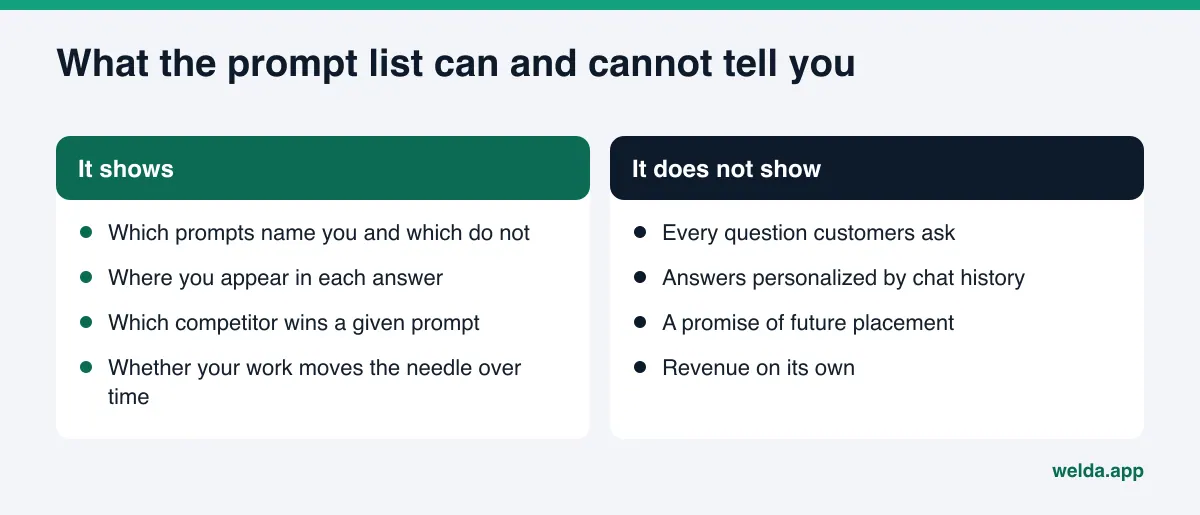
- The list is a sample. Customers ask far more questions than any list can hold. A well-built list points the way. It cannot prove you are visible everywhere.
- No placement guarantees. Welda does not guarantee rankings or that you will "show up in ChatGPT." AI engines choose their sources and answers by their own rules.
- Change takes time. A new page or a fixed profile usually takes weeks to show up in AI answers. Rewriting the list every week and expecting results will mislead you.
- Personalization and location. A user's location, chat history and app can change the answer. Tracking cannot capture all of that; it shows direction over time with fixed prompts.
- Some work stays with you. Welda does not write fake reviews. Handling negative reviews, claiming directory listings such as BBB or Healthgrades, and press outreach remain your job.
- You sign off on the list. You know which questions bring in customers. Prompt suggestions can be drafted, but the final list is your call.
Prompt list decision checklist
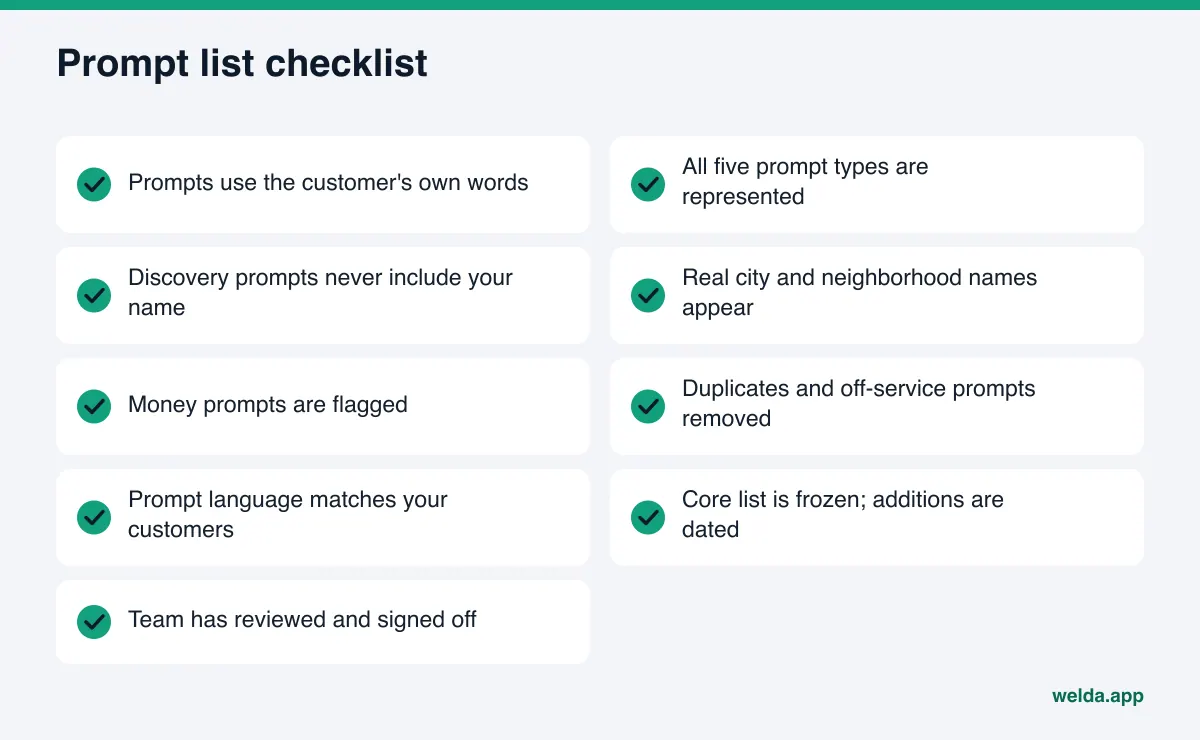
Once the list is built, run it through these checks. Every "no" raises the chance that your score is measuring the wrong thing.
| Check | If yes | If no |
|---|---|---|
| Is every prompt type represented? | You see more than one side of your visibility | Add the missing type |
| Do discovery prompts leave out your name? | The mention rate reflects real discovery | Move those prompts to the brand group |
| Are money prompts flagged? | Priorities are clear | Mark the prompts that lead to bookings |
| Is the core list unchanged since the last check? | Before and after can be compared | Log the change with a date |
| Does a page on your site answer each prompt? | Look for gaps in outside sources next | Write the missing page first |
If you are comparing tools, our guide to AEO tool features covers what to look for. For the prompt list in particular, ask four questions: does the tool show results prompt by prompt, does it run each prompt more than once, is the score formula public, and does it break results out by engine? Engine-level differences are real; our piece on Gemini visibility tracking looks at one engine on its own.
Frequently asked questions
Is a prompt list the same as a keyword list?
No. Keywords are short phrases typed into a search box. Prompts are the longer, context-rich questions people type to an AI assistant. Keywords can spark ideas, but turn them into real questions before you track them.
Should I write my own prompts or use a ready-made list?
Ready-made lists help you get started, but the final list should use your customers' words. What you hear on the phone, in texts and in reviews gives a truer picture than any template.
What happens if I put my business name in a prompt?
AI will most likely name you in the answer, and your mention rate will rise for no real reason. Keep those prompts in a separate brand group and check whether what AI says about you is accurate.
How often should I change my prompt list?
As rarely as you can. Add prompts when you launch a service, open a location, or keep hearing a new question, and date every change. Content changes usually take weeks to reach AI answers, so frequent edits break the measurement.
Why is each prompt asked more than once?
AI answers vary from run to run. Welda asks each prompt three times per engine and reports a margin based on the spread, so you are not making decisions on one lucky or unlucky check.
Does the free analysis track my prompt list?
No. The free analysis asks 5 likely customer questions once and checks whether you are named. Ongoing prompt tracking is part of the Welda panel, which is in early access.
Start by seeing where you stand
A list of prompts to track for AI visibility is the first step from guessing to measuring. Written in your customers' words, grouped by intent, with money prompts flagged and the core kept fixed, it shows which pages are missing, which competitor leads where, and whether your work is paying off. Before you build it, check whether your site can answer those prompts at all. Run the free AI visibility analysis. Results arrive by email, with each gap, why it matters, and how to fix it.