How do you do Gemini visibility tracking? Write down the questions your customers would actually ask Gemini, ask them on a fixed schedule, repeat each one a few times, and record whether your business is named, where it appears in the answer, and which competitors show up instead. A single answer tells you very little. What matters is the pattern across repeats and across weeks.
Gemini is Google's AI assistant, and for a growing number of people it sits right next to the search box. Questions like "emergency plumber in Tempe open on Sunday" or "family dentist in Austin that takes walk-ins" now get typed or spoken straight into Gemini. Gemini visibility tracking measures how often your business is part of those answers. It is one piece of AEO (answer engine optimization), the work of getting your business cited in AI answers. This guide covers how to track Gemini by hand, how to read the results, what usually causes a gap, and how Welda handles the job. If you want a baseline first, run the free AI visibility analysis on your site; knowing your starting gaps makes the tracking numbers much easier to interpret.
What is Gemini visibility tracking, and why track Gemini separately?
AI search visibility is not one number. ChatGPT, Gemini, Perplexity and Google's AI Overviews and AI Mode can give different answers to the same question. Each one leans on different sources, summarizes differently and lists a different number of businesses. A roofing company can be named regularly in ChatGPT and be missing from Gemini, or the other way around. (You may also see this work called GEO, or generative engine optimization. In the US, AEO is the more common term, and it means the same thing.)
There are three reasons to give Gemini its own column. First, Gemini lives close to Google's ecosystem. Google's search index, your Google Business Profile and Google Maps data are among the sources that tend to shape its answers, so weak spots on the Google side can hit you harder here. Second, Gemini is built into Android phones and Google's apps, which means a customer can ask without ever opening a separate site. Third, the competitors Gemini names are often the ones that look strong on Maps and in reviews, which gives you a direct hint about what to fix.
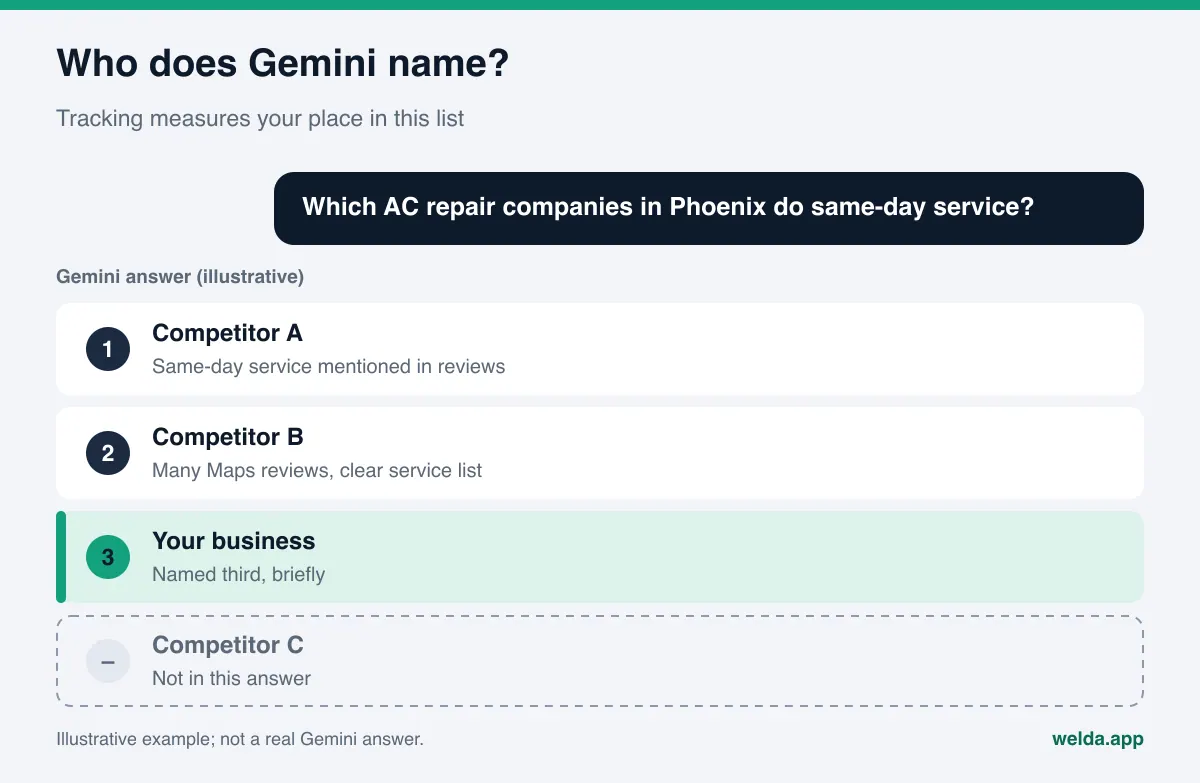
That is also what separates Gemini visibility tracking from classic rank tracking. In Google Search you measure the position of a page. In Gemini there is no list of ten blue links. There is a written answer, and your business name is either in it or not. If it is, you note whether you are named first, fifth, or tucked into "a few other options." The unit you measure is the business name, not the URL.
Where does Gemini get its answers?
Knowing where Gemini pulls information from helps you read what you measure. When it answers a local, current question, Gemini can ground its response in content from Google's search index. Google documents a robots.txt token called Google-Extended for this. According to Google, the token controls whether your site's content can be used to train future Gemini models and to ground answers at prompt time in Gemini Apps, and it does not affect your inclusion or ranking in Google Search (Google's crawler documentation).
In practice: if your robots.txt blocks AI crawlers or the Google-Extended token without anyone remembering why, Gemini is less likely to lean on the current information on your site. Blocking can be a valid business decision. The point is that it should be a decision, not a leftover setting from a website template. If your site loads its text only through JavaScript, check that crawlers can see the words on the page at all.
Beyond your own site, these are the sources that tend to matter for Gemini answers about local businesses:
- Google Business Profile: primary category, hours, services, photos and reviews. Gaps here make it harder for Gemini to match you to the need in the question.
- Google Maps reviews: phrases customers use, such as "same-day appointment" or "great with kids," help match you to specific questions.
- Industry directories and review sites: Yelp and Tripadvisor for restaurants and hotels, Healthgrades for medical practices, Angi for home services.
- Trust signals: sources like the BBB can show up when someone asks whether a company is reliable.
This list also tells you what to watch. If you are missing from Gemini, the problem may not be your website at all. You may be thin or inconsistent in the places Gemini trusts.
Which prompts belong in your Gemini tracking list?
Tracking is only as good as the prompt list. A generic prompt like "best hotel" says almost nothing about you, because your customers do not search that way. They name the need, the place and the situation together. Grouping prompts by intent shows you where in the decision you are losing.
| Prompt type | Example (for an example HVAC company) | What it reveals |
|---|---|---|
| Discovery | "Who should I call when my AC stops working in Phoenix?" | Whether you show up when the customer describes a problem |
| Specific service | "Phoenix HVAC company that installs heat pumps" | Whether your services are written clearly enough to be matched |
| Comparison | "Best-rated AC repair companies in east Phoenix" | Which competitors win and the reasons Gemini gives |
| Brand | "Is Example Air reliable? What do reviews say?" | What Gemini believes about you and whether it is accurate |
| Practical | "Does Example Air offer financing or weekend service?" | Whether facts from your site make it into the answer |
For most local businesses, 20 to 40 prompts is a workable starting list. Most should be discovery and specific-service prompts, since that is where new customers come from. Brand prompts catch bad information: if Gemini quotes an old phone number, a closed location or a service you dropped, the only way to find out is to ask.
Write prompts in your customers' words. Say "AC repair," not "climate control solutions." Use neighborhood and city names. If you serve Spanish-speaking customers, add a few prompts in Spanish, because Gemini may draw on different sources in each language.
How to do Gemini visibility tracking by hand
You do not need a tool to start. The method is simple but it takes discipline. Here is a routine a small business can run once a month.
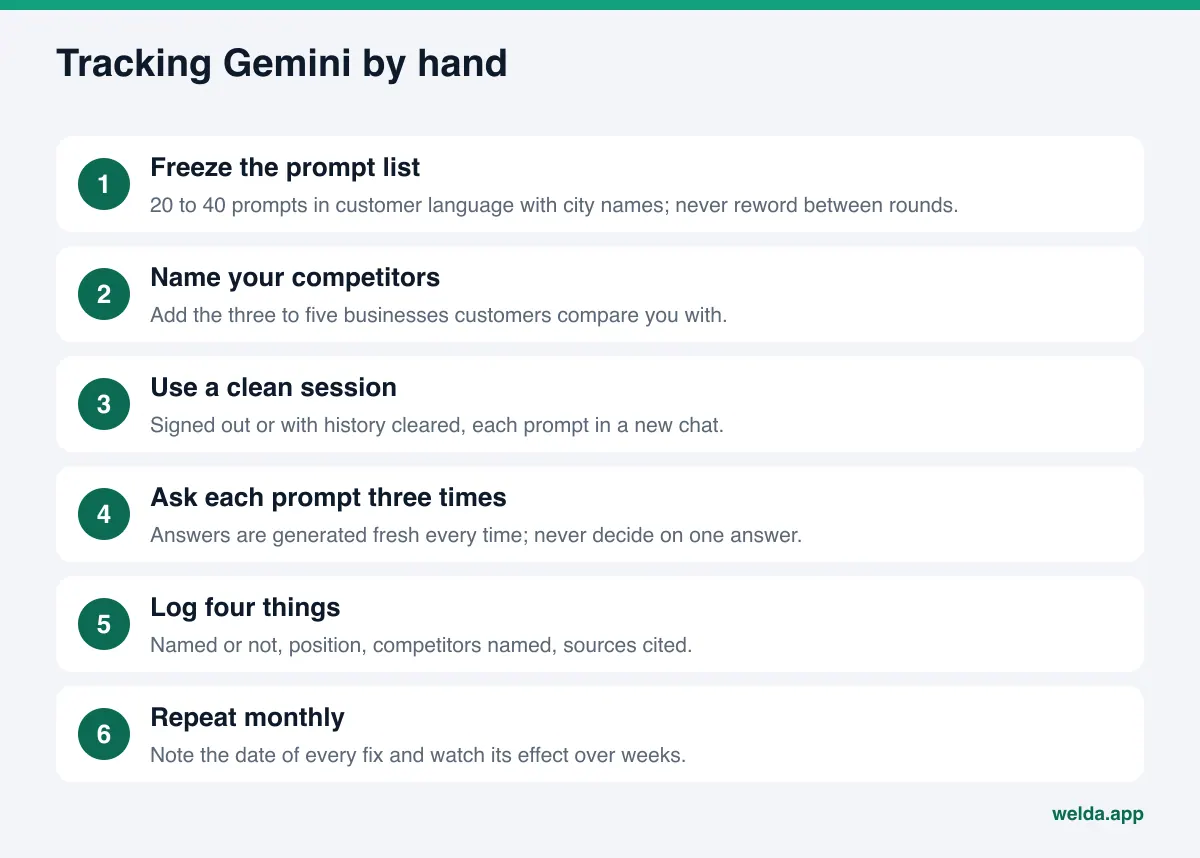
- Freeze the prompt list. Pick 20 to 40 prompts from the types above and put them in a spreadsheet. Do not reword them between rounds, or you will not be able to compare results.
- Name your competitors. Add the three to five businesses customers compare you with. You will mark whether each one appears.
- Ask in a clean session. Use a signed-out browser or an account with history cleared where possible. If Gemini remembers past conversations, answers can be shaped around you.
- Ask each prompt more than once. AI answers are generated fresh every time. Asking the same prompt in three new chats keeps you from reacting to one lucky or unlucky answer.
- Log four things. Were you named, at what position, which competitors appeared, and which sources the answer relied on. If Gemini shows links, save them.
- Repeat monthly and write down the change. The trend matters more than any single result. When you make a fix, note the date and check over the next few weeks whether related prompts moved.
Manual tracking works for a short list. It gets hard as the list grows: 30 prompts with three repeats on one engine is 90 answers a month. Track four engines and you are reading 360 answers, marking names and saving sources, which takes hours and invites mistakes. We cover the same method for another engine in Perplexity rank tracking; running two engines side by side makes the differences much easier to see.
How to read your Gemini results
Turning answers into a number lets you compare week to week. But you need to know what the number measures. Three questions cover it.
How many prompts name you? This is the base metric. If you appear in 6 of 30 prompts, you are visible in one out of five customer questions. As that share rises, more people hear about you from Gemini.
Where are you when you are named? Being the first business in the answer is not the same as being listed last under "other options." People tend to read the first few names.
What is your share against competitors? Count how often your competitors are named for the same prompts. If your share rises but a competitor's rises faster, you are moving forward and still falling behind.
Here is why one answer can mislead. An example dental practice asks Gemini "dentist open Saturday in north Austin" once and sees its name first. Asked twice more, it lands third in one answer and is missing from the other. Saying "we rank first in Gemini" after one try would be wrong; the middle result of three repeats is closer to the truth. The spread itself is useful: if results swing widely, Gemini probably has no solid source about you.
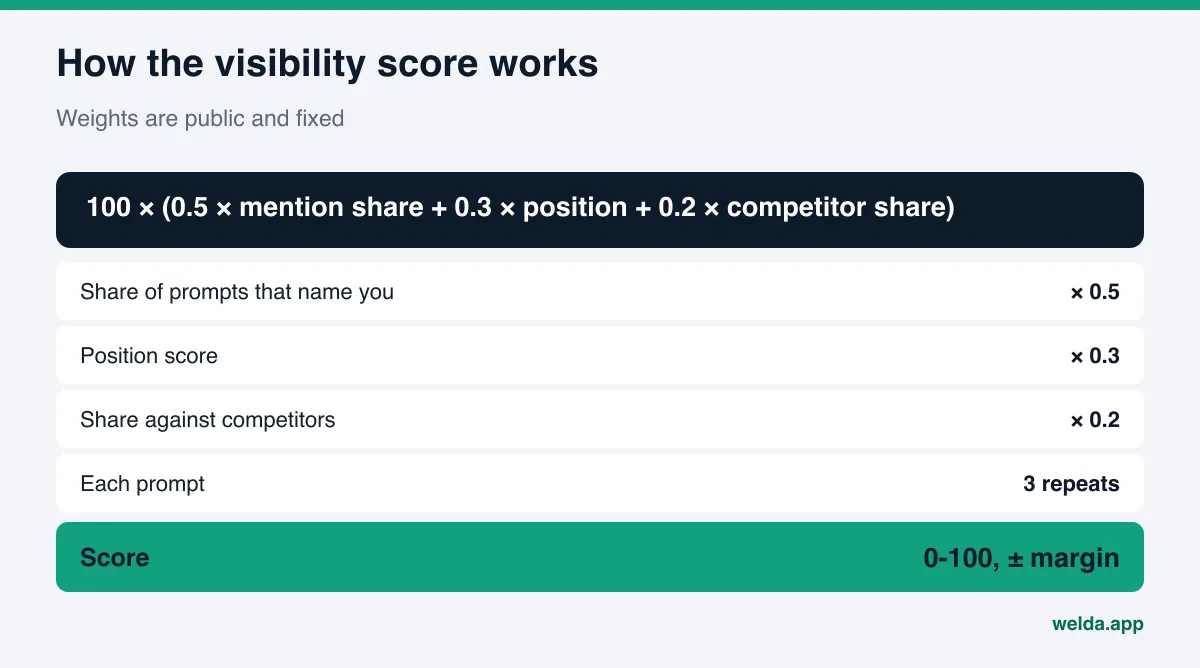
Combining those three metrics into one score works only if the weights are fixed and published in advance. A score you cannot reconstruct is a score you cannot act on. For a full example of how these numbers can be presented, see our AI visibility report template.
How Welda handles Gemini visibility tracking
Welda turns the manual routine above into a scheduled measurement and then drafts the fixes for the gaps it finds. Gemini is one of the four engines Welda measures, along with ChatGPT, Perplexity and Google AI. This section focuses on the two parts most relevant to Gemini.
First, the current status. The free AI visibility analysis works in English today, and anyone can use it. The full Welda dashboard is in early access and is opening first in Turkey. Regular four-engine measurement is being added during early access, and the dashboard screens described here use illustrative data.
Prompt-by-prompt view: where does Gemini name you? Your prompt list appears row by row, with a column per engine. Each cell shows your position in that engine's answer or a blank when you are not named. Filter to Gemini alone and you see at a glance which prompts Gemini answers with your name and which it skips. Click a prompt and you get the answer text, the result of all three repeats, and the sources the answer cited. The decision you make here: what do the skipped prompts have in common? The same service? The same part of town? That common thread points to the fix.
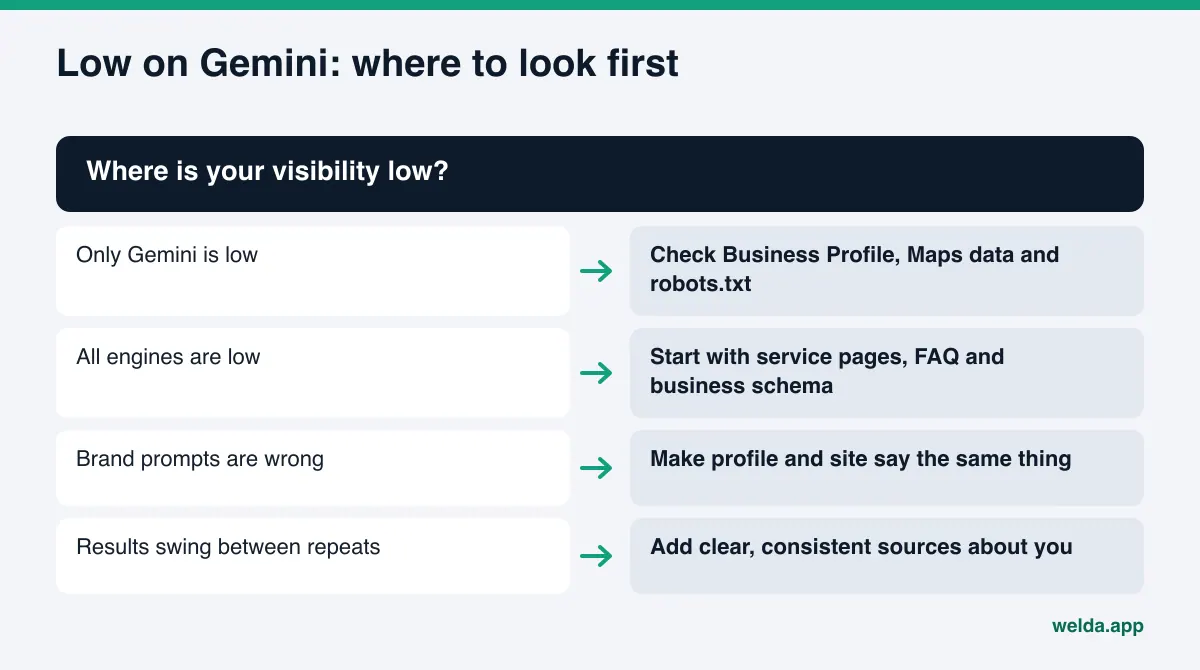
Engine breakdown: is Gemini the outlier? The visibility view shows your score over time and the split by engine. If your Gemini share is clearly lower than the other engines, the gap is most likely on the Google side: your Business Profile, Maps data or robots.txt. If all engines are low together, the problem is more likely the content on your site. A weekly changes list shows which prompt started naming you on which engine, and which fix came before it. The score formula is public: 50 percent weight on the share of prompts that name you, 30 percent on position, 20 percent on share against competitors, with a ± margin calculated from the spread of the three repeats. That lets you tell real movement from normal answer-to-answer noise.
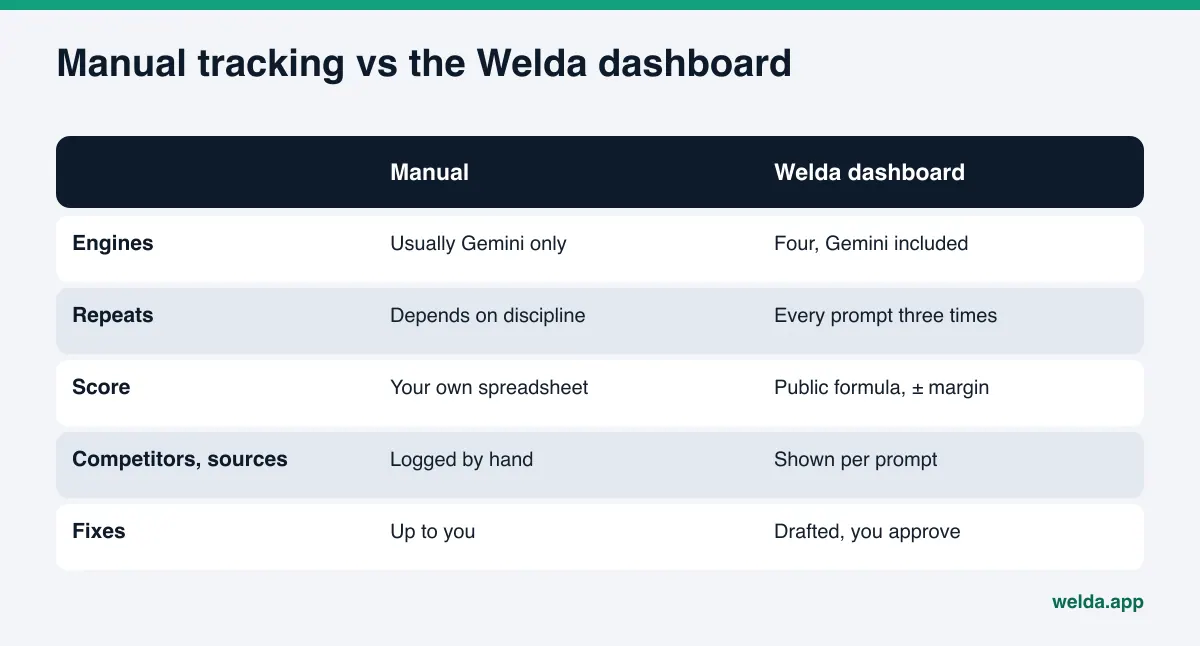
What happens after the measurement? Prompts where you trail on Gemini become items on a single to-do list. Welda drafts the missing content, profile copy and review replies; you keep the final say on publishing. On WordPress sites, Welda connects through a separate Editor user and an application password, so content opens as a draft and goes live when you approve it. If Google Business Profile is connected, profile updates can go through there; if not, the task is listed as manual with the text ready to paste. Your content always lives on your own site. For a broader look at the two kinds of tools, see AI visibility monitoring vs done-for-you AEO.
Missing from Gemini? What to check first
When tracking shows a gap, starting with the most likely cause saves time. These are the common ones for Gemini:
- robots.txt: if AI crawlers or Google-Extended are blocked, confirm whether that was intentional.
- A thin Google Business Profile: wrong primary category, missing services, outdated hours. Gemini cannot match the question to you.
- Vague service pages: instead of "full-service solutions," name each service, where you offer it and who it is for.
- Missing business schema: address, phone, hours and service area in machine-readable form tie your website and your profile together as one business.
- No FAQ section: if answers to "Do you offer financing?" or "Is there parking?" are not on your site, Gemini looks elsewhere or says nothing.
- Reviews that never mention the need: you cannot write reviews, but your replies can mention the service naturally.
The free analysis checks the website side of this list in one pass: AI crawler access, title and meta description, business schema, address and contact details, FAQ content, how clearly services are described, and page speed. For each gap it explains what it found, why it matters and how to fix it, and it gives you ready-to-use homepage copy and a fix package to add to your site. It also asks an AI assistant with web search five questions your customers might ask and checks whether your business name comes up. That is a one-time check, not a Gemini-specific measurement, so it does not replace ongoing tracking. It gives you a starting point.
Example scenario: turning a Gemini finding into work
Tracking pays off when a finding turns into a concrete task. The scenario below is an example and does not describe a real business. An example bakery-cafe tracks 30 prompts on four engines. It is named regularly in ChatGPT and Perplexity for gluten-free prompts but never in Gemini. Competitor A leads most of those prompts in Gemini.
The answers and their sources show why. Competitor A lists "gluten-free baked goods" as a service on its Google Business Profile, and the phrase comes up often in its reviews. The example cafe's profile does not mention it, and its website mentions gluten-free options once, in a photo caption.
| Finding | Likely cause | Task | Stays with the business |
|---|---|---|---|
| Missing from gluten-free prompts in Gemini | Service not on the profile | Add to profile services and description | Approve the text |
| Website mentions it once | Service not described clearly | Dedicated section plus FAQ entry | Confirm what is actually offered |
| Competitor's reviews mention it | Customer language matches the prompt | Mention the option naturally in review replies | Approve the replies |
| Brand prompt quotes old hours | Profile and site disagree | Make both say the same thing | Confirm correct hours |
None of these tasks guarantees a result. Each makes it easier for Gemini to match the question to the business. After the fixes, the same prompts are tracked for several weeks. If the Gemini column changes, you note which fix came before it. If it does not, you move to the next likely cause.
Limits: what Gemini tracking and Welda do not do
Gemini visibility tracking is a measurement, not a promise. Knowing the limits keeps expectations realistic.
- It cannot measure every personal answer. Gemini can answer differently based on location, language and history. Tracking measures a clean, repeatable setup, not every customer's screen.
- No ranking guarantees. Welda does not guarantee that you will appear in Gemini or any other engine. We explain why in guaranteed ChatGPT rankings.
- It does not make up facts. If your hours, price range or service details are missing, Welda asks you instead of guessing.
- No sensitive content without approval. In healthcare there is no automatic publishing; every piece goes to approval, and patient data is not sent to AI.
- No fake reviews. Handling negative reviews, directory accounts and press work stays with the business.
- Not instant. New content usually takes weeks to show up in AI answers, so a fix has to be tracked over several rounds.
Welda's compliance check flags patterns such as pricing claims, guarantees, superiority claims and diagnostic suggestions before publishing. That is relevant in the US, where the FTC holds businesses responsible for deceptive advertising claims. It is a warning, not legal advice, and it has not been reviewed by legal counsel.
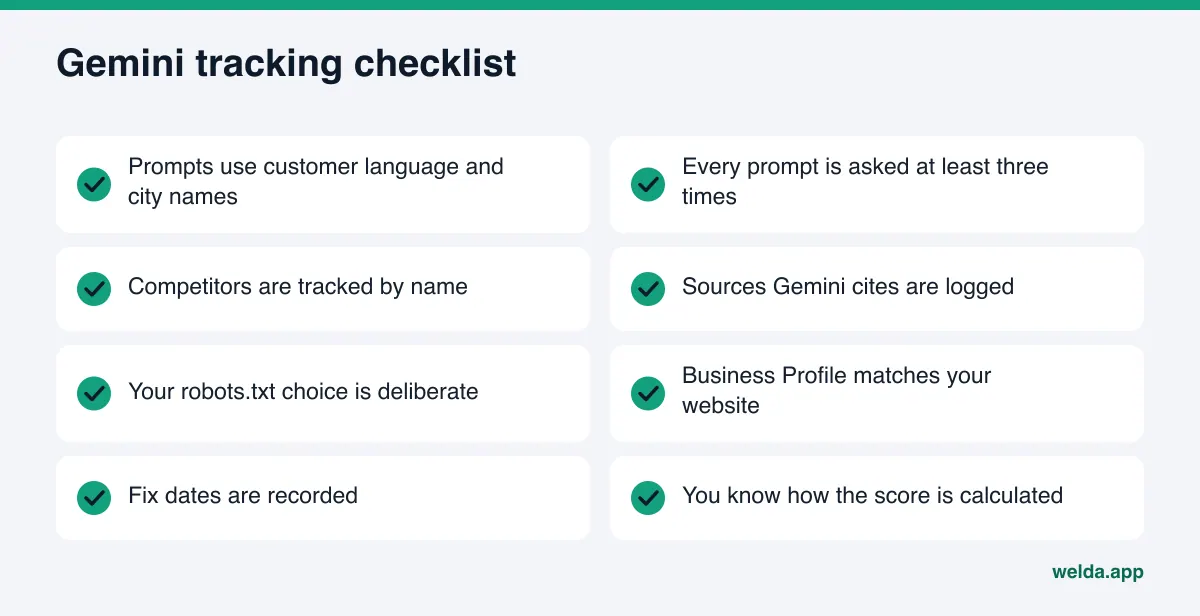
Gemini visibility tracking checklist
Go through these points before you start tracking or choose a tool. Every "no" is a gap that makes the measurement less reliable.
If you want to fold this into a broader AEO plan, the AEO checklist covers website, profile and content work in one place.
Frequently asked questions
Is Gemini tracking the same as tracking Google AI Overviews?
No. AI Overviews and AI Mode appear inside Google Search results, while Gemini is a separate assistant. Both draw on Google's sources but can answer the same question differently, so they should be measured as separate engines.
How often should I check Gemini?
For manual tracking, once a month is enough for most small businesses. After a fix, watch the same prompts for several weeks. Answers can shift day to day, so one daily check is not a good basis for decisions.
Gemini named me first once. Is that enough?
One answer is not enough information. Ask the same prompt several times and you may get different results. The middle of several repeats and the trend over weeks are more reliable than one good result.
If I block Google-Extended, will I drop out of Google Search?
According to Google's documentation, the Google-Extended token does not affect inclusion or ranking in Google Search. It does limit the use of your content to ground Gemini answers. Make the choice knowing that.
Can Welda guarantee I show up in Gemini?
No. Welda measures, shows the gaps and drafts the fixes, but it does not guarantee placement on any engine. What an AI answer says is the engine's decision.
Can I use the Welda dashboard in the US today?
The free analysis works in English now. The full dashboard is in early access and is opening first in Turkey. Pricing is discussed in the early access conversation.
Where to start with Gemini tracking
Gemini visibility tracking turns the questions your customers ask into a measurement you run on a schedule. Build the prompt list in your customers' words, ask each prompt more than once, log your name, position and competitors, and watch the trend over weeks. If you trail on Gemini specifically, look at the Google side first: your Business Profile, Maps data and robots.txt. As a first step, run the free AI visibility analysis to see how your site looks to AI systems, with a score, the gaps it found and fixes you can use right away.