Should you buy AI visibility monitoring or done-for-you AEO? Monitoring tells you where your business shows up in ChatGPT, Gemini, Perplexity and Google's AI answers. Done-for-you AEO drafts the copy, schema and pages that close the gaps. If you have people who can act on a report, monitoring is often enough. If you don't, a report alone just collects dust, and an approach that pairs tracking with ready-to-use fixes makes more sense.
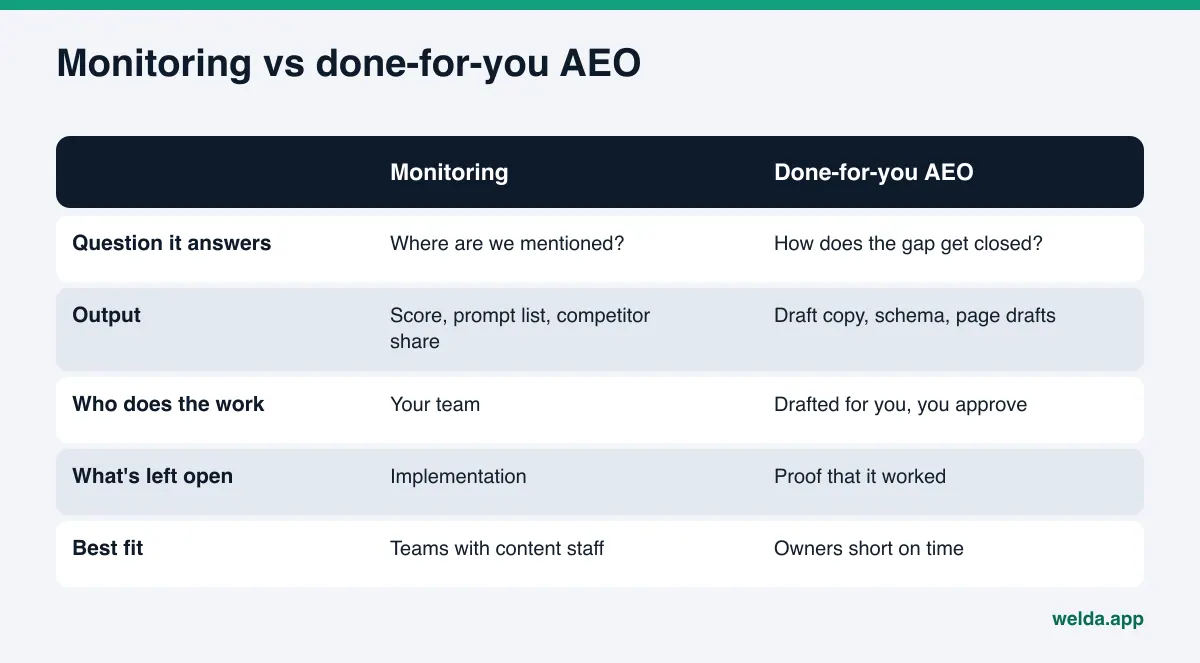
AI visibility monitoring vs done-for-you AEO: what's the actual difference?
AEO, or answer engine optimization, is the work of getting your business named when customers ask AI assistants for a recommendation. You'll also see it called GEO (generative engine optimization); the two terms describe the same job, and AEO is the one most US buyers search for. The tools sold under either label tend to fall into two camps.
The first camp monitors. It runs the questions your customers are likely to ask through AI engines, then reports whether your business is mentioned, where it appears in the answer, and which competitors come up instead. The second camp does the work. It looks at what's missing on your website and profiles and drafts the fix: a clearer service page, an FAQ section, LocalBusiness schema, a profile description, review response drafts.
Both get marketed as "AI search visibility," so they look alike on a pricing page. What you get is very different. A monitoring tool gives you a dashboard. A done-for-you approach gives you finished drafts to approve. One answers "where do we stand?" The other answers "what do we do on Monday?"
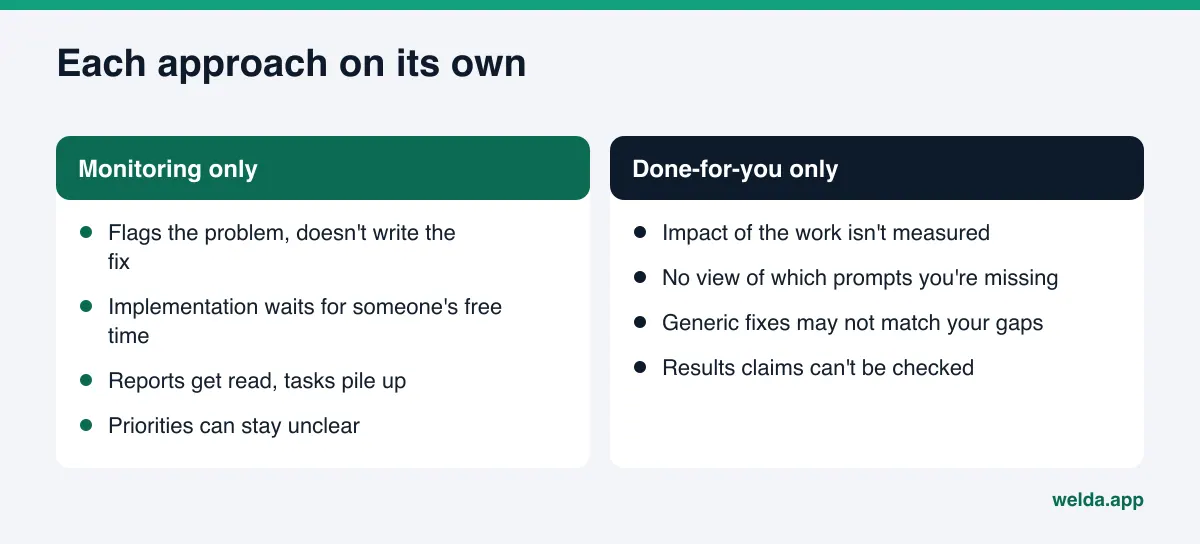
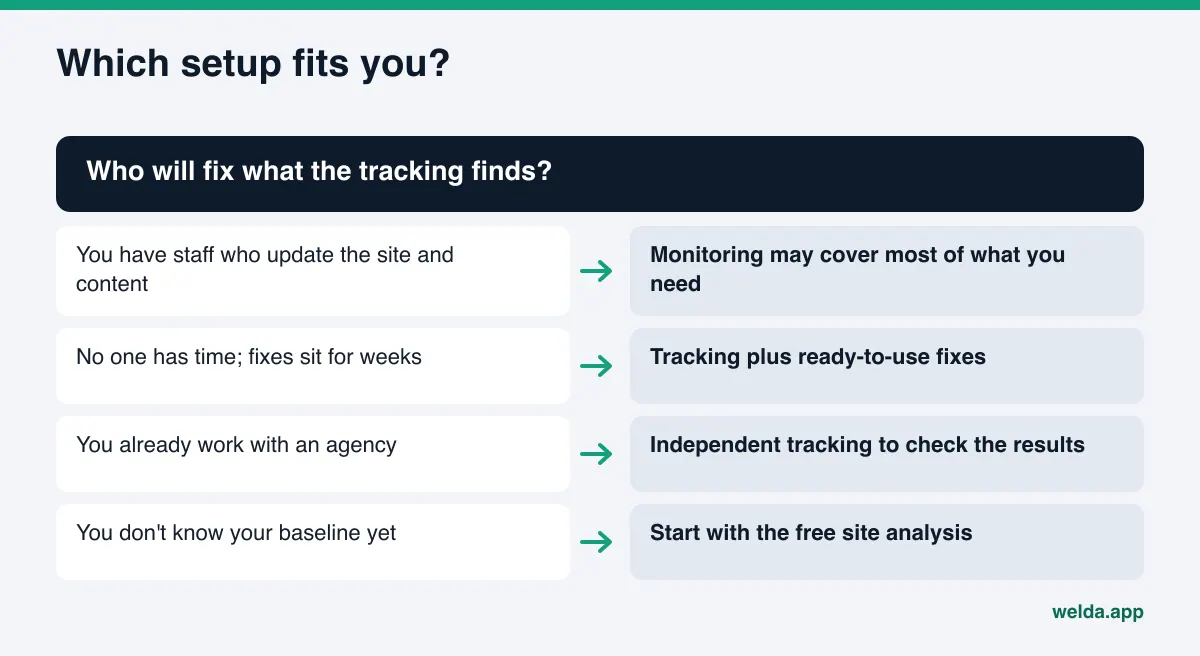
Buying without knowing the difference tends to end one of two ways. Either you get monthly reports nobody acts on, or you get a stream of new content and no one can tell you whether it changed anything. The right pick depends less on the software and more on your team: who will fix what the tracking finds?
If you'd like to see the difference on your own site before deciding, the free AI visibility analysis is a good starting point. It reads your site the way search engines and AI assistants do, lists each gap, and gives you a concrete fix for each one. In other words, you see both halves, the measurement and the fix, on your own pages.
Why this choice matters for a small or mid-sized business
Customers now type questions like "Which dentist in Austin is open on Saturdays?" or "Family-friendly hotel in San Diego near the beach?" into ChatGPT or Google's AI Mode. They don't get ten blue links. They get two or three names. Getting onto that short list takes two things: knowing which questions you're missing from, and fixing what causes it. Either one alone leaves the job half done.
For most small businesses, the bottleneck isn't information. It's time. The owner or the one marketing person reads the report, writes "add Saturday hours to the services page" on a sticky note, and that task sits for weeks. In that situation, a more detailed monitoring tool produces more data, not more progress.
The opposite is also a risk. If a vendor writes you a set number of posts each month but never measures which prompts mention you, the direction of the work is a guess. Maybe your competitor is ahead because of fresh Yelp reviews and a complete Google Business Profile, and what you need isn't another blog post but a cleaned-up profile. Without measurement, you can't see that.
We cover the broader version of this question, staffing versus tooling, in hire an AEO specialist or use software. Here the focus is narrower: what the software itself takes off your plate.
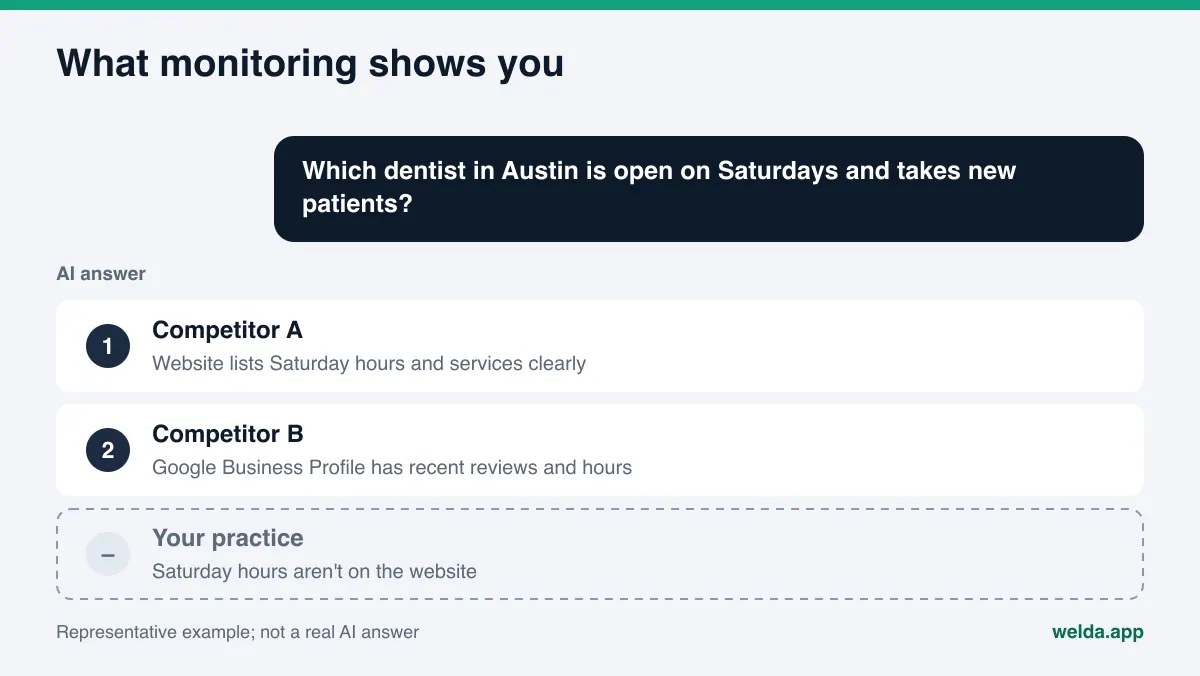
What an AI visibility monitoring tool shows, and what it doesn't
A good monitoring tool should tell you:
- Which customer prompts mention your business and which don't
- Where you appear in the answers that do mention you
- Which competitor is ahead on which prompt
- Which sources the answer leans on: Google Business Profile, Yelp, Tripadvisor, Angi, the BBB, industry directories, your own site
- How things change over time, and the margin of error on that change
This matters because AI answers aren't stable. Ask the same question twice and you can get different names. Making decisions from a single screenshot is risky. We explain why repeated runs matter, and how to read the spread, in margin of error in AI visibility tracking.
What a monitoring tool usually doesn't show is the next step. "You're missing from this prompt" is a long way from "add this paragraph to your services page and this field to your schema." Many tools stop at generic advice like "strengthen your content" or "get more reviews." That may be true, but it isn't specific. It doesn't put a finished draft in front of the person who has to do the work.
When you evaluate a monitoring tool, ask: Are the prompts written the way your customers actually talk? Is each prompt run more than once? Is the scoring formula disclosed? Can you see the raw answer and its sources? Is competitor comparison broken out by topic, or is it one blended number? We go deeper on these questions in our guide to choosing an AI brand monitoring tool.
What done-for-you AEO does, and where it stops
Done-for-you AEO turns a gap into a specific task with the work already drafted. Typical outputs include title and meta description suggestions, a rewritten headline and intro paragraph, an FAQ section, LocalBusiness schema, a service page draft, profile descriptions and review response drafts.
The value is that nobody starts from a blank page. A hotel owner reviews and edits a drafted "family suites" page instead of spending an evening writing one. A practice manager doesn't have to learn how to write JSON-LD.
But done-for-you work has limits, and you should know them going in:
- It shouldn't make things up. If your hours, price range or the owner's name aren't on your site, a good tool asks you instead of guessing. A wrong fact that ends up in AI answers is much harder to correct than a missing one.
- It shouldn't publish without sign-off. In healthcare, legal or pricing content, a single wrong sentence can create real exposure. The publishing decision belongs to the business.
- It can't do everything. Many review and booking platforms don't allow outside publishing. The copy can be drafted, but pasting it into the profile and verifying it is the account owner's job. Handling negative reviews and press outreach also stays with you.
- It can't aim without measurement. A fixing tool that doesn't know which prompts you're missing works from a generic checklist. That checklist doesn't know your competitors or your customers' questions.
That last point is the key one. Fixes are only targeted when they're tied to measurement. Otherwise every business gets the same tasks in the same order.
How to decide: a step-by-step approach
To settle the AI visibility monitoring vs done-for-you AEO question for your business, work through these steps in order. Each one builds on the answer to the one before.
- Get your baseline. Find out how your site reads to AI assistants. Can AI crawlers reach it? Is your business information clear? Are your services spelled out? This first picture tells you whether your gaps are mostly technical or mostly content.
- Sort the gaps by type. Are most of them one-time technical fixes (robots.txt, schema, page titles), or do they call for ongoing content and profile work? One-time fixes can be handled once. Ongoing work needs a process.
- Write down who does the work. Who updates your website? Who writes profile copy? How many hours a week can they give it? An honest answer here is half the decision.
- Decide how often to measure. In a competitive local market (hotels, dental, med spas, home services) regular tracking pays off. In a slower market, a quarterly check may be enough.
- Set the approval flow. Which content needs your sign-off before it goes live? Who reviews anything that mentions health claims or pricing? Set this rule before you pick a tool.
- Define how you'll judge results. Three months from now, how will you answer "did it work?" Pick concrete measures: share of prompts that mention you, share against competitors, a log of what was done.
At the end, you're usually in one of three places. If you have content staff and can close gaps yourselves, monitoring covers most of what you need. If your gaps are mostly technical and one-time, a single round of fixes plus occasional checks may be enough. If your team is small and the work keeps piling up, an approach that gives you both tracking and ready-to-use fixes wastes the least effort.
For a wider map of tool categories, see our overview of AI SEO tools.
Example scenario: the same gap, two different paths
Here's a made-up example to make the difference concrete. An example family-run hotel in San Diego doesn't show up when people ask AI assistants for "family-friendly hotels near the beach in San Diego." Competitor A shows up regularly.
With monitoring only. The owner sees those prompts flagged red in the monthly report. The report shows the answers lean on Competitor A's Tripadvisor listing and a "Traveling with kids" page on its own site. The recommendation reads "add family-focused content." The owner makes a note. It's peak season, so the page never gets written. Next month's report shows the same red.
With done-for-you only. The vendor crawls the hotel's site, notices the schema is missing and adds it. It also drafts a general "things to do in San Diego" post. Because it doesn't know the hotel is missing from family prompts, the post doesn't address families. The owner assumes the work is handled; nothing changes on those prompts, and no one notices.
With both together. Tracking shows the gap on family prompts and the sources the competitor is winning with. That finding becomes a task: a page draft covering family rooms, kid-friendly amenities and age policies, a matching FAQ section, and ready copy for the Tripadvisor description. Anything the tool doesn't know, such as whether cribs are available, gets asked, not guessed. The owner reads the draft, edits it, approves it. A few weeks later the same prompts run again and the change is visible.
This scenario is fictional. The point isn't the outcome but the workflow. In all three paths something got done. Only in the last one did the work line up with the gap that was measured.
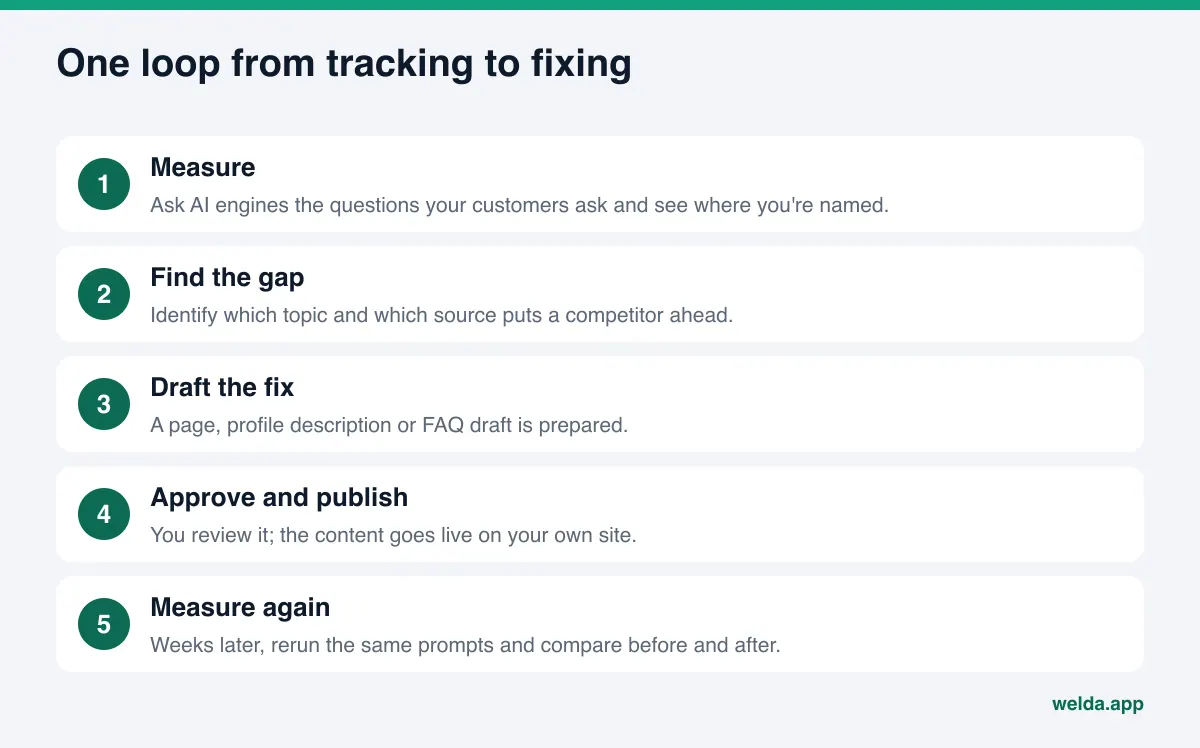
How Welda handles it: tracking and fixes in one place
Welda is built around this split. Measurement should end in a to-do list, not just a report, and a fix should end in a re-measured result, not an assumption. So Welda puts both in one dashboard. Here are the three parts that matter most for this question.
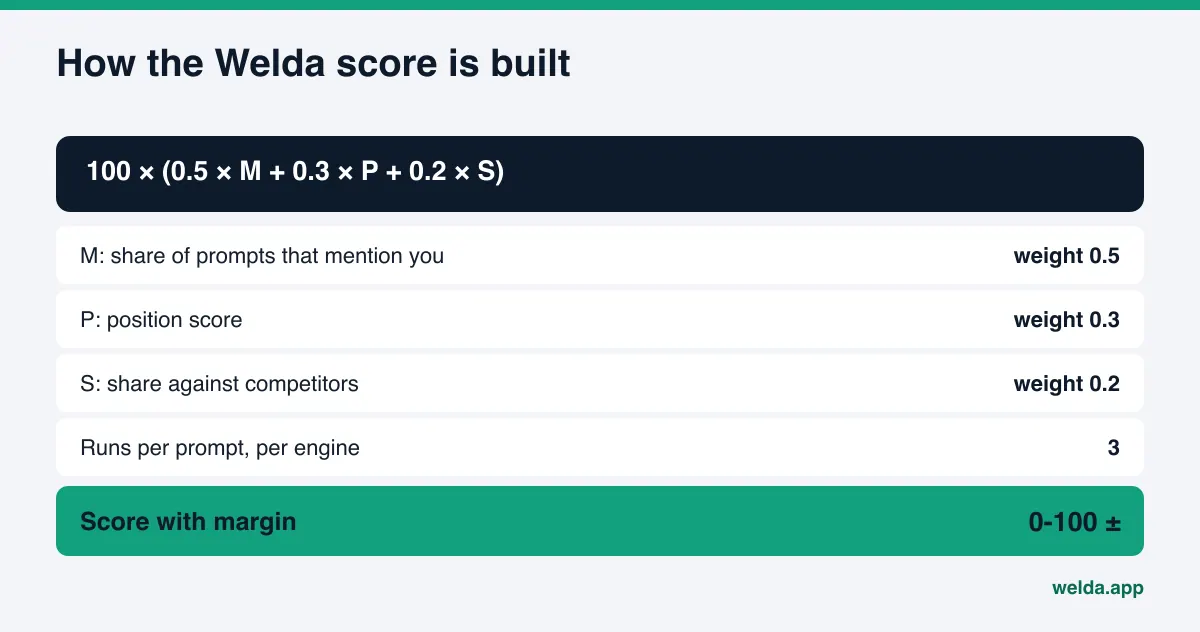
The prompts view: the monitoring side. Welda asks the questions your customers are likely to ask in ChatGPT, Gemini, Perplexity and Google AI, three times each. In the prompts view, every prompt shows whether you were mentioned in each engine and in what position. Click a prompt and you see the answer and the sources it cited. If you're consistently missing from "open on Saturday" prompts and the answers cite a competitor's Google Business Profile, you know the fix is on your profile, not your site. The score isn't a black box either: mention rate, position and share against competitors are weighted and added, and the spread across the three runs gives you a margin of error. A small wobble doesn't get mistaken for real movement.
The to-do list: the fixing side. Every gap from tracking and from reading your site lands on one to-do list, split into three parts. First, information Welda needs from you: if it can't find something on your site, like the owner's name or weekend hours, it asks rather than inventing it, and once you enter it, it flows into every related draft. Second, drafts waiting for your approval: service pages, FAQ sections, profile descriptions, review responses. Third, manual tasks: for profiles Welda can't connect to, the copy is ready and you paste it in and mark the task done.
Before-and-after comparison: closing the loop. After a fix goes live, Welda reruns the same prompts and shows the change side by side. New content usually takes weeks to show up in AI answers, so this comparison is read across measurement cycles, not the next morning. That way "what we did this month" and "what changed this month" sit in the same place.
It's also clear what stays with you. On WordPress sites, Welda connects through a separate Editor user and an application password, with no code to install. Content opens on your site as a draft and goes live when you approve it. On other platforms, Welda gives you a ready package and you or your web person apply it. Content always lives on your own site; Welda doesn't host it. Before publishing, a compliance check flags patterns like pricing claims, guarantees and superiority claims. It isn't legal advice. In healthcare there's no automatic publishing at all; every piece comes to you for approval.
A note on availability: the Welda dashboard is in early access and is opening first to businesses in Turkey. Regular four-engine tracking is being added during early access, and the sample screens show representative data. What anyone can use today is the free analysis, which runs in English. Pricing is discussed in an early access conversation.
Where the free analysis fits
The free analysis is the first point where measuring and fixing meet. It reads your homepage and a few inner pages (services, pricing, about, contact) and checks whether AI crawlers can reach your site, your title and meta description, your main headline, your business schema, your address, phone and location details, whether your social and map profiles are linked, your FAQ section, reviews and trust signals, how clearly your services are described, and page speed.
On the measuring side, you get a score out of 100, with technical and content scores shown separately, plus a competitor comparison. It also asks five customer-style questions to an AI assistant that can search the web and checks whether your business name shows up. That's a one-time test, not ongoing tracking.
On the fixing side, each gap comes with what was found, why it matters and how to fix it. You get ready-to-use homepage copy (title, description, headline, intro paragraph, FAQ), a simulation of how much each fix could move your score, and a fix package you can add to your site, schema included. We walk through every section in how to read your AI visibility report.
The analysis is free once per site. Your email and phone are verified, the results link arrives by email and stays open for 14 days. It doesn't measure rankings and doesn't promise any.
Limits: what Welda doesn't do
Combining tracking and fixes doesn't mean automating everything. Here's what Welda deliberately leaves out:
- No guarantee of placement or of "showing up in ChatGPT." No tool controls AI answers. What you can do is make the information those answers rely on accurate and complete.
- No made-up facts. If something isn't on your site, Welda asks you.
- No sensitive content published without approval. The publishing decision is always yours.
- No fake reviews. Welda drafts responses to reviews; it doesn't write reviews. The FTC's rule on consumer reviews and testimonials bans fake reviews outright, and that's a line Welda doesn't approach.
- Negative reviews, directory accounts and press outreach stay with you. Welda can draft copy and lists for them, but you send and own the relationships.
There's also a time limit. A page published today won't be in an AI answer tomorrow. It usually takes weeks for engines to pick up new content and reflect it. So read your tracking a few weeks after a fix, not the next day.
AI visibility monitoring vs done-for-you AEO: a buyer's checklist
Use this table when you evaluate any tool, agency or mix of the two. Ask the question on the left, look for the answer in the middle, and watch for the one on the right.
| Question | Answer to look for | Answer to watch for |
|---|---|---|
| Which engines do you track? | Each engine named | "We look at AI in general" |
| How many times is each prompt run? | Multiple runs with a margin of error | A one-off screenshot |
| How is the score calculated? | Formula and weights disclosed | "It's proprietary" |
| What do I get when a gap shows up? | Drafted copy, schema or a page draft | General advice only |
| What happens with facts you don't know? | You're asked | They're filled in by guesswork |
| Who approves publishing? | The business | Auto-publish with no review step |
| Where does the content live? | On your own site | On the vendor's servers or a separate domain |
| How is impact shown? | Same prompts, before and after | A count of tasks completed |
These questions work the same for an agency, software or a combination. A monitoring tool may score well on the first three rows and poorly on the rest. A fixing service may look the other way around. What you want is an acceptable answer on every row.
One quick test helps too: over the last three months, how many recommendations from your current reports did you actually implement? If most of them, measurement isn't your problem. If few, you don't need a better report; you need a tool that takes work off your plate.
Frequently asked questions
Is AI visibility monitoring enough on its own?
Often, if you have someone who updates your site and writes content. Without that person, reports pile up and gaps stay open. In that case, an approach that hands you finished drafts is more productive.
Does done-for-you AEO work without tracking?
Technical fixes like robots.txt, schema and page titles can be done without tracking. But only measurement shows which customer prompts you're missing and why a competitor is ahead. Content work without it tends to drift.
Does Welda publish content by itself?
No. Publishing approval stays with you. On WordPress, content opens as a draft and goes live when you approve it. On other platforms, Welda provides a ready package and you apply it.
How long until I see results?
New content usually takes weeks to show up in AI answers, so read before-and-after comparisons over several weeks. No one can promise a specific result by a specific date.
Is the free analysis monitoring or done-for-you?
A bit of both. It reads your site, scores it and runs a one-time five-question AI test. It also gives you a fix for each gap, ready-to-use copy and a fix package for your site. Ongoing tracking happens in the dashboard.
I already work with an agency. Do I still need a tool?
If you want to see the impact of the agency's work independently, a tracking tool helps. It lets you check their reports against your own data.
Can I use the Welda dashboard in the US today?
The dashboard is in early access and opening first in Turkey. The free analysis works in English today, and the dashboard can run prompts in English.
Start with your own site
The answer to AI visibility monitoring vs done-for-you AEO depends on where your site stands today and who's on your team. The fastest way to see where you stand is to have your site read the way AI assistants read it. Run the free AI visibility analysis to get your score, your gaps, ready-to-use copy and a fix package in one report. Then decide, from your own data, which work you can handle in-house and where you want help.