What does an AI brand monitoring tool actually do? It takes the questions your customers ask ChatGPT, Gemini, Perplexity and Google AI, runs them on a schedule and more than once each, and records whether your business is named, in what position, and which competitor shows up instead and from what source. A good AI brand monitoring tool turns scattered spot checks into a consistent record you can act on month after month.
Most owners start the same way. They open ChatGPT, type in a question about their own category, and either feel relieved because their name is there or uneasy because it is not. Both reactions rest on a single answer. Ask again tomorrow and the reply may change. Ask Gemini or check an AI Overview and the picture can look entirely different. This guide explains how to turn that one-off glance into tracking you can trust: which prompts to monitor, which metrics mean something, how to set it up yourself, and what Welda takes on. If you want a baseline first, the free site analysis reads your site the way AI systems do and asks five customer-style questions to an AI assistant that can search the web, then checks whether your business name comes up. It works in English and gives you a clean starting point.
What is AI brand monitoring, and how is it different from rank tracking?
Classic brand monitoring had two jobs: track where you rank on Google and catch where your name is mentioned online. Both produced a list. If you were in position eight, you were in position eight. If a local news site wrote about you, the article sat at a fixed URL.
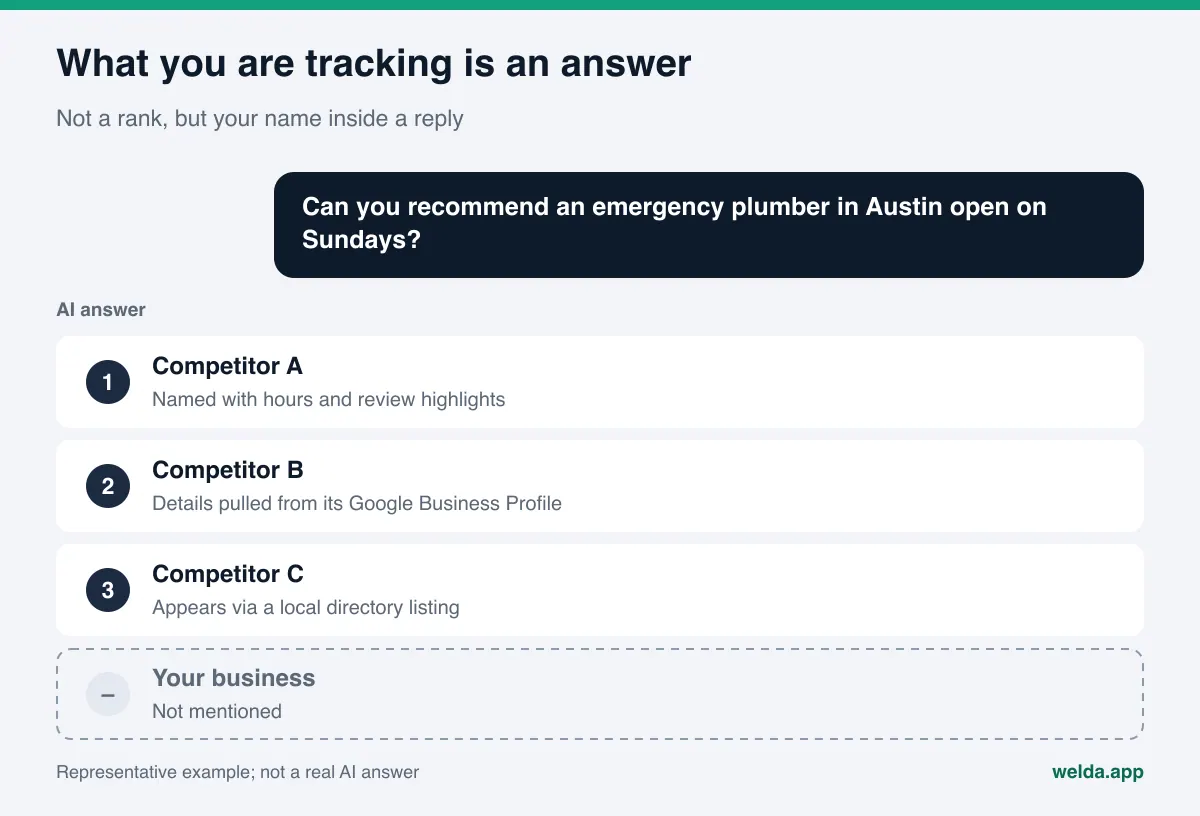
AI answers do not work that way. A customer asks a question and the engine writes a reply on the spot. It might name three businesses, five, or none. Your name might lead the answer, appear in the last line as an afterthought, or not appear at all. Ask the same question an hour later and the order can shift. What you are tracking is not a rank. It is your presence inside an answer.
This is the core of AEO, or answer engine optimization: making sure answer engines can find, understand and cite your business. You will also see the same work called GEO (generative engine optimization), a term more common outside the US. Whatever you call it, monitoring is the measurement side, and it should answer three questions on a regular basis:
- Am I mentioned? For the prompts that matter to your customers, does your business name appear in the answer, and for which prompts does it not?
- How and where am I mentioned? Are you the first recommendation or the last? Are the facts about you correct?
- Who wins instead, and why? When you are missing, which competitor is named, and which source is the engine leaning on for that competitor?
The third question is the one most dashboards underplay, and it is the most useful. "You are not mentioned" does not tell you what to do. "Competitor A is named because it appears on a local directory roundup and its Google Business Profile lists complete Sunday hours" is a task list.
Who needs AI brand monitoring?
Any business whose customers arrive by asking for a recommendation. Restaurants, hotels, dental and medical practices, med spas, law firms, home service pros, ecommerce brands. Wherever someone is deciding "which one should I pick," some of those people now ask an AI assistant. If the answer names three businesses and you are not one of them, that customer may decide without ever considering you.
The hard part is that this loss is invisible. When your Google ranking slips, analytics shows a drop in traffic. When an AI answer leaves you out, nothing shows up anywhere. The customer who never called does not appear in a report. Monitoring is the only way to make that blind spot visible, and without it every fix you make is a guess, because you cannot tell whether it worked.
There is also the opposite risk: you are mentioned, but with the wrong facts. An old address, a location you closed, a service you dropped, or outdated hours can end up in an answer. You only catch that by reading the reply. Good monitoring checks not just whether you were named, but whether you were described correctly.
Which prompts should an AI brand monitoring tool track?
Monitoring is only as good as its prompt set. Tracking "best dentist" tells you little about the questions real patients type. Real customers are specific: they name a neighborhood, a need, a condition. Build your list from those specific questions.
Grouping prompts by intent makes the results easier to read. The table below shows a split that works for most local and service businesses:
| Prompt type | Example prompt | What it tells you |
|---|---|---|
| Local recommendation | "Kid-friendly brunch spot in Wicker Park" | Whether you are top of mind for your area |
| Need or constraint | "Emergency plumber open on Sunday near me" | Whether your services and hours reach the engine clearly |
| Comparison | "Is Competitor A or Your business better for families?" | Which facts about you get emphasized |
| Direct brand | "What do reviews say about Your business?" | Whether answers about you are accurate and current |
| Informational | "How long does clear aligner treatment usually take?" | Whether you get cited on topics you know well |
The prompts above are examples; write your own in your customers' words. The best source is the questions you already hear on the phone, in contact forms and in first consultations. It makes sense to weight your set toward local and need-based prompts, since that is how most new customers arrive. Always include direct brand prompts too. Someone who already knows your name and asks about you is close to a decision, and the answer they get matters.
Once your prompt set is in place, keep it stable. If you change the questions every month, you cannot compare one month to the next. Add prompts when you launch a service or open a new location, but keep the old ones running.
How to set up AI brand monitoring yourself, step by step
You do not need a tool to start. A manual setup helps you understand where you stand and clarifies what you would want from an AI brand monitoring tool later. Work through it in this order:
- Write your prompt set. Starting from the types above, write ten to twenty prompts your customers would actually ask. Tag each one with its intent: local, need, comparison, brand, informational.
- List your competitors. Pick three to five businesses customers compare you with. These are not always the biggest names in your industry; they are the ones chasing the same customer in the same area.
- Open a spreadsheet. Columns: date, engine, prompt, mentioned (yes or no), position, other businesses named, sources cited, notes. Some engines do not show sources; leave that column blank for them.
- Run each prompt several times in each engine. Use a fresh chat with no history. Asking the same prompt at least three times keeps one lucky or unlucky answer from driving your conclusions.
- Summarize. In how many prompts were you named? What was your average position? Which competitor most often appeared ahead of you? Those three numbers are your monitoring summary.
- Turn lost prompts into tasks. For every prompt where you were missing, look at the source behind the winning competitor and write down what you are missing there.
- Put the next run on the calendar. Repeat in the same week each month with the same prompts. That is the only way to see real change.
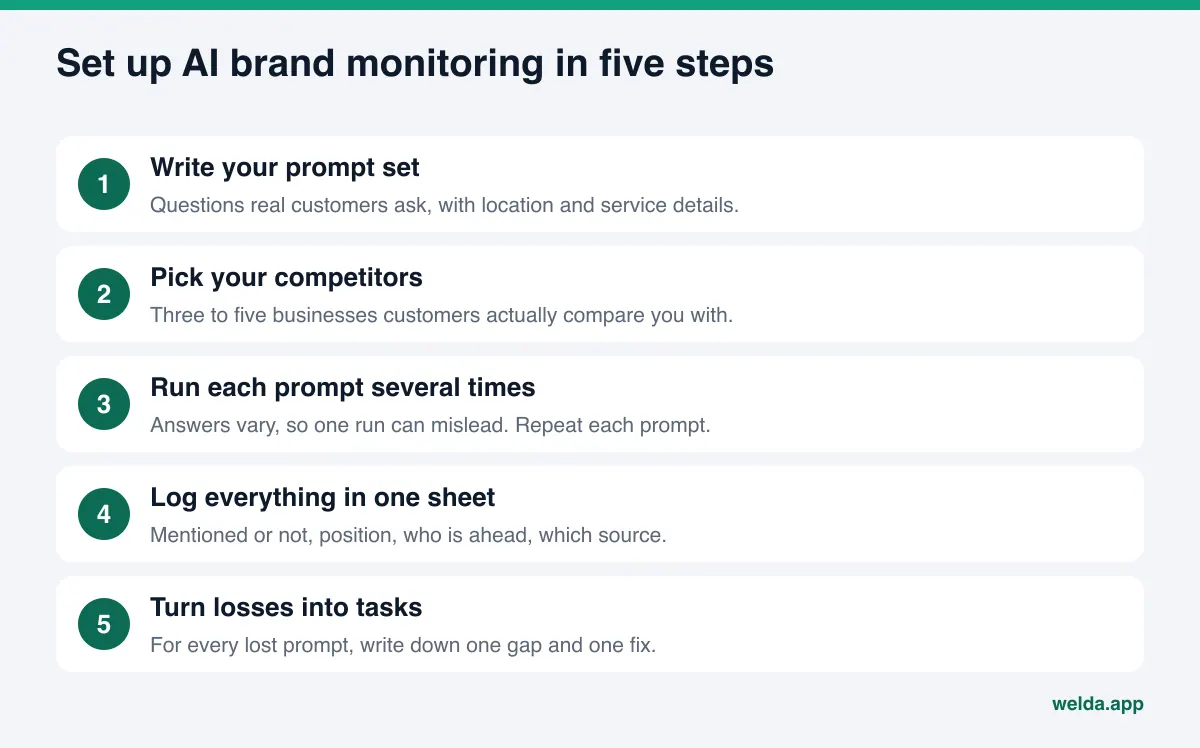
Step four is the one people skip, and it matters most. AI answers are generated fresh each time, so a single run can mislead; we cover the reasons in why AI answers change every time. The short version: if you show up in two out of three runs, neither "we're in" nor "we're out" is accurate. "Usually mentioned" is, and your tracking should capture that difference.
Which AI brand monitoring metrics actually matter?
A sheet full of rows needs to be reduced to a few numbers, or you will stare at hundreds of lines each month and learn nothing. Three metrics carry most of the weight:
- Mention rate: the share of tracked prompts where your name appears. The most basic and easiest to explain.
- Position: when you are named, where you land in the answer. Being the first recommendation and being the fifth are not the same to a customer.
- Share of voice: your share of all mentions across you and your competitors. If your own rate climbs but competitors climb faster, this metric shows it.
Add one qualitative check on top: are the facts right? Address, phone, hours, services, service area. That is hard to turn into a number, but reading a handful of full answers every cycle catches errors early. We go deeper on what is worth reporting in AEO KPIs.
If you want these metrics rolled into one score, the formula has to be visible. In the Welda dashboard, the score is calculated like this:
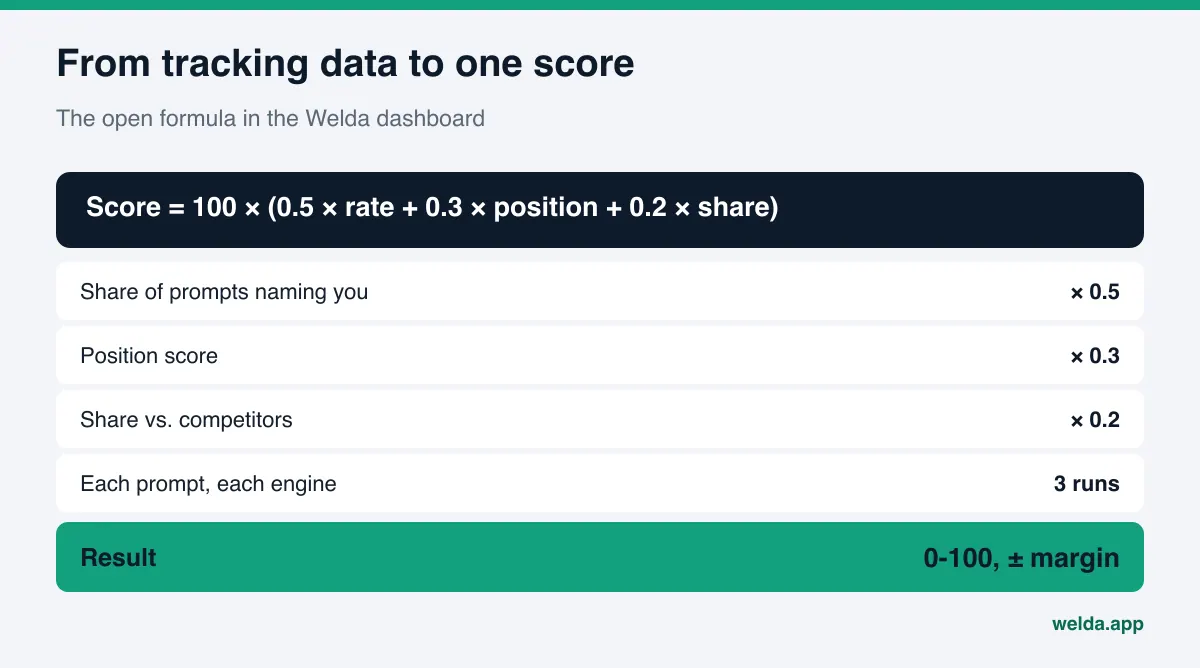
An open formula is not a nice-to-have. It is what makes the number trustworthy. If your score moves from 34 to 41 in a month (example values), you should be able to see whether that came from being named in more prompts, from moving up in answers, or from competitors slipping. A score with a hidden formula cannot tell you what worked. And because each prompt runs three times, the score carries a margin of error. If the change between two months falls inside that margin, it may not be a real change at all.
Spreadsheet or AI brand monitoring tool?
A spreadsheet is enough to get started, but it gets heavy fast. Twenty prompts across four engines, three runs each, is 240 separate checks every month. Reading every answer, logging names in order, noting sources and comparing month to month is hard to keep up. In most small businesses, manual tracking gets done with enthusiasm in month one and quietly dropped by month three.
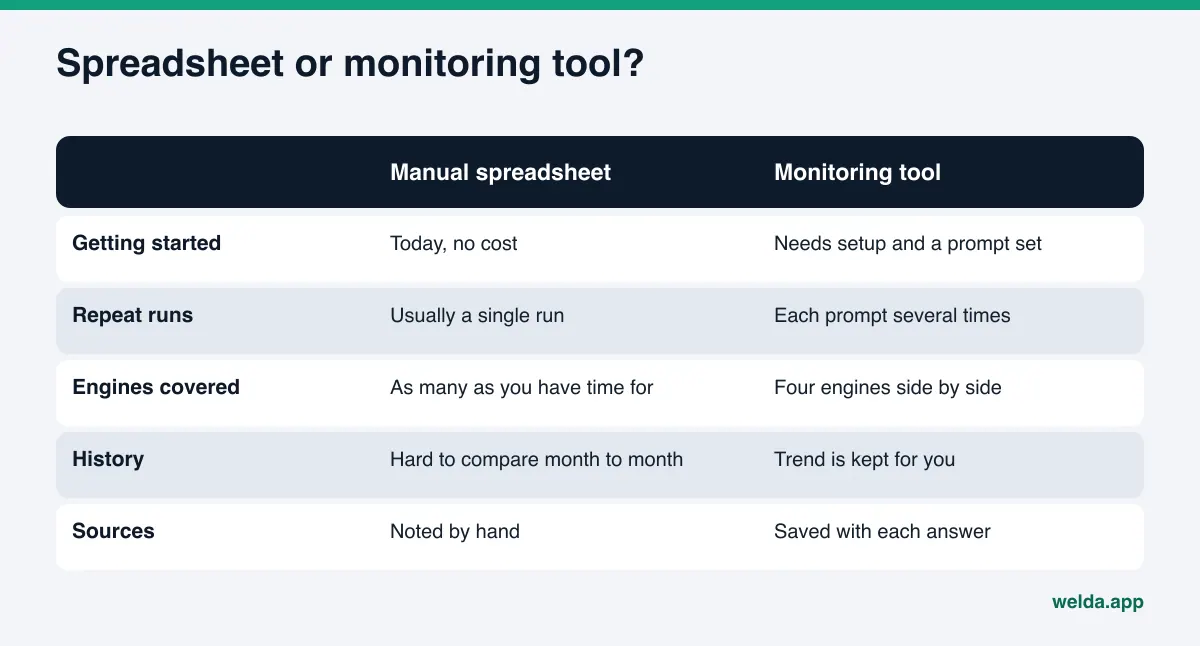
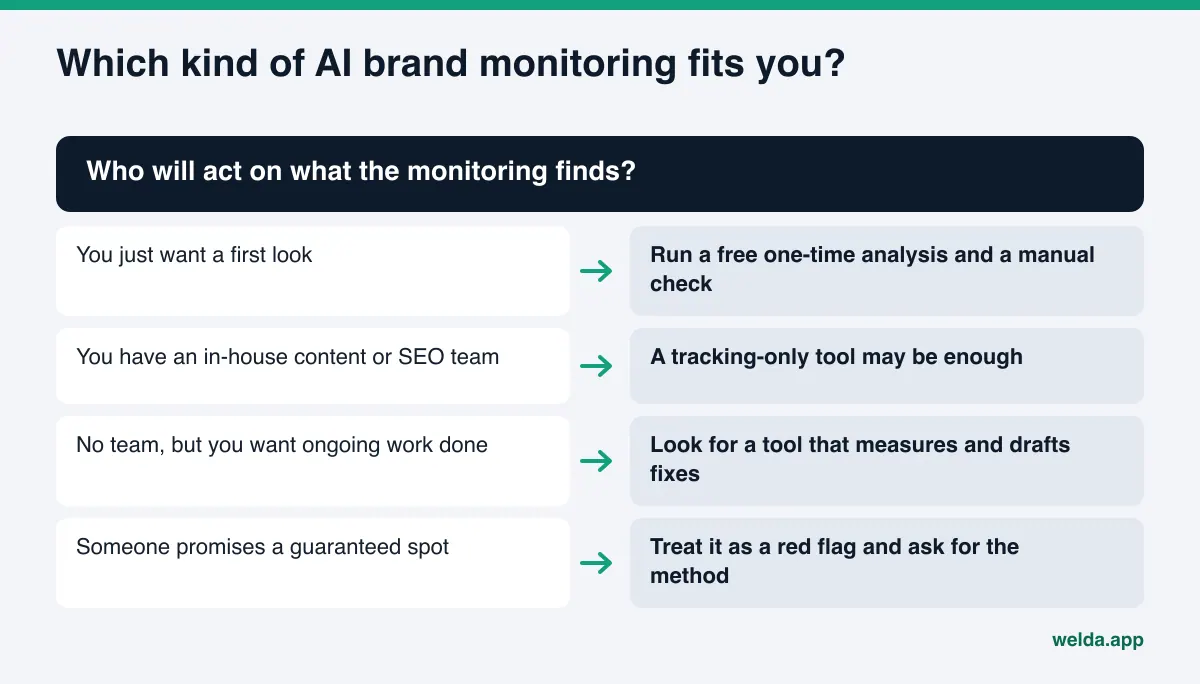
A tool takes over that repetitive work: it runs the prompts on schedule, saves the answers, extracts positions and competitors, and keeps the trend. But tools differ a lot. Some only measure and leave everything else to you. Others also draft the fixes. We compare the two approaches in AI visibility monitoring vs done-for-you AEO. The question to ask yourself is simple: who is going to do the work the monitoring uncovers? If you have a content team, a tracking-only tool may be enough. If you do not, "you are missing from these prompts" stays a report.
A related choice is whether you need a one-time check or ongoing tracking. An audit tells you what is broken today; tracking tells you whether your fixes are landing. We lay out the difference in one-time AEO audit vs ongoing tracking. In practice, a good sequence is a one-time analysis to find the gaps, then tracking while you close them.
How Welda handles AI brand monitoring
Welda approaches monitoring in two layers. The first is the free site analysis, which anyone can use today in English or German. Alongside reading your site, it asks five customer-style questions to an AI assistant with web search and checks whether your business name appears in the replies. That is a one-time measurement. It gives you a snapshot, not ongoing tracking.
The second layer is the Welda dashboard. The dashboard is in early access and opening in stages, starting with businesses in Turkey. Regular four-engine measurement is being added during early access, and the sample screens in the dashboard use representative data. Pricing is discussed in an early access call. Within the dashboard, monitoring lives mainly on two screens.
The Questions screen. Each row is one customer prompt. Every prompt is asked three times each in ChatGPT, Gemini, Perplexity and Google AI, and the row shows your position in each engine or a blank where you were not named. You can filter by intent (booking, comparison, informational) and by engine. Click a prompt and a side panel opens with the answer itself, the result of all three runs, and the sources the engine cited. The decision here is straightforward: you see which prompts you are losing and which source is feeding the answer. The most time-consuming part of a manual setup, reading every reply and pulling out names and sources, is already done.
The Visibility screen. This is where time comes in. Your score over recent weeks, mention rate, share versus competitors and an engine-by-engine breakdown sit on one screen. The most useful part is the "changed this week" list: which prompt you started appearing in, which one you lost, and which fix came right before the change. That turns monitoring from a list of numbers into a record of what your work actually did.
Monitoring only pays off when a lost prompt turns into a task. The Competitors screen shows on which topic and from which source a competitor is winning, and the to-do list puts those gaps in order. Welda drafts the missing content, profile copy and review replies. You approve what goes live, and content always lives on your own site; Welda does not host it. On WordPress, Welda connects through a separate Editor user and opens drafts on your site; on other systems it hands you a ready package to apply manually. Each month the tracking is summarized in a one-page report; see what such a report should include in our AI visibility report template.
What stays with you? You decide whether the prompt set reflects your real customers. When Welda does not know something, such as new hours or a service area, it asks you instead of guessing. Approving every draft, responding to negative reviews and managing directory accounts remain your call.
Limits of AI brand monitoring and what Welda does not do
No matter how disciplined, AI brand monitoring cannot tell you everything. Knowing the limits up front keeps expectations honest.
- It is a sample. Your tracked prompts are a small slice of everything customers might ask. A well-chosen set gives meaningful results, but not enough to claim you are "visible everywhere in AI."
- Answers can vary by user. Location, chat history and model version can all shape a reply. Monitoring measures the answer in a clean session.
- It is not rank tracking. It does not measure your Google ranking, and the free analysis does not measure rankings either.
- Change takes time. New content or a corrected profile usually takes weeks to show up in AI answers. Expecting results after one week leads to misreading the data.
Welda's own limits are just as clear. Welda does not guarantee rankings or a spot in ChatGPT; we explain why those promises do not hold up in guaranteed ChatGPT rankings. It does not invent facts it does not have. It does not publish sensitive content without your approval. It does not create fake reviews. Responding to negative reviews, managing directory listings and PR stay with your business. In healthcare, nothing is published automatically, every draft goes to review, and patient data is never sent to AI.
AI brand monitoring tool checklist
Before you start tracking, or before you sign up for an AI brand monitoring tool, run through this list. Each item tests whether the monitoring will produce data you can actually decide with.
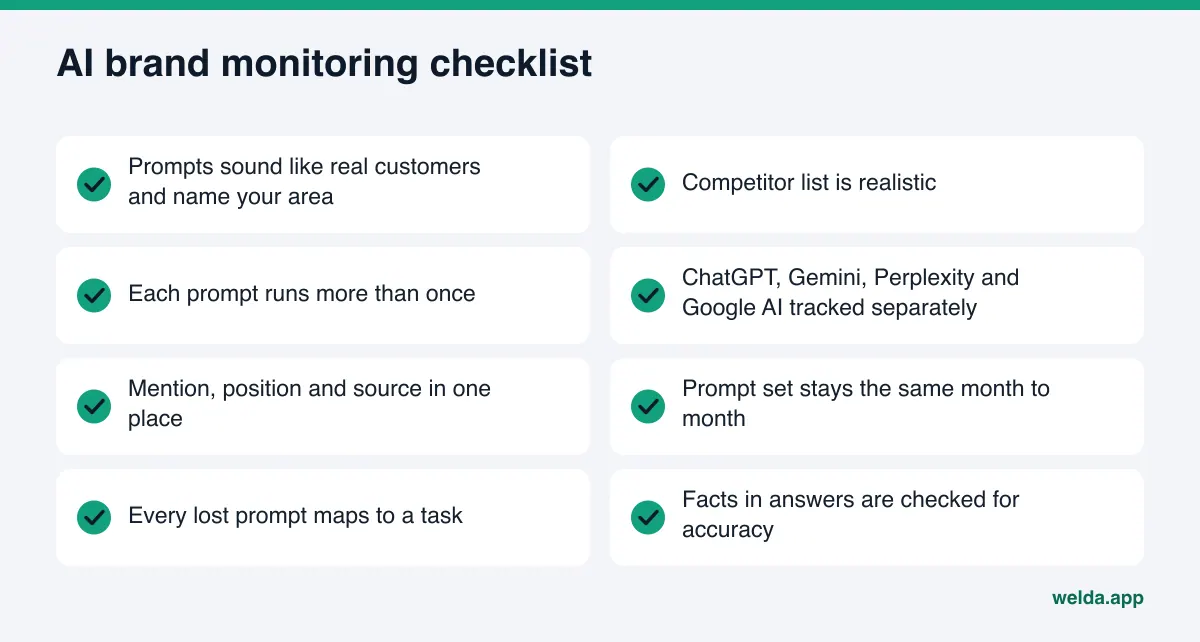
If you are evaluating a vendor, ask for written answers to these questions:
- Which engines are measured, and how many times is each prompt run per engine?
- How is the score calculated? Are the formula and margin of error shown?
- Are prompts written in your customers' words and specific to your area?
- Are the sources behind each answer saved?
- Is the demo data live measurement or representative sample data?
- When you are missing from a prompt, does the tool say what to do, and who does the work?
- Is there a guarantee? If so, treat it as a warning sign.
If you cannot get a straight answer to one of these, the rest of the dashboard matters less. The point of monitoring is to make decisions. Data that does not help you decide is just a screen.
Frequently asked questions
How often should I run AI brand monitoring?
For most businesses, a full monthly run is enough. If you made a significant fix, recheck the related prompts a few weeks later. Consistency matters more than frequency: same prompts, same method, same week.
How many prompts should I track?
For a small business, ten to twenty well-chosen prompts is a solid start. If you have multiple locations or service lines, add prompts for each. How closely the prompts match real customer language matters more than how many there are.
Why run the same prompt more than once?
Because AI answers are generated fresh every time and vary slightly. A single run can land on an unusually good or bad answer. In the Welda dashboard, each prompt runs three times in each engine, and the score shows a margin of error based on those runs.
Does the free analysis replace ongoing monitoring?
No. The free analysis reads your site and asks five questions once, giving you a snapshot of today. Monitoring repeats the same prompts over time to show change. The analysis is a good first step to spot gaps before you start tracking.
What if AI answers mention me with wrong information?
Start by checking which source the answer relies on. Wrong facts usually trace back to an old directory listing, an outdated Google Business Profile, a stale Yelp page or an old page on your own site. Fix the source and make sure your name, address and phone number match everywhere.
How long before monitoring shows a change?
Fixes typically take weeks to show up in AI answers, and timing differs by engine. Judge the effect of a fix over several monitoring cycles, not one.
Start with a baseline
Starting AI brand monitoring without a baseline is like measuring a trip without knowing where you started. The free site analysis reads your site the way AI systems do, scores it out of 100 with a clear note on what to fix for each gap, and checks whether your business is named across five customer-style questions. It is free once per site, works in English, and the results link arrives by email. Use it to pick the prompts you will track and the first gaps you will close.