How does Perplexity rank tracking work? You pick the questions your customers actually ask, run each one through Perplexity several times, and record three things for every answer: whether your business is named, where it appears in the list, and which source websites the answer cites. Repeat that on a fixed schedule and you can see what changed and which sources you are missing from.
Perplexity is an AI search engine that looks up your question on the web in real time and returns an answer with the sources it used. That makes Perplexity rank tracking a slightly different job from checking whether ChatGPT mentions you. In Perplexity the source list sits right next to the answer, so you can often read off why a competitor is ahead of you. This is part of AEO (answer engine optimization), the work of getting your business named in AI answers; some people call the same work GEO, for generative engine optimization. This guide shows how to set up tracking by hand, what to log, how to read the results, and how Welda handles the job. If you want to know first whether AI crawlers can reach your site and read your basic business details, run a free AI visibility analysis. It gives you a clean starting point for your tracking sheet.
Why Perplexity rank tracking is its own task
According to Perplexity's own help center, the system interprets your question, searches the web in real time, summarizes what it finds and attaches numbered citations to the original sources. For a business owner, that has three consequences.
First, the answer is rebuilt every time. Ask the same question twice in one afternoon and you may see the businesses in a different order. A single screenshot is not enough to say "we show up in Perplexity" or "we don't." Tracking means asking each question more than once and reading the results together.
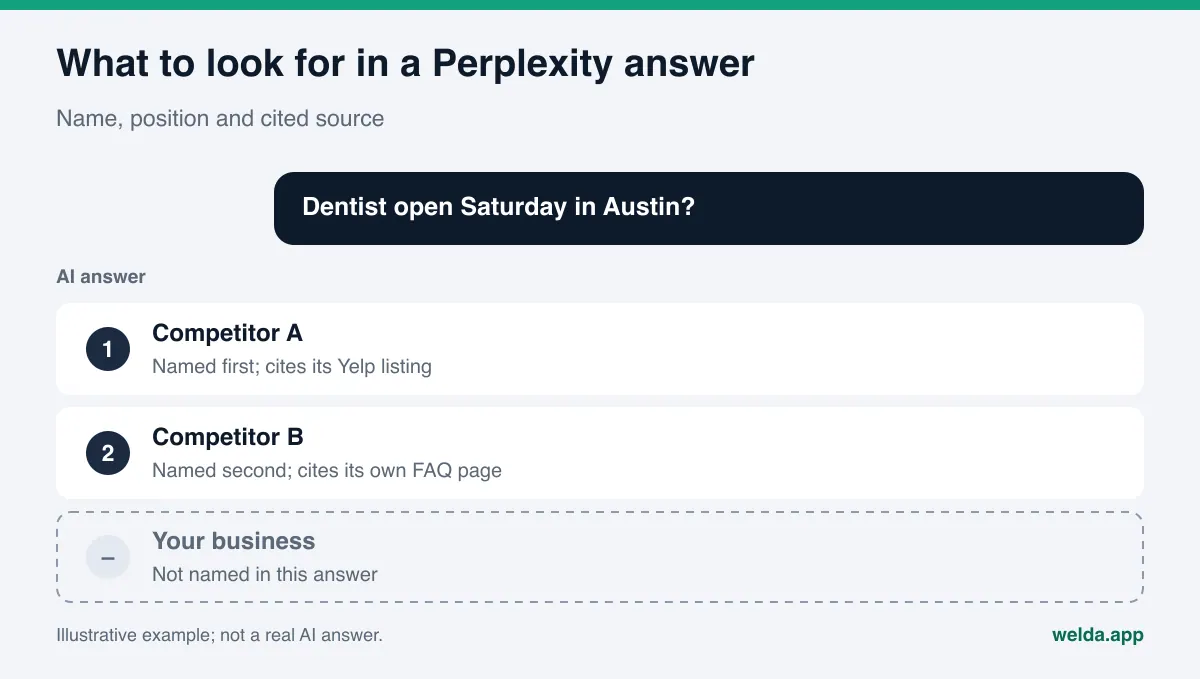
Second, the sources are visible. With some AI assistants you cannot always see what an answer is based on. In Perplexity, the cited websites appear as numbered references inside the answer. If a competitor is winning because of a detailed Yelp page or a complete Google Business Profile, you will often see that directly. Tracking stops being just a number and starts pointing at work you can do.
Third, because Perplexity searches the live web, whether your site is reachable matters directly. If your site is closed to Perplexity's crawler, or your services, address and hours are not written as plain text, the answer leans on what other sites say about you. That information may be outdated or incomplete.
Why does this matter for a small business? People who use Perplexity for local questions are usually close to a decision. They ask "family dentist open Saturday in Austin" or "kid-friendly boutique hotel in Charleston" and look closely at the first two or three names. If you are not in that short list, the customer moves on without ever hearing of you. Tracking is how you make that loss visible.
What should you track in Perplexity?
Visibility is not one number. For Perplexity rank tracking, log five things for every answer. Define them up front and your month-over-month comparison will actually mean something.
| What to log | How to read it | Why it matters |
|---|---|---|
| Were you named? | Yes or no, per run | The core measure: in how many questions you appear at all |
| Position | Your place among the businesses named | Customers tend to look at the first few names |
| Cited sources | The numbered sites behind the answer | Shows where you are missing or out of date |
| Competitors | Who is named ahead of you or instead of you | Shows your share and what a competitor wins on |
| Accuracy | Are address, phone, hours and services right? | Being named with wrong details can still cost you the customer |
The last row is easy to skip. Perplexity may name you but list an old address or a service you dropped last year. In that case the job is not to raise visibility but to fix the source. We cover that case in depth in wrong address or phone number in AI answers.
How to set up Perplexity rank tracking step by step
You can run tracking by hand. It takes time, but doing it once teaches you how it works. All you need is a spreadsheet and a calendar reminder.
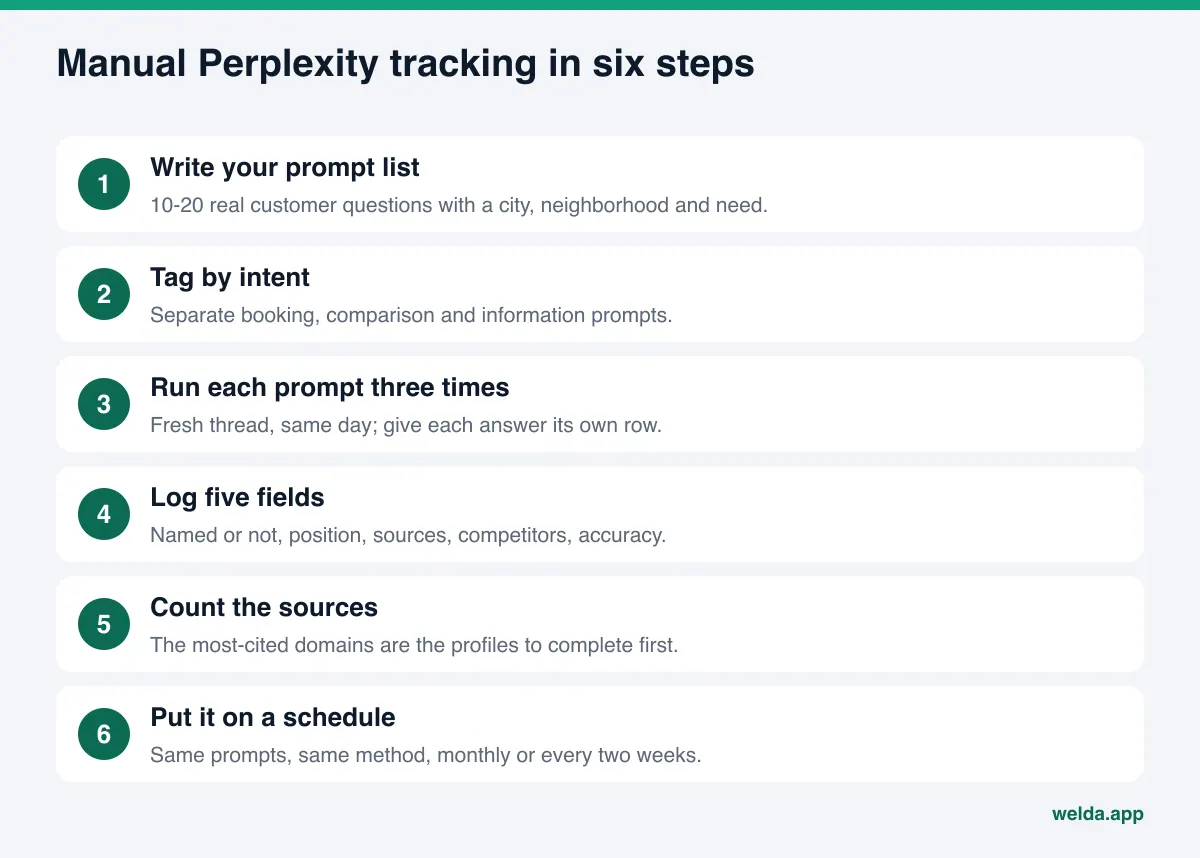
- Write your prompt list. Pick 10 to 20 questions your customers would really ask. Include a city or neighborhood and a need: "emergency plumber in North Dallas," "best brunch with outdoor seating in Denver." Don't track only your brand name; you will show up for that anyway and learn nothing. We go deeper on choosing questions in prompts to track for AI visibility.
- Tag each prompt by intent. Booking or appointment, comparison ("best," "which one"), information ("how much," "what time do they open"). Splitting results by intent shows which kind of question you are weak on.
- Run each prompt three times. Use a fresh thread each time, on the same day. Earlier conversation can shape the answer. Give each of the three answers its own row.
- Log the five fields. Named or not, position, cited sources, competitors, accuracy. Record sources as domain names so you can group them later.
- Count the sources. After a month, list which domains are cited most often. That list is your to-do list of profiles to complete or update.
- Put it on a schedule. Re-run the same prompts the same way every month or every two weeks. If the method changes, the comparison breaks.
Here is what a few rows of that sheet might look like. These are made-up sample rows for an example dental practice, not a real measurement. The point is to show which column feeds which decision.
| Prompt | Run | Named? | Position | Cited sources | Note |
|---|---|---|---|---|---|
| Dentist open Saturday in Austin | 1 | No | - | Yelp, Competitor A's site | Competitor A lists Saturday hours clearly |
| Dentist open Saturday in Austin | 2 | Yes | 3 | Google Business Profile, Healthgrades | Our Saturday hours look missing |
| Dentist open Saturday in Austin | 3 | No | - | Yelp, a Reddit thread | Thread mentions our old address |
| Pediatric dentist in Austin | 1 | Yes | 2 | Our own site, Google Business Profile | Our kids' dentistry page got cited |
Even four rows produce three tasks: add Saturday hours to the Yelp listing, check the hours on your Google Business Profile, and track down where the old address is coming from. The pediatric row is a signal too. A separate, clearly written service page earned a citation, so the same approach is worth trying for weekend appointments. The value of the sheet is in those notes more than in the totals.
The weak spot of this method is effort. Fifteen prompts, three runs and five fields means reading 45 answers and filling in 225 cells every month. Do the same for ChatGPT, Gemini and Google AI and the work quadruples. Most small teams quit in month two. Still, doing it by hand once tells you exactly what to ask when you look at a tool.
Can Perplexity actually read your website?
If you never show up in your tracking sheet, check access before content. According to Perplexity's crawler documentation, there are two separate agents. PerplexityBot is used to surface and link websites in Perplexity's search results, and Perplexity recommends allowing it in robots.txt if you want to appear there. Perplexity-User visits a page when a user asks a question. Because a user requested that fetch, the documentation says it generally ignores robots.txt rules.
In practice, check the following:
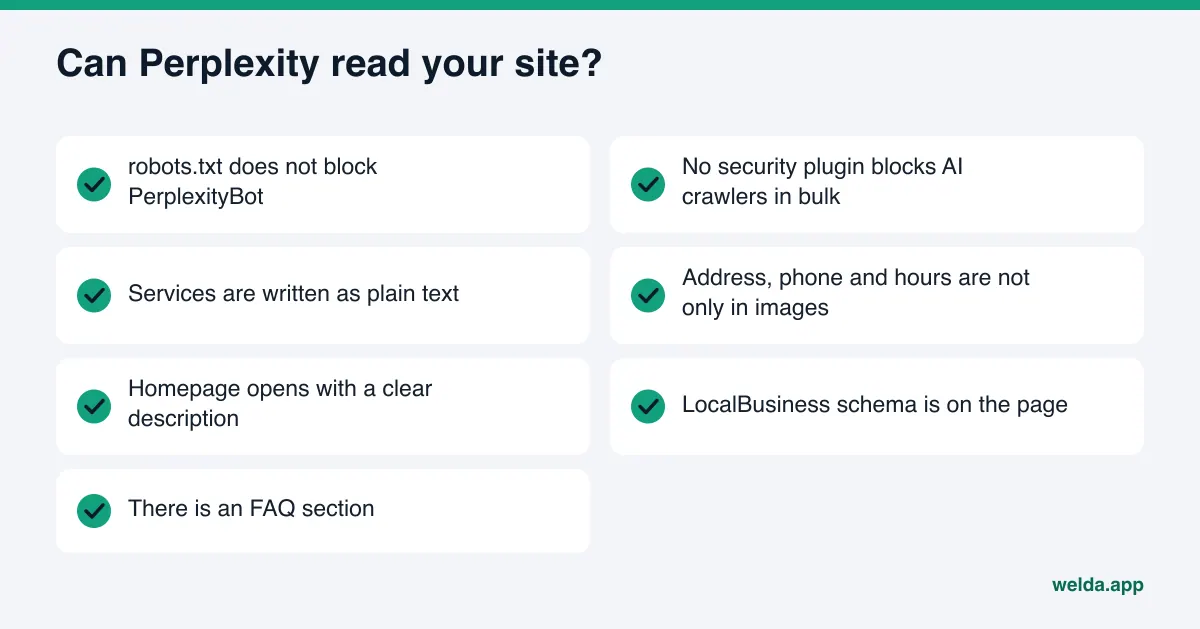
- Look for a Disallow rule for PerplexityBot in your robots.txt. Some security plugins and site templates block AI crawlers in bulk.
- Make sure your services, address, phone number and hours are written as plain text on the page, not only inside an image or an embedded map.
- Check that your homepage opens with a short paragraph saying what your business does and where.
- Confirm that structured data (LocalBusiness schema) with your address and phone is on the page.
The free analysis runs most of these checks for you. It looks at whether AI crawlers can access your site, your title and description, structured data, address and phone, FAQ content and how clearly your services are described, and it tells you how to fix each gap. We explain how to read the result in how to read your AI visibility report.
How to read your Perplexity tracking results
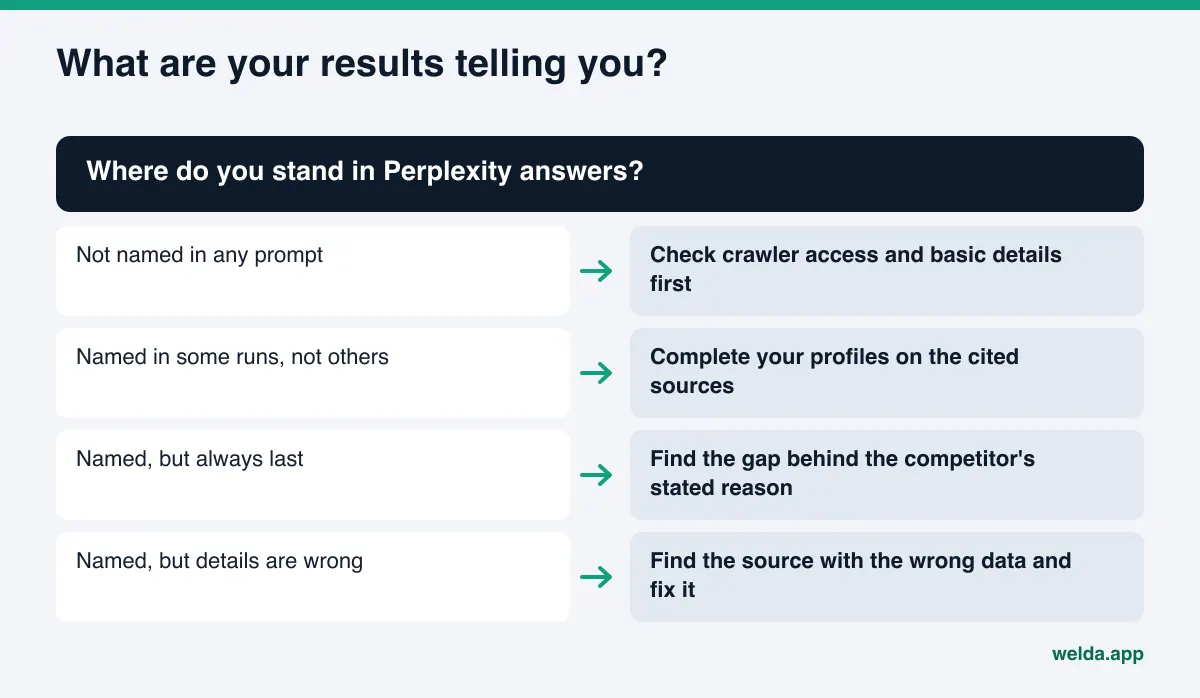
Once the sheet is filled in, the real work starts. Here are four common patterns and what to do about each.
You are not named in any prompt. Check access and basics first (see the list above). Then look at the cited sources. Which sites does Perplexity rely on for these questions, and do you have a presence there? For many local businesses the first gap is an incomplete Google Business Profile or no listing at all on the directories that matter in their category, such as Healthgrades for medical practices or Angi for home services.
You are named in some runs and not in others. You are on the edge. Perplexity knows you but does not find enough to pick you consistently. The most effective move here is to complete your details on the sources the answers cite and to describe the relevant service on its own clear page on your site.
You are named, but always last. Read why competitors come first. Perplexity's answers often include a short reason: "known for guest reviews," "lists prices openly." What is the matching gap on your side? An FAQ section, replies to reviews, a clear list of services?
You are named, but the details are wrong. Go through the cited sources one by one and find which one carries the wrong data. It could be an old directory listing, a duplicate map profile you never closed, or a local news story from before you moved. After you fix it, re-run the same prompt over the next few weeks and watch whether the answer changes.
A caution: don't overreact to one month of data. Perplexity's answers vary, and new content usually takes weeks to show up in AI answers. A change that holds in the same direction for two or three months means more than a one-week spike.
How Welda handles Perplexity rank tracking
In Welda, Perplexity is not a separate tool. It is one of four engines measured side by side: ChatGPT, Gemini, Perplexity and Google AI. The same prompt list goes to all four, so you see your Perplexity results next to the others. This section focuses on the two parts that matter most for this topic.
First, a plain statement of where things stand. The Welda dashboard is in early access and is opening first to businesses in Turkey. Regular four-engine measurement is being added during early access, and the dashboard views described here use illustrative data. What anyone can use today is the free website analysis, which works in English.
The questions view. Your prompt list appears row by row. Each row shows the intent (booking, comparison, information) and your position in each of the four engines. A filter at the top lets you show only Perplexity, or only the prompts where you are not named. Click a prompt and a detail panel opens: the engine's answer, your position in each of the three runs and the median, and the sources the answer cited. Four of the five fields from the manual sheet are already filled in. What is left for you is reading why a competitor came out ahead.
The sources view. This view matters especially for Perplexity, because Perplexity shows its sources openly. Welda lists the sites AI answers draw on, ranked by how often they are cited, and next to each one shows your status there: profile incomplete, details unverified, or your site could not be reached. A side panel breaks citations down by source type: directories, your own site, social profiles, forums. The question "why aren't we showing up?" turns into "which source are we missing from?"
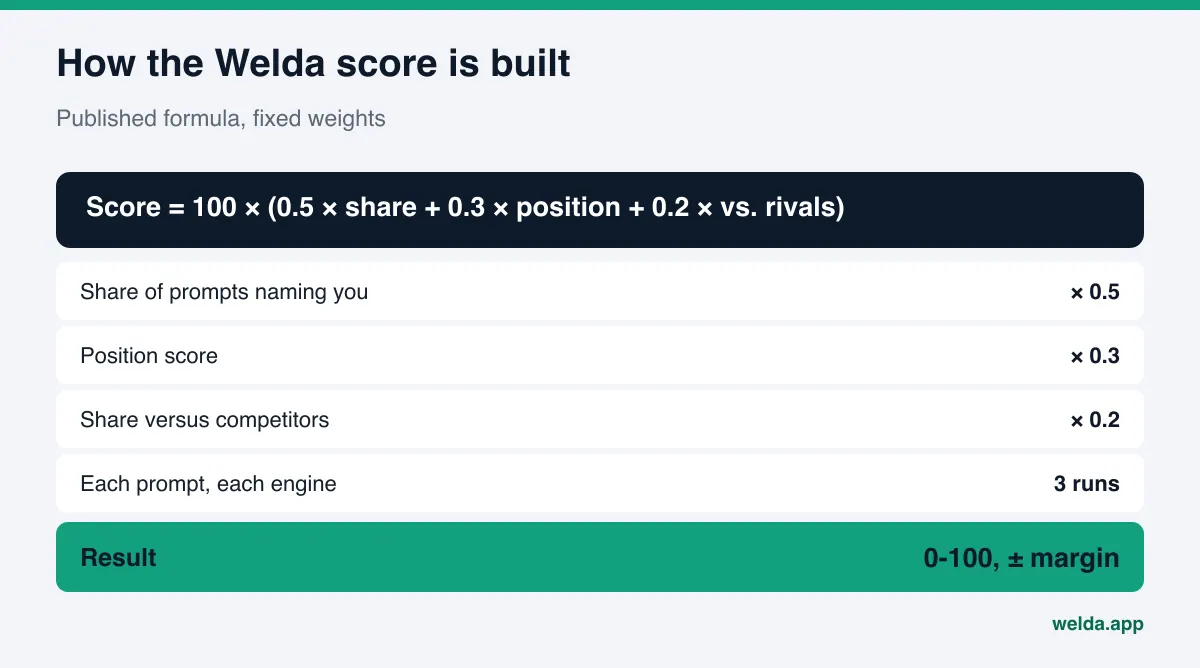
From measurement to work. Every prompt runs three times on every engine. The score uses a published formula: the share of prompts that name you carries 50 percent of the weight, position 30 percent and your share versus competitors 20 percent. The spread across the three runs is shown as a ± margin. Gaps go to a single to-do list: ready-to-use profile copy for an incomplete directory listing, or a drafted FAQ section for your site. On WordPress sites, Welda connects through its own Editor user and an application password, without installing code, and opens content as a draft on your site; it goes live when you approve it. Content always lives on your own website.
There is also a competitors view that shows which topic and which source a competitor wins on, and a one-page monthly report that compares against the previous month. We cover that in before and after AEO measurement.
What stays with you. You always approve what gets published. Welda does not invent details it does not know, such as prices, hours or a new service; it asks you. Work on a site Welda is not connected to, like editing a directory listing or replying to a negative review, is listed as a manual task with the copy ready to paste. Pricing is not published during early access; it is discussed in the early access call.
What the free analysis tells you about Perplexity, and what it doesn't
The free website analysis is not a Perplexity rank tracker, and it is worth being clear about that. It reads your site the way Google and AI systems do and checks the foundation Perplexity needs to find you: crawler access, structured data, address and phone, FAQ content and clear service descriptions. It also asks a web-search-enabled AI assistant 5 questions a customer might ask and checks whether your business name appears in the answers.
That is a one-time check. It does not show your Perplexity position prompt by prompt, the spread across runs, or how things change over time. Ongoing tracking is the dashboard's job. What the analysis gives you is a list of gaps to close before tracking starts, with a ready fix for each.
| Question | Free website analysis | Welda dashboard (early access) |
|---|---|---|
| Can Perplexity read my site? | Checks AI crawler access | Sources view shows if your site could be reached |
| Am I named in answers? | One-time check with 5 questions | Your prompt list, three runs per engine |
| What position am I in? | Not shown | Position by prompt and engine |
| Which sources matter? | Not shown | Cited sites and your status on each |
| Change over time | Not shown | Before and after comparison, monthly report |
| Fixes | Ready fix package and copy suggestions | To-do list, drafted copy, publishing on approval |
Limits: what Perplexity rank tracking can't tell you
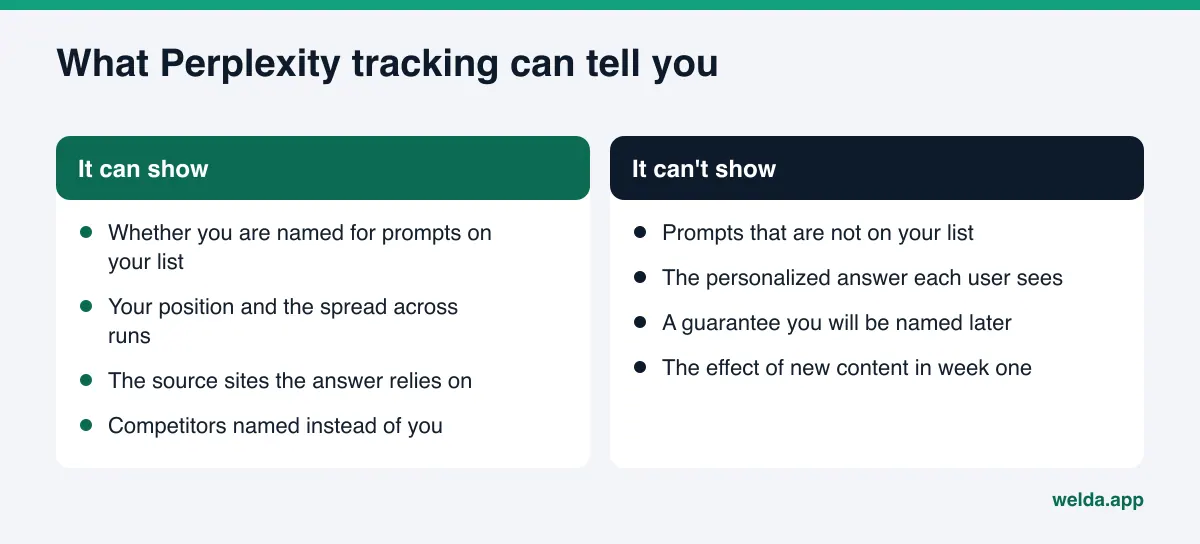
Honest tracking says what it cannot measure as clearly as what it can.
- It can't see every question asked in Perplexity. It measures only the prompts on your list. What customers really ask is an estimate; the better the list, the more meaningful the result.
- Personalization and location vary. What one user sees may differ from what your tracking sees. Three runs narrow that gap but do not close it.
- Position is not a fixed ranking. Where you appear in an answer matters, but it is not a stable slot like a spot on a results page.
- Nobody can guarantee placement in Perplexity. Welda does not promise rankings or a spot in AI answers either.
What Welda does not do is clear as well. It does not write fake reviews, does not publish sensitive content without approval, and does not make up information. Replies to negative reviews, managing directory accounts and press outreach stay with you; Welda can draft text for them but does not run those accounts for you. New content usually takes weeks to show up in Perplexity's answers, so expecting results in month one is not realistic.
Checklist for choosing a Perplexity tracking tool
If you decide to use a tool instead of a spreadsheet, ask these questions in the demo. A broader version of this list is in our AI visibility tool demo checklist.
- Is Perplexity actually queried, or is the result estimated?
- How many times is each prompt run, and is the spread shown?
- Can you see cited sources for each prompt?
- Can prompts be set up at city and neighborhood level?
- How is the score calculated, and is the formula published?
- When a gap is found, is fix copy drafted, or do you just get an alert?
- Who approves publishing, and where does the content live?
- Is the demo data real or illustrative?
If you can't get a clear answer to one of these, a polished dashboard is not enough to decide on. If you are weighing software against hiring someone, hire an AEO specialist or use software compares the two.
Frequently asked questions
Do I need a paid Perplexity account for rank tracking?
For manual tracking, the free version is enough. What matters is asking every prompt the same way, in a fresh thread, more than once. Different account types may produce different answers, so stick with one account type for the whole tracking period.
Why run each prompt three times?
Perplexity rebuilds the answer every time. One answer can be good or bad by chance. Three runs show whether you are named consistently and how much your position moves.
What happens if I block PerplexityBot in robots.txt?
Perplexity's documentation says PerplexityBot is used to surface and link sites in its search results and recommends allowing it if you want to appear. Block it and Perplexity has a harder time finding you, so answers lean on what other sites say.
What is the fastest way to show up in Perplexity?
There is no shortcut. For most local businesses, the order is: make the site crawlable and write key details as plain text, then complete the directories and profiles Perplexity cites. The effect usually shows over weeks.
Does Welda only track Perplexity?
No. The same prompt list goes to ChatGPT, Gemini, Perplexity and Google AI, and you can filter to Perplexity alone. The dashboard is in early access, opening first in Turkey, and regular four-engine measurement is being added during that period.
How often should I track?
If you track by hand, once a month or every two weeks is enough. Checking more often can make normal answer-to-answer variation look like real change. Keeping the method identical each time matters more than frequency.
Where to start with Perplexity rank tracking
Start with whether your site can be read, not with the prompt list. If Perplexity can't reach your site or can't find your business details, nothing you write in the sheet will change. The free AI visibility analysis checks crawler access, structured data and the basic gaps, runs a 5-question AI test to see whether you are named, and gives you a ready fix for each issue. The results link arrives by email. Once the foundation is solid, Perplexity rank tracking gives you more than a number: it gives you next month's to-do list.