Which AEO tool features actually matter? A good answer engine optimization tool asks the questions your customers really ask, sends them to several AI engines more than once, and shows whether and where your business is named, with an error margin. It also tells you which source puts a competitor ahead and gives you a concrete fix for each gap. A tool that measures but never tells you what to do, or one that writes content on top of shaky measurement, is only half a tool.
If you are shopping for AI search visibility software, you have probably noticed that every vendor shows a score, a few charts and a long feature list. The lists look alike; the promises and prices do not. This guide sorts AEO tool features into four groups: tracking, diagnosis, fixes and reporting. For each group you will find the questions to ask a vendor, the red flags to watch for and how Welda handles that part of the job. Some people call this work GEO (generative engine optimization); in the US, AEO and AI visibility are the more common terms, and they describe the same goal. If you want to see your own starting point before you compare tools, run the free AI visibility site audit. Knowing where you stand makes it much easier to tell which features you actually need.
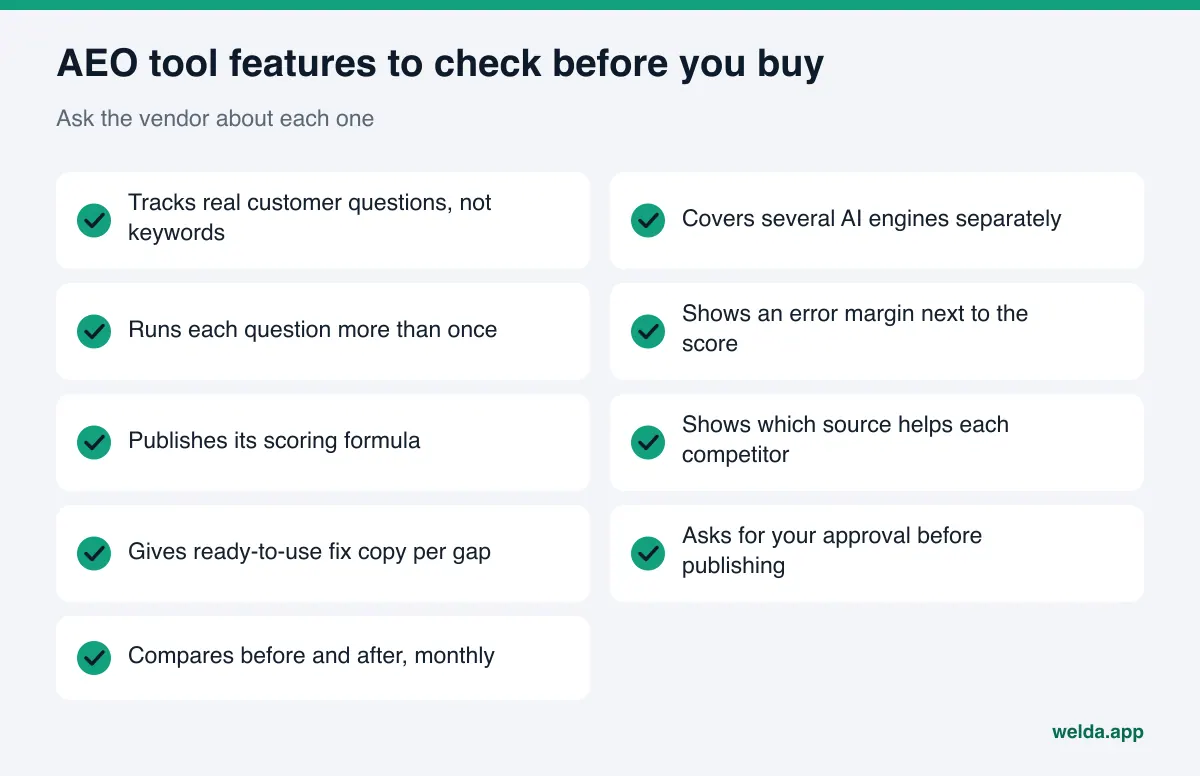
What does an AEO tool do, and why do the features matter?
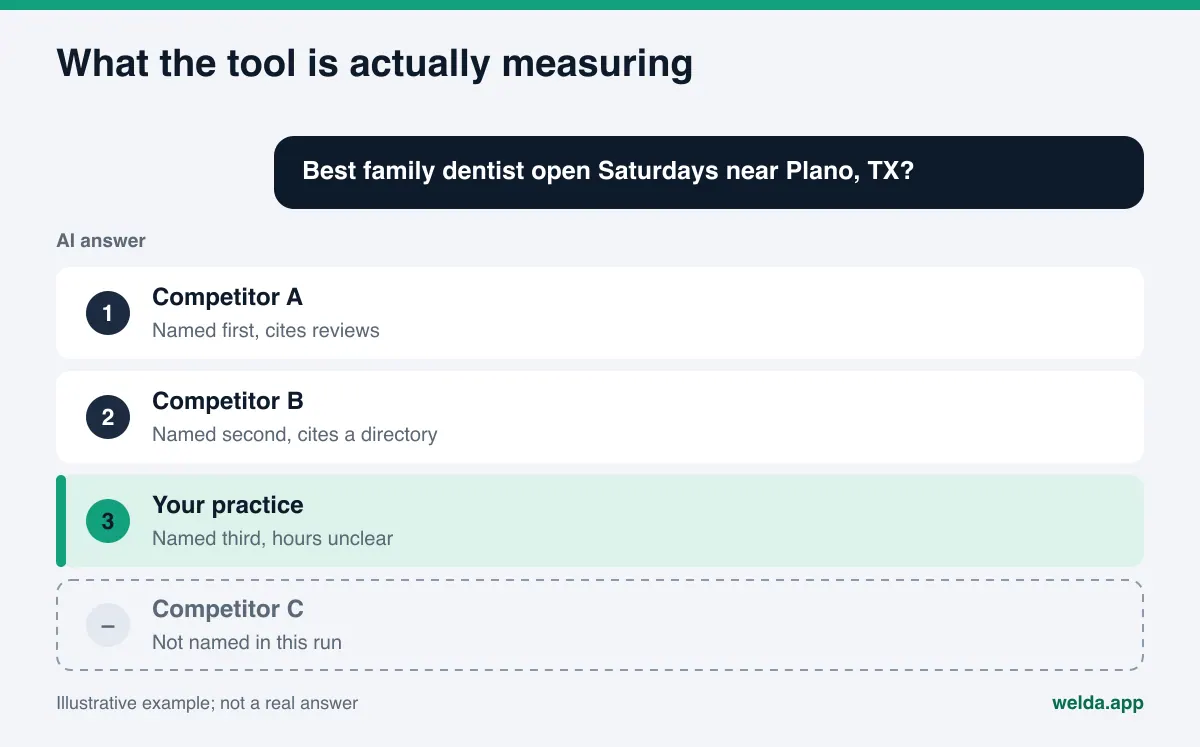
When a customer asks ChatGPT, Gemini or Perplexity "best family dentist open Saturdays near me" or "which HVAC company in Tampa offers same-day repair," the answer names a handful of businesses. Google's AI Overviews and AI Mode do something similar at the top of the results page. If your business is not in that short list, you do not exist for that customer. Often they never click a link at all. They learn a name, check the map and call.
An AEO tool watches these answers systematically. But "watching" means very different things from one product to the next. Some tools ask a few keywords to a single engine once and turn the result into a percentage. Others run hundreds of questions across several engines with repeat runs. Some only measure. Others measure and then prepare the missing pieces for you. None of this is obvious on screen. Two very different tools can both greet you with "Your score is 42."
There are three reasons to read the feature list carefully:
- AI answers are volatile. The same question asked twice on the same day can return different names. Without repeat runs and an error margin, a tool can present luck as a result.
- A score alone does not get work done. Knowing you are at 42 does not tell you what to do this week. The value is in showing what pulls the score down and how to fix it.
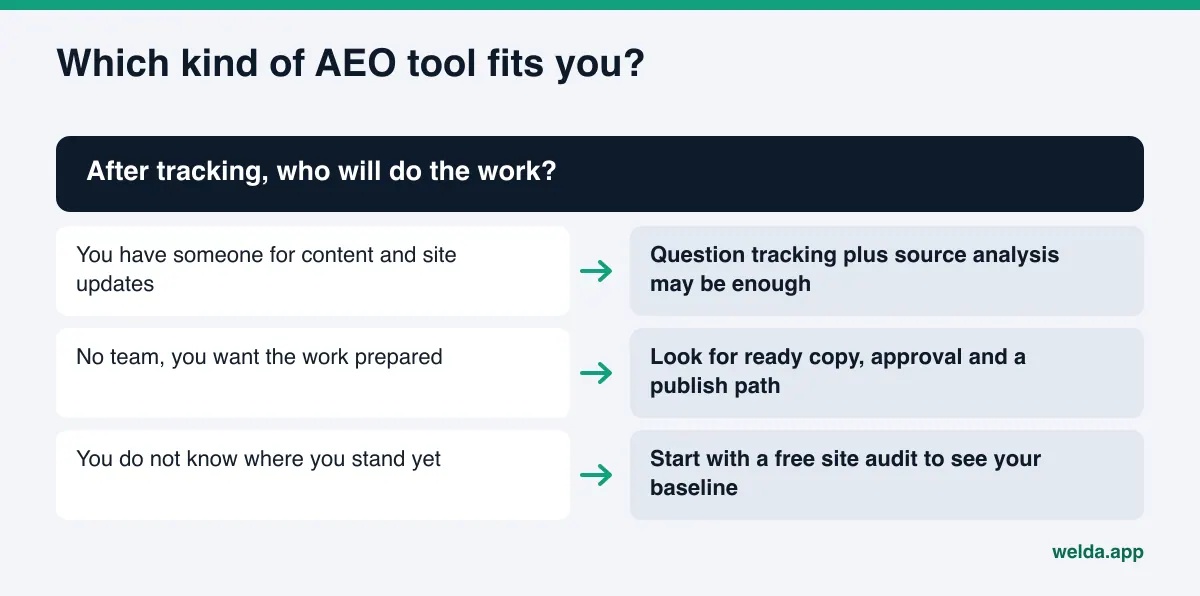
- The wrong tool wastes money and time. If you have no marketing staff, a tracking-only tool will deliver the same bad news every month. If you do have a team, a tool that tries to automate everything can take control away from them.
We covered the broader category in our guide to choosing an AI brand monitoring tool. This article goes one level deeper: individual features, the questions behind them and how to read a vendor's answers.
Tracking: the core AEO tool features
Everything starts with measurement. If the measurement is weak, every report, recommendation and comparison built on it is weak too. These six features decide whether you can trust the numbers.
1. Customer questions, not keywords
Classic SEO tools work with keywords: "dentist plano." People talk to AI in full sentences: "Can you recommend a dentist in Plano who takes my insurance and is open on Saturdays?" Those are not the same thing. A good tool groups questions by intent (booking, comparison, information) and varies them by neighborhood, service, price and hours. Ask the vendor: who writes the question list, can I edit it, and how many questions do we start with?
2. Several engines, reported separately
Your customers do not all use the same assistant. ChatGPT, Gemini, Perplexity and Google's AI features draw on different sources and can name different businesses. Ranking second in one engine and not appearing at all in another is common. The tool should at least show the engines your customers use, one by one. A report that blends them into one number hides which engine is the problem.
3. Repeat runs and an error margin
This is the feature most often skipped. Asking a question once and recording the answer is like rolling a die and writing down the number. A reliable tool asks each question several times and calculates how much the results move. If you do not see something like "± 3" next to the score, you cannot tell whether a four-point gain since last month is real or noise. Ask directly: how many times is each question run, and where is the margin shown?
4. Position and context
Being mentioned is not the whole story. Being fifth in a list of five is different from being the first recommendation. The context matters too: is it a positive suggestion, or a mention with "some customers report billing issues"? The tool should show your position and, ideally, the answer text itself, so you can read the sentence behind the number.
5. Share versus competitors
If your score holds steady while a competitor climbs fast, you are actually losing ground. The tool should show how often your competitors are named on the same questions and compare that with you. You should also be able to choose the competitor list yourself. If the tool picks competitors on its own, you may end up benchmarked against the wrong businesses.
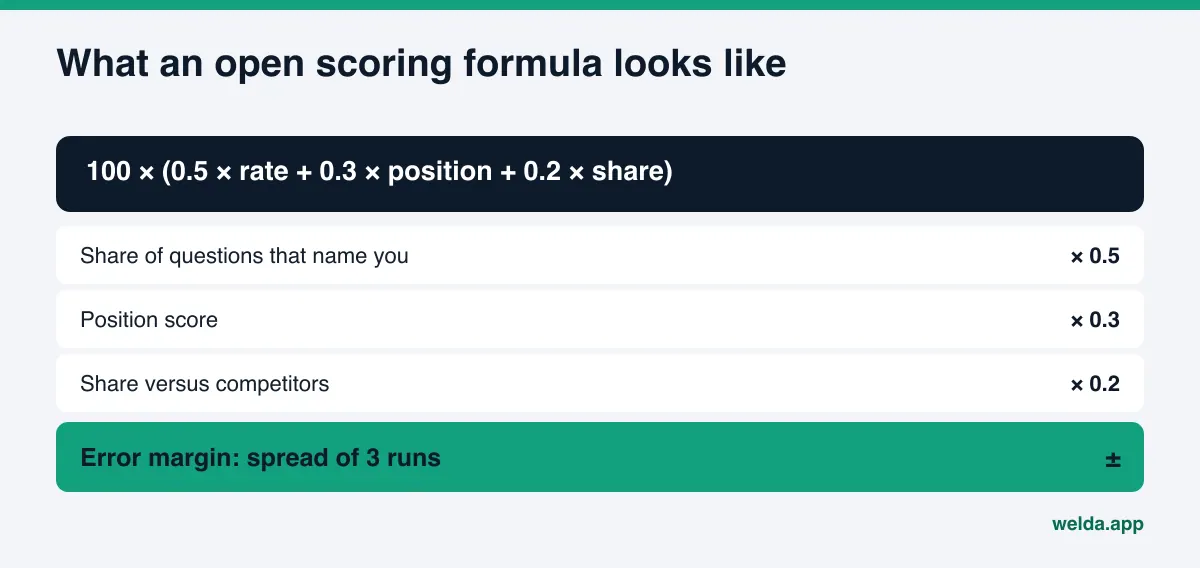
6. A published scoring formula
How is the score calculated? If the answer is "our proprietary algorithm," be careful. With an open formula, you can see which part dropped when the score drops, and you can check the vendor's claims yourself. What counts as a healthy number is a separate question, which we answer in what is a good AI visibility score.
The table below puts these six features, why they matter and the question to ask side by side. Print it and bring it to your next vendor demo.
| Feature | Why it matters | Ask the vendor |
|---|---|---|
| Question-level tracking | Customers ask AI in full sentences | Who writes the questions, and can I edit them? |
| Several engines | Each engine relies on different sources | Which engines, and can I see them separately? |
| Repeat runs | Answers change from run to run | How many times is each question asked? |
| Error margin | Small changes can be noise | Is a margin shown next to the score? |
| Position and answer text | Mentioned is not the same as recommended | Can I read the actual answer? |
| Share versus competitors | A flat score can mean falling behind | Do I choose the competitors? |
| Open formula | You can verify the number | Exactly how is the score calculated? |
Diagnosis: why is a competitor ahead, and why are you missing?
Tracking tells you "you are missing on this question." Diagnosis answers "why." This is the second group of AEO tool features, and it is where many tools are weakest.
Source analysis. AI engines build answers from other websites: your Google Business Profile, Yelp, Tripadvisor, the BBB, Healthgrades, Angi, local news, industry directories and, of course, your own site. A tool should show which sources appear in answers to your questions, how often, and what your status is on each one. Findings like "you have no profile on this directory," "your hours on this site are out of date" or "the engine could not reach your website" are worth far more than generic advice.
The topic a competitor wins. Competitors rarely win every question. They win specific topics: price questions, neighborhood questions or a feature like "accepts walk-ins." A tool should show where a competitor is ahead and which source gives them the edge. "Competitor A wins emergency-repair questions because two directories list their 24-hour service and none list yours" tells you exactly what to do next.
Site checks. Part of the problem often lives on your own website. AI crawlers may be blocked in robots.txt. The page title and description may be vague. Structured business data (schema markup) may be missing, or the address, phone number and hours may not be written anywhere a machine can read them. Services may be described loosely, and there may be no FAQ section at all. A good tool runs these checks and, for each finding, tells you what it saw, why it matters and how to fix it.
Ask the vendor: "If I am missing on a question, can the tool show me why? Does it tell me which source I am missing from?" If the only answer is "create more content," the diagnosis features are not there.
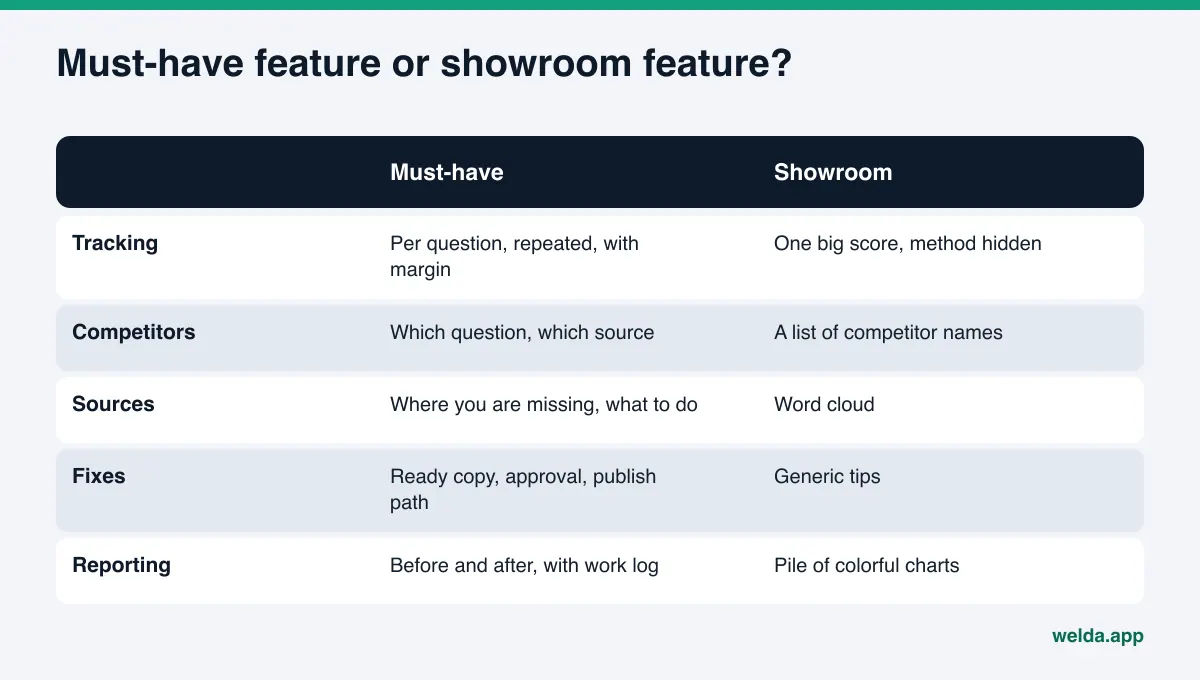
Fixes: after the tracking, who does the work?
Once the diagnosis is done, the real work begins. There are two kinds of tools here: those that tell you what to do and those that prepare the work for you. Both are legitimate. Which one fits depends on who will do the work. Either way, look for these features:
- One to-do list. Findings should not be scattered across five screens. Missing information, content waiting for approval and manual tasks belong in one list, ordered by impact.
- Ready-to-use copy. Saying "add an FAQ" is easy. Delivering questions and draft answers specific to your business is the real work. Ready copy turns a multi-day task into a short review.
- Asking instead of guessing. The tool should never invent facts it does not have, such as prices, hours or service areas. It should ask you. Feeding AI engines wrong information can be worse than giving them none.
- An approval step. Anything that goes live should pass through your approval. In regulated fields like healthcare, legal or financial services, this is not optional.
- A clear publishing path. How does approved copy get onto your site? Can the tool connect to your CMS, or does it hand you a package to paste in? Both work. What matters is that the path is defined.
- Content that stays yours. Content should live on your website, under your domain. Pages hosted on the vendor's domain disappear when the subscription ends.
Be realistic here: no tool can automate everything. Responding to negative reviews, logging into directory accounts and earning press coverage stay with the business. A tool that says so plainly is more trustworthy than one that hides it.
Reporting and trust: how do you prove progress?
A few months in, you or your business partner will ask, "Is this working?" A tool can only answer that with three features.
Before and after comparison. The starting score, question-level status and competitor share should be saved and compared month over month using the same question list. If the question list changes every month, the comparison loses its meaning.
A dated work log. Which page went live when, and which profile was fixed when? Without that log, you cannot connect a score change to a piece of work. New content usually takes weeks to show up in AI answers, which makes dates even more important.
A report people will read. A twenty-page chart deck goes unread. One page with the score, the margin, questions won and lost, competitor status and next month's tasks is enough.
On the trust side, look for two more features. The first is a compliance check before publishing that flags risky phrases such as price promises, guarantees, superiority claims and anything resembling a medical recommendation. The second is a data boundary: in healthcare in particular, patient data should never be sent to an AI model. Get the vendor's answers to both in writing. To see how these reporting features connect to the business case, read our piece on AEO ROI.
Red flags: which promises should make you walk away?
A long feature list does not make a good tool. Be careful if you see any of the following.
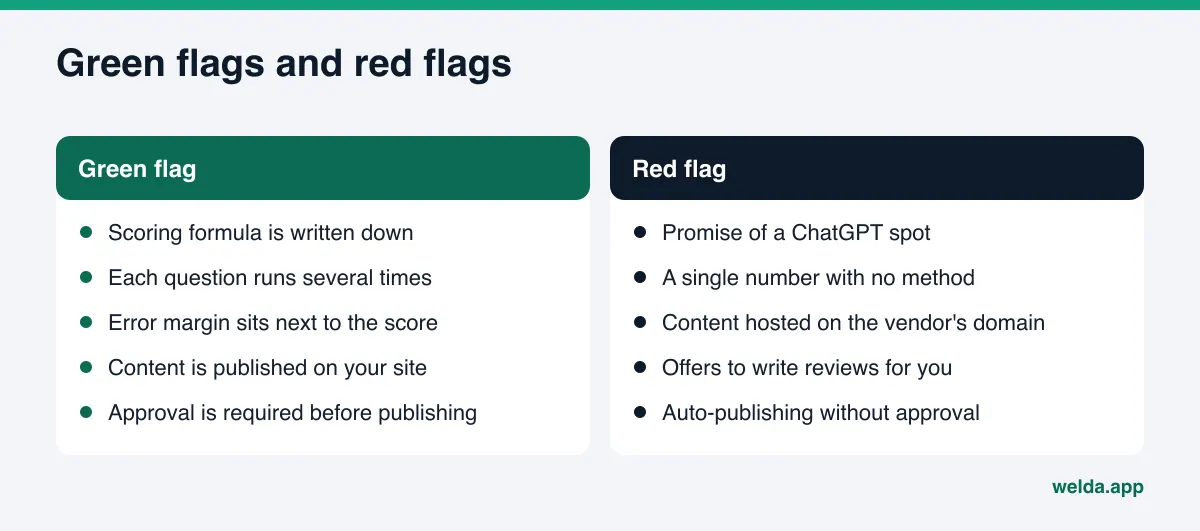
- "Guaranteed top spot in ChatGPT." No outside tool or agency controls what AI engines say. Anyone who guarantees placement is either not explaining their method or has set up the measurement in their own favor.
- A single number with no method. If you cannot learn how many questions, which engines and how many runs, the score is useless for comparison.
- Content hosted on the vendor's domain. When you cancel, your work goes with it.
- Offers to write reviews or create fake profiles. Beyond breaking platform rules, this carries legal risk. The FTC's final rule on fake reviews and testimonials explicitly covers reviews that claim to come from someone who does not exist, including AI-generated fake reviews.
- Auto-publishing without approval. Nothing should go live under your name that you have not seen.
- A single screenshot as proof of success. "Look, ChatGPT recommended you" proves nothing without repeat runs and a margin.
How to test an AEO tool, step by step
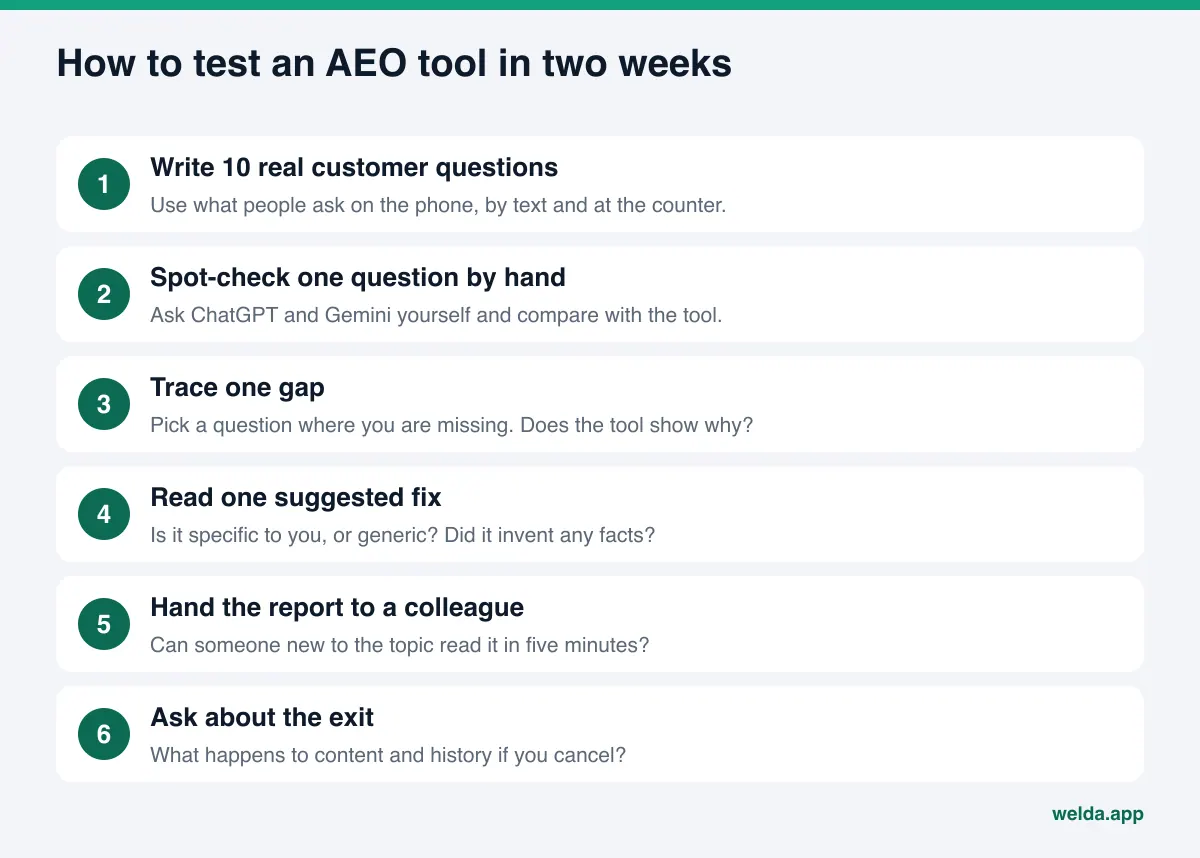
Skip the sales deck and test the tool against your own business. Follow this sequence and you will have a clear view within one or two weeks.
- Write ten of your own questions. Note the questions customers ask on the phone, by text or at the front desk, in full sentences. Even if the tool suggests its own list, these must be on it.
- Spot-check one question by hand. Ask ChatGPT and Gemini yourself. Does the tool's result roughly match what you see? Do not expect an exact match, since answers move. But if it is completely different, ask why.
- Trace one gap. Pick a question where the tool says you are missing. Does it show the reason: which source, which competitor, which page?
- Read one suggested fix. Is it specific to your business or generic enough to fit anyone? Did it invent any facts?
- Hand the report to a colleague. Can someone new to the topic understand it in five minutes?
- Ask about the exit. If you cancel, what happens to your content, your data and your tracking history?
If you are at the RFP or contract stage, sending every vendor the same written questions makes the comparison much easier. For the trade-offs between large enterprise suites and tools built for smaller businesses, see our look at an affordable alternative to enterprise AEO platforms.
How Welda handles AEO tool features
Welda was built to bring both halves of this list, tracking and fixing, into one place. Rather than walk through every screen, here are the three parts that matter most for this topic: question-level tracking, the sources view and the to-do list.
Question-by-question tracking with repeat runs and an open formula. In the Welda dashboard, the questions your customers are likely to ask go to ChatGPT, Gemini, Perplexity and Google AI, each one three times. On the questions screen, every row is one question, with each engine's result next to it: whether you were named and in what position. Click a question and you see a summary of the answer, the outcome of all three runs and the sites the answer relied on. The score uses the formula shown above: the share of questions that name you carries 50 percent of the weight, position 30 percent and share versus competitors 20 percent. The spread across the three runs produces the error margin. So when the score moves, you can see which part moved and whether the change is larger than the margin.
The sources and competitors views: why is someone else ahead? The sources view lists the websites AI engines lean on for your questions. Next to each one is your status there: no profile, incomplete profile, unverified details or complete, plus the next task. The competitors view shows which topic a competitor wins and which source gives them the edge. Read together, they lead to a concrete conclusion, such as "we lose emergency-service questions because a competitor has complete profiles on two directories and we have none."
The to-do list: the work arrives ready, approval stays with you. Welda collects every gap into a single list. When information is missing, such as hours, service area or a price range, Welda does not guess; it asks you. Page copy, FAQ entries, profile descriptions and review replies arrive as ready drafts. Nothing goes live without your approval. On WordPress sites, Welda connects through a dedicated Editor user and an application password, with no code to install; content opens on your site as a draft and goes live once you approve it. Where no connection is possible, Welda hands you a ready package and you or your web person apply it. Google Business Profile, Instagram and Facebook can be connected; if they are not, the task appears on the list as manual. Content always lives on your own website. Welda does not host it.
The dashboard also includes a home summary, a compliance check that flags risky phrasing before publishing, a before-and-after comparison and a one-page monthly PDF report. In healthcare there is no auto-publishing; every piece of content waits for approval, and patient data is never sent to an AI model. Questions can be tracked in English or Turkish.
What is available today? The Welda dashboard is in early access and opening in stages, starting with businesses in Turkey. Regular four-engine tracking is being added during early access, and the dashboard views described here use representative data. What anyone can use today is the free site audit, which works in English. It reads your homepage and a few inner pages such as services, pricing, about and contact. It checks whether AI crawlers can access your site, your title and description, main heading, structured business data, address and phone details, links to your social and map profiles, FAQ content, reviews and trust signals, how clearly your services are described and page speed. You get separate technical and content scores, an explanation and fix for each gap, ready homepage copy suggestions, a simulation of how much each fix would raise the score, a competitor comparison and a fix package for your site, including the business schema code. The audit also asks 5 likely customer questions to an AI assistant with web search and checks whether your business name appears in the answers. That is a one-time snapshot, not a replacement for repeated tracking. Pricing is discussed in the early access conversation.
Limits: what Welda does not do
Knowing what not to expect from a tool matters as much as knowing what to expect. For Welda, that list looks like this:
- No guarantee of placement or of "showing up in ChatGPT." Nobody controls AI answers. Welda measures, shows the reason and prepares the fixes.
- No invented facts. Welda does not guess your prices, hours or services. It asks.
- No sensitive content published without approval. Approval always stays with the business.
- No fake reviews. Welda drafts replies to real reviews. It does not write reviews.
- Some work stays with you. Handling negative reviews, managing directory logins and earning press coverage are the business's job.
- Not legal advice. The compliance check flags risky patterns, but it has not been reviewed by legal counsel.
- Results take time. New content usually takes weeks to show up in AI answers.
The free audit does not measure rankings or promise them either. It shows how readable your site is to AI systems, plus a one-time five-question mention check.
AEO tool buyer's checklist
Fill in this table for every tool on your shortlist. Each "no" or "not sure" is a question to send back to the vendor.
| Question | If yes | If no |
|---|---|---|
| Is tracking based on full customer questions? | It measures real demand | It turns into keyword tracking |
| Is each question run several times, with a margin shown? | You can interpret changes | You may mistake noise for progress |
| Can you see each engine separately? | You find the problem engine | The problem hides in an average |
| Is the scoring formula written down? | You can verify it | You rely on the vendor's word |
| Does it show which source helps each competitor? | Your next task is clear | You work on guesses |
| Is there ready copy for each gap? | Implementation is fast | The work falls on you or an agency |
| Is approval required before publishing? | You stay in control | Unseen copy may go live |
| Does content live on your own site? | Your work stays yours | It leaves with the subscription |
| Is there a before-and-after view? | You can show progress | You cannot tell what worked |
If you would rather hand the whole process to someone else, compare this list with what you would expect from AEO consulting. The same questions about method, margin and ownership apply.
Frequently asked questions
Is an AEO tool the same as an SEO tool?
No. An SEO tool tracks keyword rankings and clicks in Google. An AEO tool tracks whether your business is named in AI answers to the questions customers ask. They complement each other; strong SEO does not guarantee a mention in an AI answer.
How many AI engines should a tool cover?
It should cover the engines your customers use. In the US, ChatGPT, Gemini, Perplexity and Google's AI features are the usual starting set. More important than the count is being able to see results engine by engine.
Why does the score need an error margin?
AI answers change even for the same question. The margin tells you whether the difference between two measurements is a real change or just that natural movement. A change smaller than the margin should not be reported as progress.
Is a tool that writes content for me safe?
It is, if there is an approval step and the tool asks for facts it does not have instead of inventing them. Auto-publishing without approval is risky, especially in healthcare and financial services. Content should also live on your own site.
Can a free audit replace a paid AEO tool?
No, but it is a good starting point. A free audit shows how readable your site is to AI and gives a one-time snapshot of mentions. Regular, repeated tracking with competitor comparison needs a full dashboard.
Can any tool guarantee I will show up in ChatGPT?
No. No tool or agency controls AI answers. A tool can measure, explain why you are missing and help you close the gaps. A guarantee is a red flag.
Start by seeing where you stand
Once you know which AEO tool features matter, you will ask better questions in every vendor demo. But which features you need most depends on where you are today. Can AI crawlers reach your site? Is your business information readable? Does your name come up when customers ask? To find out, run the free AI visibility audit. The results link arrives by email, stays open for 14 days and lists what to do about each gap. From there, you can decide much more clearly whether you need a tool at all, and which features are must-haves for your business.