Does content freshness matter for AI search? Yes, but not in the way most people assume. Answer engines care less about a new date at the top of a page and more about whether the facts on your site, your profiles and your directory listings are true today and agree with each other. Old hours, a service you dropped or last year's prices can travel straight into an AI answer, or make you the business the answer leaves out.
This guide looks at content freshness for AI search from the point of view of a business owner, not a publisher. It covers where stale facts pile up, what ChatGPT, Gemini, Perplexity and Google's AI Overviews do with them, which pages need attention and when, how to date pages honestly, and which parts of the work Welda takes off your plate. If you want to see what your own site says right now, the free site analysis reads your homepage together with your services, pricing, about and contact pages and shows where the facts are missing or inconsistent.
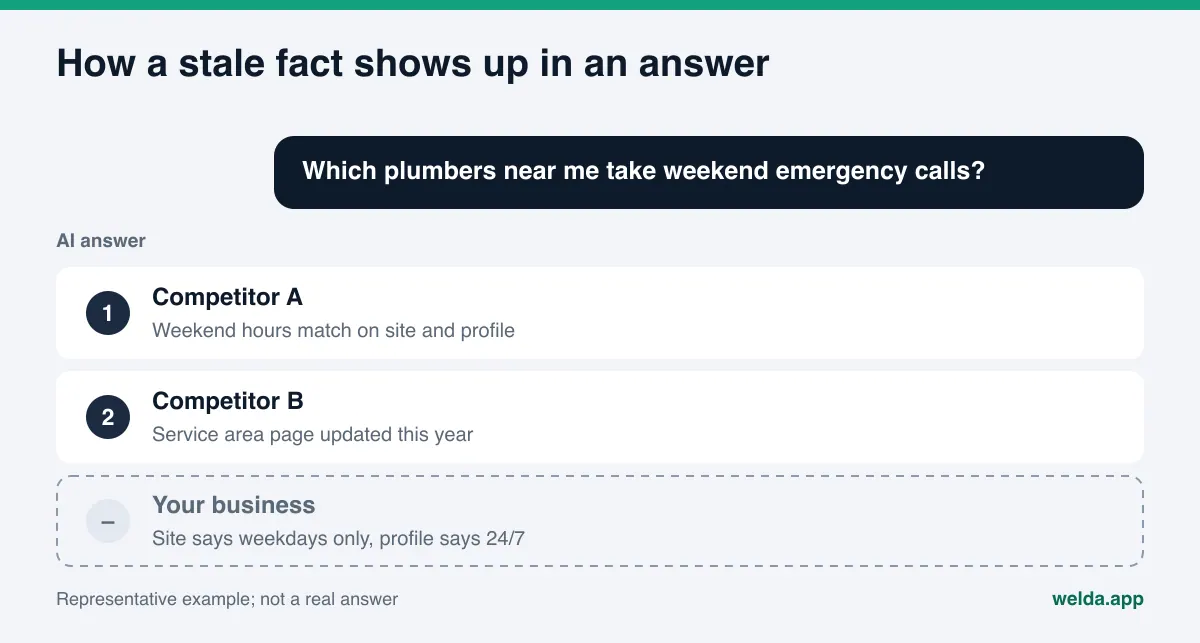
Content freshness for AI search: what is the actual problem?
In classic search, an outdated page mostly just ranked lower. A searcher could scan ten blue links and click the newer one. AI answers work differently. The searcher reads one summary, and that summary is assembled from several sources. If one of those sources is stale, the stale fact can end up inside the answer, stated with the same confidence as everything else.
For a local or small business this shows up in three ways:
- The answer repeats something that is no longer true. It says you offer a service you stopped offering or quotes hours you changed last spring. The customer shows up or calls, finds out the hard way, and blames you.
- Contradictions keep you out of the answer. If your site says weekdays only and your Google Business Profile says open 24/7, an answer engine has no clean fact to repeat. It may simply name a competitor whose details line up.
- What is new about you stays invisible. A new location, a new service or a new service area that is not written clearly on any page cannot be known. This is the mirror image of the stale-fact problem, and it has the same root: your pages no longer describe the business you run today.
One distinction matters a lot here. "Fresh content" is often read as "publish often." But a business that posts a new blog article every week while leaving a two-year-old address in its footer is not fresh in any way that matters to AEO (answer engine optimization). Freshness is measured by whether your facts are correct, not by how often you publish. You will also see the same work called GEO, or generative engine optimization; in the US, AEO is the more common name.
Where do AI answers pick up outdated facts?
AI assistants that can search the web read the pages they find at the moment they answer. When they answer without searching, they lean on what they learned during training. Either way, the raw material is pages that are live now or were live at some point. These are the places stale facts most often hide:
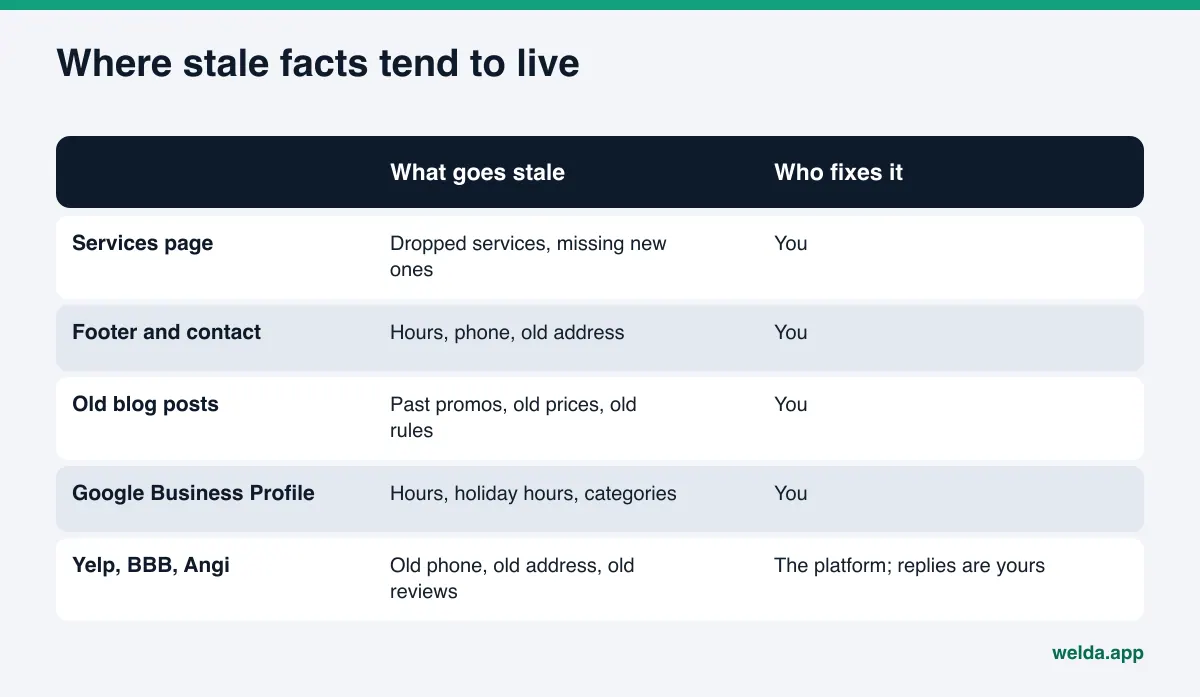
The first four rows are yours to fix. Yelp, the BBB, Angi and similar platforms are someone else's sites. You may not be able to edit everything there, but as the listing owner you can claim the profile, request corrections and reply to reviews. We cover that side in detail in our guide to business directories for AI visibility.
Two sources are easy to overlook. The first is old blog posts: "Our 2024 spring special" or "What the new rule means for you" keep getting read years later, and without a clear date they can be repeated as if they apply today. The second is the site-wide parts of your website, especially the footer. An old phone number in the footer appears on every single page, so to a machine reading your site it looks like the most frequently confirmed fact you have.
Which pages need updating, and when?
Pages do not go stale at the same speed. The founding story on your about page may stay accurate for years; your pricing or holiday hours can change within a season. It is more reliable to think in terms of triggers than calendar intervals: the day a fact changes is the day every page that mentions it should change.
| Page | What goes stale most often | What should trigger a review |
|---|---|---|
| Homepage | Featured service, promotion, main headline | New service, ended promotion, new season |
| Services | Services offered and dropped, service area | Adding or dropping a service or area |
| Pricing | Prices, what a package includes, effective dates | Every price change |
| Contact and footer | Hours, phone, address, holiday hours | A move, a new number, a holiday period |
| About | Team, owner, licenses, locations | Staff change, new location, renewed license |
| FAQ | Turnaround times, refund and booking terms | Any policy or process change |
| Blog posts | Dated advice, old rules, old comparisons | A change to the rule or product discussed |
If you publish comparison pages or "best of" roundups, they age fastest of all, because every fact in them depends on someone else's product. Our article on comparison pages for AI search explains how to keep them accurate.
How to run a content freshness pass, step by step
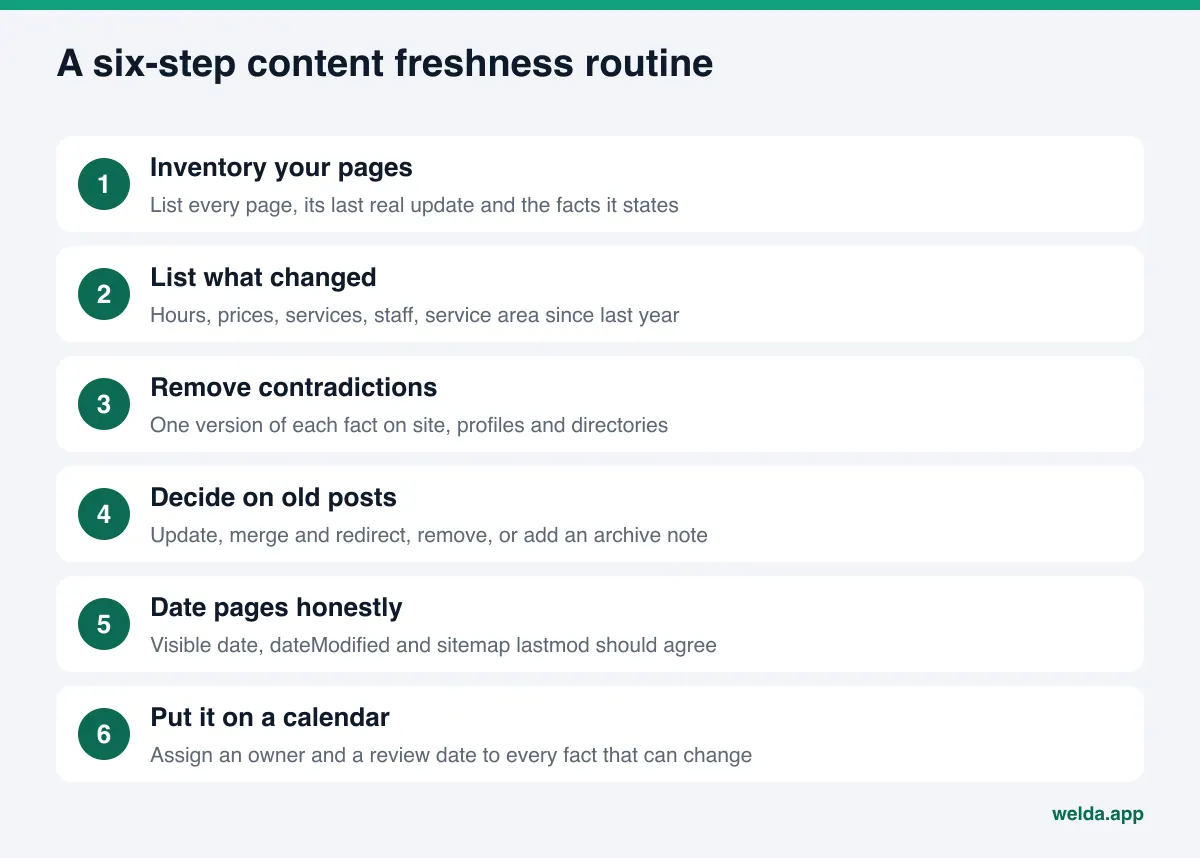
None of these steps needs a developer. Most of them start with a spreadsheet and an afternoon.
- Inventory your pages. Put every URL in a spreadsheet. For each one, note when it last changed in a meaningful way and which changeable facts it mentions: hours, prices, service names, staff names, addresses, service area. For a small business site this is usually a few dozen rows.
- List what changed. Think back over the past year. Did you move, change hours, drop a service, add a technician, expand into a new county? Match each change to the pages in your inventory. You will usually find that one change left traces on three or four pages.
- Remove contradictions. Compare the same facts across your site, Google Business Profile, Apple Maps, your social bios and directories such as Yelp. The goal is the same address, the same phone number and the same hours everywhere, written the same way.
- Decide on old posts. Make a call on each older page; the decision chart below helps.
- Date pages honestly. Show a visible "Last updated" date on pages you actually changed, and make sure it matches your structured data and sitemap.
- Put it on a calendar. Give every changeable fact an owner and a review date. Holiday hours, seasonal openings and price changes can be scheduled in advance.
Step 3 takes the longest and pays off the most. AI answers vary from one run to the next, and inconsistent facts make that variance bigger. We explain why in why AI answers change every time.
Example: a freshness pass for a home services company
Here is how the routine plays out in practice. This is an example, not a real business: a small plumbing company that stopped serving one county last year and started taking weekend emergency calls. The owner updated the Google Business Profile hours and considers the job done.
The inventory tells a different story. The old picture of the business still lives in several places:
- The footer still reads "Monday to Friday," on every page of the site.
- The service area page still lists the county they no longer serve.
- The LocalBusiness schema on the homepage still has the old opening hours; nobody sees it, so nobody remembered it.
- A blog post from three years ago titled "Do we do emergency calls?" answers no.
- The Yelp and Angi listings still show the old hours and the old service area.
Read by a machine, the signals point mostly one way: one profile says weekends, while the website, its structured data, an old article and two directories say weekdays. An answer to "which plumbers near me take weekend emergency calls" is unlikely to include this company, even though it now does exactly that.
A proper pass can be done in a day. The footer, service area page and schema change together. The old blog post is rewritten or gets a clear note that the policy has changed, with a link to the current page. Directory listings are corrected through the owner dashboards, and a reminder goes on the calendar to check that the changes stuck. The visible date and dateModified on every changed page reflect the day of the change. The lesson generalizes: freshness comes from changing a fact everywhere it appears, not just in the most visible place.
What to do with old blog posts and pages
The two most common mistakes are opposites. Either old posts are never touched, or they are deleted in bulk. Neither works well. Untouched posts keep repeating outdated facts; bulk deletion throws away useful content and the links that point to it.
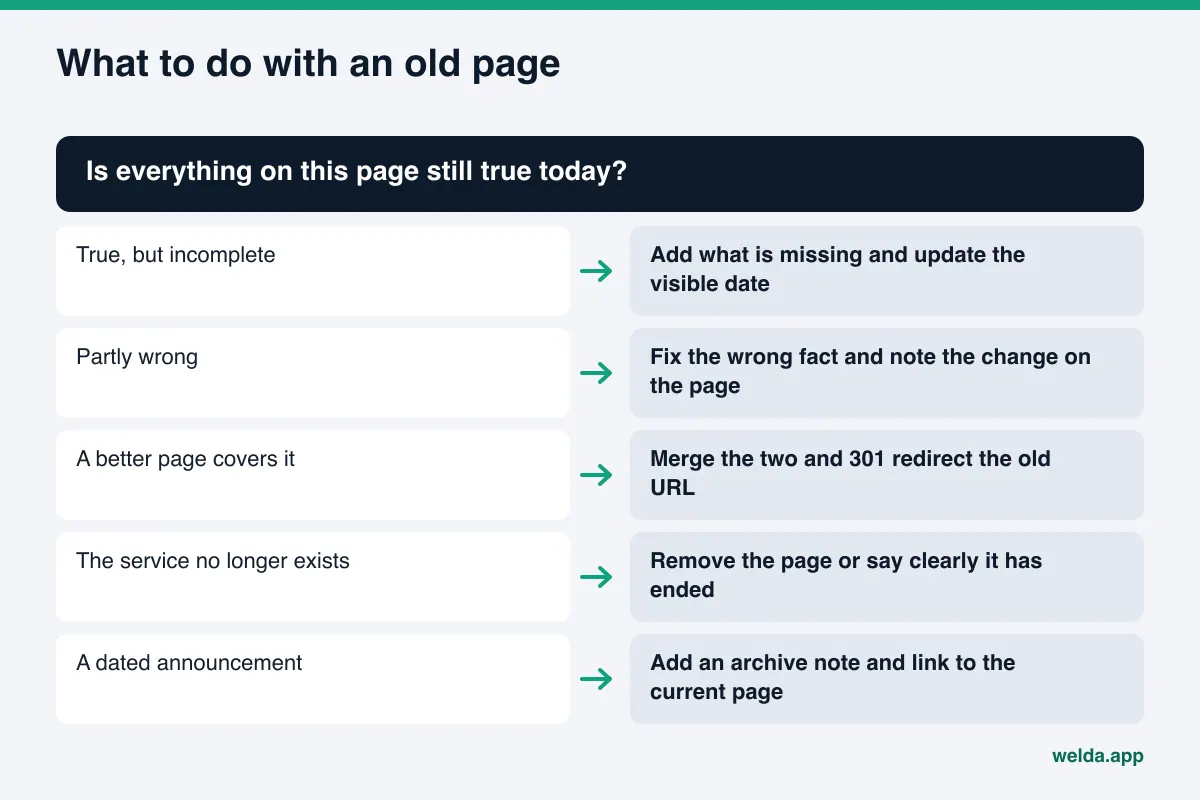
The merge-and-redirect option matters most for businesses that have written about the same topic several times over the years. Three pages giving three different answers to the same question hand an answer engine three conflicting sources. One current page, with the older URLs pointing to it through a permanent 301 redirect, is a much cleaner signal.
The archive note is for dated announcements. A line at the top such as "This post describes our 2024 event; see our events page for the current schedule" tells both readers and machines exactly which period the information belongs to.
Showing dates honestly: visible dates, dateModified and lastmod
Date information lives in three places, and all three should agree:
- The visible date: the "Published" or "Last updated" line readers see on the page.
- Structured data: the
datePublishedanddateModifiedfields in your schema markup. - The sitemap: the
lastmodvalue for that URL insitemap.xml.
Google's own documentation asks for a user-visible date and says the visible and structured dates should match (Google Search Central, publication dates). Its sitemap guidance adds that Google uses lastmod only if it is consistently and verifiably accurate, and that the value should reflect the last significant update to the page (Google Search Central, build a sitemap). Those are Google's rules, but other AI tools read the same pages, and consistent dates tell every reader the same story.
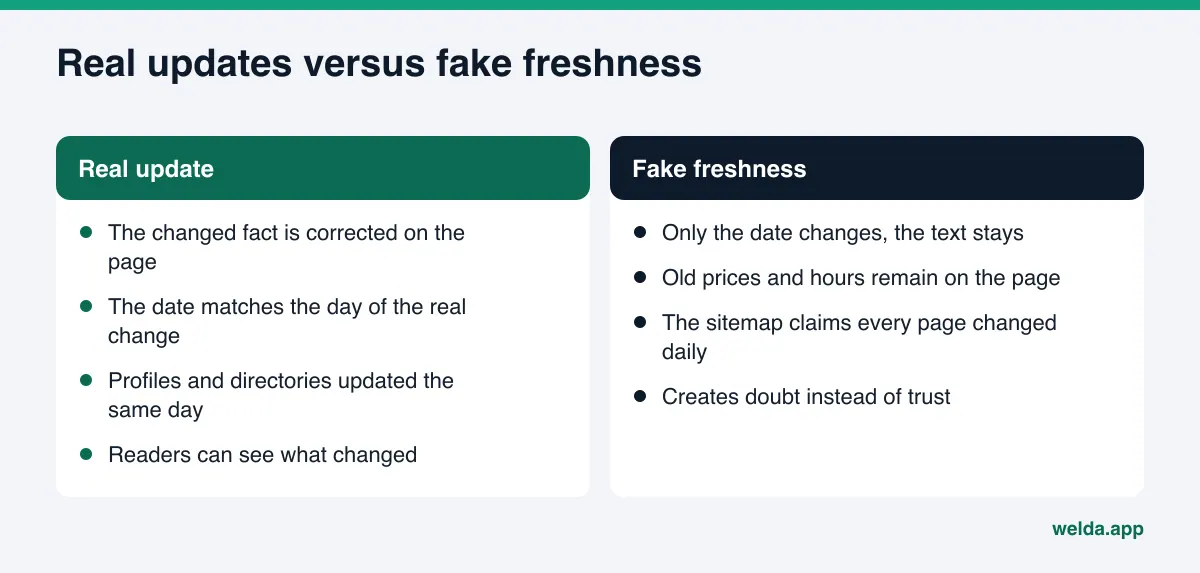
The practical rule is simple: change the date only when the content actually changes. Some content management setups bump every page's lastmod to today on each save or every night. That turns your sitemap into a document claiming everything changes daily, which is exactly the kind of signal that stops being trusted. If your site does this, fix it first.
Facts can carry their own dates too. "Prices effective March 1" under a price list, or "Holiday hours, December 24 to January 2" on the contact page, tells readers and machines which period a fact applies to. When that period ends, the fact reads as historical rather than current.
How Welda handles content freshness
Welda's work here comes in three parts: finding where your facts are inconsistent or missing, preparing the fix for your approval, and measuring whether AI answers changed afterward.
The free analysis: spotting inconsistencies across pages
The free site analysis does not stop at your homepage. It also reads your services, pricing, about and contact pages, and checks how your address, phone and location appear, whether your business details are marked up as schema, whether your Google Business Profile and social profiles are linked from the site, and whether your services are spelled out clearly. For each gap it shows what it found, why it matters and how to fix it, and it includes a ready-to-install fix pack with business schema code. For freshness, the most useful part is seeing where the same fact is written differently on different pages. The analysis also asks five customer-style questions to an AI assistant that searches the web and checks whether your business name comes up. That is a one-time snapshot, not ongoing tracking. It runs in English and German as well as Turkish.
The to-do list: Welda asks instead of guessing
In the Welda dashboard, the screen most tied to freshness is the to-do list. It shows two kinds of work. The first is information Welda needs from you: when it cannot read a fact from your site or is not sure it is current, such as your hours or the owner's name, it leaves the field empty and asks you rather than inventing it. Once you answer, the fact flows into every text Welda prepares. That is the simplest safeguard against an old fact being copied into new copy.
The second kind is manual work. When Google Business Profile, Instagram or Facebook is connected, updates go through that connection. For anything not connected, Welda lists the task with the ready-made text next to it; you paste it in and mark it done. On WordPress, Welda connects through a separate Editor user and an application password, without installing code; an updated page opens on your site as a draft and goes live only when you approve it. On other systems, Welda gives you a package to apply by hand. Your content always stays on your own site, and approval always stays with you.
Before and after: did the update reach the answers?
Updating a page is half the job. The other half is checking whether the change shows up in AI answers. In the dashboard, the questions your customers would ask are put to ChatGPT, Gemini, Perplexity and Google AI three times each. You see which questions mention your name, where in the answer you appear and where competitors lead. The score formula is open: 100 × (0.5 × share of questions that mention you + 0.3 × position score + 0.2 × share against competitors), with a ± margin taken from the spread across the three runs. The before-and-after view puts measurements from before and after your update side by side, so a shift that falls inside the margin is not mistaken for progress.
A plain note on availability: the Welda dashboard is in early access. It is opening in stages and starting with businesses in Turkey. Regular four-engine measurement is being added during early access, and dashboard screens are shown with representative data. What anyone can use today is the free analysis, which works in English. Pricing is discussed in the early access conversation.
Limits: what Welda does not do
- No ranking guarantee. Accurate, consistent facts make you easier to mention; whether an answer engine mentions you is its decision. Nobody can promise placement in ChatGPT.
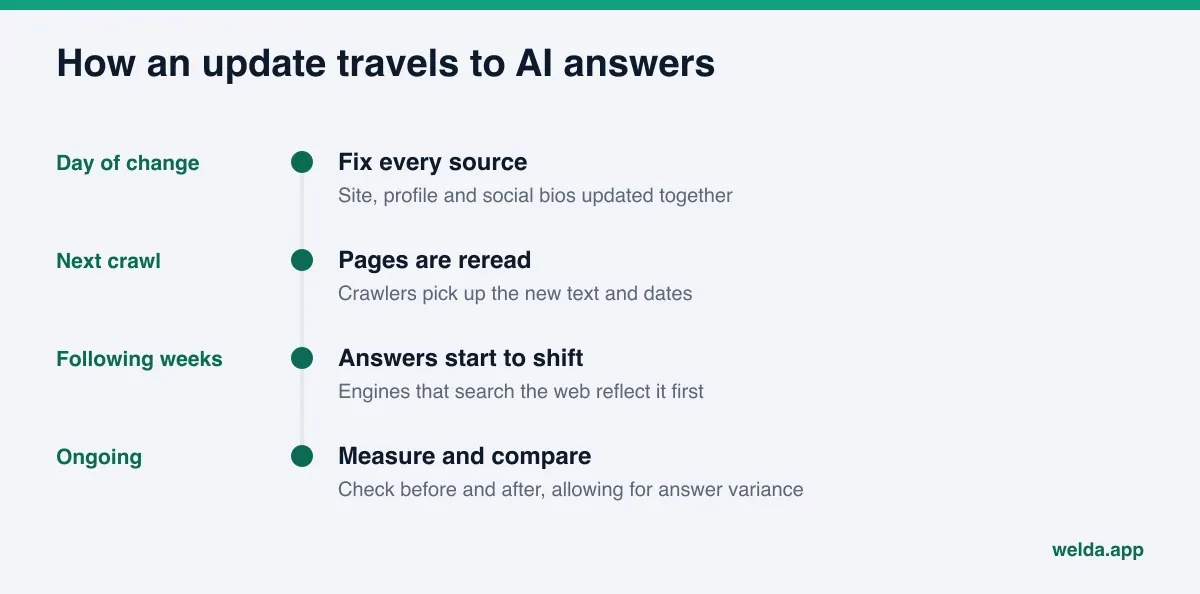
- Updates take time. New content usually takes weeks to show up in AI answers. Models answering without a web search can hold on to old facts longer.
- Welda does not make up facts. It learns your hours, prices and team from you, and you decide what is current.
- Nothing sensitive goes live without approval. Updated text comes to you first.
- Other people's sites stay with you. Directory corrections, negative reviews and press work remain your job. Welda drafts the text; the listing owner and the platform make the change.
- No fake freshness and no fake reviews. Welda does not suggest bumping dates on pages that did not change.
Content freshness checklist
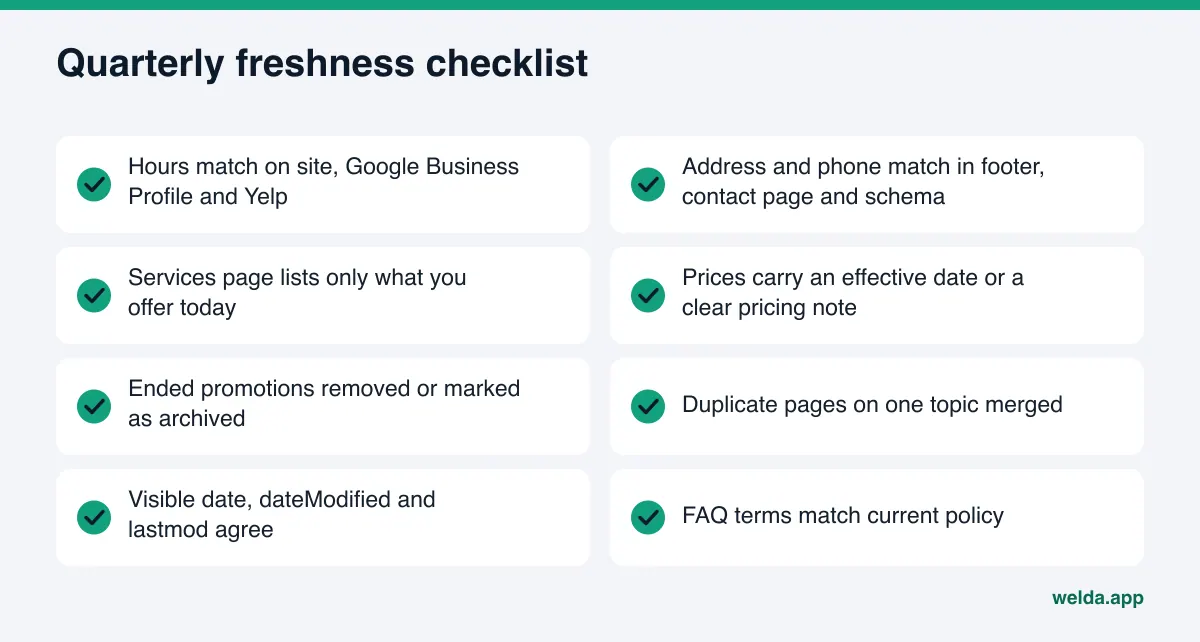
Run through the list each quarter and after any significant change. Anything you cannot answer yes to goes into your page inventory. Your about page deserves a look in the same pass, since team and license details age quietly; see about page trust signals for AI for what that page should carry.
Frequently asked questions
Does publishing more often improve AI visibility?
Not on its own. What matters is that your pages state correct, clear and consistent facts. A handful of accurate pages is a stronger foundation than a steady stream of posts that contradict each other.
Is changing the date on a page enough?
No. A new date on unchanged text does not fix a stale fact. Google says it uses sitemap lastmod values only when they are consistently and verifiably accurate. Change the date when the content changes, and only then.
ChatGPT keeps quoting my old hours. What should I do?
Find every place your hours appear: footer, contact page, schema, Google Business Profile, social bios and directories. Update them all on the same day, in the same format. Answers usually take weeks to shift, which is why it helps to measure before and after.
Should I delete old blog posts?
Decide post by post instead. Update what is still useful, merge and redirect duplicates, add archive notes to dated announcements, and remove only pages that carry wrong information and have no remaining value.
If I leave prices off my site, does the stale-price problem go away?
Not entirely. Without prices on your site, an answer engine may pull a number from an old directory listing or a review. If you list prices, keep them current with an effective date; if you do not, explain how pricing works in a clear paragraph.
Will Welda update my site for me?
Welda prepares the updated text and sends it for your approval. On WordPress the page opens as a draft and goes live when you approve; on other systems you apply the package yourself. Welda asks you for current facts rather than guessing them.
See what your site says today
The first step in content freshness for AI search is knowing what your pages actually say right now. The free site analysis reads your homepage and key inner pages, flags missing and inconsistent facts with suggested fixes, and gives you a score out of 100. It is free once per site; your results link arrives by email and stays open for 14 days.