Does your About page affect whether AI assistants recommend you? Yes, more than most owners expect. Before an AI assistant names a business, it tries to read who runs it, where it operates and why it can be trusted. A vague or missing About page leaves those questions open, so the assistant tends to name a competitor whose identity is easier to confirm.
This guide covers about page trust signals for AI from the angle of AEO, short for answer engine optimization, which is the practice of getting your business named in the answers of ChatGPT, Gemini, Perplexity and Google's AI Overviews and AI Mode. You will also see the term GEO (generative engine optimization) used for the same goal; this article sticks with AEO and AI visibility. We look at why the About page matters, what to write step by step, which markup to add, how to keep facts consistent across the web, and what Welda does in this work. If you want to see how your site reads to AI right now, a free AI visibility analysis reads your About page along with your other key pages and lists every gap it finds.
Why the About page matters for AI search visibility
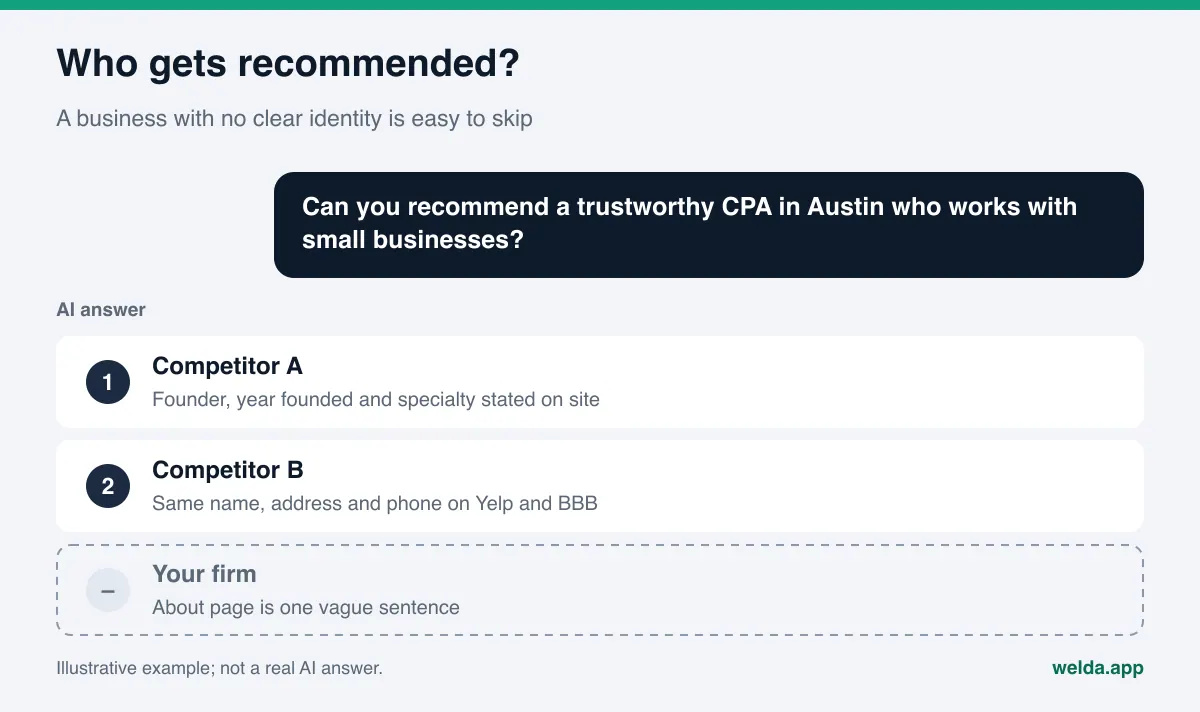
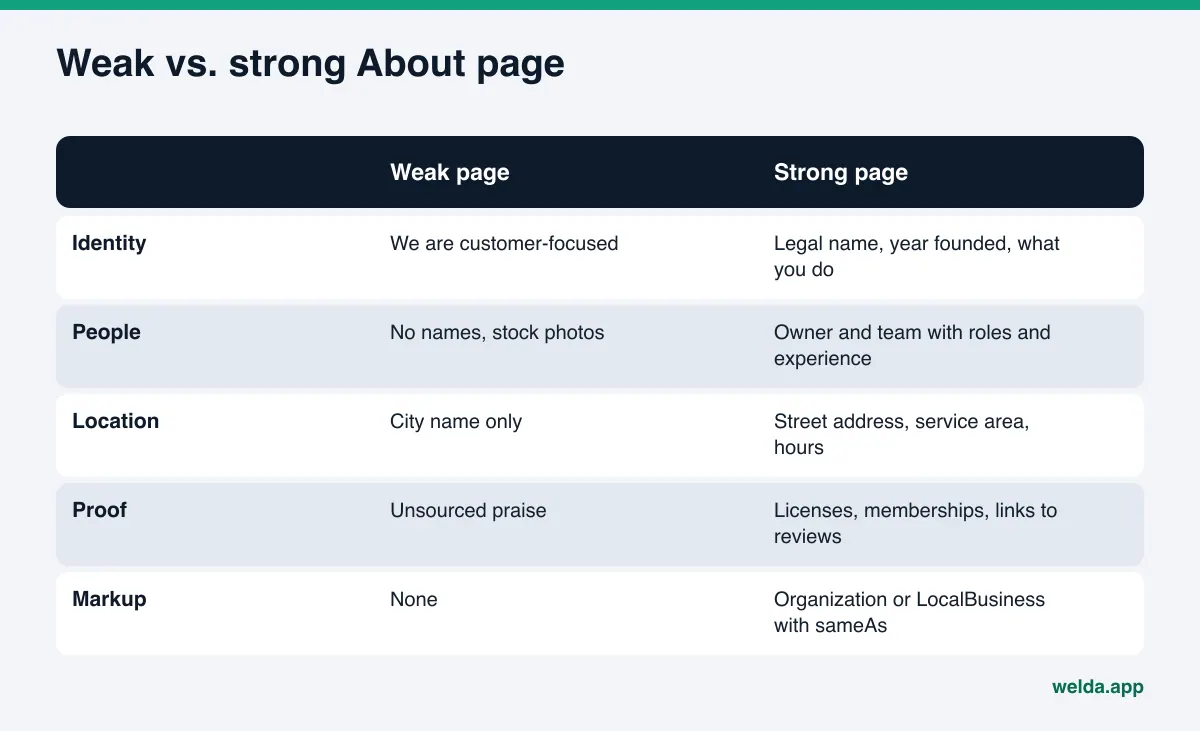
In classic search, the About page was an afterthought for most small businesses. Visitors landed on a service page or the homepage, called or booked, and rarely clicked "About." So on many sites the page still carries the same line it had years ago: "We are a customer-focused team dedicated to excellence." That sentence tells a reader nothing. It tells an AI model nothing either.
AI answers change the situation because customers now put trust words straight into the question. "Family-owned pizza place in Brooklyn that's been around for years." "Pediatric dentist in Plano who's good with anxious kids." "Trustworthy CPA in Austin who works with small businesses." "Licensed electrician near me with real reviews." Each of these asks the assistant to make a trust judgment on your behalf. To make it, the assistant looks for facts it can read and cross-check: the year you opened, who runs the business and what experience they have, a real street address, licenses, memberships, and whether other sites describe you the same way. On most websites, the About page is where those facts should live.
Google points in the same direction. Its guide on creating helpful, reliable, people-first content asks site owners to make the "who, how and why" behind their content clear, and lists background information about the site, such as an About page, among the things that build trust. The same guide says that among experience, expertise, authoritativeness and trustworthiness (E-E-A-T), trust is the most important. That guide is written for Google Search, and each AI engine works in its own way. The shared logic still holds: a source whose identity is clear is easier to use than one that is anonymous.
This matters most for three kinds of businesses:
- Trust-first purchases. Healthcare, legal, accounting, home repair, child care, tutoring. The customer's first question is "who are these people," and assistants lean toward businesses that can answer it.
- Businesses with common or similar names. If there is an "Oak Street Dental" in three states, the assistant needs distinguishing facts such as your address, your founding year and your owner's name to pick the right one.
- New businesses or those with few reviews. When there is little written about you elsewhere, the clarity of your own site carries more weight.
Which trust signals AI assistants look for
"Trust signal" sounds abstract, but in practice it means readable facts. An assistant does not scan your page for the word "trustworthy." It looks for evidence that supports trust. The table below lists the main About page trust signals, how to write each one and why it helps.
| Trust signal | How to write it | Why it helps |
|---|---|---|
| Identity | Legal business name, DBA if any, year founded, one sentence on what you do | Separates you from businesses with similar names |
| Location | Street address, neighborhood, service area, hours | Matches you to "near me" and neighborhood questions |
| People | Owner and key staff by name, with role and relevant experience | Gives a concrete answer to "experienced" and "qualified" questions |
| Licenses and memberships | License type and number where your trade is licensed, with the issuing board or agency | Checkable facts outweigh self-praise |
| Profile links | Google Business Profile, Yelp, BBB, industry directories, social accounts | Shows that the site and outside listings belong to the same business |
| Customer voice | Links to pages with genuine reviews, thoughtful replies to reviews | Shows what others say about you, not only what you say |
| Contact and policies | Phone, email, privacy policy, how to reach a person | Shows the business is real and reachable |
What these signals have in common is that each can be compared with another source. "Decades of experience" is a claim. "Founded in East Austin in 2009" is a fact that can be checked against your Google Business Profile, your state registration and local news. To show up in AI answers, write the second kind of sentence. If you are not sure of a date, leave it out. A wrong year does more harm than no year.
How to write an About page for AEO, step by step
Rewriting an About page is usually a one- or two-day job. The hard part is not the writing. It is gathering accurate facts. That is why the sequence below starts there.
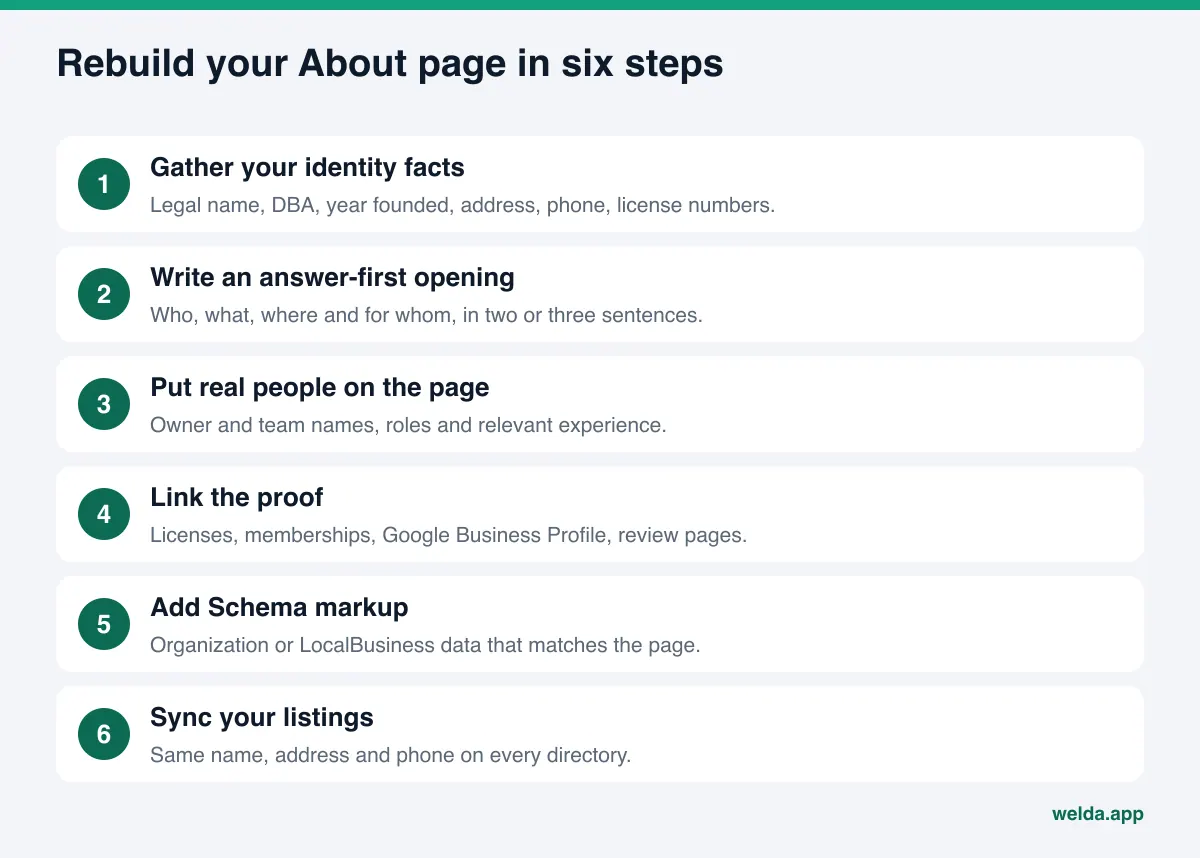
- Gather your identity facts in one place. Legal business name, the name you trade under, year founded, street address, phone, email, and any license numbers. Compare them with your Google Business Profile, your invoices and your site's contact page. Where they differ, decide which version is correct before you write anything.
- Write the opening like an answer. The first two or three sentences should say who you are, what you do, where you work and who you serve. A sample: "Sample Tax & Books is a CPA firm in Austin, Texas, that has handled bookkeeping, tax returns and payroll for small businesses since 2009. The firm is led by its founder, a licensed CPA." We cover this approach in depth in our piece on answer-first content.
- Put real people on the page. Name the owner or the person who runs the business, with their role and the experience that matters to customers. If the team is large, at least name the people customers actually deal with. Use real photos rather than stock images, and get consent from anyone pictured.
- Tell the story with facts. An origin story helps, but through events rather than adjectives: the year you opened, when you added a service, when you moved to a bigger space. These details help an assistant place you correctly when a customer asks for "long-established" or "new in town."
- Link the proof. If your trade is licensed in your state, list the license and the board that issued it, and link to the board's public lookup where one exists. Do the same for professional memberships. Link your Google Business Profile, your Yelp or Healthgrades listing and your social accounts from this page.
- Add structured data. Repeat the same facts in machine-readable form with Schema markup. The next section shows how.
- Sync your listings. Check that your name, address and phone on directories, maps and social profiles match the About page exactly.
Do not worry too much about length. The difference between a 600-word About page and a 200-word one comes from the number of concrete facts, not the word count. A short page where every sentence can be checked reads better than a long page full of general statements.
Showing trust signals in markup: Schema for your About page
People read your page, and so do AI systems and search engines. Adding the same facts as structured data reduces the chance that a machine misreads them. The shared vocabulary for this is Schema.org, which has a dedicated type for this page: AboutPage, a subtype of WebPage. The business itself is described with Organization, or LocalBusiness and its more specific subtypes for local businesses.
The most useful fields on an About page are name, legalName, foundingDate, founder, address, telephone, areaServed and sameAs, which lists the URLs of your official profiles. A minimal skeleton looks like this: {"@type": "AboutPage", "mainEntity": {"@type": "LocalBusiness", "name": "...", "foundingDate": "2009", "founder": {"@type": "Person", "name": "..."}, "sameAs": ["..."]}}. In real markup, do not leave empty fields. If you do not know a value, leave the field out entirely.
Two rules matter here. First, the markup must match the visible page exactly. Writing 2009 on the page and 2008 in the code sends a mixed signal. Second, only list profiles in sameAs that you actually own and control. We explain this field in detail in our guide to linking social profiles with sameAs.
Trust signals beyond your site: consistency
The About page cannot do the job alone. When an assistant builds an answer about a business, it often draws on several sources: your website, your Google Business Profile, Google Maps, Yelp, the Better Business Bureau, industry directories such as Healthgrades or Angi, Reddit threads and local news. When those sources agree with your site, the trust signal gets stronger. When they disagree, the assistant decides on its own which version is right, or leaves you out.
The most common mismatches are an old address still listed on directories, a landline in one place and a cell number in another, the business name abbreviated on one site and spelled out on another, and different founding years on the site and on profiles. Each looks small. Together they raise the question of whether two listings even describe the same business. Our guide to business directories for AI visibility walks through how to clean them up.
Reviews are part of this consistency too. Instead of writing "our clients love us" on the About page, link to the pages where genuine reviews live. Calm, specific replies to critical reviews also help, because assistants can read those replies. Writing or buying fake reviews damages trust and carries legal risk. The FTC's rule on consumer reviews and testimonials, in effect since October 21, 2024, prohibits fake or false reviews and testimonials, and the FTC notes that a business putting testimonials on its own website is disseminating them, not merely hosting them. That applies directly to any quotes you place on your About page. This is general information, not legal advice; check your situation with an attorney.
Common mistakes that weaken About page trust signals
The same mistakes show up again and again. All are easy to fix, but they can sit unnoticed for years.
- Facts locked inside images. If your founding year, team names or licenses only appear inside a banner graphic, they cannot be read as text. Put every important fact on the page as text.
- Unsourced claims. "Industry leader," "best in town" and "thousands of happy customers" cannot be verified. Assistants tend to read them as marketing copy, not as trust signals. In regulated fields, superiority claims can also run into advertising rules.
- A page without people. An About page that never names a person leaves "who does this work" unanswered.
- A hidden page. If the About page is missing from the menu, lives only in a footer link or is blocked in robots.txt, it is harder to read. You can check whether AI crawlers can reach your site with the steps in are AI bots crawling my website.
- Stale facts. A move, a new phone number or a partner who left often never makes it to the About page. Reread it from top to bottom at least once a year.
How Welda handles about page trust signals for AI
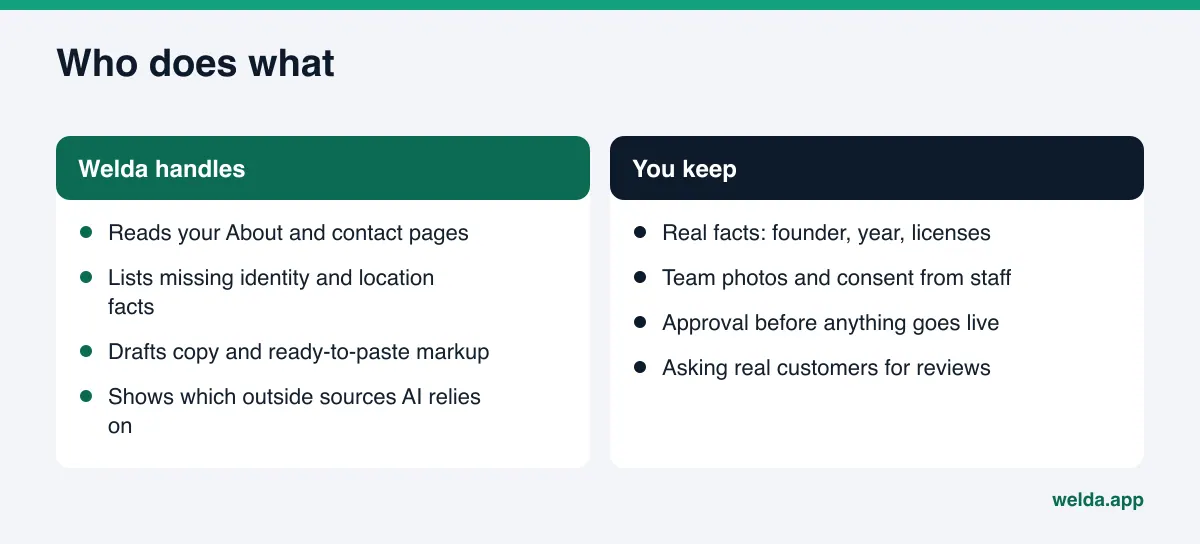
Welda is software that measures where a business appears in AI answers and fills the gaps on the business's behalf. For About page trust signals, three parts of Welda do the real work: the free site analysis, the to-do list in the panel, and the sources view.
The free analysis reads your page the way a machine does. It does not stop at the homepage. It also reads key inner pages such as services, pricing, About and contact. On those pages it checks for business markup, a written address, phone and location details, links from your site to your social and map profiles, and visible reviews and trust markers. For each gap, it states what it found, why it matters and how to fix it. You also get a ready-to-add fix pack for your site, business markup included. On top of that, the analysis asks five questions your customers might ask to an AI assistant that can search the web, and checks whether your business name comes up. It is a one-time snapshot, but it is a useful first look at how a business with weak trust signals can drop out of an answer. The free analysis works in English.
The to-do list asks you instead of guessing. The hardest About page facts are the ones only you know: the founder's name, the year you opened, your licenses, your team. When Welda cannot find these on your site or connected profiles, it does not make them up. It lists them as information it needs from you. You type each fact once, and it flows into every draft that uses it. Unfilled fields stay flagged in the preview, so a page with missing facts does not go live by accident.
Once the facts are in, Welda drafts the About page copy and stages it in the ready pages view for preview. On WordPress, Welda connects through a separate Editor user and an application password, with no code to install; the page opens on your site as a draft and goes live only when you approve it. On other platforms, Welda hands you the copy and markup as a package to apply by hand. Before anything is published, the compliance check flags patterns such as guarantees or superiority claims. It is not legal advice.
The sources view shows consistency outside your site. Half of your trust signals live elsewhere. The sources view shows which sites AI engines draw on for your questions and where you are missing or incomplete. Google Business Profile, Instagram and Facebook can be connected; anything that cannot be connected, such as a directory listing, appears as a manual task with ready-to-paste text beside it.
The rest of the panel (question-by-question results, competitors, a monthly report) helps you track the effect over time. The panel is in early access and is opening in stages, starting with businesses in Turkey. Regular four-engine measurement is being added during early access, and sample screens in the panel use representative data. What anyone can use today is the free site analysis, which runs in English and German. Pricing is discussed in the early access conversation.
Limits: what Welda does not do
About pages are about trust, so the limits deserve to be stated plainly.
- Welda does not invent facts. If it cannot find your founding year, founder or licenses, it asks. It will not write an estimated year, a made-up team or a credential you do not hold.
- No fake reviews. Welda does not write testimonials for your About page. It suggests linking to where your genuine reviews already live.
- You approve everything. Content lives on your own site; Welda does not host content. Nothing goes live without your approval. In healthcare there is no automatic publishing at all; every piece waits for approval.
- Some work stays with you. Handling negative reviews, claiming and verifying directory listings, and press outreach remain your job. Welda can draft text for them, but it does not take the steps an account owner has to take.
- No ranking guarantee. A strong About page makes it more likely that assistants identify you correctly, but no tool can guarantee you will be named in ChatGPT or any other engine. New content usually takes weeks to show up in AI answers.
Checklist: is your About page ready for AI?
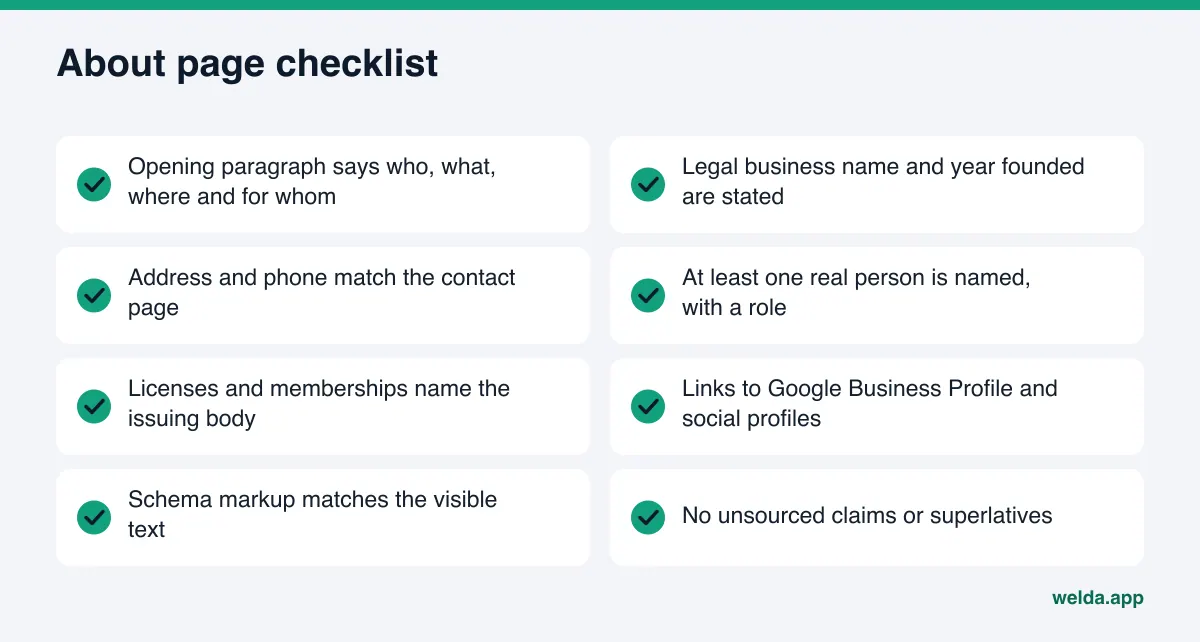
If you can answer yes to the questions below, your About page is readable for AI. Every no is a task.
| Question | How to check |
|---|---|
| Does the opening say who, what, where and for whom? | Have someone outside the business read the first three sentences. Can they say what you do? |
| Are your legal name and founding year stated? | Does the name on the page match your registration and invoices? |
| Are address and phone identical everywhere? | Put About, Contact, Google Business Profile, Yelp and BBB side by side. |
| Is at least one person named? | Search the page for a name and a role. |
| Can each license be verified? | Does each license name the issuing board, and link to its lookup if there is one? |
| Is there business markup? | Use the free analysis or a structured data testing tool. |
| Can visitors reach the page from the menu? | Is it one click from the homepage? |
The About page works together with the rest of your site. An FAQ section can carry the same trust signals as short answers: "How long have you been in business?", "Who will I actually see?", "Are you licensed and insured?" We cover that in FAQ pages for AEO.
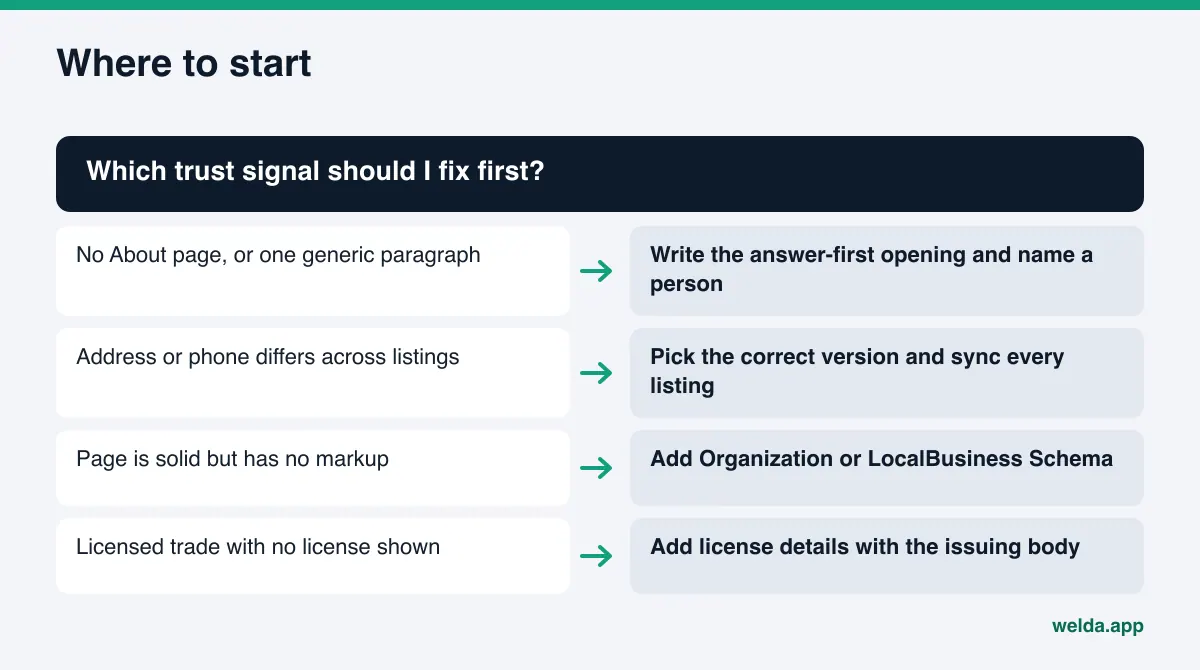
If you are not sure where to begin, the chart below helps you pick the first fix based on where your site stands today.
Frequently asked questions
Can a site without an About page still show up in AI answers?
It can, especially if the business has a strong footprint elsewhere. But the assistant then depends more on outside sources, and you have less chance to correct missing or outdated facts there. The About page is where you describe your identity in your own words.
How long should an About page be?
There is no set length. A page that answers who, what, where, for whom, since when and run by whom, with proof and links, is enough. Length should come from concrete facts, not filler.
Do I have to name my team members?
No, but naming at least the owner or the person customers deal with is a strong trust signal. Get consent before publishing anyone's name or photo.
Should business markup go on the About page or the homepage?
The core business entity is usually defined on the homepage. The About page can support it with the AboutPage type and extra fields such as founder and founding date. What matters is that markup across all pages describes the same business with the same facts.
Will Welda write my About page for me?
Welda drafts copy from what it finds on your site and connected profiles, and asks you for anything missing. The draft goes to preview and is not published until you approve it. It never adds invented facts.
How soon will changes show up in AI answers?
There is no fixed timeline. New content usually takes weeks to be reflected, and it varies by engine. To see the effect, ask the same questions before and after the change.
Make your identity easy to read
When an AI assistant recommends a business, it is making a trust call. It makes that call from facts it can read: who you are, where you are, who does the work, which licenses you hold, and whether outside sources agree. About page trust signals for AI are where those facts live on your site. Replacing generic lines with concrete facts, adding matching markup and syncing your listings are the most basic and most lasting steps in AEO.
Start by seeing how your site reads today. Run the free AI visibility analysis. It reads your About page and other key pages, lists the missing trust signals one by one, and gives you a fix pack ready to add to your site.