Do business directories still matter now that people ask AI? Yes, but for a different reason than they used to. When ChatGPT, Gemini, Perplexity or Google's AI Overviews recommend a local business, they do not rely on your website alone. They read your Google Business Profile, Yelp, the Better Business Bureau and the directories in your industry, and they compare what they find. Business directories for AI visibility are about confirmation, not backlinks: several independent sources saying the same thing about who you are and what you do.
Why business directories matter for AI visibility
For years, directory listings were mostly a link-building tactic. You submitted your business to a few hundred directories and collected a link from each. That approach stopped paying off a long time ago, and it is not what matters for AI answers either.
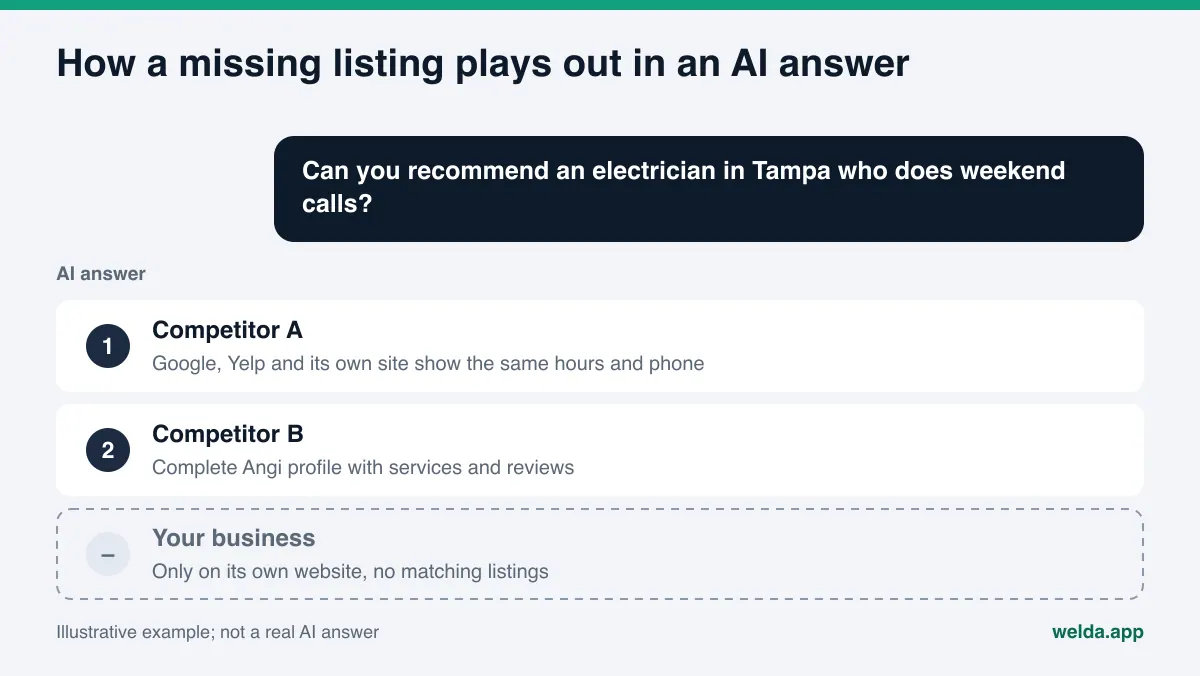
Think about what happens when a customer asks an AI assistant, "Can you recommend an electrician in Tampa who does weekend calls?" An assistant that can search the web reads several pages, combines what it finds and writes a short answer with two or three business names. To feel safe naming you, it needs two things. First, signals from more than one place that your business exists and that its details are current. Second, clear information showing that you actually fit the question: you are an electrician, you serve Tampa, you work weekends.
Directory listings supply both. Your website says you take weekend calls. Your Google Business Profile shows the same hours. Your Angi or Yelp profile lists the same phone number, the same service area and the same services. When those sources agree, the AI has an easy time including you. When they disagree, or when you only exist on your own site, the business with clearer data takes your spot.
This is part of answer engine optimization, or AEO: the work of making sure AI systems can find, understand and correctly describe your business. You will also see the same discipline called GEO, short for generative engine optimization. Whatever the label, directories are one of its most practical pieces, because the fixes are concrete and mostly in your control. If you want to see where your site stands right now, the free site analysis checks whether your address and phone can be read, whether your business markup is in place and whether your map and social profiles are linked from your site.
Which directories do AI tools actually use?
There is no single list. Sources change with the industry and with the question. The sites an AI cites for a hotel have little in common with the sites it cites for a plumber or a pediatric dentist. Still, the listings that matter for most US businesses fall into a handful of types.
- Map listings. Your Google Business Profile comes first for any business with a location or service area, followed by Apple Maps and Bing. This is where your name, address, phone, hours, categories and reviews live in the most structured form.
- Review platforms. Yelp and Tripadvisor carry reviews, photos and practical details. For restaurants, hotels and many local services they are frequently part of the picture.
- Industry directories. Healthgrades and similar sites for doctors and dentists, Angi and comparable marketplaces for home services, legal directories for law firms, wedding directories for venues. These carry the detail AI tools use to match you to a specific question: specialties, credentials, service areas.
- Trust and complaint sites. The Better Business Bureau shows how a business handles complaints. The goal there is not to collect listings but to keep the existing profile accurate and the complaint history answered.
- Local and civic directories. Your chamber of commerce, a city or neighborhood guide, a trade association member list. These are rarely the main source, but they add independent confirmation.
Which of these matter most for you is something you can find out rather than guess. Ask an AI tool a few of the questions your customers would ask, and note which sites are cited as sources in the answers. Do it for several questions and the pattern becomes clear quickly. That is a one-time snapshot, not a measurement; for an ongoing picture, the questions have to be asked repeatedly across engines.
Which listings to fix first
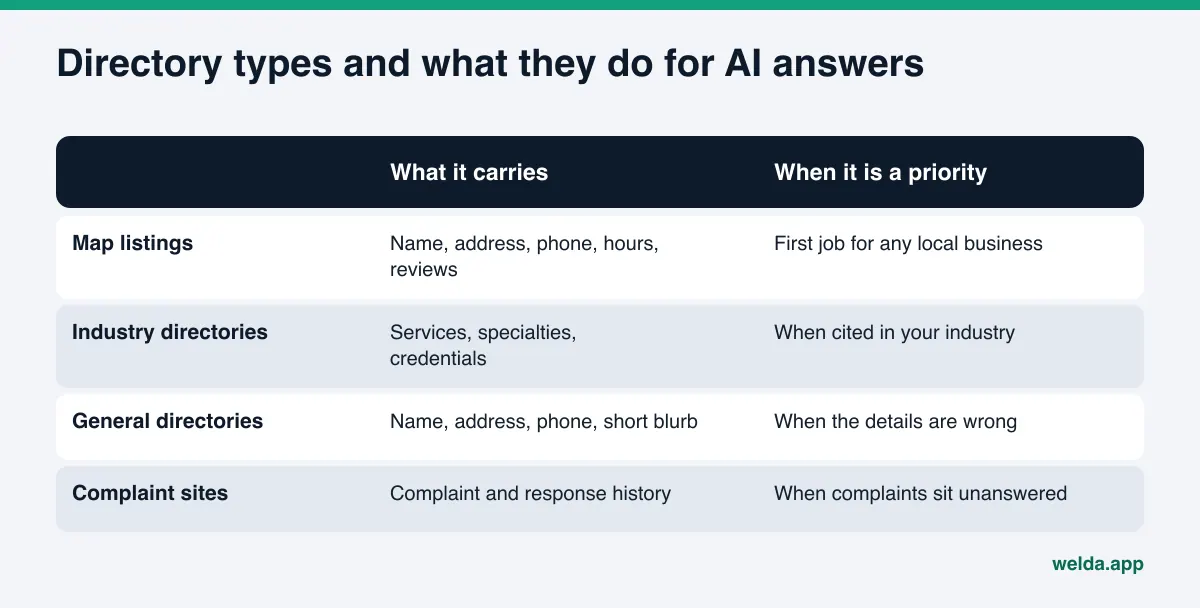
Most businesses either never start this work or start in the wrong place. A "submit to 300 directories" package is worth far less for AI visibility than one accurate, complete Google Business Profile. When you decide where to spend time, ask three questions about each listing:
- Do customers actually use it? Do people search this directory, read reviews there or call from it?
- Do AI tools cite it? Does this site show up as a source when AI answers questions about your industry and area?
- Is the information on it wrong right now? A listing with an old address or a disconnected number does more harm than having no listing at all.
Answering those questions usually produces a priority order like this one:
| Priority | Listing | Why |
|---|---|---|
| 1 | Google Business Profile | Customers see it first, and it is Google's own data; wrong hours or phone cost you calls directly |
| 2 | Any listing with wrong details | Old addresses and dead phone numbers can be repeated in AI answers |
| 3 | Directories cited in your industry | AI tools read services, specialties and service areas from them |
| 4 | Yelp, Apple Maps, Bing | Widely used, and they confirm the same facts independently |
| 5 | BBB and complaint sites | Unanswered complaints weaken trust signals |
| 6 | General directories | Leave correct ones alone; fix wrong ones; do not spend time creating new ones |
Notice what is missing: "get listed in as many directories as possible." For AI answers, consistency and relevance count, not volume. An empty profile on a directory that has nothing to do with your industry does not answer anyone's question.
How to clean up business directories for AI visibility, step by step
The work is a one-time cleanup followed by a short routine. The order below is built so a small business can get through the cleanup in a week or two of spare hours.
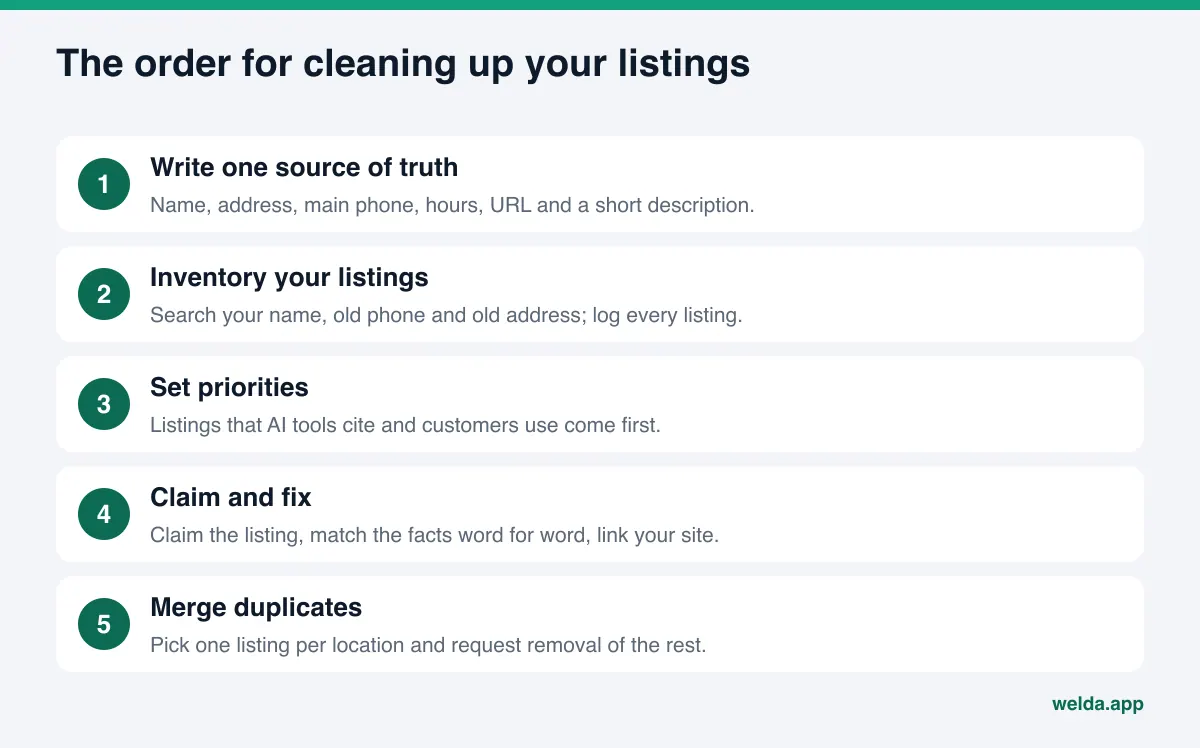
1. Write a single source of truth
Before you touch any listing, write your official details in one document: the name on your sign, the full address in one fixed format, the main phone number customers should call, regular hours, holiday hours, your website URL and a two- or three-sentence description of what you do and where. Decide on formatting details now. "Suite 200" or "Ste 200"? "Street" or "St."? Every listing you create or correct from here on is copied from this document. Our guide to NAP consistency for AI search explains why name, address and phone need to match character for character.
2. Find every existing listing
Search for your business name, any former name, your old phone numbers and your old addresses, one at a time. Log every directory listing that comes up in a simple spreadsheet: site, listing URL, the name, address, phone and hours shown, and whether you control the listing. Searches for old phone numbers tend to produce the most surprises, because they surface listings someone created years ago and forgot about.
3. Set priorities
Rank each listing with the table above. If you do not know which directories AI tools cite in your industry, start with the snapshot method described earlier and refine as you go.
4. Claim and correct
Most directories let the business owner claim a listing or submit corrections. Once you have claimed it, fill in every field exactly as in your source of truth. Choose categories carefully; a wrong primary category matches you to the wrong questions. List your services individually. Add a link to your website and click it to make sure it works.
5. Merge or remove duplicates
Two listings for the same location can look like two different businesses. Reviews and details get split, and neither listing looks strong. Choose the listing with the most history as the main one and use the directory's merge or removal process for the other.
6. Link your website back to your listings
Directories point to your website; your website should point back. The cleanest way is the sameAs property in your business markup, which tells machines which map, review and social profiles belong to the same business. The property is defined on schema.org, and our guide to schema markup for AI search walks through adding it.
7. Put it on the calendar
A move, a new phone system, new hours, a new service line. Each one changes your source of truth, and every priority listing has to change with it. A short check once a quarter is enough for most businesses.
What every directory listing should include
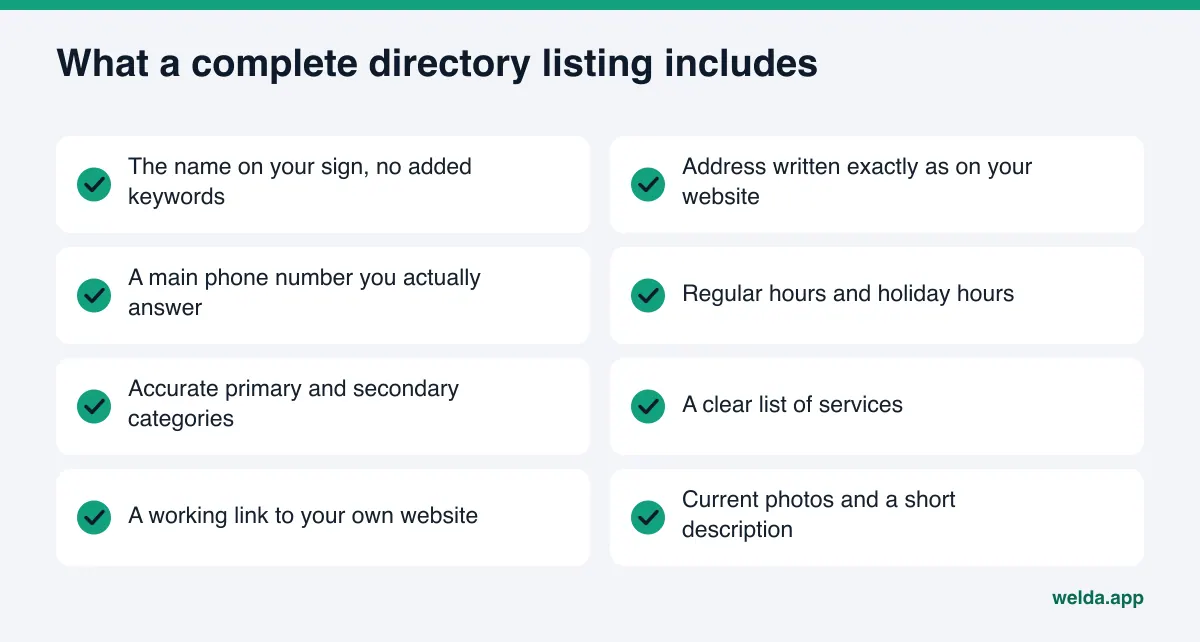
Claiming a listing is half the job. For AI visibility, the value lies in a listing complete enough to answer a customer's question. An empty field is a gap the AI fills from another source, guesses at or uses as a reason to pick someone else.
A few mistakes come up again and again:
- Stuffing keywords into the business name. "Example Electric" becomes "Example Electric Tampa Best 24/7 Electrician." That breaks Google's guidelines for representing your business, which ask for your real-world name, and it makes it harder to match your listings to each other.
- A different description everywhere. The wording does not need to be identical, but what you do, where you do it and for whom should be the same on every listing.
- Call tracking numbers as the main phone. When one directory shows your main line and another shows a tracking number, your phone data scatters. If you use tracking numbers, keep your main number as the primary listed number.
- Vague services. "Dental care" says less than a list of the procedures you actually offer. Specific services help AI tools match you to specific questions.
- A missing or outdated website link. If your domain changed, every directory link should change too.
Outdated, duplicate and unclaimed listings
Once you have your inventory, you will likely find listings you never created. Some directories pull data from other sources automatically. A former employee may have set up a profile years ago. A listing from before your last move may still show the old address.
You do not need to chase all of them. For each one, ask: does a customer or an AI tool actually look at this listing, and is the information wrong? If both answers are yes, it is a priority. If the details are correct but nobody looks, leave it. If the details are wrong but the site is an old list nobody visits, submit a correction and move on.
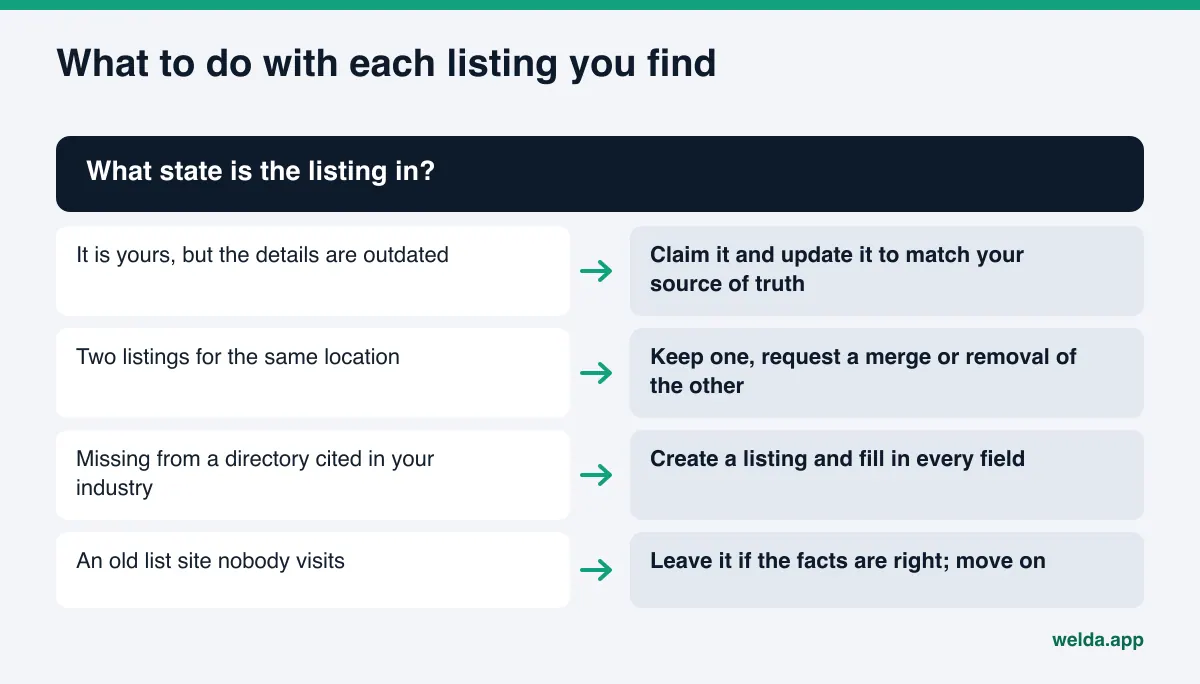
Outdated facts can be stubborn in AI answers. If an AI tool still gives out your old address months after you moved, the cause is usually not one listing but several old ones adding up. Our guide to fixing wrong information ChatGPT gives about your business covers how to trace where the wrong detail comes from.
Example scenario: a dental practice that moved
Here is an illustrative example, not a real business. An example dental practice moved to a new building in the same town two years ago. Its Google Business Profile and website show the new address. A search for the old phone number, however, turns up three listings: a general directory with the old address, a healthcare directory with the old address and old phone, and a second profile created under the name of a dentist who has since left the practice.
The order is straightforward. The healthcare directory listing comes first, because health questions often pull from directories like it: claim it and update the address, phone, services and hours from the source of truth. Next, use that directory's process to correct or remove the departed dentist's profile. Finally, submit a correction to the general directory and wait. In healthcare, listing copy should also avoid price promises, guarantees and superiority claims; check the applicable rules at their source and ask your own counsel if you are unsure.
How Welda does this work
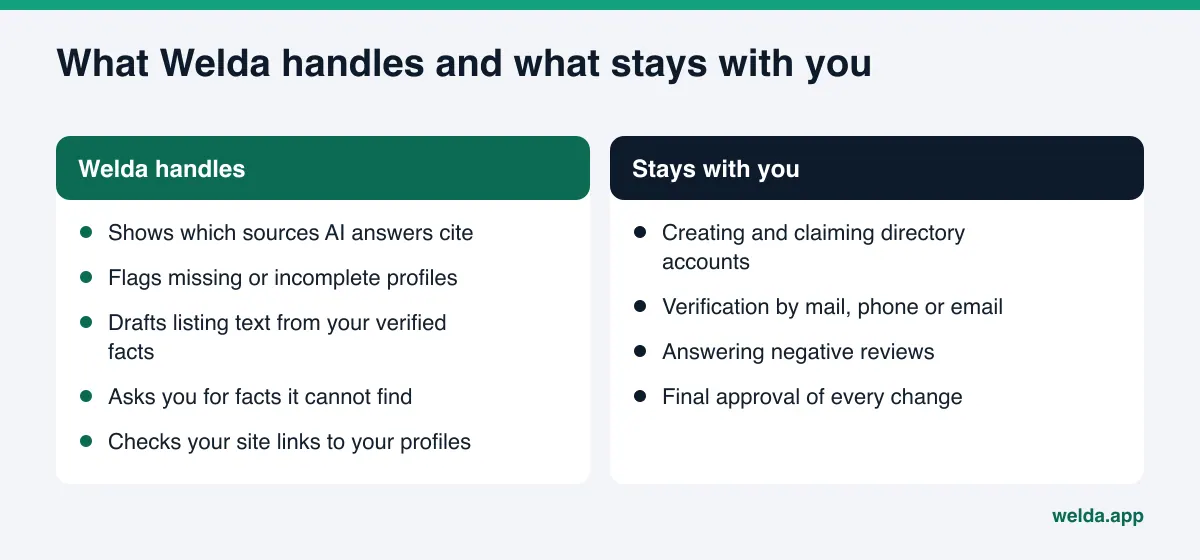
The hard part of directory work is knowing which listings matter and keeping them right over time. Welda takes on two things here: showing which sources AI answers actually cite in your space, and putting the work for each source in front of you with ready-to-use text. Creating and verifying the listings stays with you.
The Sources view: which directories count
In the Welda dashboard, the Sources view lists the sites that AI answers cite when your customers' questions are asked. Each row shows the site, its type (directory, booking platform, social, forum, your own site), its share of citations and your status there: a complete profile, an incomplete one, an unverified one or nothing at all. Next to it sits the suggested action, for example "complete the profile, add photos and hours."
This turns the priority table above into something based on measurement. Instead of guessing which directories to work on, you see the ones AI tools actually cite for your type of business, and you skip the ones nobody cites. A breakdown by source type shows how much of the picture comes from directories and how much from your own site.
The task list: ready text, your approval
Most directories have no publishing connection a third party can use, and Welda does not log into them on your behalf. Instead, each listing becomes a "do it yourself" task in the task list, with listing text already prepared: description, services, hours. You copy it, paste it into your listing and mark the task done.
Welda does not invent facts it cannot verify. If it cannot read something from your site, such as holiday hours or the name of the person in charge, it asks you. You answer once, and that fact flows into every prepared text, so every directory gets the same verified details. Google Business Profile, Instagram and Facebook can be connected directly; if they are not, they show up on the task list too.
A clear word on availability. The Welda dashboard is in early access, opening in stages and first to businesses in Turkey. Regular measurement across four AI engines is being added during early access, and the dashboard examples you may see use representative data. What anyone can use today is the free site analysis, which works in English. It checks the site side of directory work: whether your address, phone and location details can be read, whether business markup is in place and whether your map and social profiles are linked from your site. It also asks a web-enabled AI assistant five questions your customers might ask and checks whether your business name appears in the answers. That is a one-time check. Pricing is discussed in an early access conversation.
Limits: what Welda does not do
- Directory accounts stay with you. Welda does not create accounts, claim listings or receive verification codes for you. You should own your listings, and verification is the owner's job.
- No mass directory submissions. Pushing your business into hundreds of directories is not what Welda does. It focuses on the sources AI answers actually cite.
- No fake reviews. Reviews on directories must come from real customers. Welda can draft replies to reviews; handling negative reviews stays with you.
- No ranking or placement guarantees. Fixing your listings improves the odds that AI tools describe and recommend you correctly. It does not guarantee you will appear in ChatGPT or anywhere else.
- Results take time. Changes to your listings usually take weeks to show up in AI answers.
These limits are deliberate. Handing control of your directory accounts to a third party means losing control of your own business facts. With Welda, publishing approval always stays with the business.
Business directory checklist for AI visibility
Use this once when you start and then every quarter:
| Check | If yes | If no |
|---|---|---|
| Do you have a written source of truth? | Check every listing against it | Write it first |
| Is your Google Business Profile claimed and verified? | Review hours and categories | Start here |
| Have you searched your old phone and old address? | Fix what turned up | Do it today |
| Do you know which directories are cited in your industry? | Complete your listing there | Ask AI tools sample questions, or measure |
| Are there duplicate listings? | Request a merge | Recheck next quarter |
| Does your site link to your profiles with sameAs? | Update it when you add a profile | Add it to your business markup |
| Are there unanswered complaints on BBB or Yelp? | Reply calmly and sign your name | Keep monitoring |
Directory work is one part of a broader AEO effort. If you are weighing whether to handle it yourself or bring in help, our overview of what AEO services should cover lays out the pieces.
Frequently asked questions
Is it better to be listed in as many directories as possible?
No. For AI answers, accuracy and relevance matter, not the number of listings. A few complete, correct listings on directories that are cited in your industry beat a hundred empty profiles nobody reads.
Do paid directory upgrades improve AI visibility?
A paid plan may make you more visible inside that directory. Whether AI tools use that directory as a source is a separate question. Check whether it is cited for your industry before you pay.
I cannot delete an old listing. What now?
Use the directory's correction or removal process and keep a record of your request. The way to reduce the weight of a listing you cannot remove is to make sure the correct details appear consistently on more, and stronger, sources.
Will Welda create my directory listings for me?
No. Directory accounts stay with the business. Welda shows which directories matter, prepares the listing text and puts the job on your task list. Creating, claiming and verifying the listing is up to you.
How long until a corrected listing shows up in AI answers?
Usually weeks, and it varies by engine. Rather than expecting immediate change, recheck after some time has passed.
If my website is strong, do I still need directories?
Your website is the primary source of your business facts. But AI tools look for confirmation elsewhere before recommending a business. If your Google Business Profile and industry directories do not tell the same story, that confirmation stays weak, however good your site is.
See where your listings stand
Business directories for AI visibility come down to a short list of jobs: find the listings that matter, fill them from one verified set of facts and connect your website to them. Start with your own site. The free site analysis shows whether your address, phone and business markup can be read, whether your map and social profiles are linked, and gives you a ready-made fix package for what is missing. It is free once per site.