ChatGPT is giving wrong information about my business. What should I do? ChatGPT rarely invents your hours, address or services out of thin air. Most of the time it repeats something old, incomplete or contradictory that it found online. There is no form where you can tell ChatGPT to fix it, so the work is to find the source of the error, correct that source and your own website, and then ask the same questions again on a schedule.
Why does ChatGPT give wrong information about my business?
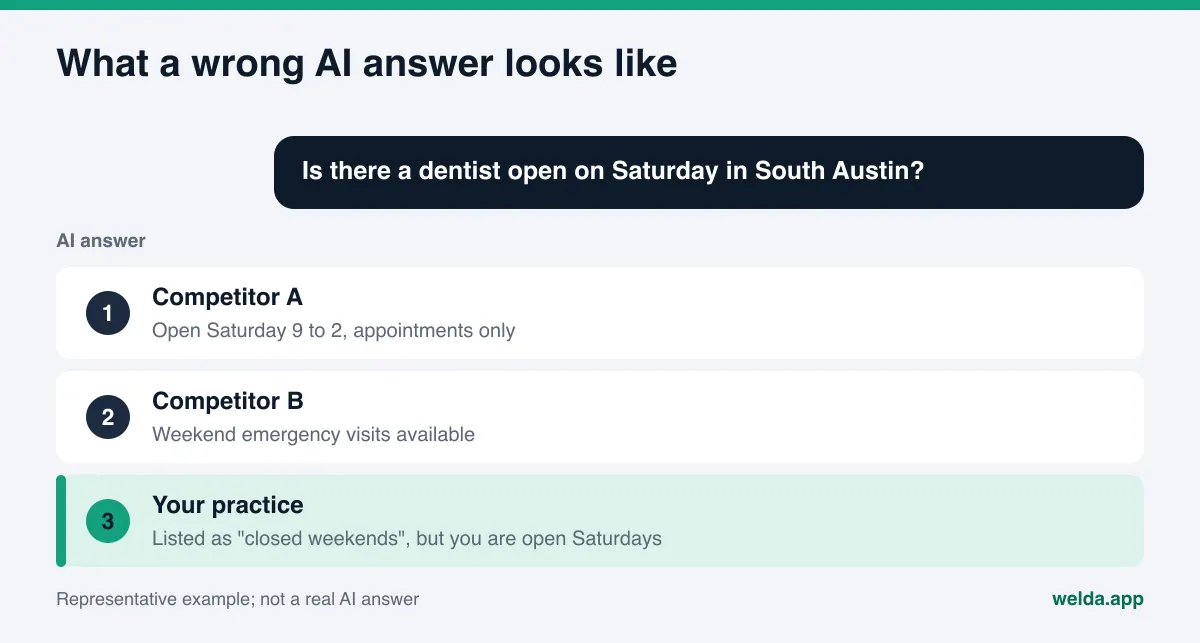
When a customer asks ChatGPT "Is there a dentist open on Saturday in South Austin?" or "Which plumbers in Plano do same-day water heater repair?", the answer can come from two places. The first is what the model learned during training. That material was frozen at some point in time, so if you moved, changed your hours or stopped offering a service, the model may simply not know. The second is a live web search. When ChatGPT searches, it builds the answer from the pages it finds at that moment and shows source links under the answer.
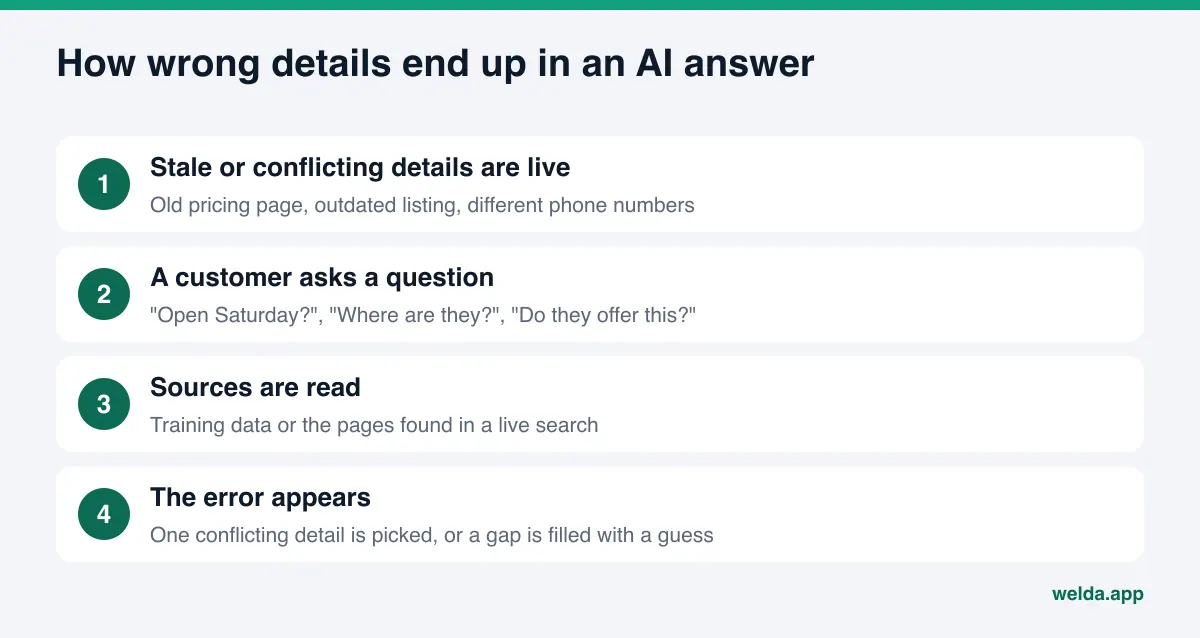
Wrong information usually enters through one of these two paths for one of a handful of reasons:
- An old page is still live. A promotion page from two years ago, an outdated price list or a contact page with your previous address can all be found by search.
- Your listings disagree. If Google Business Profile shows one phone number, Yelp another and an old local news article a third, the AI will pick one of them. Which one it picks is not up to you.
- The information was never written down. If your site does not list your hours, or your services are summed up in a single line, the model may fill the gap with a general pattern. "Most dental offices are closed on Saturday" may be wrong for you.
- Another business has a similar name. If your name overlaps with a company in another city or a business that used to operate at your address, its details can end up attached to you.
- What other people wrote. An old BBB complaint, a years-old Yelp review or a forum thread can carry a situation that no longer applies as if it were current.
What these have in common is that the source of the error almost always sits outside the AI. The model summarizes the material in front of it. If that material is contradictory or stale, so is the summary. That is why the fix is in the material, not in the model.
A quick way to see where you stand today is the free site analysis. It reads your business details, address and phone number, profile links and FAQ section one by one and lists what is missing or inconsistent.
Why wrong AI answers hurt more than a lower ranking
In classic search, a customer sees a list of results, clicks through to your site and reads the details from you. In an AI answer, the customer often decides without clicking anything. An answer that says "closed on Saturday" means that person never calls. You will not even see the loss: no missed call, no abandoned booking, just a customer who went somewhere else.
The second problem is trust. A customer arrives quoting an old price from ChatGPT, hears a different number at the counter and reads it as your inconsistency. For clinics, hotels and home service companies, that is friction before the first real conversation. A wrong service detail ("this hotel allows dogs") puts both the guest and your staff in an awkward spot.
Third, wrong information tends to repeat itself. Details that appear in one answer can be copied into other sites and content. An error that is not corrected early can show up in more places over time. That is why this belongs under reputation, not just under search. Our guide to AI reputation management covers that broader view.
This is also where AEO (answer engine optimization) comes in. AEO is the work of making sure AI answer engines can find, understand and correctly repeat information about your business. Some people call the same work GEO, short for generative engine optimization. Fixing wrong answers is one of the most practical forms of AEO, because the goal is concrete: one specific sentence in one specific answer should change.
Which errors come from where, and where do you fix them?
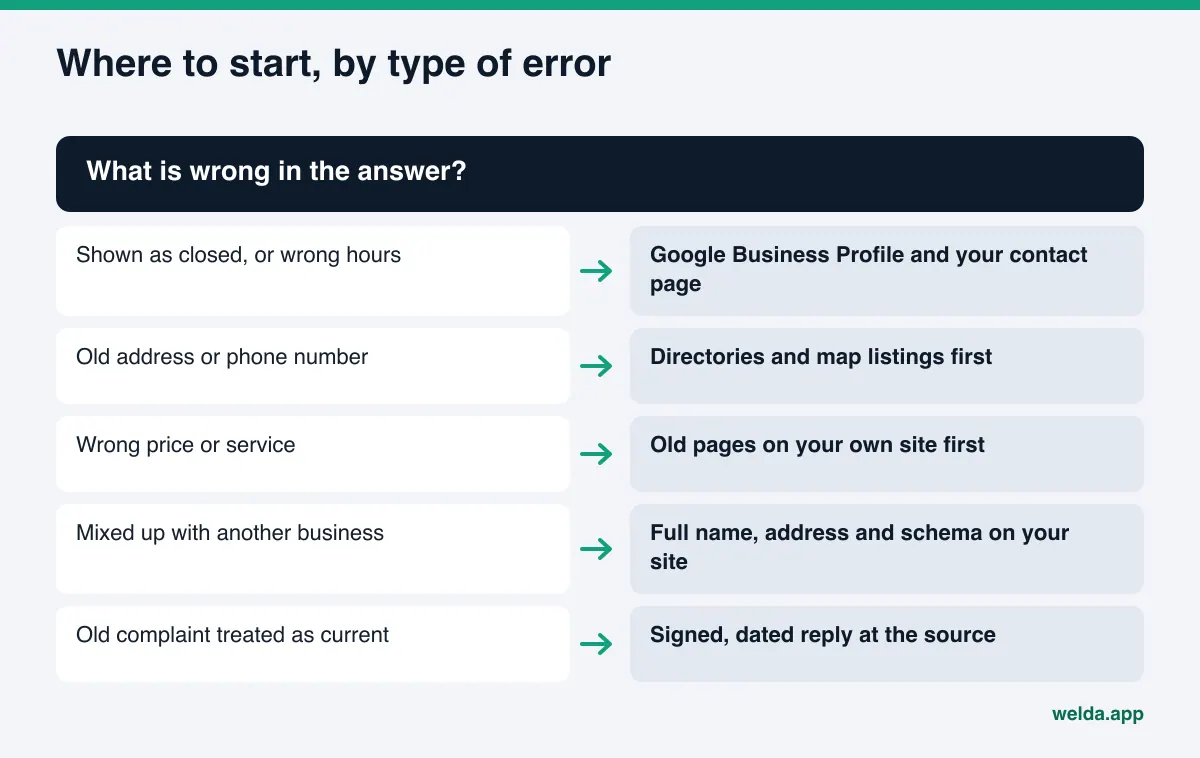
Sorting the error by type before you start keeps you from spending time in the wrong place. The table below lists error types that local businesses run into, their likely sources and where to look first. It is a checking order, not a frequency measurement.
| Type of error | Likely source | Where to look first |
|---|---|---|
| Shown as closed, or wrong hours | Stale profile, holiday hours never entered | Google Business Profile, your contact page |
| Old address | Listings not updated after a move | Google Maps, Yelp, Apple Maps, local directories |
| Wrong phone number | Different numbers on different sites | Site footer, LocalBusiness schema, directories |
| Outdated price | Old pricing page or PDF still live | Old pages on your own site |
| Service you do not offer | Vague service copy, mix-up with a similar business | Service pages, FAQ |
| Confused with another business | Similar name, similar company nearby | Full legal name, address and profile links on your site |
| Old complaint treated as current | BBB, Yelp, Tripadvisor, Angi, forum threads | A signed, dated public response at the source |
The last row needs extra care. You cannot delete content on someone else's platform. What you can do is post a clear, calm and dated response in the same place. That way, an AI reading the page sees your current answer next to the old complaint. For healthcare practices, check what your profile on Healthgrades or similar sites says, too, and keep any reply free of patient details.
How to fix wrong information about your business in ChatGPT, step by step
The steps below take you from spotting the error to measuring the fix. Doing them once is not enough. AI answers change, so the same check has to be repeated at intervals.
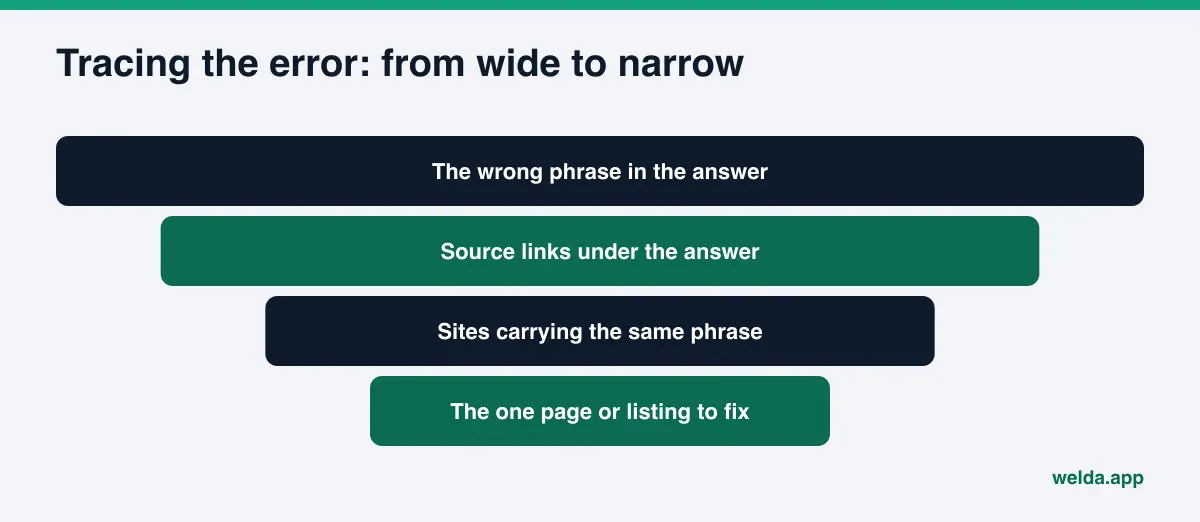
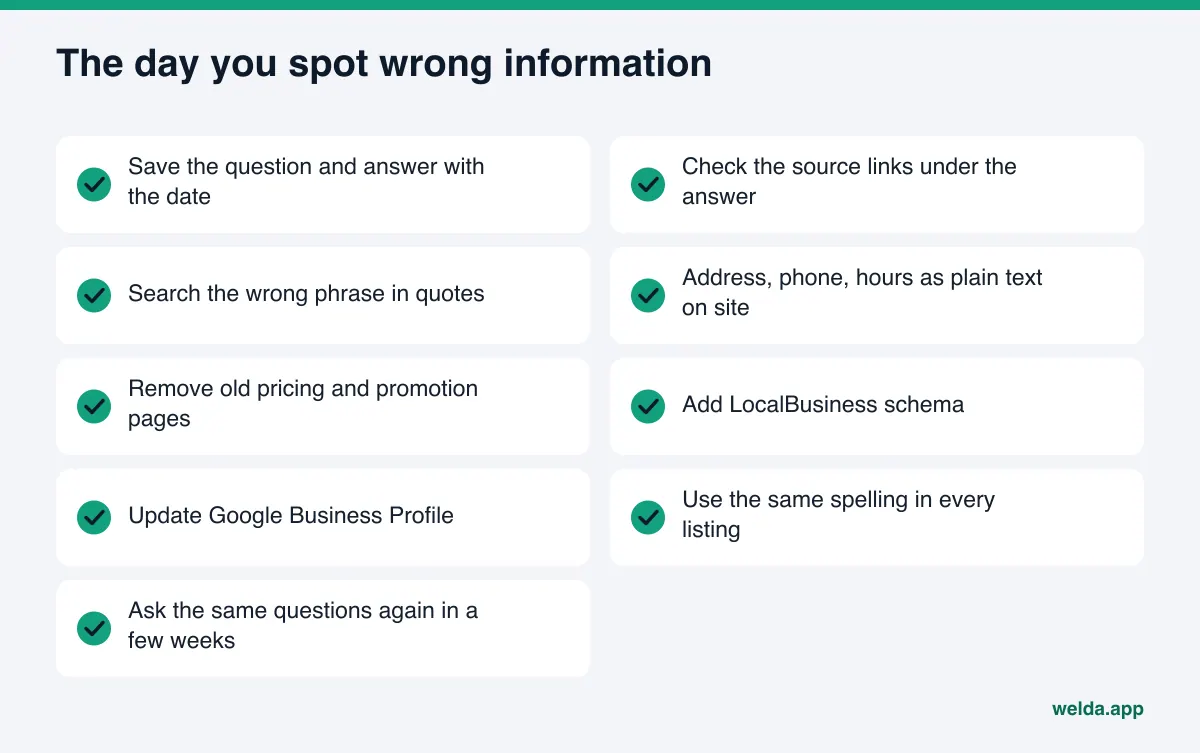
- Document the error. Write down five to ten questions your customers might ask: "dentist open Saturday in [neighborhood]", "pet-friendly boutique hotel in [city]", "[your business name] hours". Ask each one in ChatGPT and save the answer with the date. Highlight the wrong detail.
- Check the source links. If the answer shows sources, you can often see which page the error came from. If it does not, search the wrong phrase in quotes on Google. Whatever site carries the same sentence is your first suspect.
- Make your website the single source of truth. Your address, phone number, hours, service list and pricing policy should be written on your site as plain text. Remove or update old promotion pages and old price files. If you moved, mention the old address only as "we used to be at".
- Add LocalBusiness schema. Structured data with your name, address, phone, hours and profile links helps machines read your details without mixing them up. Our guide to schema markup for AI search covers the details.
- Update your Google Business Profile. Correct regular hours, special hours, address and phone. Google's own help page explains that edits are reviewed before they go live and that Google may also collect business information from other sources, which you can review under collected info (Google Business Profile Help). That is why it is worth checking that section, not just your own edits.
- Align your listings one by one. Beyond Google, update Yelp, Apple Maps, BBB, Tripadvisor, Angi or whichever directories matter in your industry. Spell your name, address and phone the same way everywhere.
- Respond on other people's platforms. If an old complaint or a wrong review is feeding the error, post a signed, dated response with the current facts. Do not argue; correct the record.
- Check access. ChatGPT's search features find sites through a crawler called OAI-SearchBot. According to OpenAI's documentation, sites that opt out of it in robots.txt are not shown in ChatGPT search answers (OpenAI crawler documentation). If your site blocks it, ChatGPT has to take your details from other sites instead of from you.
- Wait, then measure again. Ask the same questions a few weeks later. If the answer changed, note it. If not, go back to step two and look for another source.
You can also flag a wrong answer with ChatGPT's feedback option. That does not remove the source of the error; when someone else asks the same question, the answer is built from the same pages again. Give the feedback, but do the real work at the source.
Example scenario: a home service company that changed its service area
The business in this section is made up; it is here to show how the steps play out. Picture an HVAC company that stopped serving one suburb last year to focus on two others. The owner asks ChatGPT which companies do furnace repair in the suburb they no longer cover and finds their own name in the answer, with an old phone number.
Step one: the owner saves the answer with the date. Under it are two sources: a home services directory listing and an old page on the company's own site titled "Service Areas", which still lists the suburb. Searching the old phone number in quotes turns up a local chamber directory as well.
The fix happens in order of control. First, the service areas page on the company's own site is rewritten, the phone number in the footer and in the LocalBusiness schema is checked, and a short FAQ entry states which areas are covered. Next, the service area and phone in Google Business Profile are updated. Then the directory listing is edited from the owner's account. Finally, the chamber is sent a short note with the new number; whether and when they change it is up to them.
A few weeks later the same question is asked again. The point of the scenario is not a result but the sequence: start with the source you control most (your own site) and finish with the one you control least (someone else's page). Because each step has a date, it is easier to tell what made the difference when the answer changes.
One source of truth: why your website belongs at the center
Directories, profiles and review sites are not fully under your control, and some get updated without your input. Your website is. That is why the fix starts there. When an AI has to choose between conflicting details, clear and consistent information on the business's own site is a strong anchor.
In practice, making your site the source of truth means:
- Your contact page shows address, phone and hours as plain text, not inside an image.
- Each service has its own section or page, and you say clearly what you do and what you do not do.
- Your FAQ answers the exact questions AI got wrong: "Are you open on Saturday?", "Do you serve [suburb]?", "Do you allow pets?"
- Pages show when they were last updated, and old details do not sit next to new ones.
- Your site links to your social and map profiles, so it is clear which profiles are yours.
Freshness matters here because an AI may weigh an old page and a new page the same way. Our piece on content freshness for AI search covers which pages to review and how often. If your specific problem is being shown as closed, what to do when AI says your business is closed walks through that case.
How Welda helps you trace and correct wrong AI answers
Welda's role here has two parts: making visible which sources AI answers lean on, and preparing missing or inconsistent information on the business's behalf. Welda does not decide for you whether an answer is right or wrong; you know the facts of your business. What it does is put together the material you need to trace the error.
The free site analysis: get your own house in order first. The analysis reads your homepage and a few inner pages such as services, pricing, about and contact. For this topic, the checks that matter most are whether you have LocalBusiness schema, whether your address, phone and location are clearly written on the page, and whether your social and map profiles are linked from the site. For each gap it shows what it found, why it matters and how to fix it, and the ready-to-add fix package includes the schema code. It also asks five questions a customer might ask to an AI assistant that can search the web and checks whether your business name comes up in the answers. That is a one-time check. It does not verify every fact in the answer, but it shows you which questions mention you. The free analysis works in English and German.
The sources view: where the error may come from. In the Welda dashboard, the sources view lists the sites AI answers cite and your status on each: profile present, incomplete, unverified, or site not reachable. For a business hunting for wrong information, that list shortens the "find the source" step. If a booking or review site that answers cite often shows your profile as unverified, that is a likely place for stale details and the first place to look.
The to-do list: it asks instead of guessing. When Welda drafts a profile text or a page suggestion, it leaves blank whatever it could not read on your site and asks you. Once you fill in hours, a contact name or the scope of a service, that answer is applied to every draft. This is the opposite of the wrong-information problem: new content does not fill gaps with guesses. Profiles with no publishing connection appear as manual tasks with the ready text next to them; copying it in and verifying it is the account owner's job.
Beyond that, the questions view shows, question by question, whether your name appears, along with the cited sources. Each question is asked three times per engine, and the spread of those runs gives a ± margin. A before-and-after comparison and a one-page monthly report help you see whether a fix reached the answers. Publishing approval stays with you, content always lives on your own site, and Welda does not host content. On WordPress, Welda connects through a separate Editor user and an application password without installing code; drafts open on your site and go live once you approve them.
A plain note on status: the Welda dashboard is in early access and is opening first in Turkey. Regular measurement across four engines is being added during early access, and sample screens show representative data. The part anyone can use today, in English, is the free site analysis. Pricing is discussed in an early access call.
How long does a correction take to show up?
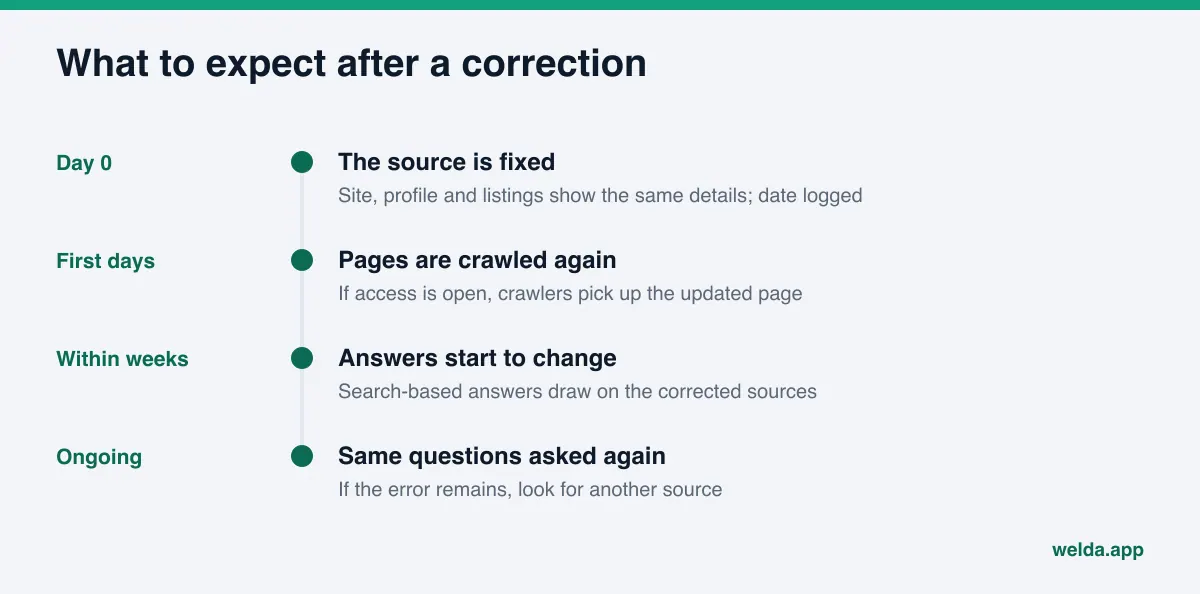
ChatGPT's answer does not change on the day you fix the source. For answers that use search, the change depends on the corrected page being found. For answers that do not search, the training data matters, and that updates far more slowly. New content usually takes weeks to show up in AI answers, so measurement has to be a routine, not a one-off.
Three things help when you track it. First, ask the same question several times; AI answers are not identical every time. Second, treat "the error is gone" and "you are mentioned with the right details" as two separate outcomes and record both. Third, log the date of every fix so you can connect a change in the answer to a specific action. For more on following the sources behind an answer, see how to get cited by AI.
Limits: what Welda does not do or promise
Honesty matters here, because any offer to "delete the wrong answer from ChatGPT" is not realistic.
- It cannot edit the answer directly. Neither Welda nor anyone else can rewrite the answer ChatGPT gives to a specific question. What can be fixed are the sources the answer is built from.
- No guarantees. Welda does not guarantee rankings or that you will appear in ChatGPT. Nor can anyone guarantee when the corrected details will show up.
- It does not make things up. If Welda cannot find a detail on your site, it asks you rather than guessing.
- It cannot fix other people's platforms. Negative reviews, directory accounts and press outreach stay with the business. Welda can draft a reply, but posting it on those accounts is your job.
- No fake reviews. No invented reviews or content are written to correct a wrong impression.
- No unapproved sensitive content. In healthcare, nothing is published automatically; every piece goes to approval and patient data is not sent to AI.
The compliance check comes with a limit of its own. It flags patterns such as pricing claims, guarantees, superiority claims and diagnostic suggestions before publishing, so you do not add a new risky statement while fixing an old one. It is not legal advice and has not been reviewed by legal counsel. In the US, claims in marketing copy fall under FTC truth-in-advertising rules, so the final call on wording stays with you and your advisers.
Checklist: the day you spot wrong information
Use the list in the figure above on the day you notice the error, and write a date next to each item. If you are not sure where to start, let the type of error decide.
| Question | If yes | If no |
|---|---|---|
| Are the correct details on your site as plain text? | Go to the next question | Fix your site first |
| Does Google Business Profile match your site? | Go to the next question | Update it and review collected info |
| Does the answer show a source link? | Fix that source or respond there | Search the wrong phrase in quotes |
| Does robots.txt allow OAI-SearchBot? | No access problem | Revisit that setting as a deliberate choice |
| Did you re-check a few weeks later? | Log the result | Put a date on the calendar |
Frequently asked questions
If I tell ChatGPT "that is wrong", will it fix the answer?
Correcting it inside a chat may change the answer in that conversation, but it does not change what another user gets for the same question. Lasting fixes happen in the sources the answer is built from.
Is there an official form to submit my business information to ChatGPT?
There is no form where businesses register their details directly with ChatGPT. Because answers that use search are built from web pages, your own site, your Google Business Profile and your listings are the practical way to do it.
How long until the wrong information goes away?
There is no fixed timeline. For search-based answers, the corrected page has to be found first, and new content usually takes weeks to show up. Ask the same questions at regular intervals to track it.
ChatGPT is mixing my business up with a competitor. What should I do?
This usually comes from a similar name or similar services nearby. State your full legal name, address and profile links clearly on your site, add LocalBusiness schema and use the same spelling across every listing.
Does Welda detect wrong information automatically?
Welda does not decide for you whether an answer is accurate. It shows the cited sources question by question and lists where you are missing on the sites AI relies on. You recognize the error; finding its source and preparing the correction becomes easier.
An old complaint is causing the error. Can I get it removed?
You usually cannot delete content on someone else's platform. A signed, dated and calm public response with the current facts lets every reader, and the AI, see the current situation. If there is a legal issue, talk to an attorney.
First step: see what your own site is saying
When ChatGPT gives wrong information about your business, it is usually a sign that the facts about you are scattered across the web. Start the fix where you have the most control: your own website. Run the free site analysis. It reads your schema, address and phone, profile links and FAQ, explains how to fix each gap and gives you a ready-to-add fix package. It is free once per site, your results link arrives by email and stays open for 14 days.