AI says my business is closed. What should I do? First, pin down which kind of closed the answer means: permanently closed, temporarily closed, closed at certain hours, or confused with another business. Then trace that claim to its source and fix it there. The source is usually a map listing, an old directory entry or missing hours on your own website, and the correction typically takes weeks to show up in AI answers.
"AI says my business is closed" has become a common complaint from owners of perfectly open businesses. A customer asks ChatGPT, Gemini, Perplexity or Google's AI Overviews for a place that is open nearby, and the answer either skips you or, worse, says you appear to have shut down. This guide explains where that closed signal comes from, the order to fix it in, and how to check whether your website clearly tells AI that you are open. The broader discipline is called AEO, answer engine optimization; you will also see GEO (generative engine optimization) used for the same goal. To see how your site reads to AI today, run a free AI visibility analysis. It checks your address, phone and location details, your business schema, and whether your map and social profiles are linked from the site.
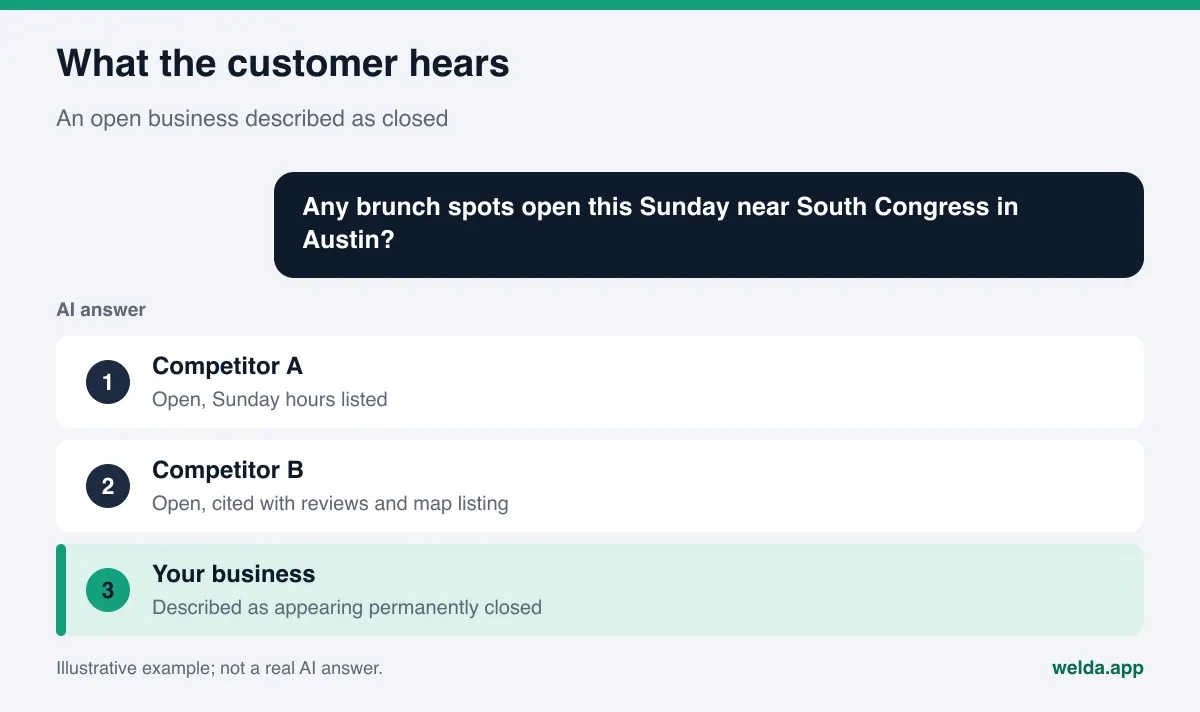
AI says my business is closed: what is actually going on?
An AI answer about a local business is not pulled from one official record. Assistants that search the web read several pages, look at map and business listings, and blend what they find into a single paragraph. If one of those sources says you are closed and the others do not clearly say you are open, the answer can easily tip toward closed.
That means there are really two problems. The first is the wrong fact itself: an open business is labeled closed. The second is missing evidence: nothing strong and consistent confirms that you are open. The first can sometimes be fixed by correcting one listing. The second takes a consistent picture across your website, your map listings and the directories AI reads. In practice the two usually show up together.
This is the most damaging version of the broader problem of ChatGPT giving wrong information about your business. A wrong price or a missing service makes a customer hesitate. A closed label removes you from consideration entirely. Nobody calls, books or drives to a place they have been told is shut.
Which businesses run into this most?
Any business can be hit, but some situations make it much more likely:
- Businesses that moved. A listing at the old address correctly shows as closed. If the new location is weaker or not clearly connected, AI may treat the old record as the whole story.
- Businesses that closed for a while. A remodel, a slow season or a temporary shutdown can leave a temporary closure flag or a website banner in place long after you reopened.
- Seasonal businesses. A beach rental shop or a ski-town restaurant that does not state its season clearly can be read as permanently closed in the off-season.
- Businesses under a new name or owner. Listings under the old name may be closed while the new name has little history yet.
- Businesses with a similar name nearby. If a business with a similar name closed in your area, AI may blend the two.
If you fall into one of these groups, fixing it once is not the end. Every move, remodel or seasonal closure is a reason to run the same check again.
Diagnose first: which kind of closed?
"Closed" can mean four different things, and each has a different starting point. Before you change anything, record the exact answer: the question you asked, the engine that answered, the date, and the precise words used. Ask the same question a few times as well. AI answers vary from one run to the next, and one odd answer is a weaker signal than a pattern.
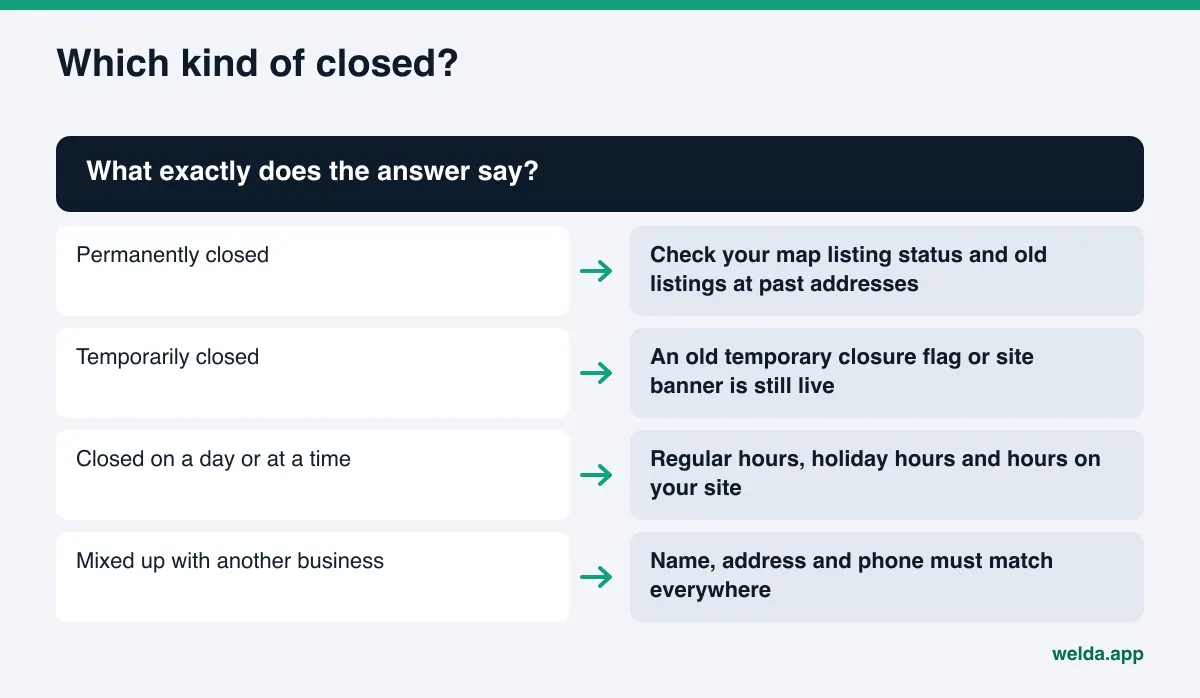
- Permanently closed. The most serious case. It usually traces back to a map listing marked permanently closed, an old address that shows as closed after a move, or an old news article or forum post saying you shut down.
- Temporarily closed. Typically a temporary closure flag that was never removed, or a forgotten banner on your website saying something like "we are closed until further notice."
- Closed on a certain day or at a certain time. Missing or outdated hours lead to answers like "closed on Sundays" or "closed in the evening." Missing holiday hours cause the same problem around Thanksgiving, Christmas or the Fourth of July.
- Confused with another business. If the answer uses your name but gives the address or phone number of a business that closed, the issue is identity consistency, not your listing status.
Getting the diagnosis right saves time. A business with an hours problem gains little from chasing directory listings, and a business that is being confused with another one will not fix it by editing its hours.
Where does the closed signal come from?
Behind most closed answers there is one source, or a few, from the list below. The table shows how to check each one and who can fix it.
| Source | How to check | Who can fix it |
|---|---|---|
| Google Business Profile and Google Maps | Search your name on Maps; check the status line and hours | The verified owner of the profile |
| Apple Maps and Bing | Search your name in each and check status and hours | The owner, through each platform's business tools |
| Listing at an old address | Search the old address and see which listing shows as closed | The owner, or a suggested edit on the map |
| Yelp, BBB and industry directories | Search your name and open every directory result | The business after claiming the listing, or the directory's support |
| Your own website | Are hours written out? Is an old notice still up? Is there business schema? | You or whoever manages your site |
| Social profiles | Bio, hours and date of last post on Instagram and Facebook | The account owner |
| Forums, Reddit threads and local news | Search your name with "closed" or "shut down" | You cannot remove them; you can post a signed, factual update |
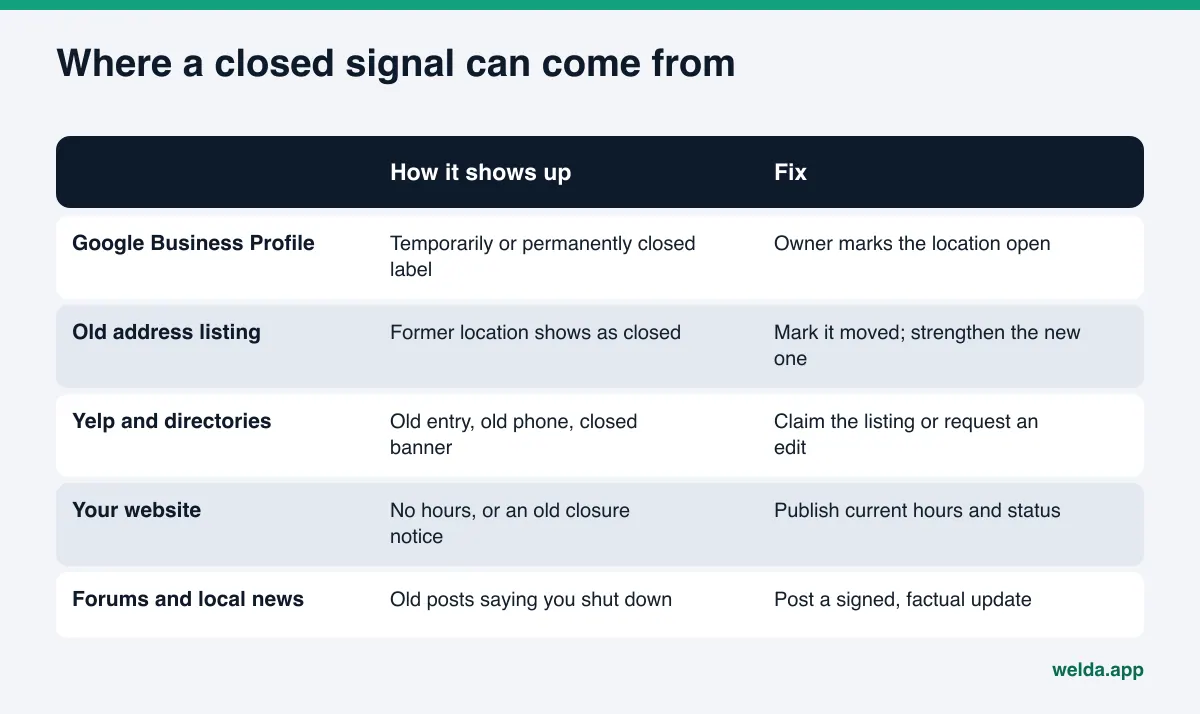
The strongest source is usually your map listing, because location and hours questions lean on it heavily. That makes Google Business Profile the sensible place to start. Directories matter too, especially Yelp in the US, and we cover which ones to prioritize in our guide to business directories for AI visibility.
What to do when AI says my business is closed, step by step
The sequence below starts with the strongest source that you can fix fastest and works outward.
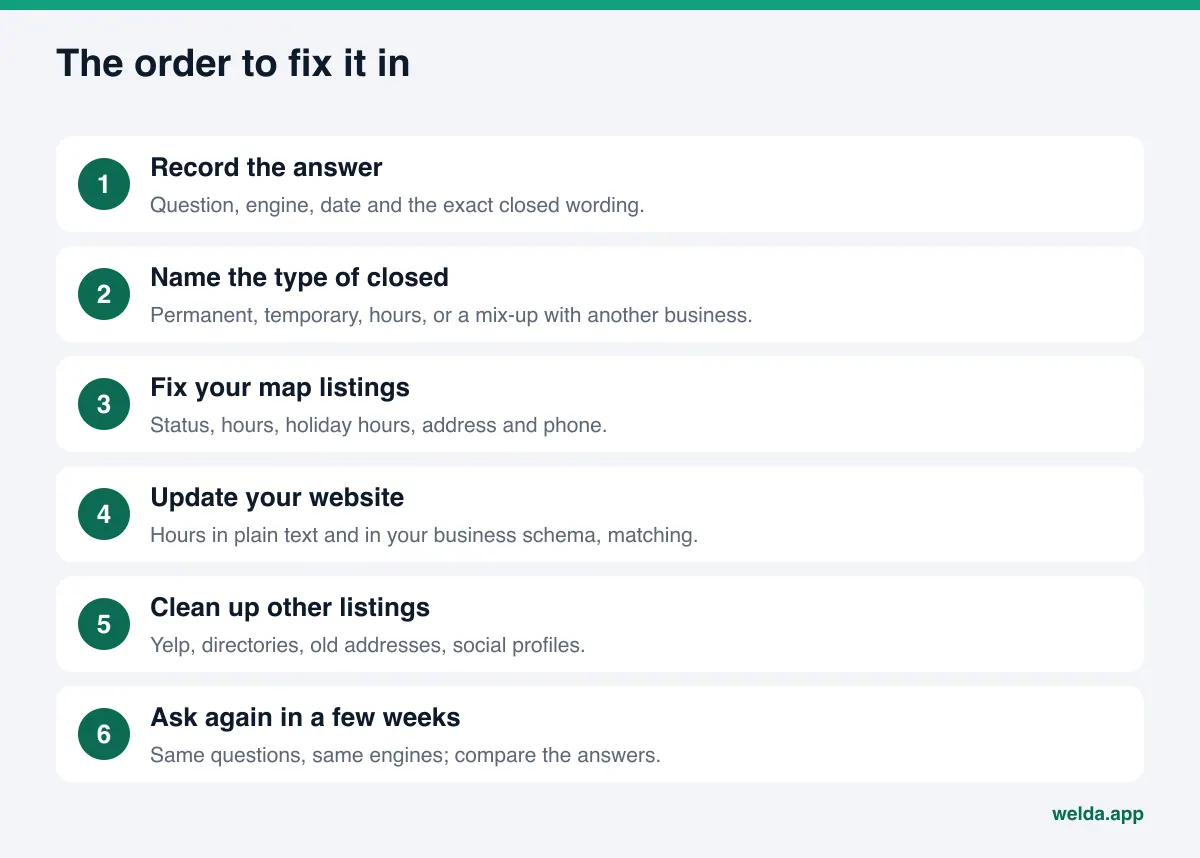
1. Record the answer as evidence
Write down the question, the engine, the date and the closed wording. If the answer cites a source, save that link too. Perplexity and other assistants that search the web often show which pages they relied on, and that citation can point straight to the record you need to fix.
2. Check your Google Business Profile status
Look at whether your profile is marked temporarily or permanently closed. According to Google's help page on marking your business as closed, the temporarily closed status is meant for closures longer than 7 days, for an off-season, or for closures with no end date; for closures of 7 days or less, Google points owners to special hours instead. The same page explains that a location mistakenly marked permanently closed can be reopened. If your status is wrong, change it to open.
3. Fill in regular and holiday hours
Make sure every day of the week has hours, and add special hours for holidays. A listing with blank hours gives AI nothing to work with when someone asks "is it open now." Without hours, the answer either guesses or leaves you out.
4. Separate an old location from the new one
If you moved and control the old listing, mark it appropriately and keep a separate, verified listing for the new address. The real problem is rarely that the old listing says closed; it is that the new one is too thin to outweigh it. Writing the new address the same way on your site, your profile and your directory listings helps AI tell the two apart.
5. Update your website
The next section covers this in detail. In short: write your hours in plain text, remove old closure notices and update your business schema.
6. Clean up other listings
Go through Yelp, the BBB, industry directories and your social profiles. Claim what you can and correct it. Where you cannot claim a listing, use that platform's correction process.
7. Ask the same questions again in a few weeks
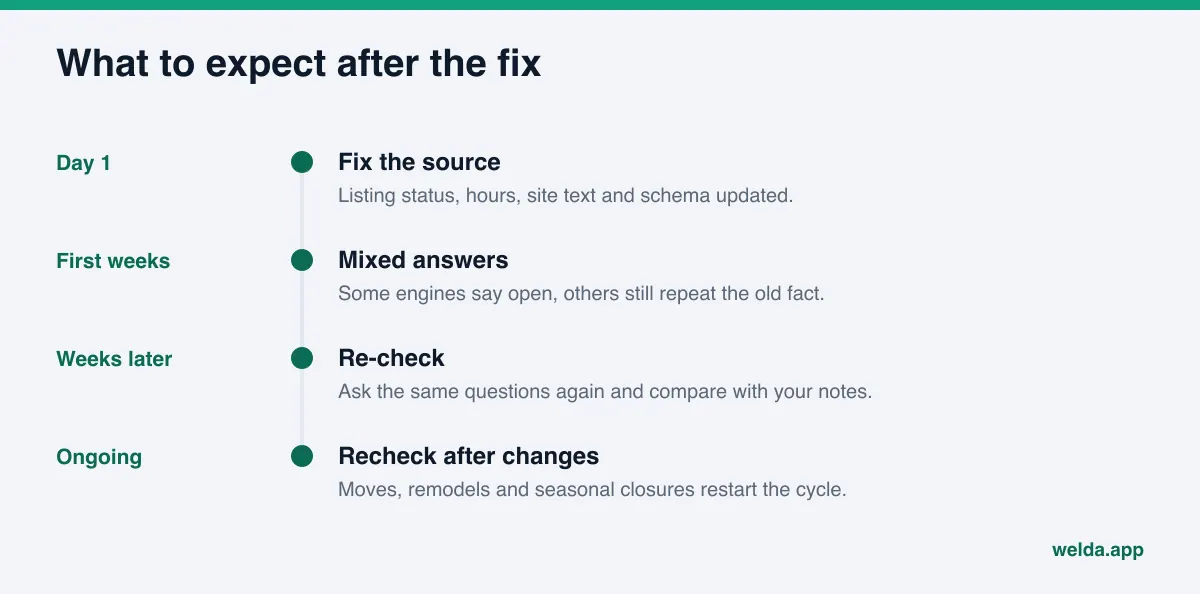
Return to the questions you recorded in step one and ask the same engines again. If one engine now says open and another still says closed, go back to the source that engine cites. To decide which questions are worth checking regularly, see our list of prompts to track for AI visibility.
How to tell AI you are open on your own website
Your website is the only source about your business that you fully control. Corrections on outside platforms can take time, but a clear, current picture on your own site is entirely in your hands. Check four things.
Are your hours written out in plain text? Hours that live only inside an image or an embedded map are easy for AI to miss. Put a readable line such as "Monday to Saturday 9 a.m. to 7 p.m., closed Sunday" on your contact page and in the footer. If you are seasonal, state the season: "Open May 1 through October 31" reads very differently from silence.
Is an old closure notice still up? A banner, popup or news post from a temporary closure is easy to forget. As long as it stays on the page, AI may read it as current. Remove it, or date it and add a clear "we have reopened" line.
Do you have business schema? Structured data on your site describes your name, address, phone and opening hours in a machine-readable way. The schema.org OpeningHoursSpecification type lets you state days, opening and closing times, and the date range a set of hours applies to, which is useful for seasonal hours. The hours in that code should match the text on the page and your map listing. Three different sets of hours in three places push AI toward the wrong answer.
Do your name, address and phone match everywhere? After a move, make sure the old address does not survive anywhere on the site, including old blog posts and PDFs. An old phone number causes the same trouble: AI may match it to a closed listing and conclude that you closed.
Example scenario: a hardware store that moved
This scenario is illustrative and does not describe a real business. A family-run hardware store moves from a strip mall to a larger building across town. The owner marks the old Google listing as closed and opens a new one at the new address. A few weeks later a customer asks an AI assistant whether the store is still around, and the answer says it appears to have closed permanently.
When the owner checks the citation, it points to the old listing. The new listing exists but has no reviews yet, its hours are incomplete and the website does not link to it. The contact page still shows the old strip mall address, and the footer lists only a phone number. A Yelp page at the old address, never claimed, still carries the old details.
The fix runs in this order:
- The new Google listing gets full weekly hours and holiday hours, and its description mentions the move from the previous location.
- The contact page shows the new address, hours in plain text and a link to the new map listing.
- The business schema is updated with the new address, phone and hours.
- The old Yelp page is claimed and updated to reflect the move.
- The Facebook and Instagram profiles get the new address and hours.
The core problem here was never that the old listing said closed. The old location really is closed. What AI lacked was several consistent signals showing that the business is open at the new address. A few weeks later the owner asks the same questions again and compares; if one engine still repeats the old fact, its cited source gets a closer look.
How Welda handles this
Two jobs matter most when AI calls you closed: finding which source the wrong fact comes from, and completing the information that shows you are open. Welda covers them in different places.
The free site analysis: your website's share of the problem. The analysis, which anyone can use today in English and German as well as Turkish, reads your homepage and a few inner pages such as services and contact. The parts that bear directly on a closed signal are these: whether your address, phone and location details are on the page, whether you have business schema, and whether your map and social profiles are linked from your site. For each gap it shows what it found, why it matters and how to fix it, and the ready-to-add fix package includes business schema code. The analysis also asks five questions a customer might ask to an AI assistant that can search the web and checks whether your business name appears in the answers. That is a one-time measurement, and it does not separately flag a "closed" statement; you still check what the answer says with your own queries.
The Welda dashboard, Sources view: where the wrong fact lives. In the dashboard, the Sources view lists the sites AI cites for your questions and your status on each one. For a business being called closed, the value is in seeing which sources carry the most weight and where your presence there is missing, unverified or incomplete. That turns "where do I start" into a concrete answer: the heavily cited source where you are weakest.
The to-do list: missing facts and manual tasks. Welda does not invent information. If it cannot read your hours, your season dates or your new address from your site, it leaves the field blank and asks you; once you enter it, it flows into every draft. Places Welda cannot publish to directly, such as a directory profile, appear as manual tasks with ready-to-paste text next to them. Google Business Profile, Instagram and Facebook can be connected; if they are not, those jobs are listed as manual too.
After a fix, the Questions view shows, question by question, whether your name appears on ChatGPT, Gemini, Perplexity and Google AI, and a before-and-after comparison puts the change side by side. On WordPress sites, updates Welda prepares open as drafts and you approve publishing. Content always stays on your own site.
A clear note on availability: the dashboard is in early access and is opening first in Turkey. Regular measurement across all four engines is being added during early access, and the example screens use sample data. The part anyone can use today, in English, is the free site analysis. Pricing is discussed during the early access conversation.
Limits: how long fixes take and what Welda does not do
Fixing the source does not change AI answers overnight. Engines re-read sources on their own schedules, and new information usually takes weeks to show up. In the meantime it is normal for one engine to say open while another still says closed. When you measure, look at several runs of the same question rather than one answer. If things later move backward, our guide on why AI visibility dropped covers the usual causes.
To be clear about what Welda does not do:
- It does not guarantee that any AI engine will call you open or mention you for a given question. It does not guarantee rankings.
- It does not remove a closed label from your map listing for you. That action belongs to the verified owner; Welda gives you the steps and the text.
- It cannot get an old forum thread, news article or review page taken down. Work on negative reviews, directory accounts and press stays with the business.
- It does not guess your hours, season dates or address. It asks.
- It does not publish anything without your approval.
Checklist: does your business look open everywhere?
Use this list once the fix is done, and again every few months. After a move, a remodel or a seasonal closure, run it from the top.
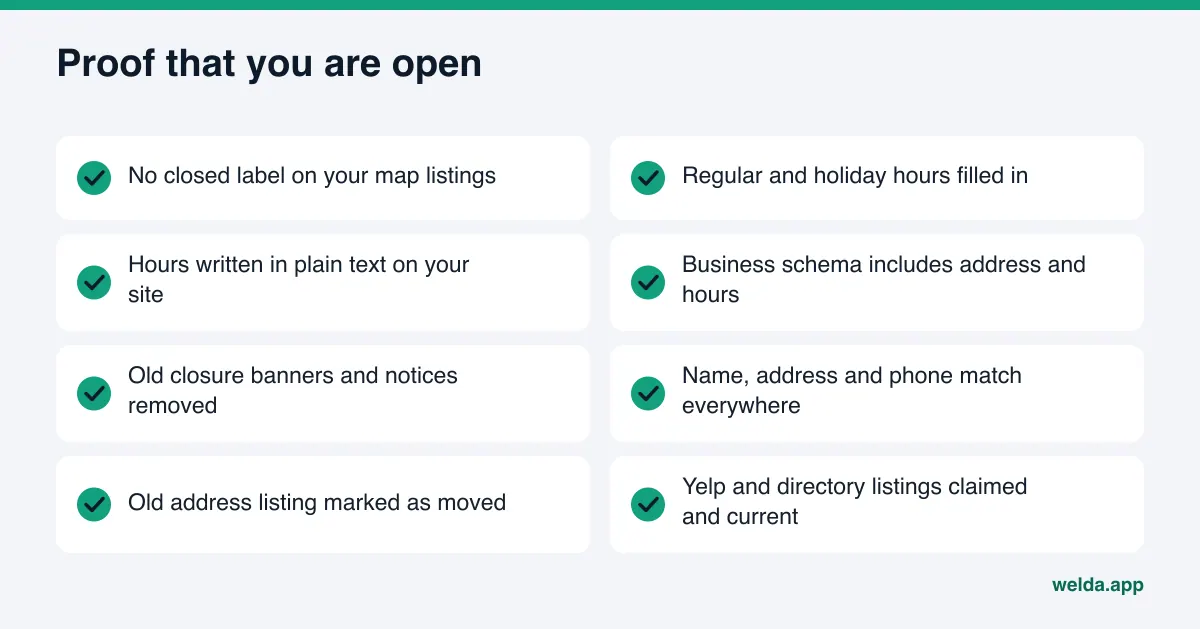
| Check | If yes | If no |
|---|---|---|
| Is any map listing marked closed? | Change the status to open | Move on to hours |
| Are regular and holiday hours complete? | Compare them with your site | Fill in the missing days |
| Are hours written in plain text on your site? | Check they match your schema | Add them to the contact page and footer |
| Is an old closure notice still up? | Remove it or date it and update it | Move on |
| If you moved, is the old address gone everywhere? | Check directories | Update site, profiles and directories |
| Did the AI answer change when you asked again? | Move to regular tracking | Go back to the cited source |
Frequently asked questions
Why does AI say my business is closed when it is open?
Usually a closed flag is still live somewhere, or the information that would confirm you are open is thin. The most common sources are your map listing status, a listing at a former address, old directory entries and a forgotten closure notice on your own site.
Can I fix it by telling ChatGPT that we are open?
A correction inside your own chat does not change the answers other people get. The lasting fix is correcting the sources AI reads: your map listings, your website and your directory listings.
I fixed my Google Business Profile. Why does the answer still say closed?
Engines re-read sources on their own schedules, so changes usually take weeks. The closed fact may also live in more than one place. If the answer cites a source, start there; if not, check directories and listings at old addresses.
We are a seasonal business. What should we do in the off-season?
Google's help page recommends the temporarily closed status for off-season closures. State your season dates clearly on your website as well, and remember to switch the status back when you reopen.
Will the free analysis detect that AI calls us closed?
It looks at your website's part of the problem: address, phone and location details, business schema and links to your map profiles. Its five-question AI test shows whether your name appears; it does not separately flag a closed statement in the answer.
We keep getting confused with a closed business that has a similar name. What helps?
Write your name, address and phone exactly the same way on your site, your map listings and your directories. State your neighborhood and services clearly. The more distinctive your details, the less room there is for a mix-up.
Can Welda remove the closed label from my listing?
No. The verified owner of the listing does that. Welda lists the gaps, provides ready text, and measures whether your name shows up for your questions after the fix.
Make it obvious to AI that you are open
A closed label often starts with one record, but the lasting fix is saying you are open the same way everywhere. Record what the answer says, start with your map listing, then work through your website and directories. To see how clearly your site speaks for you today, run the free AI visibility analysis. You get the gaps, the reasons and a ready-to-add fix package in a single report.