Why does NAP consistency matter for AI search? NAP stands for your business name, address and phone number. When ChatGPT, Gemini, Perplexity or Google's AI Overviews recommend a local business, they piece these facts together from your website, your Google Business Profile, Yelp and other listings. NAP consistency for AI search means those facts match everywhere, so the AI treats you as one trustworthy business instead of guessing, quoting an old number or skipping you.
What NAP consistency means for AI search
On paper this is the most boring topic in local marketing: write your name, address and phone number the same way everywhere. In practice those three facts end up in dozens of places over the years. Your website footer and contact page. Your Google Business Profile and Apple Maps listing. Yelp, the Better Business Bureau, Angi or Healthgrades depending on your industry. Facebook and Instagram. A chamber of commerce directory. A local news story from five years ago. Each of those was filled in on a different day by a different person, and few of them get updated when something changes.
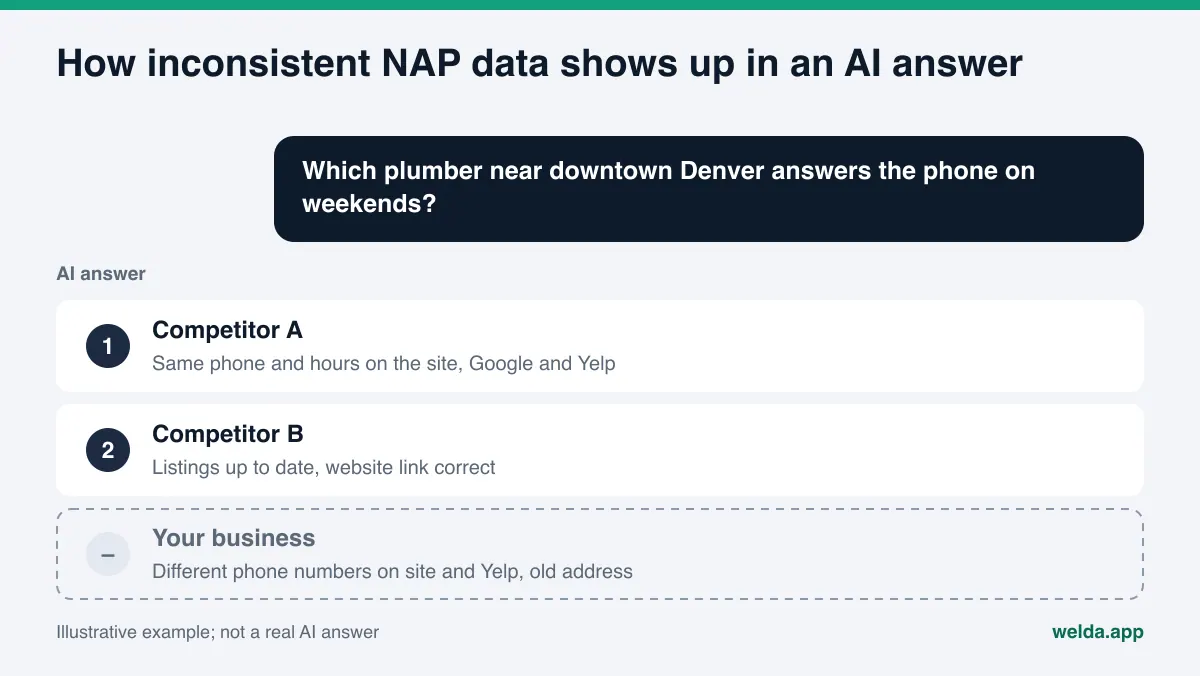
AI answer engines do not rely on a single source when they answer a question like "which plumber near downtown Denver answers the phone on weekends." They run a web search, read several pages, combine what they find and write a short answer with two or three names. Part of that work is deciding which facts belong to which business. When your website lists one phone number, your Yelp page another and an old directory a third, the system has no reliable way to know which one is current.
The term NAP comes from traditional local SEO, where inconsistent listings were mostly a ranking concern. In AI search the stakes are more direct. A wrong number in an AI answer is not a lower ranking; it is a customer calling a disconnected line. That is why NAP consistency is now part of answer engine optimization, or AEO: the work of making sure AI systems can find, understand and correctly describe your business. You may also see the same idea called GEO, short for generative engine optimization. If you want the bigger picture of how this differs from map pack work, our piece on local SEO vs. AEO covers it.
In this guide we treat two more facts as part of NAP, because AI answers use them the same way and they go stale the same way: business hours and your website URL.
How inconsistent NAP data hurts your AI visibility
Inconsistency does not cause one single problem. It shows up in a few distinct ways, and each one costs you differently.
- You look like two different businesses. Is "Example Dental" the same practice as "Example Family Dentistry, PLLC"? If the AI cannot tell, your reviews, mentions and citations get split across two entities, and neither looks strong on its own.
- Old facts make it into the answer. You moved, but an old directory listing still shows the previous address. If the AI trusts that directory, it repeats the old address, and the customer drives to an empty storefront.
- You get skipped. When facts conflict, a cautious system may simply name a competitor whose details are clear and consistent. It avoids the risk of being wrong by leaving you out.
- Locations get mixed up. For a business with two locations, phone numbers or hours from one location can end up attached to the other.
None of these problems is visible when you look at your own website. Your site may be perfectly correct. The issue is that the rest of the web disagrees with it. If an AI tool is already giving out wrong details about you, inconsistent listings are often a large part of the cause. Our guide to fixing wrong information ChatGPT gives about your business walks through that situation step by step.
Common NAP inconsistencies for US businesses
Most inconsistencies are not careless mistakes. They come from the normal variety in how American addresses, business names and phone numbers get written. The table below lists the patterns that come up most often and what to do about each.
| Fact | Typical inconsistency | What to do |
|---|---|---|
| Name | DBA on the storefront, legal LLC name on some listings | Use the name customers see on signage; keep the legal name for legal pages |
| Name | Keywords or city stuffed into the name ("... Best Plumber Denver") | Keep the name clean; put service and area in the description |
| Address | "Street" vs. "St.", "Suite 200" vs. "Ste 200" vs. "#200" | Pick one format and use it verbatim everywhere |
| Address | Suite number present on some listings, missing on others | Always include it; it is part of the address, not decoration |
| Phone | Local number on the site, toll-free or call tracking number on listings | Choose one primary local number; tracking numbers stay secondary |
| Phone | A former employee's cell number on an old listing | Replace it with the business line and remove the old number |
| Hours | Holiday or seasonal hours updated in one place only | Update every key listing from one calendar |
| Website | Old domain or a URL that no longer redirects | One current, working URL on every profile |
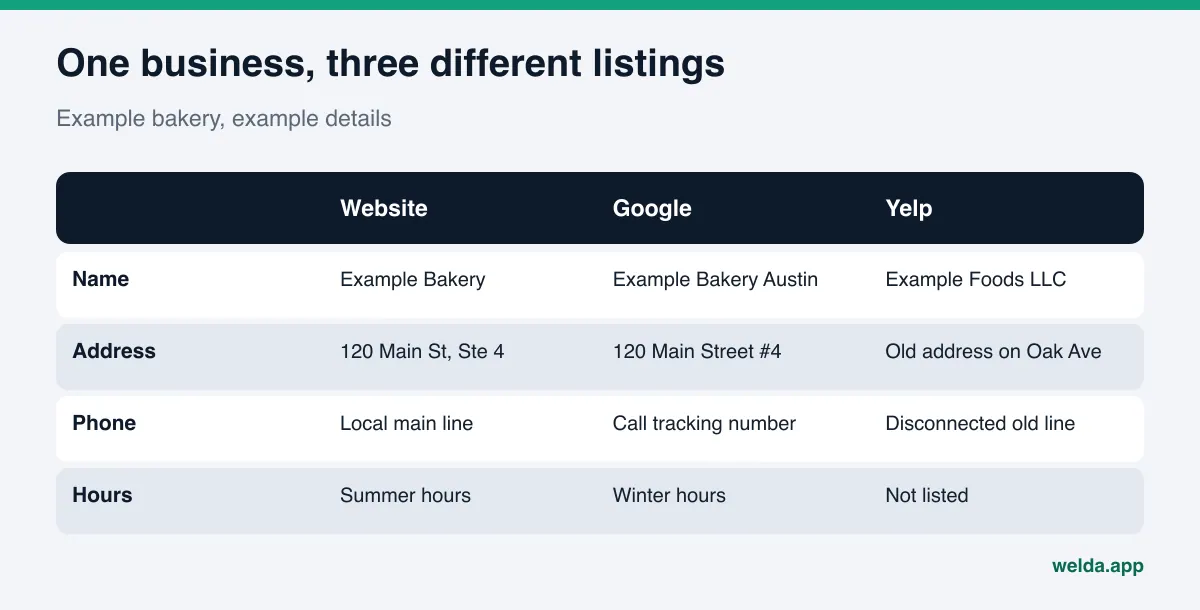
Formatting differences like "St." versus "Street" are usually not a big problem by themselves, since search systems tend to match them. The real risk is a difference in substance: a different suite number, a different phone number, a different name. Still, deciding on one format pays off, because the next time something changes you know exactly what the correct version is.
How to fix NAP consistency for AI search, step by step
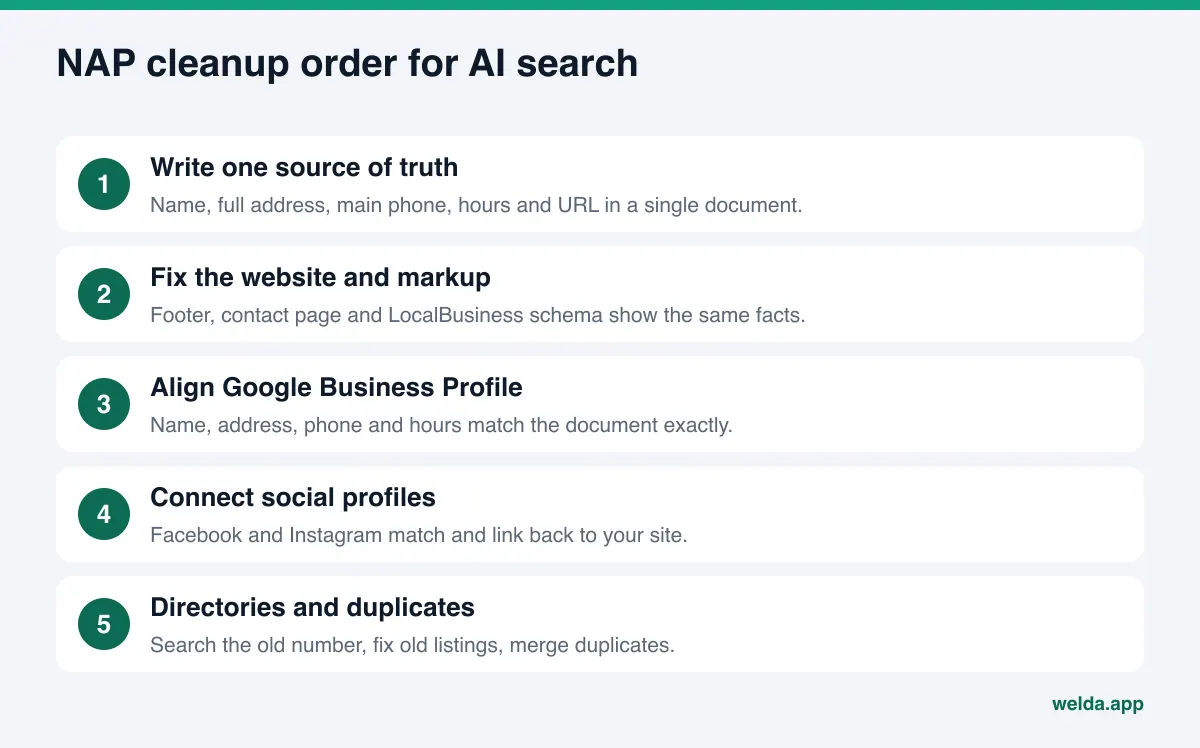
Once the first cleanup is done, keeping NAP data consistent is easy. The first round is the hard part, because most businesses do not know where all their listings live. The order below starts with the sources that carry the most weight.
- Write down one source of truth. Business name, full address (street, suite, city, state, ZIP), primary phone, hours and website URL in a single document. Every listing gets corrected against this document from now on.
- Fix your website first. Footer, contact page, about page and any location pages should show the same facts. Put the address and phone in plain text, not inside an image; AI crawlers do not reliably read text in images.
- Add structured data. Use the schema.org LocalBusiness type to state your name, address, phone and hours in a machine-readable way. The values in the markup must match what the page shows, character for character.
- Align your Google Business Profile. Google's guidelines for representing your business ask for your real-world name, a precise address, and a local phone number instead of a central call center line whenever possible. They also allow only one profile per location.
- Connect your social profiles. Facebook and Instagram should carry the same contact details and link to your site. Link from your site back to them. That two-way link tells AI systems these accounts belong to the same business.
- Audit the big directories for your industry. Yelp, BBB, Angi for home services, Healthgrades for medical practices, Tripadvisor for hospitality. Search your business name and your old phone number separately; every listing that shows the old number is a fix to make.
- Merge or remove duplicates. If a platform has two listings for the same location, request a merge or removal through that platform.
- Set up a change routine. Keep a list of which listings to update when you move, change numbers or change hours for a season or holiday.
Instagram is often forgotten in this process, even though for small businesses it is frequently the most up-to-date profile they have. Our piece on Instagram and AI search covers how to set up the bio and links so they support the rest of your listings.
A good first step is the free site analysis. It checks whether your address, phone and location details can be read on your site, whether you have business schema markup, and whether your social and map profiles are linked from your site, all in one report.
Which name, address and phone number should be the standard?
Consistency starts with deciding what the correct version is. Many businesses never make that decision explicitly, so each new listing reflects whoever happened to fill it in.
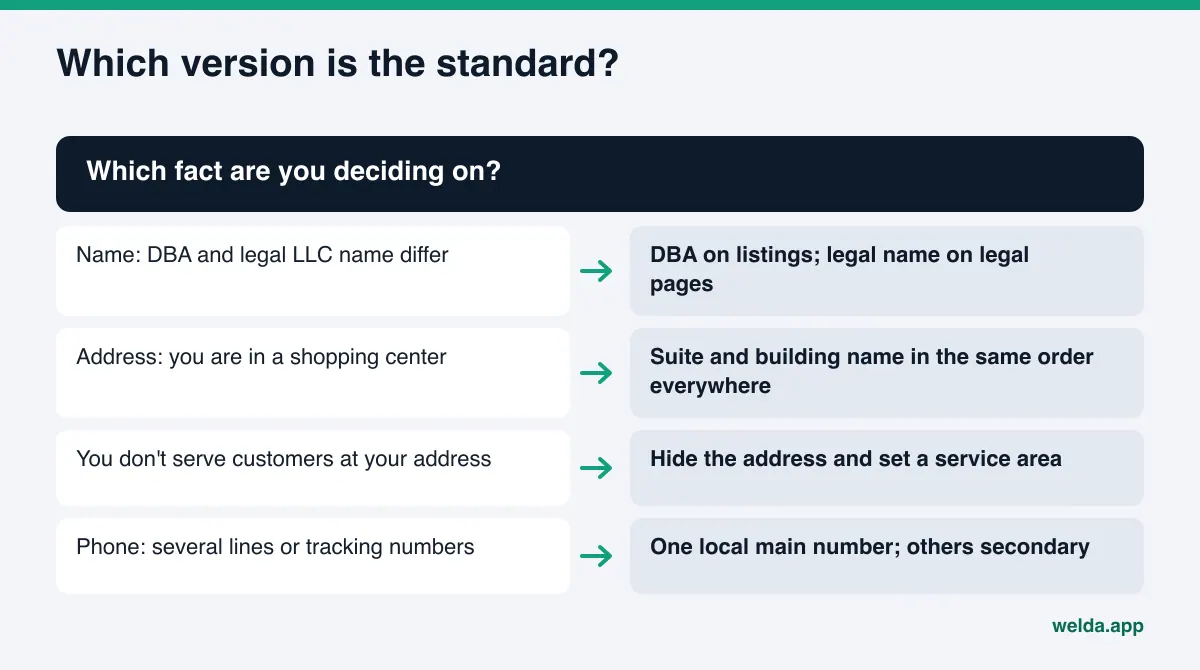
Name: Use the name customers see on your sign, invoices and social accounts. If you operate under a DBA, that is usually the public name. Your legal LLC or corporation name can appear in your site footer or legal pages, but it should not replace your public name on listings. Adding a city, slogan or keyword to the business name also goes against Google's guidelines.
Address: Follow standard postal format: street number and name, suite or unit, city, state and ZIP code. If you are inside a shopping center or office building, decide whether the building name is part of your address and use it the same way everywhere. Service-area businesses that do not receive customers at their address, such as many contractors, should usually hide the street address and define a service area instead.
Phone: Pick one primary local number that reaches your business. Call tracking numbers can be useful for marketing, but if every listing shows a different tracking number, you have created the very inconsistency you are trying to avoid. Keep your main number primary and treat others as secondary.
How NAP information should appear on your website
AI crawlers pick up your business details from three places on your site: visible text, structured data and links. When all three say the same thing, the signal gets stronger.
Visible text. Name, address and phone belong in the footer of every page as plain text. The contact page adds hours, directions and a link to your map listing. A clickable phone number (a tel: link) helps both customers and machines.
Structured data. Your LocalBusiness markup should include at least name, address, telephone, openingHoursSpecification and sameAs. The sameAs property lists your official profiles, such as Google Business Profile, Yelp, Facebook and Instagram; it is the machine-readable way of saying "these profiles are mine." The most common mistake is adding the markup once and forgetting it: the business moves, the page gets updated, and the markup keeps the old address.
Links. Link from your site to your map listing and social profiles, and make sure the website link on each profile goes to the right page. Multi-location businesses need one page per location, each with its own address, phone and markup.
Saying where you are and what you do in the first lines of your homepage supports all of this. Our guide to homepage copy for AI search shows how to write that opening.
Example scenario: a dental practice changes its phone system
Here is a made-up example to make this concrete. A small dental practice switches phone providers and, in the process, gets a new main number. The office manager updates the website and the Google Business Profile. A few weeks later, a new patient mentions that an AI assistant gave them a number that no longer works.
To track down the cause, the practice would:
- Search the old number. Every page that still shows it gets noted: a Healthgrades profile, an insurance network directory, a Facebook page's About section, a local business directory.
- Check the site's structured data. The visible footer may be correct while the LocalBusiness markup still carries the old number. This is one of the most frequently missed fixes.
- Update the high-trust listings first. Profiles that AI answers actually cite for dental questions come before minor directories.
- Keep the old number forwarding for a while. Old details can keep appearing in AI answers for some time, so forwarding protects against lost calls.
The lesson is simple: the day a fact changes is the day every listing should change. A business that knows where its listings live can finish this in an afternoon. One that does not may spend weeks with the wrong number in circulation.
How Welda handles NAP consistency
Welda is software that measures where a business shows up in AI answers and prepares the fixes on the business's behalf. For NAP consistency it works in two places: the free analysis covers your own website, and the Welda dashboard covers the sources outside it.
Free analysis: NAP on your website. The analysis reads your homepage plus internal pages such as contact, about, services and pricing. It checks whether your address, phone and location details appear as readable text, whether you have business schema markup, and whether your social and map profiles are linked from the site. For each gap it explains what it saw, why it matters and how to fix it. The report includes a ready-made fix package with business schema markup that you or your web person can add to the site. It also asks a web-search-enabled AI assistant five questions a customer might ask and checks whether your business name appears in the answers. That is a one-time snapshot, and it does not measure rankings.
Dashboard: the Sources view. The dashboard lists the sites AI engines cite when they answer questions in your space, along with your status on each: profile present, incomplete or unverified. For NAP work, this is the useful part. Instead of fixing fifty directories one by one, you start with the handful that actually feed AI answers in your category.
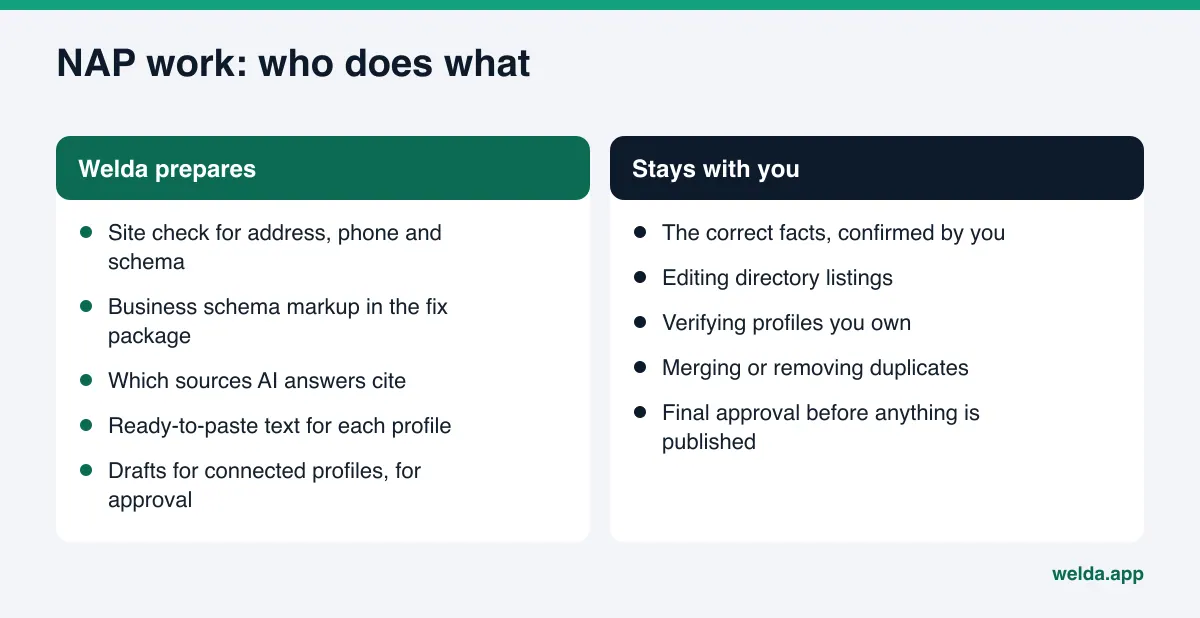
Dashboard: the to-do list. Gaps from the Sources view become tasks. Where Welda has no publishing connection to a platform, the task is listed as manual work with ready-to-paste text next to it: a profile description and the correct name, address and hours. You paste it in and mark it done. Welda does not invent facts; if it cannot read your new hours from your site, it asks you, and your answer flows into every draft. Google Business Profile, Facebook and Instagram can be connected, in which case Welda prepares the content and you keep the approval. On WordPress sites, Welda connects through a separate Editor user without installing code and opens its fixes as drafts.
A note on availability. The free analysis works in English and is available to anyone today. The Welda dashboard is in early access and is opening first in Turkey, so US businesses cannot sign up for the full dashboard yet. Regular four-engine measurement is being added during early access, and dashboard screens are shown with sample data. Pricing is discussed in the early access conversation.
Limits: what Welda does not do
Part of NAP work cannot be done by software, because you own the listings. Knowing this up front sets the right expectations.
- Directory accounts stay with you. Welda does not create or log into Yelp, BBB or other directory accounts on your behalf. It provides the text; editing and verifying the listing is the account owner's job.
- Duplicate removal stays with you. Merge or removal requests go through each platform, and you file them.
- It does not guess. Welda will not put a phone number or address into any draft unless it has it from you or your site.
- No guarantees. Fixing NAP data does not guarantee that an AI tool will mention you, or mention you in a particular position. There is no ranking guarantee and no promise of "showing up in ChatGPT."
- Results lag. Corrections usually take weeks to show up in AI answers, and old listings may still be read for a while.
- No fake reviews. Welda can draft review replies, but it does not generate reviews. Negative reviews and PR work stay with you.
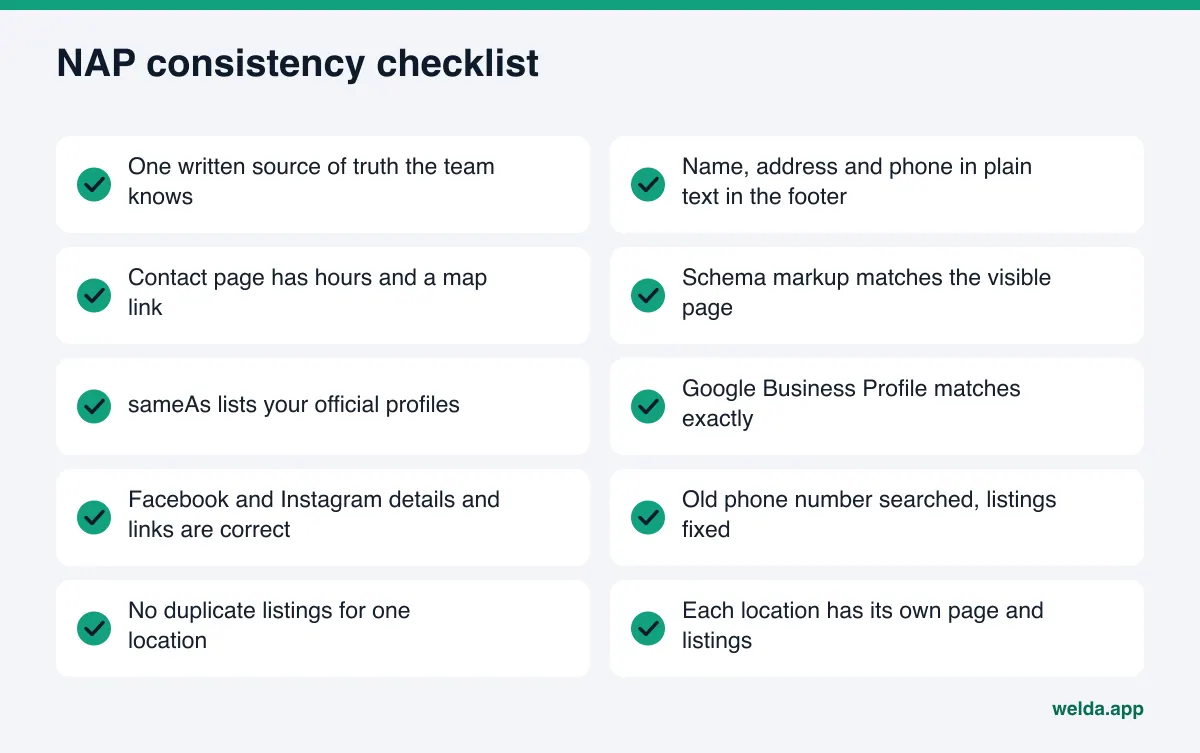
NAP consistency checklist for AI search
Use this list after your first cleanup and again after every major change. If your honest answer to an item is "not sure," that item is not done.
| Situation | Do this first |
|---|---|
| You just moved | Website, schema markup and Google Business Profile on the same day; then the directories AI answers cite |
| Your phone number changed | Search the old number, list every page that shows it, keep the old line forwarding |
| You opened a second location | Separate page, profile and markup for each; make the homepage distinguish them clearly |
| You rebranded | Mention the former name on your site ("formerly ..."); use the new name on all profiles |
| Nothing changed | Search your name and number every quarter and check for new listings |
Rebrands deserve special care. AI systems keep reading news stories and reviews written under the old name. A short "formerly known as" line on your site states plainly that both names belong to the same business and helps AI systems connect the two.
Frequently asked questions
Is NAP consistency only important for local businesses?
It matters most for local businesses, because location is central to their customers' questions. But any business with a public address or phone number loses trust when those details conflict. A wrong phone number in an AI answer hurts any business.
Does "St." versus "Street" really matter?
Usually not much on its own; search systems tend to match common abbreviations. The real risk is a different suite number, phone number or name. Picking one format still helps, because it makes future corrections unambiguous.
How many directories should I be listed in?
Accuracy matters more than volume. Start with the sources AI answers actually cite in your category: Google Business Profile, the major map apps, and the few directories that dominate your industry. Dozens of listings you cannot maintain become a new source of inconsistency.
Does the free analysis check my directory listings?
No. The free analysis reads your website: address, phone and location details, business schema markup, and whether your social and map profiles are linked. Outside sources are handled in the dashboard's Sources view, which is in early access.
How long until AI answers show my corrected details?
There is no fixed timeline. Corrections usually take weeks to show up, and old listings may still be read for a while. Ask the same questions again at intervals to see when the change lands.
Will Welda update my Google Business Profile for me?
If the profile is connected, Welda prepares the content and you approve it before it goes live. If it is not connected, the task appears as manual work with the text ready. Ownership and verification of the profile always stay with you.
Start by checking the NAP data on your own site
NAP consistency looks like a one-time cleanup, but it is really about setting up a system: one source of truth, a website and markup that match it, and a fix list that starts with the sources AI engines actually read. You can see the first part today. Run the free site analysis to see how your address, phone and business markup are read, whether your profiles are linked from your site, and what is missing. Then add the business schema from the fix package to your site and work outward from there.