Does my Instagram account help me show up in AI answers? It can, but not on its own. The link between Instagram and AI search depends on whether search engines can see your account, what your profile and captions actually say in words, and whether your website clearly ties that account to your business. Information locked inside photos and Stories rarely makes it into an answer. Information written out, and repeated on your own site, does.
This guide is for businesses that live on Instagram: coffee shops, bakeries, brow and lash studios, boutique hotels, florists, home service crews that post before-and-after shots. The pattern is familiar. The Instagram account is active, with hundreds of posts. The menu sits in a Highlight, prices show up in Stories, and the bio says "DM to book." The website is a single page built years ago. When someone asks ChatGPT, Gemini, Perplexity or Google's AI Overviews for "a quiet brunch spot in East Austin that takes walk-ins," the AI has very little text about you to work with. The practice of fixing that is usually called AEO, short for answer engine optimization. To see how your website reads to AI right now, run a free AI visibility analysis; whether your social profiles are linked from your site is one of the things it checks.
Instagram and AI search: where the gap actually is
When an AI assistant answers a local question, it leans on two things: what the model already learned, and a live web search. For "near me" and "open now" style questions, the live search matters most. The assistant searches, opens the pages it can read, builds an answer from their text, and often cites them. To be in the answer, you first need to exist as readable text somewhere the assistant can reach.
Instagram is a special case. According to Instagram's Help Center, Instagram generally asks search engines not to index Stories, reels, posts and Highlights. The exception is accounts that are public, professional (business or creator) and held by someone over 18: their public posts and reels from January 1, 2020 onward can be indexed. Owners can turn this off in settings, and switching to a private or personal account removes it as well.
That explains the first problem for small businesses that still run on a personal account: if search engines cannot see it, an AI assistant that relies on web search cannot find it either. The second problem remains even for public business accounts. Instagram is a visual platform. Your menu is a photo, your hours are a Story graphic, your price list is a Highlight cover. You cannot know how much of the text inside an image a search engine or an AI reads, or whether it uses it. If captions are short and mostly emojis, there is little left to read.
The third problem is matching. An AI does not automatically know that the handle @examplebakery, the website examplebakery.com and the Google Business Profile listing "Example Bakery, South Congress" are one business. It infers that from a consistent name, address and phone number, and from structured business data on your site that lists your profiles. Without that link, the work you put into Instagram does not get credited to your business.
Why AEO matters for Instagram-first businesses
Businesses that treat Instagram as their storefront tend to be in categories where photos sell: food, beauty, hospitality, design, events. A customer picks a place by looking at the latte art, the treatment room or the hotel pool. But when they ask an AI, they are not asking for pictures. They are asking for a recommendation: "a bakery in Austin that does gluten-free birthday cakes," "a brow lamination studio in Williamsburg that is open Sundays," "a small adults-only hotel in Palm Springs." The answer is a short list of names with a reason for each, and the reasons come from text: "offers gluten-free options," "appointments only," "adults only."
Those reasons may be on your Instagram, but if they are not somewhere the AI can read, they do not reach the answer. A competitor with fewer followers can appear instead, simply because they have a clear services page, an FAQ section and a complete Google Business Profile and Yelp listing. There is no public evidence that follower count is a direct factor in AI answers. What the AI can weigh is what it can read.
Trust is the other half. Before recommending a business, an AI looks for the same facts in more than one place. If Instagram says "closed Mondays," your site says "open daily" and your Google listing shows different hours, the answer may get the details wrong or skip you entirely. Knowing which questions customers actually ask is part of the work too; our guide on how to find the questions customers ask AI covers that step.
What can AI read from Instagram, and what does it miss?
The table below is not a definitive technical spec. Each AI tool reads pages differently, and much of that is not visible from outside. Treat it as a practical split between information that sits somewhere reliably readable and information that is left to chance.
| Where the information lives | Status for AI | What to do |
|---|---|---|
| Posts on a personal or private account | Closed to search engines; not found by web search | Switch to a public professional account and check the setting |
| Captions on a professional account | Can appear in search, but short and scattered | Write the business name, neighborhood and service in a plain sentence |
| Menu or prices typed into an image | Unclear whether it is read | Publish the same information as text on your site |
| Stories | Temporary; generally closed to search engines | Put any lasting announcement on a page of your site |
| Highlights (menu, pricing, FAQ) | Image-heavy; reading is uncertain | Turn them into a services page and an FAQ section |
| Link in bio | Readable; connects the account to a site | Point it straight to your own website |
| Instagram link and business data on your site | Readable; the basis for matching | Footer link plus the profile URL in your Schema markup |
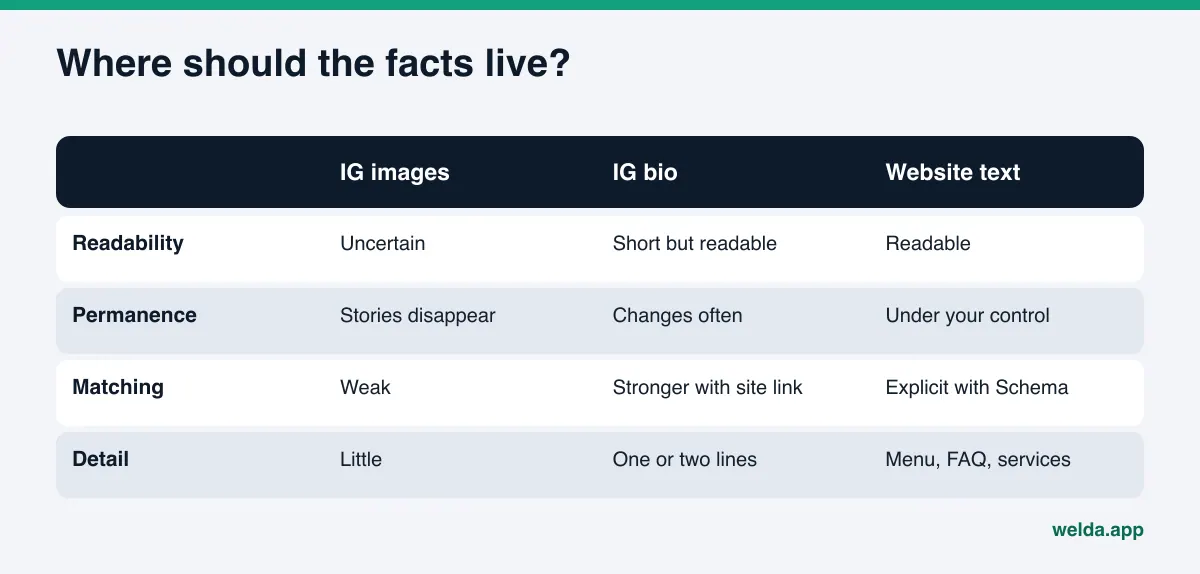
The takeaway: on its own, Instagram is a weak information source for AI, but it is a useful confirmation source. The core facts belong on your website, your Google Business Profile, your Apple Maps listing and the review sites your customers use, such as Yelp or Tripadvisor. Instagram shows that the same business is active and real. So the job is not to post more. It is to connect Instagram to your site and keep the facts consistent. If Apple Maps matters for your customers, see our piece on Apple Business Connect for AI assistants.
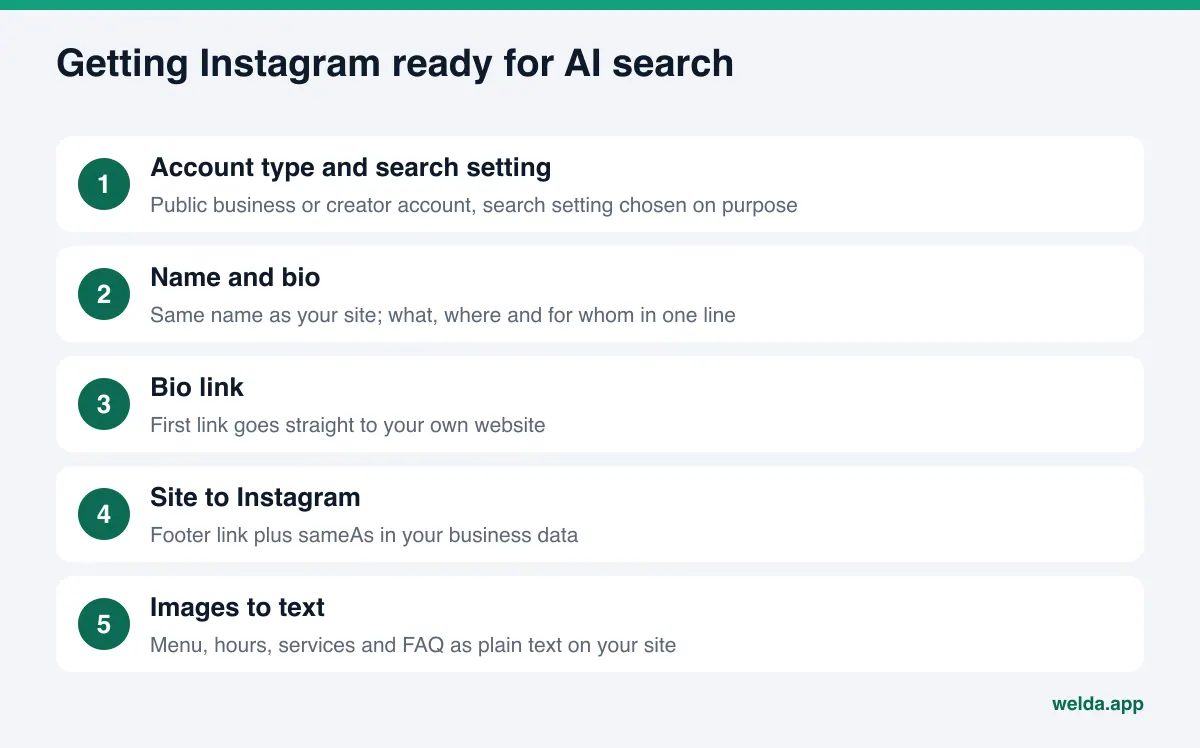
Instagram and AI search: a step-by-step setup
The order below starts with the work that takes the least effort for the most effect. Each step builds on the one before it, so do not skip the first two.
- Check your account type and the search setting. Is your account a public business or creator account? In privacy settings, is the option that lets public photos and videos appear in search engine results turned on? If it is off and that was not a deliberate choice, turn it on. This is a judgment call; a business that posts customer photos may prefer to keep it off.
- Match your display name to your business name. Use the same name as your website and Google Business Profile. A format like "Example Bakery | South Congress" carries both the name and the neighborhood.
- Rewrite the bio as a one-sentence business description. Say what you do, where, and for whom, in plain words: "Specialty coffee and gluten-free pastries on South Congress. Weekend brunch, no reservations." Emojis are fine, but do not leave the facts to emojis.
- Point the bio link to your own site. If you use a link-in-bio page, make your own website the first link. The aim is to show clearly which website owns the account.
- Link Instagram from your site and add it to your business data. Put an Instagram link in your site footer. In your structured business data (Schema), list your profile URLs in the sameAs property. That property is the standard way to say "these accounts belong to this business."
- Turn image information into text. Publish your menu, price range, service list, hours and booking policy as plain text on your site. In captions, name the service and the neighborhood in one sentence.
- Move Highlight and DM questions into an FAQ. "Do you take reservations?", "Are dogs allowed?", "Is there parking?" are often answered in Highlights or DMs. Write them into an FAQ section on your site. Our guide to FAQ pages for AEO shows how to structure it.
- Keep the facts identical everywhere. When hours, address or phone change, update Instagram, your site, Google Business Profile, Yelp and Apple Maps the same day. Why stale information hurts is covered in content freshness for AI search.
How do you move Instagram content onto your website?
Step six is where most owners stall, with the thought "it is all on Instagram already, why write it twice?" For AI, it is not redundant. Your website is the place where the business states its facts in its own name, permanently and in readable form. The mapping below shows how typical Instagram content translates into site content.
| On Instagram | On your website | A sentence AI can use in an answer |
|---|---|---|
| Menu Highlight | Menu page with categories and price range | "Offers gluten-free and vegan options" |
| "New service" post | Service page: what, for whom, how long | "Brow lamination by appointment" |
| Story announcing new hours | Contact page and hours in business data | "Closed Mondays, opens 8 a.m. on weekends" |
| Most common DM questions | FAQ section | "Reservations only for groups of six or more" |
| Screenshots of customer reviews | Real reviews and your replies on Google and Yelp | "Guests mention the quiet atmosphere" |
| Team intro reel | About page with founder and expertise | "Cakes are made by the founding pastry chef" |
The sample sentences are illustrative. What matters is that the reasons an AI could cite exist as clear sentences on your site. Posting review screenshots as images on your website does not replace real reviews on a review platform. One US-specific caution: according to the FTC's guidance on its Consumer Reviews and Testimonials Rule, a business that puts testimonials on its own website is treated as disseminating them, not just hosting them, so only real reviews belong there. This is general information, not legal advice.
How to write captions that AI can actually use
Captions are the largest block of text left on Instagram. If your account is visible to search engines, captions become readable too, so carrying one factual sentence per post adds up over time. The rule is simple: the first sentence should tell someone who cannot see the photo what it is about.
- Weak: "Back at it again" plus three emojis. Strong: "This week at our South Congress shop: a gluten-free lemon tart, also available to order."
- Weak: "New season just dropped." Strong: "Brow lamination is now available by appointment at our Williamsburg studio; it takes about an hour."
- Weak: "Details in DMs." Strong: "Price range and FAQs are on our website; link in bio."
The businesses and services in these examples are illustrative; your sentence should carry your own real information. Hashtags are fine, but do not let them carry the facts. "A bakery in South Austin" inside a sentence is clearer to people and machines than "#austin #bakery." Use the same names across posts; if your site calls it "brow lamination," do not call it something else in captions.
How Welda handles this
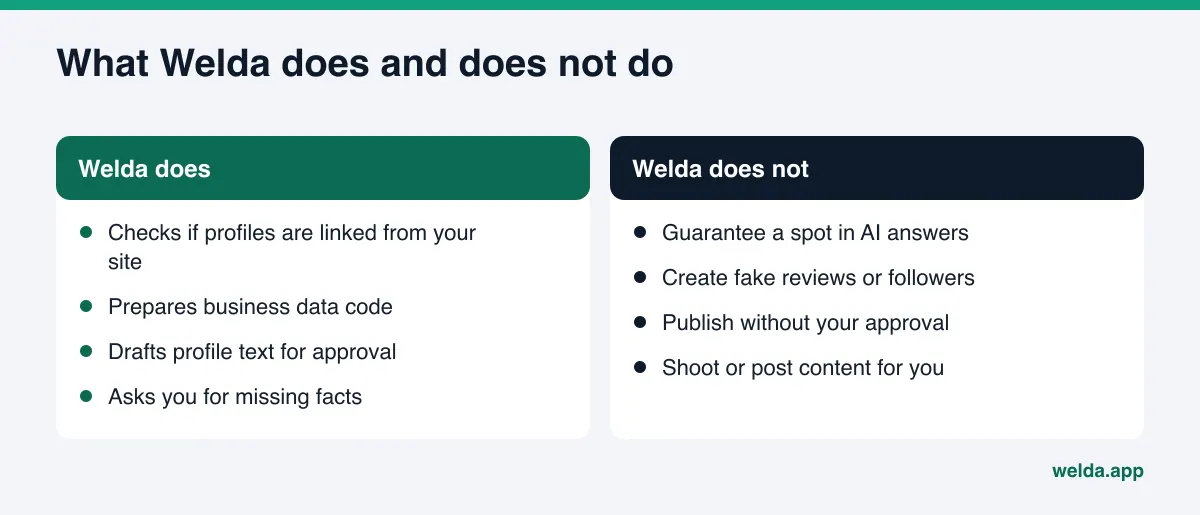
Welda's role here has two parts: checking whether your Instagram account is tied to your website and business data, and preparing the fix when that link is missing or the profile text is thin.
In the free site analysis. The analysis reads your homepage and a few inner pages, and checks whether your social and map profiles are linked from your site. If there is no Instagram link, or your structured business data does not list your profile, it shows up as a gap: what was found, why it matters and how to fix it. The fix package at the end of the report includes business data code, and adding your profile URLs there is the shortest way to formally connect Instagram to your site. The same analysis also puts 5 questions your customers might ask to an AI assistant that can search the web, and shows whether your business name appears in the answers. That is a one-time measurement, but for an Instagram-first business it usually makes the text gap obvious. The free analysis works in English.
In the Welda dashboard's Sources view. This screen lists the sites AI answers draw on and how you look on each. Instagram can appear there as its own source, with your status next to it: missing, incomplete or done. The decision it supports is practical: in your category, is Instagram actually a source AI uses, or should your effort go to your website and map listings first? The answer rests on the sources seen in answers, not on guesswork.
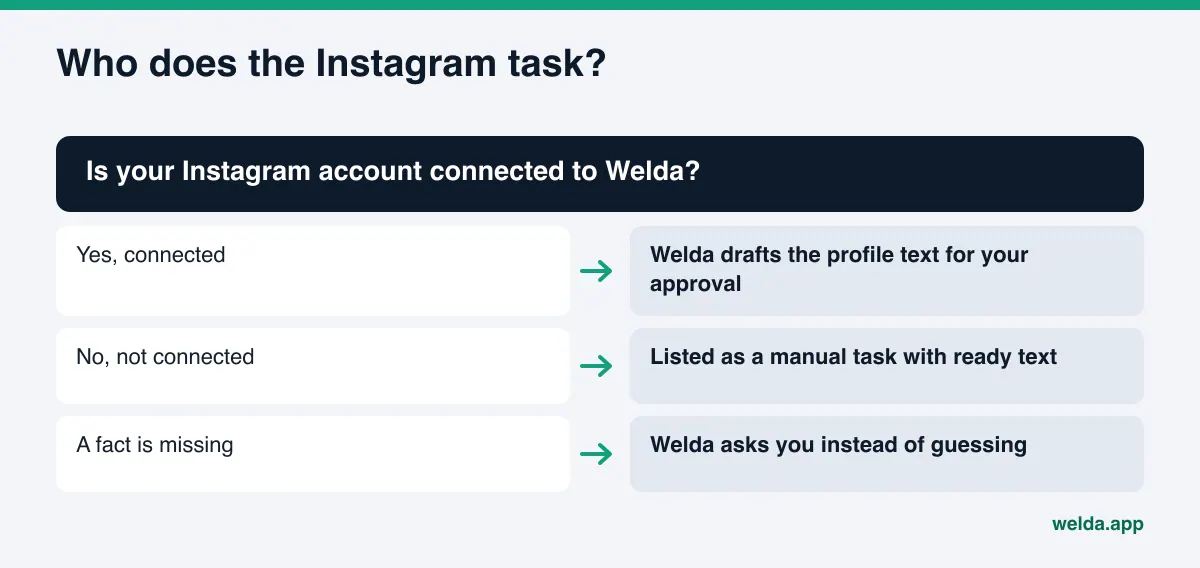
In the to-do list. If your Instagram account is connected to Welda, Welda drafts profile text such as your bio and sends it to you for approval; publishing stays your decision. If it is not connected, the task is listed as a manual one with the ready text next to it, which you copy into your profile. When Welda cannot find a fact on your site, such as which neighborhoods you serve, it does not make one up. It asks you, and your answer is applied to every draft. For content that belongs on your site, WordPress sites connect through a separate Editor user and an application password; drafts open on your site and go live once you approve them. Other platforms get a ready-to-apply package. Content always lives on your own site.
A clear note on availability: the Welda dashboard is in early access, rolling out first to businesses in Turkey. Regular measurement across ChatGPT, Gemini, Perplexity and Google AI is being added during early access, and the dashboard screens shown in demos use representative data. What anyone can use today, in English, is the free site analysis. Pricing is discussed in the early access conversation.
Limits: what Welda does not do
Instagram and AI search attract big promises. Here is the honest version.
- No guarantees. Welda does not guarantee that fixing your Instagram setup will get you named in ChatGPT or any other AI answer. The AI tool builds the answer, and how it weighs sources is not fully visible from outside.
- Not a follower-growth service. This work is not about followers, likes or the Instagram Explore feed. It is about your business facts being readable and correct in AI answers.
- No fake reviews or accounts. Welda does not write reviews, buy followers or create extra accounts.
- No invented facts. If a detail is not on your site or in what you told Welda, it does not go into a bio or a page; Welda asks.
- No publishing without approval. Profile text and site content go live only with your sign-off.
- What stays with you. Changing account settings, shooting and posting content, handling negative reviews, managing directory and review-site accounts, and press outreach remain your work.
- It takes time. New content and fixed links usually take weeks to show up in AI answers.
Which Instagram content is open to search engines is Instagram's call, and it can change. That is why we recommend anchoring lasting information on the site you control, not on a platform you rent. For how other people's posts on community sites feed AI answers, see Reddit and AI answers.
Example scenario: an Instagram-first bakery
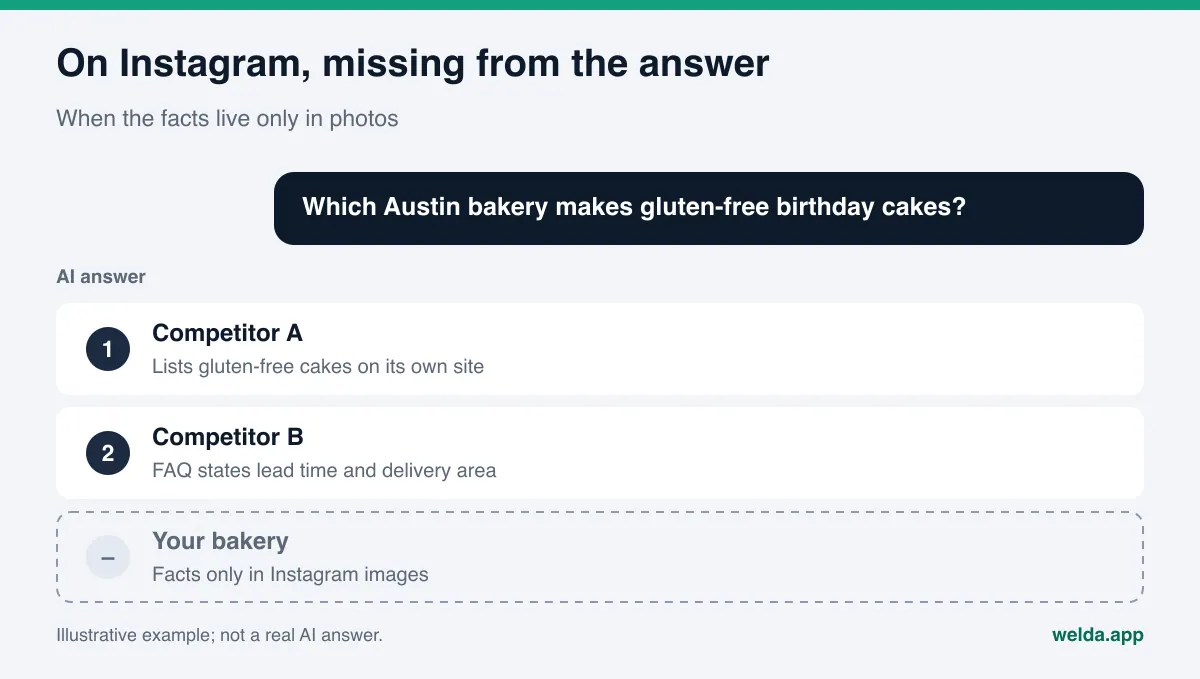
This scenario is an example and does not describe a real business. Picture a small bakery in Austin. Its Instagram started as a personal account and has thousands of followers. It bakes gluten-free and vegan cakes, but that fact appears only on post images and in a "Menu" Highlight. The website has one page: a logo, a phone number and the line "DM us on Instagram to order."
When a customer asks an AI "which Austin bakery does gluten-free birthday cakes," the assistant runs a web search. The bakery's site never mentions "gluten-free." The Instagram account is personal, so it is closed to search engines. The answer names other bakeries that list their gluten-free cakes on a page of their own website.
The work for this bakery is straightforward: switch to a public business account and check the search setting; rewrite the bio as "Gluten-free and vegan cakes in South Austin, made to order"; add a products page with gluten-free and vegan options, lead time and delivery area in plain text; add FAQ answers such as "Are gluten-free items prepared separately?" only if the true answer is known; add the Instagram URL to the site's business data. None of it requires a new Instagram strategy. It moves existing information to where AI can read it.
Decision checklist
Before deciding how much effort Instagram deserves, ask these questions in order:
- Is my account a public business or creator account?
- Is the search engine visibility setting set by deliberate choice?
- Does my display name match my website and Google Business Profile?
- Does my bio say what I do and where, in one sentence?
- Does my bio link go to my own website?
- Is there an Instagram link in my site footer?
- Does my site's business data list my Instagram URL in sameAs?
- Are my menu, services, price range and hours on my site as text?
- Are the questions I answer in Highlights and DMs in an FAQ on my site?
- When hours or address change, do I update everything the same day?
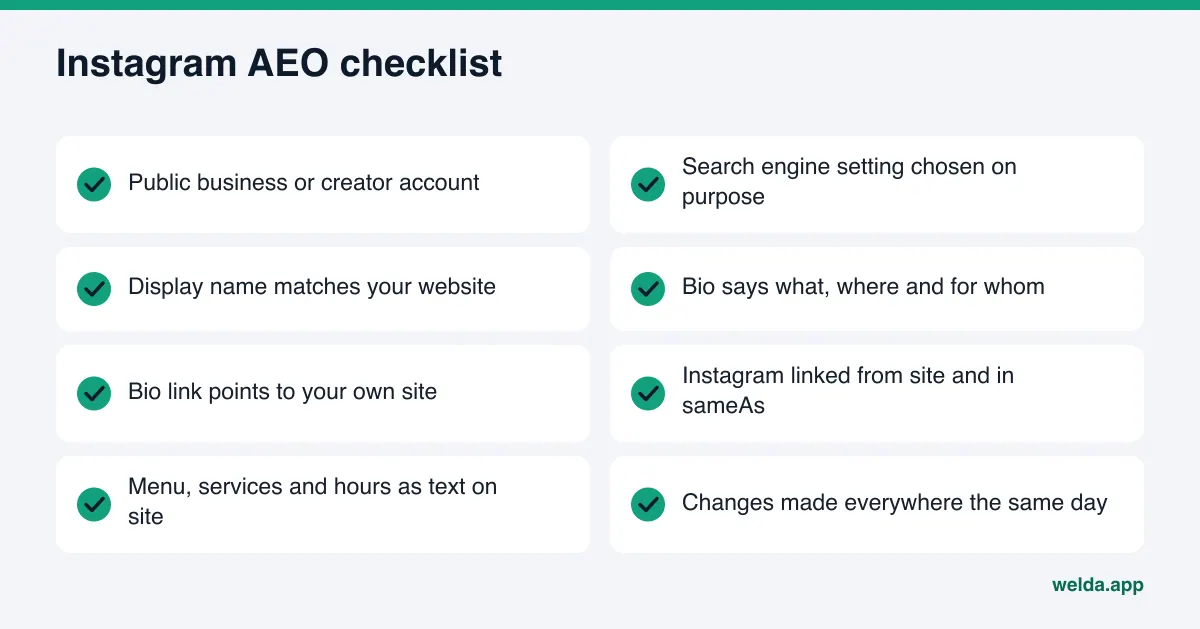
If the first seven answers are yes, your Instagram is ready to serve as a confirmation source for AI. If the last three have gaps, effort spent on your website will make more difference than effort spent on Instagram.
Frequently asked questions
Can ChatGPT read my Instagram posts?
There is no simple answer, because how each tool reads pages is not fully visible. What is documented: Instagram only allows posts from public professional accounts that meet certain conditions to appear in search engines. For an assistant that relies on web search, a closed account is effectively invisible.
Do followers matter for AI visibility?
There is no public evidence that follower count is a direct factor in AI answers. Answers lean on readable information, consistent business details and reviews. A large following does not replace those.
Should I switch from a personal to a business account?
If you want to be found as a business, usually yes, since the content Instagram opens to search engines is limited to professional accounts. Weigh your privacy preferences and the people who appear in your photos before you switch.
Is Instagram enough if I do not have a website?
It is a weak starting point for AEO. A website is where you state your facts in your own name, permanently and readably. At minimum, keep your Google Business Profile complete and have a short, clear site.
Will Welda post to Instagram for me?
Welda's role here is preparing business information such as profile text. If your account is connected, the draft comes to you for approval; if not, it is listed as a manual task with ready text. Creating and posting content stays with you.
Is this the same as GEO?
GEO, or generative engine optimization, is another name for the same goal and is more common outside the US. Both describe making your business readable and citable for AI answer engines.
How soon will changes show up in AI answers?
New content and fixed links usually take weeks to be reflected. No one can promise an exact timeline, so it pays to measure again after a few weeks.
Next step: connect Instagram to your site and put the facts in writing
In the relationship between Instagram and AI search, what counts is not how often you post but where your information lives and how it is written. Make your account a public business account, turn your bio into a clear one-line description, link your site and your account in both directions, and move the facts trapped in images onto your website as text. To see whether your site makes that connection today and how AI reads your business, start your free AI visibility analysis. The report lists every gap with its fix and a ready fix package.