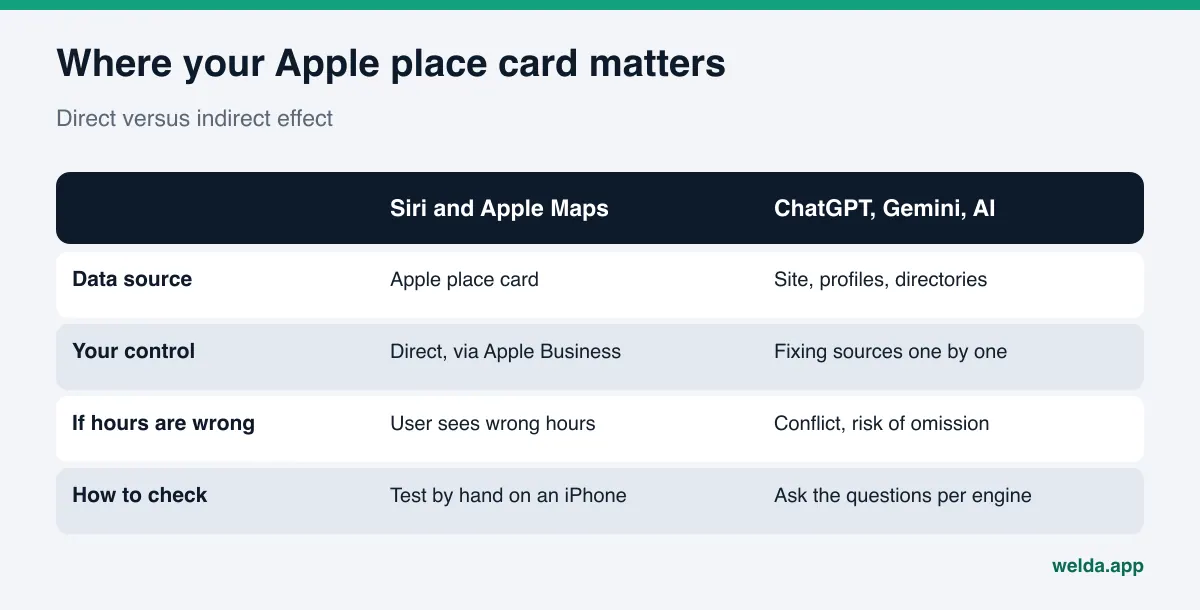
Does Apple Business Connect help you show up in AI assistants? On Apple's own surfaces (Apple Maps, Siri, Spotlight, Safari), yes, directly: the business details people see there come from your Apple place card. In ChatGPT, Gemini, Perplexity, and Google AI the effect is indirect. Your Apple listing is one of many sources that can describe your business, and what matters most is that every source says the same thing.
This guide is for owners and marketers who serve a lot of iPhone users and want a straight answer on Apple Business Connect for AI assistants and what it means for answer engine optimization (AEO). We cover what changed on Apple's side in 2026, how to fix your Apple place card step by step, and how to keep it consistent with the other sources that shape AI answers. If you want to see how your website reads to AI systems before you touch any listing, start with the free site analysis. It checks your address, phone, structured business data, and whether your map and social profiles are linked from your site.
What is Apple Business Connect, and what changed in 2026?
Apple introduced Apple Business Connect in January 2023 as a free tool. In the launch announcement, Apple described it as a way for businesses to claim their place cards and customize how key information appears across Apple Maps, Messages, Wallet, Siri, and other apps. After Apple verified a business, the owner could edit hours, phone, address, photos, and a short description, add Showcases for offers, and link actions such as reservations or ordering.
In March 2026, Apple announced Apple Business, a single free platform that took over its separate business tools starting April 14. According to that announcement, Apple Business Connect is no longer offered as a standalone product; its brand management tools now live inside Apple Business, and claimed locations, place card details, and photos migrated automatically. Apple also notes that certain features are available only in select countries and regions, so check what your own account shows.
In practice, the job did not change. You still decide how your name, logo, hours, and contact details appear on Apple devices. You just do it inside Apple Business now. We keep using the familiar name "Apple Business Connect" in this guide because that is what most people search for.
Apple Business Connect for AI assistants: where is the actual link?
"AI assistant" covers several different systems, and they do not pull business facts from the same place. It helps to split the question into three parts.
Apple's own surfaces. When someone asks Siri for "a pharmacy open near me" or types your name into Spotlight, the card they see comes from Apple's map data. Apple's 2026 announcement says place cards display across Apple Maps, Safari, and Spotlight, and that businesses reach local customers through Maps, Mail, Wallet, Siri, and more. Here the link is direct: if your Apple hours are wrong, the customer sees wrong hours.
Third-party assistants on an Apple device. On devices with Apple Intelligence, a user who turns on the ChatGPT extension can have Siri hand some requests to ChatGPT. Apple's ChatGPT extension help page explains the setup and notes that the extension is not available in every language or region. In that case the answer comes from ChatGPT and its own sources, not from your Apple place card. The same phone can give two answers from two different places.
Assistants outside Apple. ChatGPT, Gemini, Perplexity, and Google AI can draw on your website, your Google Business Profile, review sites such as Yelp and Tripadvisor, the BBB, industry directories like Healthgrades or Angi, local news, and forums. Which source feeds which answer varies by question and is not always visible. There is no general rule that these assistants read Apple place cards, so "I filled out Apple Business Connect, now I will show up in ChatGPT" is the wrong expectation.
The right expectation: your Apple listing works directly in Apple's assistant and indirectly everywhere else, by adding one more source that agrees with the rest. When an AI system finds conflicting facts (closing at 9 p.m. here, 10 p.m. there, an old address somewhere else), it either repeats the wrong one or leaves you out. We see the same root cause in ChatGPT giving wrong information about a business: scattered, inconsistent records.
Who should care about this?
Apple place cards do not carry the same weight for every business. They matter most for:
- Local businesses whose customers search "near me" on their phones: restaurants, coffee shops, salons, dental offices, auto repair, urgent care.
- Hotels, inns, and attractions that host travelers. Many visitors navigate with Apple Maps and ask Siri for directions and hours.
- Multi-location brands and franchises. If each location's card is not maintained, hours and phone numbers drift apart. We cover the wider picture in AEO for franchises.
- Businesses that recently opened, moved, or rebranded. An old Apple record can send people to an old address.
Not having claimed your place card does not mean you have none. Most businesses already have an Apple Maps record built from various data sources, and it may be out of date. Until you claim it, your ability to correct it is limited.
How to fix your Apple place card, step by step
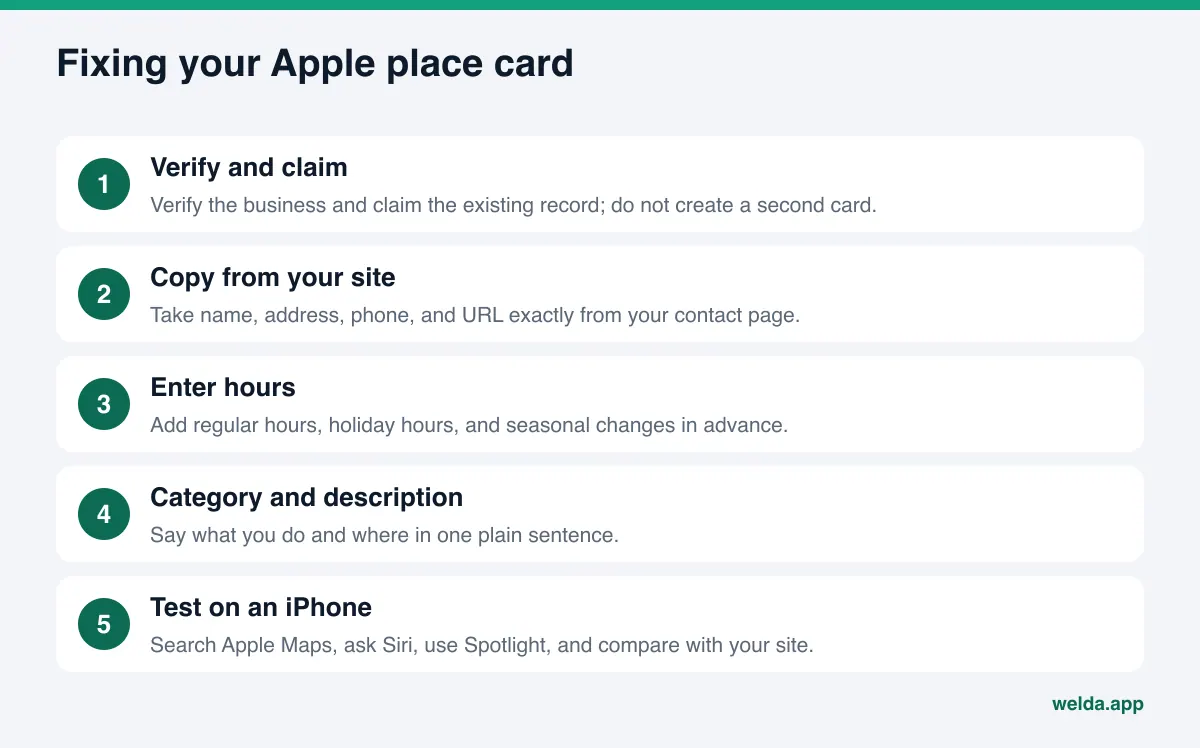
The sequence below is a general order for location management inside Apple Business. Screen names change with updates; the logic does not.
- Create the account and verify the business. Apple verifies a business before you can claim a location. Use the same legal or trading name that appears on your website and in your other listings.
- Claim the existing record instead of creating a new one. A second record for the same business can leave two different cards in Apple Maps.
- Copy core details from one source. Take your name, address, phone, and website straight from your site's contact page. "St." versus "Street" or "(555)" versus "+1 555" looks minor, but one consistent format makes every later check easier.
- Enter regular and special hours. Add holiday hours for Thanksgiving, Christmas, and the Fourth of July ahead of time, plus seasonal changes. Wrong hours are one of the most common errors in AI answers about local businesses.
- Pick the category and write a plain description. The category should match how customers phrase their question. The description should say what you do and where, without "best in town" claims.
- Upload a logo and photos. Exterior, entrance, and interior shots help people recognize the place when they arrive.
- Add action links. If you take reservations, orders, or appointments online, add the link and test it on a phone.
- Check the card on an iPhone. Search for your business in Apple Maps, ask Siri for your hours, type your name in Spotlight, and compare what you see with your website.
People can also rate places and add photos in Apple Maps. Apple's help page on rating a location says Apple Ratings and Photos is available in select countries and regions. Where it is on, those ratings and customer photos become part of your place card. You cannot write them yourself; what you can do is keep the rest of the card accurate and complete.
Apple Business Connect for AI assistants: a consistency table
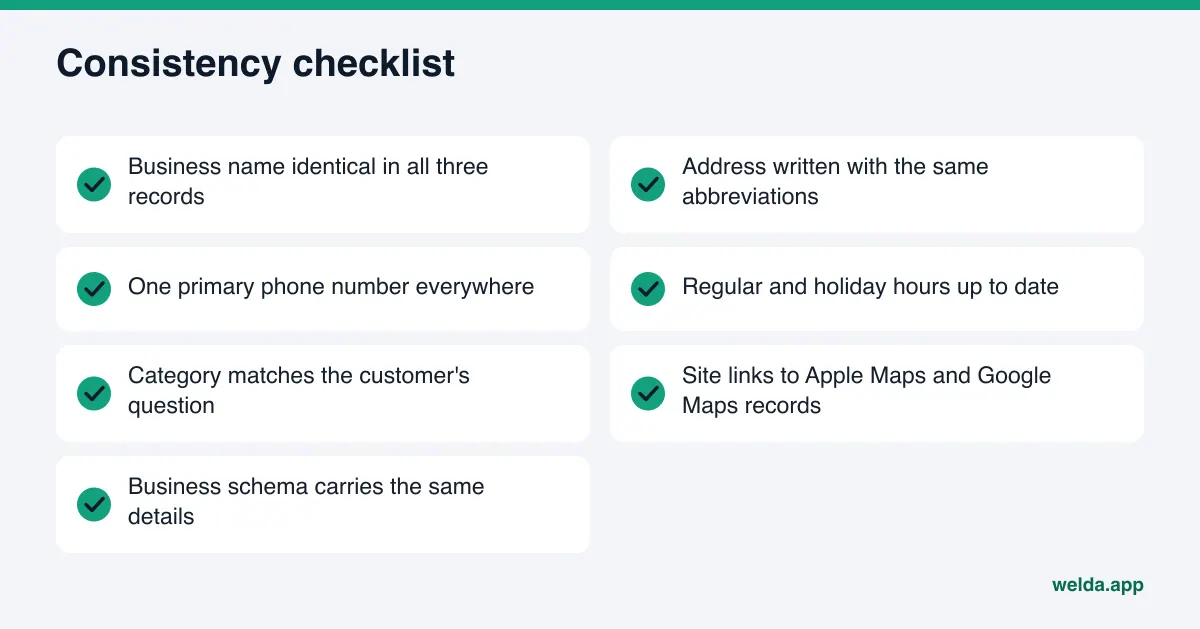
The real payoff comes when you treat the Apple listing as one row in a set of records, not a separate project. Use the table below as a worksheet: for each row, confirm the three columns match.
| Field | Apple place card | Google Business Profile | Your website | What to watch |
|---|---|---|---|---|
| Business name | Verified name | Profile name | Title tag and business schema | No keywords stuffed into the name |
| Address | Location and address line | Address field | Contact page and footer | Same abbreviations everywhere |
| Phone | Phone field | Phone field | Click-to-call number | Choose one primary number |
| Hours | Regular and special hours | Regular and special hours | Contact page | Update all three on every holiday change |
| Category and services | Category, description | Category, services list | Service pages | Use the same service names |
| Website | Website field | Website field | Your domain | Replace old redirecting URLs |
| Map links | Apple Maps record | Google Maps record | Both links on the contact page | Link from your site to both map records |
The last row is the one most businesses skip. Linking from your contact page to your Apple Maps and Google Maps records, and using the same address and phone in your business schema markup, strengthens the signal that these records belong to one business. If you also want to see how this plays out in Google's assistant, read how to get recommended by Gemini.
Common Apple place card mistakes
Apple's side is less familiar to most teams than Google's, so the same mistakes repeat. Each one affects what Siri tells customers and weakens the overall consistency of your business facts.
- Adding services or a city to the name. "Example Cafe Brooklyn Brunch" conflicts with your legal name and website. Keep the name clean; put services in the description and location in the address.
- Setting it once and forgetting it. Hours, phone numbers, and photos age. The person who updates Google often does not remember Apple.
- Leaving a closed or moved location open. If you do not mark the old location closed after a move, two addresses can show for a while.
- Using a different phone number than your site. If the card lists a call center and the site lists a direct line, an AI system cannot tell which is right.
- Writing claims instead of facts. "The best in the city" carries no information. The sentence that answers a customer question says what you do and who you serve.
- Ignoring verification requests. If Apple asks for more information and nobody replies, the process stalls and the card stays unclaimed.
An example scenario: a change in hours
Take an example brunch spot. In winter it moves closing time from 4 p.m. to 2 p.m. The owner updates Google Business Profile and the website, but forgets the Apple place card.
A customer asks Siri when the place closes. Siri reads the Apple card and says 4 p.m. The customer shows up at 3 p.m. to a locked door. The same week, someone else asks ChatGPT for "a brunch place open Sunday afternoon in the neighborhood." The sources it finds disagree on closing time, so the brunch spot is either left out or mentioned with a caveat.
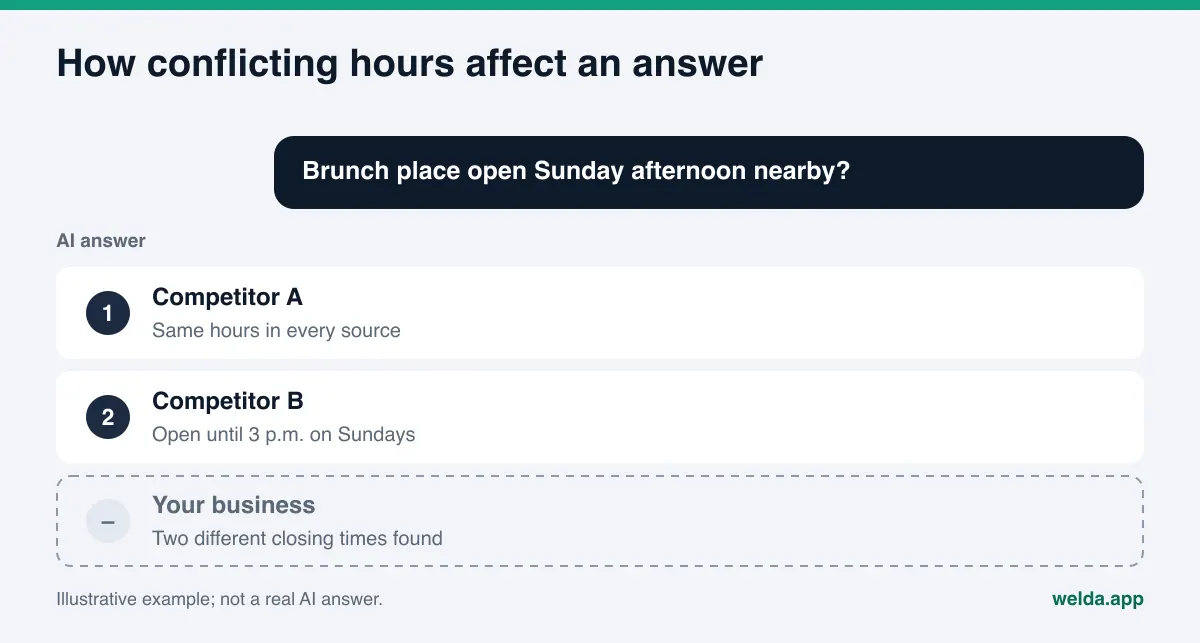
This is an illustration, not a real business. But the mechanism is concrete: one forgotten record can turn into two separate problems in two separate assistants. The fix is simple too. Tie every hours change to a checklist and update the website, Google Business Profile, and Apple place card together.
How Welda handles this work
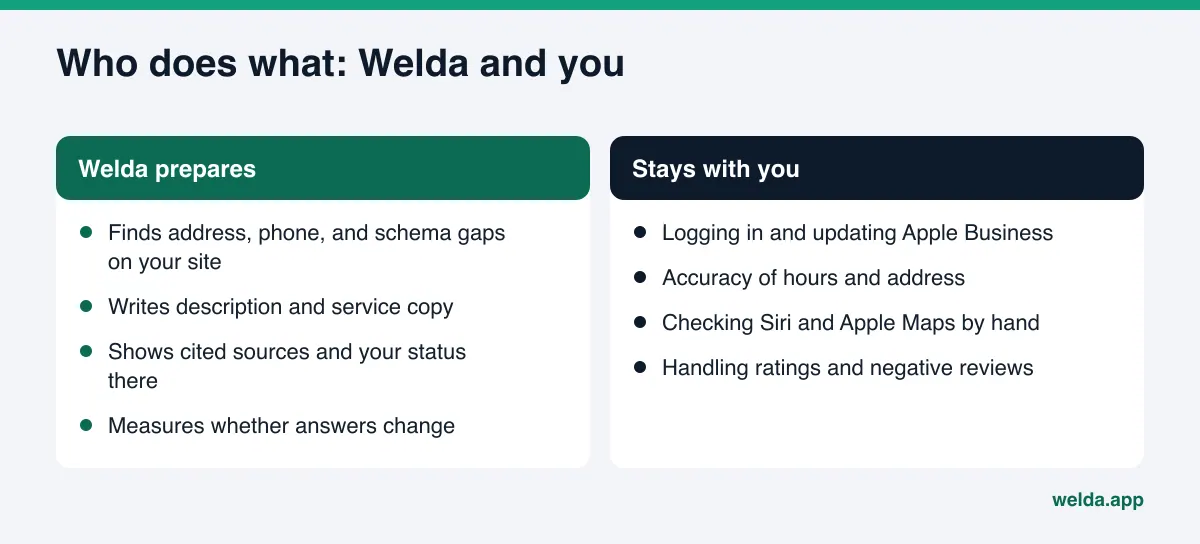
First, the boundary: Welda does not measure Siri or Apple Maps. The engines Welda tracks are ChatGPT, Gemini, Perplexity, and Google AI. Welda also does not connect to Apple Business; you or your team make the change to the Apple place card. Welda's role here is to make it easier for every record, Apple included, to say the same thing, and to show whether that shows up in AI answers. In AEO terms (some call it GEO, generative engine optimization), this is source consistency work.
The free site analysis checks the center of your consistency. Every listing should be copied from one source: your website. The free site analysis reads your homepage and a few inner pages such as contact and services. It checks whether your address, phone, and location are clearly stated, whether business schema is present, and whether your map and social profiles are linked from the site. For each gap it explains what it found, why it matters, and how to fix it, and it includes a ready-to-add fix package with business schema code. Once that code is in place, you have one correct block of name, address, and phone to paste into your Apple card. The analysis runs in English and German as well.
The Sources screen in the Welda panel shows where AI systems actually look. You cannot know in advance how much ChatGPT or Gemini relies on your Apple listing. The Sources screen replaces that guess with a list of the sites cited in answers to your questions, and your status on each: present, incomplete, or unverified. That tells you which listing deserves your time first.
The to-do list treats Apple as a manual task. Welda can connect directly to WordPress sites, Google Business Profile, Instagram, and Facebook. For any profile without a connection, Welda prepares the copy and lists the job as manual. Your Apple place card falls into that group: the description and service wording are ready next to the task, you paste them into Apple Business, and you mark it done. Welda does not invent facts it does not have, such as your new winter hours. It asks you for them.
A plain statement of where things stand: the Welda panel is in early access and is opening first in Türkiye. Regular four-engine tracking is being added during early access, and panel screens are shown with sample data. The part anyone can use today is the free site analysis, in English and German. Pricing is discussed in an early access conversation.
Limits, and what Welda does not do
Apple listings and AI assistants invite unrealistic expectations. Knowing these limits up front saves frustration.
- No Siri or Apple Maps tracking. Welda does not report how you appear there. Check Apple's surfaces by hand on an iPhone.
- No automatic writes to Apple Business. There is no connection; Welda prepares the copy and you apply it.
- No ranking or placement guarantee. Neither an Apple listing nor Welda can promise you a spot in any AI answer.
- No fake reviews. Ratings in Apple Maps come from customers. The FTC's final rule on fake reviews and testimonials bans them in the US, and Welda does not write them. Responding to negative reviews stays with you.
- No made-up facts. Hours, addresses, and service scope come from you.
- Change takes time. New or corrected information usually takes weeks to show up in AI answers. We explain the timeline in how long AEO takes.
The free analysis also states its own limits. It does not measure rankings, it runs once per site, and its AI test asks five likely customer questions to an AI assistant that can search the web, then checks whether your business name appears. That is a one-time snapshot, not ongoing tracking.
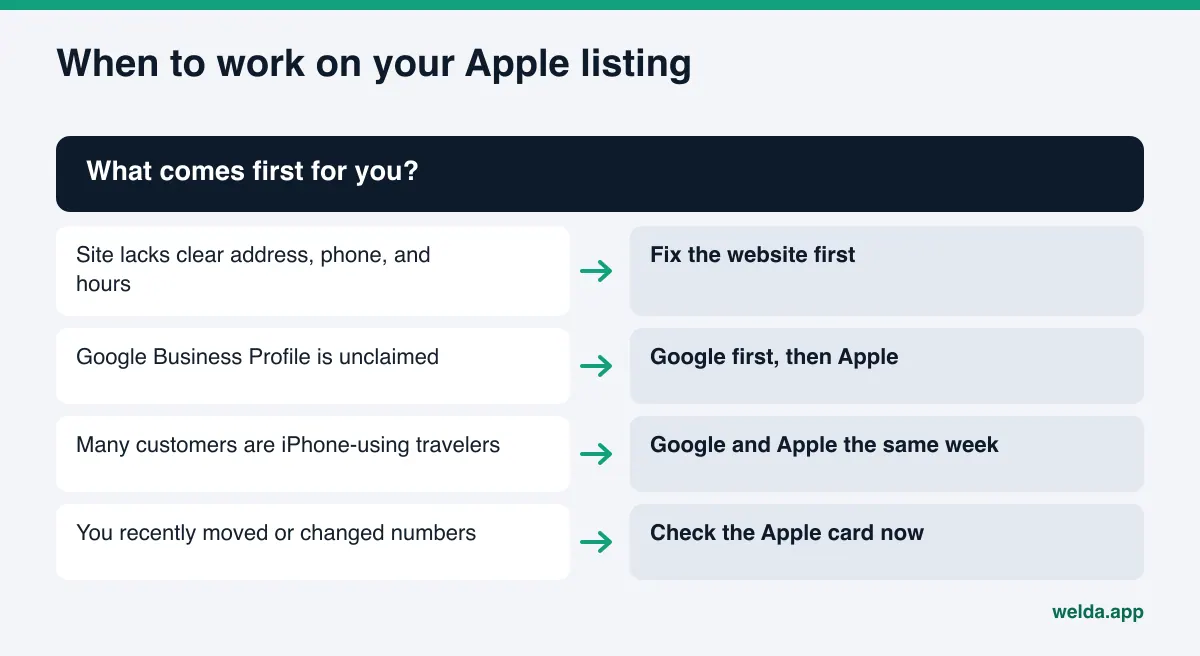
Decision list: when should Apple be on your plate?
For a business with limited time, the Apple place card may not be job number one. Use this table to set the order.
| Your situation | Suggested order |
|---|---|
| Your site does not clearly state address, phone, and hours | Fix the site first; every listing gets copied from it |
| Your Google Business Profile is unclaimed | Claim and fix Google, then move to Apple |
| Many customers are travelers or iPhone users | Update Apple the same week as Google |
| You recently moved, rebranded, or changed numbers | Check Apple now; old data lingers there most often |
| You run several locations | One card per location, one shared master sheet |
| Everything already matches | Quick review each quarter and on every hours change |
A quick self-check: does the right card come up when you search your name in Apple Maps? Does Siri state your hours correctly? Does your contact page link to your Apple Maps record? Does your category match the question customers ask? Did your last hours change go into all three places? Any "no" is your next task.
Frequently asked questions
Does Apple Business Connect still exist?
Apple said in March 2026 that Apple Business Connect would no longer be available once Apple Business launched, and that its brand management tools would move into Apple Business. Claimed locations and place card details migrated automatically. The job is the same; the address changed.
Will filling out my Apple place card get me into ChatGPT answers?
Not directly, and no one can guarantee it. The Apple card mainly affects Apple Maps, Siri, Spotlight, and Safari. For ChatGPT and other assistants, it adds one more source that agrees with your other records.
Where does Siri get business information?
Apple says place card details appear across Apple Maps, Siri, and other Apple apps. If a user has turned on the ChatGPT extension, Siri can pass some requests to ChatGPT, and that answer comes from ChatGPT's own sources.
Is Apple Business free?
Apple announced Apple Business as a free service. Some add-on services and features vary by country, so check what your account shows.
Will Welda update my Apple listing for me?
No. Welda has no connection to Apple Business. It prepares the description and service copy and adds the job to your to-do list as a manual task.
Should I do Apple or Google first?
For most businesses the order is website, then Google Business Profile, then Apple. If many customers are iPhone-using travelers, update Google and Apple in the same week.
Your next step
Apple Business Connect for AI assistants comes down to one idea: your Apple card works directly in Apple's assistant and indirectly in the others, and in both cases what decides the outcome is whether your facts match everywhere. The center of that consistency is your website. To see how your site reads on address, phone, business schema, and map links, run the free site analysis. It takes a few minutes and gives you a list of concrete fixes.