How do you get recommended by Gemini? Gemini mostly knows your business through what Google already knows: the pages of yours in Google's search index, your public Google Business Profile and Maps listing, and the other sites that mention you. If those sources state clearly and consistently what you do and where you do it, Gemini has something to recommend. Nobody can promise you a spot in a specific answer. But how to get recommended by Gemini is not a mystery either: you close the gaps in those sources and track the result question by question.
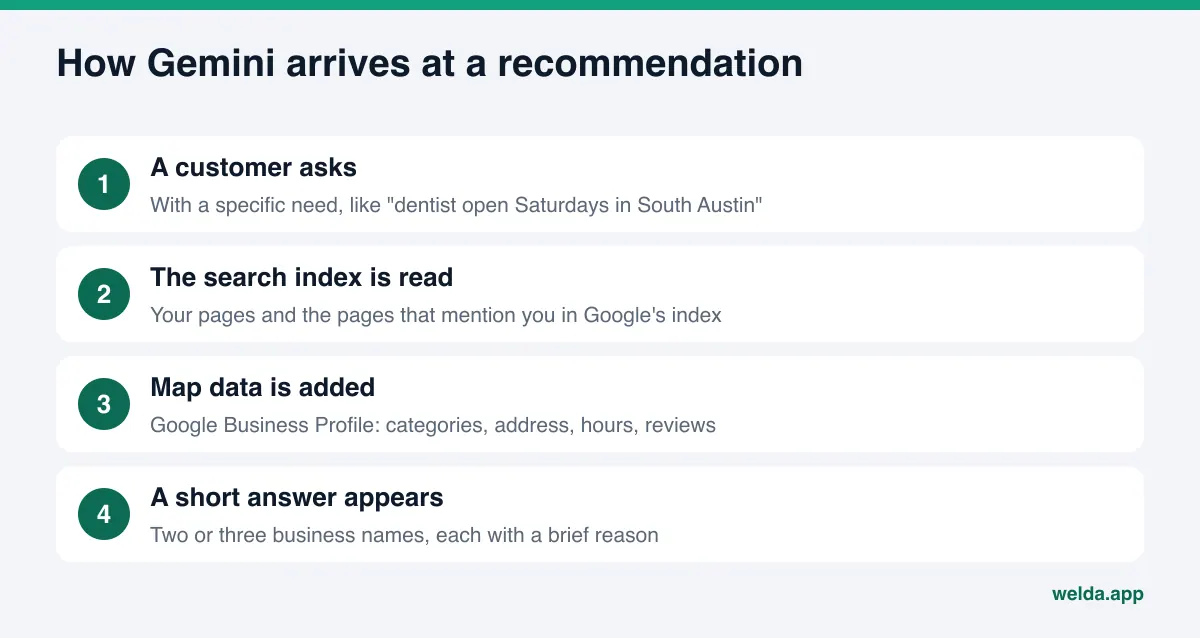
Where does Gemini get its information about local businesses?
When someone asks Gemini for "a dentist open Saturdays in South Austin" or "a pet-friendly inn near downtown Asheville," the model does not rely only on what it learned in training. Google states plainly that Gemini Apps can pull content from the Google Search index at the moment a question is asked, to make answers more accurate and current. Google calls this grounding. The same page explains that you control whether your site may be used this way with the Google-Extended token in robots.txt (Google crawler documentation).
The second source is Google Maps. The Gemini help center says Gemini automatically uses public information from certain Google services, Google Maps among them (Gemini Apps Help). For a local business, that makes your Google Business Profile the most direct fact sheet Gemini can read: categories, hours, address, phone, services and reviews.
The third source is everyone else who writes about you: Yelp, Tripadvisor, Angi, Healthgrades, the Better Business Bureau, local news sites, booking platforms, industry directories. Those pages sit in the same search index, so they reach Gemini the same way. What other people say about you shapes the answer as much as what you say about yourself.
All three sources have one thing in common: Google already crawls them. There is no separate Gemini sign-up form and no application. The work is making what Google knows about you complete, accurate and easy to read. That is the core of AEO (answer engine optimization), and it is the same discipline some people call GEO, generative engine optimization. To see where your site stands today, start with the free site analysis: it reads your site the way Google and AI assistants do and lists the gaps one by one.
Why getting recommended by Gemini deserves its own attention
Gemini lives inside Google's products. People use it as the assistant on Android phones, alongside Google apps and as a standalone chat app. AI Overviews and AI Mode in Google Search belong to the same family. So the way Gemini describes you may be the first sentence a customer reads about you anywhere in Google's world.
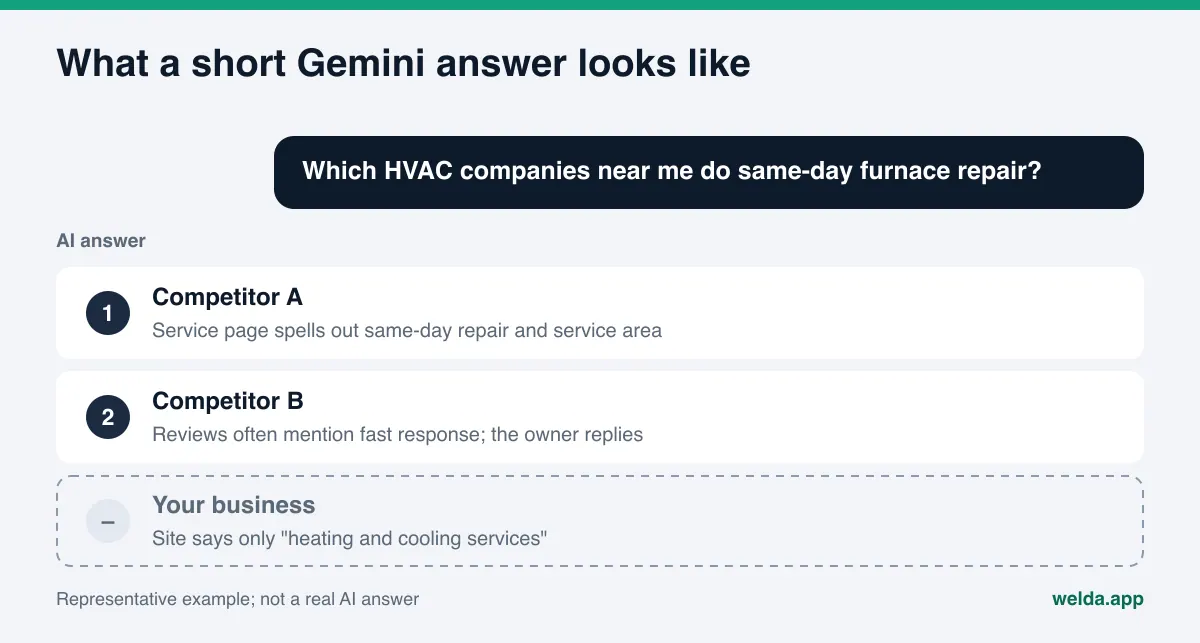
In classic search, a customer scans ten links, opens a few and compares. A Gemini answer usually names two or three businesses with a short reason next to each. If you are not on that short list, the customer may decide without ever seeing your website. If you are on it but the reason is wrong (old hours, a closed location, a service you dropped), that costs you too.
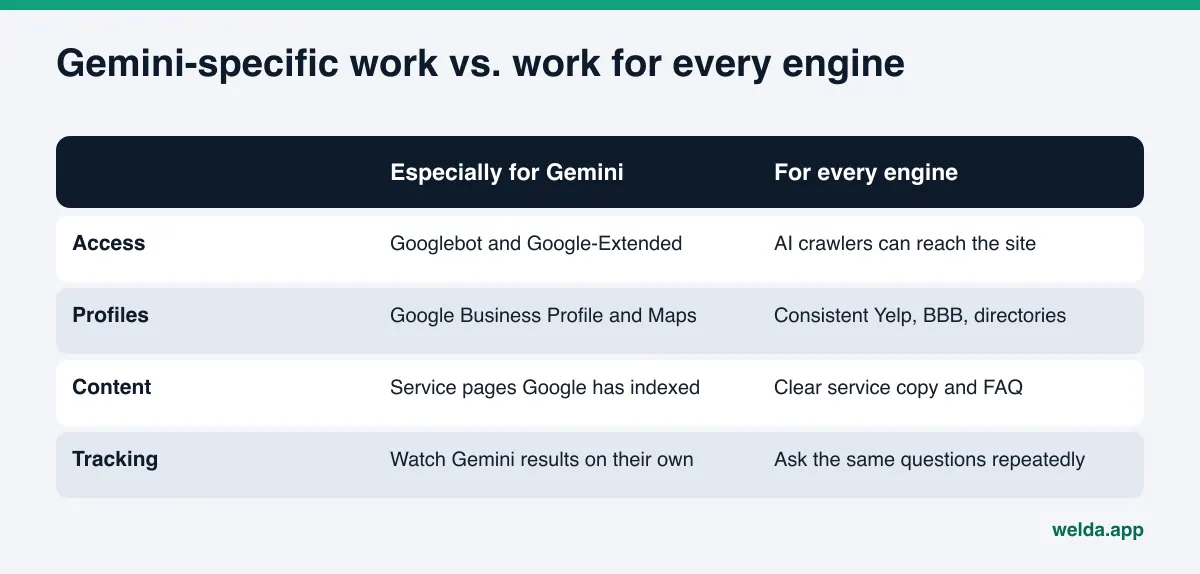
Where Gemini differs from other assistants is how close it sits to Google's own data. The basic AEO playbook is the same everywhere, but for Gemini the weight shifts toward your Business Profile, your Google reviews and how well Google has indexed your service pages. It is normal to show up in one assistant and not in another; each one leans on different sources. If you are also working on Microsoft's assistant, our guide on getting your business into Copilot answers covers how that side differs.
One more point. Gemini answers are not fixed. The same question can surface different businesses on different days, for different accounts and after different conversation history. We explain the reasons in why AI answers change every time. The practical takeaway: one test is never enough to say "Gemini knows us" or "Gemini ignores us."
How to get recommended by Gemini: a step-by-step plan
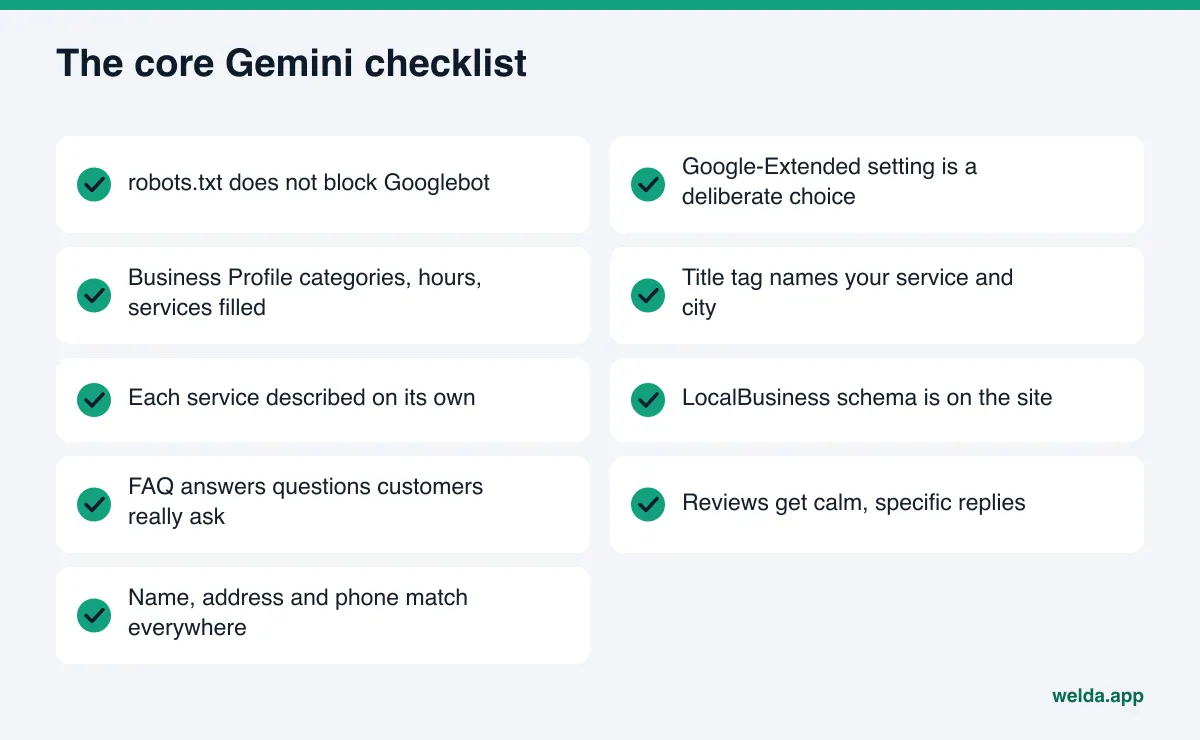
These steps build on each other. If a lower step is missing, effort spent on the higher ones can go to waste. If Google cannot read your site, for example, a beautifully written FAQ does not matter.
- Confirm Google can reach your site. Open
yourdomain.com/robots.txt. There should be no blanket block onGooglebot. IfGoogle-Extendedis disallowed, check whether someone decided that on purpose. According to Google, that token also governs whether your content is used for grounding in Gemini Apps. It does not affect your ranking in classic search, but it can limit whether Gemini uses your site as a source. - Complete your Google Business Profile. Is the primary category right? Do the secondary categories match services you actually offer? Are regular hours, holiday hours, address, phone, website link, services or menu and the business description all filled in? Write the description in plain sentences: what you do, who you serve and which area you cover.
- Fix your homepage title, meta description and H1. Your title tag should say what you do and where. A title that reads "Home" or just your brand name tells Gemini nothing. The same goes for your first paragraph. Our guide to title tags and meta descriptions for AI search goes deeper on wording.
- Describe each service on its own. Replace one-line summaries like "all your plumbing needs" with a short section or page per service: what it involves, who it is for, how long it takes, how to book. Customers ask Gemini about a specific need. Gemini can only match you to that need if the need is written down on your site.
- Add LocalBusiness schema. Put structured data in your page source using
LocalBusinessor a more specific type, with name, address, phone, hours and URL. Google documents this format in its own guide (Google Search Central). The markup repeats what the page says in a form machines read without guessing. - Write an FAQ that answers real questions. Collect the questions you hear on the phone, by text or at the front desk. "Do you take walk-ins?" "Is there parking?" "Do you offer same-day appointments?" Give each one a clear two- or three-sentence answer.
- Reply to reviews. Answer Google reviews calmly and specifically. Naming the service in your reply makes clear what the review is about. Do not buy or fabricate reviews: the FTC's final rule on fake reviews bans creating, buying and selling them.
- Make your listings match. Do Yelp, BBB, Angi, Tripadvisor, Apple Maps, your social profiles and any industry directories show the same name, address and phone? An old address or a closed second location can carry wrong facts into a Gemini answer. We cover the symptoms and fixes in wrong address or phone number in AI answers.
- Track results question by question. List the questions your customers are likely to ask and check regularly whether your name shows up in Gemini. Ask the same questions again at intervals rather than relying on a single test.
Which source feeds which part of a Gemini answer?
If you take a Gemini answer apart, each piece likely comes from a different place. Your name and location usually come from map data, what you do comes from your site and directories, and why you are recommended comes from reviews and what others write. Knowing which source feeds which piece tells you what to fix first.
| Piece of the answer | Likely source | Your control |
|---|---|---|
| Address, neighborhood, phone, hours | Google Business Profile, Google Maps, contact details on your site | High: you edit the profile and the site |
| What services you offer | Your service pages, profile categories, industry directories | High: you write the copy |
| Why you are recommended ("friendly," "fast," "great with kids") | Google reviews, Yelp, Tripadvisor, Healthgrades, forums | Medium: you write the replies, customers write the reviews |
| Price range, offers, special terms | Your site, booking and scheduling platforms | Medium: platform data often goes stale |
| Complaints or warnings | BBB complaints, review sites, local news | Low: you can respond, you cannot delete |
The word "likely" is deliberate. Gemini does not always show which source an answer came from, and it may lean on different sources for the same question on different days. Still, the pattern is useful: close the gaps in the high-control rows first. They are the fastest to fix and they support everything below them.
Take an example. Picture a sample HVAC company in a mid-sized city. Ask Gemini for "an HVAC company that does same-day furnace repair near me" and two competitors appear while the sample company does not. Its website mentions "heating and cooling services" in one line and never says "same-day." Its Business Profile lists only the generic category, with no services added. Customers praise its fast response in reviews, but the company has never replied. The first job here is not new content. It is writing down what is already true and completing the profile.
How to run your own Gemini check
Before you use any tool, you may want to look with your own eyes. That is a good idea as long as the test is set up properly. Asking one random question and reacting to the result creates false confidence or needless worry.
Start with a question list. Write the questions the way a customer would say them, not in your marketing language. For a dental practice: "good dentist for implants in Plano," "pediatric dentist open Saturdays near me," "where should I take my kid for a first dental visit." For a restaurant: "quiet spot for a business lunch in River North," "restaurants with a real gluten-free menu in Midtown." Ten to twenty questions is enough to begin.
Sort the questions into three groups:
- Discovery questions: the customer does not know anyone yet ("where can I get...").
- Comparison questions: the customer is choosing between options ("which is best for...," "X or Y").
- Detail questions: the customer knows you and wants specifics ("are they open Sunday," "is there parking").
Ask Gemini each question and note three things: does your name appear, in what position, and is the reason next to it correct? Ask again a few days later. Answers will change; the real signal is how many runs include you. If you can, repeat the test from a second Google account, since Gemini can use account history.
This manual method works, but it gets tiring fast. Twenty questions, several repeats and your competitors' positions turn into a large spreadsheet. If you want the same view for ChatGPT, Perplexity and Google's AI features, the work multiplies by four. Even so, running it once by hand shows you which questions are worth tracking over time.
How Welda handles Gemini visibility
Welda is software that measures where a business shows up in AI answers and fills the gaps on the business's behalf. For Gemini, three parts matter most: question tracking, the sources view and ready-to-use fixes.
Question tracking. Your customers' likely questions are listed and each one is asked three times to each of four engines, Gemini included. Filter by Gemini and you see which questions mention you, in what position, and which ones never do. Select a question and a summary of the answer opens next to it, along with the sources it relied on. The decision you make here: which questions do I win in ChatGPT but miss in Gemini? That gap usually points to something on Google's side, such as an empty field in the Business Profile, a service page Google has not indexed, or a missing category on Maps.
Sources view. This lists the sites AI answers cite and your status on each: profile present, incomplete, unverified, or your own site unreachable. For Gemini, look closely at the Google Maps rows and other Google properties. Each row carries a suggested action, such as "complete profile" or "fix access issue." What stays with you is approving the change, or making it yourself if you hold the login for that listing.
Ready-to-use fixes. Each gap goes onto a single to-do list, and Welda drafts the text to apply: a Business Profile description, a service section, an FAQ answer, a review reply. If it does not know a fact, such as whether you open on Sundays, it asks you instead of guessing. On WordPress, Welda connects through its own Editor user and an application password, with no code to install; content opens on your site as a draft and goes live when you approve it. If your Google Business Profile is connected, profile copy can be updated from there; if not, the task stays on the list as a manual step. Your content always lives on your own site.
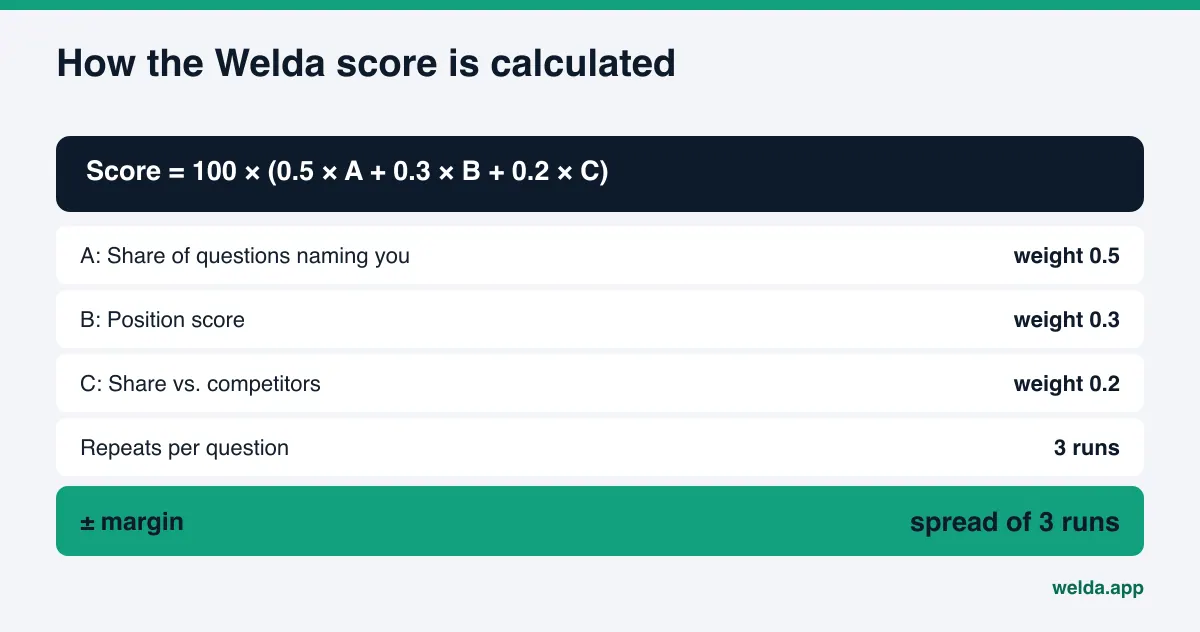
The score is open, too: 100 × (0.5 × share of questions that mention you + 0.3 × position score + 0.2 × share versus competitors). A ± margin comes from the spread of the three runs, so you can tell a real change in Gemini from normal answer-to-answer noise. There is also a competitors view, a before-and-after comparison and a one-page monthly report.
A plain statement of where things stand: the Welda dashboard is in early access and is opening first in Türkiye. Regular four-engine tracking is being added during early access, and sample screens in the dashboard use representative data. What anyone can use today is the free site analysis, which works in English. It checks how readable your site is for Google and AI assistants, and it also asks five likely customer questions once to an AI assistant that can search the web, then checks whether your name appears. That is a one-time check, not a Gemini-specific measurement. Pricing is discussed in an early access call.
Limits: what Welda does not do
Nobody fully controls Gemini visibility. Google does not publish exactly how answers are assembled, models get updated and the same question returns different results on different days. Be careful with anyone who promises a top spot in Gemini; we explain why in guaranteed ChatGPT rankings, and the same logic applies here.
Here is what Welda does not do:
- It does not guarantee rankings or a mention in Gemini.
- It does not write facts it does not know; it asks you.
- It does not publish sensitive content without your approval. In healthcare there is no automatic publishing, every item waits for approval and patient data is never sent to AI.
- It does not create fake reviews.
- Handling negative reviews, managing directory accounts and press work stay with you.
Timing matters too. New content on your site or a fix to your profile usually takes weeks to show up in Gemini answers. Google has to recrawl the page, update its index, and answers have to start drawing on the new information. Seeing no change in week one does not mean the fix failed. That is why tracking the same questions over several weeks matters.
A note on compliance checks: before anything is published, Welda flags patterns such as price claims, guarantees, superiority claims and diagnostic suggestions. This is a warning layer, not legal advice, and it has not been reviewed by legal counsel. In regulated fields like healthcare, law or finance, make the final call with your own advisor.
Decision checklist: what to start on this week
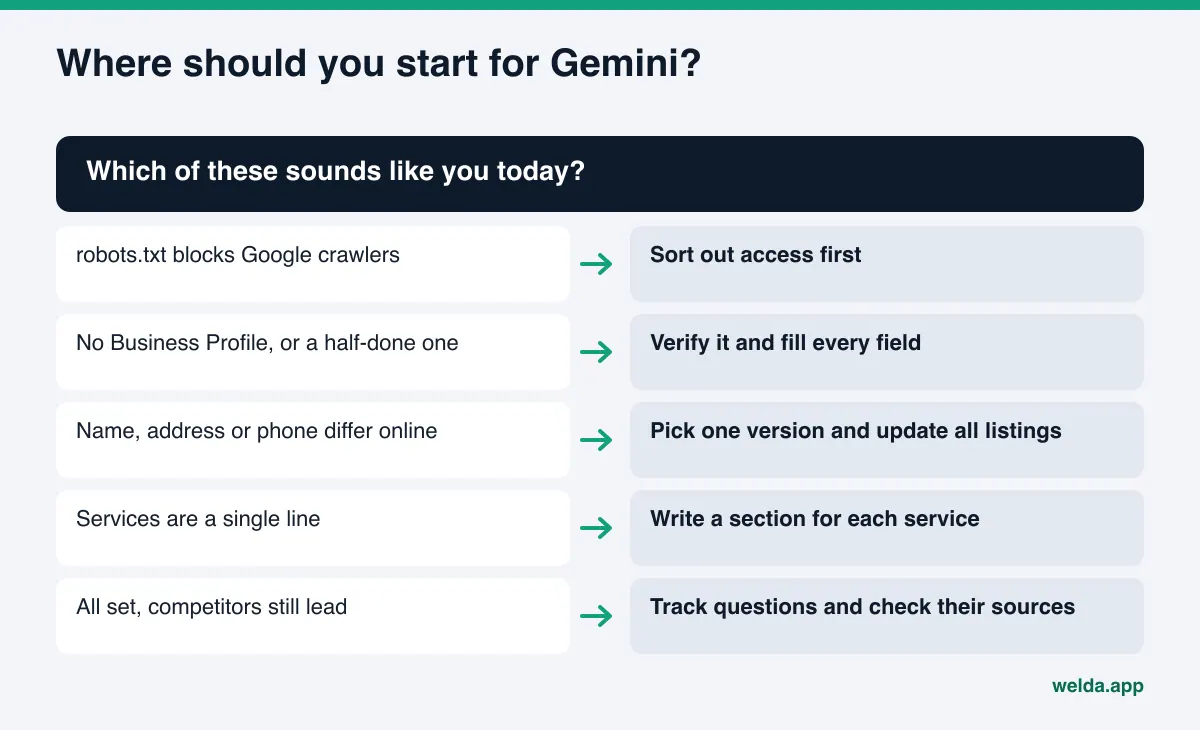
Every business has a different first step. Find the highest row below that matches your situation and finish that job before moving down.
| Where you are today | First job | How you will know it is done |
|---|---|---|
| robots.txt blocks Googlebot or Google-Extended | Confirm whether the block is intentional and remove it if not | The relevant line in robots.txt |
| No Google Business Profile, or a half-finished one | Verify it and fill in categories, hours, services and description | No empty fields left |
| Name, address or phone differ across sites | Pick one correct version and update every listing | Same details on Yelp, BBB and directories |
| Services appear as a single line | Write a short section or page per service | The need in the customer's question is written on your site |
| Site and profile are solid but competitors still lead | Track questions regularly and see which sources competitors win on | Share of questions that mention you |
The first three rows take a few hours for most businesses and tend to have the most effect. The fourth takes writing time. The fifth is ongoing: as Gemini and the other engines change, you need to see where you are falling behind.
Frequently asked questions
Do I need to apply to Google to appear in Gemini?
No. There is no separate sign-up or application for Gemini. It uses information Google already crawls and holds. Your job is to make that information complete and consistent, starting with your website and your Google Business Profile.
If I rank well on Google, will Gemini recommend me?
It usually helps, but it is not automatic. A Gemini answer is a few business names with a short reason each. If your site does not say clearly what you do, or your Business Profile is incomplete, even a well-ranked page may not make it into the answer. Only question-level tracking shows you the difference.
Does blocking Google-Extended in robots.txt hurt my Gemini visibility?
According to Google, Google-Extended governs whether your content is used to train future Gemini models and for grounding in Gemini Apps at the time a question is asked. It does not affect classic search rankings. Blocking it can limit whether Gemini uses your site as a source, so make that choice deliberately.
Can I pay to be recommended by Gemini?
Google's ad products are a separate topic and outside the scope of this guide. Being named as a recommendation in a Gemini answer depends on the quality of what Google knows about you. Be wary of any service that says it can guarantee a recommendation for a fee.
How long until changes show up in Gemini answers?
Usually weeks. Google needs to recrawl, update its index, and answers need to start using the new information. Tracking the same questions over several weeks is the most reliable way to see the change.
Does Welda track Gemini separately?
In the Welda dashboard, tracking covers ChatGPT, Gemini, Perplexity and Google AI, and you can filter results by engine. The dashboard is in early access and regular four-engine tracking is being added during that phase. The free site analysis includes a one-time AI test that is not specific to Gemini.
Your first step toward Gemini recommendations
There is no shortcut to getting recommended by Gemini, but the path is clear: Google has to be able to read your site, your Business Profile has to be complete, your services have to be written out, your listings have to match, and the result has to be tracked question by question. Most of this can be started within a week.
If you are not sure where to begin, look at where your site stands now. The free site analysis reads your homepage and a few inner pages, gives you a technical and a content score out of 100, explains each gap and how to fix it, and suggests ready-to-use copy for your homepage. It is free once per site; the results link arrives by email and stays open for 14 days.