How do you get your business into Microsoft Copilot answers? When Copilot pulls in web information, it sends a short search query to Bing and builds its answer from what comes back. So getting cited by Copilot depends on three things: Bing being able to read your site, your business details being accurate on the Bing side, and your pages answering the question in plain terms. This guide explains where Copilot gets its sources, the steps to take in order, and where Welda fits in.
In the US, this kind of work is usually called AEO, short for answer engine optimization. You will also see it called GEO (generative engine optimization); both names describe the same goal of being named and cited in AI answers, and this guide uses AEO. Copilot deserves its own look because it lives inside Windows, Edge and Microsoft 365. People use it without opening a separate app: a procurement manager drafting a vendor comparison in Word, an office manager asking a quick question in Teams, a homeowner using the Edge sidebar. To see how your site reads to AI and search engines today, run a free AI visibility analysis first. It lists most of the signals Copilot also relies on in a single report.
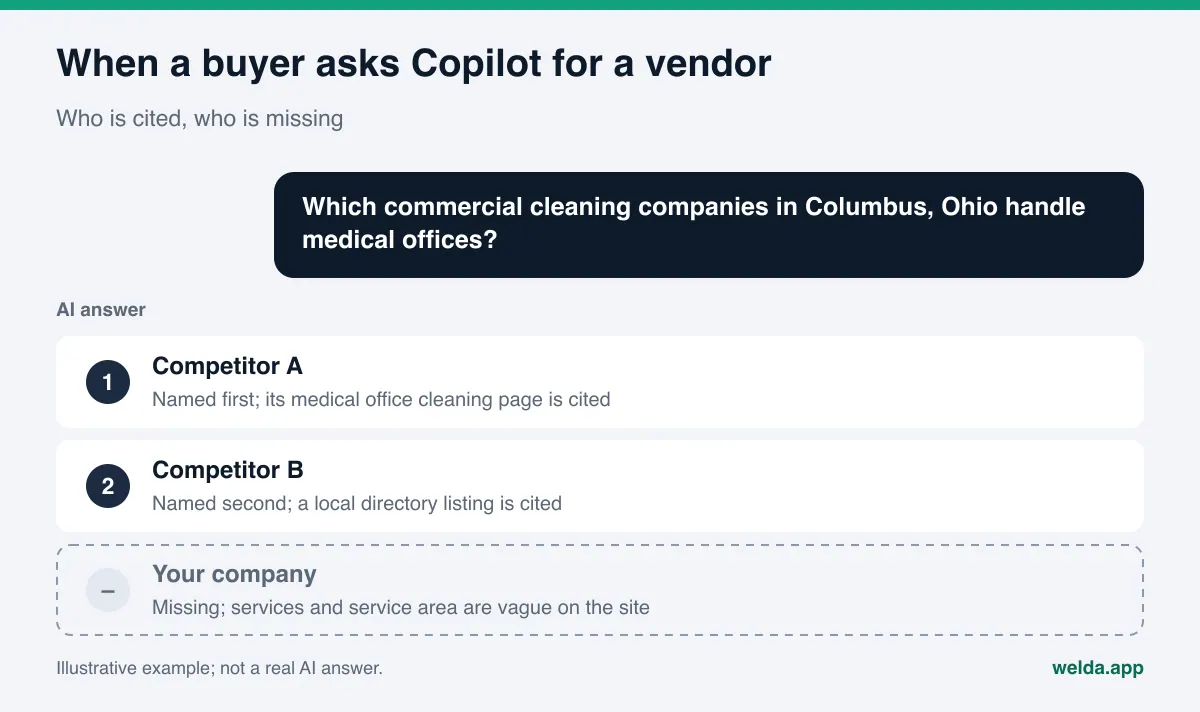
Where does Microsoft Copilot find businesses?
Microsoft's own documentation describes the mechanism. With web search turned on, Copilot parses the user's prompt, generates a search query of a few words, and sends that query to the Bing search service. The results are used to compose the answer. In Copilot Chat, users can see the exact queries that were sent to Bing in the citation section of the response. The details are in Microsoft Learn's article on web search in Copilot.
For a business, that has three practical consequences:
- A page that is not in Bing is not in Copilot. Your site may do well on Google, but if Bing has not indexed your service pages, Copilot cannot use them as a source.
- Copilot searches its own short query, not the full question. A question like "which commercial cleaning companies in Columbus handle medical offices?" turns into something closer to "Columbus medical office cleaning company." If your pages never state those words plainly, the match is weak.
- Citations are visible. Copilot lists the pages it drew on as links. If your page is the source, the reader is one click from your site. If a competitor's page is the source, that click goes to them.
Local businesses have a fourth layer: Bing's own business listings. Bing collects addresses, hours and contact details through Bing Places for Business, and Microsoft's announcement of its AI Performance report explicitly recommends that local businesses keep this information current in Bing Places. Microsoft does not spell out exactly how Copilot uses those listings in local answers, so treat this as Microsoft's own recommendation rather than a proven ranking factor.
Why Copilot AEO needs its own attention
Many owners treat AI visibility as one job: if we show up in ChatGPT, we show up everywhere. In practice, each assistant draws on different sources. The same question can produce one competitor in ChatGPT, another in Gemini and a third in Copilot. The most common reason is that a site is easy to read in one search system and weak in another.
Copilot matters most for companies that sell to other businesses. Office workers already spend their day inside Microsoft 365, and more of their vendor research, comparison tables and shortlists now start with a prompt. We cover the wider pattern in our guide on how B2B buyers use AI to find vendors: the shortlist often forms before the first sales call. Copilot is one of the places where that shortlist gets written.
Consumer use follows the same logic. Copilot is a click away in Windows and Edge, so questions like "pediatric dentist near me," "emergency vet open on Sunday in Plano" or "AC repair in Tampa that comes out the same day" can go to Copilot instead of a classic search box. There is no reliable public number for how many local searches start this way, so we will not invent one. What is clear is that the channel is built into the device and runs on Bing.
The good news is the cost. Most Copilot work overlaps with work you should do for every AI assistant: clear service pages, an FAQ section, business schema, a consistent name, address and phone number. The Copilot-specific part is narrow: Bing Webmaster Tools, Bing Places and Bing's page-level usage controls. Treating Copilot separately does not double the work. It closes a few doors that are often left open.
Steps to get your business into Microsoft Copilot answers
The order below starts with the most basic blocker and moves toward content and outside sources. Skipping ahead usually wastes time: if Bing cannot read your site, you will never see the effect of better content.
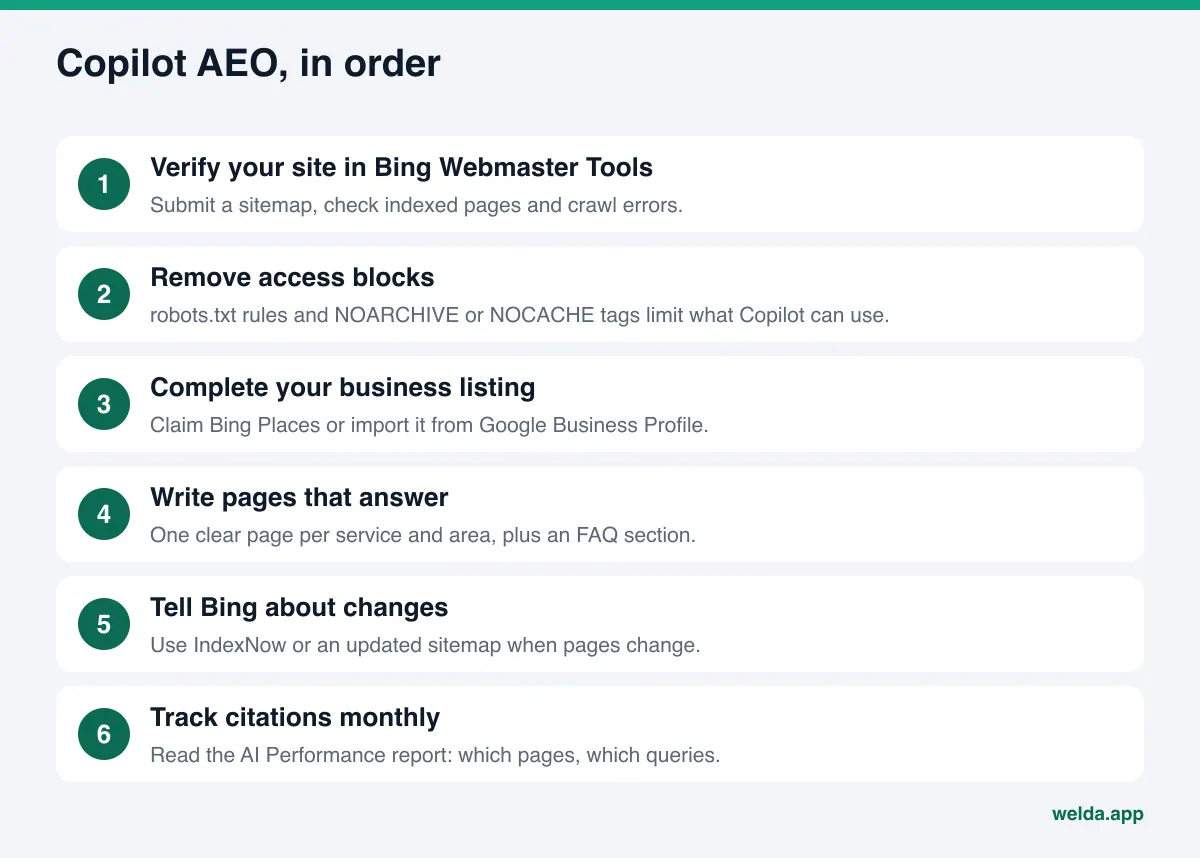
- Add and verify your site in Bing Webmaster Tools. Verification is how you see what Bing sees. Submit your sitemap, check how many pages are indexed and look for crawl errors. If you already use Google Search Console, Bing Webmaster Tools offers an import option that speeds this up.
- Read your robots.txt file. If Bing's crawler, Bingbot, is blocked, Copilot cannot pull information from your site. Some themes, security plugins and CDN settings block "unknown bots" in bulk. Open the file and read it once.
- Check page-level tags. Under rules Bing announced in 2023, pages tagged NOCACHE can appear in chat answers only with their URL, title and snippet, and pages tagged NOARCHIVE are left out of those answers entirely (Bing Webmaster Blog). These tags are sometimes left over from an old plugin or setting. Make sure your service, pricing and contact pages do not carry them.
- Watch the new preference system. In October 2026, Microsoft announced two separate preferences, "AI Training" and "AI Grounding," to replace NOARCHIVE and NOCACHE for these purposes. According to the announcement, the new preferences apply to pages as they are crawled from February 1, 2027, and the old tags will no longer be read this way after March 1, 2027 (Bing announcement). If you do not use the old tags and do not want restrictions, the default for grounding stays "allow."
- Claim your Bing Places listing. If you already have a Google Business Profile, Bing Places can import it and keep it in sync on a schedule. According to Microsoft's help page, categories are not imported and have to be set by hand (Bing Places help). Check that hours, phone and service area match your website exactly.
- Give each service its own clear page. Copilot's short query usually contains a service and a place. A "Services" page that lists ten jobs in one paragraph answers none of those queries well. For each service, write what you do, where you do it, who it is for and how the process works.
- Add an FAQ section. Write the questions customers actually ask, with short, direct answers. Our guide to FAQ pages for AEO covers how to build one.
- Add business schema. Name, address, phone, hours and service area should be machine-readable on the page, and identical to what Bing Places shows.
- Tell Bing when pages change. Microsoft recommends the IndexNow protocol so that updated content reaches AI answers sooner. Many content management systems have a ready-made IndexNow plugin; if yours does not, keep your sitemap current.
- Read the AI Performance report once a month. The next section explains what it shows.
How to write pages that match Copilot's short query
Because Copilot reduces a long question to a short search query, your page needs to state the pieces of that query plainly. The table below shows the idea with example questions. The queries are illustrative examples we wrote based on the mechanism Microsoft describes; the real query Copilot generates depends on the prompt and the user.
| User's question (example) | Possible short query (illustrative) | What your page needs |
|---|---|---|
| Which commercial cleaning companies in Columbus handle medical offices? | Columbus medical office cleaning company | A dedicated page naming the service type and the city |
| Can you recommend an industrial flooring contractor near Charlotte? | Charlotte industrial epoxy flooring contractor | Service area, floor types and how a job runs |
| Is there an AC repair company in Tampa that comes out on weekends? | Tampa AC repair weekend service | Days and hours, identical on the site and in Bing Places |
| Who is a good pediatric dentist in Plano? | Plano pediatric dentist | Age groups served, address and how to book |
The pattern is simple: every part of the query, the place, the service and the condition, should be answered by a plain sentence on your page. "Comprehensive solutions for every need" matches nothing. "We clean medical and dental offices across Franklin County after hours, with staff trained in infection control procedures" answers each part of the query. This answer-first style works for every AI assistant, not only Copilot; our piece on answer-first content goes deeper.
What the AI Performance report in Bing Webmaster Tools shows
In February 2026, Microsoft released an "AI Performance" report in Bing Webmaster Tools as a public preview. It counts how often your site is shown as a source in Microsoft Copilot, in AI-generated summaries on Bing and in select partner integrations (Bing Webmaster announcement). For a site owner, it is the official place to track Copilot citations today.
| Report area | What it shows | What it means for you |
|---|---|---|
| Total citations | How many times your content was shown as a source in AI answers in the chosen period | The overall trend; not good or bad on its own |
| Average cited pages | How many unique pages are cited per day | Whether citations cluster on one page or spread across the site |
| Grounding queries | Key phrases the AI used when retrieving your content; sampled data | Which topics Copilot connects you with |
| Page-level citations | Citation counts per URL | Which service pages work and which are never cited |
| Trends over time | Daily citation activity | Whether a fix changed anything |
Keep three limits in mind. First, Microsoft says the report measures citation frequency only; it does not show ranking, authority or your position inside an answer. Second, grounding queries are a sample, not a full log. Third, the report shows no clicks, so you cannot see how many visitors a citation produced.
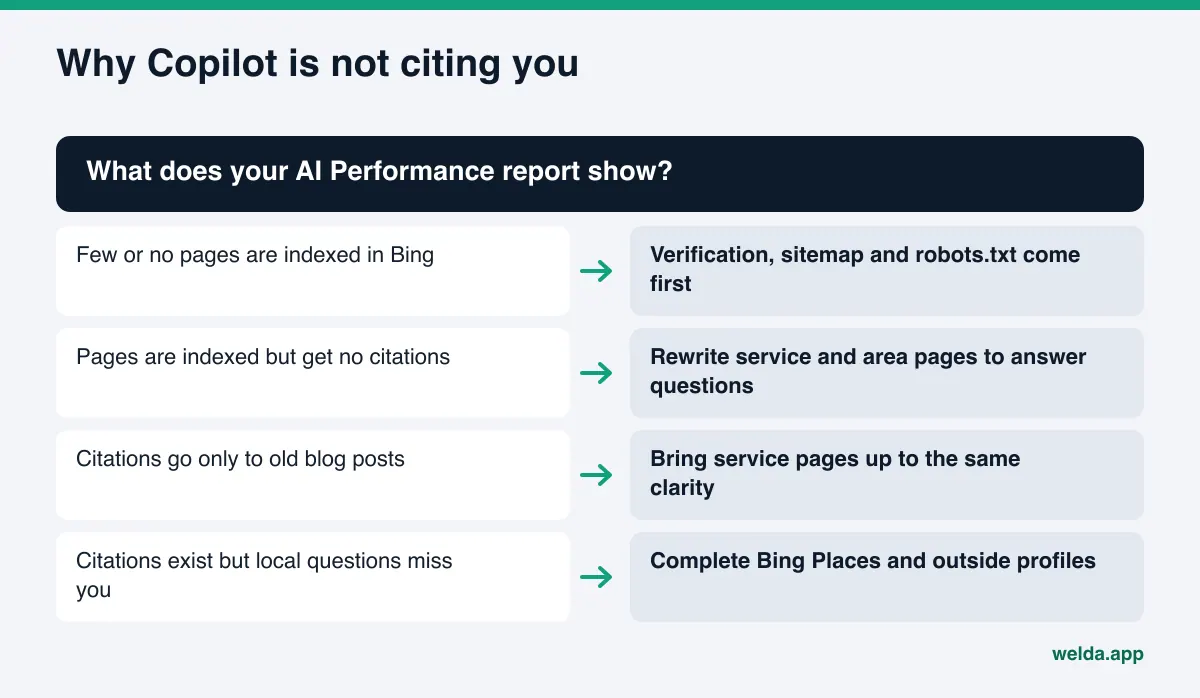
None of that makes it useless. The page-level table answers a practical question: which page does Copilot know you by? If all your citations point to a blog post from years ago and your service pages are never cited, you know what to fix next.
Copilot compared with ChatGPT, Gemini and Perplexity
Most of what you do for Copilot also helps with ChatGPT, Gemini and Perplexity. The differences are in the search layer and the reporting. We cover Google's side in how to get recommended by Gemini.
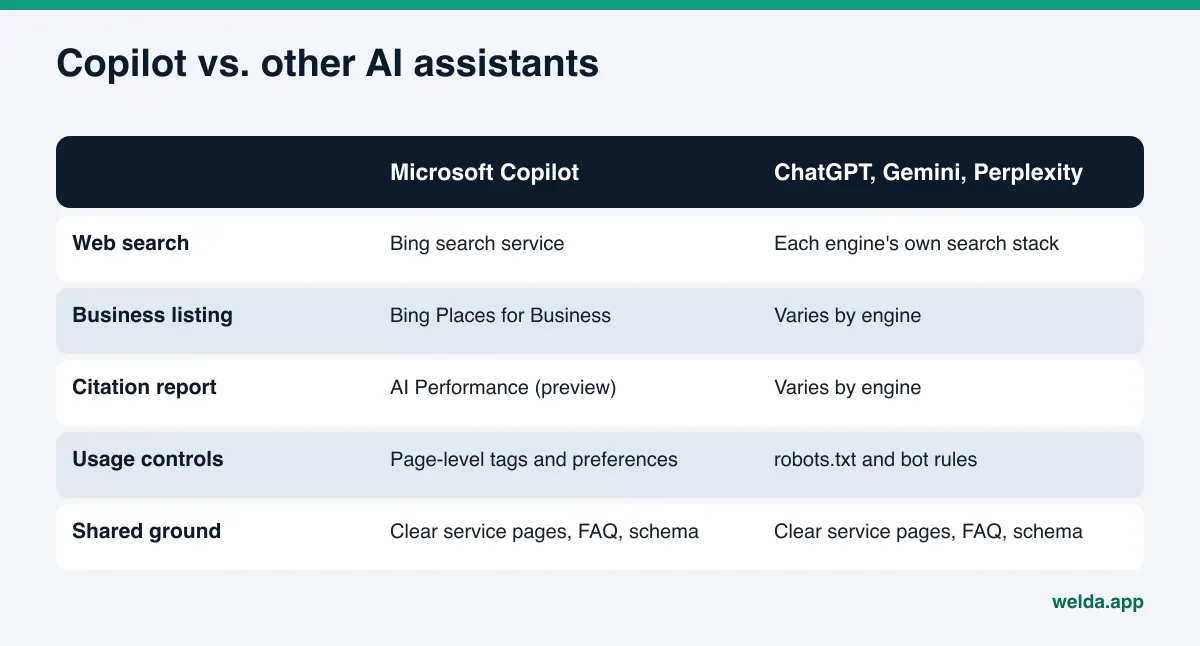
Our suggested order: fix the shared ground on your own site first, then add the two Copilot-specific jobs, Bing Webmaster Tools and Bing Places. Doing it the other way around leaves you with a site that Bing knows about but that has nothing clear to say.
How Welda handles Copilot visibility
To be direct: the Welda dashboard tracks four engines, ChatGPT, Gemini, Perplexity and Google AI. Microsoft Copilot is not one of them. The official way to track your Copilot citations is the AI Performance report described above. What Welda contributes is the shared groundwork that Copilot also reads, prepared so you do not have to write it from scratch.
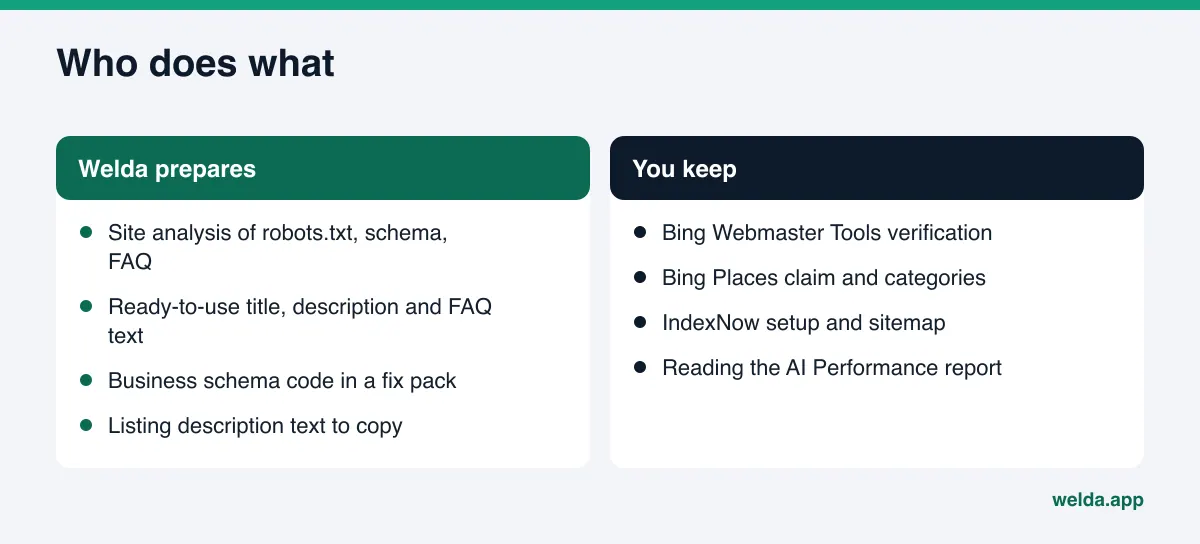
Finding the gaps: the free site analysis. The analysis reads your homepage and a few inner pages, such as services, pricing, about and contact. For Copilot, the most useful findings are whether AI crawlers are blocked in robots.txt, whether your page title and description are clear, whether business schema is present, whether your address and phone are consistent, whether you have an FAQ section and whether your services are spelled out. Bing reads every one of those signals. For each gap, the report explains what was found, why it matters and how to fix it. It also drafts a title, description, main heading, intro paragraph and FAQ for your homepage, and gives you a fix pack with business schema code ready to add to your site. The analysis works in English and is free once per site.
Take an example scenario: a commercial cleaning company in Columbus. The analysis shows that the services page mentions office, medical and post-construction cleaning in a single paragraph, that the service area is never stated, and that business schema is missing. Those three findings are exactly what makes it hard for Copilot to match a query like "Columbus medical office cleaning company" to this company's site. The fix pack closes the site-side gaps. Notifying Bing and reading the AI Performance report stay with the company.
Sharing the work: who does what. Welda connects to WordPress sites, Google Business Profile, Instagram and Facebook. Bing Places and Bing Webmaster Tools are not on that list, so the Bing-side accounts stay with you. Welda prepares the business description, service descriptions and copy that matches your site; you paste it into your Bing Places listing. Welda does not invent facts it does not have: if your hours or service area are not on your site, it asks you.
The rest of the dashboard, question-by-question tracking, competitor comparison and the monthly one-page report, covers the four engines and is in early access. The full dashboard opens first in Turkey; regular four-engine tracking is being added during early access, and the sample screens use representative data. What anyone can use today is the free site analysis, which works in English and German. Pricing is discussed in the early access conversation.
Limits, and what Welda does not do
Knowing what is in your control, and what is not, prevents the wrong expectations.
- Welda does not track Copilot. The dashboard covers ChatGPT, Gemini, Perplexity and Google AI. You track Copilot citations in Bing Webmaster Tools.
- No one can promise a Copilot citation. Welda does not guarantee rankings or placement in any AI answer. Copilot decides which sources it uses.
- Your Microsoft accounts are yours. Bing Webmaster Tools verification, the Bing Places claim and IndexNow setup stay with the business. Welda does not connect to them.
- Content lives on your site. Welda does not host content. What it drafts is published on your own site, with your approval.
- No fake reviews. Welda does not write reviews; it drafts replies to them. Handling negative reviews, directory accounts and press work stays with the business.
- It takes time. New content usually takes weeks to show up in AI answers. We explain the timing in how long AEO takes; the same logic applies to Copilot.
A note on measurement: AI assistants do not give the same answer to the same question every time. Asking Copilot once on your own laptop and not seeing your name does not mean you never appear, and seeing it once does not mean you always do. The trend in the AI Performance report is a better guide than single tests.
Decision guide and checklist for Copilot
To decide where to start, look at what your AI Performance report shows. The chart below separates the four most common situations.
Once you know where to start, use this checklist for regular review.
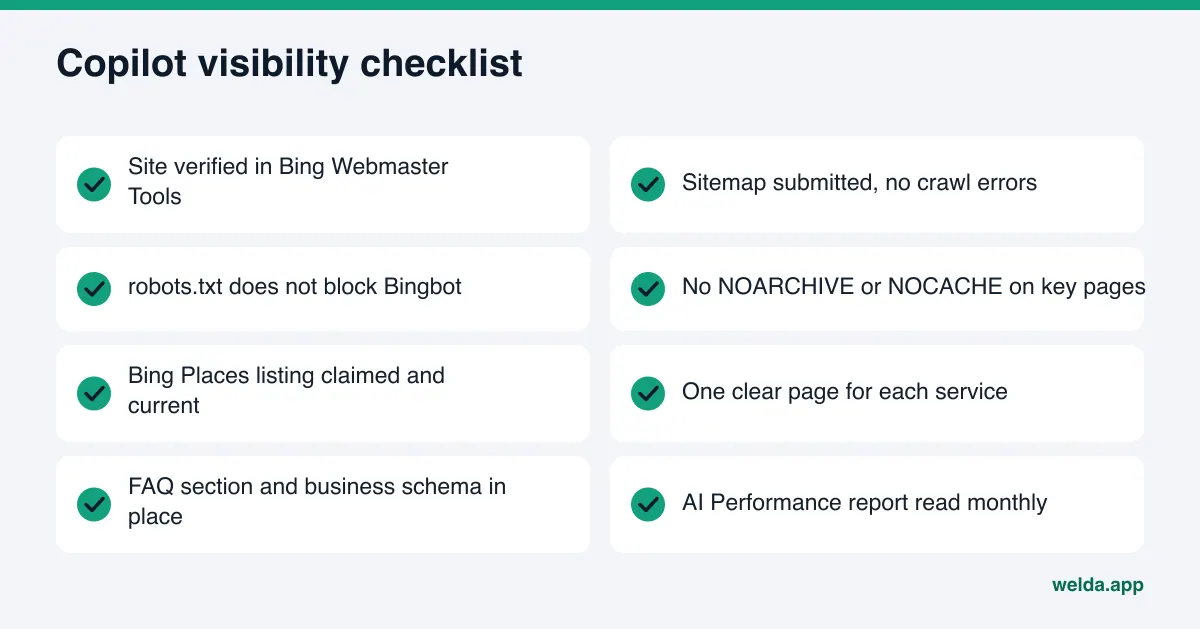
| Task | Who does it | How often |
|---|---|---|
| Bing Webmaster Tools verification and sitemap | Owner or web manager | Once, then when errors appear |
| robots.txt and page tag check | Free analysis flags issues; the fix is yours | Once, then after site changes |
| Bing Places listing | Owner; Welda can draft the text | Once, then when details change |
| Service pages and FAQ | Welda drafts, owner approves | Until the gaps are closed |
| Business schema | Fix pack from the analysis | Once, then when details change |
| Reading the AI Performance report | Owner | Monthly |
If Copilot shows wrong information about your business, start with the source links under the answer. Our guide on what to do when ChatGPT has wrong information about your business walks through the fix step by step; for Copilot, the first step is the same: correct the source the error comes from.
Frequently asked questions
Does Copilot use the same sources as ChatGPT?
Not always. According to Microsoft's documentation, Copilot gets web information from the Bing search service. Other assistants may use different search systems, which is why the same question can surface different businesses in different tools.
I rank well on Google. Will I show up in Copilot too?
Possibly, but not automatically. If Bing has not indexed your pages, if robots.txt blocks Bingbot or if key pages carry a NOARCHIVE tag, Copilot cannot use them. Checking your indexed page count in Bing Webmaster Tools is the first step.
Do I need a Bing Places listing?
It is not required, but Microsoft recommends that local businesses keep their address, hours and contact details current in Bing Places. If you have a Google Business Profile, the import option saves time; you still need to set categories by hand.
How can I measure whether Copilot cites my business?
As a site owner, the official route is the AI Performance report in Bing Webmaster Tools. It shows how often your site is cited in Copilot and Bing's AI summaries and which pages are cited. It does not show rankings or clicks.
Does Welda track Copilot?
No. The Welda dashboard tracks ChatGPT, Gemini, Perplexity and Google AI. Welda helps with Copilot by analyzing the site signals Bing also reads and by drafting the fixes for you.
Does an llms.txt file help with Copilot?
Microsoft does not say Copilot uses it when choosing sources. What Microsoft does recommend is clear headings, tables, FAQ sections, fresh content and an up-to-date Bing Places listing. Spend limited time on those first.
Bottom line: shared ground first, then the Bing-specific jobs
Getting your business into Microsoft Copilot answers is not a separate discipline. It is a thin layer on top of the AEO work you do for every assistant. If your site is clear, each service is explained on its own, and your business details are consistent, most of the work is done. What is left is verifying your site in Bing Webmaster Tools, claiming Bing Places and reading the AI Performance report regularly.
Start by seeing where your site stands today. The free AI visibility analysis checks the signals Copilot also reads, from robots.txt access and business schema to your FAQ and service descriptions, and gives you a ready fix for every gap it finds.