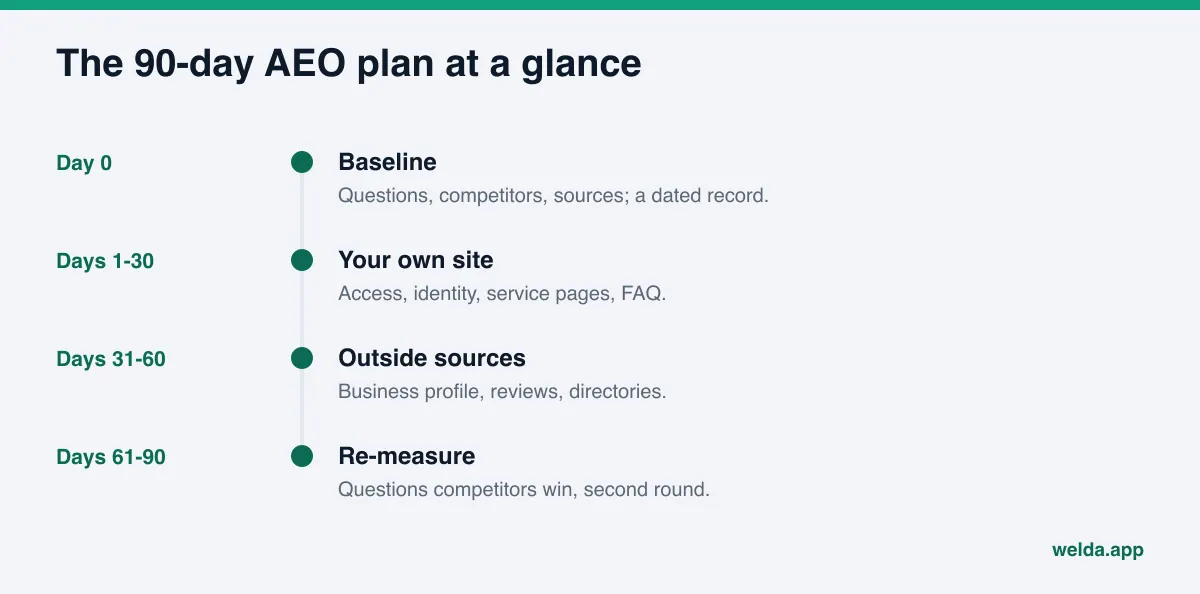
What does a realistic 90-day AEO plan look like? Week one is a baseline measurement. Days 1 to 30 fix your own website, days 31 to 60 clean up the outside sources AI relies on, and days 61 to 90 re-measure and go after the questions where competitors still win. Each month ends with a number you can compare against day zero.
AEO, short for answer engine optimization, is the work of getting your business named when people ask ChatGPT, Gemini, Perplexity or Google's AI Overviews and AI Mode for a recommendation. You will also see it called GEO (generative engine optimization); the two terms describe the same goal. Most small and mid-sized businesses approach AI search visibility in bursts: an FAQ page one week, a Google Business Profile update a month later, then nothing. There is no starting measurement and no finish line, so nobody can say whether any of it worked. This guide lays out a 90-day AEO plan broken into weeks, with a table you can hand to your team or an agency. If you want to see how your site reads to AI before you start, a free AI visibility analysis covers most of week one for you: a score, every gap it finds, and the order to fix them in.
Why a 90-day AEO plan instead of random fixes
Two things wear businesses down when they work on AI visibility.
The first is lag. A service page you publish today will not show up in a ChatGPT answer tomorrow. AI tools need time to find new content, read it and start using it, and that usually takes weeks. If you expect results in two weeks, you will abandon steps that were working, just not yet visible.
The second is fragmentation. AI search visibility does not come from one setting. Crawlability, consistent business details, clear service descriptions, reviews and third-party listings all work together. Trying to fix everything at once burns time and budget. Fixing only one thing caps the result.
Ninety days sits in the middle. It is long enough for the first changes to start showing up in answers, and short enough that you review the plan before spending too much. It also splits naturally into three blocks, each with a different kind of work:
- Month 1: what you fully control, which is your own website.
- Month 2: what you partly control: Google Business Profile, Yelp, the BBB, industry directories and review sites.
- Month 3: re-measurement, competitor comparison and a second round of fixes.
The order matters. Before an AI assistant recommends a business, it tends to check what the business says about itself against what other sites say. If your own site is incomplete or contradicts your listings, good information elsewhere only goes so far. Fixing the foundation first makes the next two months more productive.
Day zero: the baseline your 90-day AEO plan depends on
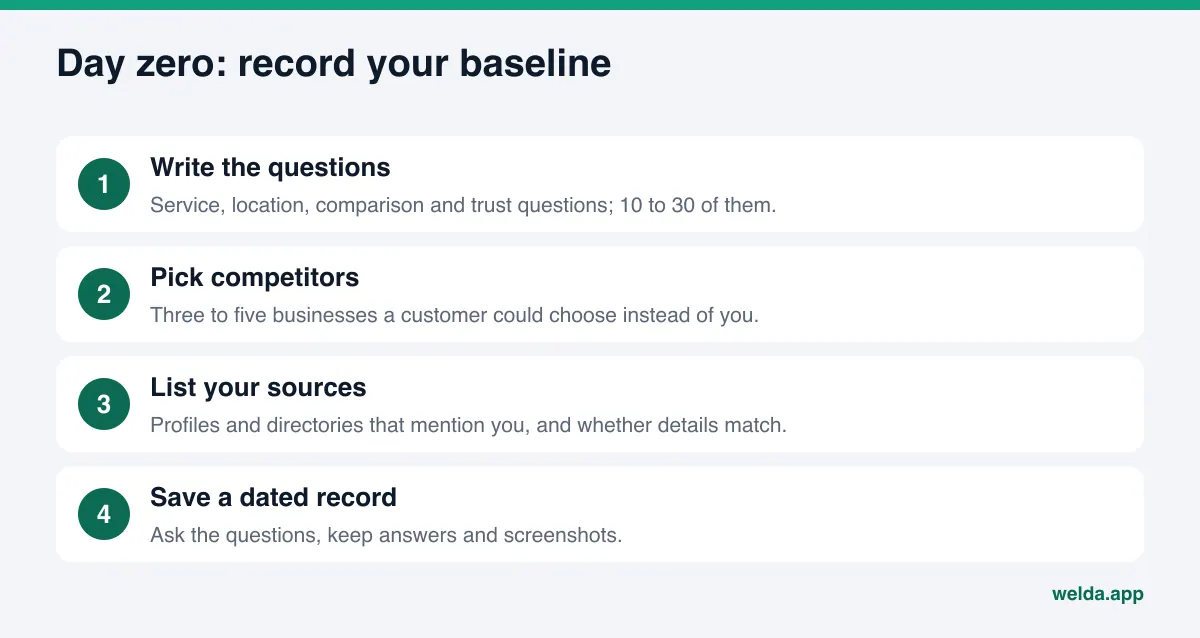
You cannot compare day 90 with a starting point you never recorded. Week one has a single goal: write down where you stand today. Build three lists.
Questions. Write the questions your customers would actually type or say to an AI assistant. For an HVAC contractor: "Who does reliable furnace repair in Plano, TX?" For a physical therapy practice: "Which PT clinic near me takes Medicare and has evening hours?" Mix service questions, location questions, price questions, comparisons and trust questions ("reputable," "no complaints"). Ten to thirty questions is a sensible start for a small business. Keep the list fixed for the whole 90 days. If you change it halfway, the before-and-after comparison stops meaning anything.
Competitors. Pick three to five businesses a customer could choose instead of you. They are not always your biggest rivals. The businesses AI names most often tend to be the ones with tidy websites and complete profiles.
Sources. List every place your business name appears: Google Business Profile, Apple Maps, Yelp, the BBB, Angi or Healthgrades depending on your field, local news coverage, industry associations. For each one, note whether your address, phone number and services match your website.
Then ask your questions in a few AI tools and save the answers with the date. The same question can produce different answers at different times, so do not judge from one try. Take screenshots and look at what repeats. This manual baseline is rough, but it costs nothing and it gives you something real to compare against in month three.
Days 1 to 30: make your own site readable to AI
Month one is about your website, because every change here is your call and needs nobody else's approval. Order the work by impact and effort.
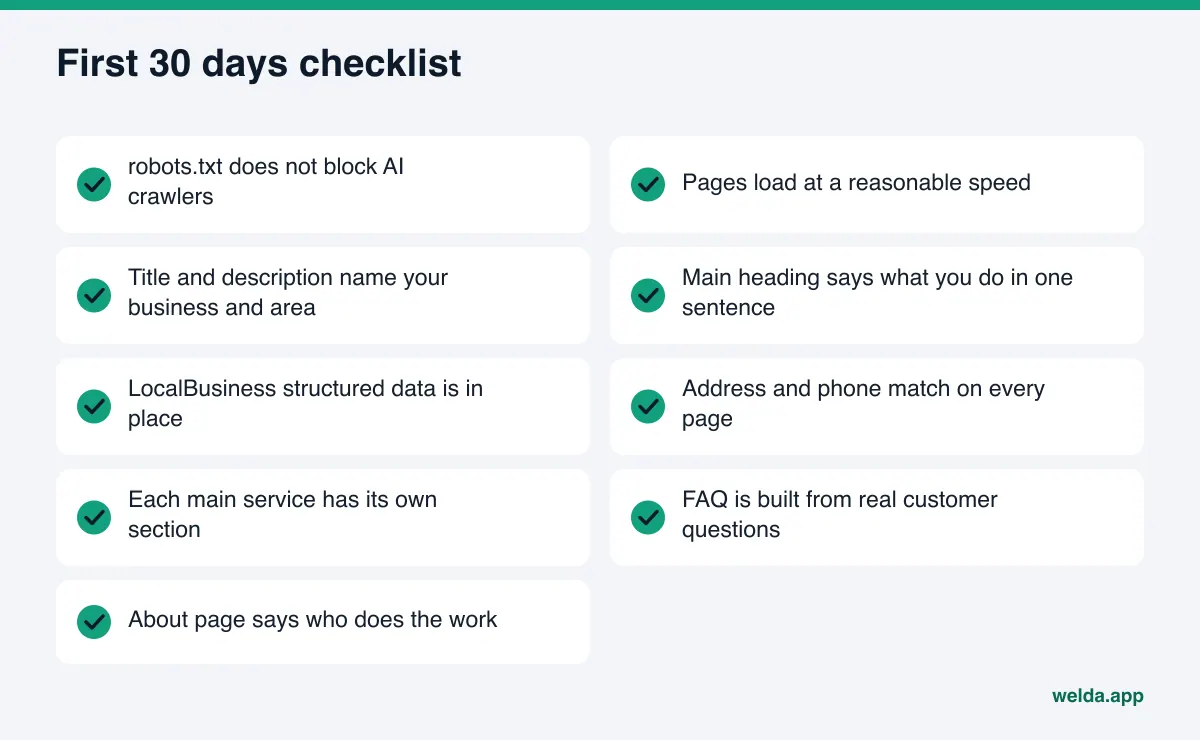
Week 1: Access. Check whether your robots.txt file blocks AI crawlers. Some themes, security plugins and hosting defaults block them without telling you. If they cannot get in, nothing else in this plan matters. Our guide to robots.txt for AI crawlers explains what to look for. Check page speed in the same week; very slow pages lose both visitors and crawlers.
Week 2: Identity. Your page title, meta description and main heading should say what you do and where, in one sentence. A homepage that opens with "Welcome to our website" tells an AI assistant nothing. Add structured data (LocalBusiness or the type that fits your industry) with your name, address, phone, hours, service area and links to your social profiles.
Week 3: Services. Give every main service its own page, or at least its own clearly headed section. A six-word bullet list under "Our Services" does not let an AI answer "does this company install heat pumps?" with confidence. For each service, explain what it is, who it is for, what the process looks like and what customers usually ask.
Week 4: Trust and questions. Your About page should say who you are, how long you have been in business, who does the work, and which licenses or certifications you hold. Build an FAQ section from the question list you wrote on day zero, with short, direct answers. Bring reviews and credentials onto the site where people and AI can see them.
At the end of month one, resist the urge to re-run your question list. It is too early, and a flat result will discourage you for the wrong reason. Instead, keep a simple change log: which page changed on which date. On day 90, that log is how you connect a new mention to the work that caused it.
Days 31 to 60: outside sources AI trusts
AI answers are not built from your website alone. Before naming a business, assistants look at what other sites say about it. Month two is about getting those sources right. For more on why third-party sources carry so much weight, see how to get cited by AI.
Weeks 5 and 6: Google Business Profile and maps. Category, services, description, hours, photos and the Q&A section should all be complete. Your address and phone number should match your website character for character. Check Apple Maps and Bing Places for the same details.
Week 7: Reviews. Reply to recent reviews on Google, Yelp and any industry site your customers use. A good reply is not a copy-paste apology; it includes something concrete: which service, what was done, how to reach you. Look at your BBB profile too. A complaint marked as resolved changes the picture an AI assistant sees. Do not try to remove negative reviews or bury them with fake ones.
Week 8: Directories and industry sites. Check your listings on Angi, Healthgrades, Tripadvisor, Avvo or whichever directories matter in your field, plus local chambers and trade associations. The goal is not to sign up everywhere. Start with the sites that showed up as sources in your day-zero AI answers. Where is a competitor mentioned that you are not? That question gives you month two's short list.
Month two moves more slowly than month one, because part of the work sits on other people's platforms and depends on their processes. Plan for it. If half the list is done by the end of week 8, that is a reasonable outcome, not a failure.
Days 61 to 90: re-measure and close competitor gaps
At the start of month three, run your day-zero question list again, the same way you ran it the first time. Several weeks have passed since the month-one changes, so the comparison now starts to mean something.
Sort the results into three groups:
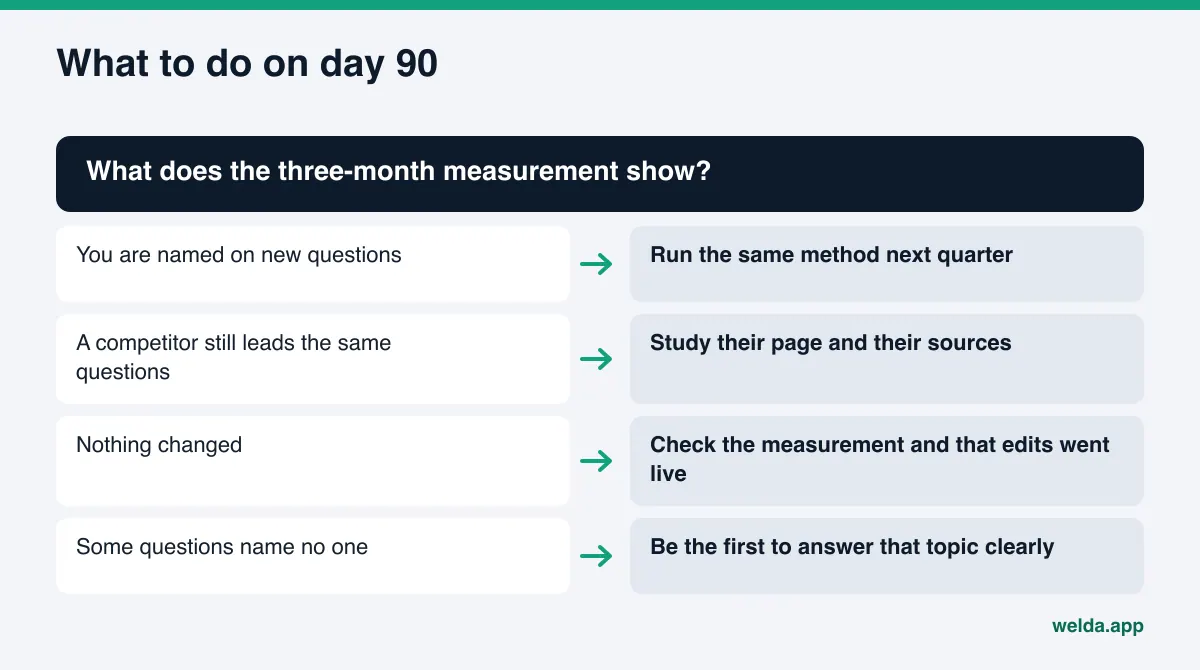
- Questions where you are newly named. Match each one against your change log. Repeat what worked for similar questions.
- Questions where a competitor is still named and you are not. Why are they named? Do they have a dedicated page on the topic, a listing on a site AI cites, more detailed reviews? This is the real work list for month three. Our guide to AI competitor analysis walks through the method.
- Questions where nobody is named. These are often openings. Being the first business that explains a topic clearly is easier than overtaking a competitor.
Use weeks 9 to 11 for group two: the missing service page, the missing FAQ, the missing directory listing. Run a final measurement in week 12, and in week 13 (around day 90) write up the results and the plan for the next quarter.
Week-by-week 90-day AEO plan
The table below is a realistic schedule for a small or mid-sized business. Shift weeks to fit your situation, but keep the order.
| Week | Work | Output | Owner |
|---|---|---|---|
| 0 | Question, competitor and source lists; baseline measurement | Dated baseline record | Owner or marketing lead |
| 1 | robots.txt, page speed | AI crawlers can reach the site | Web admin |
| 2 | Title, meta description, main heading, structured data | Homepage says what you do and where | Web admin |
| 3 | Service pages | Each main service clearly described | Owner and writer |
| 4 | About page, FAQ, trust signals | FAQ answers the question list | Owner and writer |
| 5-6 | Google Business Profile, Apple Maps, Bing Places | Same details as the website | Owner |
| 7 | Review replies, BBB profile | Recent reviews answered | Owner |
| 8 | Industry directories and associations | Priority listings correct | Owner |
| 9 | Re-measure | Questions sorted into three groups | Marketing lead |
| 10-11 | Content and source work for questions competitors win | New pages and listing updates | Owner and writer |
| 12-13 | Final measurement, review, next quarter | One-page summary and new plan | Owner |
The weekly workload depends on your size and how your site looks today. A business with a well-kept site may finish month one in a few hours. A business with an outdated site will find that month one carries most of the effort. If you work with an agency or a freelancer, you can use this table as the scope when you ask for a proposal.
Example scenario: a 90-day AEO plan for a home services company
To make the plan concrete, here is a made-up example. It is not a customer story; there are no real names or results in it.
An example HVAC company serves a metro area with two crews. On day zero it writes 20 questions: "emergency AC repair near me," "who installs heat pumps in [suburb]," "furnace maintenance plans worth it?" Its manual check shows the company is named only when someone asks for it by name. On service and suburb questions, two competitors come up instead.
In month one, it replaces a single "Services" page with separate sections for AC repair, furnace repair, heat pump installation and maintenance plans. It adds the cities it actually serves, its hours, its license information and structured data. The FAQ is built straight from the day-zero list.
In month two, it notices that the weekend hours on its Google Business Profile do not match its website and fixes them. It replies to recent Yelp and Google reviews with specifics about the job and how to book. It finds that both competitors have complete Angi profiles while its own is half filled in, and completes it.
In month three, it asks the same 20 questions again. It now shows up on some maintenance plan questions; on heat pump questions, a competitor still leads because its site walks through the installation process step by step. Weeks 10 and 11 go to a process section on the heat pump page. On day 90, the decision is to continue with the same method, starting the next quarter with suburb-specific pages.
Notice that nothing here needed a big budget. The difference came from keeping the order and measuring with the same question list every time.
How Welda handles this work
Welda fits into this plan in two places: the day-zero measurement and month-one priorities, and keeping the whole 90 days on one task list.
Day zero and month one: the free analysis. The slowest part of a baseline is seeing how your site actually reads to AI. Welda's free analysis, which runs in English, reads your homepage and several inner pages (services, pricing, about, contact). For each gap, from robots.txt access and structured data to address details and FAQ coverage, it shows what it found, why it matters and how to fix it. The most useful part for planning is the simulation: it shows how much each fix would move your score, so you can sort weeks one to four by expected impact instead of guesswork. It also asks five customer-style questions to an AI assistant that can search the web and checks whether your business is named. That is a one-time check. It belongs in your baseline record, but it is not a 90-day tracker. The report also includes a competitor comparison and a ready-made fix package, structured data included. For a walkthrough of each section, see how to read your AI visibility report.
Across the 90 days: one task list. In the Welda dashboard, every task in the plan sits on a single list split three ways: information Welda needs from you, drafts waiting for your approval, and tasks you do by hand with the text already written. Welda does not invent details it cannot verify. If your hours or the name of your lead technician are not on your site, it leaves the field empty and asks. For listings it cannot connect to, it drafts the text and adds a manual task. That keeps weeks 5 to 8, the outside-source work, from quietly slipping.
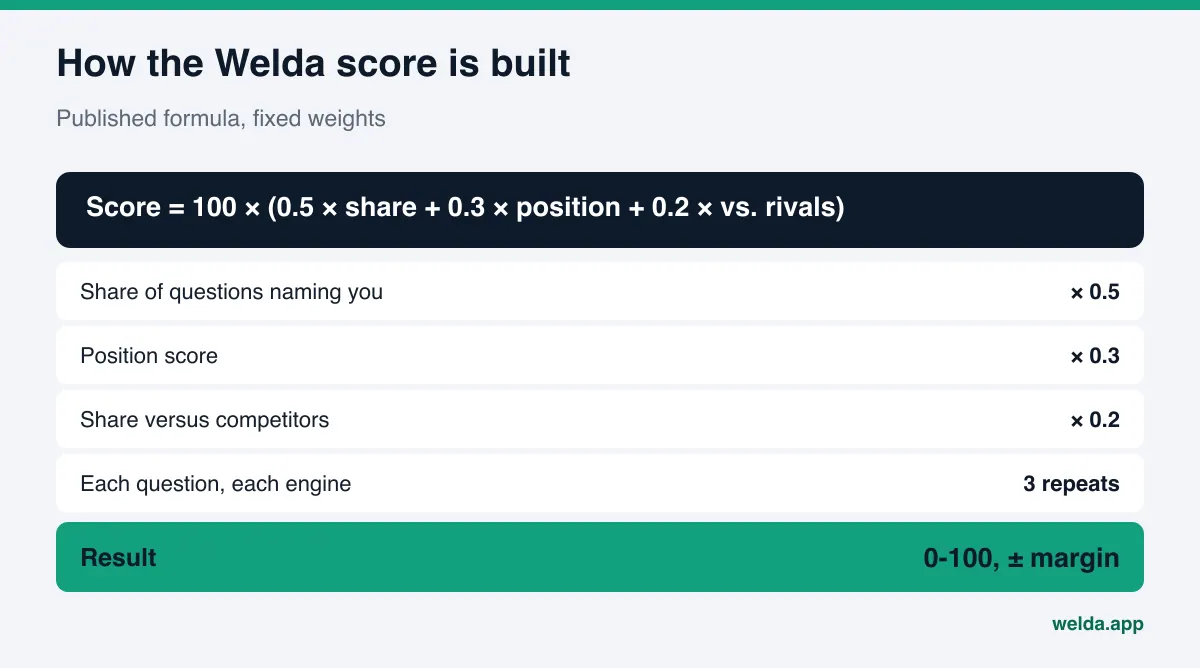
Tracking the trend. The dashboard's visibility view shows the score week by week, the split by AI engine, and which questions named you for the first time. A 90-day plan is roughly a 12-week line on that chart. The scoring formula is published: 50 percent weight on the share of questions that name you, 30 percent on position, 20 percent on your share against competitors. Each question goes to each engine three times, so a decision rests on the average of repeats, not on one lucky answer. A one-page monthly PDF report and a before-and-after view give you the material for your day-90 review.
To be clear about status: the Welda dashboard is in early access and is opening first in Turkey. Regular four-engine measurement is being added during early access, and the dashboard screens Welda shows use representative data. The part anyone can use today, in English, is the free analysis. Pricing is discussed in an early access conversation.
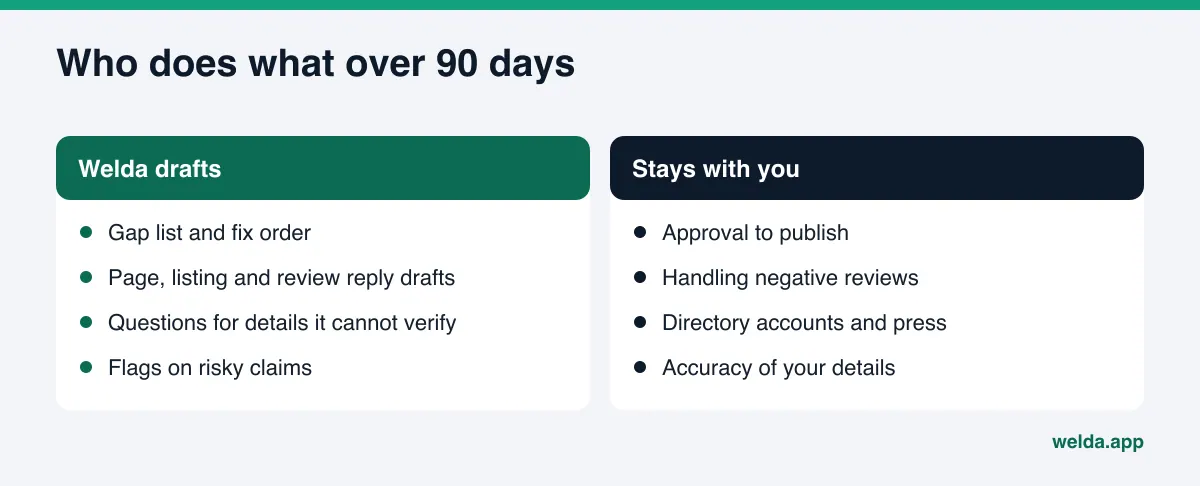
What stays with you is also clear. Welda drafts content, listing copy and review replies; you approve what gets published. On WordPress sites, content opens as a draft and goes live when you approve it. Content always lives on your own site. For how to set up approvals, see our guide to a content approval workflow for AEO.
Limits: what 90 days can and cannot do
A plan is more useful when its limits are written down up front.
- No guarantees. Nobody, Welda included, can promise you will appear in ChatGPT after 90 days. How AI tools build answers is not something an outside party controls. The plan stacks the work that raises your odds.
- Results lag. New content usually takes weeks to show up in AI answers. Some month-two changes may not be visible by day 90. That does not mean they failed.
- Rankings are not measured. The free analysis does not track Google rankings. The dashboard measures whether and where you are named in AI answers, which is not the same as a classic search position.
- Some work stays with you. Handling negative reviews, managing your directory accounts and press outreach are the business's job. Welda drafts text but does not open accounts on your behalf.
- No fake reviews. Writing or buying reviews to boost visibility is risky and has no place in this plan.
- Healthcare is approval-only. For clinics and practices, every piece of content goes to approval and patient data is never sent to AI. Welda's compliance check flags risky claims before publishing, but it is not legal advice.
Day 90: continue, adjust or stop
At the end of three months, make a decision. Base it on how your question list is distributed across the three groups, not on a single score.
Use this checklist for the review:
- Were day 0 and day 90 measured with the same question list?
- Are robots.txt, titles, structured data and service pages done?
- Do Google Business Profile and priority directories match the website?
- Have the last three months of reviews been answered?
- Do the questions where you are newly named line up with the work you did?
- For questions a competitor still wins, is the reason (page, source, reviews) written down?
- Are the first three tasks of next quarter decided?
If competitor-led questions are shrinking and your new mentions line up with your work, run the same method for another quarter. If nothing changed, check the measurement first: did the question list change, did the edits actually go live, is robots.txt still open? Only after that should you change your content and source strategy.
Frequently asked questions
Is a 90-day AEO plan too much for a small business?
No. The weekly workload is modest, and most weeks focus on one thing. What matters is keeping the order and recording the baseline.
Is 90 days enough to see results?
The first changes usually start showing up in AI answers within a few weeks, but not everything appears within 90 days. Treat day 90 as the first review point, not the finish line.
Does traditional SEO cover this?
Partly. Page speed, titles and structured data help both. But AI search visibility is measured question by question and leans more heavily on reviews and third-party sources.
Can I change my question list halfway through?
You can add questions, but do not delete the original ones. Otherwise the day 0 versus day 90 comparison no longer holds.
Does the free analysis track me for 90 days?
No. It is free once per site, the results link stays open for 14 days, and the five-question AI check inside it is a one-time measurement. Ongoing tracking is the dashboard's job, and the dashboard is in early access.
Will Welda publish content for me?
Welda prepares drafts; you approve publication. On WordPress, content opens as a draft. For other systems, Welda provides a ready package and the changes are applied by hand.
Start week one today
The part of a 90-day AEO plan that gets postponed most is week one, because a baseline feels like busywork. Yet everything after it depends on that baseline. To see how AI reads your site, which gaps to fix first and how you do on a first five-question check, run the free AI visibility analysis. Save the report as your day-zero record, order your first four weeks by the simulation, and run the plan from there.