Who should check AEO content before it goes live, and what should they check? A good content approval workflow for AEO asks three questions in order: is the information accurate, can every claim be backed up, and has the person with authority to publish signed off? When those checks are written down as a process, you can move fast without letting a wrong price or an unprovable claim travel from your website into AI answers.
AEO, or answer engine optimization, is the work of getting your business named and described correctly when people ask ChatGPT, Gemini, Perplexity or Google's AI Overviews for a recommendation. (You may also see it called GEO, generative engine optimization; it is the same goal under a different name.) AEO produces a lot of new text: service pages, FAQ sections, Google Business Profile descriptions, review responses. AI assistants read that text, summarize it and sometimes repeat it almost word for word. This guide walks through a content approval workflow for AEO step by step: who reviews what, which phrases need a second pair of eyes, and how Welda builds approval into the way it works. If you want to see how AI reads your site today, run the free AI visibility analysis first. The copy suggestions it gives you are exactly the kind of draft that should go through the approval steps below.
Why a content approval workflow for AEO matters more than in classic SEO
On a traditional web page, a bad sentence mostly stays on that page. A visitor reads it, may notice, may not. AI answers work differently. When an assistant answers a question about your category, it uses your page as a source and restates your wording inside its own answer, often with your business name attached. The person asking can make a decision without ever visiting your site.
That has three consequences. First, errors multiply. If the wrong opening hours sit on your website and were copied to your Google Business Profile and a directory listing, AI sees the same mistake in several places and treats it as more reliable. Second, fixes are slow. Even after you correct your page, it usually takes weeks for new content to show up in AI answers. Third, responsibility stays with you. The assistant wrote the answer, but the source was text you published.
In the US, the baseline rule for marketing claims is straightforward. The FTC's advertising guide for small businesses says advertising must be truthful and not deceptive, and that advertisers need evidence to back up their claims before the ad runs. A sentence like "the fastest emergency service in town" on a service page or in an FAQ raises the same question as it would in a print ad: can you prove it? This article is not legal advice, and you should talk to a lawyer about your own situation. But that question is the reason a content approval workflow exists: to catch unsupported claims before they are published.
There is also a speed problem. As the volume of AEO content grows, "can you take a quick look at this?" stops working. Either everything waits, or everything goes out unread. Both are bad. A written workflow decides in advance which content moves quickly and which needs a careful review.
Which content types and claims need approval?
Not every piece of content carries the same risk. A fix to a page title and a description of a medical procedure do not need to wait in the same queue for the same length of time. The table below lists common AEO content types and what to watch for in each.
| Content type | Typical risk | Who should review |
|---|---|---|
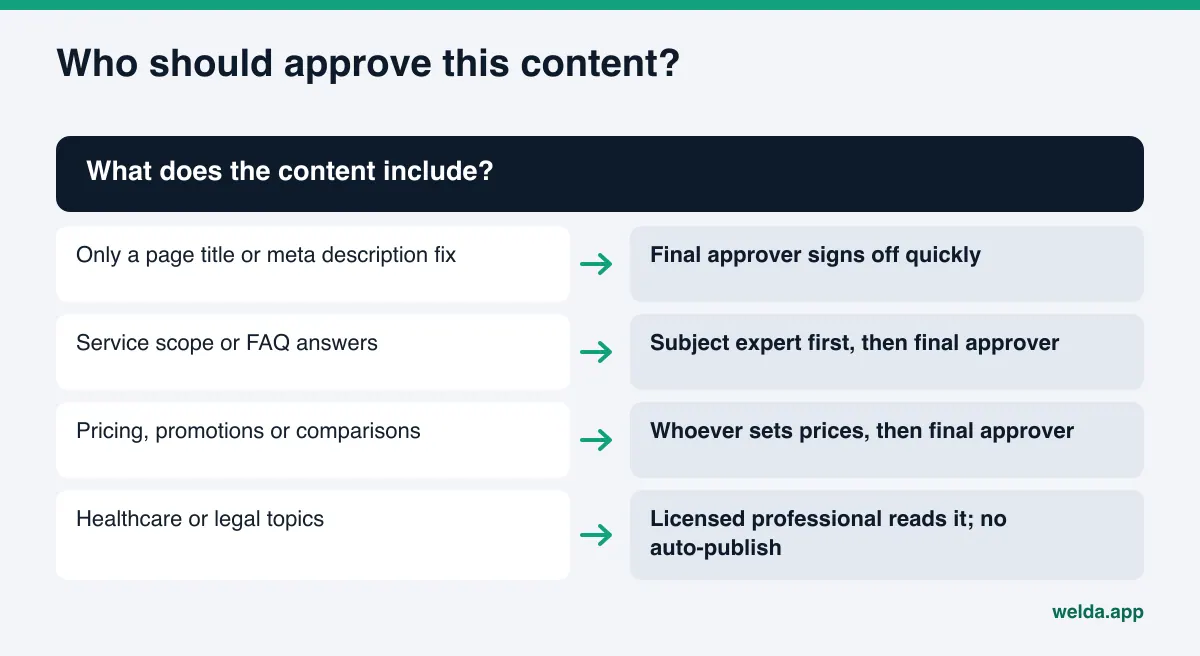
| Service and product pages | Wrong scope, outdated price, unsupported superiority claim | The person who delivers the service, plus the owner |
| FAQ sections | Absolute promises ("always", "guaranteed"), missing conditions | The person who delivers the service |
| Business details (NAP, hours) | Wrong address, phone number or hours across listings | Front desk or owner |
| Pricing and promotions | Expired offer, discount without stated terms | Whoever sets prices |
| Review responses | Personal details, defensive tone, promised refunds | Whoever owns customer relations |
| Healthcare, legal, financial content | Diagnosis suggestions, outcome promises, professional rule violations | The licensed professional; counsel if needed |
Two things stand out. First, most of the risk is not typos; it is facts and claims. The person who writes good copy may not know the price changed last month. Second, review responses look small but are published often, and they are where mistakes are easiest to make. Repeating a customer's name, appointment date or complaint details in a public reply on Yelp or Google is an unnecessary privacy risk.
Certain phrase patterns deserve a standing list. We cover how to write pricing claims in AI-ready content and how to handle "best", "leading" and "number one" wording in best claims and advertising rules in AI content. Keeping those patterns on a list makes the reviewer's job faster.
How to set up a content approval workflow for AEO, step by step
These steps work for a single-location business and for a company with several locations. The difference is how many people are involved at each step.
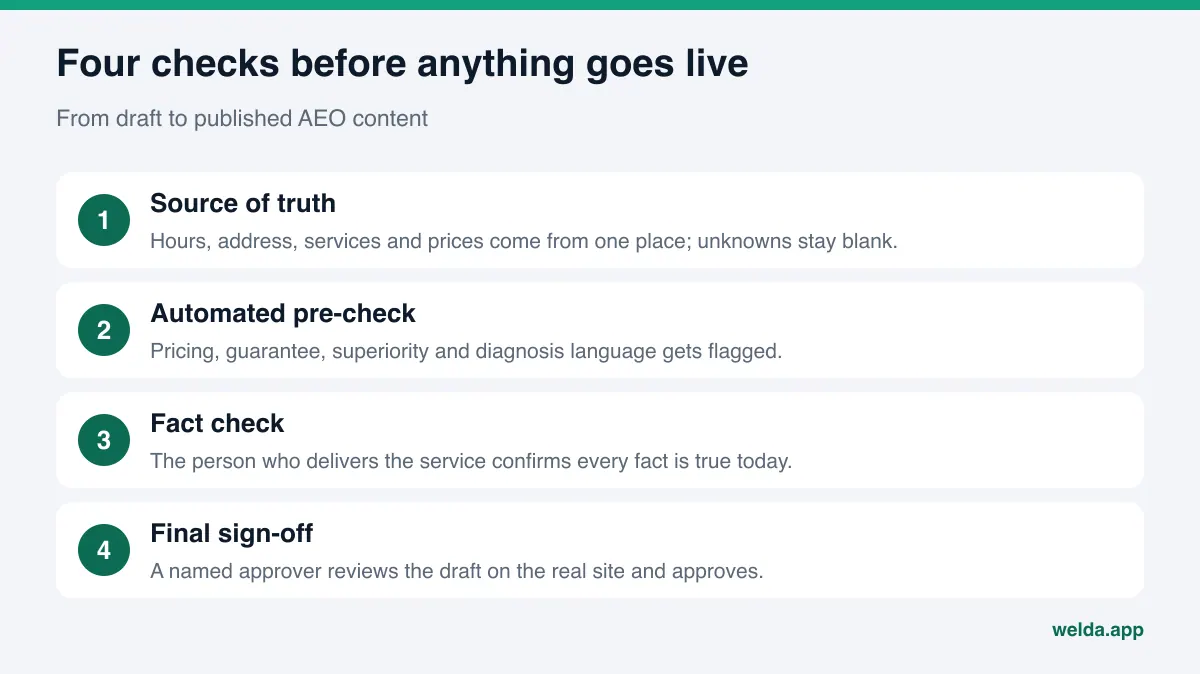
- Keep one source of truth. Address, phone, hours, service list, names and titles of key staff, current price ranges. Whoever writes the content, person or software, pulls from here. If a fact is missing, it should be left blank and asked for, never guessed.
- Assign a risk level to each content type. For example: low (title and meta description fixes), medium (service pages, FAQs), high (pricing, healthcare, legal, anything that compares you with competitors). The level decides who reviews and how many sign-offs are needed.
- Run an automated pre-check at the draft stage. A check that flags price, guarantee, superiority and diagnosis language before publishing surfaces sentences a human reviewer might skim past. The check does not decide anything. It points.
- Have the subject expert check facts. The person who actually delivers the service reads the draft and asks one question: is everything here true today?
- Give final sign-off to a named approver. "Someone on the team looked at it" is not enough. Keep a record of who approved which content and when.
- Stage as a draft, publish on approval. The content sits on your site as a draft and goes live only after sign-off, so the final layout is reviewed on the real page.
- Monitor after publishing. Check periodically how AI answers describe your business. If a wrong fact has made it into answers, find the source and correct it there.
Step one is the one most often skipped. When business facts live in five places, every new draft asks the same questions again, and you can get a different answer each time. One page says you open at 8, another says 8:30, and the assistant sees both without knowing which is right.
The second common mistake is putting low-risk changes in the strictest queue. The approver gets tired quickly and starts approving without reading. Sorting by risk level exists to prevent exactly that fatigue.
Who approves what: roles in an AEO review process
In a small business one person may hold every role. Writing the roles down separately still helps, because each role asks a different question. Here is a sample split for a local home services company:
| Role | Question it asks | Example decision |
|---|---|---|
| Drafter (person or software) | Does the content answer the customer's question clearly? | Adds two new questions to the FAQ |
| Subject expert | Is everything here accurate today? | Changes "open weekends" to "open Saturdays" |
| Claims check | Can each claim be backed up? Is any phrasing risky? | Removes "guaranteed results" |
| Final approver | Can this go out under the company's name? | Approves, or sends back with a note |
Written roles are not about blame when something goes wrong. They tell you at which step a mistake slipped through. If wrong hours went live, either the source of truth was wrong or the subject expert step was skipped. Knowing which one prevents the same error next time.
People also ask who is responsible when AI-drafted content contains an error. We discuss that in liability for errors in AI-written content. The short version: you are the publisher, so the approval step has to stay with you.
How to keep the approval queue from backing up
Most approval processes fail because of backlog, not because of bad rules. In the first weeks of AEO work, a lot of content is drafted at once: missing FAQs, rewritten service pages, profile descriptions. The approver sees the pile and either puts it off or waves it through. A few practical habits prevent both.
- Set a fixed review slot. Two half-hour blocks a week is often enough. The queue gets cleared during that time.
- Fill in missing facts first. When one fact is used across several drafts, entering it once completes many drafts at the same time.
- Send things back with a specific note. "Saturday hours end at 2 p.m." gets you a correct second draft. "Not quite right" does not.
- Avoid bulk approval. Approving a queue without reading it defeats the purpose of the workflow. If time is short, read and approve a few items rather than approve many unread.
Queue size is itself a signal. If it keeps growing, either content is being drafted faster than you can review it, or the risk levels are set wrong. In the second case, moving low-risk items to a separate fast lane usually fixes it.
How Welda handles content approval
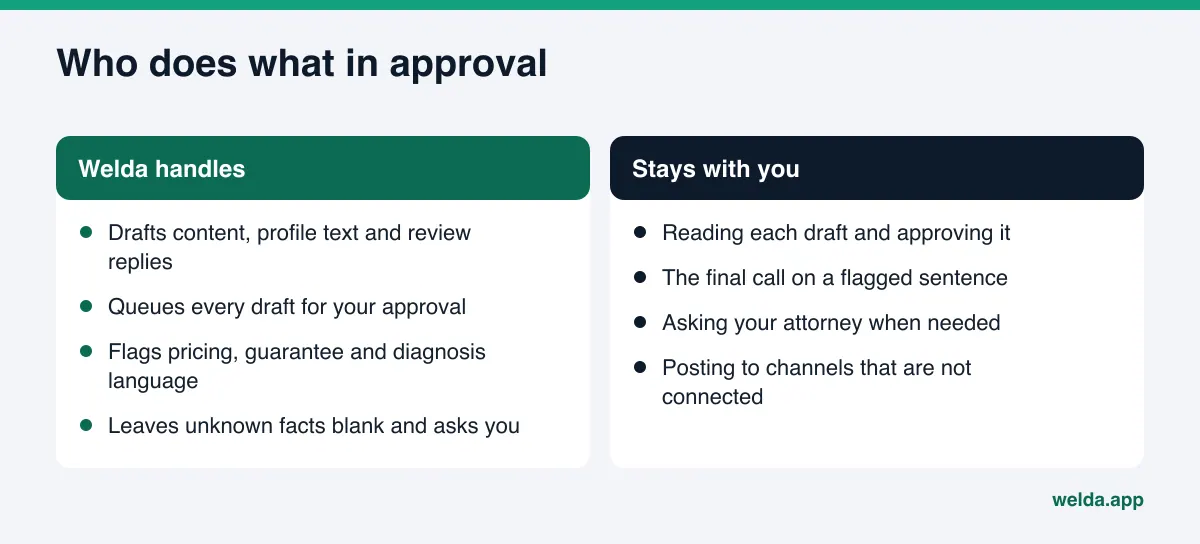
Welda measures where your business shows up in AI answers and prepares the fixes on your behalf. The line between preparing and publishing is a deliberate design choice: Welda drafts content, profile text and review responses, but the decision to publish stays with the business. Three parts of Welda map directly onto the workflow above.
1. The approval queue on the to-do screen. Every piece of content Welda drafts lands on a single to-do list, grouped by where it will go: a page on your website, a Facebook post, an Instagram post. Each item has a button to read the full text and a button to approve it. If you approve, it moves forward; if you do not, it does not go out. The number of items waiting is shown at the top, so approvals do not quietly pile up somewhere. Above the queue, a separate section lists the facts Welda needs from you. Welda does not invent facts it could not read from your site, such as hours, a full street address or a staff member's name and title. It leaves the field blank and asks. Under each field you see how many drafts use that fact, and once you fill it in, it is applied to all of them. Fields left empty stay marked in the preview, so nothing goes live with a gap. That is the in-product version of step one, the single source of truth.
2. The compliance check. Before anything is published, Welda flags patterns such as pricing, guarantees, superiority claims and diagnosis suggestions. If a service page draft says "guaranteed results" or "best in the area", that sentence is highlighted for you before the draft reaches approval. The limits are clear: this is not legal advice, and the check has not been reviewed by legal counsel. Its job is to surface phrasing a person might skim past. The decision stays with you.
3. Content staged as a draft on your own site. For WordPress sites, Welda connects through a separate Editor user and an application password you create, with no code to install. Content opens on your site as a draft and goes live when you approve it. That makes step six, reviewing the final layout on the real page, the default. Content always lives on your own site; Welda does not host content.
For sites not on WordPress, Welda provides a ready-to-apply package and the changes are made by hand. Google Business Profile, Instagram and Facebook can be connected. If a channel is not connected, the task shows up on the to-do list as a manual item with the drafted text next to it. Platforms without a publishing connection, such as a Yelp or Tripadvisor listing, are handled the same way: the text is ready, and copying it in and verifying it is the account owner's job.
The rest of the product, question-by-question measurement, competitor and source views and the monthly report, does not change approval itself. It is where step seven, monitoring, happens. The effect of a newly published page usually shows up over a few weeks.
A note on availability: the Welda dashboard is in early access and is opening first to businesses in Turkey. Regular measurement across all four AI engines is being added during early access, and the sample screens shown use representative data. What anyone can use today is the free site analysis, which works in English. Pricing is discussed in an early access call.
Approval for healthcare and other regulated businesses
In healthcare, legal and financial services, a misread sentence is costly. For these businesses the approval workflow should tighten in a few places.
- No automatic publishing. Nothing goes live without the licensed professional reading it, even if it looks low risk.
- The approver is the professional. At a dental practice the dentist reads it; at a law firm, the attorney. Marketing can polish the language, but sign-off on content belongs to the professional.
- Strip out diagnosis and outcome promises. "These symptoms mean you have X" or "guaranteed results in one visit" are risky patterns in health content.
- Keep patient and client details out. Even a review response should not repeat anything about a person's treatment or case.
In Welda, healthcare businesses get no automatic publishing; every piece of content comes to approval. Patient data is not sent to AI. We go deeper into which phrasing causes trouble in compliant AEO content for healthcare practices.
Example: a service page going through approval
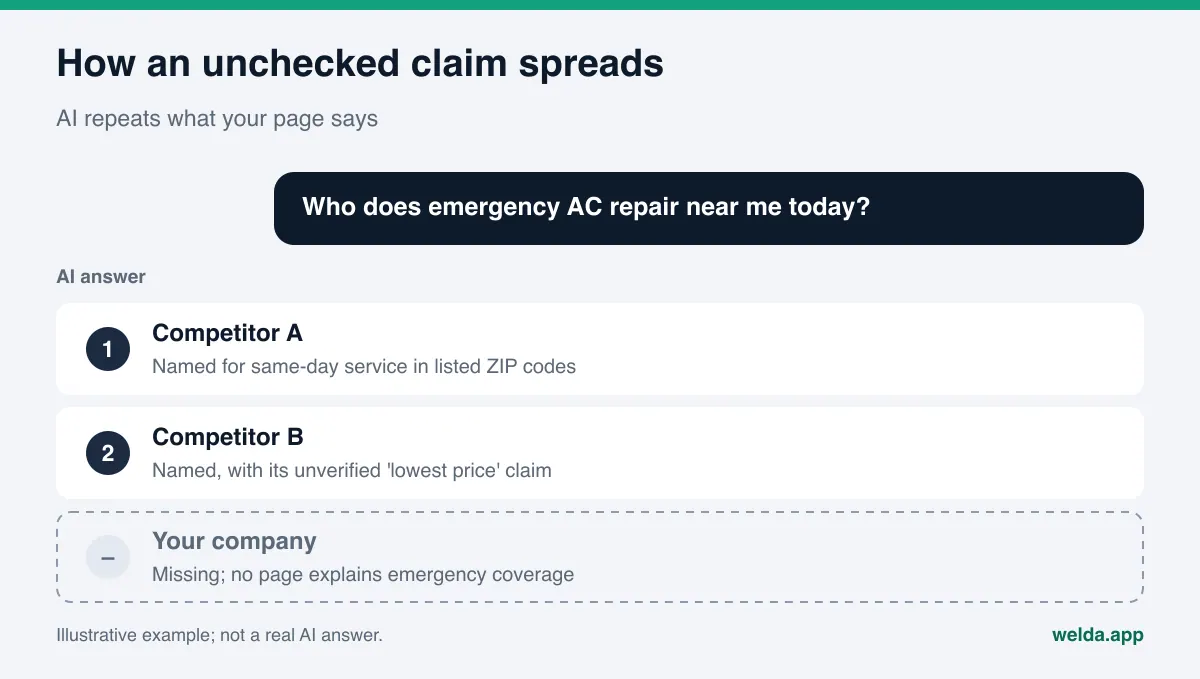
This scenario is an example, not a real business. An example HVAC contractor notices it is not named when people ask AI for "emergency AC repair" in its metro area. What is missing is a page that clearly explains its emergency service coverage.
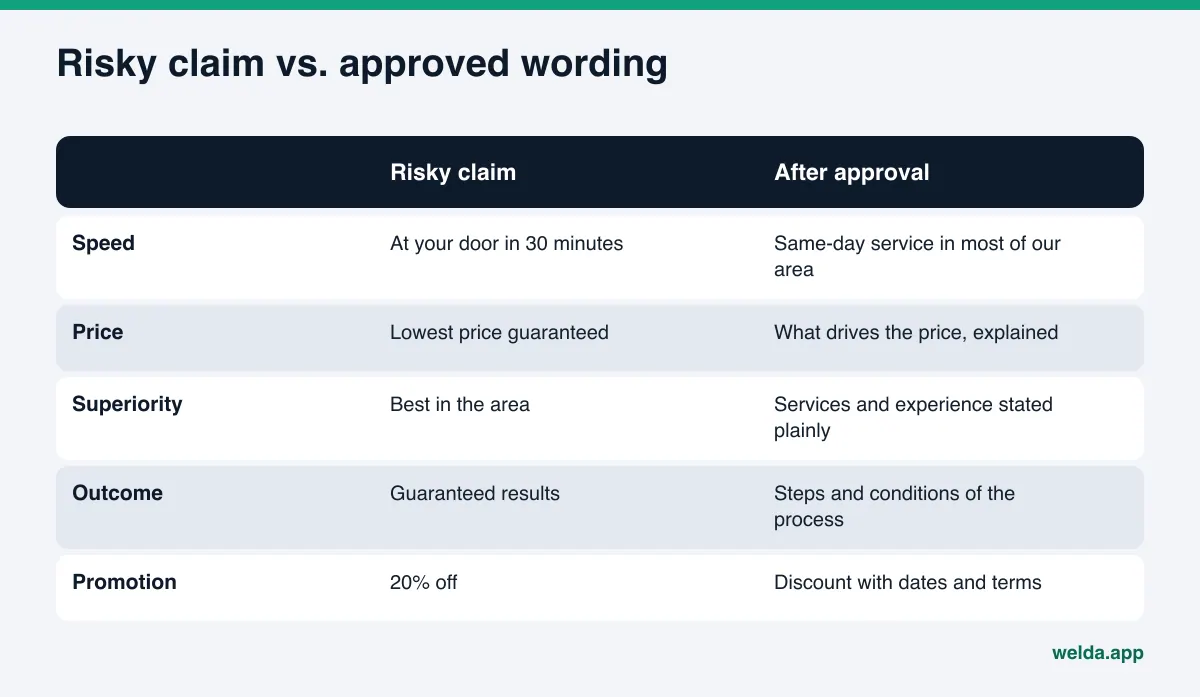
A draft is prepared. On the first pass, the compliance check flags two sentences: "we'll be at your door in 30 minutes" and "lowest price guaranteed". The subject expert, the service manager, looks at the first one: some ZIP codes can be reached that fast, others cannot. The sentence becomes "same-day service in most of our service area". The second sentence cannot be backed up, so it is removed and replaced with a paragraph explaining what drives the price of a repair. Hours come from the source of truth. The final approver, the owner, opens the page as a draft on the site, checks the layout and approves.
Notice that approval did not weaken the page. Two unsupported claims came out, and in their place came specific, checkable facts AI can quote more easily: which areas get same-day service and what affects cost. AI answers tend to favor concrete, verifiable sentences. An inflated claim, even if it makes it into an answer, puts the business in a risky spot.
Limits: what Welda does not do
However well an approval workflow is built, some things belong to the business, not to software. What Welda does not do:
- It does not guarantee rankings or "showing up in ChatGPT". Approved content supports visibility; it does not guarantee an outcome.
- It does not write facts it does not know; it asks the business.
- It does not publish sensitive content without approval.
- It does not create fake reviews. It drafts responses to reviews, not reviews. See fake reviews rules and AI visibility for the background.
- Its compliance check does not replace legal advice. The final call on a flagged sentence is yours, with your attorney where needed.
- Handling negative reviews, managing directory accounts and press outreach stay with the business.
One more limit: approval cannot control how an assistant uses your published content. When it summarizes your page it may drop a detail. The only defense is to make the original text clear and to state conditions explicitly. A discount without stated terms can turn into an unconditional discount once it is summarized.
A content approval workflow for AEO: reviewer checklist
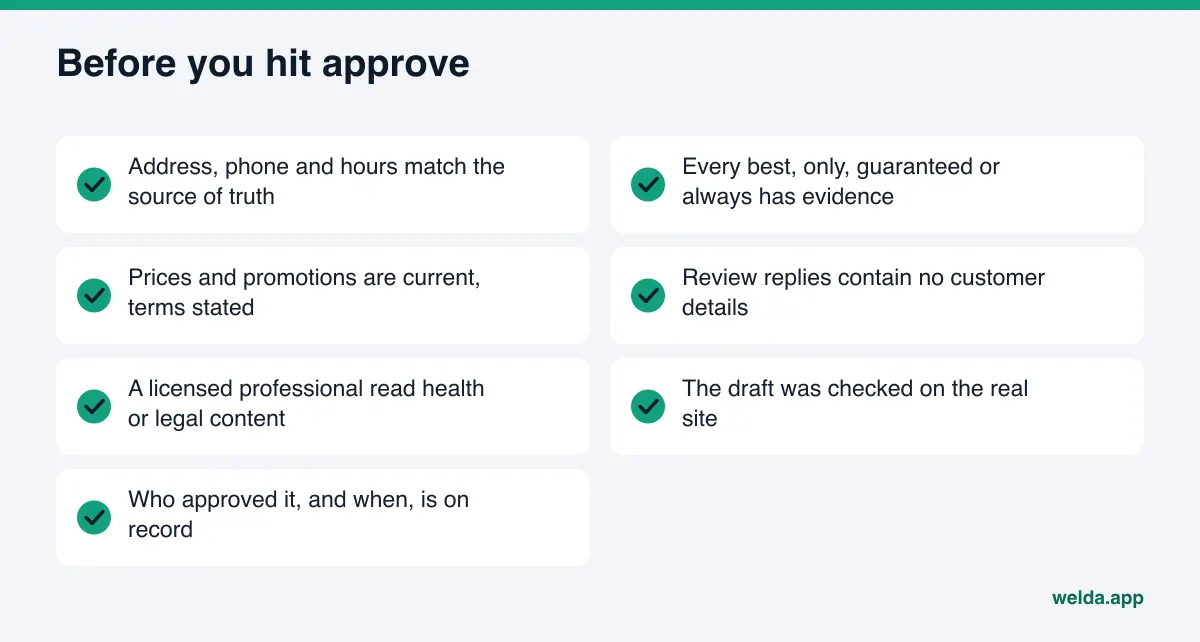
The approver can run through these questions on every item. If you cannot answer yes to each, fix the content or send it back before it is published.
| Check | Question | If no |
|---|---|---|
| Facts | Do address, phone, hours and services match the source of truth? | Update the source and pull from it |
| Claims | Is there evidence for every "best", "only", "guaranteed" or "always"? | Replace it with a specific fact |
| Pricing | Are prices and promotions current, with terms stated? | Add dates and terms, or remove |
| Privacy | Does a review response include customer details? | Remove them and reply in general terms |
| Professional rules | Has the licensed professional read healthcare or legal content? | Hold publishing |
| Layout | Was the content reviewed as a draft on the real site? | Open the preview |
| Record | Is it clear who approved it and when? | Log the approval |
Frequently asked questions
Does a small business really need a content approval workflow for AEO?
Yes, but it can be simple. Even if you are the only person involved, write and approve at different moments. Re-reading a day later and running through the checklist catches most mistakes.
Does AI-drafted content need stricter review?
You ask the same questions. The difference is that AI tends to fill gaps with plausible guesses, so the fact-check step cannot be skipped. Welda reduces that risk by leaving unknown facts blank and asking the business.
How much does an approval workflow slow down publishing?
Very little if you sort by risk. Title and description fixes move fast; pricing and healthcare content waits longer. The real delay comes from a queue that gets forgotten, and seeing the whole queue in one place prevents that.
Does Welda publish content on its own?
The decision to publish stays with the business. On WordPress sites, content opens as a draft and goes live after approval. In healthcare there is no automatic publishing; every item comes to approval.
Is Welda's compliance check a substitute for a lawyer?
No. It flags patterns such as pricing, guarantees, superiority claims and diagnosis suggestions. It is not legal advice and has not been reviewed by legal counsel.
What if a mistake I published has already shown up in AI answers?
Find where the wrong fact lives: your site, your Google Business Profile, a directory. Fix it everywhere. New information usually takes weeks to show up in answers, so keep measuring in the meantime.
Next step: see how AI reads your site today
A content approval workflow is not a brake on AEO; it is what makes the work safe to scale. Accurate facts live in one place, risky phrasing is flagged before publishing, and a named person approves after seeing the real page. The sentences AI repeats about your business end up being sentences you can stand behind.
Start by finding out how AI reads your website right now. The free AI visibility analysis lists each gap, why it matters and how to fix it, along with ready-to-use copy suggestions for your homepage. Run those suggestions through the checklist above before you publish them.