Who is liable when AI-written content on your website is wrong? In practice, the business that publishes it. An AI tool, an agency or an employee may have drafted the text, but customers read it as your statement, and U.S. advertising rules look at the claim, not at the software that produced it. Managing liability for errors in AI-written content therefore comes down to one thing: a review and approval process that runs before anything goes live.
This article is not legal advice. It explains, in concrete terms, what kinds of errors AI-written business content tends to contain, how those errors spread into answers from ChatGPT, Gemini, Perplexity and Google AI Overviews, and what a small or mid-sized business can do to catch them. If you want to see which facts about your business are missing or unclear on your site today, start with the free site analysis.
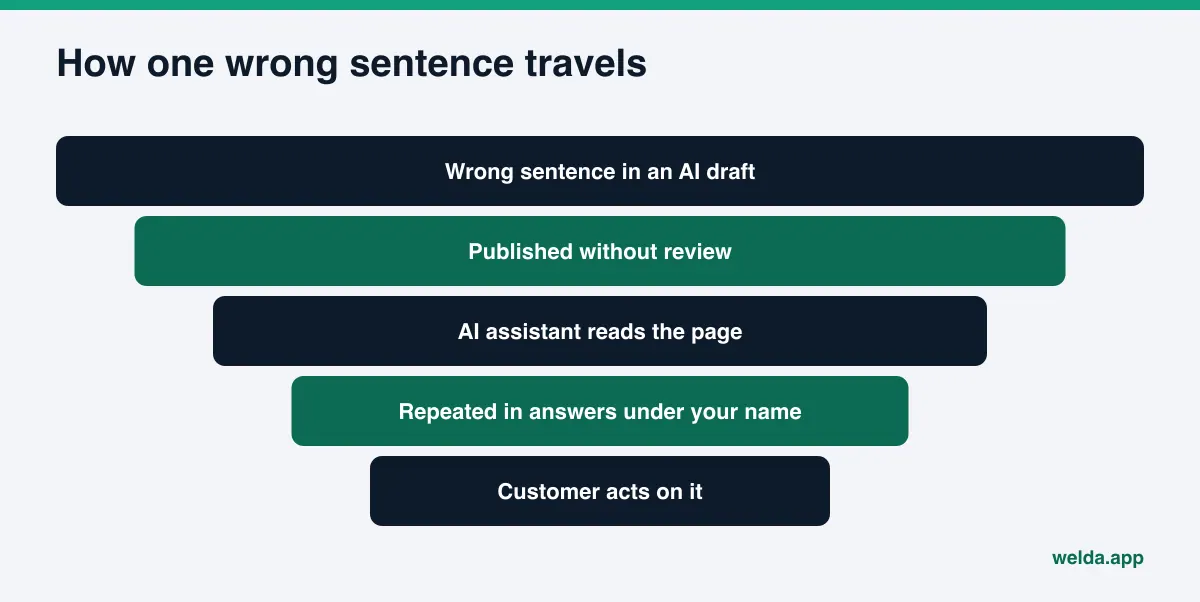
Why liability for errors in AI-written content stays with the business
AI tools produce text. They do not decide to publish it. Someone uploads the service page, approves the FAQ, or pastes the description into a Google Business Profile. A customer reading that page does not know or care who drafted it; they see your name. If the price is wrong, if a service you do not offer is described, or if the page promises a result, the frustration, the refund request and the complaint all land with you.
In the United States, the baseline is Section 5 of the FTC Act, which prohibits deceptive practices in commerce. The FTC has long held that advertisers need a reasonable basis for objective claims before they make them; its policy statement on advertising substantiation says firms must have substantiation before disseminating a claim. When the FTC announced its Operation AI Comply sweep in September 2024, the agency's chair put the principle plainly: there is no AI exemption from the laws on the books. State consumer protection laws and industry rules add their own layers. Whether a particular web page counts as advertising, and how responsibility is split in a specific case, is a legal question for your attorney.
The practical takeaway is simple. "The AI wrote it" does not make a wrong price, an invented guarantee or an unsupported "best in town" claim go away. What does help is being able to show who checked the content, against what, and when.
Why this matters for AEO
AEO, or answer engine optimization (sometimes called GEO, generative engine optimization), is the work of making sure AI assistants describe your business accurately and name it when customers ask relevant questions. Until recently, a wrong sentence on your site only misled the people who read that page. Now AI assistants read your site too. When someone asks for "a dentist in Denver open on Sundays," the assistant pulls the sentence from your FAQ, summarizes it, and puts it in an answer next to your name. Half of AI visibility work is publishing the right facts clearly. The other half is keeping wrong ones off your pages.
What kinds of errors show up in AI-written content?
The best-known weakness of AI language models is that they can state things they do not know as if they did. In business content this rarely looks like a typo. It looks like a confident, plausible fact about your business that happens to be false. The model assumes something common in your industry is true for you: "free parking," "open 24/7," "family-owned for over 20 years." These sentences read smoothly, and that is exactly why they slip past a quick review.
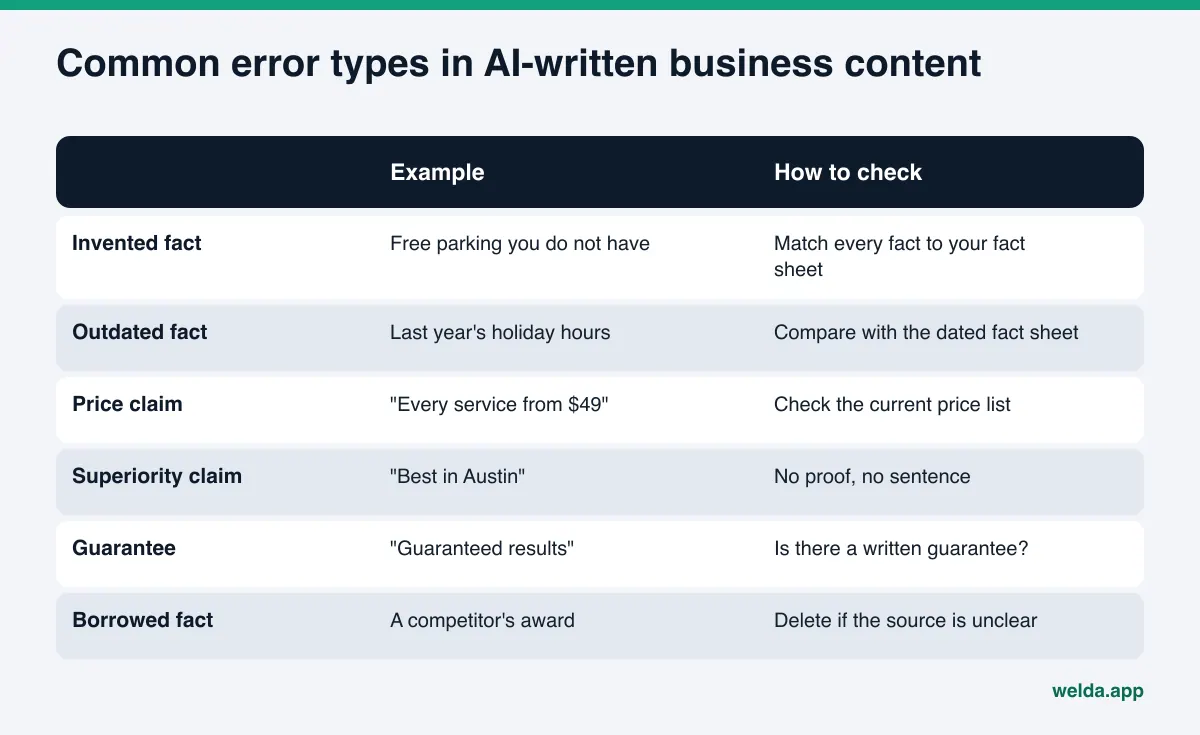
Separating errors by type makes review faster, because each type has a natural owner.
| Error type | How it happens | Who should check it |
|---|---|---|
| Invented fact | The model fills a gap with what similar businesses usually offer | Owner or a staff member who knows the operation |
| Outdated fact | The draft was built from an old page, listing or brochure | Whoever owns that information today (front desk, sales) |
| Price or promotion | The text adds a dollar figure, "starting at" or a discount | The person who sets prices |
| Superiority claim | "Best," "leading," "#1" get added because they sound good | Owner; without proof the sentence goes |
| Guarantee or result | "Guaranteed," "proven results," "satisfaction assured" | Whoever knows the written guarantee terms |
| Professional advice | General medical, legal or financial recommendations | A licensed professional |
Two of these categories get their own deep dives in this series: see "best" claims and advertising rules in AI content and pricing claims in AI-ready content.
How errors spread from your site into AI answers
When an AI assistant searches the web to answer a local question, it typically pulls from several places at once: your website, your Google Business Profile, review platforms like Yelp or Tripadvisor, industry directories such as Healthgrades or Angi, and sometimes your BBB listing. Among these, your own website usually reads as the business speaking for itself. If your FAQ says "we're open Sundays," the assistant can repeat it as your claim.
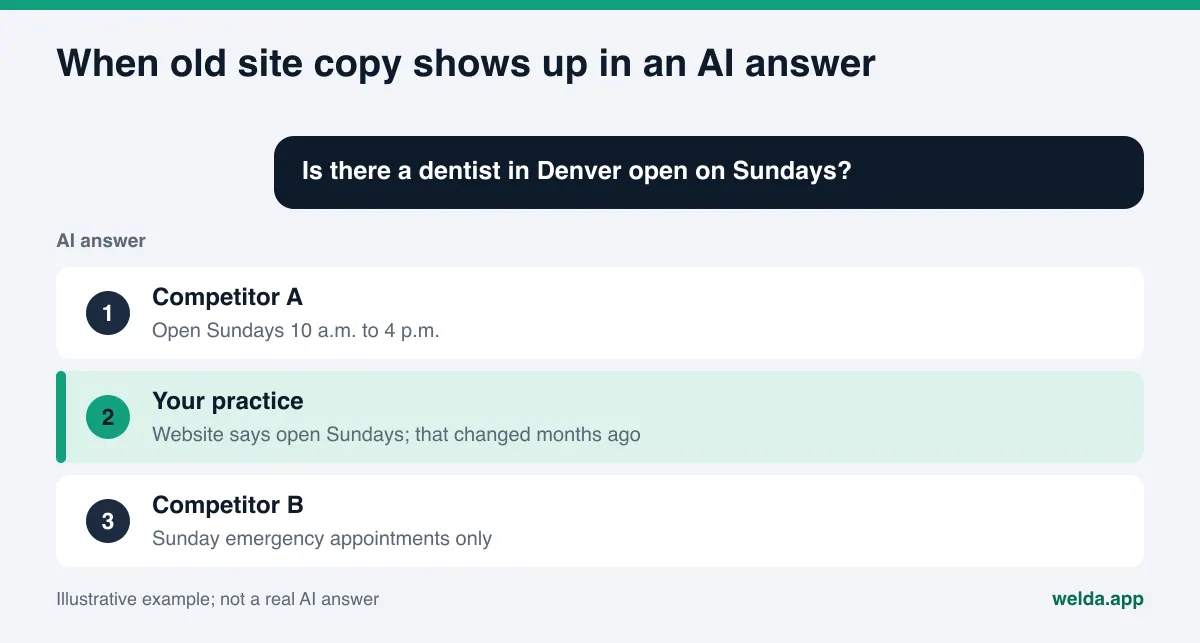
There are two different problems here, and they need different fixes:
- Errors you published. A wrong sentence on your site, your profile or your social accounts. You own it, and you can fix it today.
- Errors an AI assistant made about you. A sentence the assistant built from an old directory record or by confusing you with another business. You cannot edit the answer directly, but you can correct the sources it draws on.
A common example of the second kind is an assistant telling people you are closed; we cover causes and fixes in what to do when AI says your business is closed. This article focuses on the first kind, because fixing the second kind starts with getting your own sources right.
Timing matters too. Even after you correct a page, AI answers usually take weeks to reflect the change. Assistants revisit pages on their own schedule, and earlier answers can linger. That is why catching an error before publishing is always cheaper than cleaning it up afterward.
Managing liability for errors in AI-written content, step by step
The steps below are built for a business without an in-house legal team. The goal is to be able to show, for any page, what it was based on and who approved it.
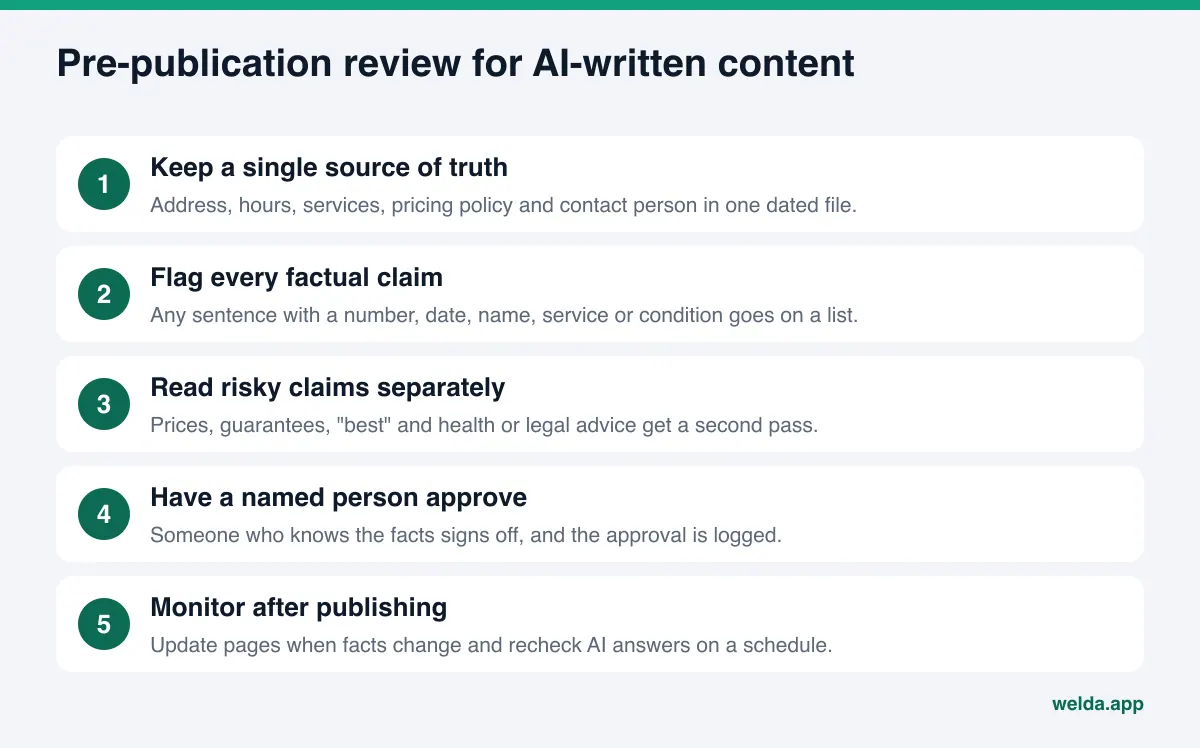
- Create a single source of truth. Keep your legal business name, address, phone, regular and holiday hours, services you offer and do not offer, pricing policy, accepted payment methods and the name of the responsible person in one document. Put the last-updated date at the top. Give this file to the AI tool when you ask for a draft, and check every draft against it.
- Flag every factual claim. As you read a draft, mark each sentence that contains a number, date, name, service, condition or time frame. Vague but harmless sentences are rarely the problem. The problem is sentences that look verifiable and have not been verified.
- Leave unknowns blank. If the draft says "over 15 years of experience" and you are not sure of the exact number, do not guess. Remove the sentence or hold the page until you have the fact.
- Read risky claims in a separate pass. Prices, discounts, guarantees, "best," "only," "leading," and anything that sounds like medical, legal or financial advice deserve a second read. These are the claims customers complain about and regulators look at first.
- Tie approval to a named person. Decide in advance who approves which kind of content: the owner for hours, the person who sets prices for pricing, a licensed clinician for health content. Log the approver and the date. We walk through how to set this up in a content approval workflow for AEO.
- Keep facts identical everywhere. If your site lists different hours than your Google Business Profile or Yelp page, the AI assistant picks one, and it may not pick the right one. When a fact changes, update the site and every profile the same day.
- Monitor after publishing. When something changes, find every page that mentions it. On a regular schedule, ask AI assistants the questions your customers ask, and check whether anything said about you is wrong.
Reducing errors at the prompt stage
How much review a draft needs depends heavily on how it was requested. Asking an AI tool to "write an About page for our dental practice" invites it to fill gaps with guesses. Three additions to the request cut that risk early:
- Supply the source. Paste your source-of-truth file into the request and tell the tool to use only those facts.
- Ask for visible gaps. If a fact is missing, tell it to leave a bracketed marker such as "[needed: year founded]" instead of inventing one. Those markers are easy to search for before publishing.
- Ask for a claims list. Have the tool end with a separate list of every number, date, price and claim it used. That list becomes your review checklist.
This does not eliminate errors; a model can still add something it was told not to. But it changes the reviewer's job from "read everything with suspicion" to "verify these specific items," which is faster and misses less.
Who approves what?
In a small business it can feel like everyone knows everything, but in practice one person sets prices and another runs the schedule. Assigning approval by the type of sentence keeps it simple.
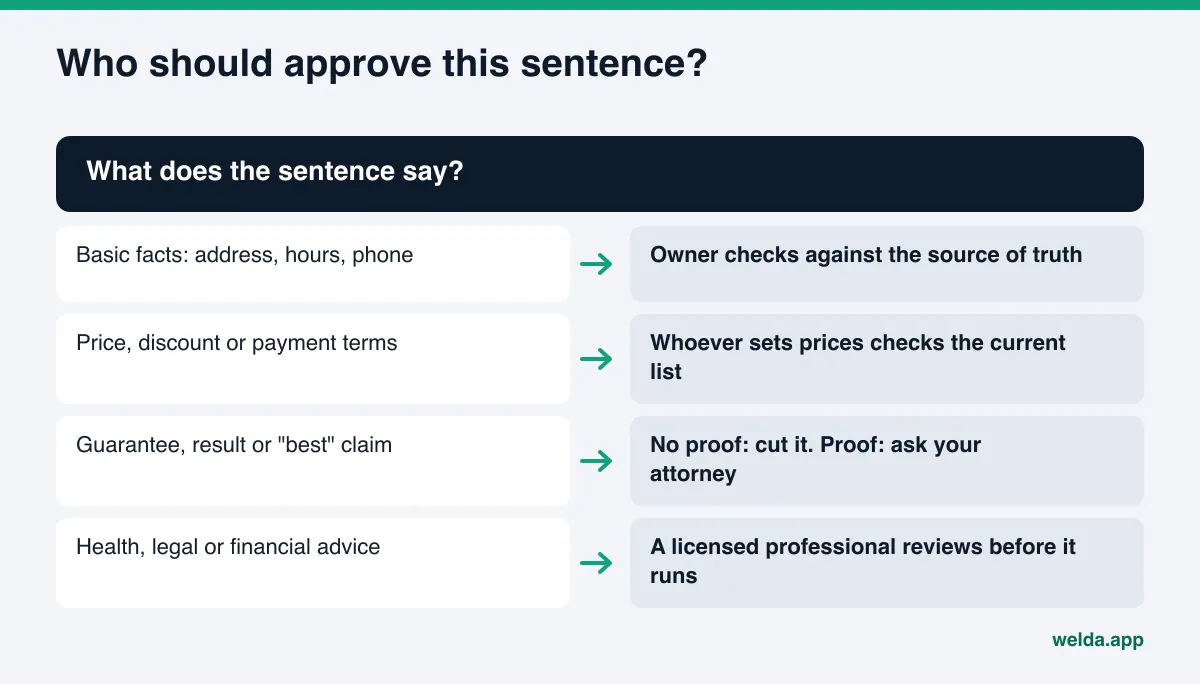
Health care, legal services and financial services carry stricter rules. In these fields, general recommendations produced by AI should not go live until a licensed professional has read them, and professional and state rules apply on top of FTC rules. Those specifics are outside the scope of this article.
How Welda handles this work
Welda is software that measures where a business shows up in AI answers and prepares the missing content on the business's behalf. For a topic like liability, the key question is how a system that drafts content deals with the risk of errors. Welda's approach rests on three habits: asking instead of guessing, flagging risky phrasing, and leaving the publish decision with the business.
It asks instead of guessing
When Welda prepares a page or profile text and cannot find a fact clearly stated on your site, it does not fill the gap with a plausible guess. It leaves the field empty and asks you for it at the top of the to-do list, under a section for information it needs from you. If your hours, full street address or the name of the person in charge are missing, each shows up as its own field, with a note on how many prepared texts depend on it. You enter the fact once and it flows into every related text. Fields left empty stay highlighted in the preview, so an incomplete page does not slip out unnoticed. This targets the most common source of AI content errors directly: a gap filled with a guess.
It flags risky phrasing before publishing
The legal check in the Welda panel flags patterns such as prices, guarantees, superiority claims and diagnosis-like suggestions in prepared content before it reaches approval. If a draft says "guaranteed results" or "the best in the area," that sentence is marked, and the business either rewrites it or keeps it deliberately. This is not legal advice and has not been reviewed by legal counsel. It is a first filter that makes easy-to-miss phrasing visible.
The business approves every publish
Content Welda prepares lives on your own website; Welda does not host content. On WordPress sites, Welda connects through a separate Editor user and an application password, without installing code. Content opens on your site as a draft and goes live only when approved. Where no connection is available, Welda provides a ready-to-apply package and the business applies it by hand. In health care there is no automatic publishing at all; every item goes to an approval queue, and patient data is never sent to AI. Whoever drafted the words, the decision to publish, and the record of it, stay with the business.
On the measurement side, Welda asks AI assistants the questions your customers would ask and shows whether your business is named. For error correction, that means you can see over time whether a fix has started to show up in answers.
A note on availability: the Welda panel is in early access and opening first in Turkey. Regular measurement across four AI engines is being added during early access, and sample panel screens use representative data. What anyone can use today is the free site analysis, which works in English. Pricing is discussed in an early access conversation.
Limits: what Welda does not do
On a topic like liability, knowing what a tool does not do matters as much as knowing what it does.
- It does not give legal advice. The legal check is a pattern-based first filter. It does not decide whether a claim complies with FTC rules or state law; that call belongs to you and your attorney.
- It does not take on your liability. Welda prepares and flags; the business approves. Approved content is the business's statement.
- It does not invent facts. Missing information is requested, not guessed, which means some texts wait until you answer.
- It does not publish sensitive content without approval. In health care, every item is approved by the business.
- It does not write fake reviews. It drafts replies to reviews, never reviews themselves. The rules are covered in fake reviews rules and AI visibility.
- It cannot edit AI answers. Nobody can change an assistant's answer directly; only its sources can be improved. Changes usually take weeks to show, and there is no guarantee of rankings or of appearing in ChatGPT.
- Some work stays with you. Handling negative reviews, directory accounts and press outreach remain the business's decisions.
What to do when you find an error after publishing
Even a solid process lets an occasional error through. What matters is having a plan for when you find one.
- Fix every source. Find each page, profile and post with the wrong sentence and correct them the same day. Fixing only one leaves the old version for AI assistants to keep using.
- Decide how to treat affected customers. If someone acted on a wrong price or condition, decide how you will respond. That is a customer relations question and, where needed, a legal one.
- Find the root cause. Was the source-of-truth file outdated, was approval skipped, or did the model invent the fact? Add a checklist item for that error type.
- Watch AI answers. Ask assistants the same questions over the following weeks. The old version may linger for a while; that is expected.
- Keep a record. Note when the error was found, and when and how it was fixed. If a complaint or inquiry follows, that record shows your diligence.
Example scenario: changed hours
An example dental practice decides to close on Sundays for the winter. Its FAQ, drafted with AI a year earlier, still says "We're open Sundays from 10 a.m. to 2 p.m." The Google Business Profile was updated, but nobody remembered the FAQ. A patient asks an AI assistant for a dentist open on Sundays, the assistant cites the FAQ, and the patient arrives at a locked door.
The root cause here is not the AI. It is a changed fact that was not updated everywhere. The fix is procedural: the source-of-truth file lists which pages mention hours, and whenever hours change, someone walks that list. We cover the practical side in keeping business hours accurate for AI.
Checklist: are you managing liability for errors in AI-written content?
Use the list below to see how well your process handles errors in AI-written content. Each item asks whether a problem has been solved in advance.
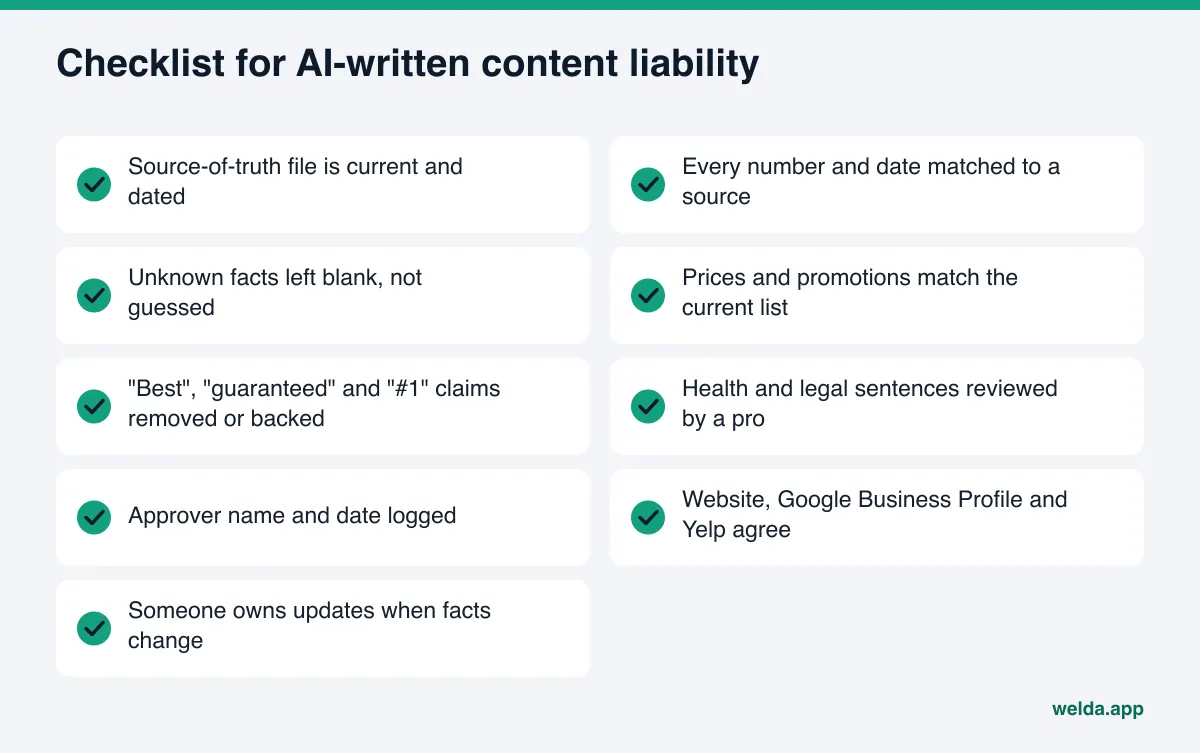
One test sums it up: if a customer or a regulator asked "what is this sentence based on, and who approved it," could you answer within a minute? If yes, your process works. If not, what is usually missing is not a tool but a record.
| Situation | What it means | First step |
|---|---|---|
| No source-of-truth file | Each page may rest on different facts | Gather core facts in one dated document |
| No named approver | Nobody owns the error when it surfaces | Assign an approver per content type |
| Risky claims not read separately | Prices and guarantees slip through | Add a second review pass |
| Profiles differ from the site | AI picks which version to trust | Update every listing the same day |
| No monitoring after publishing | Errors can sit in answers for months | Re-ask the same questions on a schedule |
Frequently asked questions
Isn't the AI vendor liable for errors its tool writes?
A vendor's responsibility depends on its contract terms and applicable law, and it varies case by case. Toward your customers, though, the business that published the content is the visible party, and the FTC expects advertisers to have substantiation for their claims. For a specific situation, talk to an attorney.
Does labeling content as AI-generated remove liability?
Disclosure can be good practice, but it does not make a wrong price or a nonexistent service accurate. The customer still acts on the information. Review and approval before publishing are the real protection.
What can I do if an AI assistant says something wrong about my business?
You cannot edit the answer directly. You can correct the sources the assistant draws on: your website, Google Business Profile, Yelp and relevant directories. Changes usually take weeks to show up in answers.
Does Welda guarantee error-free content?
No. Welda does not invent facts, asks you for missing information, and flags risky phrasing before publishing. Final review and approval stay with the business, and the legal check is not legal advice.
How can a small business keep this up?
A source-of-truth file and one named approver per content type are enough for most businesses to start. Running the same checklist on each new page takes a few minutes and keeps the same mistake from repeating.
Will the free analysis find factual errors on my site?
The free analysis reads your business information, address and phone details, FAQ section and how clearly your services are described, and shows what is missing or unclear. Whether a fact is actually true, only you know; the analysis does not make that judgment for you.
Start with your own site
Liability for errors in AI-written content is manageable with a clear process: keep facts in one place, never guess, read risky claims twice, and tie every publish to a named approver. The first step is seeing what your site tells AI assistants today. The free site analysis reads your homepage and several inner pages, shows gaps in business information, contact details and FAQs along with why they matter, and checks whether your business is named when an AI assistant with web search is asked five questions your customers might ask. It is free once per site.