Are you losing traffic to AI Overviews? If your impressions and average position in Search Console are holding steady while clicks fall, especially on "how", "when" and "what is" queries, the answer is probably yes. Some of those clicks are not coming back. But whether your business gets named inside the answer for the questions that bring customers is something you can work on and measure.
This guide is for owners and marketers of small and mid-sized businesses who suspect they are losing traffic to AI Overviews. It walks through how to confirm the cause, how to tell which lost clicks actually matter, and the answer engine optimization (AEO) steps that get you cited. Near the end we explain how Welda handles this work and, just as plainly, what it does not do.
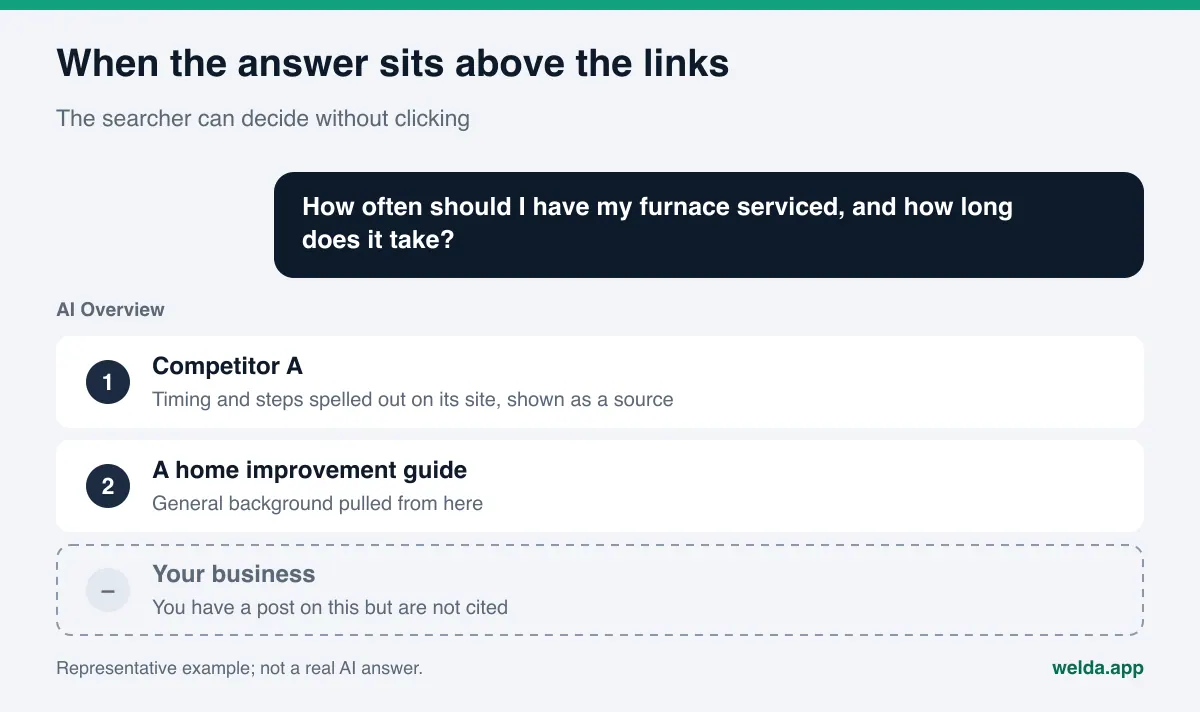
Why are businesses losing traffic to AI Overviews?
For many searches, Google now shows an AI-written summary above the regular results. That is AI Overviews; the longer, conversational version is AI Mode. The summary answers the question in a few sentences and shows a handful of source links beside it. When people get their answer right there, fewer of them scroll down to the blue links.
One of the clearest public measurements comes from Pew Research Center, which analyzed the real browsing data of 900 U.S. adults in March 2025. On searches that showed an AI summary, users clicked a traditional result link in 8% of visits, compared with 15% on searches without one. Clicks on links inside the summary itself happened in just 1% of visits (Pew Research Center, July 2025). Your own numbers will differ by industry and query mix, but the direction is clear.
For a business, that adds up to two separate problems:
- Lost visits. Your informational content (guides, how-to posts, explainer pages) gets fewer clicks than it used to.
- Lost visibility. More important: if the summary cites someone else instead of you, the searcher never sees your name at all. Even without a click, seeing your name could have led to a branded search later.
The first problem is largely out of your hands. The second is work you can do something about, and it is what the rest of this article focuses on. In AEO terms (some people call the same discipline GEO, generative engine optimization), the goal shifts from ranking a link to being part of the answer.
How to tell if you are losing traffic to AI Overviews
Not every traffic dip is caused by AI Overviews. Misreading the cause means doing the wrong work: if you blame AI for what is really a ranking drop and wait it out, the real problem gets worse. Rule things out first.
Google says traffic from sites appearing in AI Overviews and AI Mode is counted in the Search Console Performance report under the "Web" search type, not in a separate report (Google Search Central, AI features and your website). There is no ready-made filter labeled "AI Overviews clicks." You diagnose it indirectly, by reading several numbers together.
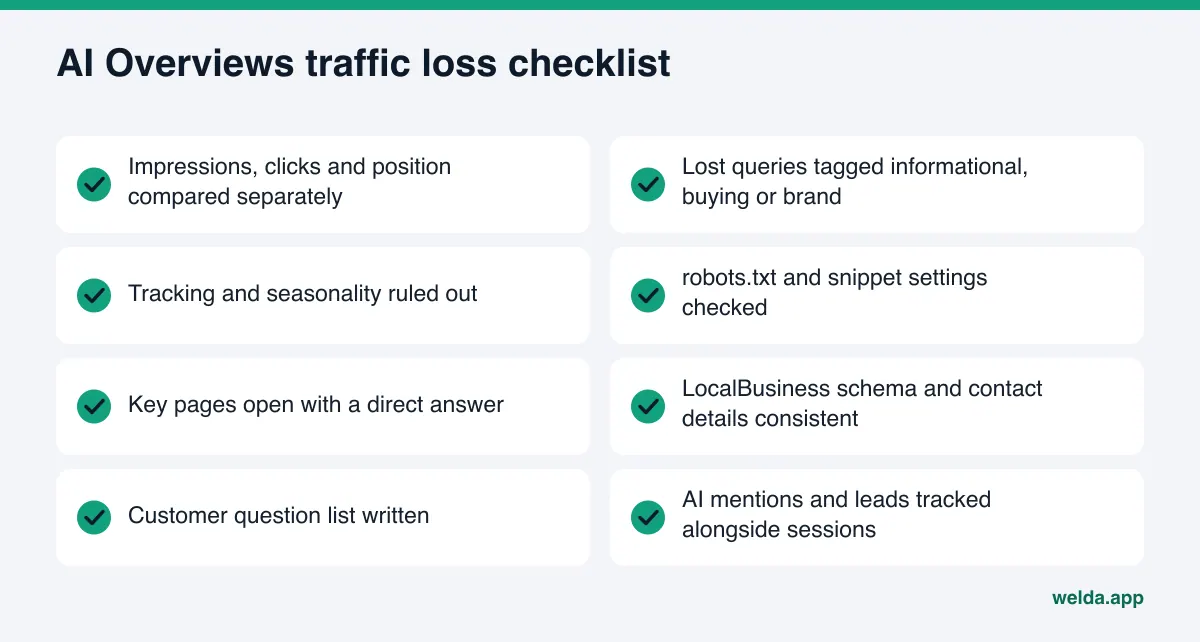
- Compare periods. In Search Console's Performance report, compare the last three months with the previous three, and with the same period last year if you have it. Turn on impressions, clicks, CTR and average position.
- Look for the pattern. If impressions are flat or up and average position is flat, but clicks and CTR are down, something on the results page is taking the click. AI Overviews is a prime suspect.
- Split by query. In the Queries tab, sort by click loss. If the drop is concentrated on informational queries ("what is", "how to", "how long", "difference between"), the picture points to AI Overviews. If branded searches or "near me" and city-name searches are falling, look for a different cause.
- Look at the results page yourself. Search your top five to ten losing queries in a private window. Does a summary appear? Who is cited? Are you there? Save screenshots; you will check again in a month.
- Rule out other causes. Site migrations, URL changes, a page missing its analytics tag, a cookie consent banner that blocks tracking, and seasonality can all produce the same drop.
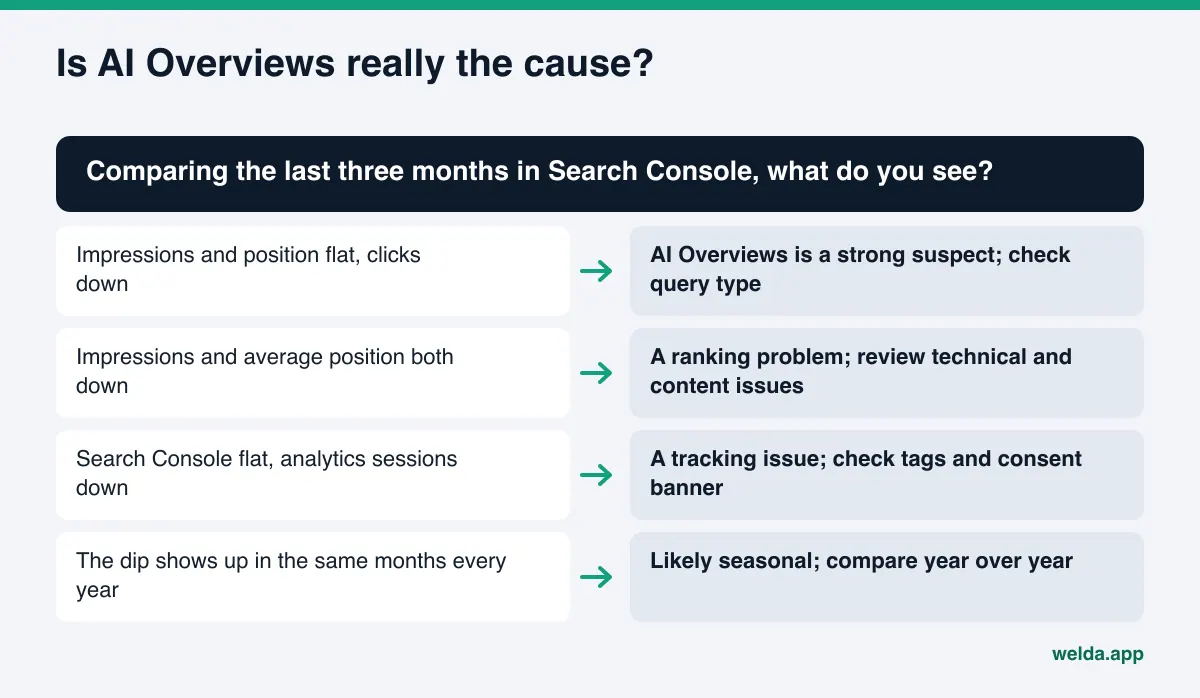
The table below summarizes the patterns we see most often and what each one usually means:
| What Search Console shows | Likely cause | First thing to do |
|---|---|---|
| Impressions flat, position flat, CTR down | A summary or another feature on the page is taking the click | Search the losing queries and see who is cited |
| Impressions down, average position worse | Ranking loss | Check technical issues and competing pages |
| Search Console clicks flat, analytics sessions down | Tracking problem | Check the analytics tag and consent banner setup |
| Sudden drop on a single page | Page deindexed or URL changed | Run the URL Inspection tool on that page |
| Drop in the same months every year | Seasonality | Compare year over year |
Skipping this step usually leads to one of two mistakes: giving up because "Google took our traffic," or publishing more informational posts to make up for the loss, which feeds the same pattern.
Which lost traffic actually matters?
On sites losing traffic to AI Overviews, the pages that drop hardest are usually informational. An HVAC company's "how often should you service a furnace" post. A dental practice's "what causes tartar" article. A hotel's "things to do nearby" page. Those pages pulled in visits for years, but many of those visitors were never going to become customers. They wanted an answer, not a provider.
Searches that bring customers look different: "HVAC company near me open Saturday," "dentist that takes walk-ins in Austin," "family-friendly hotel on the beach in San Diego." AI summaries can appear on these too, and they usually name a few businesses. Here CTR is not the number that matters. What matters is whether your name is on that short list. We cover how to earn a spot on those lists for a business with no track record yet in our guide to getting a new business found in ChatGPT.
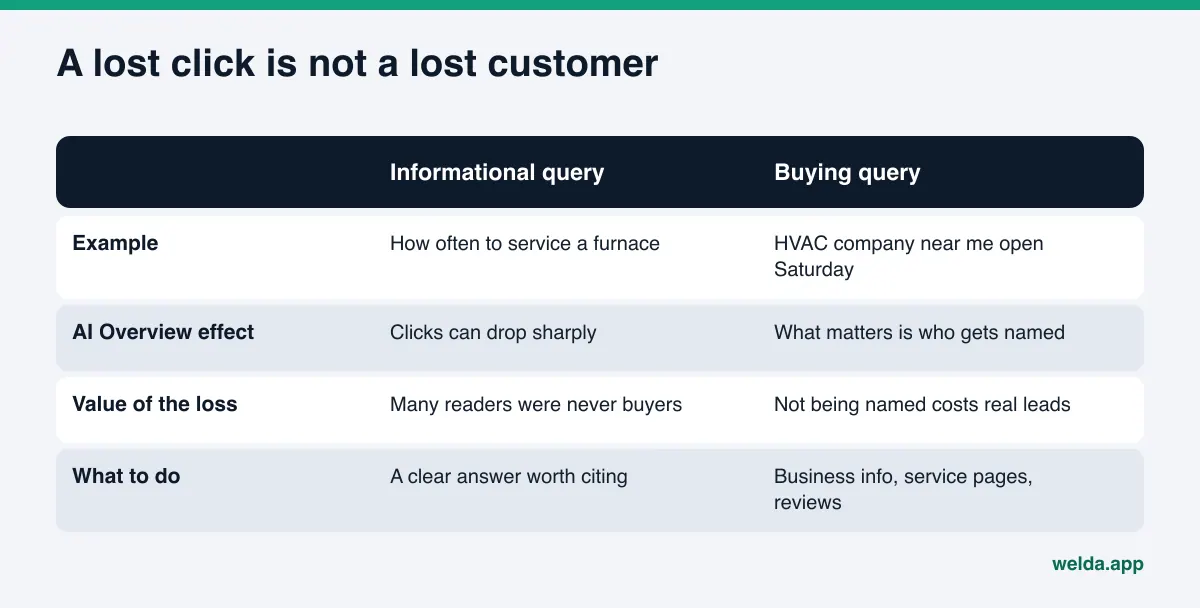
The practical takeaway: split your traffic report into groups. For informational queries, your goal is to be the cited source. That builds awareness, but it will not bring back every lost visit. For buying queries, your goal is to be one of the businesses named in the summary and in chat answers. That second group deserves most of your time and budget.
There is also a third group: branded searches. If people see your name in a summary and then search for you directly, branded queries tend to hold up or grow. If informational clicks fall while branded searches stay level or rise, some of your visibility may be turning into awareness rather than visits. Do not read this as proof of cause and effect, but it is worth watching.
What to do about losing traffic to AI Overviews, step by step
These are steps a small or mid-sized business can take on its own or with a part-time helper. Order matters: finish the diagnosis before you start writing.
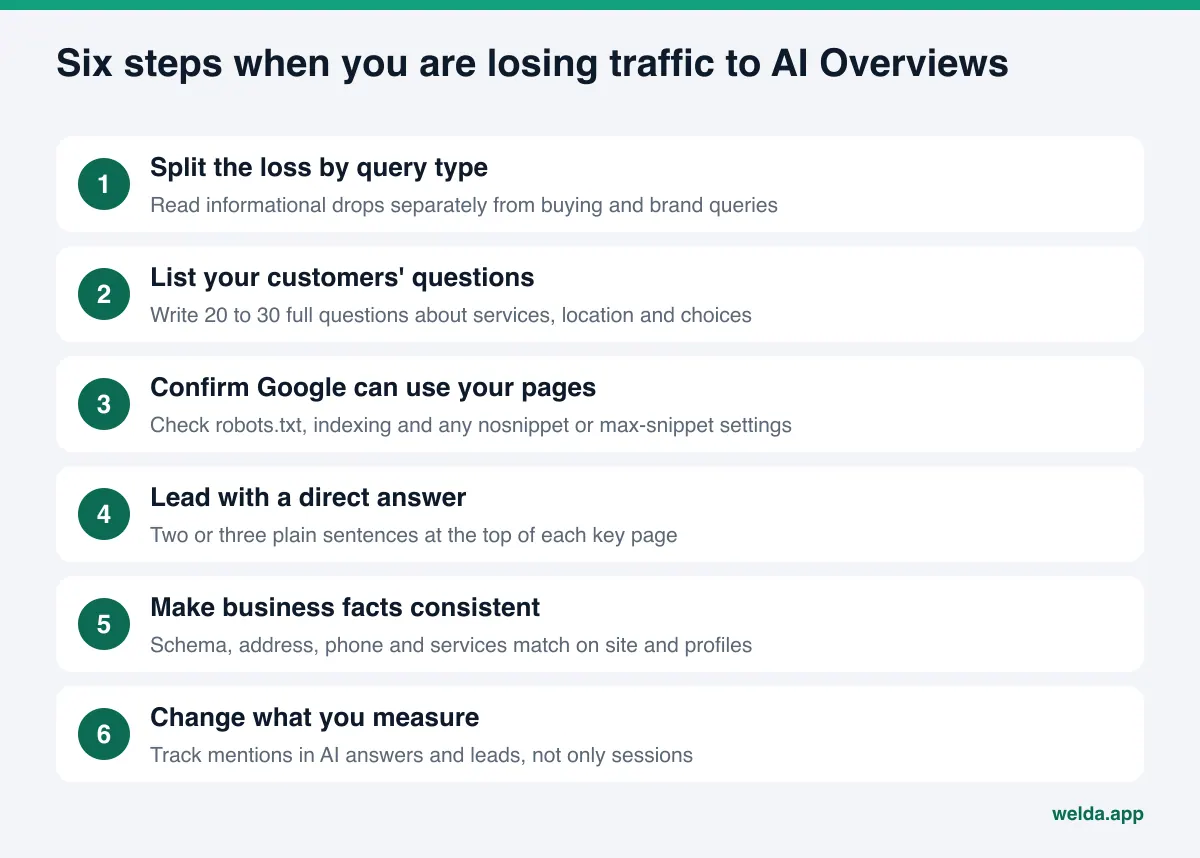
1. Split the loss by query type
Export your declining queries from Search Console into a spreadsheet and tag each one "informational," "buying" or "brand." This simple labeling tells you where to spend effort. If informational queries dropped a lot but buying queries are holding, the situation may be less serious than the top-line chart suggests.
2. List the questions your customers actually ask
Instead of short keywords, write the full sentences a customer would type into an AI assistant: "Is there a vet open on Saturdays in Brooklyn?", "Can you recommend a pet-friendly boutique hotel in Charleston?" A list of 20 to 30 questions about services, location, price, hours and comparisons is a solid start. It becomes both your content plan and your measurement list. We go deeper on building it in our piece on checking whether your website is ready for AI.
3. Confirm Google can use your pages
According to Google, a page needs to be indexed and eligible to appear in Search with a snippet to be shown as a supporting link in AI features, and there are no additional technical requirements. Some sites quietly exclude themselves anyway: a leftover nosnippet tag, a very low max-snippet value, or a robots.txt rule that blocks important sections. Check all three. While you are in robots.txt, see whether you are blocking other AI crawlers too; assistants like ChatGPT and Perplexity read your site through their own bots.
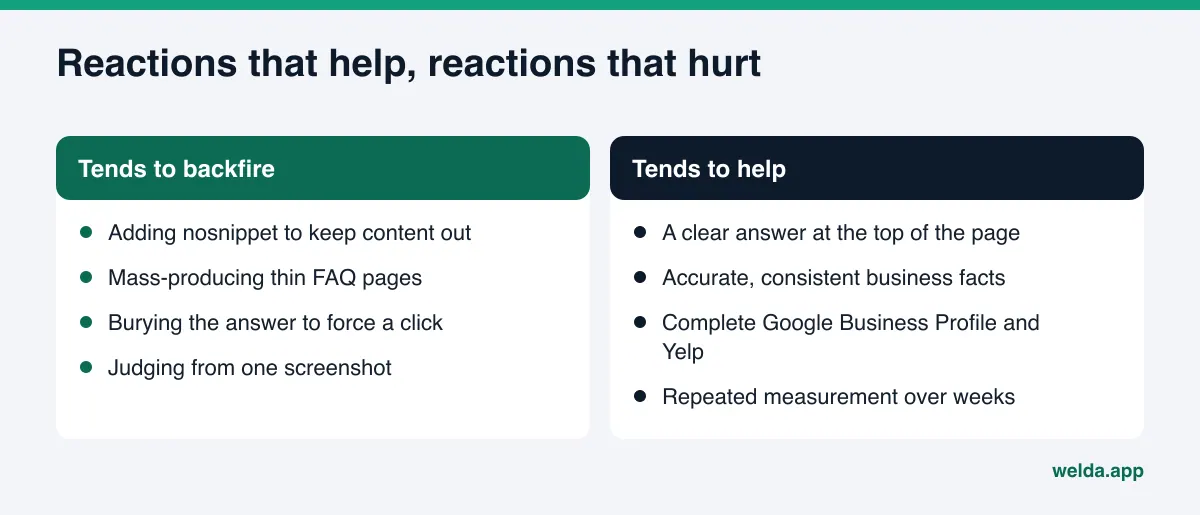
A warning: some site owners react to the click loss by adding nosnippet to pull their content out of the summary. That also removes any chance of being cited, and it strips the description from your regular listing. For most local businesses that is a bad trade.
4. Lead with a direct answer
AI summaries readily quote sentences that answer the question directly. Put a two-to-three sentence answer at the top of your service pages and key articles, then add detail below. Swap vague lines like "industry-leading service" for specifics: what you do, where, for whom, and how. A well-organized FAQ section is the tidiest way to offer those answers in one place.
5. Make your business facts consistent everywhere
Add LocalBusiness structured data (schema) to your site. Make sure your address, phone, hours and services read the same on your site, your Google Business Profile, Yelp and any industry directories. If an old phone number lives on one listing and a new address on another, AI systems see conflicting facts and either skip you or get you wrong. We cover that situation specifically in what to do when ChatGPT has wrong information about your business.
6. Change what you measure
A report that only counts sessions gives you an incomplete picture in the AI Overviews era. Track three things separately: whether your name appears in AI answers for the questions on your list, how many branded searches you get, and how many leads arrive (calls, forms, messages).
If you want to check several of these points right now, our free AI visibility analysis shows how AI systems read your site in a few minutes.
What not to do in the short term
A traffic drop creates pressure, and some panicked reactions make things worse:
- Blocking the summary. As noted above,
nosnippetand similar settings also remove your chance of being cited. - Mass-producing thin pages. Hundreds of near-identical pages, one per question, give AI systems nothing new. A few clear, accurate pages work better.
- Burying the answer. Hiding the answer below a long intro to force a click makes it less likely you will be picked as a source.
- Overclaiming. "Best in town" or "number one" rarely shows up in AI answers, and unsupported claims can draw FTC scrutiny as deceptive advertising.
- Deciding from one search. AI summaries can cite different sources for the same question at different times. One screenshot does not tell you much; repeated measurement does.
How Welda helps when you are losing traffic to AI Overviews
Welda is software that measures where a business appears in AI answers and fills the gaps on its behalf. For a business losing traffic to AI Overviews, Welda's contribution is showing what the traffic chart cannot: for the questions your customers ask, are you named in the answer, and if not, who is named instead and based on which source. Here are the three parts most relevant to this problem.
The free analysis: can AI read your site?
The free site analysis reads your homepage and a few inner pages (services, pricing, about, contact) the way Google and AI systems do. It covers much of steps 3 and 4 for you: whether AI crawlers are blocked in robots.txt, whether page titles and descriptions exist, whether business schema is missing, whether your services are stated clearly, whether there is an FAQ section, and how fast the page loads. For each gap it explains what it found, why it matters and how to fix it, and it drafts a title, description, main heading, intro paragraph and FAQ for your homepage. A simulation shows how much each fix would move your score, which helps you decide where to start.
The analysis also asks 5 likely customer questions to an AI assistant that can search the web, and checks whether your business name appears in the answers. It is a one-time snapshot of whether AI answers mention you, not a measurement of AI Overviews itself, and it does not track rankings. The analysis works in English; you get a score out of 100, a PDF and a shareable score card.
Ongoing measurement: a second chart next to your traffic
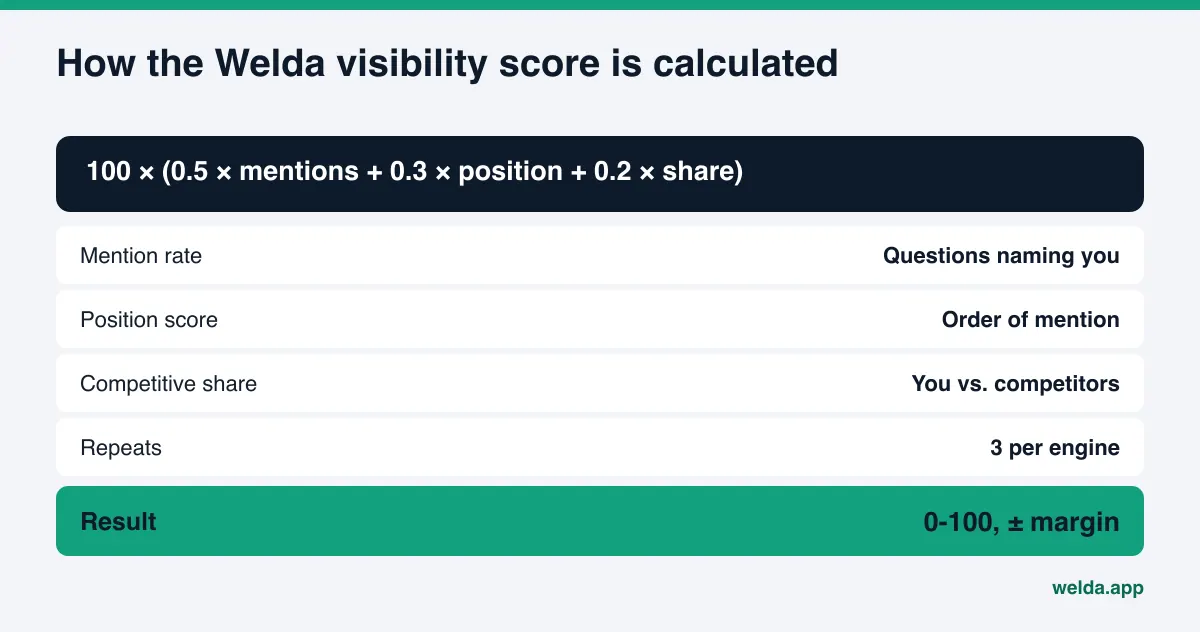
In the Welda dashboard, which is in early access, your customers' questions are asked three times each in ChatGPT, Gemini, Perplexity and Google AI. You see which questions mention your name, how early you are named, and where competitors are ahead. Search Console tells you clicks are down; it does not tell you whether you are named inside the answer. This measurement fills that gap. If informational visits fall while the share of buying questions that mention you rises, the work is heading in the right direction.
The score formula is public: 100 × (0.5 × share of questions that mention you + 0.3 × position score + 0.2 × share against competitors). The spread across three repeats produces a ± margin, so one lucky answer is not mistaken for real progress.
Sources: who gets cited, and why
AI Overviews and other AI answers lean on a small set of sources. The dashboard lists which sites get cited most for your questions and how you look on each: missing profile, incomplete listing, or not there at all. That answers the frustrating question "why does my competitor get cited and I don't?" Sometimes the gap is on your own site. Sometimes the AI is leaning on Yelp, Tripadvisor, the BBB or an industry directory where your profile is thin. Knowing which puts your effort in the right place.
After measurement, the work goes onto a to-do list. Welda drafts the missing content, profile text and review replies; you keep publishing approval. On WordPress sites, Welda connects through a separate Editor user and an application password, with no code to install; content opens on your site as a draft and goes live when you approve it. For other platforms, Welda hands you a ready-made package to apply yourself. Your content always lives on your own site. For a fuller comparison of tools that only measure versus ones that also do the work, see AI visibility monitoring vs done-for-you AEO.
Where Welda stands today: the free analysis works in English and German and is open to anyone now. The full dashboard is in early access and is opening first in Turkey. Regular four-engine measurement is being added during early access, and sample dashboard screens use representative data. Pricing is discussed in an early access conversation.
Limits: what Welda does not do
No tool can change Google's results page, and it is worth being honest about that:
- It does not promise to bring back lost clicks. On informational queries with a summary, some clicks may be gone for good. The goal is being named inside the answer.
- It does not guarantee rankings or placement in AI Overviews. Google decides which sources to show.
- It does not invent facts. If your hours, service area or pricing approach are unclear, Welda asks you.
- It does not publish sensitive content without approval or create fake reviews. Fake reviews are also prohibited under the FTC's rule on fake reviews and testimonials. A built-in check flags price, guarantee and superiority claims before publishing; it is not legal advice.
- Some work stays with you. Handling negative reviews, owning directory accounts and press outreach remain the business's job.
Timing matters too. New or corrected content usually takes weeks to show up in AI answers. Google itself notes that recrawling can take anywhere from several days to several months. Judge a change by repeated measurement over several weeks, not by the first week.
Decision guide: where to focus this month
Here is the order we suggest for the first month after you notice the drop:
| Your situation | Priority | Can wait |
|---|---|---|
| Drop only on informational posts | Direct answers at the top of posts; start measuring buying questions | Publishing new how-to posts |
| Buying queries are dropping too | Business facts, service pages, profile consistency | Blog calendar |
| A technical block turned up | Fix robots.txt and snippet settings | Content refresh |
| A competitor is always cited | Find which source they win from | Full site redesign |
| Cause still unclear | Tracking and seasonality checks | Any major change |
Frequently asked questions
Will traffic lost to AI Overviews come back?
Some of the loss on informational queries is probably permanent, because people get the answer on the results page. What you can win back is being cited or named inside the answer. That shows up more in awareness and branded searches than in visits.
Can I see AI Overviews traffic separately in Search Console?
According to Google, traffic from AI Overviews and AI Mode is counted in the Performance report under the "Web" search type, with no separate filter. You diagnose it by reading impressions, clicks, CTR and position changes together.
Should I opt my site out of AI Overviews?
For most businesses, no. Settings like nosnippet keep your pages from being cited and affect your regular listing too. They do not bring clicks back; they reduce visibility.
Do I need special code to be cited in AI Overviews?
Google says there are no additional technical requirements beyond being indexed and eligible for a snippet. Still, LocalBusiness schema, a clear page structure and paragraphs that answer the question directly make it easier for AI systems to understand you.
Is AEO different from SEO?
They overlap. SEO is about ranking links; AEO is about being the answer, or part of it, in AI-generated responses. The same basics (crawlable pages, accurate facts, clear writing) serve both, but AEO is measured by mentions in answers rather than position alone.
How long until changes make a difference?
Usually weeks. Pages need to be recrawled, and AI answers take time to pick up new information. Judge results by asking the same questions repeatedly over several weeks, not by a single search.
Start by seeing where you stand
Losing traffic to AI Overviews starts with a change you cannot control, but much of what follows is up to you. Diagnose the drop correctly, separate buying questions from informational ones, make your site clear and readable, and widen what you measure from visits to mentions inside the answer. As a first step, run the free AI visibility analysis to see how AI systems read your site, which fixes would move your score most, and whether your name shows up for 5 customer questions. It is free once per site, and the results link arrives by email.