What does multi-location AEO actually require? Every location needs its own page, its own name, address, phone number and hours, its own Google Business Profile and its own reviews. When AI assistants cannot tell your locations apart, they send customers to the wrong neighborhood, to a closed address or to a competitor. This guide walks through multi-location AEO step by step.
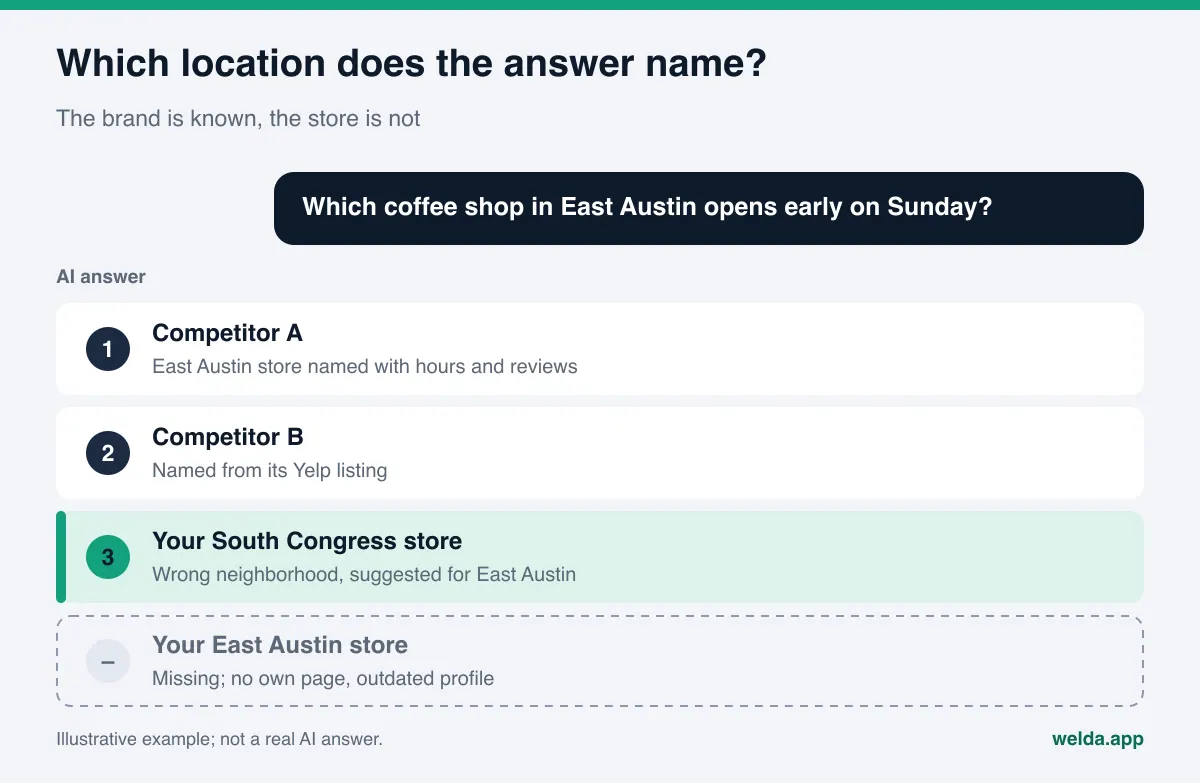
Picture a coffee chain with four stores across Austin, a dental group with three offices in the Chicago suburbs, a tire and auto service brand in five Phoenix-area towns, or a salon with locations in two states. When a customer asks ChatGPT, Gemini, Perplexity or Google's AI Mode for "a coffee shop open early on Sunday in East Austin," the answer does not recommend a brand. It recommends an address. That is why multi-location AEO (answer engine optimization) is not about getting your brand mentioned once. Each location has to show up, with correct details, for the questions people ask in its own area. You will also hear this work called GEO, generative engine optimization; the two terms describe the same goal, and this article uses AEO. To see how AI reads your website today, run a free AI visibility analysis first. It lists each gap it finds and how to fix it.
Why multi-location AEO is its own job
For a single-location business, the question is simple: does AI know you, and does it describe you correctly? Once you have more than one location, the question multiplies. AI may know your brand perfectly well and still mix up which store is where, which one opens on Sunday, or which one offers a given service. For the customer, the result is easy to describe: they drive to the wrong place.
Three patterns cause most of the trouble for multi-location brands.
- All locations on one page. The website lists every store on a single "Contact" or "Locations" page, one address under another. AI reads that page and understands the brand, but it has no dedicated source to answer "is the Round Rock store open on Sunday?"
- Inconsistent outside sources. One location's Google Business Profile is complete, another has not been touched in years. One store appears on Yelp with an old phone number, another is missing from the directories altogether. AI reads these sources together and resolves the conflict on its own terms.
- Traces of closed or moved locations. A closed store keeps living on in an old listing, a forgotten landing page or a local news article. AI finds those traces and recommends an address that no longer exists. We cover the cleanup in detail in how to update AI answers after a rebrand or move.
A fourth pattern is easy to miss: visibility is rarely spread evenly across locations. The oldest store, or the one with the most reviews, shows up for everything, while the newest location never gets named. A brand-level report that says "we are visible" can hide the fact that a newer store is invisible in its own neighborhood. If visibility suddenly shifts between locations, the checks in why your AI visibility dropped apply store by store.
Where AI mixes up locations
The table below shows common mix-ups for multi-location businesses, what they look like in an answer, and where they usually come from. Test each row against one of your own locations: ask an AI assistant a question a real customer would ask, and compare the answer to the table.
| Mix-up | What the answer shows | Usual source | First fix |
|---|---|---|---|
| Wrong location suggested | Customer asks about Brooklyn, answer gives the Queens address | No separate location pages, one contact page | A dedicated, specific page per location |
| Hours mixed up | One store's Sunday hours attributed to another | Hours published only once, brand-wide | Location-specific hours on the page and the profile |
| Wrong phone number | Corporate line or an old number is given | Outdated directory and citation listings | One master location list, directories updated to match |
| Services mixed up | A service offered at one store is credited to all | Services never listed per location | A "at this location" list on each page |
| Closed store mentioned | An address that no longer exists appears | Old profile, old page, old news story | Mark profile closed, redirect the page |
| New store missing | Only competitors named in its neighborhood | No footprint yet in outside sources | Profile, reviews, page and neighborhood questions |
Most of these mix-ups are not AI "errors" in the usual sense. They come from inconsistencies in the sources AI relies on. We cover wrong answers in general in what to do when ChatGPT has wrong information about your business. The focus here is how those inconsistencies multiply with every location you add.
How customers ask AI about multi-location businesses
Questions about multi-location businesses fall into three groups, and each group draws on different sources.
Neighborhood questions. "Best brunch spot in Wicker Park," "dentist open late in Evanston," "tire shop in Mesa that does same-day alignment." Here AI is looking for a place, not a brand. Without a source that shows your store exists in that area, you may not appear no matter how well known the brand is. We explain how these questions work in AI in how "near me" searches work in AI.
Brand and location questions. "Where are the brand's Dallas locations," "what time does the Uptown store close," "which location has parking." AI knows the brand here and is looking for location details. The location page and the location's profile are the direct sources for these answers.
Comparison questions. "Is brand X or brand Y better," "are all of X's locations the same." Reviews carry these answers. When reviews are collected per location, AI can distinguish between stores. When they pile up on one profile, a problem at one store can stick to the whole brand. How negative reviews flow into answers is covered in negative reviews in AI answers.
Multi-location AEO, step by step
The order below is built to clear the most confusion with the least effort. The first two steps are the foundation. Skip them and every later step spreads inconsistent data further.
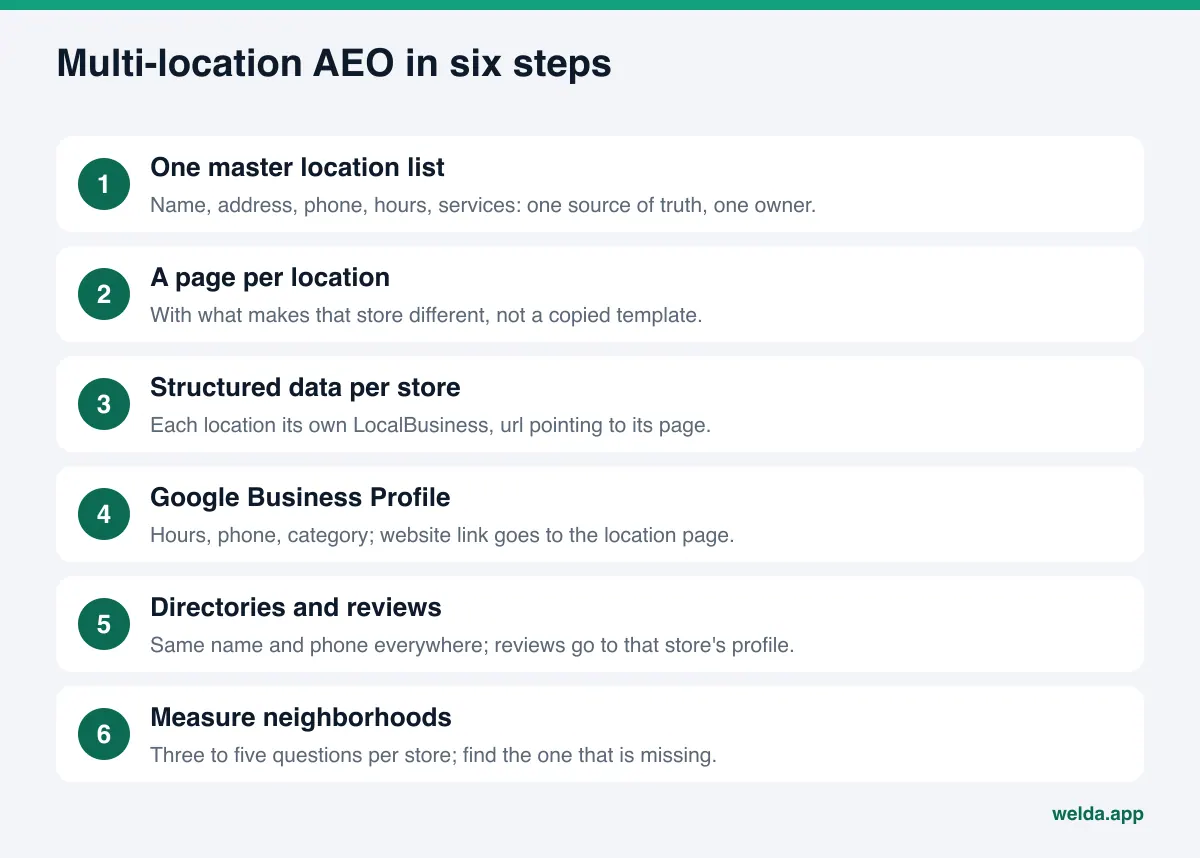
- Build one master location list. For each location: official name, full address, phone, hours (including holidays and Sundays), services offered, parking and transit notes, opening date. This list is the reference for every other source. Keep it in one spreadsheet and give one person ownership.
- Give every location its own page. Use a clean URL such as
/locations/east-austin. The page carries information specific to that store. We describe what goes on it below. - Add structured data to each location page. Google's local business structured data documentation asks you to define each business location as its own LocalBusiness and to put the URL of that specific location in the
urlproperty. Brand information lives on the main page, location information on the location page. - Complete each location's Google Business Profile. Name, category, hours, phone, photos and a website link that points to the location page, not your home page. Businesses with 10 or more locations can use Google's bulk verification; service-area businesses are not eligible for it.
- Align directories with the master list. Yelp, Apple Maps, BBB, Tripadvisor where relevant, and the industry directories your customers use, such as Healthgrades for medical practices or Angi for home services. Same name, same address format, same phone number for each store.
- Collect and answer reviews per location. When you ask a customer for a review, send them to that store's profile. In replies, mention the location and neighborhood naturally.
- Measure neighborhood questions. Write three to five questions a customer would ask for each store and ask them in AI assistants. Note which locations are named, which are missing and which competitor wins instead.
- Handle closures and moves the same day. Mark the closed store's profile as permanently closed, redirect its page to the nearest location and remove it from the master list.
How to write a location page that AI can use
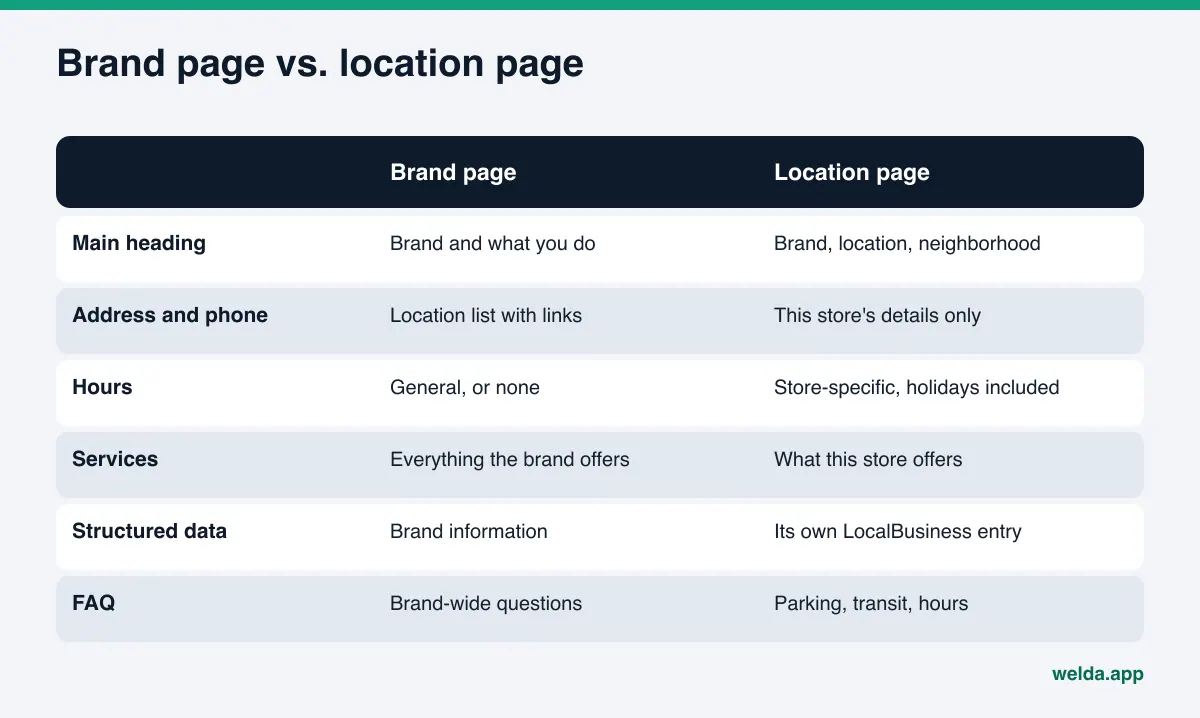
The location page is where most brands go wrong. The common mistake is to copy a template and swap the city name. When the pages are nearly identical, neither search engines nor AI can tell one store from another. A location page has the opposite job: to state what makes this location different.
A strong location page includes:
- A clear main heading with the brand, the location and the neighborhood ("East Austin, Cesar Chavez St.").
- Full address, phone, a map link and location-specific hours, with holiday hours listed separately.
- Services available at this location. If every store offers the same thing, say so; if not, spell out the difference.
- Getting there: nearest transit stop, parking, accessibility.
- A short description specific to the store: size, busy hours, the team. Leave out anything you do not know or that changes often.
- A short FAQ answering the questions people actually ask about this store.
- LocalBusiness structured data repeating the same facts in machine-readable form.
The main brand page explains the brand: what you do, how many locations you have, and the location list. Link from that list to every location page. AI then reads the brand and each location underneath it as separate, connected entities.
Service-area businesses work a little differently. For a plumber, cleaning company or mobile mechanic covering several counties, a "location" is often a service area rather than a storefront. A separate page per town only makes sense if something real changes from town to town: arrival times, the crew that works there, a service only offered in that area. Otherwise, a single page that clearly lists the service area is more honest and easier to read than a set of pages where only the town name changes.
How Welda handles multi-location AEO
Welda is software that measures where a business appears in AI answers and fills the gaps on the business's behalf. For a multi-location brand, three parts matter most: the free site analysis, question-by-question measurement and the to-do list.
Start with the free site analysis. It reads your home page and a few inner pages (services, pricing, about, contact) the way Google and AI do. On a multi-location site that usually includes the contact or locations page where your store list sits. It checks whether structured data is present, whether address and phone are written in a readable way, whether your map and social profiles are linked from the site, and whether AI crawlers can access the site at all. For each gap you see what was found, why it matters and how to fix it, plus a ready-made fix package that includes the business structured data code. One honest limit: the analysis is free once per site and does not crawl every location page one by one. Use the location page checklist in this article as your own check for those.
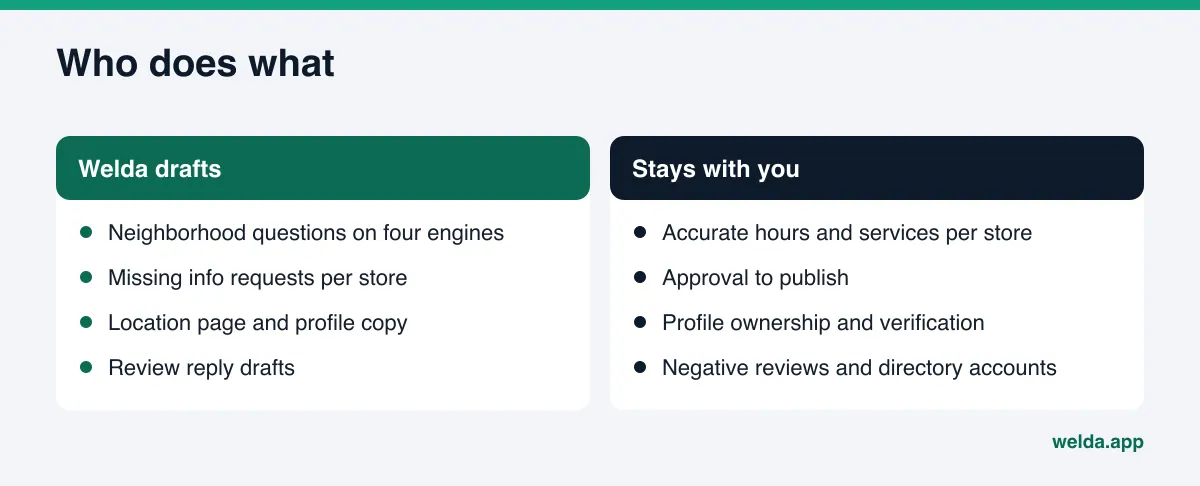
Question-by-question measurement in the Welda panel. In the panel, the questions customers would ask are put to ChatGPT, Gemini, Perplexity and Google AI three times each. Every question is a row, and for each engine you see whether your name appears and in what position. For a multi-location brand, the value is that questions can name the neighborhood. If your name comes up for "coffee shop open early Sunday in South Congress" but no engine names you for the same question in East Austin, the problem is not the brand. It is that store. Open a question and you see a representative answer and the sources it cites, which tells you where the missing store has no footprint.
The to-do list, store by store. Welda does not invent information it does not have; it asks you. With several locations this happens often. If a store's holiday hours, parking situation or service list is not on your site, the to-do list shows it as information needed from you. You enter it once and it flows into every related draft. Profile copy and review replies arrive as ready-to-use text. If Google Business Profile is connected, the work runs through that connection; if not, the task is listed as manual with the text ready next to it. On WordPress sites, Welda connects through a separate Editor user with an application password, location page suggestions open as drafts on your site, and they go live only when you approve them. Content always stays on your own website.
The other screens round this out and we will only mention them briefly: the competitors view shows which competitor wins in a neighborhood and from which source, the sources view lists the sites AI draws on, and the monthly one-page report shows the change from last month. The score uses a published formula, so you can see which part moved.
A note on availability: the Welda panel is in early access and is opening first to businesses in Turkey. Regular four-engine measurement is being added during early access, and the sample screens in the panel use representative data. How your locations would be set up and pricing are discussed in an early access conversation. What anyone can use today, in English, is the free site analysis.
Who owns what: corporate or the store?
One thing that quietly damages multi-location AEO is unclear ownership. Marketing manages the website, a store manager adds photos to the profile, someone else claims a directory listing. Before long the same store has three phone numbers in circulation. Writing down who owns what can do more than any technical fix.
| Task | Corporate owns | The store provides |
|---|---|---|
| Master location list | Owns the list as the single source of truth | Reports changes the same day |
| Location pages | Template, publishing, structured data | Store-specific details and photos |
| Google Business Profile | Ownership and access management | Hours, photos, current updates |
| Review replies | Tone and reply guidelines | The facts of what happened |
| Measurement | Question list and reporting | What local customers really ask |
The logic is simple: consistency comes from corporate, accuracy comes from the store. Corporate publishes one version of the facts; the store knows whether those facts are true.
Limits, and what Welda does not do
Setting the right expectations matters with multi-location AEO.
- No guarantees. Welda does not guarantee that a brand or a location will appear in an AI answer. Nobody can honestly promise that; AI answers vary.
- It takes time. New location pages and corrected profiles usually take weeks to show up in AI answers. For brand-new stores it can take longer.
- No invented facts. Welda does not guess a store's hours, services or team. It asks you.
- Nothing sensitive goes live without approval. Location pages and profile copy come to you for approval. In healthcare, every piece of content goes through approval and nothing is published automatically.
- No fake reviews. Collecting reviews per location means asking real customers. Buying or writing fake reviews is also prohibited under the FTC's rule on consumer reviews and testimonials. This is not legal advice.
- Some work stays with you. Handling negative reviews, opening directory accounts, verifying profile ownership and PR remain with the business.
A multi-location AEO decision guide and checklist
To pick where to start, ask one question: does AI not know you at all, or does it know you and mix up your locations? The answer sets your first month.
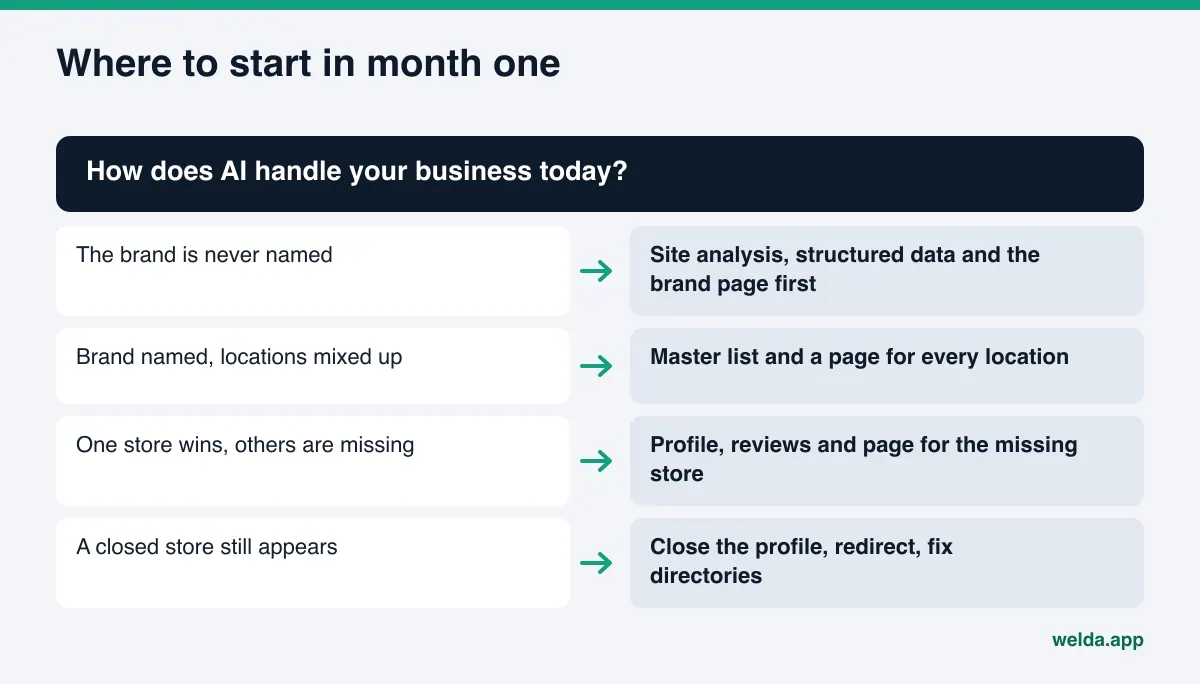
Then run the checklist below separately for each location. Every unchecked item is something AI is missing when it decides whether to name that store.
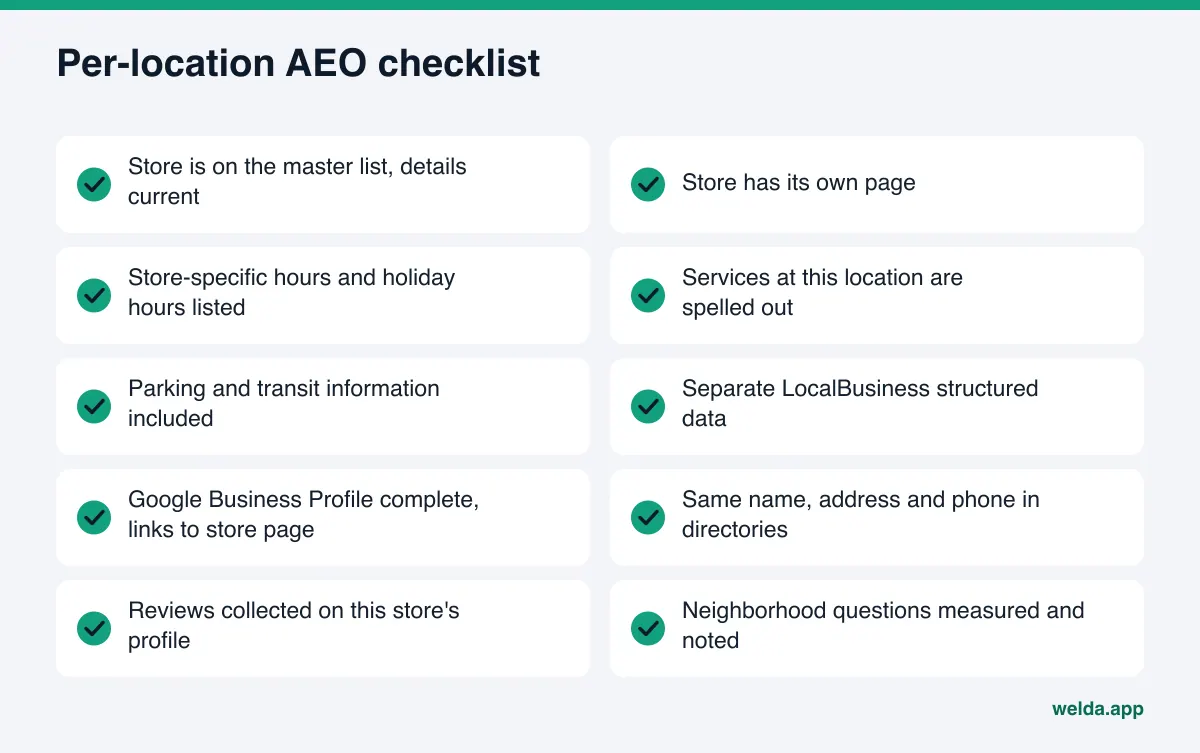
Compare locations against each other as you go. If one store checks every box and another checks half, expect to see that gap in the measurement as well. Starting with the weakest location often brings the fastest gain, because the strong store already gives you a working template.
Frequently asked questions
Does every location need its own website?
No. One website with a separate page per location is enough and usually healthier. Separate sites split your brand signals and multiply maintenance.
Is it a problem to build location pages from one template?
The template is fine; identical content is the problem. If nothing but the heading, address and hours differs, the pages cannot be told apart. Give each one a few sentences that describe that store and its own FAQ.
Does the free analysis check every one of my locations?
No. It is free once per site and reads the home page and a few inner pages. A locations or contact page may be part of that read, but individual location pages are not crawled one by one.
Why is our newest location never mentioned?
Because the sources AI relies on do not show it yet. As the location page, a complete Google Business Profile, first reviews and directory listings build up, the store can start appearing. That usually takes weeks.
How do we get a closed location out of AI answers?
Mark the profile as permanently closed, redirect its page to the nearest store and update directory listings. Answers change as old sources are updated or removed; it does not happen overnight.
Can Welda measure questions for each location?
Questions can include neighborhood names, so each store's local questions can be tracked as separate rows. How your location structure would be set up in the panel is part of the early access conversation.
See how your locations look to AI
Multi-location AEO is won one location at a time: not by introducing your brand once, but by giving each store correct, consistent information in its own neighborhood. Start with the master list and location pages, align profiles and directories with that list, then measure the neighborhood questions. To see how AI reads your site today, run the free AI visibility analysis. A link to your results, with your score, the gaps found and a ready-made fix package, arrives by email and stays open for 14 days.