How do I show up for near me searches in AI? When someone asks ChatGPT or Gemini for "a dentist near me open Saturday," the assistant first works out where the person is, then names a few businesses it can clearly tie to that area and that need. That tie comes from the address, neighborhood, hours and services written on your website, your Google Business Profile and your listings. The work is to make those details clear and identical everywhere, then ask the same questions on a schedule to see what changes.
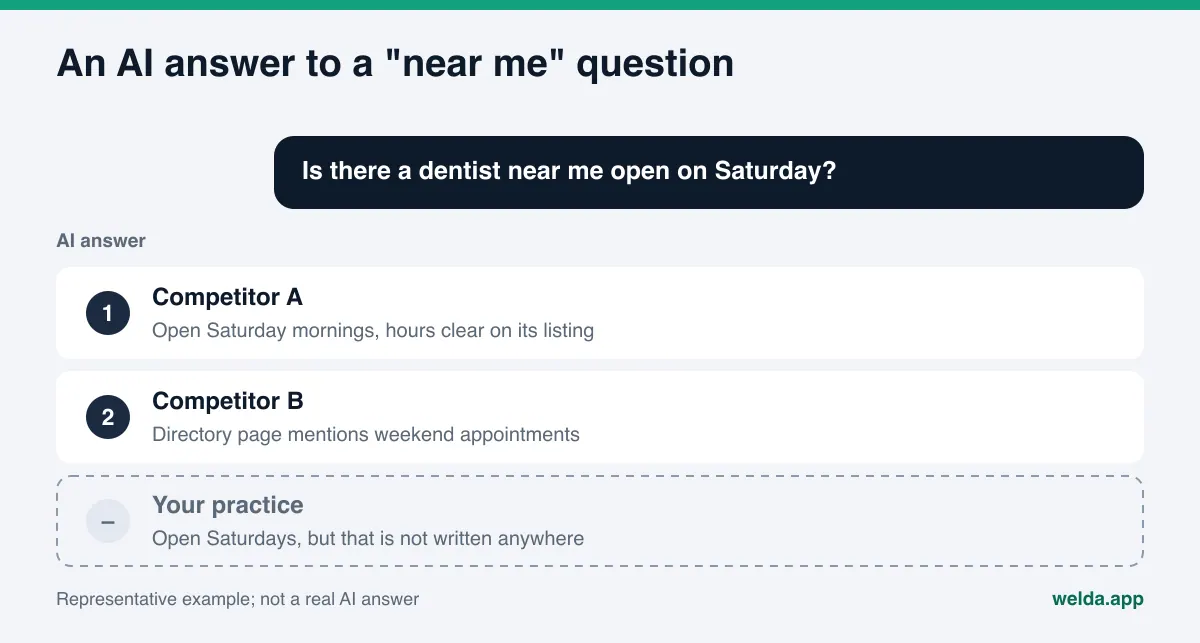
How do near me searches in AI actually work?
In a classic map search, someone types "coffee shop near me" and gets a map pack: pins, star ratings, a scrollable list. If location services are on, the map centers on them automatically. An AI assistant handles the same request differently. When the question goes to ChatGPT, Gemini, Perplexity or Google's AI Mode, the assistant has to answer two questions before it can reply: where is this person, and which businesses in that area fit what they asked for? Then it writes a short paragraph naming two or three of them.
The location can come from three places:
- The question itself. "Is there a coffee shop near Union Station where I can work for an hour?" contains the location. People do this often with AI assistants because they type the way they talk.
- The device or account. Some assistants fill in "near me" with an approximate location when permission is granted or when they can estimate it. How much location each tool uses depends on its settings and version.
- The conversation. If the user said "I just moved to the Heights" a few messages earlier, the assistant may carry that forward.
Once the location is settled, the real selection starts. The assistant reads pages it finds through web search, map listings, directories and reviews. If no source clearly connects your business to that neighborhood, that service and that time of day, you can be the closest option on the map and still be left out of the answer.
This guide covers what matters for near me searches in AI, the steps to take, and which part of the work Welda handles. If you want a baseline first, the free site analysis checks your address, phone and location details, your business schema and whether your map and social profiles are linked from your site.
Why near me questions are worth more than most AEO queries
Answer engine optimization, or AEO (some people call the same work GEO, generative engine optimization), covers every kind of question a customer might ask an AI. Near me questions are the ones closest to a purchase. Someone asking "what is a crown versus a veneer" is researching. Someone asking "dentist near me open Saturday morning" has their phone in hand and is about to call.
The format of the answer raises the stakes. A map pack shows many businesses and lets people scroll. An AI answer usually names two or three, each with a one-line reason. If you are not one of them, the customer has to run a separate search to find you, and most will not bother.
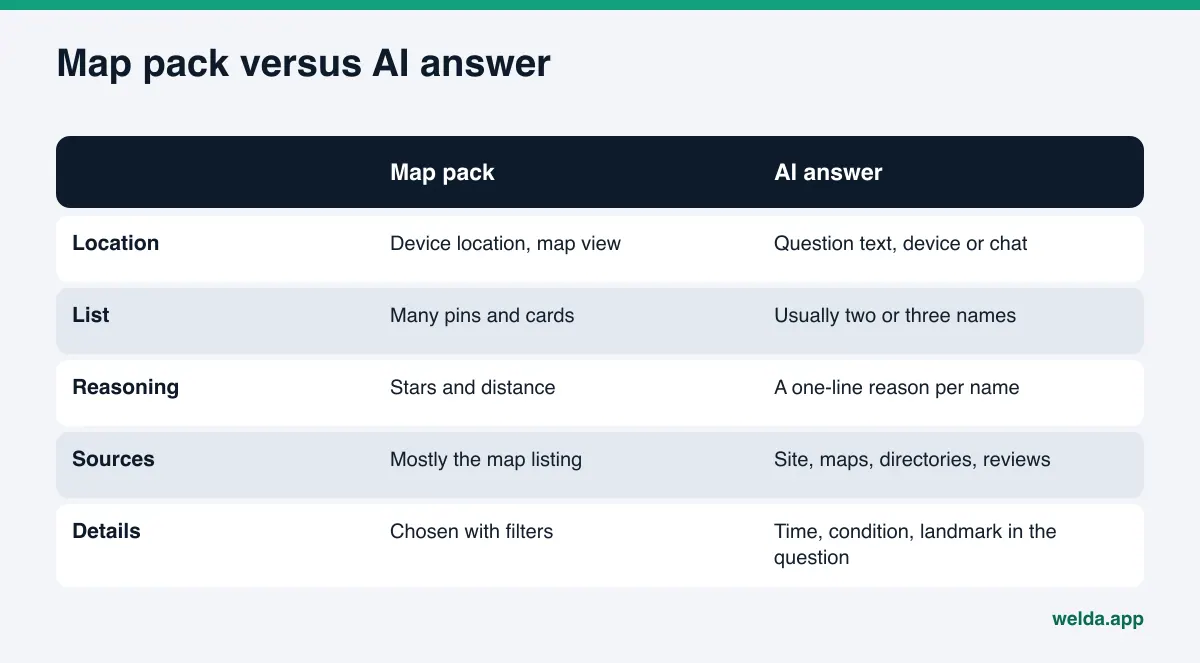
Look closely at how people phrase these questions and you will see they carry more than a location:
- "Emergency plumber near me who can come tonight" (time and urgency)
- "Pediatric dentist near me that takes walk-ins" (specialty and booking style)
- "Quiet coffee shop near Union Station with outlets" (landmark and amenities)
- "Hair salon open Sunday near downtown Austin" (day and area)
- "Pet-friendly brunch spot near me with outdoor seating" (policy and setting)
These are illustrative examples of the shape of the question, not measured data. The point is that the assistant looks for a business that matches every detail. If your site never says "open Sundays" or "two blocks from Union Station," that fact has to come from somewhere else on your behalf, or it does not come at all.
What does AI look at for near me searches?
AI companies do not publish a detailed recipe for how they pick local recommendations. Google does publish the three main factors for its own local results: relevance, distance and prominence. According to Google's help page on local ranking, relevance is how well a profile matches the search, distance is how far the business is from the searcher, and prominence is how well known the business is, with reviews and links from other websites playing a part. AI answers draw on much of the same material, so those three factors are a sensible starting frame for near me searches in AI.
In practice, for an assistant to say "this business fits this request in this area," it needs the following:
| Detail | Where it should live | What happens if it is missing |
|---|---|---|
| Full street address, neighborhood and city | Site footer, contact page, LocalBusiness schema | The assistant cannot tie you to the right area |
| Phone number and hours | Site, Google Business Profile, Apple Business Connect, Yelp | You drop out of "open now" questions or show the wrong hours |
| A clear list of services | Service pages, profile description | A "same-day water heater repair" request may skip a site that only says "plumbing" |
| Landmarks and directions | Homepage intro, contact page | You miss "near the stadium" or "walking distance from the train" questions |
| Reviews and ratings | Google Business Profile, Yelp, Healthgrades, Angi, Tripadvisor | A nearby competitor gets described as "well reviewed" and you do not |
| Links to map and social profiles | On your site and in your schema | Separate listings are not recognized as the same business |
Having each detail is not enough. They also have to agree. If your site says "Midtown," your Google Business Profile says "Downtown" and an old BBB listing still shows your previous suite number, the assistant decides on its own which one to trust. We cover what happens when that goes wrong, including AI listing a business as closed or moved, in AI says my business is closed.
Step by step: showing up for near me searches in AI
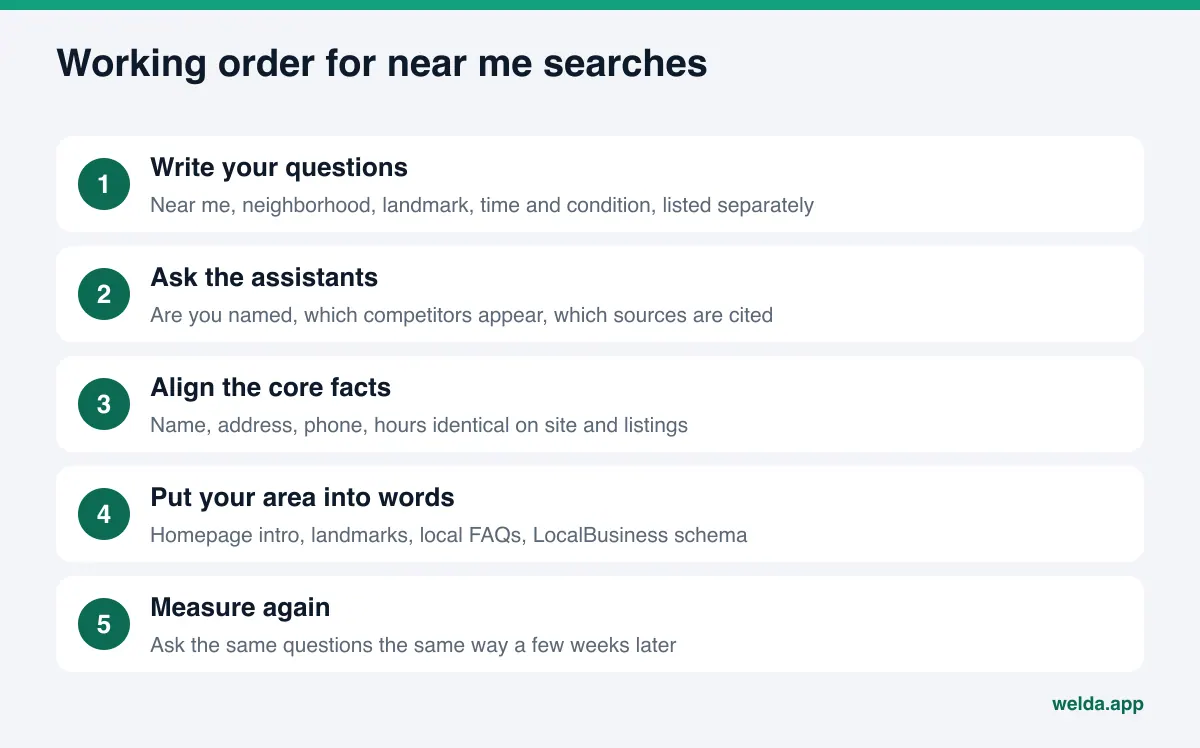
You can start everything below within a week. Some steps take half an hour, others a few days. Order matters: fix the core facts first, then add depth.
- Write down your own questions. List ten questions your customers would type into their phone. Separate the ones that say "near me," the ones that name a neighborhood or landmark, and the ones that include a time or condition. For a hair salon: "salon near me open Sunday," "walk-in haircut in Midtown," "balayage specialist near the Domain."
- Ask the assistants. Put the same questions to ChatGPT, Gemini, Perplexity and Google's AI Mode. Note whether your name appears, which competitors appear and which sites are cited as sources. Expect some variation from one run to the next; why AI answers change every time explains why.
- Make your name, address, phone and hours identical everywhere. Your site, Google Business Profile, Apple Business Connect, Bing Places, Yelp and any industry directories should use the exact same business name, address format, phone number and hours.
- Write your neighborhood and landmarks as plain text. Do not leave your address only in small print in the footer. Put a sentence like "in East Nashville, two blocks from Five Points" in your homepage intro and on your contact page.
- Add LocalBusiness schema. Use LocalBusiness or the subtype that fits your industry, with address, coordinates, phone, opening hours and links to your map profiles. It makes it easier for an assistant to connect this address with this business.
- State services and conditions plainly. If you truly offer them, use the phrases customers use: "emergency service," "walk-ins welcome," "open Saturdays," "free parking," "wheelchair accessible."
- Add location-specific FAQs. "Where do I park?", "Which train stop is closest?", "Are you open on holidays?" Write the answers in full sentences.
- Ask for reviews and reply to them. Ask real customers for reviews and respond to what they write. When neighborhood and service names come up naturally in reviews, your link to that area gets stronger. Fake reviews are not an option: in August 2024 the FTC announced a final rule banning fake reviews and testimonials, including AI-generated ones.
- Ask the same questions again in a few weeks. New information usually takes weeks to show up in AI answers. Ask the same questions the same way and log the difference.
If you run several locations, each one needs its own page, its own map listing and its own set of questions. Five addresses on one page make it hard for an assistant to match each location with its own neighborhood. Multi-location AEO goes into this in detail.
How to write your neighborhood into your site: an example
Many small business homepages open with something like "Quality service with a smile." That line does nothing for near me searches. It carries no location and no service. The example below is written for an entirely fictional coffee shop and shows an intro paragraph an assistant can actually read and use.
Example: "We are a coffee bar on the ground floor of the old post office building, a three-minute walk from Union Station's main entrance. We open at 6:30 a.m. on weekdays so commuters can grab a drip coffee before their train. Inside there are 30 seats, outlets along the window counter and free Wi-Fi. On weekends we stay open until 9 p.m."
Everything an assistant needs is there: the landmark, the walking distance, the opening time, the use case (grab-and-go before a train, a place to work), the amenities and weekend hours. It answers "quiet coffee shop near Union Station with outlets" directly. Of course, every detail has to be true, and every hour you list has to match your Google Business Profile and other listings.
Apply the same idea to your contact page. Instead of only embedding a map, write directions: "From the Red Line, exit at 8th Street and walk two blocks north." An embedded map is often not readable text for an assistant. Written directions are.
How Welda handles near me searches in AI
Welda's work on this comes in two parts: seeing which neighborhood and near me questions mention you, and finding where the missing information lives so it can be filled in. Here is how those two parts look in practice.
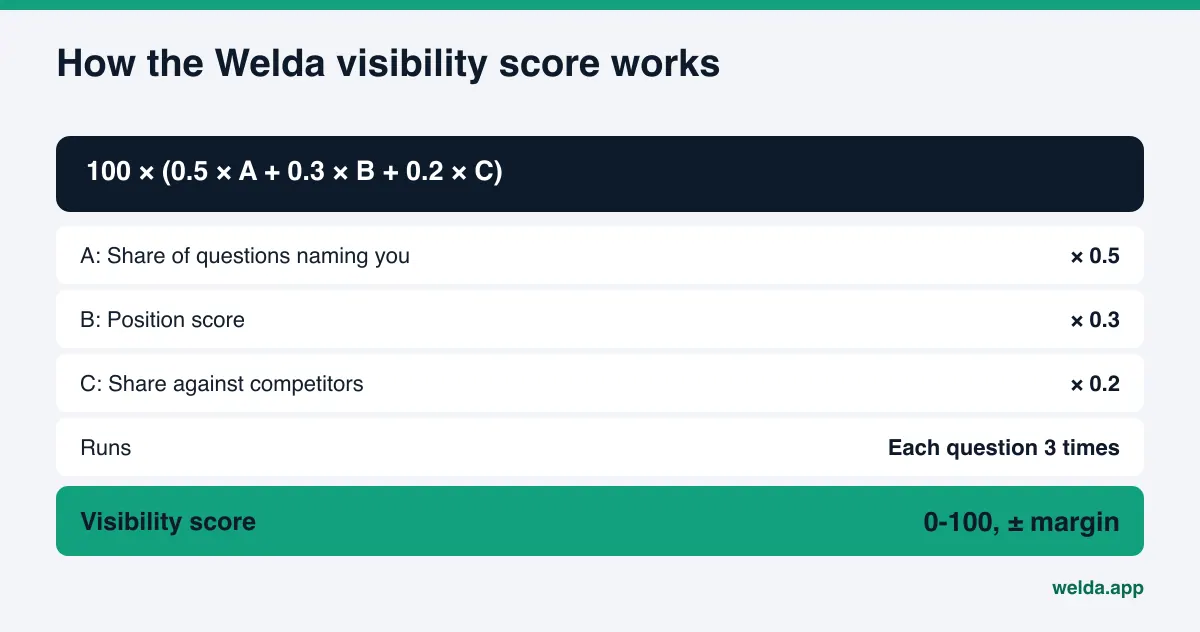
Question tracking: which local questions mention you? In the Welda dashboard, the questions your customers are likely to ask are listed, and each one is asked three times in ChatGPT, Gemini, Perplexity and Google AI. For near me searches, questions that name a neighborhood, a landmark or a condition such as "open Sunday" each get their own row. For every row you see which engine mentions you and in what position. Open a question and you read the answer text and the sites it relied on. Question language can be set to English or Turkish.
The decision on this screen is straightforward: which local questions matter most to you, and why are you missing from them? If you never appear in "open Sunday" questions but do appear in general neighborhood questions, the gap is most likely your hours. The score that sums this up uses a published formula, shown below.
Sources: what feeds the answers for your area? Near me answers lean heavily on map listings, directories and review platforms. Welda shows which sites the engines cite in answers and how you stand on each: profile incomplete, unverified or missing. That answers the question "where do I start?" If a directory is cited often in questions about your neighborhood and your profile there is thin, that is the first job.
Fixes: drafted for you, approved by you. Gaps land in a single to-do list. Welda drafts the neighborhood intro, the location FAQs, profile descriptions and review replies. It does not invent facts; if it needs the name of the closest train stop or your Sunday hours, it asks you. On WordPress sites the content opens as a draft on your own site and goes live once you approve it. If Google Business Profile is connected, the profile text can be updated from there; if not, the task is listed as manual with the drafted text next to it. Content always lives on your own site.
The rest of the dashboard, including competitor comparison, before and after view and a one-page monthly report, helps you follow the effect over time.
A note on availability: the Welda dashboard is in early access and is opening in stages, starting with businesses in Turkey. Regular four-engine measurement is being added during early access, and the sample screens use representative data. The part anyone can use today, in English, is the free site analysis. Pricing is discussed in an early access conversation.
What the free analysis checks for near me searches
The free site analysis reads your homepage and a few inner pages such as services, about and contact. For near me searches it checks whether your address, phone and location details are readable on the page, whether business schema is present, whether your map and social profiles are linked from your site, whether your services are spelled out and whether you have an FAQ section. It also checks whether AI crawlers can access your site at all; if they cannot, nothing you write about your neighborhood will reach them.
For every gap you see what was found, why it matters and how to fix it, plus suggested homepage title, description and intro copy. It also asks five customer-style questions to an AI assistant that can search the web and checks whether your business name comes up. That is a one-time snapshot, not ongoing tracking. Each site gets one free analysis, the result link arrives by email and stays open for 14 days.
Limits: what Welda does not do for near me searches
Near me searches depend on factors outside your control more than any other kind of AI question. So it is worth being clear about the limits.
- Distance cannot be changed. Recommending a Brooklyn business to someone standing in Queens works against how these assistants reason. Welda does not try to place you in an area you do not serve.
- No ranking or placement guarantee. Welda does not guarantee rankings or that you will "show up in ChatGPT." Answers vary, and the engine decides which businesses to name.
- User location settings are not yours to control. How accurately an assistant knows where someone is depends on the device, permissions and the tool.
- No fake reviews, no fake locations. Welda does not write fake reviews or create address pages for neighborhoods where you have no presence.
- Some work stays with you. Handling negative reviews, claiming directory accounts and local press outreach remain your job. Welda drafts review replies and profile text; publishing approval stays with you.
- It takes time. New information usually takes weeks to reach AI answers.
For healthcare businesses such as dental or medical practices, nothing is published automatically; every piece of content comes to you for approval, and patient data is never sent to AI. Welda's compliance check flags phrases like "best," "guaranteed" or diagnosis-style claims before publishing. It is not legal advice.
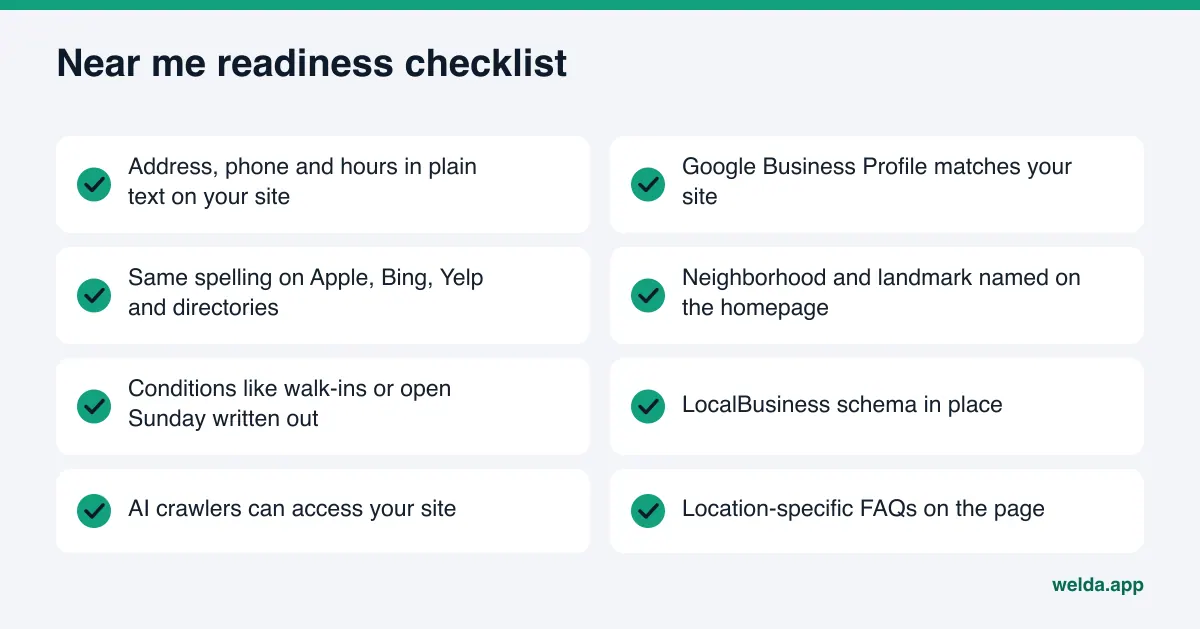
Checklist: are you ready for near me searches in AI?
Go through this list once from top to bottom. Every "no" is something standing between you and being matched to your area.
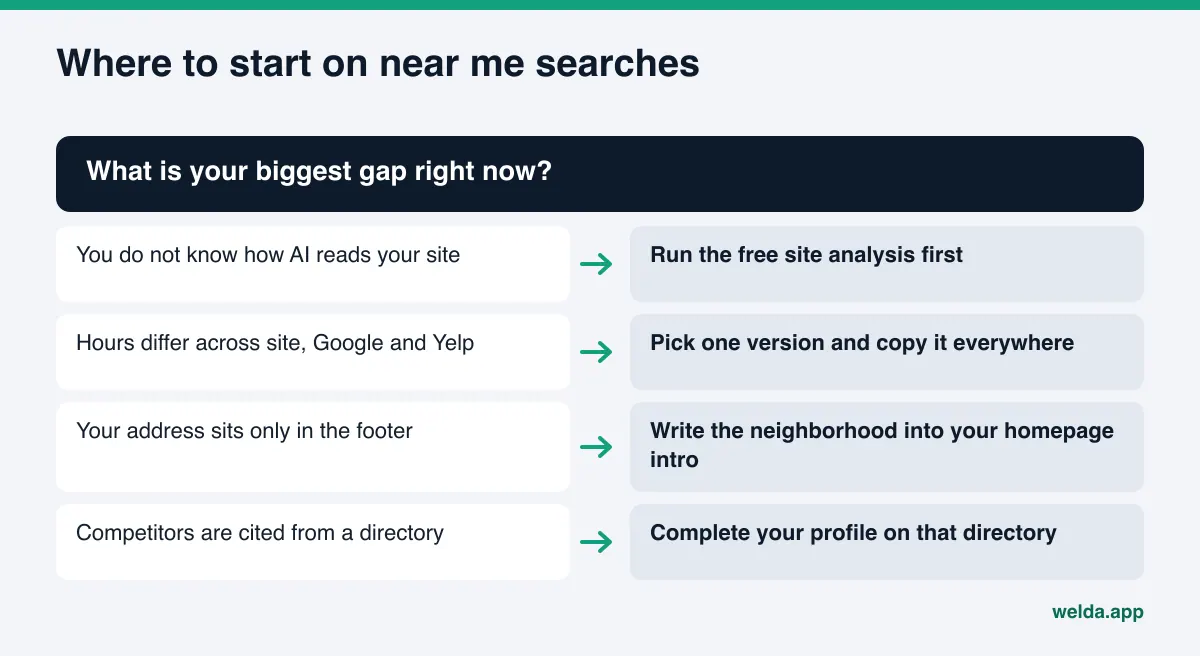
Do not focus on Google alone. Some assistants may draw on other map and search data. Bing Places for ChatGPT visibility explains why your Bing listing may matter too.
Frequently asked questions
How does an AI assistant know where I am?
Location comes from the question itself ("in Midtown"), from device or account settings, or from earlier messages in the conversation. How much each tool uses depends on its settings and version, which is why it helps to track neighborhood questions and "near me" questions separately.
Is Google Business Profile enough for near me searches in AI?
It is an important source, but not the only one. Assistants also read your site, directories and review platforms. If the details in those places disagree, the profile carries less weight.
Should I create a page for every neighborhood?
Only if you actually have a location or a service area there. Thin pages for places you do not serve are misleading and do not build trust. With a single address, describing that address and its landmarks well is worth more.
Why do the same businesses keep showing up for "best near me"?
They usually have many reviews, complete map listings and directory pages written about them. Assistants lean on those sources and pick businesses that are already well documented.
When will I see a difference?
New information usually takes weeks to show up in AI answers. It varies by engine, how often a source is re-read and the kind of change. Nobody can promise a date.
Can Welda make me appear in neighborhoods where I am not located?
No. Welda works on making your business appear with accurate, consistent details in the places you actually serve. Trying to appear elsewhere is misleading and does not last.
Does AI know your neighborhood? Check today
Showing up for near me searches in AI is not a big campaign. It is steady information work: write your address, hours, neighborhood and services clearly and identically everywhere, then ask the same questions and watch what changes. The first step is seeing how well your site explains those details to an assistant. Run the free site analysis and get every gap, from location details to map links, with the fix for each, in one report.