You moved or rebranded, so why does ChatGPT still give customers your old name and address? AI answers are built from many sources at once: your website, your Google Business Profile, map listings, Yelp, directories, old news stories and forum threads. If those sources don't change together, AI engines see old and new information side by side and often pick whichever version appears in more places. To update AI answers after a rebrand or move, you change every source in the same order with the same wording, then check the answers until the new details show up consistently.
This guide is for owners of local and regional businesses going through a transition: a coffee shop moving across town, a dental practice renaming after a partner leaves, a home services company consolidating two brands into one, a salon relocating to a bigger space. The problem looks the same in every case. A customer asks ChatGPT, Gemini, Perplexity or Google's AI Overviews about you, and the answer sends them to the old door or doesn't recognize the new name at all. That is a lost call, a wasted trip, or a customer who decides you closed. This is a core answer engine optimization (AEO) problem (some call the same discipline GEO, generative engine optimization), and it is fixable with a disciplined process. If you want a baseline first, the free AI visibility site analysis reads your homepage and a few inner pages and reports what it finds in your address, phone, location details and business schema.
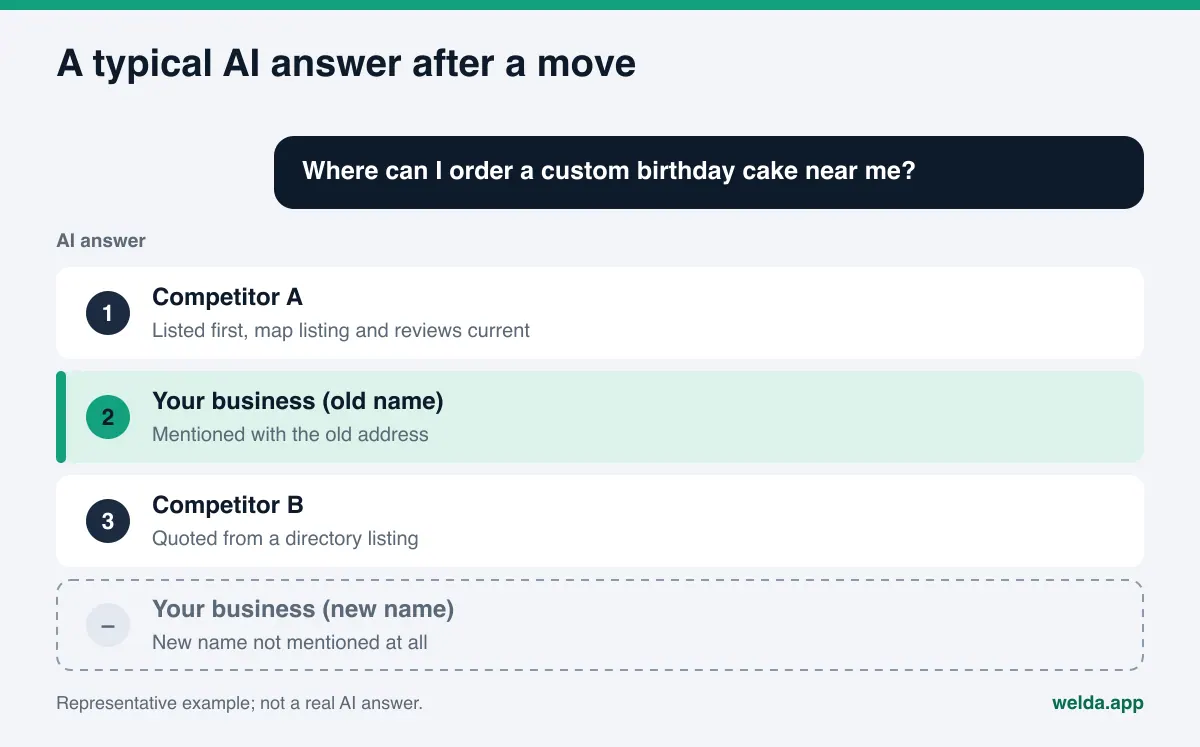
Why AI answers lag behind a move or a rebrand
When you change your address on a search engine listing, the results page eventually reflects it. AI answers work differently. An answer engine writing a response draws on live web search, map data, and text it saw during training. Each of these updates at its own pace. Your website can change today. Your Google Business Profile edit may go through review over a few days. But a five-year-old Yelp review that mentions "the place on Main Street," a local news piece about your grand opening, or a Reddit thread using your old name stays exactly where it is.
Think of an AI answer as a kind of vote. When an engine finds several sources about the same business, it leans on the details that repeat most often and look most consistent. If your old address appears in ten places and your new one in two, the old address winning is not a surprise. A rebrand is harder still. The engine may not connect the new name to your history, may treat the old and new names as two separate businesses, or may tell a customer searching the new name that it can't find anything.
This is more than a data accuracy issue. Stale information in AI answers has three concrete costs:
- Misdirected customers: Someone drives to the old location, finds it empty and assumes you went out of business. We cover that scenario in detail in what to do when AI says your business is closed.
- Split reputation: Reviews under the old name and reviews under the new name get counted as two businesses, and neither looks strong on its own.
- Competitors filling the gap: When an engine can't place you, it fills the slot with someone else. That's often why a competitor appears when people ask about your own brand, a pattern explained in why competitors show up when AI is asked about your brand.
Where old business information lives
The first job after a move or rebrand is finding where the old details still live. The table below lists typical sources for a US local business, what each one holds, and who can change it. Your list will differ by industry; a medical practice will also have Healthgrades, a contractor will have Angi, a restaurant will have Tripadvisor and delivery apps.
| Source | What stays outdated | Who can update it |
|---|---|---|
| Your website | Footer address, contact page, embedded map, schema markup, page titles | You or your web admin |
| Google Business Profile | Name, address, map pin, categories, photos | Profile owner; edits are reviewed by Google |
| Apple Maps and Bing Places | Name, address, phone, pin location | Listing owner |
| Yelp | Business page details, old name in reviews | Business account holder or platform support |
| BBB, chamber of commerce, trade associations | Directory profile, address, legal name | Account holder or the organization |
| Industry directories (Healthgrades, Angi, Tripadvisor and others) | Listing card, address, previous name | Account holder or platform support |
| Instagram and Facebook | Profile name, bio, location tag | Account owner |
| Reddit, Nextdoor, forums | Threads and comments using the old name | Can't be edited; you can only add clear, current information |
| News and blog articles | Opening announcements, articles with the old address | The publisher; you can request a correction |
The last two rows matter. Some sources are out of your hands. The goal there is not to erase the old information but to repeat the new information clearly and consistently enough that the engine draws the right connection. A simple line such as "formerly known as X" is valuable for exactly this reason.
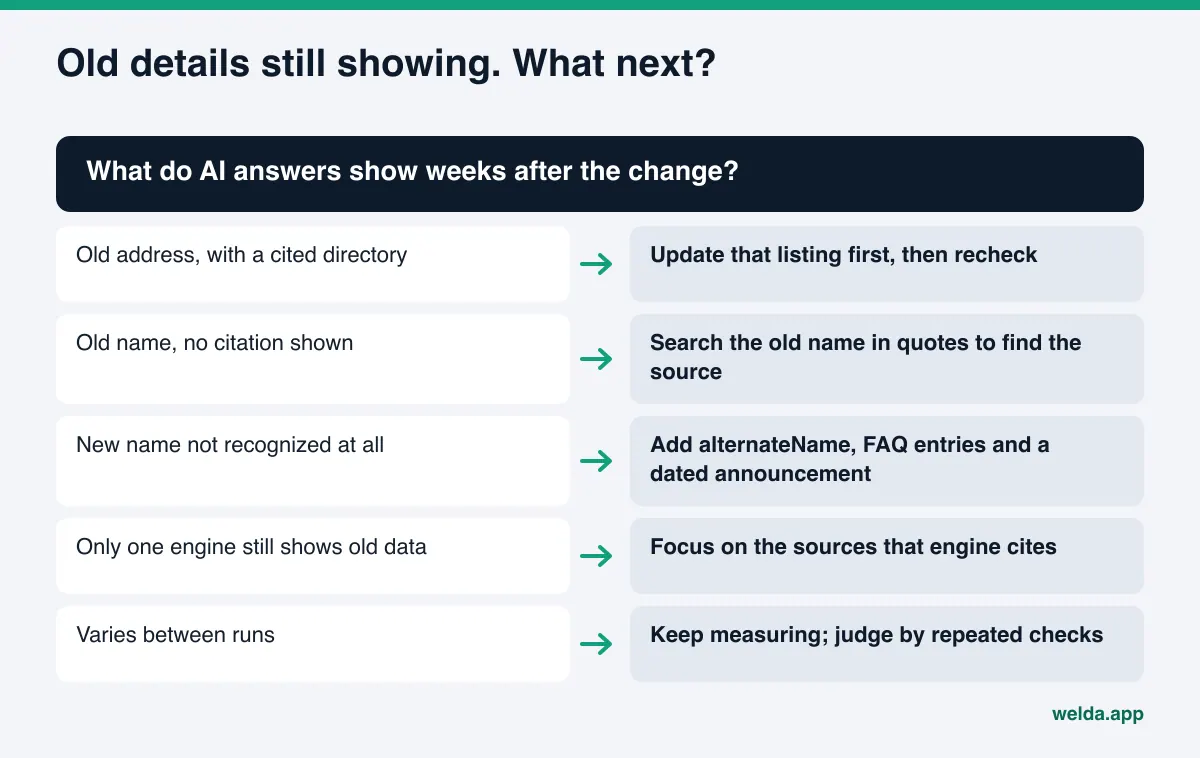
It's better to see which sources feed AI answers than to guess. If an answer shows citations, those sites go to the top of your list. For answers without citations, searching your old name and old address in quotes usually turns up the pages still carrying them.
A timeline for the transition
The cleanest transitions start before the change happens. If you prepare once the move date or new name is settled, launch day becomes a single coordinated push instead of months of piecemeal edits. The timeline below shows the order; actual durations vary.
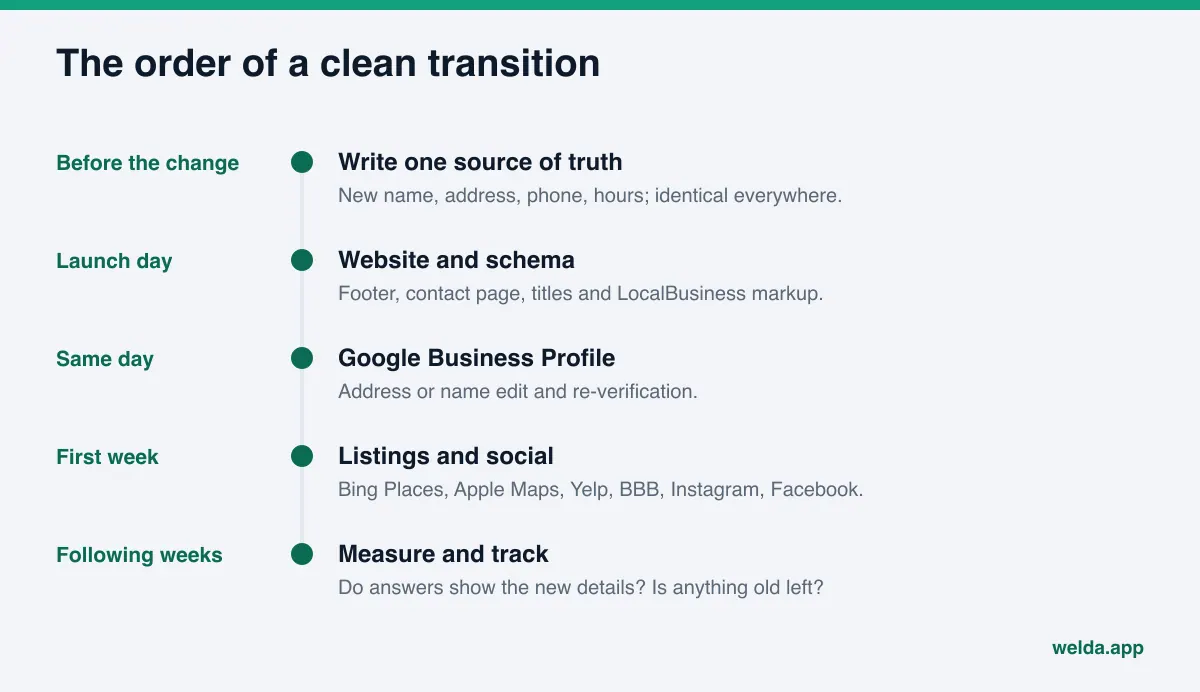
The most common mistake is updating the website and Google Business Profile and forgetting everything else. Answer engines don't rely on Google alone; many answers draw on directories, review platforms and forums. The second most common mistake is updating in pieces: the website one week, Instagram a month later, the directories next quarter. Throughout that stretch, engines see conflicting data and can't tell which version is current.
How to update AI answers after a rebrand or move, step by step
These steps apply to both a relocation and a name change. If both are happening at once, do them in one pass so customers and engines live through one transition, not two.
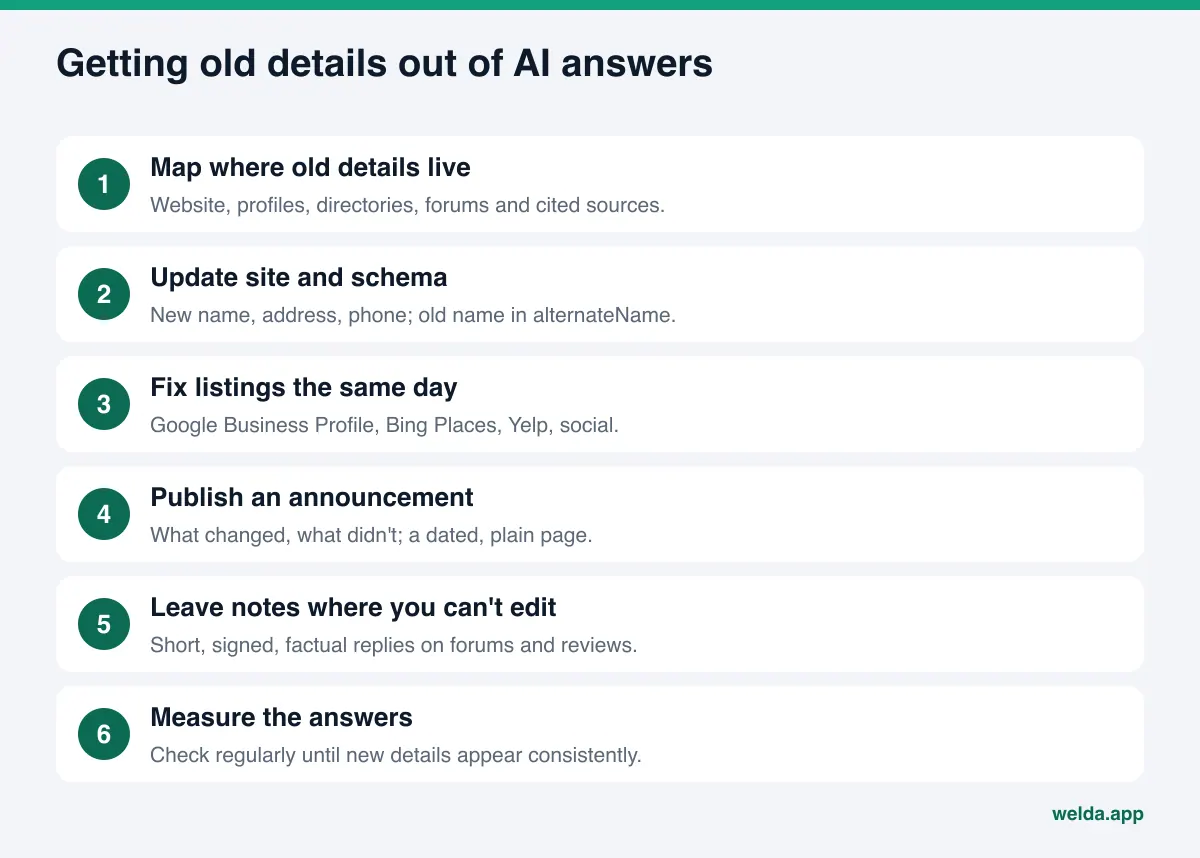
- Write one source-of-truth record. New name, new address, phone number, hours, and, if relevant, "formerly X." Keep it in a shared document and paste it exactly everywhere. Abbreviations, alternate spellings or a missing suite number can look like a different business.
- Update your website first. Your site is the primary source. Footer, contact page, about page, embedded map, page titles and meta descriptions should all carry the new details. One forgotten mention of the old address keeps the confusion alive.
- Refresh your schema markup. Update name, address and phone in your LocalBusiness markup. For a rebrand, put the previous name in the
alternateNameproperty, which tells engines both names belong to the same business. Schema.org defines this property as an alias for the item. List your social and map profile URLs insameAs. - Update Google Business Profile. Google's help documentation says a business that moves after verification must verify again, a name change may also require re-verification, and edits are reviewed before they go live (Google Business Profile Help). Make this edit early and watch the review status.
- Update the other map and directory listings the same day. Bing Places, Apple Maps, Yelp, BBB and your industry directories. The connection between Bing listings and ChatGPT answers is explained in Bing Places for ChatGPT visibility.
- Fix your social profiles. Profile name, bio, location and contact buttons on Instagram and Facebook. After a rebrand, keep "formerly X" in the bio for a while.
- Publish a short announcement on your site. A dated page or section titled "We've moved" or "Our new name," a few clear paragraphs: what changed, what stayed the same, how to find you if you know the old name. Answer engines quote plain, specific text like this easily.
- Add two FAQ entries. For example "Are you still at the old location?" and "Is X the same business as Y?" Short, direct answers.
- Leave a clear note where you can't edit. A brief, signed reply on a Yelp review that mentions the old address, a factual comment in a local forum thread. Give the information without arguing.
- Measure for weeks. Ask answer engines the questions your customers ask and record whether the new name and address appear and whether the old details still surface. New information usually takes weeks to show up in AI answers.
What exactly should change on your website?
The website is the most neglected part of the job, because "we updated the address" usually means the contact page and nothing else. AI crawlers read the whole page. For a move or rebrand, check these places:
- Page titles and meta descriptions: does the old name or old neighborhood still appear?
- The main heading and intro paragraph: does the one-sentence description of your business use the new name and location?
- The footer: address and phone repeated on every page.
- The contact page and embedded map: does the pin point to the new location?
- The about page: a short explanation of the change in your story.
- Schema markup: name, address, phone, geo coordinates,
alternateNameandsameAs. - Image alt text and file names: logos still carrying the old name.
- Older blog posts and announcements: a short update note at the top of anything describing the old location.
If the rebrand also changes your domain, you need permanent redirects from the old URLs to the new ones. Without them, old pages either vanish or keep living with outdated details. If the domain stays the same, the job is simpler: content edits are enough.
One more thing: don't strip the old name from your site entirely. Plenty of customers will keep searching for you by the old name for a long time. Keeping "formerly X" on the about page and in the FAQ helps both people and engines connect the two names.
Is a rebrand the same risk as a relocation?
The fix is the same process, but the risks differ. In a move, your identity stays intact; the engine knows you and simply sends people to the wrong place. In a rebrand, the identity link itself can break; the engine may not recognize the new name at all. Multi-location businesses need extra care when one location moves or closes, which we cover in multi-location AEO.
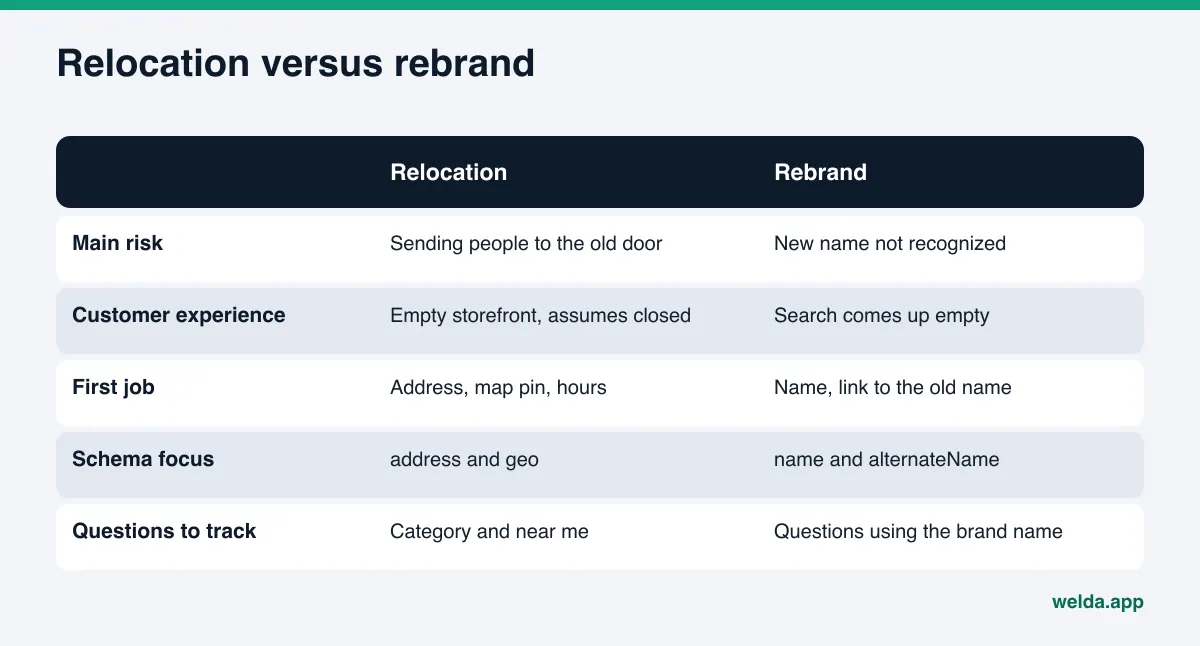
Take an example. An example bakery moves a few blocks away within the same neighborhood and changes its name at the same time. When a customer asks ChatGPT "where can I order a custom birthday cake near me," the engine may still recommend the old name at the old address. A customer who asks about the new name may get a vague answer or none at all. In this example, two question types need tracking: the category question ("bakery near me") and the brand question ("new name, where is it"). For the first, watch which name appears. For the second, watch whether the engine recognizes the new name and links it to the old one.
How Welda handles a move or rebrand
Welda is software that measures where your business appears in AI answers and prepares the missing pieces on your behalf. During a transition like a move or rebrand, three parts of it do the heavy lifting: source tracking, a single to-do list with ready-made text, and question-by-question measurement.
Sources: where the old information still lives. Welda shows which websites the answer engines rely on when they answer your customers' questions, and what your presence looks like on each. During a transition the question is simple: do the cited sources carry your new details? If a directory profile is incomplete or unverified, or a map listing still shows the old version, it shows up here. You prioritize updates by the sites engines actually read, not by guesswork.
The to-do list: ready text for every source. Starting from your new details, Welda drafts text for each platform: profile descriptions, the announcement copy, FAQ answers. It doesn't invent what it doesn't know. If it needs your new hours or how you want to describe the link between old and new names, it asks you and leaves the field flagged as empty. When Google Business Profile, Instagram or Facebook are connected, drafts come to you for approval. Platforms without a connection, such as Yelp or an industry directory, are listed as manual tasks: the text is ready, and copying it in and completing that platform's verification is your job. If your site runs on WordPress, Welda connects through a separate Editor user; the announcement page or updated about text opens on your site as a draft and goes live once you approve it.
Questions and before-and-after: did the change land? The questions your customers would ask are put to ChatGPT, Gemini, Perplexity and Google AI three times each. For every question you see whether your name appears and where it ranks in the answer. After a rebrand, the thing to watch is which questions start showing the new name. The before-and-after comparison puts your pre-change state next to today. Because the shift can take weeks, this view replaces "we did the work, but did it help?" with something you can actually read.
The rest of the panel plays a supporting role here: the competitor view shows who filled the gap during the transition, and the monthly one-page report summarizes progress.
An honest note on availability: the Welda panel is in early access and is opening in stages, starting in Turkey. Regular four-engine measurement is being added during early access, and the sample screens are shown with representative data. What anyone can use today, in English, is the free site analysis. Pricing is discussed in the early access conversation.
Limits, and what Welda doesn't do
Setting the right expectations matters during a transition. Some of this work isn't in any software's hands.
- No timing guarantee. New information usually takes weeks to reach AI answers. Welda doesn't promise to shorten that; it helps you update sources quickly and consistently, then measures when the change lands.
- No ranking or "show up in ChatGPT" guarantee. The engines write the answers. No tool can guarantee a specific answer.
- Platform verification stays with you. Re-verifying Google Business Profile, account work on directories and domain redirects belong to the business or its web admin. Welda prepares the text and keeps the task on the list.
- Some sources can't be erased. Old forum threads, news stories and other people's reviews stay. Welda can draft a short factual note for those places; whether and how to post it is your call.
- No fake reviews. Welda won't generate reviews to boost the new name. Negative reviews, directory accounts and press outreach stay with the business.
- Nothing goes live without approval. Every draft comes to you first. Content always lives on your own site and profiles; Welda doesn't host content.
The free site analysis has limits too. It reads your homepage and a handful of inner pages, so it may miss an old blog post that still mentions the previous address. Its five-question AI check is a one-time snapshot; it won't show the multi-week arc of a transition. Answers also vary from run to run, which is why single checks mislead; see why AI answers change every time.
Transition checklist: are you done?
When you think the transition is complete, run through the checklist below. If any item is a "no," old information can keep leaking into answers from that source.
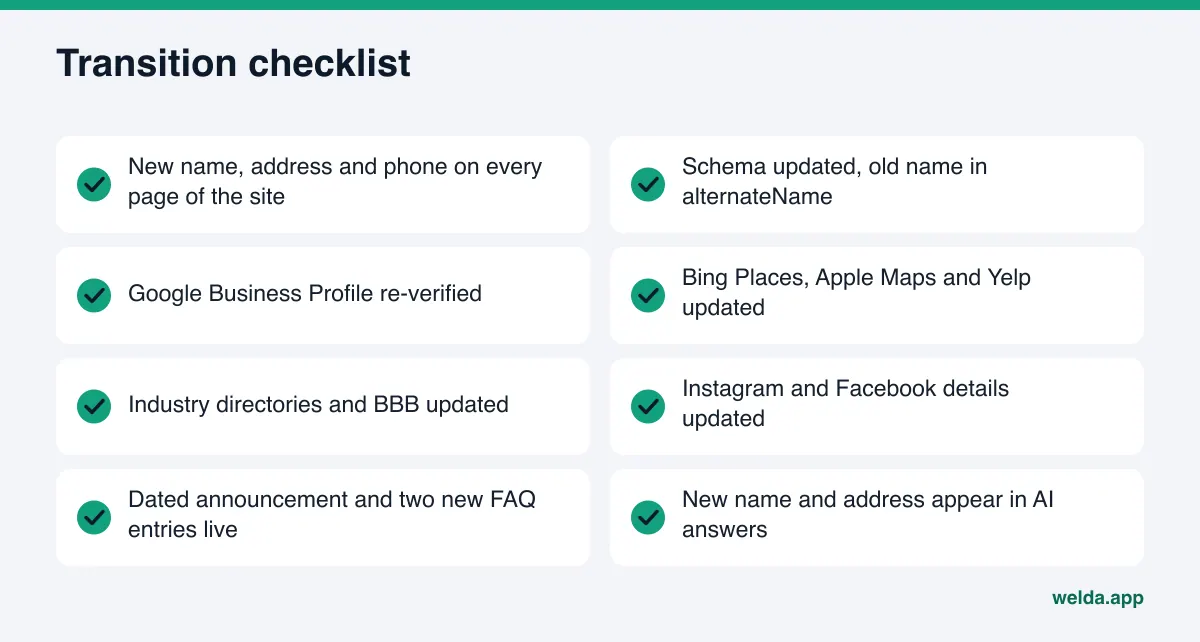
There's one more decision: when is the transition actually over? A practical test: the new name and address appear consistently in answers to the questions your customers ask, questions using the old name get matched to your new name, and the cited sources no longer carry the old details. Until then, keep the "formerly X" notes in place.
Your priority also depends on where you are in the process. If the move hasn't happened yet, write the announcement text and lock the date. If it's happening today, update the website, schema and Google Business Profile the same day. If weeks have passed and old details still surface, start with the cited sources; the culprit is often a single directory or platform listing nobody updated. If your visibility dropped after the change, work through the possible causes in why AI visibility dropped.
Frequently asked questions
How long does it take for AI answers to reflect a move?
There's no fixed timeline. New information usually takes weeks to show up, and it varies by engine. What helps most is updating every source at the same time with identical details.
Should I remove my old business name from my website?
No. Keep the old name for a while as "formerly X" on your about page and FAQ, and in the alternateName property of your schema. That tells both customers and engines that the two names belong to one business.
Is updating Google Business Profile enough?
No. It's an important source, but answer engines also draw on Yelp, directories, forums and your own website. A single stale listing can keep the confusion going.
Can I fix it by telling ChatGPT our address changed?
Information you type into a chat doesn't update the answers other people get. Answers come from web sources and the engine's own data; a lasting fix comes from updating those sources.
What about old news articles and Reddit threads I can't edit?
They stay. What you can do is make sure the new information appears in more places and more consistently, ask publishers for a correction note where it makes sense, and leave short factual replies in forum threads.
What does Welda do for me during a rebrand or move?
Welda shows where you're missing or outdated in the sources AI relies on, drafts text for each platform, sends it for your approval on connected sites and profiles, and measures whether the change reaches the answers. Verifications, manual platform work and publishing approval stay with you.
Start by checking what your site says today
After a move or rebrand, the first question is simple: what name and address is my website giving AI? The free AI visibility site analysis reads your homepage and inner pages such as contact and about, then reports what it finds in your address, phone and location details, your schema markup and your profile links, why each gap matters and how to fix it. The ready-to-install fix package includes the business schema code. It also asks an AI assistant with web search five questions your customers might ask and checks whether your business name appears in the answers. It's free once per site, works in English, and the results link arrives by email and stays open for 14 days.