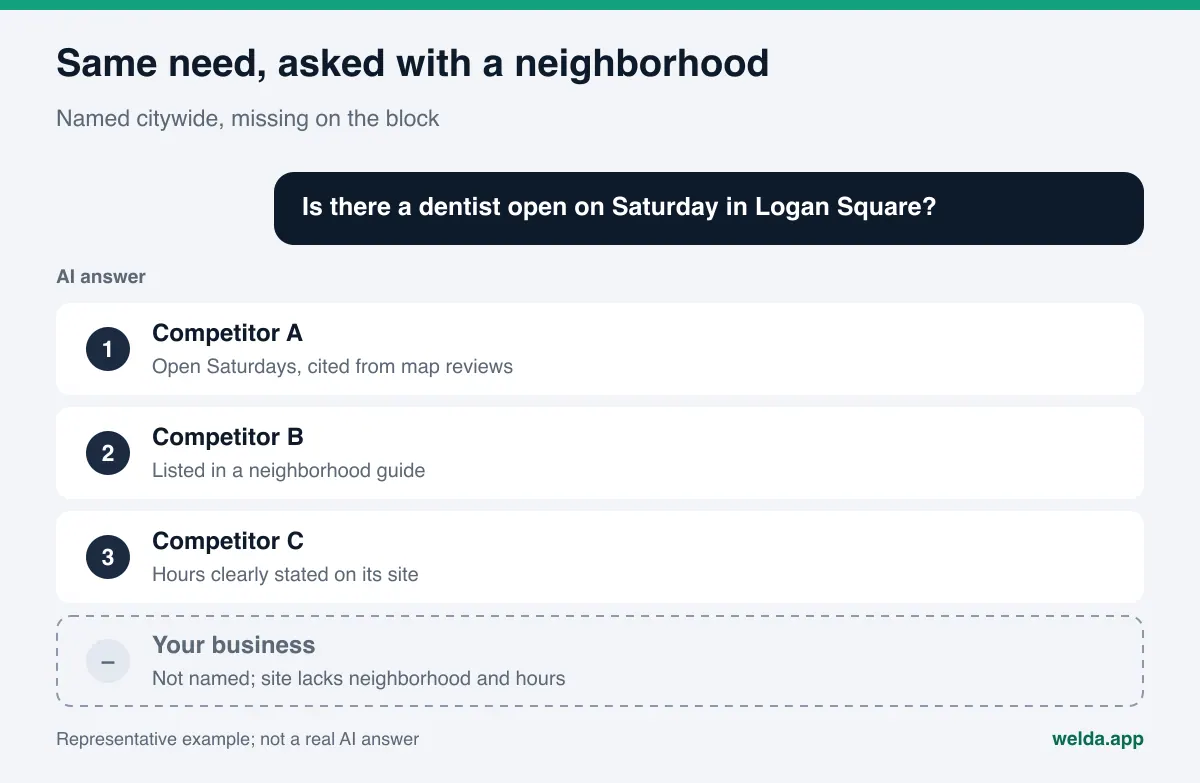
What is local AI rank tracking, and why track by city and neighborhood? It is the practice of checking whether AI assistants name your business when customers ask location-specific questions, and where in the answer you appear. ChatGPT does not give the same list for "best dentist in Chicago" as it does for "dentist open Saturday in Logan Square." If you only track the city, you can miss the neighborhood where most of your customers actually live.
Local AI rank tracking applies the logic of local search tracking to AI answers from ChatGPT, Gemini, Perplexity, and Google's AI Overviews and AI Mode. Instead of a position on a map pack, you are tracking whether your name shows up in a generated answer, how early it is mentioned, and which competitors are named instead. This is a core part of AEO (answer engine optimization), the work of making a business easy for AI answer engines to find, understand, and recommend. Some people call the same discipline GEO, short for generative engine optimization; in this article we use AEO and AI visibility. Below we cover how location gets into an AI answer, how to build a question set by city and neighborhood, how to read the results, and what Welda does in this process. If you want to start by checking whether AI systems can read your address, phone number, and location details correctly, the free AI visibility analysis is a quick first step.
Why AI answers change from city to city and neighborhood to neighborhood
An AI answer to a local question picks up location from two places. The first is the question itself. Phrases like "in Logan Square," "near Union Station," or "walking distance from the convention center" anchor the answer to a specific area. The second is where the person is asking from. Google explains that it can estimate location from the general area of an IP address, from device location when it is turned on, and from home and work addresses saved to an account, and that this makes results for local places more relevant (Google, how location data is used). OpenAI's help center says ChatGPT search may use an approximate location based on IP address, that sharing precise device location is a separate opt-in setting, and that adding a city, neighborhood, or ZIP code to a question can fix wrong local results (OpenAI Help Center, ChatGPT search).
For a local business, that has practical consequences:
- One city has many answers. "Best hair salon near me" asked from Wicker Park returns a different list than the same question asked from the Loop. A single measurement point does not represent the whole metro area.
- Your competitor changes by neighborhood. The practice that beats you citywide may not appear at all in your own neighborhood. The reverse is also true: a small shop that outranks you two blocks away may never show up in a citywide question.
- The sources change too. Citywide questions often lean on large roundup articles and national directories. Neighborhood questions tend to lean harder on Google Business Profile, Yelp reviews, Nextdoor recommendations, and local news or neighborhood guides.
- Customers are getting more specific. Someone who types three words into a search box will often write a full sentence to an AI assistant, and that sentence frequently includes a street, a landmark, or a neighborhood name.
Who needs local AI rank tracking, and how detailed should it be?
Not every business needs the same level of detail. Where you fit determines how granular your question set should be.
| Business type | Why location matters | Tracking detail |
|---|---|---|
| Single-location neighborhood business (cafe, salon, dental office) | Most customers come from walking or short driving distance | Your neighborhood, two or three adjacent ones, and nearby landmarks |
| Multi-location business | Each location has different rivals and sources | Separate neighborhood questions for each location |
| Home services (plumber, HVAC, movers, cleaning) | Service area is wide, and customers ask by suburb or town | At least one question per town or suburb you actually serve |
| Hotel or restaurant in a tourist district | Visitors ask by district and landmark | District, landmark, and "near [attraction]" questions |
| Specialty clinic or brand serving a whole region | City and state level questions carry more weight | Mostly city questions, fewer neighborhood ones |
We cover the broader strategy in AEO for local businesses. Here the focus is narrower: how to measure the result of that work by place.
How to build a question set for local AI rank tracking
Everything in local AI rank tracking depends on the question set. Writing the location into the question makes the measurement repeatable: if you ask the exact same words every week, the thing that changes is the answer, not the question. It helps to think in four layers.
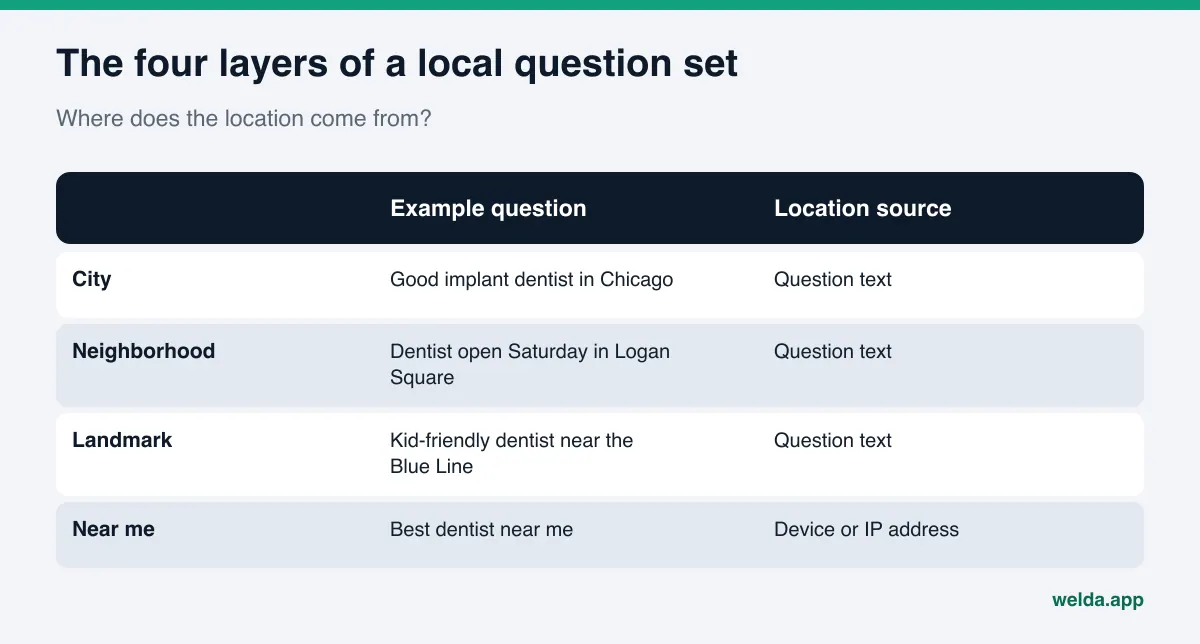
- City layer. "Who is a good dentist for implants in Chicago?" Competition is heaviest here. A small practice rarely appears, but a handful of these questions shows you the ceiling.
- Neighborhood layer. "Is there a dentist open on Saturday in Logan Square?" This is the center of gravity. Include your own neighborhood and the adjacent ones your customers really come from.
- Landmark and street layer. "Kid-friendly dentist near the Milwaukee Avenue Blue Line stop?" or "coffee shop near Union Station that opens before 6?" Customers often think in streets, transit stops, and landmarks, not in official neighborhood boundaries.
- "Near me" layer. "Best dentist near me." Here the location is not in the text. It comes from the device or the IP address. When a tracking tool asks this question, the location that shapes the answer is probably not your customer's location. Track these alongside the same question with the neighborhood name written in, never alone.
Inside each layer, vary the intent. For a dental office, a neighborhood set might cover urgency ("emergency dentist open tonight in Logan Square"), service ("teeth whitening in Logan Square"), comparison ("best pediatric dentist in Logan Square"), and trust ("dentist in Logan Square with good reviews"). Repeat the same four intents in each adjacent neighborhood and you can compare neighborhoods fairly.
A few cautions:
- Write questions the way customers talk. "Best" triggers list-style answers, and it is the word people actually use.
- Leave out neighborhoods you do not serve. Not appearing there is not a problem, and including them only drags your numbers down.
- If you serve Spanish-speaking customers or tourists, keep those questions as a separate set. Language changes both the answer and the sources. Note that Welda's panel lets you choose English or Turkish as the question language.
- Keep the number of questions per neighborhood balanced. Twelve questions in one and two in another produce a difference that comes from your list, not from reality.
Local AI rank tracking step by step
Once the question set exists, the tracking itself is routine. The order stays the same whether you do it by hand or with a tool.
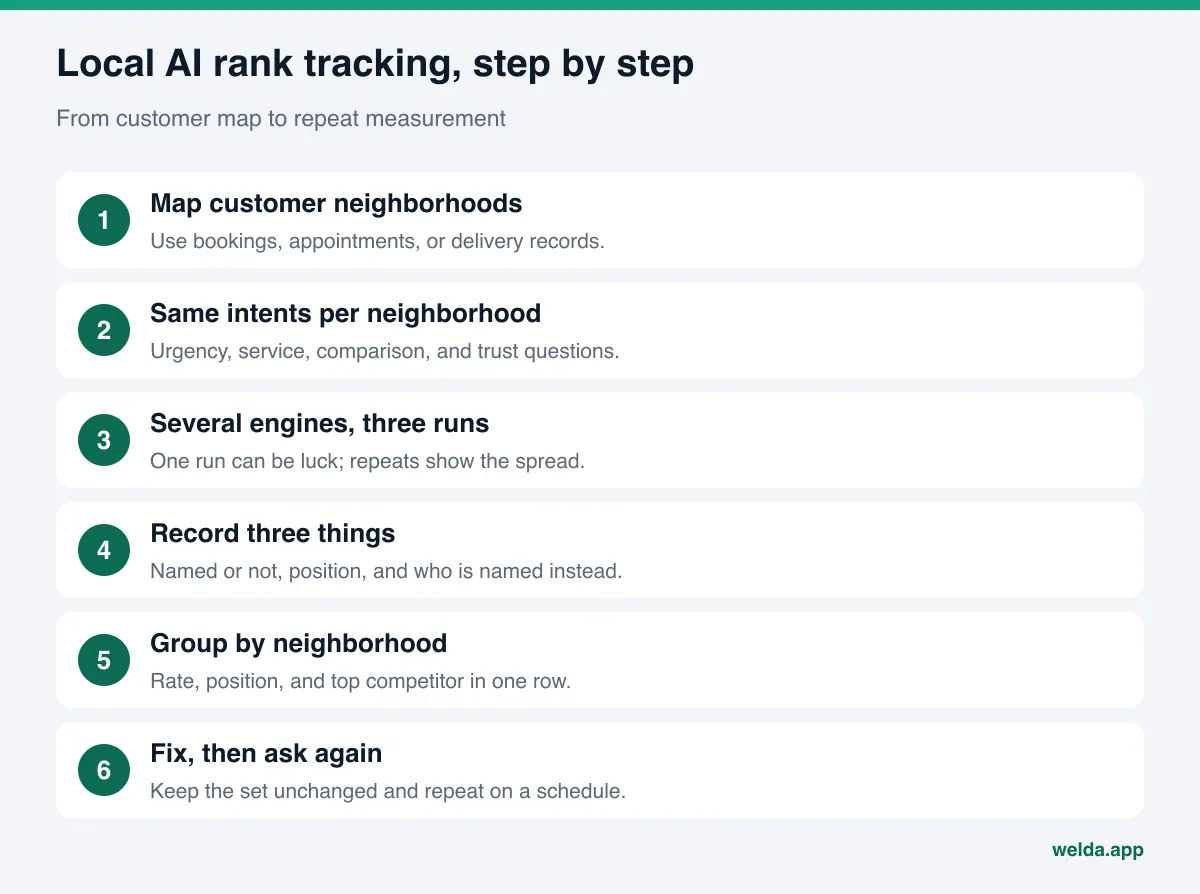
- Map where your customers come from. Use booking records, appointment data, delivery addresses, or service tickets. Use records, not guesses.
- Write questions with the same intents for each neighborhood. Four layers and four intents usually give you four to eight questions per neighborhood.
- Ask each question on several engines, several times. AI answers vary even for the same prompt. One run can be luck. Three runs give you an average and a sense of the spread.
- Record three things for every answer. Is your business named, in what position, and who is named instead. Note the sources the answer cites.
- Group the results by neighborhood. For each neighborhood, summarize mention rate, average position, and the most frequently named competitor in one row.
- Compare neighborhoods and pick one. The neighborhood where you are weakest but where many customers come from is your first work area.
- Make fixes and ask the same questions again. Keep the question set unchanged and repeat on a regular schedule. New content usually takes weeks to show up in AI answers.
By hand, this grows fast. Four neighborhoods, six questions each, four engines, and three runs come to 288 answers in a single round. That is why neighborhood-level tracking is usually either skipped or done once and abandoned.
One more methodological point. AI answers you get through a developer API are not always identical to what a person sees in the consumer app, and location handling is one of the places they can differ. We explain this in more detail in API vs app answers in AI visibility tracking.
How to read neighborhood results
When you have the neighborhood table in front of you, you will usually see one of three patterns. The table below is built for an example dental office; the figures are example values, not measurement results.
| Area | Answers naming you | Most named competitor | Reading |
|---|---|---|---|
| Your neighborhood | Example: 6 of 10 questions | Competitor A | Strong; work on reviews and sources to move up |
| Adjacent neighborhood 1 | Example: 2 of 10 questions | Competitor B | Customers come from here, but AI does not connect you to it |
| Adjacent neighborhood 2 | Example: 0 of 10 questions | Competitor C | Not a priority if few customers come from here |
| Citywide | Example: 1 of 10 questions | Large chains, roundup lists | Expected for a single location; not an alarm by itself |
Strong at the center, weak at the edges. This is the most common pattern. AI connects you to the neighborhood in your address but not to the one ten minutes away. The usual cause is that the adjacent neighborhood never appears on your site or profiles. A site that says "We're in Logan Square" but never says "a short walk from Bucktown and Avondale" will struggle on the Bucktown question.
The competitor changes by neighborhood. If the same business beats you in one neighborhood every time, look at why it is named: is the cited source a neighborhood guide, a Yelp listing, a local news roundup, or a Nextdoor thread? Read alongside a citation gap analysis, this turns into a concrete to-do list.
"Near me" and the neighborhood name disagree. If you appear when the neighborhood is written out but not on "near me," the tracking location is the likely reason. Read it as a limit of the measurement, not as a failure, and base your decisions on the questions with the place written in.
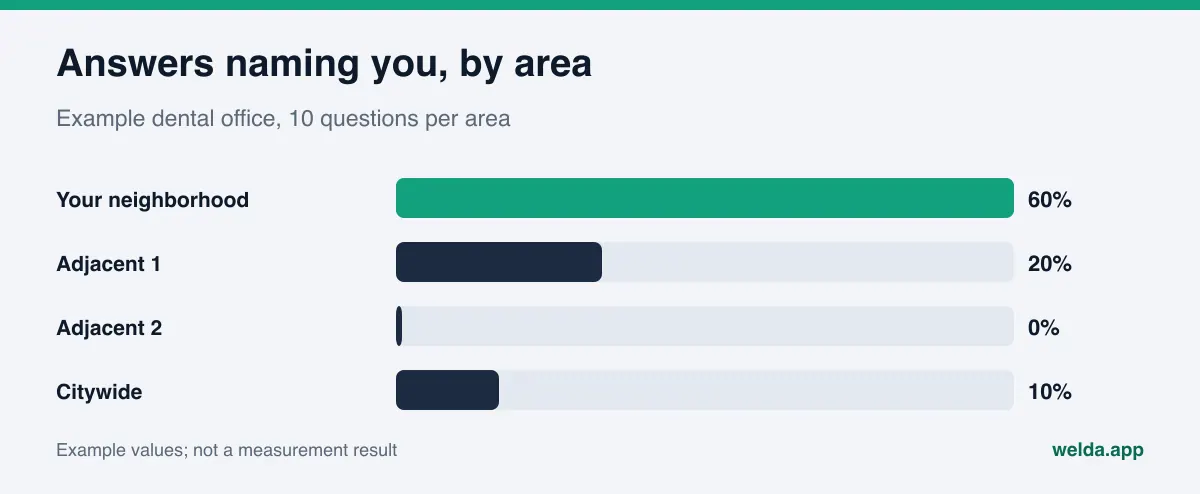
Keep the margin of error in mind. With few questions per neighborhood, a single changed answer moves the rate a lot. Going from two to three mentions out of ten in a neighborhood can be ordinary noise across three runs. We discuss what counts as a meaningful change in what is a good AI visibility score; the same logic matters even more at the neighborhood level.
What to do when you are weak in a neighborhood
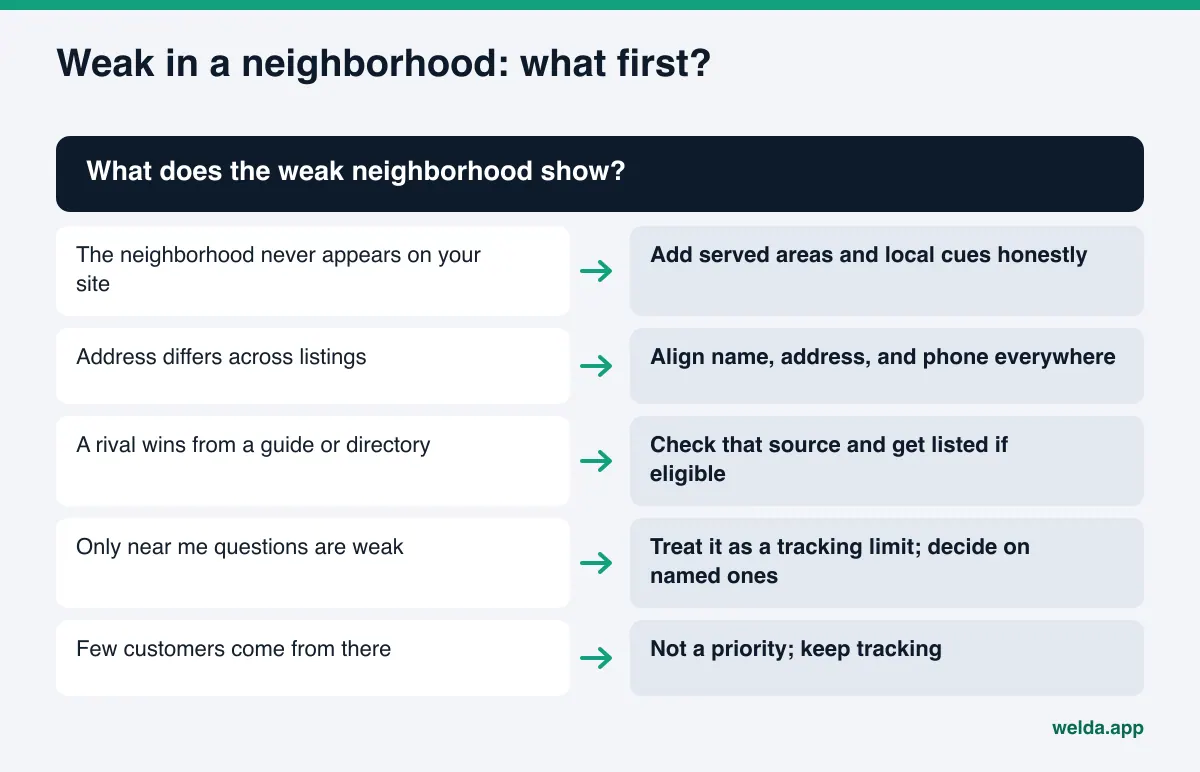
When tracking shows a weak neighborhood, the fixes are usually the following. Order matters: first fix the basic facts that let AI connect you to the place, then strengthen the sources.
- Keep name, address, and phone identical everywhere. Your site, Google Business Profile, Apple Business Connect, Yelp, and BBB listing should spell the neighborhood and city the same way. Your site's structured data (LocalBusiness schema) should carry the full, correct address.
- State the areas you serve, honestly. A sentence like "patients come to us from Logan Square, Bucktown, and Avondale," if true, helps AI connect you to those areas. Thin pages for neighborhoods you do not serve mislead readers and search engines alike.
- Add local cues. Distance to the nearest transit stop, parking, cross streets, and landmarks. Landmark questions use these directly.
- Link your map profile from your site. Make your Google Business Profile, Yelp page, and social profiles reachable from the website.
- Show up in the sources AI cites for that neighborhood. Neighborhood guides, industry directories like Healthgrades or Angi, and local lists. We list the ones that tend to matter in business directories for AI visibility.
- Add location questions to your FAQ. "Is there parking nearby?" or "Are you open on weekends?" answer neighborhood questions directly.
How Welda handles local AI rank tracking
Welda's role here is to turn the 288-answer job into a routine and put the result on a screen you can actually read. The Welda panel asks customer questions on ChatGPT, Gemini, Perplexity, and Google AI three times each. Location lives in the question text: if your question set includes neighborhood questions, the results are that neighborhood's results. Two parts of the panel matter most for this topic.
The questions view: filter to one neighborhood at a glance. Each question is a row, and for each engine you see the position where your name appears or a dash where it does not. Type a neighborhood name into the search box and only the questions containing it remain. You can tell in seconds that you show up on ChatGPT for your neighborhood questions but not on Gemini. Open a row and you see the answer detail, all three runs, and the sources the answer cited. That is where you learn which neighborhood guide or map source the engine relied on.
The competitors view: separate your neighborhood rival from your citywide rival. This view shows which question cluster each competitor wins and which sources it wins from. The question to ask at the neighborhood level is simple: is the business that beats me really my rival on my block, or only on citywide questions? If it is the latter, your effort is better spent on the gap in your own neighborhood than on chasing a citywide leader.
From tracking to work. When a weak neighborhood shows up, the missing information lands on a single to-do list. Welda drafts the neighborhood copy, transit and parking notes, or FAQ answers as ready text, but it does not invent facts: it asks you which neighborhoods your customers come from and whether there is parking. On WordPress sites, content arrives as a draft and goes live when you approve it. On other systems, Welda gives you a ready package to apply yourself. Content always stays on your own site.
The score formula is public and can be read the same way at neighborhood level: 50 percent weight on the share of questions that name you, 30 percent on position, and 20 percent on share against competitors, with a plus-or-minus margin from the spread across three runs. Knowing that the margin is wide when a neighborhood has few questions keeps you from overreacting to a single week.
What stays with you. You decide which neighborhoods you serve and which location covers which area. If Google Business Profile is connected, Welda drafts the profile text; if not, the task is listed as manual. Signing up for neighborhood directories, asking for reviews, and handling negative reviews remain your work.
Limits: what local AI rank tracking and Welda do not do
- Tracking does not replicate a specific customer's phone. On "near me" questions, the answer depends on device location, account settings, and history. Writing the neighborhood into the question narrows that gap but does not close it.
- No ranking guarantee. Welda does not promise that you will appear in any neighborhood or on any engine. AI answers vary and rely on sources outside any business's control.
- It takes time. New neighborhood information on your site usually takes weeks to show up in answers. Seeing no change in the first weeks is expected.
- No fake reviews, no fake locations. Welda does not generate reviews and does not write about a location or service area that does not exist. Showing up in a neighborhood requires actually serving it. We cover the rules around reviews in fake reviews rules and AI visibility.
The product status should be just as clear. The Welda panel is in early access and opening in stages, starting with businesses in Turkey. Regular four-engine tracking is being added during early access, and the panel screens shown in our materials use representative data. What anyone can use today is the free analysis, which works in English and German. It checks whether AI crawlers can access your site, whether your address, phone, and location details and LocalBusiness schema are present, and whether your map and social profiles are linked. It also asks five questions customers might ask to an AI assistant that can search the web and checks whether your business name appears. That is a one-time snapshot, not ongoing neighborhood tracking. Pricing is discussed in an early access conversation.
Checklist: are you ready for local AI rank tracking?
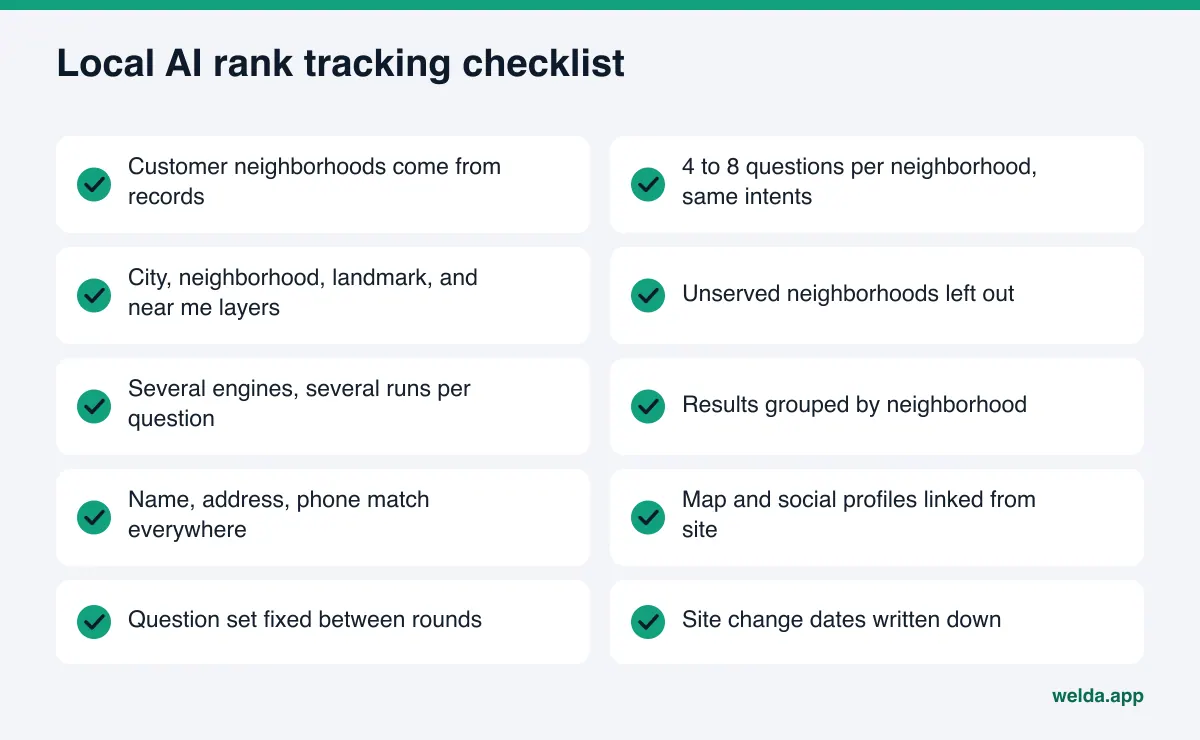
Running through this once tells you whether your tracking stands on solid ground.
- Customer neighborhoods are taken from records, not guesses.
- Each neighborhood has four to eight questions with the same intents.
- All four layers (city, neighborhood, landmark, near me) have questions.
- Neighborhoods you do not serve are not in the set.
- Each question runs on more than one engine, more than once.
- Results are grouped by neighborhood with the margin noted.
- Name, address, and phone match across site and listings.
- Map and social profiles are linked from the site.
- The question set does not change between rounds.
- The dates of your site changes are written down.
Multi-location businesses have one more decision: track all locations in one set or in separate sets? If the locations are far apart and face different competitors, separate sets give clearer results. Two locations in the same neighborhood can share one set.
Frequently asked questions
Is local AI rank tracking the same as local SEO rank tracking?
No. Local SEO tracking checks your position in search results and the map pack. Local AI rank tracking checks whether an AI answer names you, how early, and which sources it cites. Both draw on the same basic facts about your business, but they can produce different results.
How many questions per neighborhood are enough?
Four to eight is a good starting point for most businesses. Fewer questions widen the margin of error; many more create a list that is hard to maintain. Balance across neighborhoods matters more than the exact number.
Is it worth tracking "near me" questions?
Yes, but never alone. The answer depends on the asker's location, and tracking cannot reproduce it exactly. Tracked next to the same question with the neighborhood written in, the gap between the two shows you the limit of the measurement.
Should I create a page for every neighborhood I serve?
Only if you have something real to say about that neighborhood: a location, a team, or a service specific to it. Copies that change only the neighborhood name add nothing for readers and are not a trustworthy source for AI.
How does Welda know which neighborhood I am in?
It learns your address and service area from you. It does not guess; it asks which neighborhoods your customers come from and which location serves which area.
Can I use Welda's panel for a US business today?
The panel is in early access and is opening first in Turkey. The free analysis works in English today and is the place to start.
Where to start with local AI rank tracking
Tracking by neighborhood is how you put effort where it pays. Your citywide numbers may look low while you are strong where your customers actually live. The opposite can also happen: you show up citywide and leave your own block to a competitor. The first step is to see whether AI systems read your business with the right address and the right neighborhood. The free AI visibility analysis checks your address, phone, location details, and business schema, tests five customer questions for a mention of your name, and gives ready fixes for what is missing.