Do API answers and app answers differ in AI visibility tracking? Yes. Asking ChatGPT a question in the app, signed in to your own account, is not the same as sending that question to the model through the API. Memory, location, the selected model, whether web search runs, and the fact that every answer is generated fresh all change what comes back. A single screenshot is not a measurement, and neither is a single API call.
This guide explains where the gap between API vs app answers in AI visibility tracking comes from, how to read the answer you see on your own phone, how to keep your AEO (answer engine optimization, also called GEO or generative engine optimization) measurement trustworthy despite the gap, and what Welda does and does not do here. If you have no baseline yet, start with a free AI visibility analysis of your website before you set up any tracking.
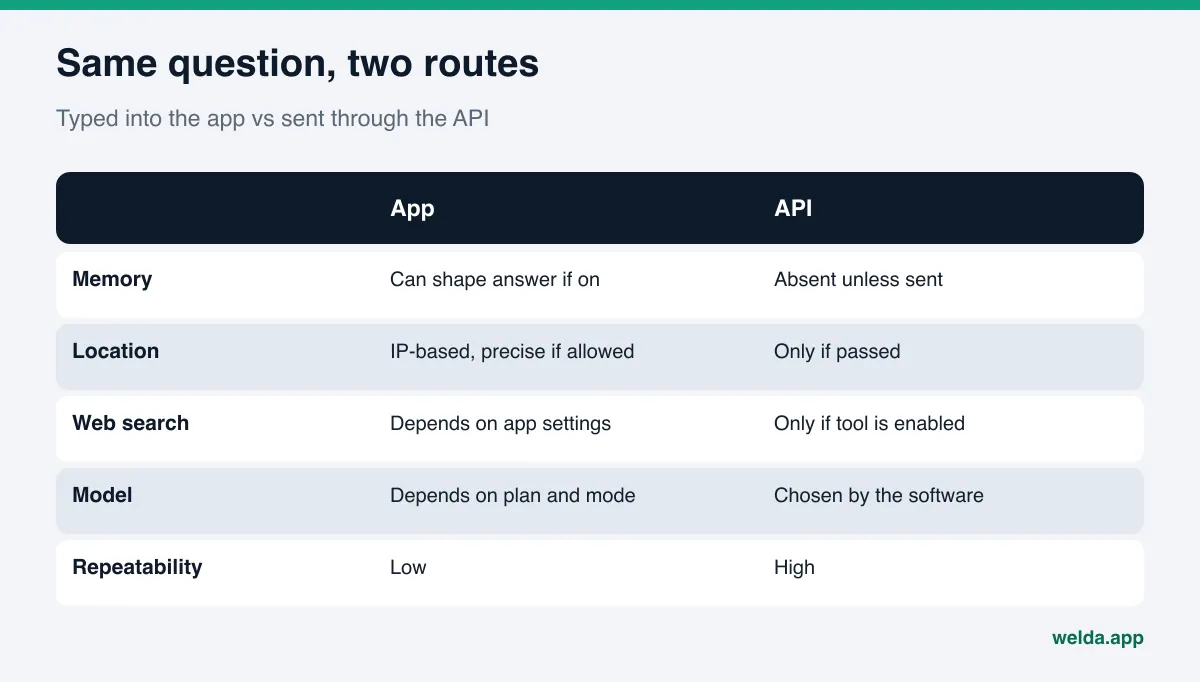
What is the difference between API answers and app answers?
There are two ways to put a question to an AI engine. The first is the one everyone knows: you open ChatGPT, Gemini, or Perplexity, sign in, and type. On Google, you type into the search box and the answer appears in AI Overviews or AI Mode on the results page. The second way is the one developers use: software sends the question to the provider's programming interface, the API, and gets the answer back as text.
Both routes can use the same company's models, but they do not run under the same conditions. The app knows you. Your account, your past chats, your device location, the model you picked, and the app's own instructions all feed into the answer. The API only knows what the software sends: the model it names, the tools it turns on, the location it passes. If something is not sent, it is not part of the answer.
So there is no single answer to "What does ChatGPT say about my business?" ChatGPT can say different things depending on who asks, from where, in which mode, and which sources it happened to read in that search. Knowing this protects you from false alarms and from false comfort when you track AI search visibility.
Six reasons API and app answers diverge
Here are the main sources of the gap. They do not carry equal weight on every engine, but for a local business the first three usually matter most.
- Memory and personalization. When memory is on in the ChatGPT app, saved memories and past conversations can be used to personalize replies. If you have asked about your own practice or restaurant many times, it is not surprising that the app mentions it to you more readily. A question sent through the API carries none of that history.
- Location. OpenAI's help article on ChatGPT search explains that the app may use an approximate location inferred from your IP address for local results, and that sharing precise device location is optional. On the API side, location exists only if the software provides it: OpenAI's web search developer guide describes passing an approximate user location by country, city, region, and timezone. For a "near me" question, that difference alone can reshape the answer.
- Whether web search runs. In the API, web search is a tool that has to be enabled in the request, and even then the model decides from the prompt whether to search. Google's Gemini API documentation on grounding with Google Search describes the same pattern: the search tool is declared in the request, and the model judges whether a search would improve the answer. Without search, the model speaks from training data only, which usually means no current information and often no local businesses at all.
- Model and mode. In the app, the model that answers can depend on your plan and the mode you select. In the API, the software picks the model by name. Two models from the same provider answer the same question with different length and different source preferences.
- App instructions and interface. The app formats the answer and may add maps, place cards, source lists, or shopping modules. An API answer is usually plain text. A business can appear in a map card in the app and be missing from the API text, or the reverse.
- Every answer is generated fresh. Even under identical conditions, the engine rewrites the answer each time. Ask the same question twice in a row and a business can slip from second to fourth place or drop out. That variability exists in both the app and the API.
A separate note on Google: AI Overviews and AI Mode run inside the search results page. An answer from the Gemini API is not the same product as the AI Overview a searcher sees for the same question. One uses the searcher's location, language, and live search results; the other is limited to what the software sends.
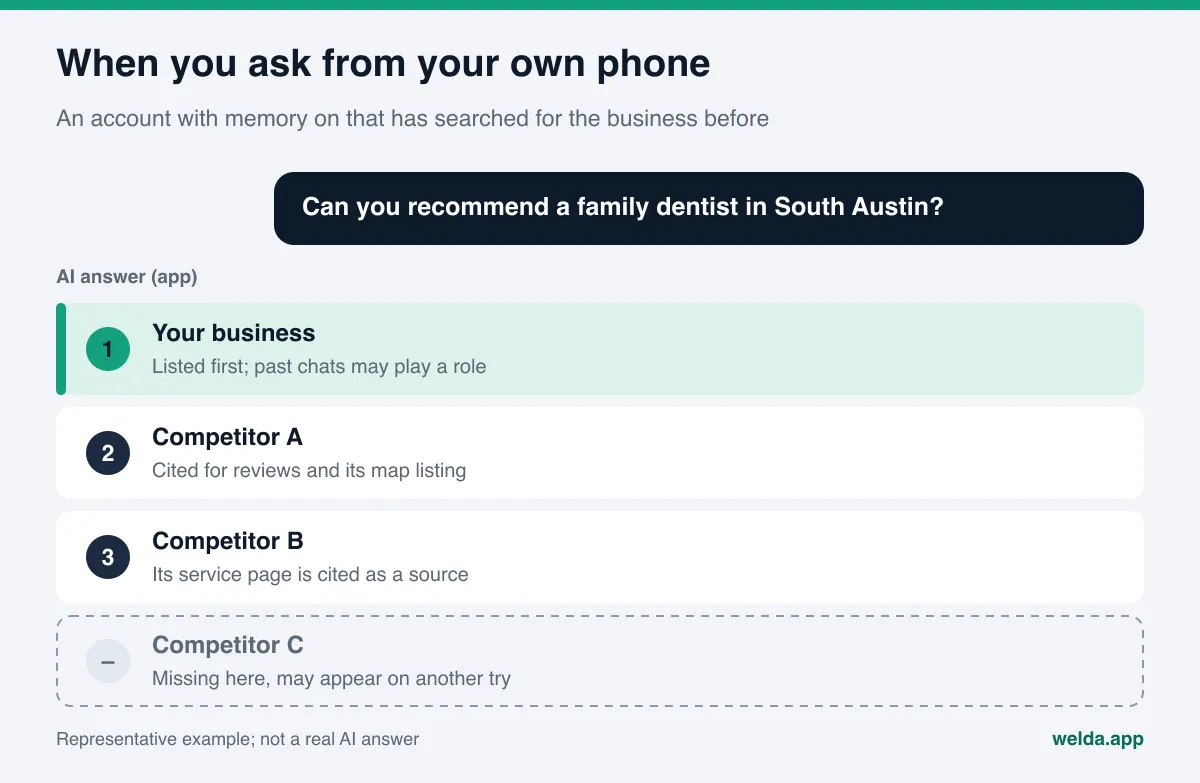
Why the gap matters for a business owner
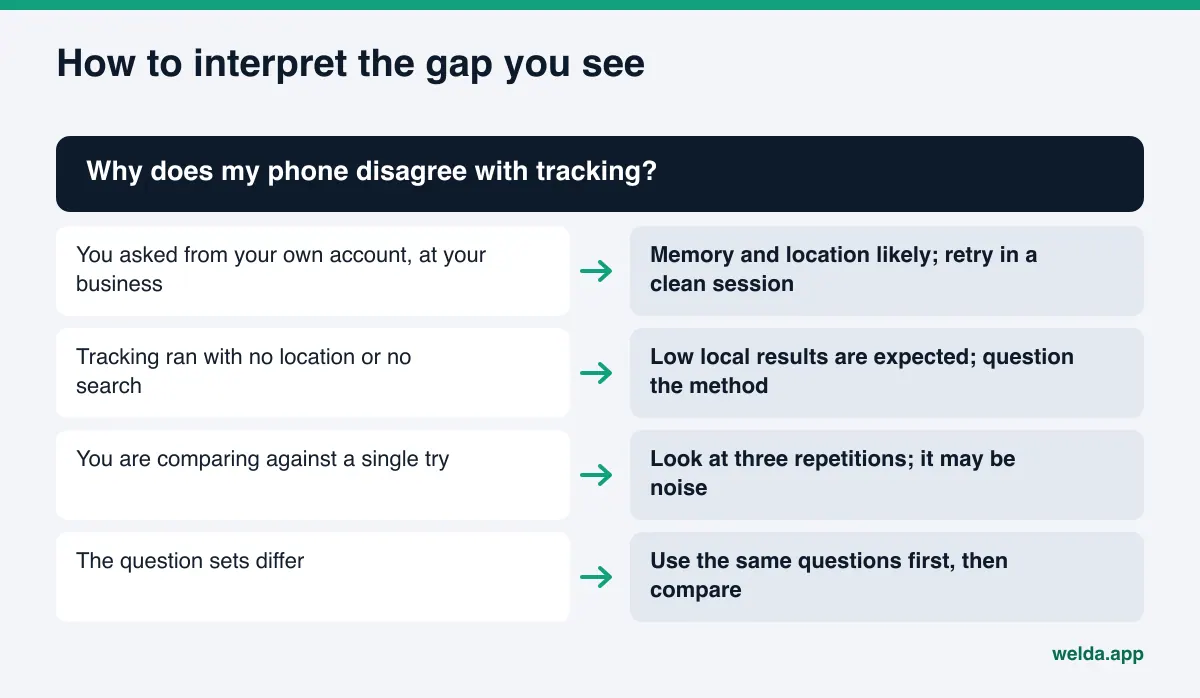
The most common scenario: an owner asks ChatGPT on their own phone, "What's the best family dentist near me?", sees their practice listed first, and relaxes. But that phone is sitting inside the practice, the account has searched for the practice dozens of times, and the website may have been pasted into a chat before. What the owner sees is not what a new patient across town, who has never heard of the practice, will see.
The opposite happens too. An agency or consultant runs a batch of prompts through the API, the business name appears in none of the answers, and the report says "you are invisible." But the prompts may have been sent with no location and with web search off. In that setup, a local business missing from every answer is the expected outcome and says little about what real customers see.
Both mistakes are costly. In the first, the owner postpones real work: structured business data stays incomplete, an outdated phone number on Yelp or a local directory never gets fixed. In the second, money goes into the wrong fix out of panic. The point of tracking is a repeatable picture that sits as close as possible to what customers generally see. That requires knowing what each route actually shows.
There is also a comparison problem. If you checked in the app last month and through the API this month, you cannot tell how much of the change is real and how much is a change in method. The first rule of measurement is to keep the method fixed.
A worked example makes this concrete. The owner of an example boutique hotel asks, from the front desk computer, "quiet hotel near the beach in Santa Barbara," and sees the hotel in second place. That evening a friend in Denver, who has never searched for the hotel, asks the same question from their own account, and the hotel is not listed. A third attempt is an API call with no location and web search off; the answer is a general description of the area and names no hotels at all. All three answers are real, but each answers a different set of conditions. What you need for a decision is a repeated measurement with fixed conditions that sits between them.
API vs app answers: what each route tells you
The table summarizes the strengths and weaknesses of each route from a business point of view. The goal is not to declare a winner but to be clear about which one answers which question.
| Factor | Question typed into the app | Question sent through the API |
|---|---|---|
| Whose view | The account, device, and location that asked | The conditions the software defines |
| Memory and history | Can shape the answer if enabled | Absent unless the software sends it |
| Location | Approximate from IP, precise if allowed | Approximate, only if passed |
| Web search | Depends on app settings and the question | Only if the tool is on and the model uses it |
| Repeatability | Low; conditions shift between tries | High; conditions can be fixed |
| Scale | A handful of questions by hand | Many questions on a schedule |
| Best use | Sampling one real customer experience | Tracking trends and comparisons |
The takeaway is simple. A question typed into the app is a sample, not a measurement. An API question is better suited to measurement, but if its conditions are not realistic it drifts away from what customers see. Good AEO tracking sits between the two: fixed conditions, close to the real customer's question and location.
How to read the answer you see in the app
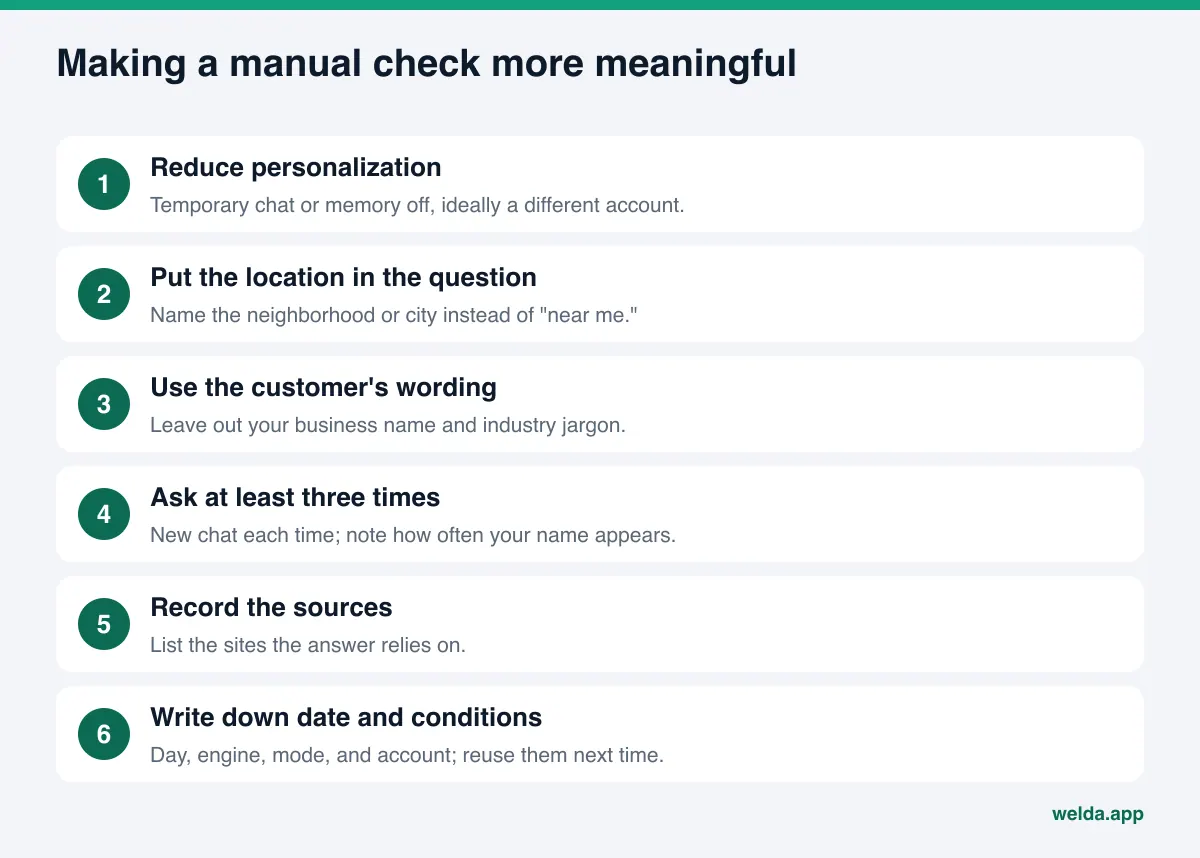
Checking from your own phone is fine. It just has to be set up properly. These steps strip as much of your personal history out of a manual check as possible.
- Reduce personalization. In ChatGPT, use a temporary chat or a session with memory off. If you can, ask from an account or device that has never searched for your business.
- Put the location in the question. Instead of "near me," name the neighborhood or city: "in Midtown Sacramento" or "in South Austin." The answer is then built around the place in the question, not where your phone is. This matters most when you ask from inside your own business.
- Use the customer's wording. Leave out your business name, industry jargon, and your own service names. Ask the way a customer would: "Can you recommend a kid-friendly hotel with a pool near Myrtle Beach?"
- Ask at least three times. Open a new chat each time. Note how often your name appears across the three answers and in which position.
- Record the sources. Look at which sites the answer cites. Google Business Profile, Yelp, Tripadvisor, Healthgrades, Angi, the BBB, or an industry directory? That list shows where you are missing.
- Write down the date and conditions. Day, engine, mode, account. If you do not repeat the check under the same conditions next month, the two results are not comparable.
These steps make a manual check more meaningful, but they do not turn it into measurement. Three questions asked three times give nine answers; add four engines and you have thirty-six. For a question list you want to follow regularly, the manual approach runs out quickly. For help choosing which questions to follow, see our guide to prompts to track for AI visibility.
Managing API vs app answers in AI visibility tracking
You cannot remove the gap. No measurement method can copy every user's personal session. What you can do is shrink its effect and read the results with it in mind. Four rules help.
First, fix the question set. Write down the questions customers actually ask and keep them stable between measurements. If you need to add questions, do it at set intervals and record when each one was added.
Second, ask each question more than once. One answer is a coin toss. Three repetitions show how consistently a business appears for that question, and the spread across repetitions gives you the margin of error. We cover this in detail in our article on margin of error in AI visibility tracking.
Third, read each engine separately. ChatGPT, Gemini, Perplexity, and Google AI rely on different sources. Rolling four engines into one number is convenient, but it hides where you are weak. Look engine by engine first, then at the total score.
Fourth, state the method in the report. If a report does not say which questions, which engines, how many repetitions, and which date, the reader cannot tell it apart from a screenshot. We explain how to structure that report in AEO reporting for executives.
With these four rules, the gap between API and app answers no longer breaks the measurement; you simply know what it represents. The result is not "every customer's screen" but "how often your name appears when the same questions are asked under the same conditions." That is what a decision needs.
How Welda handles this
Welda's approach rests on repeated measurement rather than a single screenshot. Two parts of it relate directly to this topic.
The questions view. In the Welda dashboard, each question customers are likely to ask is put to ChatGPT, Gemini, Perplexity, and Google AI three times. In the questions view you go question by question: on which engines your name appears, in what position, what the three repetitions returned, and which sources the answer relied on. So an observation like "I was second in ChatGPT yesterday and gone today" gets judged against three repetitions, not one answer. The decision this view supports is separating questions that are genuinely weak from ones that are just volatile.
An open score formula with a margin of error. The dashboard score is not a black box: 100 × (0.5 × share of questions where your name appears + 0.3 × position score + 0.2 × share against competitors). A ± margin of error comes from the spread across the three repetitions. If your score moves two points in a month and the margin is about the same, you read that as noise, not change. A single answer on your phone cannot give you that distinction.
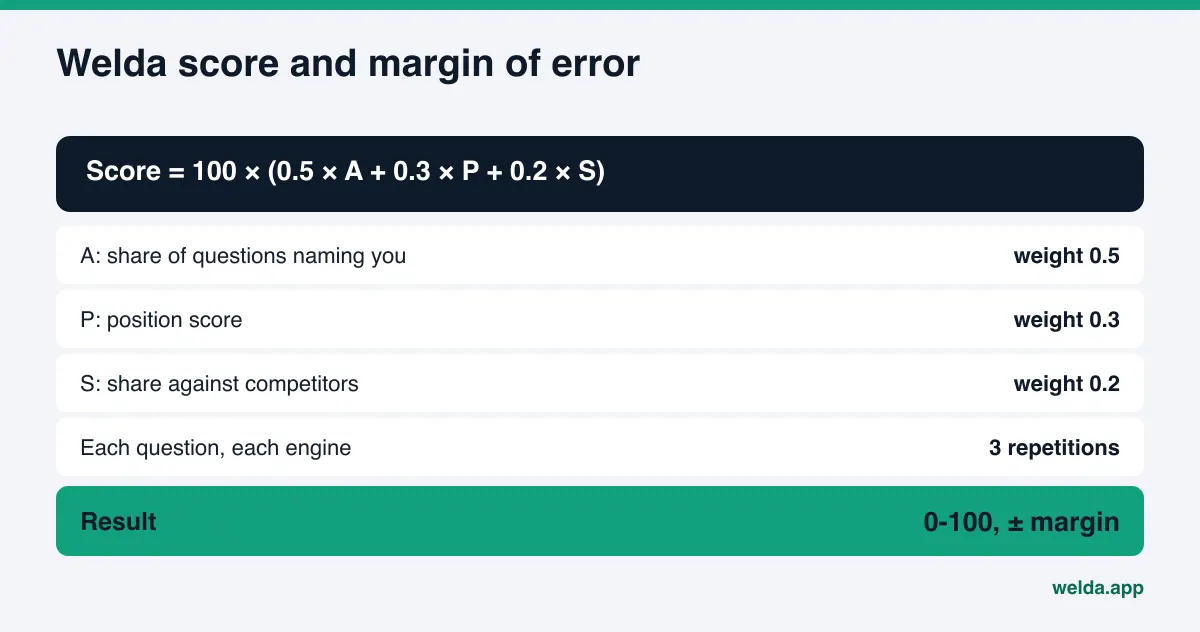
To be straightforward about it: Welda's measurement is also a method. It does not reproduce the personal screen of a user who has memory turned on and has searched for your business before; no tracking tool can. What Welda shows is how your name appears when the same questions are repeated under the same conditions. Question language can be set to English or Turkish.
Beyond this, the dashboard shows where competitors lead and from which sources, which sites AI answers draw on, a single to-do list, and a one-page monthly report. To close gaps, Welda drafts content, profile text, and review replies; publishing approval stays with the business, and content always lives on the business's own website.
The part anyone can use today is the free website analysis, which works in English and German. It reads your site the way Google and AI systems do, and it also asks an AI assistant with web search five questions customers might ask, then checks whether your business name appears in the answers. That is a one-time check, not ongoing tracking across four engines, and it does not replace what you see in the app. But it answers the first question: what on your site makes it harder for AI to understand you.
The full Welda dashboard is in early access and is opening first in Turkey. Regular four-engine measurement is being added during early access, and sample dashboard screens use representative data. Pricing is discussed in the early access conversation.
Limits and what Welda does not do
Once the gap between API and app answers is clear, it is also clear what to expect from a tracking tool and what not to.
- It does not copy anyone's personal screen. Welda's measurement does not look into individual users' accounts, memory, or device location. It runs under repeatable, non-personalized conditions.
- No ranking guarantee and no promise to "get you into ChatGPT." AI answers are regenerated every time; no service can promise a business will appear in every answer.
- It does not invent facts. If a price, opening hours, or service area is unknown, Welda asks the business instead of guessing.
- No fake reviews. Reviews are one of the signals AI relies on, but drafting a reply and writing a review are different things. Welda only drafts replies.
- Some work stays with the business. Handling negative reviews, setting up directory accounts, and PR outreach remain the business's job.
- Results take time. New content or a corrected profile usually takes weeks to show up in AI answers. Checking your phone the day after a change will mislead you.
There is a limit in the method itself, too. Whatever route you use, a score is an estimate of what customers see. The more questions, repetitions, and fixed conditions behind it, the more reliable it is, but it is never identical to what one particular person sees.
Checklist: how to read a tracking result
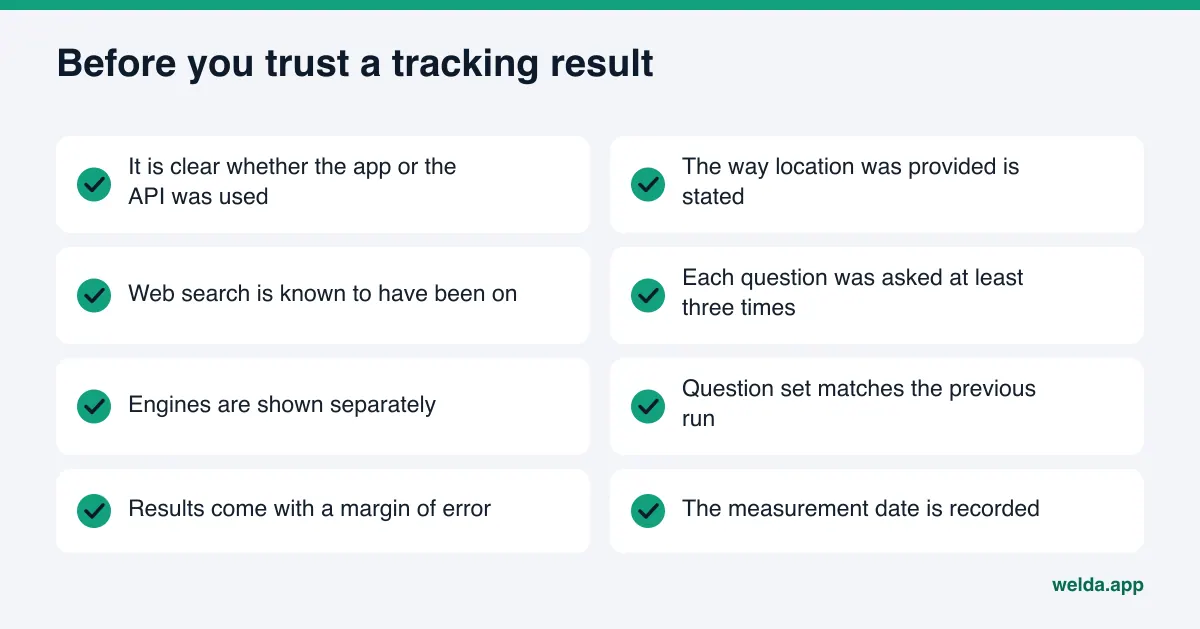
When a tracking report or a screenshot lands on your desk, ask these questions in order. Every "no" lowers how much weight the result deserves.
| Question | Why it matters |
|---|---|
| Was it the app or the API? | Tells you whether personalization shaped the answer |
| How was location provided? | For local questions, the biggest single driver |
| Was web search on? | Without it, current info and local businesses may be absent |
| How many times was each question asked? | One answer makes noise look like change |
| Are engines shown separately? | A total score can hide a weak engine |
| Is the question set the same as last time? | If not, the results cannot be compared |
| Is a margin of error given? | Shows whether a small difference means anything |
Use the same list for competitor comparisons. "Competitor A shows up everywhere" is often based on one try, from one account, at one moment. For reading your position against competitors properly, see AI share of voice.
Frequently asked questions
ChatGPT lists my business first on my phone. Why is my tracked score lower?
The answer on your phone can include your account history, memory, and location. If you have searched for your business before, the app is more likely to mention it to you. Tracking runs under repeatable, non-personalized conditions and is usually closer to what a customer who has never heard of you would see.
Which is more accurate, the API answer or the app answer?
They answer different questions. The app answer shows one person's experience at one moment. Fixed, repeated measurement through an API shows the trend. Use the trend for decisions and a sample answer to understand a single customer's experience.
What should I watch for when checking manually?
Use a temporary chat or one with memory off, put the location in the question, leave your business name out, ask the same question in fresh chats at least three times, and write down the date and conditions.
Can Google AI Overviews be tracked through an API?
AI Overviews and AI Mode run inside Google's results page. An answer from the Gemini API is not the same product. That is why Google-side tracking results should always be read together with the method used.
Does Welda measure what I see in my own account?
No. Welda does not access personal accounts, memory, or device location. Questions are asked three times on each of four engines, and the result shows how your name appears under repeated, identical conditions. The dashboard is in early access and opening first in Turkey; regular four-engine measurement is being added during this phase.
Is the five-question test in the free analysis the same as what I see in the app?
No. The analysis asks five questions once, to an AI assistant with web search. It is a starting signal for your site's overall condition, not a copy of the answer you see in your own account and not ongoing tracking.
Bottom line: repeated measurement, not screenshots
The gap between API and app answers is not a flaw; it is how AI answers work. The app knows you, the API knows only what it is told, and both generate the answer fresh every time. Making decisions from one answer on your phone is misleading, and so is declaring a business invisible from an API call with no location and no search. A fixed question set, three repetitions, engine-by-engine reading, and a margin of error are how you manage the gap.
If you want to see how AI systems read your website first, run the free AI visibility analysis. You get a score out of 100, what was found for each gap and how to fix it, ready-to-use text suggestions for your homepage, and the result of the five-question AI test.