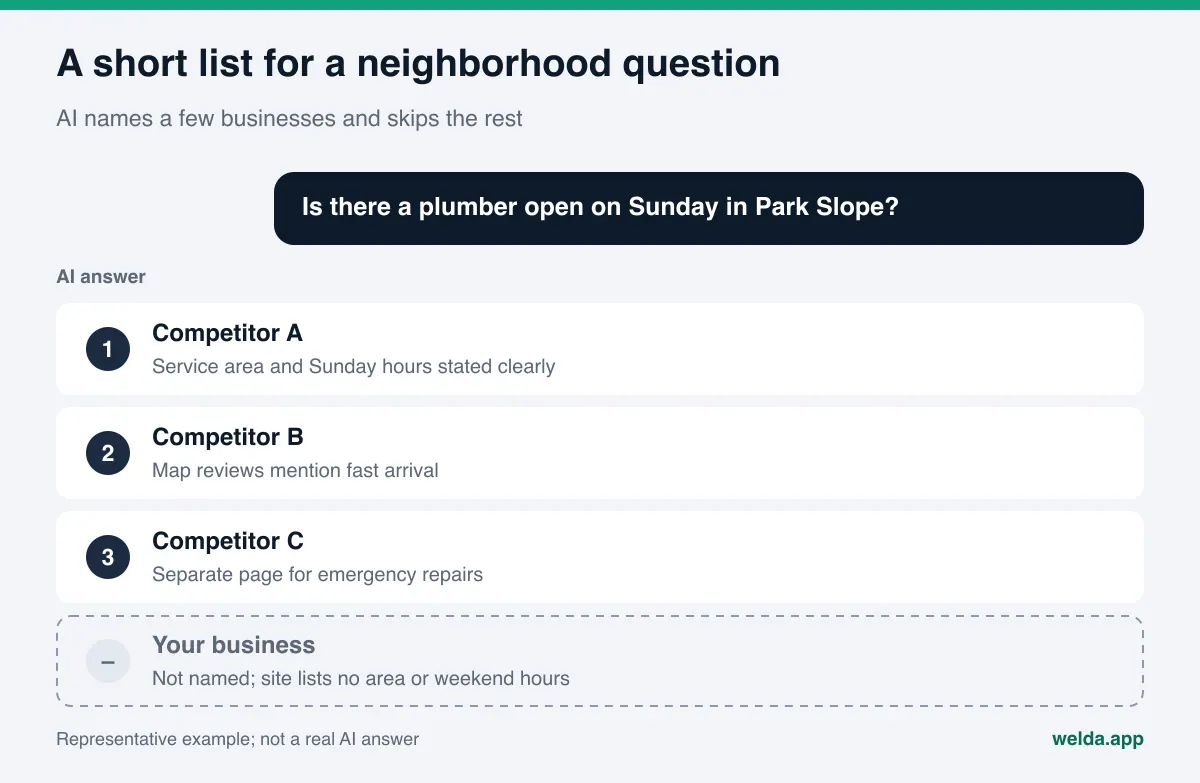
What is AEO for local businesses, and why does it matter now? AEO for local businesses is the work of getting your name into the answer when a customer asks ChatGPT, Gemini, Perplexity, or Google's AI Overviews and AI Mode for something nearby, like "plumber open Sunday in Park Slope." AI answers for local questions name a handful of businesses and skip the rest. To be in that handful, your address, service area, hours, and reviews need to be consistent and easy to read everywhere they appear.
Think about how people ask now. A homeowner with a leaking water heater does not type "water heater repair" and scroll. They ask an assistant: "Who can fix a water heater today in Arlington, and roughly what does it cost?" A parent asks: "Kid-friendly dentist near Logan Square that takes walk-ins on Saturday." The answer usually lists three or four businesses, each with a one-line reason. If you are not in that list, the customer decides without ever seeing you. AEO (answer engine optimization) is the practice of making a business easy for these answer engines to find, understand, and recommend. You will also see it called GEO, short for generative engine optimization; it is the same idea under a different name, and we use AEO and AI visibility in this guide. Below we cover how AI picks a local business, what to fix and in what order, and what Welda does in the process. If you want to see where you stand first, the free AI visibility analysis checks whether AI systems can read your address, phone number, and location details in a few minutes.
Why AEO for local businesses is its own job
For a national ecommerce brand, AI visibility is mostly about product data, comparison content, and press coverage. For a local business, the center of the question is place. Nobody asks "best hair salon." They ask "good hair salon in Wicker Park." That small difference changes the whole job.
Four things set local businesses apart:
- Answers are short and tied to a place. An AI assistant names a few businesses for one neighborhood. Being known across the city does not mean you are named in the neighborhood your customer is asking about.
- The facts come from scattered sources. Your address may be read from Google Business Profile, reviews from Google Maps and Yelp, your service list from your website, and customer stories from Nextdoor threads or Reddit. When these sources disagree, the assistant cannot be sure, and it may leave you out.
- Time and urgency are part of the question. "Open now," "tonight," and "this weekend" show up constantly in local questions. A business that never states its hours falls behind on every one of them.
- Trust and price arrive together. "Without getting ripped off," "honest," and "upfront pricing" are common in questions about trades like locksmiths, movers, and HVAC. For these, assistants lean on reviews and on clearly written service details.
Google says there are no additional requirements or special optimizations needed to appear in AI Overviews or AI Mode, and that fundamental SEO best practices still apply (Google Search Central, AI features and your website). For a local business, that is useful news. There is no hidden setting to flip. But well-kept basic information now does more work than it ever did, because it is the only material the answer engine has to describe you.
How do AI assistants choose a local business?
When an assistant can search the web, it answers a local question by checking several sources and combining what it finds. Nobody outside these companies knows exactly how much weight each source gets. But when you look at the sources cited in local answers, a recurring pattern shows up. The table below sums up what each source type contributes and what you should check there.
| Source | What it adds to the answer | What you should check |
|---|---|---|
| Google Business Profile and Google Maps | Name, address, service area, hours, category, reviews | Name matches your storefront, correct category, current hours, defined service area |
| Your website | Services, neighborhoods, price ranges, FAQs | Each service written out separately, address and phone shown as text |
| Review sites (Yelp, BBB, Angi) | Satisfaction, how problems get resolved | Profile claimed, details match, reviews answered |
| Community threads (Reddit, Nextdoor) | Firsthand experiences, recommendations | How your name comes up (monitor, never plant posts) |
| Industry and city directories | Listing by category and area | Listing current and consistent with your site |
| Instagram and Facebook | Recent photos, announcements, schedule changes | Profiles link to your site, same address and hours |
The lesson is simple. A local business's AI visibility rests less on one great piece of content and more on consistent facts across six or seven places. If your business name is written one way on Google, another way on your site, and a third way on Yelp, an assistant may not be confident these are the same business.
Google's own guidelines for Business Profiles say your name should reflect your real-world name as used consistently on your storefront, website, and stationery, and that adding unnecessary information to the name can lead to suspension (Google Business Profile Help, guidelines for representing your business). So a profile named "Best 24/7 Emergency Plumber Brooklyn Mike's" is against the rules and also blurs your real name in the eyes of an answer engine. Location belongs in the address and service area fields, not in the name.
Storefront, service-area, or hybrid: write location the right way
Not every local business works the same way. A coffee shop that serves customers at its counter and a cleaning company that goes to customers' homes have to describe location differently. Google draws this line clearly. Businesses that do not serve customers at their address, like plumbers and cleaning services, should remove the address from their profile and set a service area instead. Hybrid businesses, like a restaurant that also delivers, can show both. You can set up to 20 service areas based on cities, ZIP codes, or other areas (Google Business Profile Help, manage your service areas).
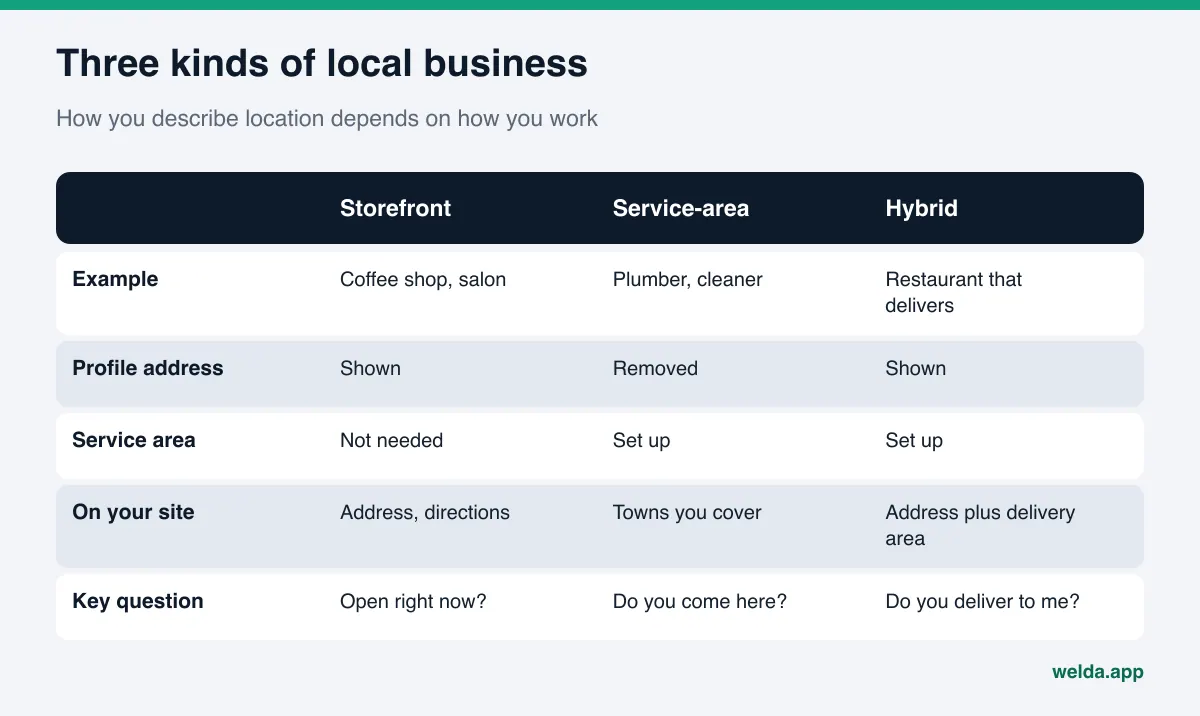
This matters for AEO too. If a mobile business lists only one headquarters address on its website, an assistant has nothing to connect it with the suburb a customer is asking about. On the other hand, if a coffee shop's footer lists 40 neighborhoods, that is not true and it erodes trust. The right approach is to state the places you really serve, alongside the services you really offer.
AEO for local businesses, step by step
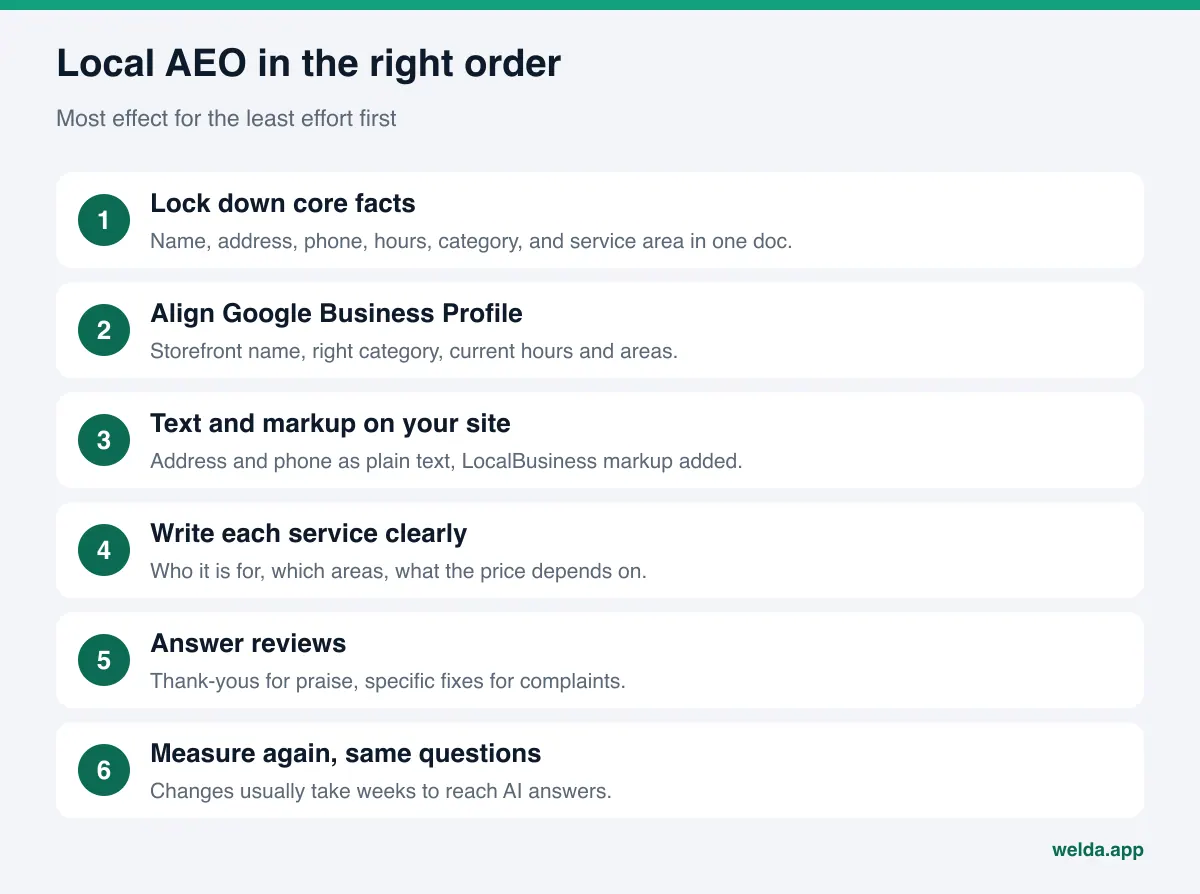
The order below starts with the work that has the most effect for the least effort. Most businesses can finish the first four steps in a day or two. The later steps need to keep going.
- Lock down your core facts in one place. Write your business name, street address, phone, hours, category, service area, and website in a single document. Every other source gets corrected against this document.
- Bring your Google Business Profile in line. Use your storefront name, choose the right category, keep regular and holiday hours current, and define your service area if you travel to customers.
- Put address, phone, and hours on your site as text. If they live only inside an image or an embedded map, they are harder to read. Put them in the footer and on the contact page as plain text.
- Add business structured data. Add LocalBusiness markup, or a more specific subtype for your field, with name, address, phone, hours, coordinates, and links to your profiles. Google's local business structured data documentation lists the supported fields (Google Search Central, local business structured data).
- Write each service separately and concretely. Instead of "plumbing services," create clear sections for "water heater replacement," "drain cleaning," and "leak detection." For each, say who it is for, which areas you cover, and what the price depends on. We go deeper on this in our guide to service pages AI can quote.
- Turn real customer questions into an FAQ. "Do you come out on Sundays?" "Is there a fee for an estimate?" "Which towns do you serve?" Short, direct answers are exactly the kind of text an assistant can lift into a reply.
- Link your profiles to your site and back. Your Instagram, Facebook, Yelp, and Google profiles should be linked from your site, and each profile should list your website. That two-way link shows that facts in different places belong to the same business.
- Respond to reviews on a schedule. A short thank-you for positive reviews; a calm, specific response for negative ones. We cover how criticism shows up in answers in negative reviews in AI answers.
- Measure, fix, measure again. Ask the same set of questions on a schedule and note where your name appears. Changes usually take weeks to show up in AI answers, so do not judge from a single check.
You can do most of these steps yourself. For an honest look at what works by hand and where a tool starts to help, see DIY AEO for small business owners.
Which local questions should you track?
Before you measure, decide which questions to track. Writing a few random prompts gives random results. A better approach is to build the set around the way your customers actually ask. For most local businesses, questions fall into four groups:
| Question type | Example for a home services business | What the answer needs from you |
|---|---|---|
| General search | "Reliable plumber in Arlington, VA" | Clear services, consistent name, reviews |
| Urgent need | "Emergency plumber open tonight near Clarendon" | Stated hours, after-hours policy, service area |
| Price and trust | "Do locksmiths have to quote a price before starting?" | How pricing works, written plainly |
| Neighborhood and condition | "Movers in Back Bay who handle narrow streets" | Areas served, specific situations you handle |
What these questions share is that the answer has to combine a place, a time, and a trust signal. If your site says "24/7 emergency service" but never says which towns you cover or how after-hours pricing works, an assistant has little reason to recommend you for these questions. When you build your question set, take questions from all four groups and repeat each one for the two or three neighborhoods where most of your customers live. Should you check these by hand or with a tool? We compared both in manual ChatGPT checks vs tracking tools.
How Welda handles AEO for local businesses
For a local business, Welda's work centers on three pieces: checking whether your location data can be read, measuring which questions name you, neighborhood by neighborhood, and putting the missing work in front of you with ready-to-use text. The product has other parts, but these three shape the first weeks.
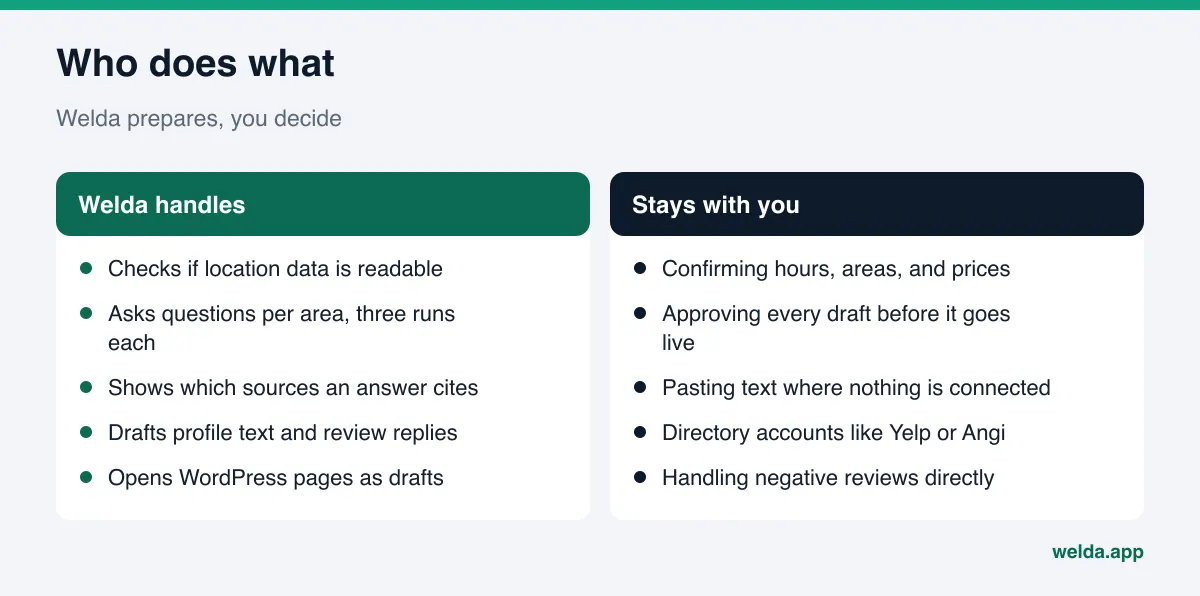
1. Location and profile checks in the free analysis. The free AI visibility analysis reads your homepage and a few inner pages, such as services, about, and contact. For a local business, the most useful part is whether your address, phone, and location details are readable on the site, whether business structured data is present, and whether your map and social profiles are linked from the site. For each gap, you see what was found, why it matters, and how to fix it, plus a ready-to-add fix package that includes the business markup. The analysis also asks five customer-style questions to an AI assistant that can search the web, once, and shows whether your business name appears in the answers. It is a one-time check, but it gives you a first concrete answer to "am I named in my area?" The free analysis works in English.
2. Question-by-question measurement in the panel. In the Welda panel, the questions your customers would ask are sent to ChatGPT, Gemini, Perplexity, and Google AI three times each. The questions screen shows, for each question, which engines named you and in what position. For a local business, the value is seeing areas separately. You might be named second for "emergency plumber in Clarendon" and not at all for "emergency plumber in Ballston." Opening a question shows a summary of the answer and the sources it cited, so you can also see where a competitor's mention comes from. The score formula is published, and the spread across three runs gives a margin of error.
3. Ready-made text on the to-do list. Gaps from the measurement land on one list. If a fact is missing, like which towns you serve or whether you work Sundays, Welda does not guess. It asks you, then applies your answer to every related piece of text. If Google Business Profile is connected, the profile update is prepared there; if not, the task stays on the list as "do by hand," with the text ready to copy. On WordPress sites, Welda connects through a separate Editor user and an application password, with no code to install; drafted pages open on your site as drafts and go live only when you approve. Review replies also arrive on this list as ready text.
The panel also has competitor, source, before-and-after, and monthly one-page report screens. What stays with you: confirming facts, approving drafts, pasting text where there is no connection, and responding to reviews. Your content always lives on your own site; Welda does not host it.
A plain note on availability. The Welda panel is in early access and is opening first in Turkey. Regular four-engine measurement is being added during early access, and sample panel screens use representative data. What anyone can use today is the free analysis, which runs in English and German. Pricing is discussed in the early access conversation.
Limits: what Welda does not do
The most common promise in this space is "we will get you to the top of ChatGPT." Nobody can make that promise honestly, because AI answers change from question to question, engine to engine, and day to day. Here is what Welda does not do:
- No ranking guarantees. Welda measures, shows the gap, and prepares the fix. The answer is still the engine's decision.
- No made-up facts. If your service area, hours, or price range are not on your site, Welda asks you instead of inventing them.
- No fake reviews. Welda drafts replies to reviews. It does not write or solicit reviews. The FTC's 2024 rule bans fake reviews and testimonials outright (FTC, final rule banning fake reviews and testimonials).
- No unapproved sensitive content. In healthcare, nothing publishes automatically; every piece goes to approval, and patient data is not sent to AI.
- Some work stays with you. Handling negative reviews directly, opening and managing directory accounts like Yelp or Angi, and press outreach are yours. Welda can prepare text and lists, but it does not act inside those accounts for you.
There is also a time limit. A new service page or a corrected profile usually takes weeks to show up in AI answers. Seeing no change in week one does not mean the work was wrong.
Where should you start? A quick decision table
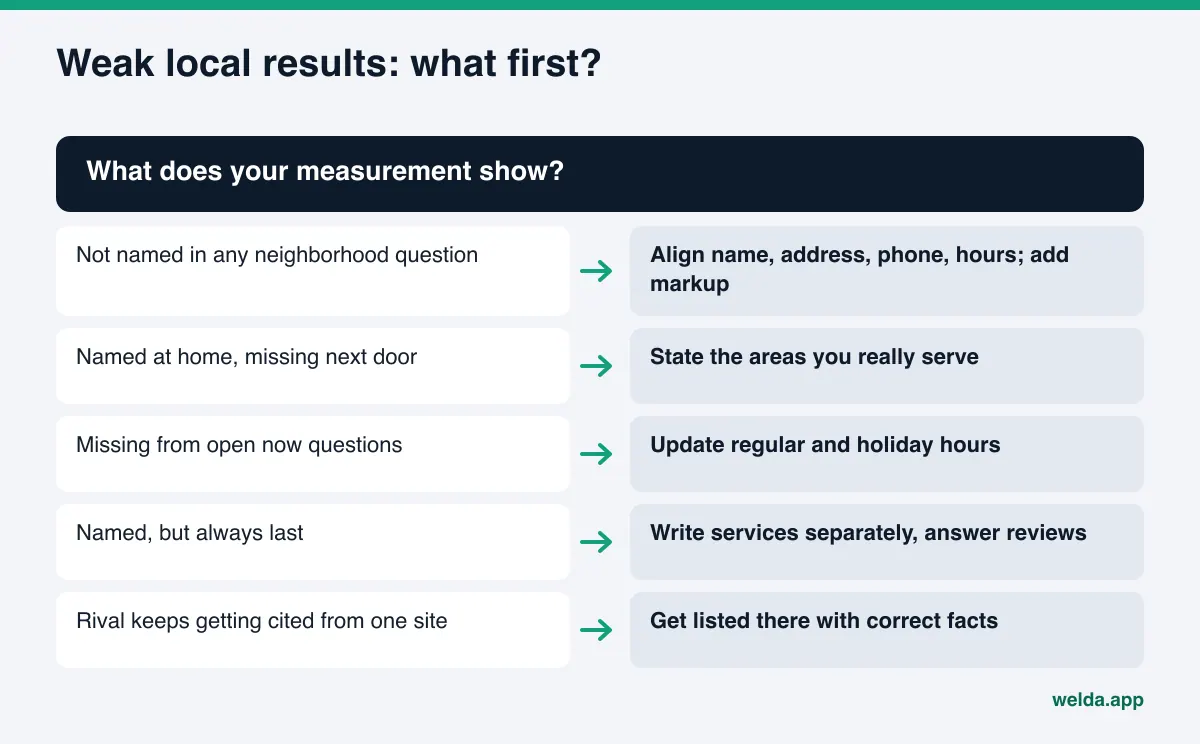
Every local business has different gaps. Use this table to pick your first move based on what your measurement shows.
| What you see | Likely cause | First move |
|---|---|---|
| Not named in any neighborhood question | Location data unreadable or inconsistent | Align name, address, phone, and hours everywhere; add business markup |
| Named in your neighborhood, missing next door | Service area not stated | Write the areas you really serve on your site and profile |
| Missing from "open now" questions | Hours missing or out of date | Update regular and holiday hours |
| Named, but last | Weak reasons: few reviews, vague services | Write services separately, answer reviews |
| A competitor keeps getting cited from one site | You are absent from that source | Find the source and get listed there with correct facts |
To see systematically which sources a competitor wins from, the method in AI competitor analysis walks through it.
Local AEO checklist
Run through this list once a quarter. If you hesitate on an item, it is probably missing.
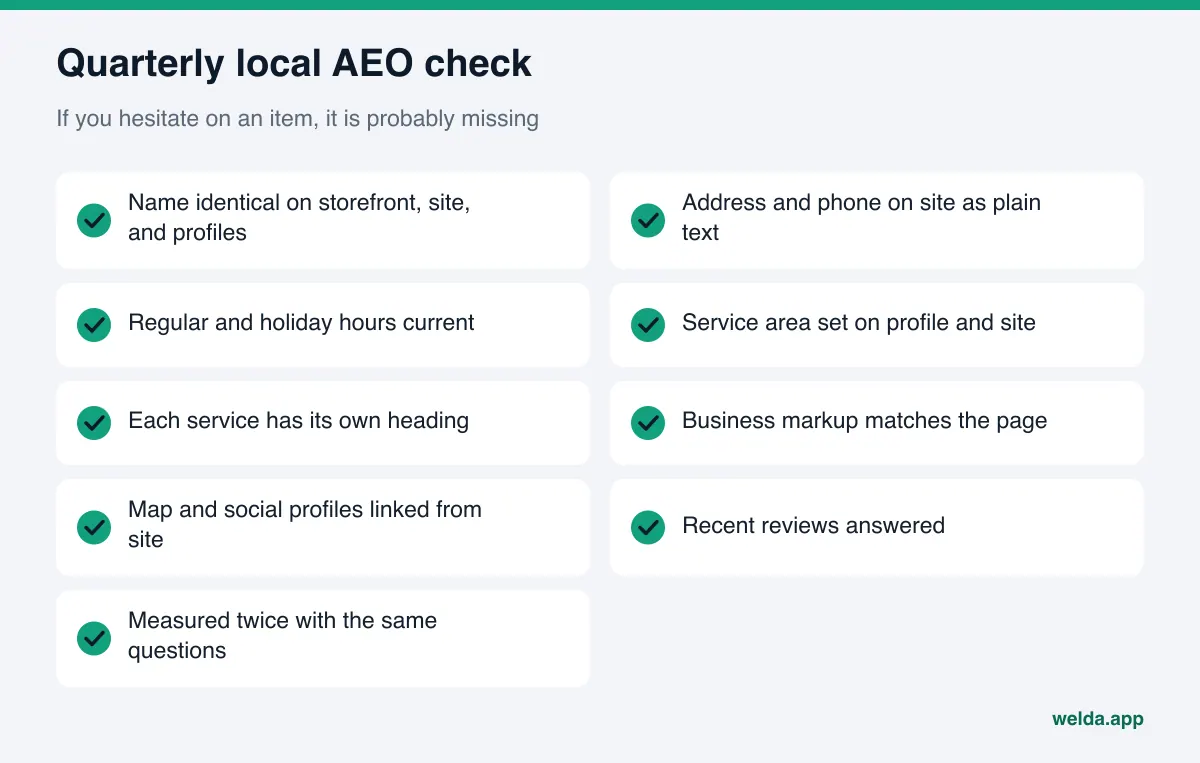
- Is your name identical on your storefront, website, Google Business Profile, Yelp, and social profiles?
- Do your address and phone appear on your site as plain text?
- Are regular hours and holiday hours current?
- If you travel to customers, is your service area set on your profile and stated on your site?
- Does each service have its own heading and a short description?
- Is business structured data present, and does it match what the page says?
- Does your FAQ answer the questions customers actually ask?
- Are your map and social profiles linked from your site?
- Have recent reviews been answered?
- Have you measured at least twice with the same question set?
Frequently asked questions
Does AEO for local businesses replace local SEO?
No. Both draw on the same foundation: accurate business information, clear service pages, and trust signals. Local SEO aims for a spot in the map pack and search results; AEO aims for your name inside the AI answer. A well-kept Google Business Profile serves both.
Is this worth it for a small neighborhood business?
If your customers ask AI assistants questions with your neighborhood in them, yes. The work is not large. Aligning core facts, writing services clearly, and answering reviews are things most small businesses can do in a few days.
Should I list every neighborhood I serve on my site?
List only the areas you really serve. Long, generic lists of towns cost trust and set wrong expectations. One clear service area section is better than dozens of thin pages, one per suburb.
What does Welda do if my Google Business Profile is not connected?
It prepares the profile text and shows the task on the to-do list as "do by hand." Copying the text into your profile and saving it stays with you. If you connect the profile, the update is prepared there, and approval is still yours.
How long until I see results?
Changes on your site and profiles usually take weeks to show up in AI answers. That is why measuring the same question set on a schedule tells you more than a one-off check.
What does the free analysis show, and what does it not?
It shows how readable your site is to AI, how your location and business details come through, what is missing, and how to fix it. It asks five questions to an AI assistant once and checks whether your name appears. It does not measure rankings or track over time. It is free once per site; the results link is emailed to you and stays open for 14 days.
Are you named in your neighborhood?
AEO for local businesses is not a big-budget campaign. It is steady work that starts with your core facts being correct and identical everywhere. The first step is to see how AI reads you today. Run the free AI visibility analysis to see whether your address, phone, services, and profiles come through, how much each fix would move your score, and whether your name appears in five questions a customer might ask.