How do I track whether Google's AI Overviews mention my business? Build a list of the questions your customers actually ask Google, run each one several times on a regular schedule, and record three things every time: whether your business was named, where it appeared in the answer, and which sources Google cited. You can do this by hand for a while. An AI Overviews tracking tool does it prompt by prompt, side by side with your competitors, and the good ones also help you close the gaps they find.
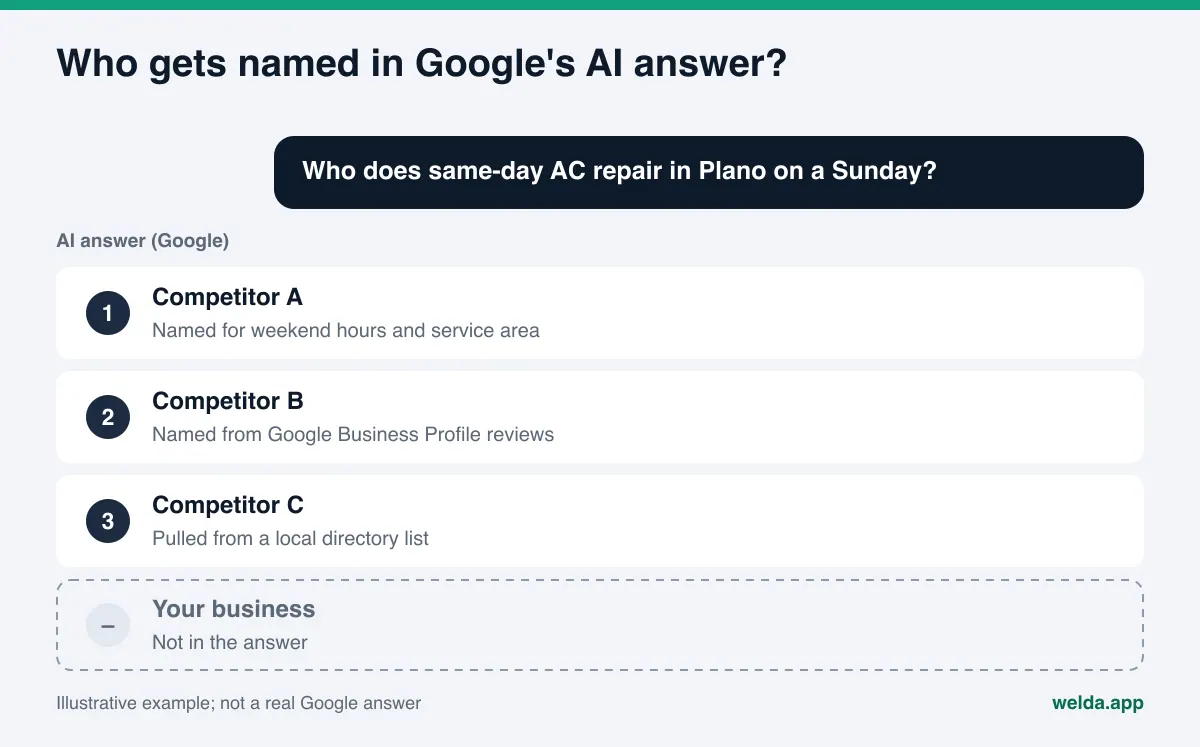
Google now answers many local and comparison searches with an AI-generated summary at the top of the page, and AI Mode turns the same idea into a conversation. Someone types "who does same-day AC repair in Plano on a Sunday" or "best family dentist near me that takes walk-ins," reads a short answer that names two or three businesses, and often makes a decision without clicking anything. If your name is not in that paragraph, ranking well in the blue links below it may not save you. That is the problem an AI Overviews tracking tool is built to expose. This guide covers what such a tool should measure, how to set up tracking yourself, and how Welda handles the work. If you want a baseline before you compare tools, run a free AI visibility analysis of your website; it shows in a few minutes how Google and AI systems read your site.
Why is AI Overviews tracking different from rank tracking?
The discipline of getting named in AI answers goes by a few names. In the US it is most often called AEO, short for answer engine optimization; you will also see GEO, generative engine optimization, used for the same work. Whatever you call it, the measurement problem is new.
Classic rank tracking asks one question: for this keyword, what position does my page hold? Positions move, but slowly, and every tool sees roughly the same results page. AI answers break that model in three ways.
First, the answer is generated fresh. According to Google's documentation on AI features for site owners, AI Overviews and AI Mode may use a technique called query fan-out, issuing multiple related searches across subtopics and data sources to build a response. So the answer is not a summary of one results page; it is stitched together from several searches. Ask the same thing twice and you may be named once and skipped once. A single screenshot proves very little.
Second, what counts is a mention, not a position on a page. The useful questions become: Was I named? Was I named first or last? Who was named instead of me? A rank tracker is not designed to answer any of those. We go deeper into this difference in rank tracker vs. AI visibility tracker.
Third, the answer leans on sources other than your website. For a local service business, Google's AI answer might draw on Google Business Profile details and reviews, Yelp, Angi, the Better Business Bureau, a city "best of" list, or a Reddit thread. For a restaurant or hotel, Tripadvisor and local press often show up. For a medical practice, Healthgrades and insurer directories. When a competitor keeps getting named ahead of you, the reason is often not their website at all; it is that they look more complete on the sites Google trusts for that question.
What Google Search Console can and cannot tell you
The obvious objection: Search Console is free, so why pay for anything else? Search Console remains essential, and you should keep using it. But it answers a different question.
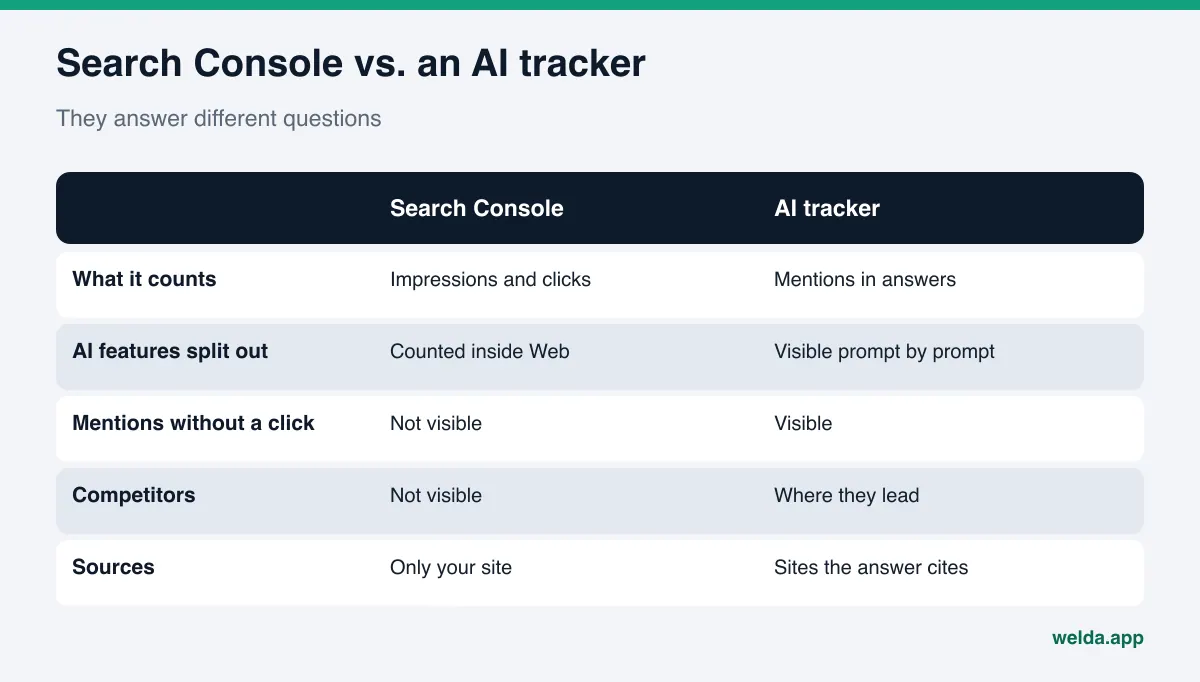
Google's documentation says traffic from AI features is included in your overall search traffic and reported in the Performance report under the "Web" search type. The documentation does not describe a separate filter for AI Overviews or AI Mode. In practice that means you see total impressions and clicks, but not a clean answer to "which prompts named me in an AI Overview?"
There is a bigger blind spot. Search Console only sees your own site. If Google's AI named your business and nobody clicked, there is nothing to report. If a competitor was named instead, you will never see it. If the answer cited a directory listing rather than your homepage, that citation is invisible to you too. For a local business, those invisible mentions are often where the decision happens.
The same documentation makes a point worth knowing before you buy anything: there are no extra technical requirements, special optimizations or special schema.org markup needed to appear in AI Overviews or AI Mode. A page needs to be indexed and eligible to show in Google Search with a snippet, and even then indexing and serving are not guaranteed. This matters for tracking because a stray noindex, nosnippet or tight max-snippet directive can quietly keep a page out of AI answers. A tracker will only tell you that you are missing; a technical check of your site tells you why.
What should an AI Overviews tracking tool measure?
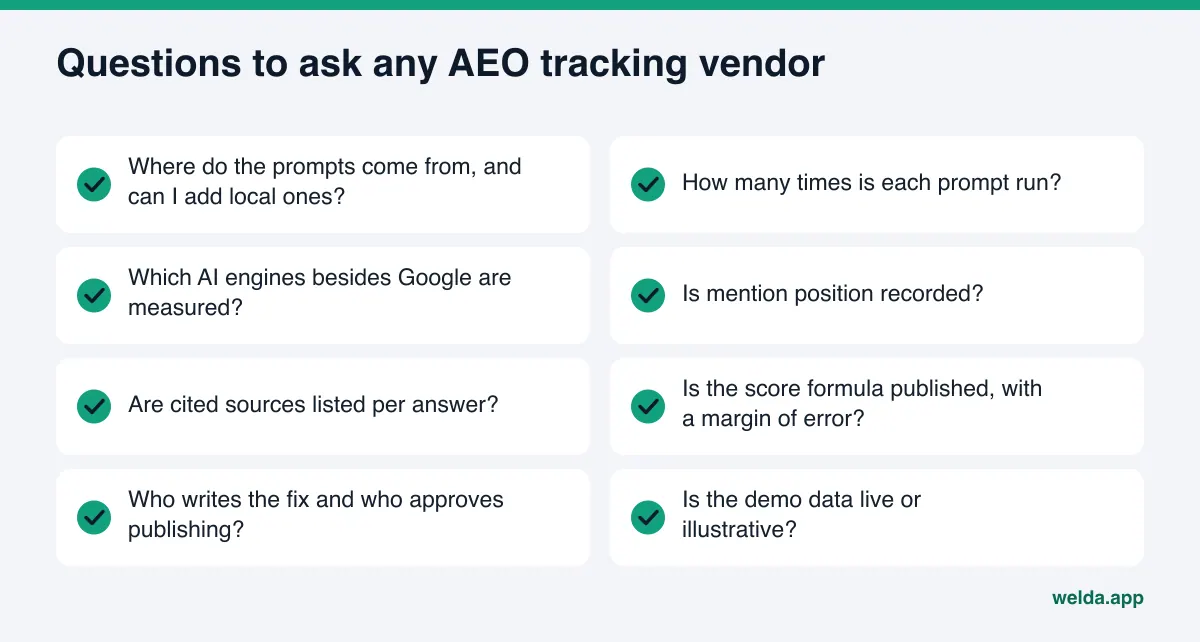
The market for AEO tools has grown quickly, and most products describe themselves in nearly identical language. Instead of comparing brand names, compare criteria. Here is what matters when you evaluate an AI Overviews tracking tool, and what to ask in the demo.
| Criterion | Why it matters | Ask the vendor |
|---|---|---|
| Prompt list | Tracking is only as good as the questions it asks | Where do prompts come from? Can I add city and neighborhood prompts? |
| Repeat runs | AI answers vary from run to run | How many times is each prompt run? Is the spread shown? |
| Engines covered | Customers do not only ask Google | Which other engines are tracked, and can I view them separately? |
| Position | Named first and named third are not the same | Is mention order recorded? |
| Cited sources | Sources explain why a competitor wins | Are cited sites listed for each answer? |
| Score method | A score you cannot audit is hard to act on | Is the formula published? Is there a margin of error? |
| Fixes | Measuring alone changes nothing | Who writes the fix, who approves it, where does it live? |
| Data honesty | Demos are often built on sample data | Is what I am seeing live or illustrative? |
No tool will be strong on every row. Decide in advance which rows are non-negotiable for you. For a broader look at features, see which AEO tool features actually matter. ChatGPT tracking follows the same logic with a few differences, covered in our ChatGPT rank tracker guide.
One warning for local businesses. Tools that build their tracking from a keyword list often miss how people talk to AI. Nobody types "teeth whitening Denver" into a chat box. They ask, "Is there a dentist in Capitol Hill that does whitening on Saturdays and doesn't cost a fortune?" Your prompt list should be made of sentences like that.
How to set up AI Overviews tracking yourself, step by step
Running tracking by hand for one week is the fastest way to learn what you actually need from a tool. It does not scale, but it shows you which prompts matter and which parts of the job you want to hand off.
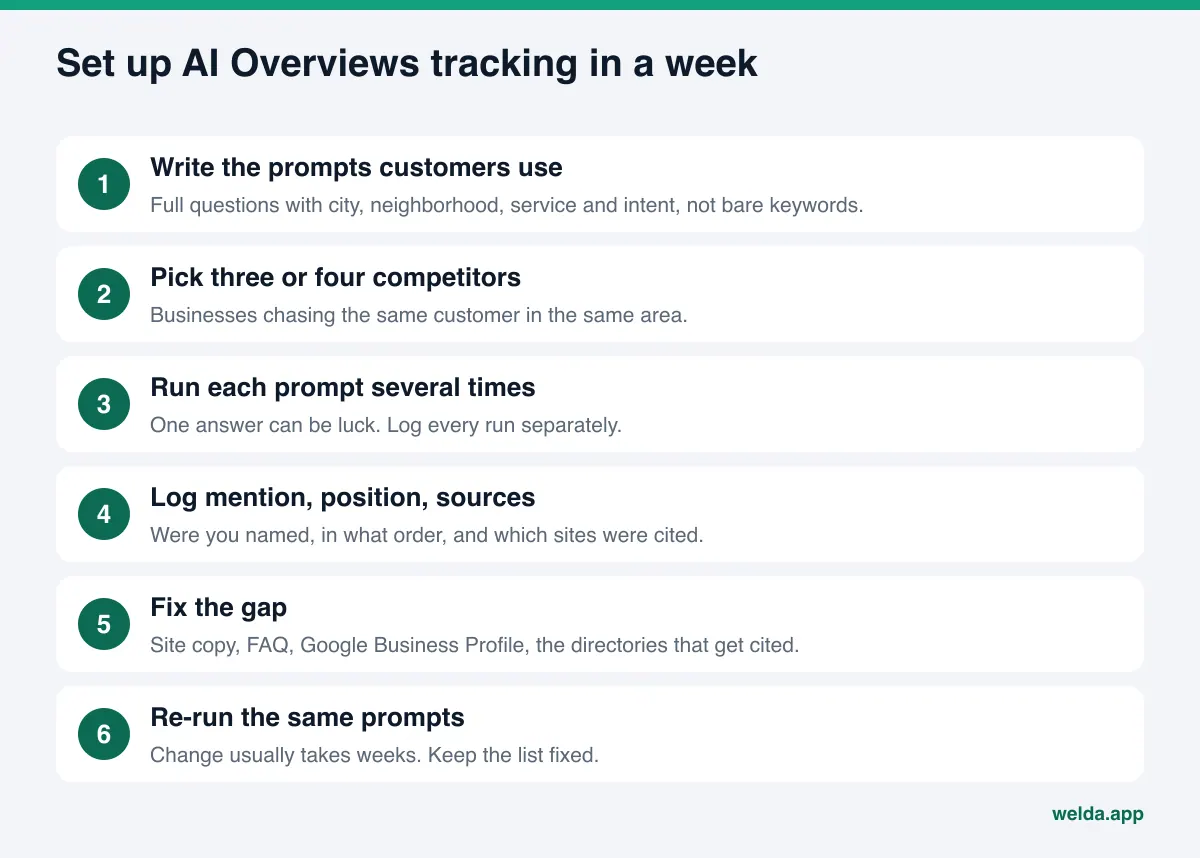
- Collect real customer questions. Pull them from phone calls, contact forms, reviews and front-desk notes. Rewrite each as a natural question someone would type or say to an AI assistant. Include the city or neighborhood, the service, and intent words like "best," "near me," "open Sunday," "affordable," or "takes insurance." Fifteen to thirty prompts is a solid start. Our guide to finding the questions customers ask AI walks through sources for these.
- Group prompts by intent. Separate information prompts ("how much does a water heater replacement cost in Phoenix"), comparison prompts ("best plumber in Tempe") and ready-to-buy prompts ("emergency plumber open now Mesa"). Losing on ready-to-buy prompts hurts more.
- Name your competitors. Three or four businesses chasing the same customers in the same area. Add any business the answers keep naming that you had not considered a competitor.
- Run every prompt at least three times. Spread runs across different days and times and log each one separately. If you are named in one run out of three, your status is "unstable," not "visible."
- Record mention, position and sources. A spreadsheet works: prompts as rows, runs as columns, with a note for which sites the answer linked to.
- Check your site's technical basics. Are key pages indexed? Is there any snippet restriction? Does robots.txt block Google's crawler or other AI crawlers? Does your homepage say plainly, in the first paragraph, what you do and where? The free site analysis checks these in a few minutes.
- Fix the biggest gap first. Pick the intent group where you lose most. Check whether your site answers that question directly, whether your Google Business Profile lists the right services and hours, and whether you have a complete profile on the directories the answers cite.
- Re-run the same prompts. Wait a few weeks and run the identical list again. If you change the list, your before-and-after comparison stops meaning anything.
After a week, two things become obvious. Running prompts repeatedly and logging results takes real time. And the hard part is not measuring; it is deciding and doing what comes next. Knowing which of those two burdens you want to hand off is half of choosing the right tool.
Reading the results: mention rate, position and share
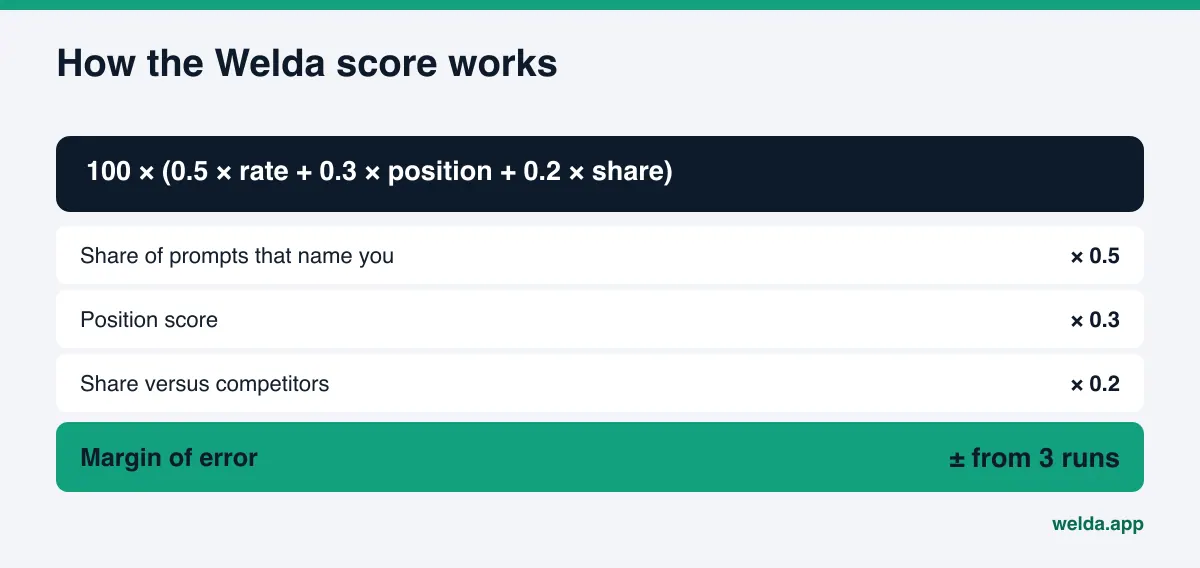
Once data piles up, it is tempting to reduce everything to one number. A score is useful, but only if you know how it is built. Read its parts separately.
Mention rate is the share of tracked prompts where you are named at all. If it is low, the cause is usually basic information: the AI cannot confidently tell what you do, where you are, or which services you offer.
Position is where you appear when you are named. If an answer lists three businesses, the first gets the most attention. If you are always named last, competitors probably look stronger on the sources Google relies on.
Share versus competitors compares your mentions with those of the competitors you track on the same prompts. A modest mention rate reads differently if you are still ahead of everyone you compete with.
Cited sources explain all three. If an answer leans on a regional directory and you are not listed there, no amount of new blog content will fix that prompt. If it leans on Google Business Profile reviews and details, your profile is where the work is. A good tracker's output is not "your score is X." It is "on this prompt, you are missing from this source." For context on what numbers are reasonable, see what a good AI visibility score looks like.
How Welda handles AI Overviews tracking
Welda is software that measures where a business shows up in AI answers and then prepares the fixes on the business's behalf. Google's AI answers are one of four engines Welda measures, alongside ChatGPT, Gemini and Perplexity. Here are the three parts most relevant to this topic.
First, an honest note on status. The Welda dashboard is in early access and is opening first to businesses in Turkey. Regular four-engine measurement is being added during early access, and the sample dashboard screens are shown with illustrative data. The full dashboard is not yet available in the US. What anyone can use today, in English, is the free site analysis.
Prompt tracking. In the dashboard, each customer question is asked of each engine three times. Every prompt is a row, and the Google column shows whether you were named and in what position. Opening a row shows a summary of the answer, your position in each of the three runs, and the sources the answer cited. The decision this screen supports is simple: which prompts matter most, and where on Google's side are you missing entirely? If you are named on ChatGPT but not by Google for the same prompt, that points toward the sources Google draws on, such as your Business Profile or a directory, rather than your website copy.
The three runs also feed the score's margin of error. The formula is published: 100 × (0.5 × share of prompts that name you + 0.3 × position score + 0.2 × share versus competitors), with a ± margin derived from the spread across the three runs. When your score moves a few points week to week, the margin tells you whether that is a real change or normal variation in the answers.
Sources. A separate view lists the sites AI answers cite for your prompts, how often each is cited, and your status on each one: missing, incomplete, unverified or complete, with the next action next to it. If Google's answers for your category lean heavily on Business Profile and a couple of directories, the first job is completing those, not publishing another blog post. This view is about priority: where your limited time pays off first.
Fixes with your approval. When Welda finds a gap, it drafts the fix: a service section for your site, FAQ copy, business information markup, profile text or a review response. Each lands in a to-do list with the draft attached, and publishing approval stays with you. On WordPress sites, Welda connects through a separate Editor user and an application password, with no code to install; content opens as a draft on your site and goes live when you approve it. On other platforms, Welda hands you a ready-made package to apply. Your content always lives on your own website; Welda does not host it.
The free analysis is the part you can use right now. It reads your homepage and a few inner pages (services, pricing, about, contact) the way Google and AI systems do, checking crawler access in robots.txt, title and description, business schema, address and phone details, links to your map and social profiles, FAQ content, reviews and trust signals, and page speed. You get a score out of 100, a fix for each gap, ready-to-use homepage copy suggestions, and a fix package to add to your site. It also asks five customer-style questions to an AI assistant that can search the web and checks whether your business name appears. That is a one-time check, not ongoing Google tracking, but it tells you where to start.
Limits: what tracking can't do and what Welda won't do
Setting the right expectations up front saves a lot of frustration. Some limits apply no matter which tool you choose.
- No tool reproduces every user's answer. Google's AI answer can vary with location, timing and phrasing. A tracker gives you a measurement, not a recording of every customer's screen. That is why repeat runs and a margin of error matter.
- No guarantees. Welda does not guarantee rankings or placement in AI Overviews. Google's own documentation says indexing and serving are not guaranteed.
- No invented facts. If Welda does not know your hours, price range or service area, it does not guess; it asks you. Missing facts appear as questions in your to-do list.
- No fake reviews. Welda does not generate reviews. The FTC's final rule banning fake reviews and testimonials is one more reason no tool should. Welda's compliance check flags patterns like pricing, guarantee and superiority claims before publishing, but it is not legal advice.
- Some work stays with you. Handling negative reviews, opening directory accounts and press outreach remain your job. Welda can list them and draft text, but it does not create accounts in your name.
- Change takes time. New content usually takes weeks to show up in AI answers. Google notes that recrawling after a change can take anywhere from several days to several months. More on timing in how long AEO takes.
One more limit sits with you: a poorly chosen prompt list gives you a misleading picture, however good the tool. A high score on questions nobody asks is worth nothing. Put as much care into the prompt list as into the tool.
Checklist: choosing an AI Overviews tracking tool
Before a demo or a subscription, get written answers to the questions in the checklist above. Then read them against your own situation.
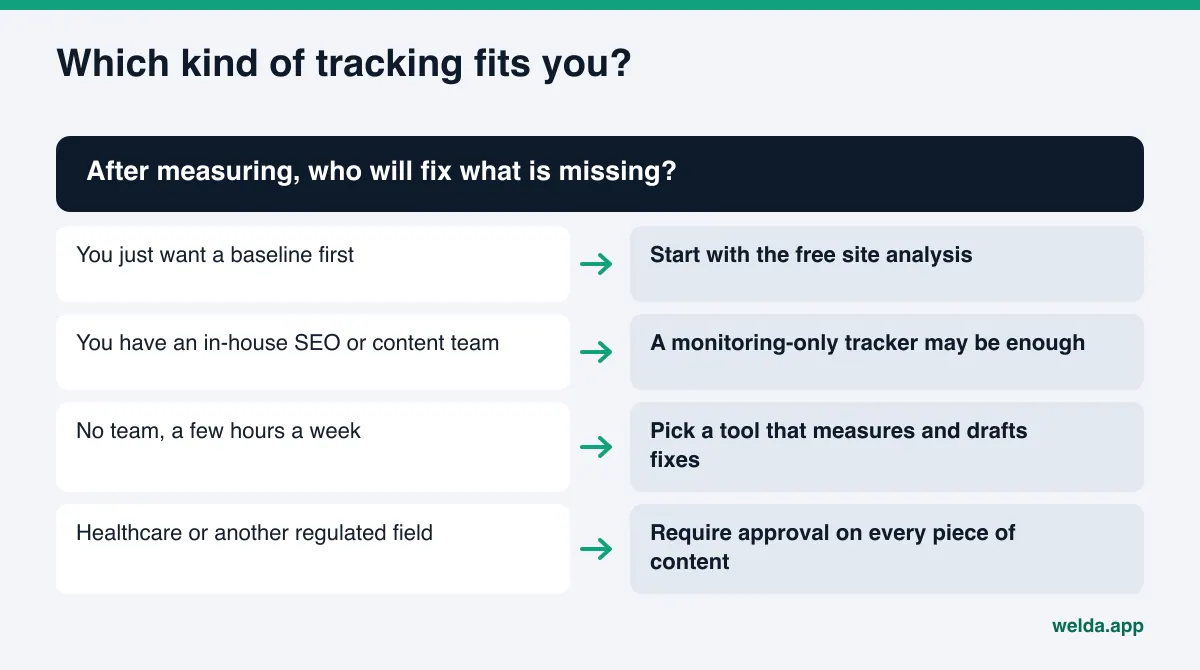
- If you have an in-house SEO or content team, a monitoring-only tracker may be enough, because your team will do the fixing.
- If you have no team and a few hours a week, a tool that measures and also drafts the fixes is the more realistic choice.
- If you are in healthcare or another regulated field, insist on a workflow where every piece of content comes to you for approval and risky claims are flagged before publishing.
- If you are still unsure where you stand, start with a free baseline and decide after you have seen it.
Frequently asked questions
Can I check for free whether I show up in AI Overviews?
Yes. The simplest way is to ask Google your customers' questions yourself, several times and at different times, since one look can mislead. To see whether your site is ready for these answers, use Welda's free site analysis, which is free once per site.
Can I see AI Overviews traffic separately in Search Console?
Google's documentation says AI feature traffic is reported in the Performance report under the "Web" search type and does not describe a separate filter. Search Console also cannot show mentions that did not get a click, or who was named instead of you.
Do I need special markup to appear in AI Overviews?
According to Google, no: there is no special schema.org markup or extra technical requirement. The page must be indexed and eligible for a snippet. Business schema still helps AI systems read who you are, where you are and what you offer.
How fast will a tracking tool improve my visibility?
A tracker does not improve visibility on its own; it shows what is missing. After gaps are fixed, changes usually take weeks to appear in AI answers, and nobody can promise a timeline or an outcome.
Does Welda track AI Overviews as a separate product?
No. Google's AI answers are one of four engines measured in the Welda dashboard. You can view results prompt by prompt and engine by engine, while the score combines all four.
Can US businesses use Welda today?
The free site analysis works in English today. The full dashboard is in early access and is opening first in Turkey. Pricing is discussed in the early access conversation.
Start with your own baseline
AI Overviews tracking comes down to a fixed list of real customer questions, run repeatedly, with mentions, positions and sources logged, followed by fixes and a re-run of the same list. Whichever tool you choose, you first need to know how Google and AI systems read your site. Run the free AI visibility analysis to get your score, see what is missing, and download a fix package for your site, then decide which prompts to start tracking.