Why doesn't ChatGPT recommend my takeout restaurant when someone asks where to order? AI assistants answer "who delivers near me right now" by reading your website, your Google Business Profile, your delivery app listings and review sites. If your delivery area, takeout hours, menu and ordering options are not written clearly and consistently, your name is left out of the answer. This guide explains AEO for takeout and delivery restaurants step by step, and shows which parts of the work Welda does for you.
What is AEO for takeout and delivery restaurants?
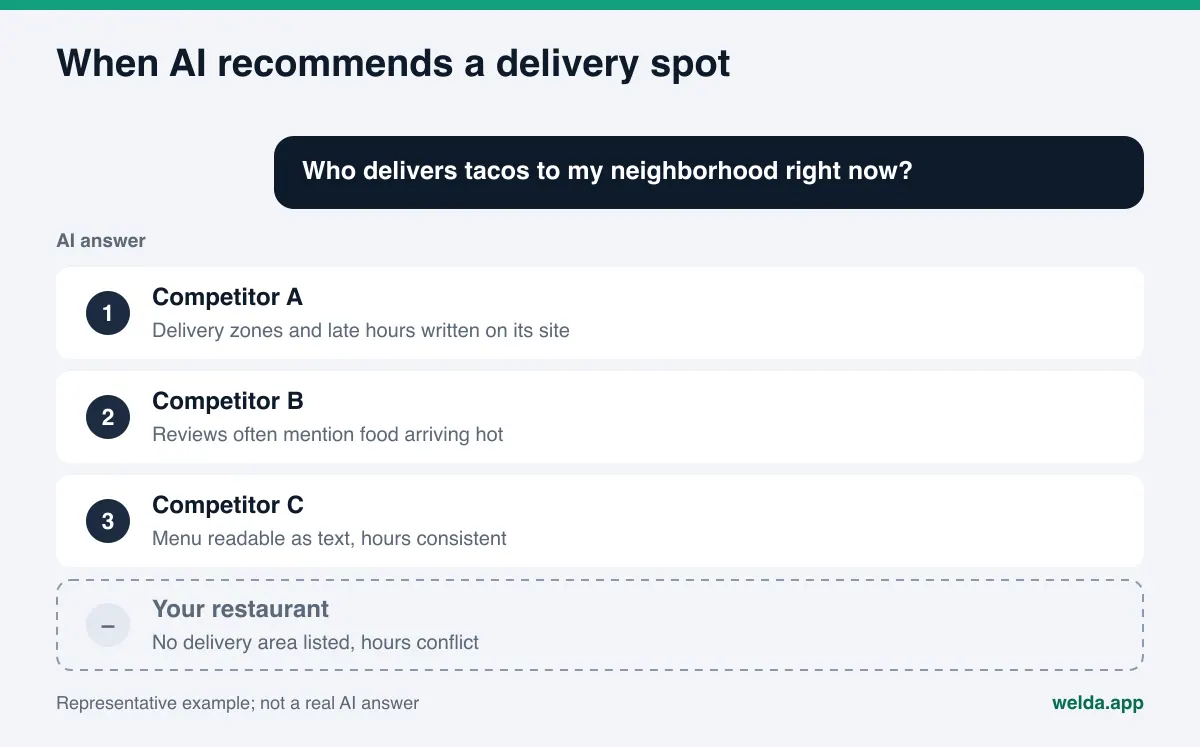
AEO, short for answer engine optimization, is the work of making sure your business is named when people ask AI tools like ChatGPT, Gemini, Perplexity and Google's AI Overviews or AI Mode for a recommendation. You will also see it called AI search visibility, and sometimes GEO (generative engine optimization), which means the same thing. In a classic search, a customer sees a page of links and picks one. In an AI answer, they usually see a short list of three or four places. If you are not on that list, the order goes somewhere else before the customer ever hears your name.
For takeout and delivery restaurants, this shift matters more than for most. Delivery questions are narrow and urgent. People rarely ask "where should I eat." They ask "who delivers Thai food to Capitol Hill after 11 pm," "gluten-free pizza delivery near me," or "can I order directly from the restaurant instead of through an app." To answer, an AI tool has to confirm three things: you deliver to that area, you are open at that hour, and you make that dish. If any of the three is missing from the sources it reads, a competitor who spelled it out gets the mention.
There is a second wrinkle. Many delivery-first restaurants take most of their orders through DoorDash, Uber Eats or Grubhub and treat their own website as an afterthought. AI tools, though, combine several sources when they describe a business. If your hours say one thing on a delivery app, another on Google, and nothing at all on your site, the AI either skips you or repeats the conflict.
The fastest way to see where you stand is to measure. Welda's free site analysis reads your homepage and a few inner pages the way Google and AI tools do, and lists each gap. If you want the broader restaurant picture first, our guide on AEO for burger restaurants covers the same ground for a dine-in concept.
What do customers ask AI about takeout and delivery?
Delivery questions fall into a handful of patterns. Each pattern depends on a different piece of information. Once you know which fact feeds which question, it becomes clear what to write and where.
| Question pattern | Example question | What the answer relies on |
|---|---|---|
| Area | "Who delivers wings to the east side right now?" | Neighborhoods or ZIP codes you serve, address, map location |
| Hours | "Late night delivery open now near me" | Takeout and delivery hours, written separately from dine-in hours |
| Dish | "Best pho for takeout near downtown" | A menu written as text, with your main items named |
| Diet | "Vegan takeout options near me" | Clear menu labels and ingredient notes |
| Ordering | "Can I order direct and skip the app fees?" | Phone, your own ordering page, which apps you are on |
| Trust | "Which pizza place gets delivery there hot?" | Reviews, your replies to reviews, how you describe packaging |
These are example questions written for this guide, not measured data. Your own customers will phrase things their own way. To find the real questions, use the method in our post on finding the questions customers ask AI. Writing down the ten questions your staff hear most often on the phone is also a good start.
Where do AI tools read about your takeout restaurant?
AI tools rarely build an answer from a single page. Assistants that can search the web read several sources and merge what they agree on. For a takeout and delivery restaurant, those sources usually fall into four groups.
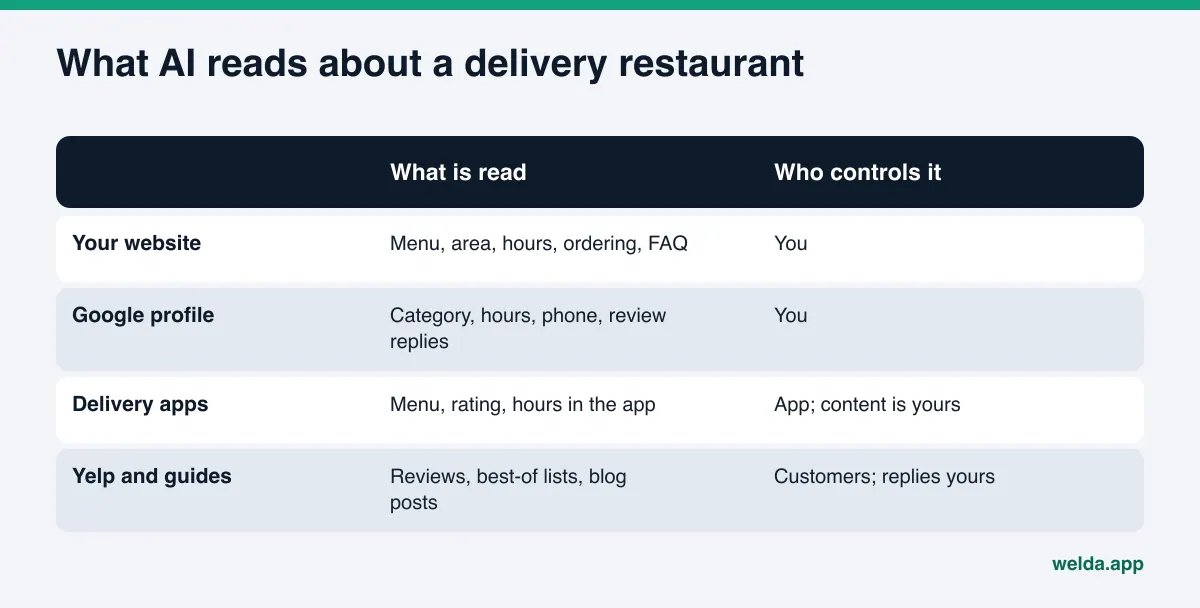
- Your own website: menu, delivery area, hours, ordering options, about page. It is fully under your control and the only place you can explain things in as much detail as you like.
- Google Business Profile and Google Maps: category, hours, phone, photos, reviews and your replies. These carry a lot of weight for "near me" questions.
- Delivery apps: your DoorDash, Uber Eats or Grubhub listing. Your menu and rating show here, but the page layout belongs to the app.
- Review and guide sites: Yelp, Tripadvisor, local food blogs and "best of" lists. You do not write these, but you can reply, claim your listing and correct facts.
The takeaway is simple. Start with the two sources you fully control, your website and your Google Business Profile, and make them complete and identical. Then bring your delivery app listings and Yelp page in line with them. When the same facts appear the same way in three places, AI tools are more likely to trust them.
Step-by-step AEO for a takeout and delivery restaurant
The steps below start with tasks that need no technical skill and move toward ones that touch your site's code. The first four can be done by an owner or manager.
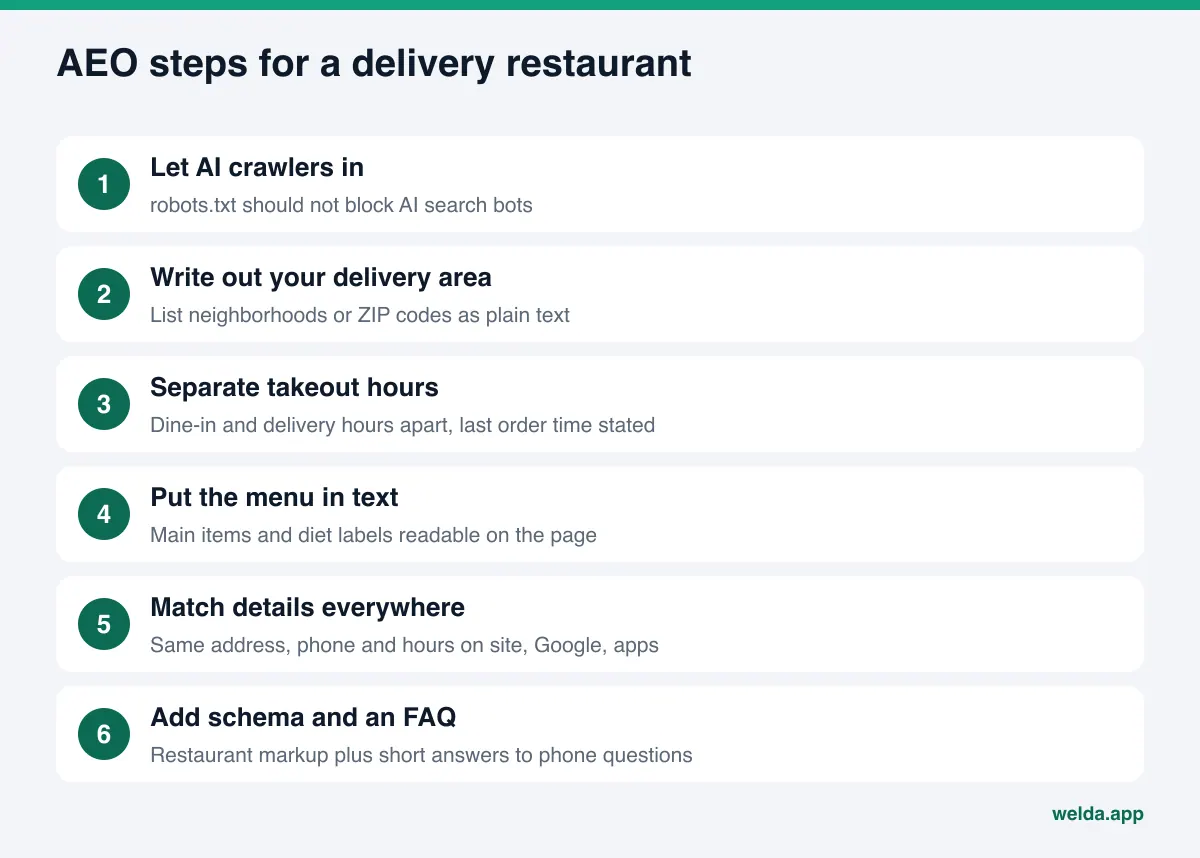
- Let AI search crawlers in. Your robots.txt file should not block AI search bots. OpenAI says ChatGPT search uses a crawler called OAI-SearchBot, and that sites which opt out of it will not appear in ChatGPT search answers. Perplexity uses PerplexityBot to surface sites in its results. Some site templates block these crawlers without the owner knowing.
- Write out your delivery area. "We deliver to nearby neighborhoods" is not enough. List the neighborhoods, towns or ZIP codes you serve. If the minimum order or delivery time changes by zone, say so.
- Separate takeout hours from dine-in hours. If your kitchen keeps taking delivery orders after the dining room closes, write both sets of hours and your last order time. This is the detail most often missing for "open now" and "late night" questions.
- Put your menu on the page as text. If your menu exists only as a photo or PDF, AI tools may not read it. Write your main items, portion notes and diet labels (vegan, gluten-free, spicy) on the page. Keep the PDF as an extra.
- Explain how to order in one place. Phone, your own online ordering, which delivery apps, pickup or curbside, payment options. Put this in a section one click from the homepage.
- Make name, address, phone and hours match everywhere. Your site, Google Business Profile, Yelp and app listings should say exactly the same thing. Conflicting details can lead an AI tool to skip you or give customers wrong information.
- Mark up your business details with schema. The schema.org Restaurant type includes properties such as hasMenu, servesCuisine, openingHoursSpecification and areaServed. This code repeats what is on the page in a form machines read reliably.
- Answer real questions in a short FAQ. Take the questions your staff hear on the phone (which areas do you deliver to, what time is last call, do you have gluten-free crust) and answer each in two or three sentences on your site.
Delivery area and hours: the two facts most often missing
One of the most common gaps for delivery restaurants is that the delivery area and takeout hours are not written anywhere as plain text. They often live only inside an app, as a radius calculated from the customer's address. An AI tool cannot run that calculation. It looks for a sentence it can read and repeat.
The table below shows weak and strong ways to write the same facts. The sentences on the right are the kind an AI tool can quote directly.
| Fact | Hard for AI to use | Easy for AI to use |
|---|---|---|
| Area | "We deliver all over the area" | "We deliver to Midtown, Old Fourth Ward, Inman Park and Virginia-Highland" |
| Hours | "Open late" | "Delivery and pickup daily 11 am to 2 am, last order 1:30 am" |
| Dish | "Amazing burritos" | "Carne asada, al pastor and veggie burritos, also as bowls" |
| Diet | "Something for everyone" | "Two vegan entrees on the menu; no gluten-free tortillas" |
| Ordering | "Order however you like" | "Order by phone, on our site, or through two delivery apps; card on pickup" |
The neighborhoods and hours in the table are examples. Write your own. Saying what you do not offer is useful too: "no gluten-free tortillas" saves a customer from a wrong expectation and saves you from the review that would follow.
If your hours change by season, for game days or for holidays, update your site and your Google profile on the same day. When an old hour ends up in an AI answer, a customer tries to order from a closed kitchen, and the frustration lands on you.
Your own website or the delivery apps?
Plenty of delivery-first restaurants have no website, or a single landing page. "We're already on the apps" is an understandable view. For AI search visibility, though, the two do different jobs.
Your app listing shows your menu and rating. The structure, headings and level of detail, however, are set by the app. You cannot explain your delivery zones in your own words there, describe how you package food so it arrives hot, or add a FAQ the way you want. Your own site is the one place where you can write those details freely and mark them up with schema.
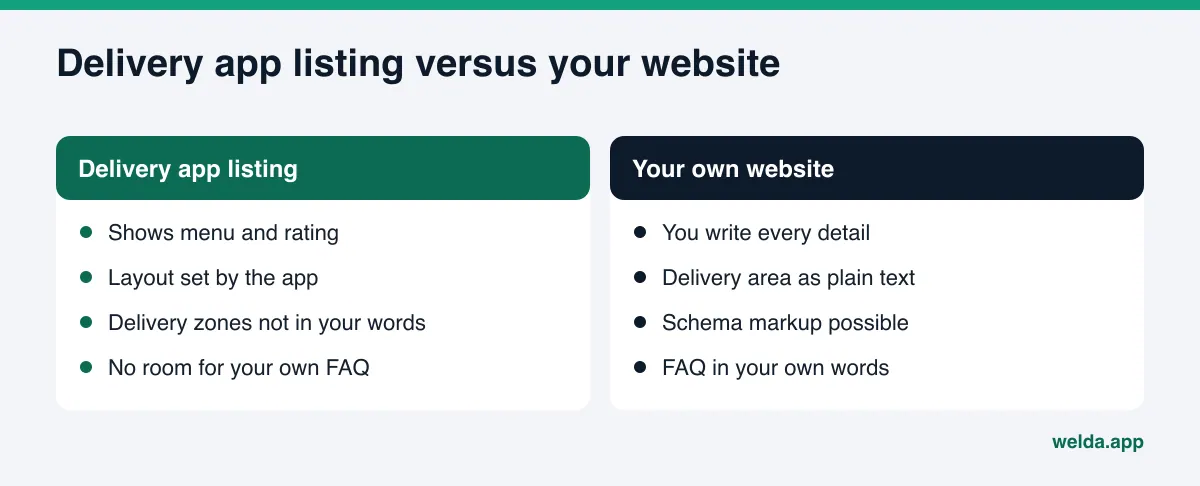
The right answer is usually both. Make your site the main source of truth, and keep your app listings, Yelp page and Google profile consistent with it. Your about page plays a part here as well; we cover it in about page trust signals for AI.
How Welda handles AEO for delivery restaurants
Welda is software that measures where a business appears in AI answers and fills the gaps on the business's behalf. For a takeout and delivery restaurant, that work has two parts: the free site analysis that anyone can use today, and the Welda dashboard, which is in early access.
The free site analysis: a snapshot of today
The analysis works in English and reads your homepage and a few inner pages (services, pricing, about, contact). It checks whether AI crawlers can reach your site, your page title and description, main heading, business details markup (schema), address, phone and location details, whether your social and map profiles are linked from the site, your FAQ section, review and trust signals, how clearly your offer is described, and page speed.
You get a score out of 100, with technical and content shown separately. For each gap, you see what was found, why it matters and how to fix it. You also get ready-to-use copy for your homepage (title, description, main heading, intro paragraph, FAQ), a simulation showing how much each fix would raise the score, a competitor comparison, and a fix package to add to your site, including the business details code. The report downloads as a PDF and comes with a shareable score card.
The analysis also asks 5 questions a customer might ask to an AI assistant that can search the web, and checks whether your restaurant's name shows up in the answers. That is a one-time check. The analysis is free once per site. Your email and phone are verified, the results link arrives by email and stays open for 14 days. It does not measure rankings and does not promise any.
The Welda dashboard: ongoing tracking and a to-do list
The dashboard is in early access and is opening in stages, starting with businesses in Turkey. Regular tracking across four AI engines is being added during early access, and sample screens in the dashboard show representative data. Pricing is discussed in an early access call.
For tracking, the questions your customers would ask (for example, "late night ramen delivery near me") are put to ChatGPT, Gemini, Perplexity and Google AI three times each. The questions view shows which engine mentions you and in what position. The competitors view shows which topic and which source a competitor wins on. The sources view lists the sites AI tools draw from and where you are missing; if a delivery app or a local guide comes up often, that is your cue to check what it says about you.
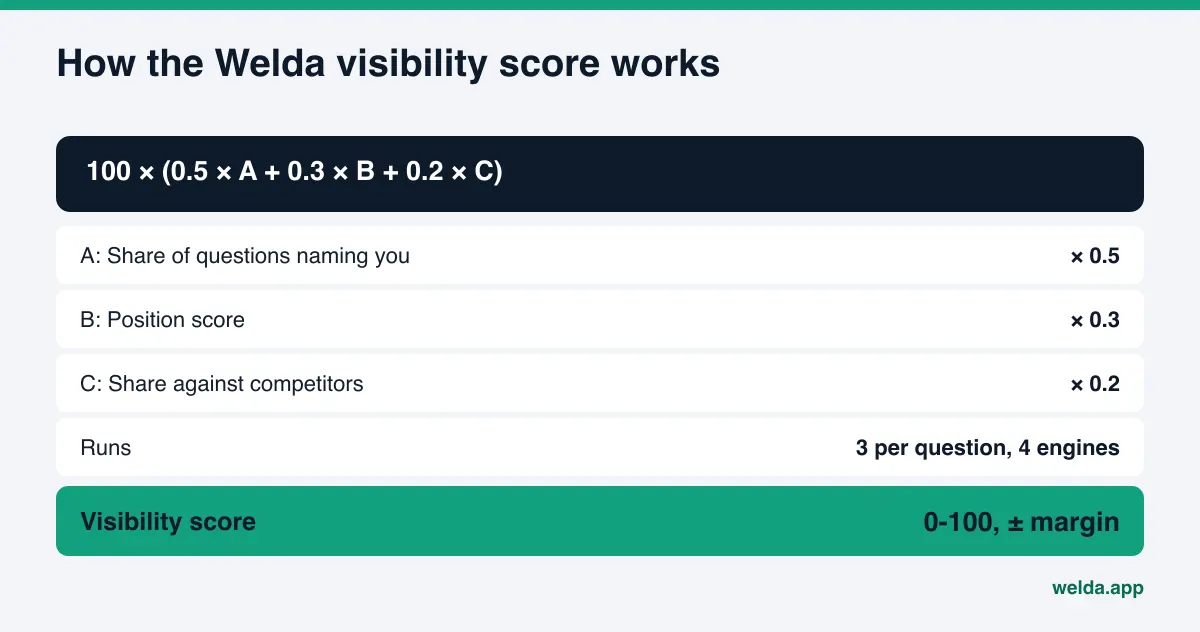
The score formula is public: 100 × (0.5 × share of questions where your name appears + 0.3 × position score + 0.2 × share against competitors). The spread across the three runs gives a ± margin shown with the score. That helps you tell a real change from the normal week-to-week drift in AI answers.
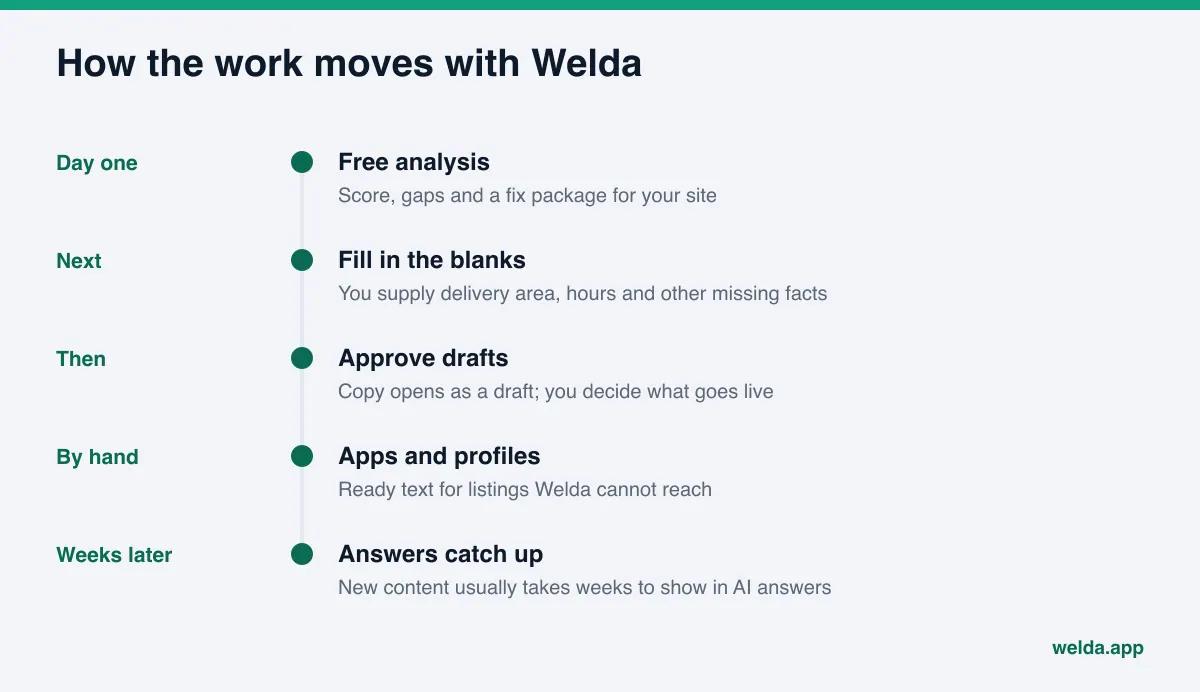
On the fixing side, Welda drafts content, profile copy and review replies. The to-do list has three parts: missing information it could not read from your site and asks you for (such as the neighborhoods you deliver to or your last order time), drafts waiting for your approval, and tasks you do by hand, each with ready copy next to it. Welda does not make up facts it does not know; it leaves them blank and asks. You always approve what gets published, and content always lives on your own website. Welda does not host content.
If your site runs on WordPress, Welda connects through a separate Editor user and an application password, with no code to install. Content opens on your site as a draft and goes live when you approve it. Where no connection is possible, Welda gives you a ready package and the change is made by hand. Google Business Profile, Instagram and Facebook can be connected; if they are not, the task is listed as manual. Delivery app listings belong in that manual group: Welda drafts the text, and you or your manager paste it into the app's merchant portal.
The dashboard also includes ready pages (it applies suggestions and prepares a page for preview), a compliance check, incoming leads, a before and after comparison, and a one-page monthly PDF report. The compliance check flags patterns like price claims, guarantees and superiority claims before publishing, so lines such as "fastest delivery in town" get a second look. It is not legal advice and has not been reviewed by legal counsel. Question language can be set to Turkish or English.
Limits: what Welda does not do
AI answers change from question to question, from engine to engine, and even between runs on the same engine. So it is worth being plain about the limits.
- Welda does not guarantee rankings or "showing up in ChatGPT." No one can; the answers belong to the engines.
- Welda does not invent information. It gets your delivery area, hours and ingredient details from you.
- It does not publish sensitive content without approval. Lines with prices, promotions or health claims come to you first.
- It does not write fake reviews. It drafts replies to reviews; the review itself belongs to the customer. For the rules around this, see fake review rules and AI visibility.
- Handling negative reviews, managing directory accounts and press work stay with you. Welda can prepare copy and lists for these; sending and relationships are yours.
- Welda does not change your delivery app listings directly. You apply the text it prepares.
Timing matters too. New content usually takes weeks to show up in AI answers. Seeing no change in the first week does not mean the work was wrong, which is why regular tracking tells you more than a single check.
Checklist: where should your delivery restaurant start?
Every takeout restaurant has a different gap. The table below matches common situations with the first task.
| Your situation | First task | Effort |
|---|---|---|
| No website, or one landing page | Add pages for menu, delivery area, hours and ordering | A few days |
| Website exists, but menu is a photo | Write the main items as text | An afternoon |
| Hours differ on site, Google, Yelp and apps | Pick one correct version and copy it everywhere | An hour |
| Delivery area is not written anywhere | Add the neighborhood or ZIP list to a page and the FAQ | An hour |
| Reviews mention cold or late food | Reply to reviews and explain your packaging | Ongoing |
| You do not know where you stand | Run the free site analysis | A short form |
Effort estimates are rough and depend on your site. When the groundwork is done, check yourself against this list:
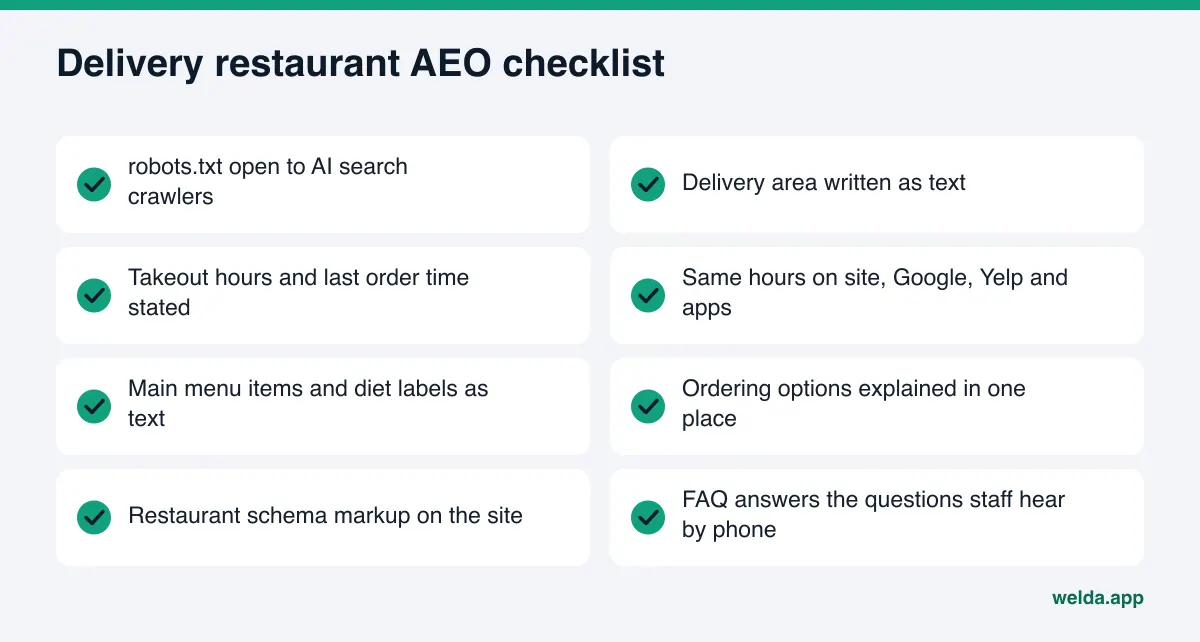
- Is my robots.txt open to AI search crawlers?
- Are the areas I deliver to written as text on my site?
- Are my takeout hours and last order time the same on my site, Google, Yelp and the apps?
- Can my main menu items and diet labels be read as text?
- Are all my ordering options explained in one place?
- Is Restaurant schema markup on my site?
- Are the questions customers ask on the phone answered on my site?
- Do I reply to reviews regularly, especially delivery complaints?
For why review replies matter, see review responses for AI visibility. If you run several locations, each one needs its own area and hours; AEO for franchises covers that in detail.
Frequently asked questions
I'm already on DoorDash and Uber Eats. Do I still need a website?
AI tools combine several sources. Your app listings show your menu and rating, but your own site is where you can write out delivery areas, hours and FAQs in detail and mark them up with schema. A short but complete site is often enough.
How should I describe my delivery area?
List the neighborhoods, towns or ZIP codes you serve. If minimums or delivery times change by zone, add that. Vague phrases like "nearby areas" give an AI tool nothing it can repeat.
How long until ChatGPT starts recommending my restaurant?
There is no fixed timeline and no one can guarantee it. New content usually takes weeks to show up in AI answers. Tracking regularly after you make changes gives a more accurate picture than a single test.
We're open late. How do I get that across?
Write your takeout and delivery hours separately from dine-in hours, state your last order time, and keep the same hours on your site, Google Business Profile, Yelp and app listings. Answer "How late do you deliver?" directly in your FAQ.
Will Welda update my delivery app listings?
Not directly. Welda drafts the text for those listings and adds the task to your to-do list as manual. Updating the listing in the app's merchant portal is up to you.
Is Welda available for US restaurants today?
The free site analysis works in English and anyone can run it. The full dashboard is in early access and is opening first in Turkey, so ongoing tracking for US restaurants comes later.
What does the free analysis show, and what doesn't it?
It shows gaps on your site as Google and AI tools see them, a score out of 100, ready copy and a fix package, plus a one-time check of whether your name appears in answers to 5 questions. It does not measure rankings or track over time.
Where to start today
AEO for takeout and delivery restaurants starts with clear answers to three questions: where you deliver, when you are open, and what you make. Write those facts as text on your site, keep them identical on Google, Yelp and the delivery apps, mark them up with schema, and answer the questions customers ask on the phone.
To see where your site stands today, run the free site analysis. The report shows which facts are missing, how much each fix would move your score, and a ready package you can add to your site.