How does a seasonal business stay visible in AI answers? By stating its season dates, its open and closed periods and this year's details in one consistent place on its website and profiles. By doing that work weeks before the season opens, because new information takes time to reach AI answers. And by keeping pages live and current during the off-season instead of letting them go stale.
Think of a clam shack on Cape Cod that opens from May to October, a ski lodge in Vermont that runs from December to March, a pumpkin patch and corn maze that lives for six weeks in the fall, a Christmas tree farm, a lake marina in northern Michigan, or a pool opening and closing service in New Jersey. They all share one problem. Customers now make decisions by asking ChatGPT, Gemini, Perplexity or Google's AI Overviews and AI Mode, and the answer either leaves the business out or describes it with last season's information. That is why AEO for seasonal businesses is its own discipline. AEO, short for answer engine optimization, is the work of making sure AI assistants find, understand and recommend your business; you may also see it called GEO, generative engine optimization. For a business with a year-round schedule, AEO is about being known and described correctly. For a seasonal business, timing is the job itself. This guide covers where the problem comes from, what to do at each point in the season, and how Welda handles the work. If you want to see where you stand first, a free AI visibility analysis reads your website the way AI does and lists every gap it finds.
Why AEO for seasonal businesses is a different job
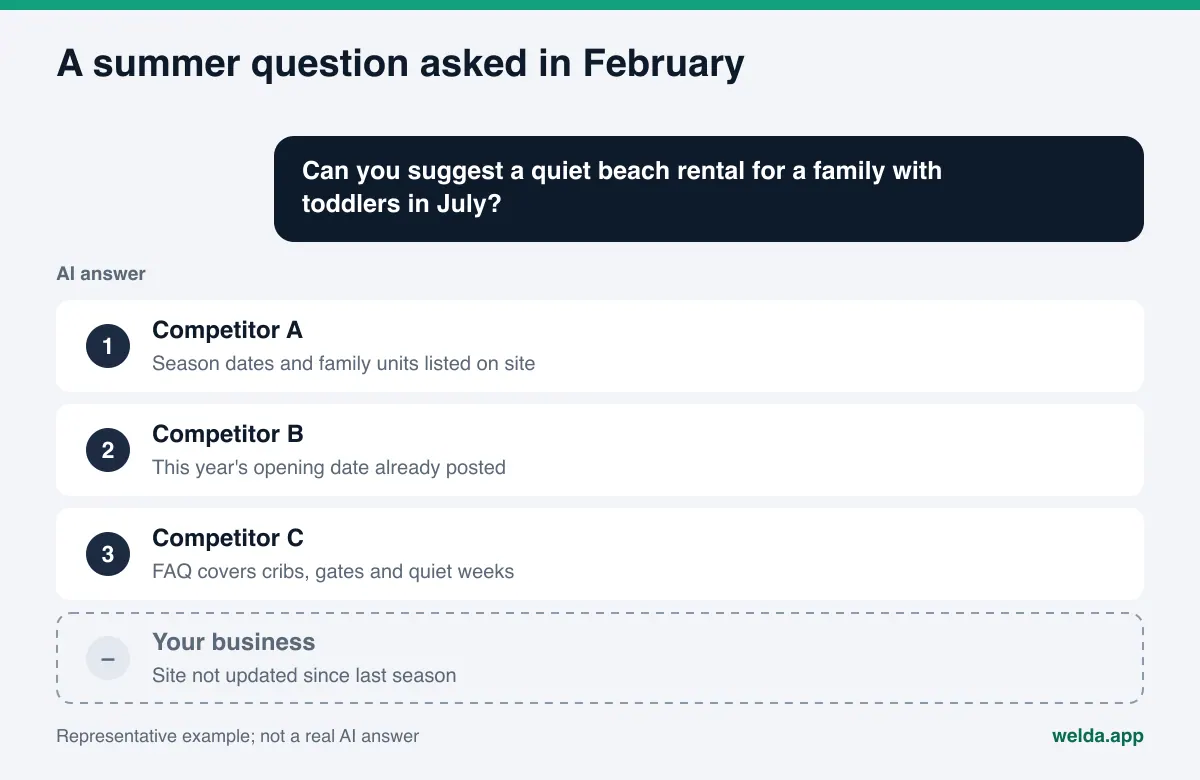
For a coffee shop that is open every day, the question is simple: does AI know you, and does it get your details right? A seasonal business adds a third question: which season's information is AI using? The customer's question changes with the calendar, and so do the sources AI reads. In practice, four problems come up again and again.
- The off-season can look like a permanent closure. When the season ends, the website goes untouched for months, hours on the profile go blank and new reviews stop. AI decides on its own how to interpret that silence. Without a clear sentence that says when you reopen, the answer may be vague or simply wrong.
- Last year's details leak into this year's answer. Last season's opening date, an old menu, an old tour schedule or an old rate is still written somewhere. If AI finds it, it may blend it with the new information. We cover the pricing side of this in our guide to pricing questions in AI answers.
- Customers decide before the season starts. A family planning a summer week at the beach asks in January or February. A ski trip often gets planned in October or November. The most valuable questions arrive while you are closed. If you are invisible then, your season may be booked by competitors before you open the doors.
- The lag between a fix and an answer competes with your calendar. It usually takes weeks for a new page or a corrected fact to show up in AI answers. A fix made the week before opening may not land in time for the first weeks of the season. We explain what that lag depends on in how long does AEO take.
None of these is a technical bug. Each one comes from information that is missing, outdated or scattered. That is good news: fixing it does not require a big software project. It does require doing the right thing at the right time.
What does AI read about you during the off-season?
When an AI assistant describes a local business, it reads several sources together: the business's own website, its Google Business Profile and Google Maps listing, reviews on Yelp and Tripadvisor, BBB listings, local Reddit threads, regional travel guides and "best of" articles. For a seasonal business, each of those sources ages at a different speed. A travel guide may stay the same for years. Reviews stop when the season ends. Your profile only changes when you change it.
Google has written a clear rule for this. Its guidelines for representing your business say that during the season you set your regular hours, that you can state in your business description that you are open only for a specific seasonal period, that during the off-season you can mark the business as temporarily closed, and that you set regular hours again when you reopen. That is the right approach for your profile. But the profile alone is not enough. AI often answers "when does it open, what does it offer, who is it for" from your website.
The table below shows what AI finds in a seasonal business's main sources and who controls each one.
| Source | What AI reads in season | What AI reads off-season | Who controls it |
|---|---|---|---|
| Your website | Services, hours, how pricing works, how to book | Reopening date, next season's program, FAQs | You |
| Google Business Profile | Regular hours, photos, reviews and replies | "Temporarily closed" status and season info in the description | You |
| Yelp, Tripadvisor and similar | New reviews and your replies | Old reviews; nothing new is added | Customers write, you reply |
| Travel guides and "best of" lists | Roundups of the area | The same roundups, often not updated | The publisher |
| Reddit and local forums | "Where should we go this summer" threads | Threads from past seasons | Users |
The first two rows are fully in your hands. For a seasonal business, the first job is to make sure those two sources say "this business exists, it opens on this date, and this is what it offers," even while you are closed.
Seasonal AEO, step by step through the year
For a seasonal business, AI visibility is not a one-time fix. It is a loop that repeats every year. The sequence below is written for a business open in summer; for a winter business, shift the months.
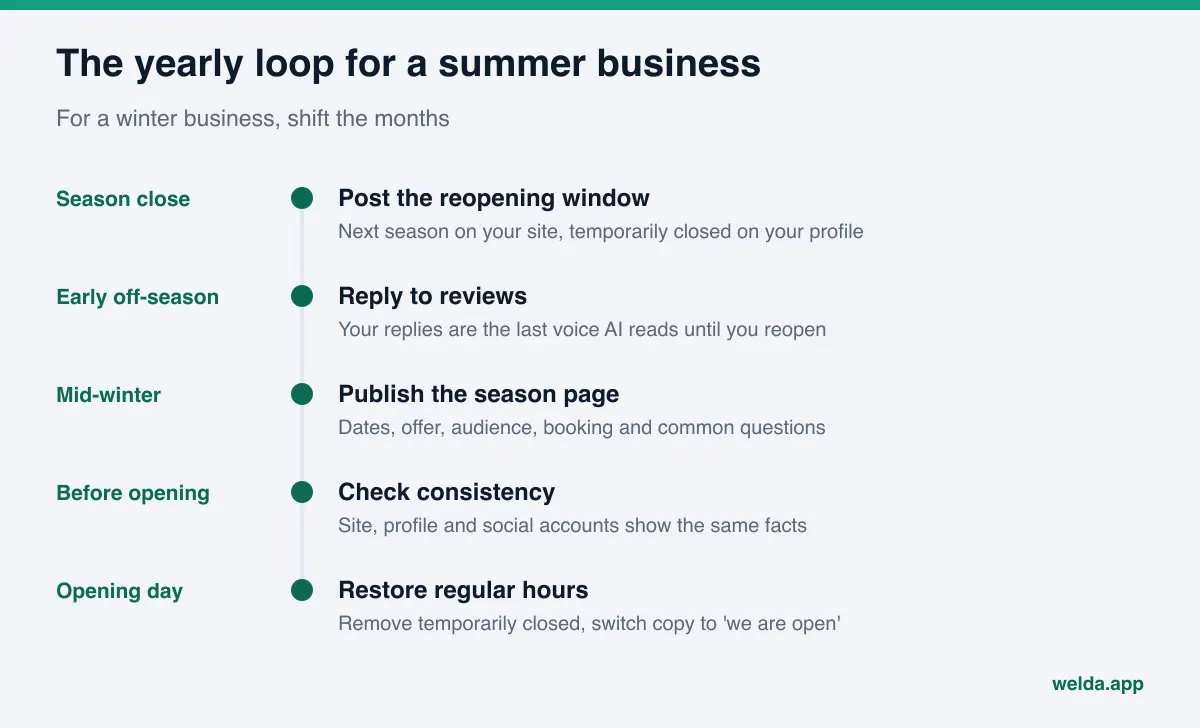
- As the season closes (final week): Put next season's expected opening window on your website. If you do not have an exact date, an honest sentence works: "We reopen in May; the exact date will be posted here in March." On your Google Business Profile, mark the business temporarily closed and add the season to the description.
- Early in the off-season: Reply to the reviews that came in during the season. Since no new reviews will arrive for months, your replies are the last voice AI will read about you until you reopen.
- Before your customers start planning: For a summer business, that is usually mid-winter. Publish next season's page: dates, what you offer, who it is right for, how to book, and the questions people ask. This page answers planning questions, and because of the lag, it needs to go live early.
- A few weeks before opening: Check for consistency. Do your website, profile description and social accounts show the same opening date? Is a page from last season still presenting itself as current? Did last year's rate or schedule survive somewhere?
- Opening day: Re-enter regular hours on your Google Business Profile and remove the temporarily closed status. Change "we open on" to "we are open" on your site.
- During the season: Reply to reviews regularly and update changed hours or services the same day. Track which questions mention your name. Mid-season is the best moment to see the questions you will want to win next year.
Step three is the one most often skipped. Writing content while you are closed feels unnatural, but that is exactly when your customer is deciding.
How to write season information on your website
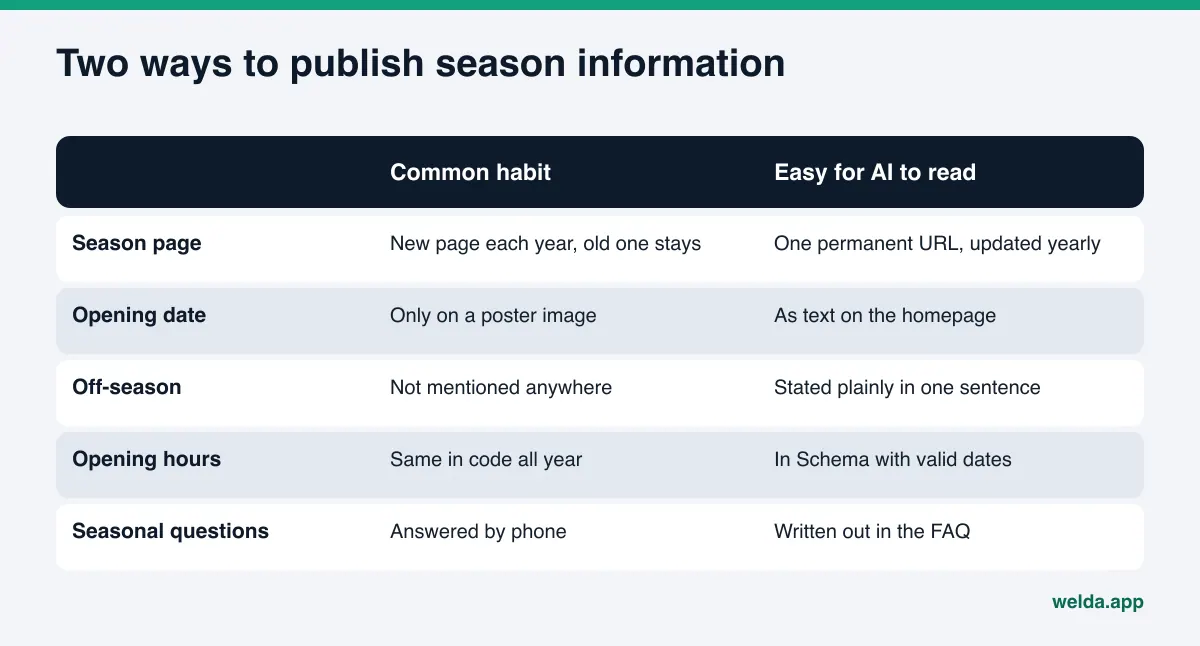
For AI to describe a seasonal business correctly, a few facts need to sit on your site clearly, as text, and in one place. A poster image, a PDF flyer or an announcement posted only on Instagram does not do the job. AI reads text.
Do not delete the season page, update it
When the season ends, two mistakes are common: removing the "2025 summer schedule" page, or leaving it untouched. Remove it and AI has one fewer source to read. Leave it untouched and last year's details look current. The cleaner approach is a permanent season page with no year in its address, updated every year. The URL stays the same, the content carries this year's dates, and a line near the top says when the page was last updated.
State the open and closed periods in one sentence
Your homepage and contact page should include a sentence like this: "We are open daily from early May through late October and closed from November through April. During the off-season we take reservations by email." That sentence gives AI a direct answer to "is it open now" and "when is it open." If your homepage copy needs work more broadly, our guide to homepage copy for AI search walks through it.
Mark your hours by season in structured data
Business structured data (Schema) on your site can include opening hours. Schema.org's OpeningHoursSpecification has validFrom and validThrough properties, and the definition notes they can mark the start and end of a period of opening hours. In other words, "these hours apply from this date to that date" can be written in a form machines read. The code does not create visibility on its own, but when it says the same thing as the text on the page, it helps AI read your information consistently.
Move seasonal questions into an FAQ
Questions like "Is the water warm enough to swim in early June?", "Do you run tours in late October?", "Do you take bookings while you are closed?" and "Do rates change at the start and end of the season?" match the questions customers ask AI almost word for word. Collect them, with short and direct answers, in an FAQ section. If you do not know an answer yet, do not guess. "We announce the schedule every March" is an answer too.
How to prepare for questions asked while you are closed
Many seasonal businesses treat the off-season as dead time for marketing. In AI search, it is the period when customers narrow their options. Someone asking in February for "a quiet beach rental in the Outer Banks that works for a family with toddlers" is deciding about July. Someone asking in October for "a ski lodge in Vermont with beginner lessons" is planning the winter.
These planning questions share three traits:
- They include a month or a period: "in July," "over Labor Day weekend," "for New Year's," "early in the season."
- They ask who it is right for: "families with young kids," "adults only," "first-time skiers," "quiet."
- They ask for comparison: "which is better," "most recommended." If your competitors' details are clearer than yours, the list fills up with them. Our guide on what to do when competitors show up when AI is asked about your brand covers the comparison side.
The answer to these questions depends on period and audience being written clearly on your site. A sentence such as "The first two weeks of June and the last two weeks of September are quieter, and families with small children make up most of our guests then" makes it easier for AI to connect a "quiet time to visit" question to you. Write it only if it is true and you know it.
For lodging and tourism businesses, there is a team question as well: who owns this calendar? Our guide to AEO for hotel marketing teams looks at how sales and marketing can split the work.
How Welda handles AEO for seasonal businesses
Welda is software that measures where a business appears in AI answers and fills the gaps on the business's behalf. For a seasonal business, three parts of Welda matter most: the free analysis as a pre-season check, measurement that follows visibility over time, and a to-do list that breaks the season loop into concrete tasks.
Before the season: the free site analysis
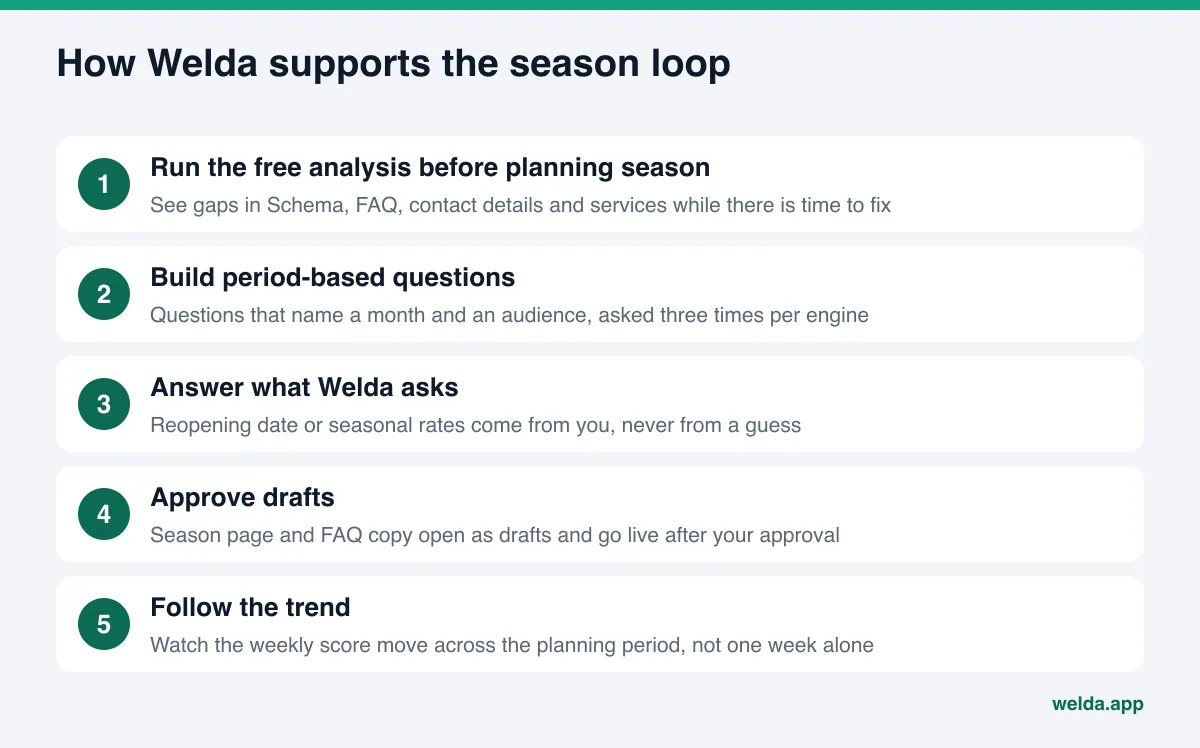
The free site analysis is the part anyone can use today, and it works in English. It reads your homepage and a few inner pages, such as services, pricing, about and contact, the way Google and AI do. For a seasonal business, the checks that matter most are: whether AI crawlers can access the site, whether business structured data (Schema) is present, whether address, phone and location details are clear, whether there is an FAQ section, and whether your services are stated plainly. For each gap, the report shows what it found, why it matters and how to fix it. It simulates how much each fix would move your score, compares you with competitors, and gives you a ready-to-install fix package, including business structured data.
The analysis also asks five questions a customer might ask to an AI assistant that can search the web, then checks whether your business name appears in the answers. This is a one-time measurement. For a seasonal business, the most useful time to run it is at the start of the planning period, before you build next season's page: you see the gaps while there is still time for fixes to land. The analysis is free once per site.
Through the season: question by question, week by week
In the Welda dashboard, the questions your customers would ask are put to ChatGPT, Gemini, Perplexity and Google AI three times each. For a seasonal business, the question list is built from questions that include a period and an audience, such as "beach rental for a family with toddlers in July" or "dive shop open in late October." The questions view shows which engine mentions you for each one. The visibility view shows how the score moves over the weeks, how it splits by engine and what changed that week, so you can follow the effect of a page you published before the season.
The score formula is public: the share of questions that mention you, your position in the answer and your share against competitors are combined with fixed weights, and the spread across three runs gives a margin of error. Reading a single week's score in isolation can mislead a seasonal business; the trend across the planning period is the useful signal.
The season loop: a to-do list with ready-made copy
The to-do view gathers missing information, content waiting for approval and manual tasks in a single list. For a seasonal business, that list changes with the calendar. As the season closes, a line may appear saying the reopening date is missing. Welda does not invent that date; it asks you. In the planning period, draft copy arrives for the season page and FAQs, and nothing goes live without your approval. If your Google Business Profile is connected, profile copy is prepared there; if it is not, the task is listed as manual, with the copy ready beside it. On WordPress sites, Welda connects through a separate Editor user and an application password, with no code to install, and opens its drafts on your site for approval. Content always lives on your own website.
A clear note on availability. The Welda dashboard is in early access and is opening first in Turkey. Regular measurement across all four engines is being added during early access, and the sample screens are shown with representative data. The part available to everyone today, including businesses in the US, is the free site analysis. Pricing is discussed in the early access conversation.
Limits, and what Welda does not do
Seasonal businesses often arrive with a deadline: "we need to show up in ChatGPT before Memorial Day." That expectation deserves an honest answer.
- No ranking guarantee. Welda does not guarantee that you will appear in AI answers or hold a particular position. It measures, shows the gap and prepares the copy; the engine writes the answer.
- The lag cannot be shortened. New content usually takes weeks to show up in answers. Work done in the first week of the season may not help that week. That is why starting early matters.
- No invented facts. Opening dates, seasonal rates and tour schedules are things Welda asks you for. It does not fill them in with guesses.
- No fake reviews. Reviews stop during the off-season. Filling that gap artificially is dishonest, and the FTC's rule on consumer reviews and testimonials targets fake reviews directly. Welda drafts review replies, never the reviews themselves.
- Some work stays with you. Handling negative reviews, managing directory listings like Yelp or BBB, and working with the press are the business's job. Welda can draft copy for them, but it does not run those relationships for you.
- Nothing sensitive goes live without approval. Publishing approval always stays with the business. The compliance check flags patterns such as price and guarantee claims before publishing; it is not legal advice.
If AI is already saying something wrong about you, such as calling you closed for good or listing a service you do not offer, start with our guide on what to do when ChatGPT has wrong information about your business.
A seasonal AEO checklist
Run through this list twice a year: as the season closes and before your customers start planning.
| Check | When | Where |
|---|---|---|
| Are open and closed periods stated in one sentence? | Always | Homepage, contact page |
| Is next season's opening window posted? | As the season closes | Season page |
| Is the profile marked temporarily closed, with the season in the description? | Off-season | Google Business Profile |
| Did last year's dates, rates or schedule survive anywhere? | Before planning season | Whole site, social accounts |
| Are seasonal FAQs current? | Before planning season | FAQ section |
| Do hours in structured data match the season? | Before opening | Site code (Schema) |
| Are end-of-season reviews answered? | Early off-season | Yelp, Tripadvisor, Google |
| Are regular hours back on the profile? | Opening day | Google Business Profile |
And one decision: when should you start? The chart below shows the first step based on where you are in the year.
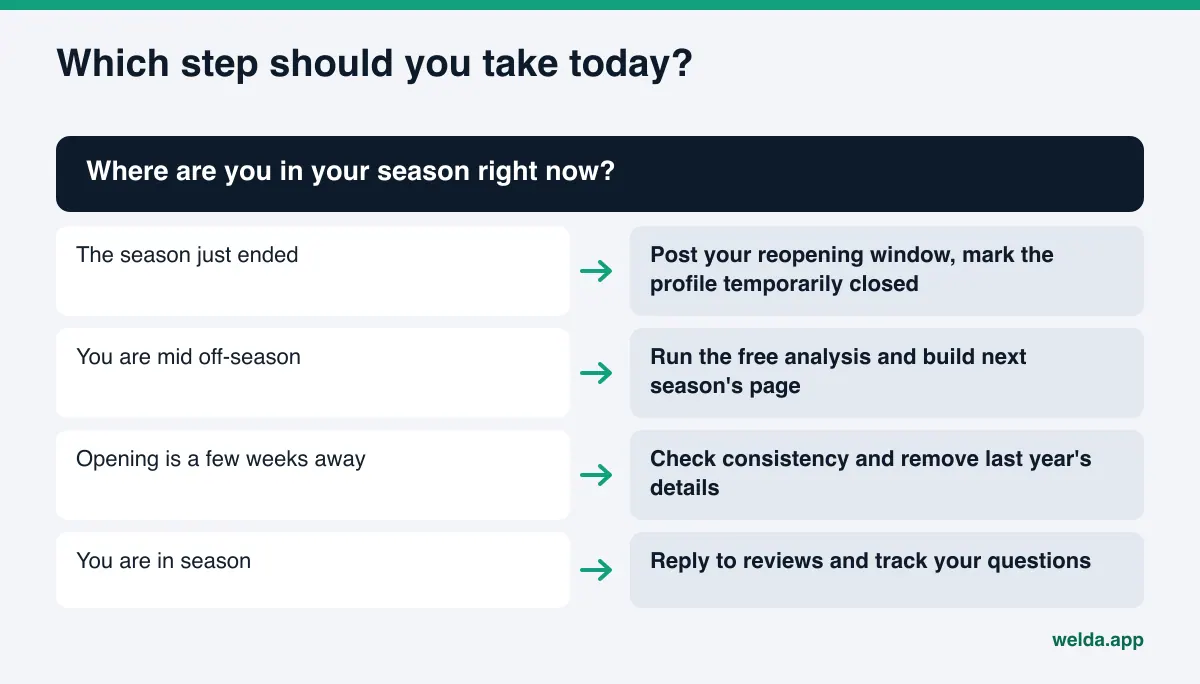
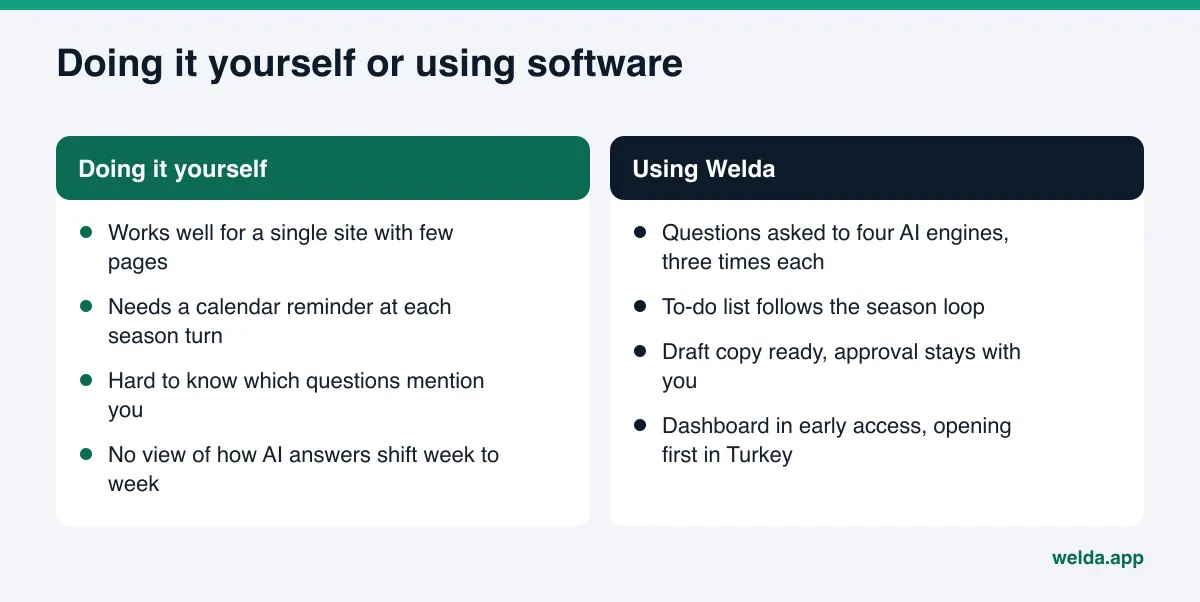
Finally, weigh what you can do yourself against what is worth handing to software. The comparison below sums up the trade-off.
Frequently asked questions
Should I take my website down during the off-season?
No. If the site goes down, AI loses its primary source about you. Keep it live, with your reopening window, booking options and FAQs up to date.
What should I do with my Google Business Profile in the off-season?
Google's guidelines say you can mark the business temporarily closed during the off-season and note in the description that you are open only for a seasonal period. When you reopen, set your regular hours again. "Permanently closed" is not meant for a seasonal closure.
When should a seasonal business start working on AEO?
Before your customers make their decisions. For a summer business, that is usually mid-winter; for a winter business, early fall. Because new content takes weeks to show up, starting close to opening can mean starting too late.
Should I create a new season page every year?
Usually not. One season page with a permanent address and refreshed content each year is cleaner. If older year-specific pages exist, add a note pointing to the current page so they are not read as current.
Is Welda a separate product for seasonal businesses?
No. Welda does the same measurement and fixing work for every business. For a seasonal business, the difference is that the question list is built around periods and audiences, and the to-do list follows the season loop.
Does the free analysis check my season dates?
It checks business structured data, address and phone details, the FAQ section and whether services are stated clearly. It cannot know whether your season dates are correct, but it shows whether that information sits where AI can read it.
See where you stand before the season starts
In AEO for seasonal businesses, the most expensive mistake is starting late. Customers decide while you are closed, and AI describes you with whatever it finds at that moment. The first step you can take today is to see how AI reads your website. Run the free AI visibility analysis: get every gap, how to fix it and how much each fix matters in one report, then line the work up with your season calendar.